

Wi-Fi dead zones are frustrating. You walk from room to room and your Apple devices disconnect or slow to a crawl. Maybe you’ve tried range extenders or fiddled with router settings, but the connection just isn’t smooth.
Picking the right mesh router for Apple gear can feel complicated. There are lots of similar-looking options—some promise higher speeds, others focus on coverage or smart features. Balancing price, compatibility, and what actually improves your experience isn’t obvious. It’s easy to buy more than you need, or to miss an essential feature for your space.
This guide will help you make sense of mesh routers for Apple users. You’ll understand what really matters, what not to stress over, and how to avoid common mistakes.
What Actually Matters When Choosing A Mesh Router For Apple Devices?
Reliability and seamless coverage are more important than chasing top advertised speeds. Apple devices work well with most modern mesh systems, but not all features are useful to everyone. Think about your home’s size, how many devices you have, and whether you value easy setup or advanced controls.
Don’t get distracted by tech jargon if your main goal is just stable, fast Wi-Fi throughout your home.
Below you’ll find a range of mesh router options, each suited to different needs and budgets. They were selected for their balance of performance, compatibility, and real-world usability with Apple products. There’s no single “best”—the right pick depends on your space and priorities.
Tp-link Deco Be25 Mesh Wifi System
A solid pick among the Best Mesh Routers for Apple users who want fast, seamless coverage without complicated setup.

The TP-Link Deco BE25 Mesh WiFi System is designed to eliminate dead zones and deliver steady WiFi throughout your home. With dual-band speeds up to 3. 6 Gbps and support for both wireless and wired backhaul, it tackles slow connections and buffering with ease.
If you have multiple Apple devices and need consistent coverage, this system handles the demand.
Daily use feels smooth, even as you move from room to room thanks to seamless AI-driven roaming. Setup is straightforward, and the built-in HomeShield provides extra peace of mind for parents and smart home users. You’ll notice fewer drops and a more reliable connection for all your Apple gadgets.
Where This Mesh System Excels
- Consistent WiFi coverage in every room
- Fast speeds for multiple Apple devices
- Supports both wired and wireless backhaul for flexibility
- Easy roaming—devices switch automatically without interruptions
- Integrated network security and parental controls
- Works with any internet service provider and Alexa
Consider Before You Buy
- Not the smallest units—check available space
- No tri-band support (dual-band only)
- Some advanced features require use of TP-Link app
Who This Fits Best
This system is ideal for households with several Apple devices, where stable WiFi and smooth handoff between nodes are a must. It’s especially useful if you want to stop worrying about weak signal areas or constant reconnecting as you move around your home.
For busy families, the built-in security and parental controls mean less time troubleshooting or worrying about online safety.
To get the most out of your mesh network, place each unit in open areas, away from large obstacles. Once set up, you can relax knowing your Apple devices will stay connected—no more hassle or surprises. I appreciate how it just works, letting you focus on what matters instead of your WiFi.
| Best for | Why |
|---|---|
| Apple-centric homes | Stable, unified WiFi for iPhones, iPads, and Macs |
| Larger apartments or multi-story houses | Eliminates weak spots with multi-unit coverage |
| Families needing robust parental controls | HomeShield offers built-in safety features |
| Users with mixed wired and wireless needs | Dual 2.5Gbps Ethernet ports support fast wired connections |
Tp-link Deco X1500 Mesh Wifi 6 (2-pack)
As one of the Best Mesh Routers for Apple users, this set delivers seamless whole-home coverage with strong, reliable Wi-Fi 6 performance.

This two-pack mesh system from TP-Link solves dead zones and weak signals by blanketing your space with dependable Wi-Fi 6. The Deco X1500 is designed to cover large homes or apartments, using two units to create a single, unified network that keeps all your Apple devices connected as you move.
In everyday use, you’ll notice fewer drops and smoother streaming—whether you’re on FaceTime, browsing, or managing smart home devices. It quietly does the job, letting you roam from room to room without losing connection or having to think about which network you’re on.
Why It’s Easy To Live With
- Smooth Wi-Fi coverage for up to 370㎡ (approx. 4,000 sq ft)
- Handles multiple Apple devices at once without slowing down
- Switches connections automatically as you move around
- Parental controls for managing family internet time
- Low latency makes video calls and gaming feel responsive
- Simple setup and integration with Amazon Alexa
What To Consider Before Buying
- Does not include advanced customization options
- Limited to two Gigabit Ethernet ports per unit
- White color may not match all interiors
What I’d Tell A Friend
If you need a mesh system that “just works” for a busy Apple household, the Deco X1500 is a strong fit. It takes away the hassle of managing multiple routers or dealing with spotty Wi-Fi in larger homes. The unified network means your devices switch seamlessly with no input needed, which removes a lot of guesswork and stress—especially when you’re moving around or have guests over.
To get the best results, place each unit in open, central spots to avoid thick walls. You’ll gain reliable coverage and fewer surprises, even in multi-floor layouts. I like that you can set it up quickly and not think about Wi-Fi again—it simply stays out of your way.
| Best for | Why |
|---|---|
| Large homes with Apple devices | Seamless roaming and strong coverage in every room |
| Families needing parental controls | Built-in tools make it easy to manage internet access |
| Busy households with many devices | Wi-Fi 6 supports more connections at once without lag |
| Anyone wanting a simple setup | App-guided installation and Alexa compatibility save time |
Mercusys Halo Wifi 6 Mesh Router
A solid choice in the Best Mesh Routers for Apple lineup, this system is ideal for stable, seamless home coverage.

The Mercusys Halo WiFi 6 Mesh Router is designed to eliminate WiFi dead zones in your home. It creates a unified, seamless network so your Apple devices stay connected as you move room to room. With support for over 100 devices, it’s a practical solution for busy households or small offices.
Day to day, you get reliable WiFi without having to reconnect or troubleshoot. Setup and management are simple using the MERCUSYS app, making it easy to adjust settings or manage parental controls. The network stays fast and consistent, reducing frustration when streaming or working from home.
Why People Pick This Mesh System
- Seamless network with automatic device handoff
- Covers up to 230 m² for full-home connectivity
- Handles 100+ devices for busy households
- Easy app-based setup and parental controls
- Dual-band WiFi 6 speeds for modern devices
- Three Gigabit WAN/LAN ports for wired connections
Things To Consider Before You Buy
- Only one unit included (expandable, but single-pack)
- No advanced customization for expert users
- Design is plain and not a style statement
Why This Makes Sense
This mesh router is best for anyone using Apple devices who wants reliable WiFi throughout a medium-sized home. It takes away the hassle of signal dropouts and complicated setup, letting you focus on enjoying your network rather than fixing it.
The parental controls are helpful for families that want to manage screen time.
To get the most out of it, place the unit centrally in your home and use the app to fine-tune coverage. With its simple management and strong coverage, you’ll experience fewer surprises and more peace of mind—especially if you’re tired of troubleshooting WiFi issues.
Personally, I appreciate not needing to remember multiple network names or passwords.
| Best for | Why |
|---|---|
| Apple device households | Unified, seamless WiFi experience across all rooms |
| Medium-sized homes | Covers up to 230 m² with a single unit |
| Simple network management | App-based controls make setup and changes easy |
| Multiple users and devices | Supports over 100 connections without slowing down |
Tp-link Deco M4 Mesh Wifi System
A top pick among Best Mesh Routers for Apple users who want seamless home coverage with simple setup and strong parental controls.

The TP-Link Deco M4 Mesh WiFi System is designed to eliminate dead spots and unreliable connections throughout your home. It uses two units to create a single, unified wireless network, so you can walk from room to room without dropping your signal.
The system is especially handy for Apple households looking for easy setup and flexible control.
In daily use, you’ll notice a more consistent WiFi experience, especially when streaming or working from different rooms. Devices automatically stay connected to the strongest unit, so you don’t have to think about which network to join. The built-in parental controls add a layer of safety for families, making it easier to manage screen time and content.
What Sets This Mesh System Apart
- Seamless coverage up to 260m² with two units
- Automatic device handoff for uninterrupted connections
- Expandable—add more units for greater coverage
- Advanced parental controls for safer browsing
- Prioritizes important applications with QoS
- Simple setup, ideal for non-technical users
Points To Consider Before Buying
- Does not support WiFi 6 (latest standard)
- Maximum speed limited to 1167 Mbps
- Basic design may not appeal to style-focused buyers
Who This Fits Best
This system is great for families or small offices using Apple devices who want WiFi that “just works” without complex setup. If you’re tired of dropped Zoom calls or buffering videos when moving around, this mesh system removes that stress and guesswork.
The parental controls are a real help for parents wanting to set boundaries easily.
To get the most out of the Deco M4, place the units in open areas to maximize coverage and add more units if you have a larger home. You’ll feel more confident knowing your connection is steady and the network is easy to manage.
I like that you can expand coverage with minimal hassle if your needs grow.
| Best for | Why |
|---|---|
| Apple device homes needing seamless roaming | Devices switch automatically between units for uninterrupted use |
| Families wanting easy parental controls | Built-in tools help manage kids’ internet access easily |
| Medium homes with WiFi dead zones | Mesh coverage up to 260m² reduces weak spots |
| Users who may upgrade later | Coverage is expandable by adding more Deco units |
Tp-link Deco E4 Mesh Wifi System
One of the Best Mesh Routers for Apple users seeking seamless coverage across larger homes.

The TP-Link Deco E4 Mesh WiFi System is designed to eliminate dead zones and unify your wireless network throughout your home. With three units covering up to 370㎡, it replaces traditional routers and range extenders, making it a solid choice for multi-room setups.
The mesh technology ensures your Apple devices stay connected to the fastest node automatically.
In daily use, you can move from room to room without losing WiFi or needing to reconnect. The Deco app guides you through setup and offers easy management for parental controls and advanced settings. This means less troubleshooting and more time enjoying consistent connectivity, especially for families or anyone who values a stable network.
What Makes It Stand Out
- Unified mesh network with seamless roaming
- Simple app-based setup and management
- Parental controls for safer browsing
- Reliable coverage up to 370㎡ with three units
- Dual-mode: Router and access point flexibility
- Works with all internet providers
Points To Consider Before Buying
- Ethernet ports limited to 100Mbps
- Not suitable for advanced gamers or heavy data users
- No support for WiFi 6 or higher-end speeds
Where This Shines
This mesh system is ideal for Apple users who want hassle-free coverage across multiple rooms, without worrying about switching networks or signal drops. It’s especially useful for families who need parental controls and easy management. The Deco E4 eliminates the guesswork of choosing the right access point, so you can just connect and go.
If you want to avoid the stress of dealing with WiFi interruptions, this system is a reliable solution. A quick tip: place the units evenly across your home for the best coverage. You’ll enjoy peace of mind knowing your Apple devices stay connected and secure, no matter where you are.
| Best for | Why |
|---|---|
| Large homes with Apple devices | Mesh network eliminates dead zones and keeps all devices connected |
| Families needing parental controls | Easy to manage content and internet access for kids |
| Replacing multiple WiFi extenders | Simplifies setup and boosts reliability with unified coverage |
| Users with basic to moderate internet needs | Dual band and intuitive app suit everyday browsing and streaming |
Tp-link Deco Be3600 Mesh Wifi 7
One of the Best Mesh Routers for Apple homes, the TP-Link Deco BE3600 Mesh WiFi 7 stands out for its strong dual-band speeds and seamless coverage.

The TP-Link Deco BE3600 Mesh WiFi 7 is a whole-home mesh router system designed to eliminate Wi-Fi dead zones and provide consistent speeds across every room. With dual-band support and combined speeds up to 3. 6Gbps, it’s ideal for users who want reliable internet for their Apple devices without complicated setup.
The two Gigabit ports add flexibility for wired connections if you need them.
Day to day, you get a stable, unified network that allows your iPhone, Mac, and iPad to roam smoothly from room to room without drops. Setup is straightforward, and smart roaming powered by artificial intelligence means you don’t have to think about switching networks.
The built-in HomeShield security gives added peace of mind for families or anyone with smart home devices.
What Makes It Stand Out
- Seamless roaming for all Apple devices
- Fast Wi-Fi 7 dual-band speeds for busy homes
- Smart AI-based network management reduces hassle
- Simple setup and unified network experience
- Flexible wired and wireless backhaul options
- Robust security with TP-Link HomeShield
- Works with any ISP and modem
Points To Consider
- Three-pack may be more than needed for small apartments
- Larger units could be noticeable in minimalistic spaces
- Weight may matter if mounting on certain surfaces
What I’d Tell A Friend
If you use Apple devices throughout your home and want Wi-Fi that just works everywhere, the TP-Link Deco BE3600 Mesh WiFi 7 is a great fit. It takes the guesswork out of coverage and lets you move freely without losing connection.
The built-in parental controls and network protection add confidence for families.
For best results, place the units strategically to cover all main living areas. The system’s AI-powered roaming means you’ll rarely have to touch your settings again. I appreciate how this system removes the stress of troubleshooting Wi-Fi, letting you focus on what matters—streaming, work, and smart home routines, with fewer surprises.
| Best for | Why |
|---|---|
| Apple device households | Unified Wi-Fi and seamless roaming for iPhone, Mac, and iPad |
| Large homes or multi-floor setups | Three units cover more space with consistent speeds |
| Families needing security | HomeShield provides network and IoT protection |
| Anyone switching ISPs | Works with any service provider and modem |
Tenda Nova Me3 Pro Mesh Wifi System
For those seeking the Best Mesh Routers for Apple, this Tenda system provides simple, fast coverage for medium-sized homes with modern security.

The Tenda Nova ME3 Pro Mesh WiFi System is designed to replace your standard router and eliminate dead zones in homes with two to three bedrooms. With dual-band WiFi 7 technology, it offers fast and stable wireless connections for all your Apple devices, making streaming and working from home more reliable.
Using this mesh system feels seamless: you can move from room to room without losing connection or needing to switch networks. The setup is straightforward, and the included security features help you feel confident that your network is protected. It’s ideal if you want less hassle and more time enjoying your devices without worrying about WiFi drops.
Why Users Like It
- Stable, wide coverage for multiple rooms
- Easy, consistent connections for Apple devices
- Modern WPA3 security for peace of mind
- Three Gigabit ports per unit for flexible wired connections
- Guest network keeps main devices safe
- Reliable performance with MU-MIMO and Beamforming
What To Consider Before Buying
- Not compatible with older Tenda MW3/MW6 mesh models
- No support for 6 GHz band (WiFi 6E/7 devices won’t use 6 GHz)
- Best for small to medium homes, not large multi-story houses
When I’d Pick This
If you want to upgrade your Apple devices’ WiFi without technical headaches, this mesh kit is a solid fit for apartments or homes with a few bedrooms. It takes away the guesswork of extending coverage and gives you the security of WPA3 without needing extra tools or expertise. A quick tip: use the guest network for visitors so your main devices stay safe and private.
The result is a more reliable and private home network, letting you stream, work, or video call with fewer interruptions. For anyone who likes clean, fuss-free setups and wants coverage that just works, this Tenda system brings peace of mind.
I like that it’s easy to recommend for families and remote workers alike.
| Best for | Why |
|---|---|
| 2–3 bedroom homes | Covers up to 220 m² with stable signal |
| Apple device users | Works well with iPhones, iPads, and Macs for seamless roaming |
| Privacy-focused households | WPA3 and guest network features add extra security |
| Homes needing wired ports | Three Gigabit ports per unit for TVs, consoles, or workstations |
Tp-link Deco Ax1500 Mesh Wifi 6 Router
A top pick among the Best Mesh Routers for Apple users who want seamless coverage and simple management in any home.

The TP-Link Deco AX1500 Mesh WiFi 6 Router is designed to eliminate dead zones and deliver consistent WiFi throughout your home. With mesh technology, it creates a single, unified network that lets you move from room to room without losing connection.
The router is ideal for Apple users who want reliable coverage without having to manage multiple networks or worry about dropouts.
Using this mesh router feels straightforward—setup is guided through the Deco app, making it easy even for those with little networking experience. Once running, you get smooth, uninterrupted browsing and streaming, and managing parental controls or security features is simple from your phone.
It brings peace of mind that your devices, from iPhones to MacBooks, stay connected and protected.
Why Apple Households Choose It
- Single, seamless WiFi network for the whole home
- Easy setup and management with the Deco app
- Supports many devices at the same time
- Advanced security features with HomeShield
- Stable, lag-free streaming and browsing
- Compact design fits discreetly in any room
Things To Consider Before Buying
- Covers up to 190 m²—may not suit very large homes without adding more units
- Only includes one mesh unit in the package
- Lacks advanced customization for network enthusiasts
Who This Fits Best
If you want a straightforward solution for whole-home WiFi and use Apple devices across your household, this router is a smart pick. It removes the guesswork and hassle of dropouts and dead zones—no more switching networks or troubleshooting connections as you move around.
To get the most from it, place the unit centrally for optimal coverage, and use the Deco app to fine-tune security and parental controls. This product delivers reliable, low-maintenance WiFi, so you can focus on your work or entertainment without interruptions.
I appreciate how it lets you set up and forget about WiFi issues entirely.
| Best for | Why |
|---|---|
| Apple device households | Delivers unified, stable WiFi for iPhones, iPads, and Macs |
| Apartments and small homes | Covers up to 190 m² with a single unit |
| Simple, secure setup | App-guided installation and easy security management |
| Families with many devices | Handles multiple simultaneous connections without slowdowns |
Mercusys Halo H1200g Mesh Wifi (2-pack)
A top pick in Best Mesh Routers for Apple for those who want seamless whole-home Wi-Fi without juggling multiple networks.
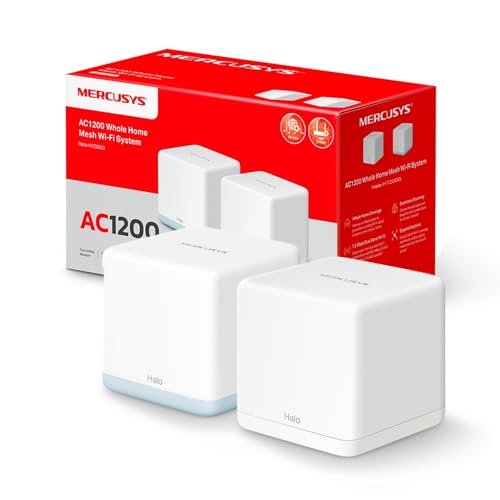
The MERCUSYS Halo H1200G Mesh WiFi (2-Pack) is designed to solve spotty Wi-Fi and dead zones at home. Using mesh technology, it creates a single, unified wireless network—so you no longer need to switch between different Wi-Fi names as you move around the house.
With two units, it covers up to 320 m² (3500 ft²), making it ideal for medium to large homes that want steady internet everywhere.
Day to day, you get a stable connection for all your Apple devices—no more dropped video calls or waiting for pages to load. Setting up the system is simple with the MERCUSYS app, and once installed, everything works quietly in the background.
Devices automatically connect to the strongest signal, so you can just enjoy fast Wi-Fi wherever you go.
What Makes It Stand Out
- Seamless roaming with one Wi-Fi name and password
- Strong coverage for large homes (up to 320 m²)
- Handles up to 100 devices without slowing down
- Easy control and setup with the app
- Works with most internet providers and modems
- Includes Gigabit Ethernet ports for wired connections
- Dual-band for better speed and reliability
Consider Before Buying
- No advanced parental controls or security extras
- Only available in a white finish
- Two-unit pack may be more than needed for small apartments
Where This Shines
The Halo H1200G Mesh WiFi (2-Pack) is best for families or anyone in a multi-story home who’s tired of Wi-Fi dead spots and constant reconnecting. It removes the hassle of managing multiple networks, making life simpler for everyone—especially if you use several Apple devices around the house.
A quick tip: use the MERCUSYS app for setup, and place the two units on separate floors for the best coverage. With this system, you get peace of mind from reliable, fast internet and fewer tech headaches. I like how you can “set it and forget it”—it just works.
| Best for | Why |
|---|---|
| Large or multi-story homes | Unified coverage eliminates dead zones on every floor |
| Multiple Apple device households | Seamless roaming means devices always have the best signal |
| Users who want easy setup | Quick install and control via app; no tech skills needed |
| Streaming and smart homes | Supports up to 100 devices for consistent performance everywhere |
Huawei Mesh 3+ Wifi 6 Router
A strong contender among the Best Mesh Routers for Apple users, this system excels at delivering consistent, high-speed coverage for multiple Apple devices.
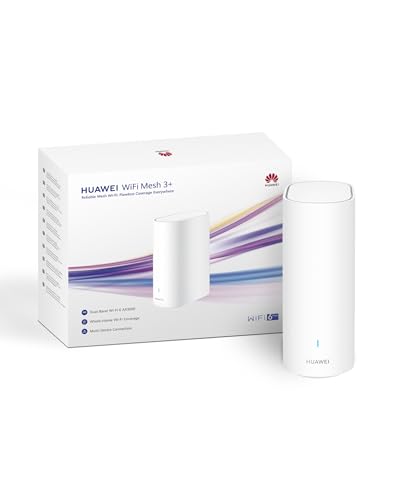
The HUAWEI Mesh 3+ WiFi 6 Router is designed to eliminate dead zones and keep all your Apple devices connected to fast, reliable internet throughout your home. It uses WiFi 6 technology and dual bands to support up to 250+ devices, making it a solid pick for busy households with lots of streaming and smart gadgets.
In everyday use, the seamless roaming means you can move from room to room on your Mac, iPhone, or iPad without losing your connection. The setup is straightforward, and the router manages to keep speeds high even when several people are streaming, gaming, or on video calls at the same time.
Where This Mesh Router Excels
- Strong, stable signal for Apple devices across multiple rooms
- Handles over 250 device connections—ideal for smart homes
- Fast WiFi 6 speeds for streaming and downloads
- Quick roaming response with minimal lag as you move around
- Wall penetration for hard-to-reach areas
- Simple parental controls for family management
Considerations Before You Buy
- Best coverage requires more than one unit for larger homes
- No included advanced Apple HomeKit integration
- Limited customization for networking enthusiasts
What I’d Tell A Friend
If you want reliable WiFi that simply works with all your Apple devices, the HUAWEI Mesh 3+ makes home networking much less stressful. It’s great for families or anyone who doesn’t want to think about their internet connection dropping in the middle of a FaceTime or AirPlay session.
You’ll spend less time troubleshooting and more time using your devices the way you want.
Set up is quick—just place the unit centrally and let it handle the rest. For best results, consider adding a second unit if you have a larger space. Once it’s running, you’ll enjoy steady coverage and fewer surprises, letting you focus on work or entertainment without worry.
Personally, I found peace of mind knowing I could move around without losing my WiFi connection.
| Best for | Why |
|---|---|
| Apple-centric households | Smooth roaming and steady speeds with iOS/macOS devices |
| Homes with many devices | Supports large numbers of simultaneous connections |
| Streaming and gaming rooms | Low lag and strong bandwidth for 4K streaming and gaming |
| Multi-room coverage | Effective wall penetration and minimal dead spots |
How To Choose The Right Mesh Wifi System
Assess Your Home Layout
Consider the size and shape of your living space. Larger or multi-story homes often need multi-unit packs. Dense walls or unusual layouts may require more units or specialized features.
Decide On Speed Needs
Think about your internet plan and device usage. High speeds (WiFi 6 or 7) matter most for gaming, 4K streaming, or many users. For basic browsing, older standards may be enough.
Wired Vs. Wireless Backhaul
If you can run Ethernet cables, wired backhaul gives better performance and stability. Otherwise, focus on mesh systems with strong wireless backhaul capabilities.
Security And Parental Controls
Homes with children or remote workers benefit from robust parental controls and network security features. Not all systems include these tools.
Common Mistakes To Avoid
- Buying more units than needed. Excess units don’t always improve coverage and may complicate setup.
- Ignoring compatibility with your internet provider or modem.
- Overlooking Ethernet port needs for wired devices.
- Assuming all mesh systems have the same features; AI roaming, HomeShield, or guest networks differ by model.
Who Should Consider Alternatives
- If you live in a small apartment, a single high-quality router may be simpler and cheaper.
- Tech-averse users uncomfortable with app-based setup or troubleshooting may prefer simpler, plug-and-play routers.
- Homes with very old devices may face compatibility issues with newer mesh standards.
Setup And Usage Tips
- Place units in open, central areas. Avoid closets, cabinets, or behind TVs for best signal.
- Follow the app’s guidance during setup—many mistakes happen by skipping steps.
- Update firmware after installation to access the latest features and security patches.
- Label or note unit locations if your system allows for individual device management.
Faqs
Can I Mix Different Brands Or Models In My Mesh Network?
Mixing brands is not recommended. Even within the same brand, not all models are compatible. Check manufacturer guidance.
Do I Need A Mesh System If My Home Already Has Good Coverage?
If you rarely lose connection or see slow speeds, a mesh system may not add value. They help most where coverage is weak or inconsistent.
Will Mesh Wifi Increase My Internet Speed?
Mesh systems improve coverage and device hand-off, but they cannot exceed your internet plan’s maximum speed.
Is Mesh Wifi Secure?
Most modern systems support WPA3 and include security updates. Always enable security settings and keep firmware current.
What Happens If One Mesh Unit Fails?
Other units typically maintain the network, but coverage may decrease. Replace or relocate units as needed.
Can I Use Ethernet Devices With A Mesh System?
Yes, if your mesh units have Ethernet ports, you can connect wired devices for stable connections.
Final Thoughts
Choosing a mesh WiFi system depends on your home’s layout, your internet habits, and your comfort with technology. Take time to match features to your real needs, and you’ll likely enjoy stronger, more reliable home connectivity.