

Getting reliable internet with Starlink can be a game changer. But setting up a solid Wi-Fi network around it is not always straightforward.
Many people find it tricky to pick the right mesh router system for Starlink. The options vary widely in features, coverage, and compatibility. Some devices work best with wired connections, while others focus on wireless mesh setups. There is often a balance between range, speed, and ease of use. Budget models may cover smaller areas but lack advanced bands or speeds. On the other hand, premium systems offer high performance but can be more expensive and complex to configure. Additionally, some routers are designed specifically for Starlink hardware, which limits mixing with third-party mesh systems.
This article will help you understand the key differences and trade-offs. It aims to guide you toward the mesh router setup that suits your Starlink system and your home needs.
What To Keep In Mind When Choosing A Mesh Router For Starlink
Compatibility is crucial. Not all mesh systems work seamlessly with Starlink equipment. Consider the coverage area you need and how many devices you will connect. Also, think about whether you prefer wired backhaul for stability or wireless for flexibility. Keep in mind that adding more nodes can improve coverage but may affect speed if not managed well.
The products reviewed below are grouped by their compatibility and feature sets. Different setups target different home sizes and user priorities. This should help you find a solution that fits your specific Starlink environment and performance expectations.
Starlink Gen 3 Wi-fi Router
Among the Best Mesh Routers for Starlink, this router is ideal for Starlink users seeking a reliable and water-resistant solution compatible with multiple Starlink generations.

The Starlink Gen 3 Wi-Fi Router is a high-speed WiFi 6 router designed specifically for Starlink satellite internet users across Gen 2, Gen 3, Gen4 4X V4, and Mini Kit models. It addresses connectivity challenges with a dual-band WLAN wireless system and offers IP56 water resistance, making it durable for various environments.
In everyday use, this router provides a stable and reliable connection when paired with Starlink hardware, especially when using a wired connection for optimal performance. Its two latching Ethernet LAN ports add flexibility, giving me confidence in a strong home network setup without worrying about compatibility issues with third-party mesh systems.
- Compatible with multiple Starlink generations and Mini Kit
- IP56 water resistance adds durability
- Two secure Ethernet LAN ports for wired connections
- Not compatible with third-party mesh systems
Who Should Consider This Router
This router is perfect for Starlink customers who want a seamless, manufacturer-supported router option that ensures compatibility and durability. If you rely on Starlink’s satellite internet and want an easy-to-set-up device that can withstand outdoor conditions, this is a solid choice.
However, if you are looking to integrate a third-party mesh system or need advanced mesh networking features, this router may not meet those needs. It removes the confusion of compatibility by being designed specifically for Starlink hardware, giving users peace of mind in their setup.
For best results, always use a wired connection when possible and ensure you have the required Starlink cables or adapters, depending on your Starlink model. This practical tip helps maintain the highest performance and reliability.
Tp-link Deco Xe75 Tri-band Mesh Wifi 6e
Among the Best Mesh Routers for Starlink, this TP-Link Deco XE75 is ideal for users seeking reliable whole-home WiFi coverage with next-gen technology.

The TP-Link Deco XE75 is a tri-band WiFi 6E mesh system designed to deliver seamless, high-speed wireless coverage up to 7,200 square feet. It effectively eliminates dead zones and buffering, making it a solid solution for larger homes or complex layouts where Starlink’s internet needs reliable distribution. The inclusion of a brand-new 6 GHz band enhances network performance by reducing interference and enabling faster, more stable connections between nodes.
Using this mesh system in real life means enjoying smooth streaming, gaming, and video calls without interruptions. Setup is straightforward, and the AI-driven mesh technology adapts to your home environment, ensuring consistent coverage and reliability. I found it particularly reassuring that TP-Link prioritizes cybersecurity, adding an extra layer of confidence to the network’s safety.
- Supports up to 200 devices with true tri-band speeds totaling 5,400 Mbps
- New 6 GHz band reduces congestion and enhances backhaul stability
- Coverage suitable for large homes up to 7,200 Sq.Ft
- Robust cybersecurity aligned with U.S. CISA standards
Who Should Consider the Deco XE75
If you have a Starlink setup in a large or multi-story home and want a mesh system that fully leverages WiFi 6E for improved speed and coverage, this TP-Link model is a great choice. It’s especially suited for tech-savvy users who value the latest wireless standards and want a secure, future-proof network.
However, if your home is small or you don’t have many connected devices, this system might be more advanced than necessary. Also, those looking for budget options might find simpler mesh setups more cost-effective.
One tip is to position the units strategically to maximize the 6 GHz backhaul benefits, which will ensure optimal performance. Overall, the Deco XE75 removes the stress of unreliable WiFi and complicated setups, giving you a smooth and confident internet experience throughout your home.
Tp-link Archer Ax21 Wifi 6 Router
One of the Best Mesh Routers for Starlink, ideal for users seeking reliable dual-band WiFi 6 performance for smart homes and small offices.

The TP-Link Archer AX21 is a dual-band WiFi 6 router designed to enhance your wireless internet experience by delivering faster speeds and improved network capacity. It is an excellent choice for Starlink users who want to extend and stabilize their WiFi coverage across multiple devices, leveraging WiFi 6 technology and Beamforming to focus signal strength where you need it most.
In everyday use, the Archer AX21 provides smooth streaming, gaming, and downloading thanks to its 1.8 Gbps total bandwidth. Setting it up is straightforward, and the router’s reliable connectivity and extensive coverage help reduce buffering and dropped signals, giving you confidence in your home network’s performance.
- Strength: Supports multiple devices simultaneously with OFDMA technology for efficient data transmission.
- Strength: Enhanced coverage with 4 high-gain antennas and advanced chipset for reliable signal reach.
- Limitation: Does not support the newer 6 GHz WiFi band, focusing on 2.4 GHz and 5 GHz only.
Who Should Consider the Archer AX21
This router is well-suited for users who want to upgrade to WiFi 6 without needing tri-band support or 6 GHz connectivity, especially those with multiple devices in homes or small offices using Starlink internet. If you prioritize ease of setup, solid dual-band performance, and security backed by TP-Link’s commitment to cybersecurity, this is a practical choice.
However, if you need the absolute latest WiFi 6E features or have extremely high bandwidth demands, you might want to consider higher-end models. The Archer AX21 removes confusion around complex networking by providing a straightforward, reliable mesh-compatible router that works well out of the box.
A simple tip is to position the router centrally and elevated to maximize its beamforming capabilities. Rest assured, TP-Link’s free expert support and “Certified for Humans” design philosophy mean you’re not alone if you need help optimizing your network.
Starlink Mini Mesh Wifi Extender
Among the Best Mesh Routers for Starlink, this extender is ideal for Starlink users looking to expand their mesh network coverage easily and effectively.

The Starlink Mini Mesh WiFi Extender is a compact device designed to extend and strengthen your Starlink mesh network, solving common connectivity gaps in larger or multi-room setups. Its advanced connectivity supports both wired Ethernet and wireless configurations, allowing seamless integration with most Starlink systems excluding Gen 1.
Setting up this extender is straightforward, whether mounted on a wall or placed on a table, making it easy to optimize your home’s WiFi coverage. The device performs best when placed within two rooms of the main router, offering reliable speeds and improving overall network stability without complicated installations.
- Supports both wired and wireless setup for flexible network expansion
- Compatible with Starlink Gen 2, Gen 3, Mini Router, and Mini Kit systems
- Includes versatile mounting options and installation accessories
- Optimized for placement close to the main router to avoid signal obstructions
Who Should Consider This Extender
If you use Starlink Gen 2 or later and need to cover multiple rooms or areas where the signal weakens, this extender is a practical solution. It’s not suitable for users with Starlink Gen 1 or those relying on third-party mesh systems for wireless expansion.
This product removes confusion around compatibility and installation by providing clear guidelines and included mounting hardware. A helpful tip is to avoid placing the extender near thick walls or metal objects to maximize performance.
Overall, it offers a reliable way to enhance your Starlink network coverage with minimal hassle, giving peace of mind that your WiFi will reach all desired areas of your home efficiently.
Compact Dual Band Mesh Router For Starlink
Among the Best Mesh Routers for Starlink, this compact device is ideal for travelers and users seeking portable, reliable WiFi solutions compatible with Starlink systems.
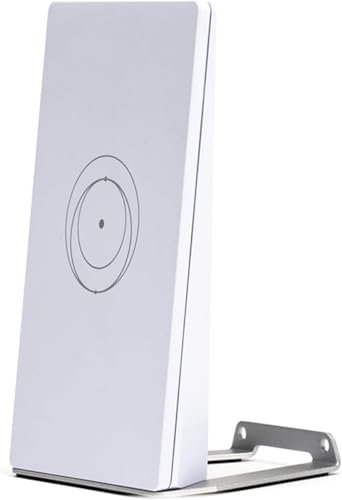
This compact dual band wireless router is designed to provide seamless internet connectivity compatible with Starlink V4, Gen3, and Mini systems. It solves the common problem of balancing portability with performance by offering dual-band technology that supports both 2.4GHz and 5GHz frequencies, ensuring smooth streaming and gaming without interference.
Using this router in real life feels convenient and reassuring, especially for travelers or users who need reliable connectivity on the go. The quick plug-and-play setup saves time, while mesh network readiness allows easy expansion of coverage, giving confidence in maintaining a stable network throughout your space.
- Strengths: Dual band technology for optimal performance, travel-friendly compact design, universal compatibility including Starlink, mesh network ready for expanded coverage, and easy plug-and-play setup.
- Limitations: Does not include advanced parental controls or built-in VPN features.
Who Should Consider This Router
This router is perfect for travelers, remote workers, or anyone who needs a lightweight yet reliable WiFi solution compatible with Starlink. It suits users who prioritize quick setup and flexibility in network expansion.
If you need advanced security features or very high-end performance for multiple heavy devices, this might not be the best fit. However, it removes confusion around compatibility with Starlink systems and helps maintain a consistent internet connection without fuss.
A practical tip: Pair this router with additional mesh nodes if you plan to cover a larger home or office space. Rest assured, its universal design means it will work seamlessly whether you use Starlink or a traditional ISP.
Tenda Ax3000 Wifi 6 Mesh System (3-pack)
Among the Best Mesh Routers for Starlink, this Tenda AX3000 system is ideal for homeowners seeking reliable whole-home coverage with fast Wi-Fi for multiple devices.

The Tenda AX3000 WiFi 6 Mesh System is a powerful whole-home mesh network solution designed to eliminate Wi-Fi dead zones and support over 160 devices simultaneously. With dual-band Wi-Fi 6 technology offering speeds up to 2976Mbps, it ensures a fast and stable connection throughout up to 7,000 square feet, making it a great complement for Starlink internet users seeking consistent coverage.
Setting up the system is straightforward with the Tenda Wi-Fi app, allowing quick management and expansion of your network. The seamless roaming feature means devices automatically connect to the strongest node, providing a smooth online experience whether streaming, gaming, or working from any corner of your home.
- Strengths: Covers large homes up to 7,000 sq. ft., supports 160+ devices with MU-MIMO and OFDMA technology, and offers easy setup via app or web GUI.
- Limitations: Lacks built-in advanced parental controls or VPN features.
Who Should Consider This Mesh System
This mesh system is well-suited for Starlink users who need reliable, widespread Wi-Fi coverage in larger homes or multi-device environments. If you want to avoid dead zones and enjoy uninterrupted streaming or gaming, this setup provides confidence and convenience without complicated configuration.
However, if your home is small or you only connect a few devices, this might be more than you need. Also, those requiring advanced network controls may want to explore other options.
To get the best from this system, place nodes strategically around your home for optimal coverage and rely on the app to monitor network performance easily. Rest assured, once set up, it maintains a stable connection so you can focus on your tasks without Wi-Fi interruptions.
Starlink Mini Mesh Router
One of the Best Mesh Routers for Starlink, ideal for users looking to extend their Starlink WiFi coverage with a compact and reliable device.

The Starlink Mini Mesh Router is a high-performance WiFi extender designed to seamlessly integrate with your Starlink internet setup. It solves common connectivity dead zones by expanding your mesh network coverage, featuring one latching Ethernet LAN port and one WAN port for stable wired connections.
Using this router in daily life means enjoying a reliable and consistent WiFi signal throughout your space without complicated setups. Its compact design and ease of installation let you quickly enhance your network confidence and save time troubleshooting signal issues.
- Compact and lightweight design for easy placement
- Dual Ethernet ports provide flexible wired connections
- Compatible specifically with Starlink networks for optimized performance
Who Should Consider the Starlink Mini Mesh Router
If you’re a Starlink user experiencing weak WiFi signals in parts of your home or office, this router is a practical choice to extend your network smoothly. However, if you need advanced mesh features or multi-band support, you might want to explore higher-end models designed for more complex networking.
This router removes the guesswork from expanding Starlink coverage by offering a straightforward plug-and-play solution. A simple tip is to position the router centrally between your Starlink dish and WiFi dead zones for best results. Rest assured, its compatibility and ease of use make it a stress-free upgrade for most Starlink setups.
Flenkn Starlink Gen 3 Router Mount
Among the Best Mesh Routers for Starlink, this mount is ideal for Starlink Gen 3 users looking to optimize their router setup in compact spaces.

The FlenKn Starlink Gen 3 Router Mount is a space-saving bracket designed specifically for the Starlink Gen 3 router and power supply. It addresses the common issue of cable clutter and limited workspace by integrating the router and power supply into one compact unit, making installation cleaner and more efficient.
Using this mount gives a neat, organized feel to your Starlink setup, especially in tight spaces like RVs or tiny homes. The easy installation and durable ABS plastic construction ensure you can rely on this mount for stable, long-term use without worry.
- Combines router and power supply into one compact unit to save up to 60% workspace
- Made of impact-resistant, scratch-proof ABS plastic for durability
- Signal-optimized design with built-in ventilation for better performance
- Simple installation with included wire fixing ties for secure cable management
Who Should Consider This Mount
This mount is perfect for Starlink Gen 3 users who want a clean, organized, and space-efficient router setup. It is especially useful for those with limited space, such as RV owners, boaters, or small office users. If you frequently move your router or want to avoid tangled cables, this mount simplifies your life.
However, if you have a different version of Starlink hardware or prefer a non-wall-mounted solution, this mount may not fit your needs. It specifically fits the Gen 3 router and power supply only.
By using this mount, you eliminate confusion over cable management and reduce the risk of accidental damage. A practical tip: ensure you position the mount where ventilation is adequate to keep your router cool. Rest assured, its sturdy design and snug fit offer peace of mind for your Starlink setup.
Starlink Mini Router Wall Mount
For those seeking the Best Mesh Routers for Starlink setup, this wall mount kit is perfect for organizing and optimizing your Starlink Mini Router installation at home, office, or RV.

The Starlink Mini Router Wall Mount by STARGEAR is a 2-in-1 mounting kit designed to neatly hold your Starlink Router Mini and its power adapter in one compact wall unit. It solves the common issue of desk clutter and cable chaos by integrating a hidden power adapter holder and cable organizer, ensuring your mesh router setup stays tidy and efficient. Its precise design stabilizes the router to maintain strong WiFi signal coverage.
Installing this mount transforms your space by freeing up valuable surface area while securing your router in an optimal position to reduce interference. The tool-free, plug-and-play installation makes setup quick and straightforward, giving you confidence in the stability and signal quality of your Starlink network whether at home, in an office, or on the road in an RV.
- Space-saving 2-in-1 design: Combines router and adapter into one neat wall unit.
- Durable ABS plastic: Provides sturdy, vibration-resistant support.
- Signal optimized placement: Mounts router at ideal height and angle to reduce interference.
- Easy installation: No tools or holes needed for a seamless setup.
Who Should Consider This Mount
If you use a Starlink Mini Router and want a clutter-free, reliable setup with enhanced signal stability, this mount is a practical choice. It’s especially beneficial for RV users or anyone needing a compact, tidy installation without drilling or complicated assembly. However, if you do not have the Starlink Mini model or prefer placing your router on flat surfaces, this mount may not be necessary.
By securing your router and power supply off desks or counters, it removes the stress of tangled cables and unstable placements that can degrade WiFi performance. For best results, ensure the mount is installed in an area with minimal physical obstructions to maximize signal strength. Rest assured, this accessory offers a neat, durable solution that complements your Starlink mesh network setup while saving space.
Netgear Orbi 370 Wifi 7 Mesh System
One of the best mesh routers for Starlink, ideal for users needing fast, reliable WiFi coverage throughout large homes and multiple devices.

The NETGEAR Orbi 370 WiFi 7 Mesh System is a whole-home network solution designed to provide fast and reliable internet across up to 6,000 square feet. It addresses common issues like dead zones and slow speeds with its advanced dual-band WiFi 7 technology, delivering speeds up to 5 Gbps while supporting up to 70 devices simultaneously.
In everyday use, this mesh system ensures smooth 4K streaming, video calls, and gaming without interruptions. Its enhanced backhaul technology and built-in security features offer peace of mind and stable connectivity, making it a dependable choice for busy households or home offices.
- Speeds up to 5 Gbps with WiFi 7, 1.7x faster than WiFi 6
- Covers large areas (6,000 sq.ft.) and supports up to 70 devices
- Includes automatic firmware updates and advanced security protection
- Dual-band mesh with enhanced backhaul for consistent coverage
Who This Is For
This mesh system is perfect for Starlink users with large homes or multiple connected devices who need robust WiFi performance and coverage. If you want seamless streaming, gaming, and working from home without worrying about network drops, this is a solid choice.
However, if your space is small or you only use a few devices, this advanced system might be more than you need. It removes the stress of weak signals and complicated setups by offering easy installation and automatic security updates.
A practical tip: position the extenders strategically around your home to maximize the 6,000 sq.ft. coverage. Rest assured, this system is designed to keep your network running smoothly and securely without constant troubleshooting.
How To Choose The Right Mesh Router For Starlink
Consider your home size and layout first, as coverage needs vary widely. Think about whether you prioritize speed, ease of setup, or integration with existing devices. Remember that some routers work better with wired connections, while others excel at wireless mesh networking. Balance your budget against the features that matter most to your daily use. Filtering options by compatibility with your Starlink version can simplify the decision.
Common Mistakes And Who Should Avoid These Mesh Routers
- Expecting all mesh systems to seamlessly replace your existing router without setup complexity.
- Choosing a device incompatible with your specific Starlink generation or mesh network needs.
- Overestimating coverage capabilities in large or multi-story homes without additional nodes.
- Buying routers without considering if you need wired backhaul support for better performance.
- Assuming that the latest WiFi standard is necessary for every user’s internet habits and devices.
Frequently Asked Questions About Best Mesh Routers For Starlink
Can I use any mesh router with my Starlink system?
Not all mesh routers are compatible with every Starlink version. It’s important to verify that the router supports your specific Starlink generation and networking setup.
Do mesh routers always improve my WiFi coverage?
Mesh routers can enhance coverage, but their effectiveness depends on placement, home layout, and the number of nodes. Poor placement or insufficient nodes may limit improvements.
Is wired backhaul necessary for the best performance?
Wired backhaul often provides a more stable and faster connection between mesh nodes. However, some mesh systems use wireless backhaul effectively depending on your environment.
Will upgrading to WiFi 6 or WiFi 7 routers make a big difference?
Newer WiFi standards offer better speeds and capacity but may not provide noticeable benefits if your internet plan or devices do not support them fully.
Can I extend my existing Starlink router with third-party mesh systems?
Many third-party mesh systems do not integrate wirelessly with Starlink routers, so compatibility and setup options should be checked before purchasing.
Are mesh routers complicated to set up with Starlink?
Setup complexity varies. Some routers offer straightforward installation apps, while others require manual configuration. Knowing your comfort level with tech setup helps in choosing.
What common issues do users face after buying a mesh router for Starlink?
Users often encounter signal interference, limited coverage despite mesh setup, or compatibility challenges with certain Starlink hardware versions.
Final Thoughts On Choosing Mesh Routers For Starlink
Selecting the right mesh router for your Starlink system involves understanding your home’s unique needs and your internet usage patterns. Taking time to evaluate how different products align with your setup helps reduce confusion and regret.
With careful consideration, you can find a solution that provides stable, consistent WiFi without unnecessary features or complexity. Confidence comes from matching your choice to your real-world environment and expectations.