
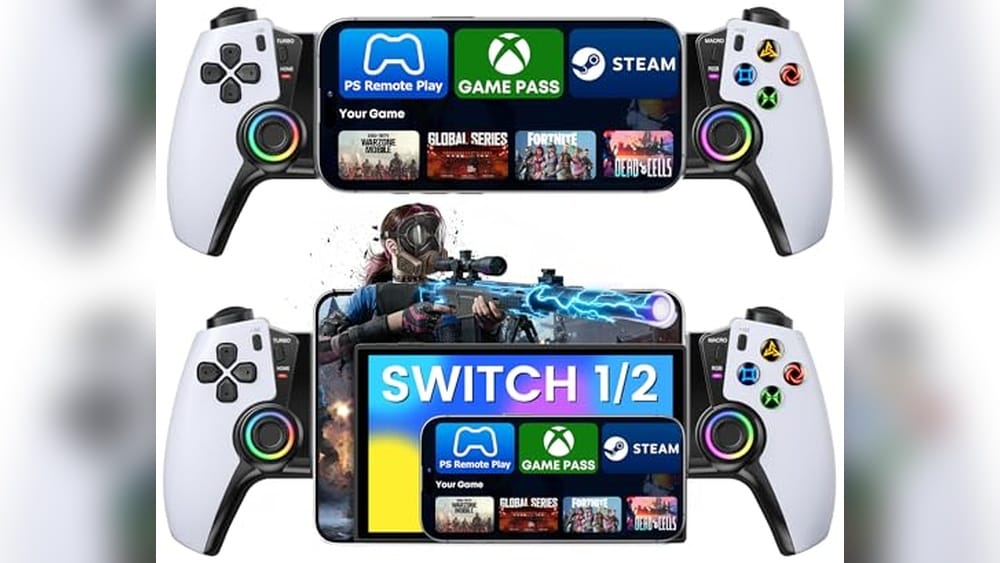
Streaming your PlayStation games to a mobile device can be a game-changer. But finding the right controller to pair with PS Remote Play often feels like navigating a maze. Each option brings different designs, compatibility quirks, and feature sets.
The challenge lies in balancing comfort, responsiveness, and device compatibility without getting lost in technical jargon. Some controllers focus on precision and customization, while others emphasize ease of use or broad platform support. Battery life, button layout, and wireless stability also come into play, making the choice less straightforward than it seems.
This guide will help clarify what matters most when choosing a mobile controller for PS Remote Play. It will focus on practical considerations to help you find a controller that fits your gaming style and device setup.
Understanding What You Need
Before picking a controller, think about how and where you’ll use it. Are you mainly playing on a phone or tablet? Do you want a controller that works with other cloud gaming services too? Comfort during long sessions is key, as is reliable wireless connection to avoid lag.
Also consider if you prefer a controller that mimics the PlayStation layout closely or one with extra programmable buttons.
Common Confusions When Choosing
It’s easy to get overwhelmed by features like hall effect joysticks, turbo functions, and RGB lighting. While these can enhance gameplay, they aren’t essential for everyone. Some controllers require specific apps for customization, which may not be ideal if you want plug-and-play simplicity.
Compatibility claims can also be vague, especially around iOS and Android support.
What Truly Makes A Difference
Focus on core aspects like device fit and secure mounting, latency during streaming, and button responsiveness. Consider battery life and ergonomics, since mobile gaming often involves holding the controller and device together. Multi-platform compatibility is a bonus if you switch between PS Remote Play and other cloud gaming platforms.
With these points in mind, the following selections cover a range of controller types and use cases. Each one was chosen to address different priorities and preferences, helping you find the right match for your PS Remote Play setup.
Kickdot Telescopic Bluetooth Gamepad
For those seeking the Best Mobile Controller for Ps Remote Play, this model stands out with its console-like feel and broad device compatibility.
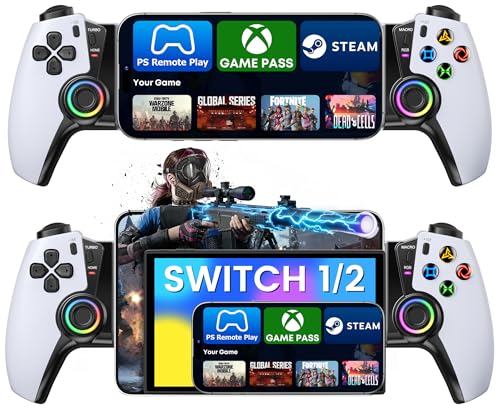
The KICKDOT Telescopic Bluetooth Gamepad is designed for gamers who want console-quality control on their mobile devices. It solves the problem of clumsy touchscreen play by providing precise Hall Effect joysticks and triggers, eliminating stick drift and ensuring reliable input.
Its telescopic clamp securely fits phones and tablets up to 200mm—even with most cases—so you can easily turn your device into a true handheld console.
Using this controller feels smooth and intuitive, especially for PlayStation fans thanks to the familiar button layout. The ergonomic, non-slip grips make long gaming sessions comfortable, while the programmable back buttons and customizable RGB lighting add flexibility. Pairing is quick over Bluetooth, giving consistent, low-latency performance across PS Remote Play, Xbox Cloud Gaming, and Steam Link.
I noticed that setup is straightforward and there’s no need to relearn your controls.
What Makes This Controller Stand Out
- Hall Effect joysticks eliminate stick drift for reliable precision
- Works with iPhone, Android, iPad mini, and fits devices up to 200mm
- PlayStation-style layout for seamless transition from console gaming
- Programmable back buttons for advanced macros
- 10 RGB lighting modes for personalizing your setup
- 15+ hours battery life for uninterrupted gaming
- Ergonomic, textured grips for lasting comfort
Things To Consider Before Buying
- Does not include built-in charging for your device
- Best suited for those who prefer PlayStation-style controls
- RGB lighting can impact battery life if left on
Where This Shines
This controller is ideal for players who use PS Remote Play or cloud gaming and want a console-like experience on their mobile devices. It removes guesswork and frustration from touchscreen controls, letting you focus on your game. Quick Bluetooth pairing and programmable buttons mean you spend less time tweaking settings and more time playing.
For reliable performance during long sessions, the ergonomic design and long battery life help you avoid hand fatigue and mid-game interruptions. To get the best results, adjust your device placement within the clamp for optimal comfort and stability. With sturdy construction and dependable input, you can play with confidence and fewer surprises.
If you love seamless transitions between console and mobile, this feels like a natural extension of your setup.
| Best for | Why |
|---|---|
| PS Remote Play users | Console-style controls and layout make mobile gaming familiar |
| Cloud gaming on mobile devices | Low-latency Bluetooth ensures smooth streaming and input |
| Gamers seeking comfort for long sessions | Ergonomic grips and long battery life reduce fatigue |
| Players needing macro buttons | Programmable back buttons allow custom actions for competitive play |
Joso Mobile Game Controller
As the Best Mobile Controller for Ps Remote Play, this Joso controller stands out for gamers seeking reliable and comfortable gameplay across iPhone and Android devices.
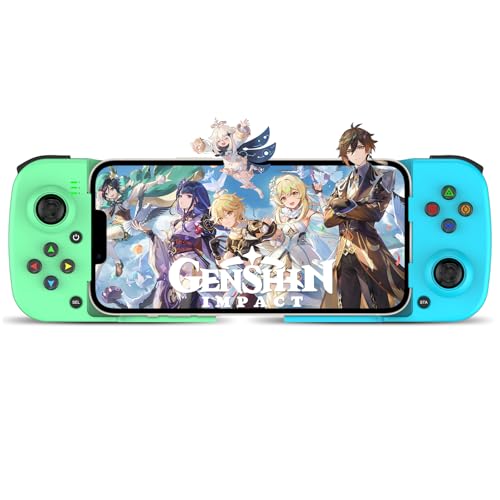
The Joso Mobile Game Controller is a wireless gamepad designed for both iPhone and Android users who want hassle-free PS Remote Play and cloud gaming. It solves the problem of awkward touchscreen controls by offering tactile buttons and a comfortable grip, making long sessions much easier.
In daily use, the controller feels lightweight and portable, so you can game anywhere without extra bulk. Its ergonomic design means your hands stay comfortable, and the Bluetooth 5. 0 connection keeps everything responsive. You’ll notice less hand fatigue and more confidence in your controls, especially during fast-paced games.
What Makes It Stand Out
- Works with a wide range of iPhone and Android models
- Supports PS Remote Play, cloud gaming, and emulator apps
- Customizable back buttons for quick actions
- Non-slip grips for comfort during long gaming sessions
- Stable Bluetooth 5.0 connection for low-latency play
- Lightweight and easy to carry
What To Consider Before Buying
- May not fit extra-large phone cases
- No information about battery life included
- Color options are limited to Green+Blue
Who This Fits Best
This controller fits best if you want to play PlayStation games remotely on your phone or enjoy cloud gaming without the typical touchscreen hassle. It removes the guesswork of compatibility, as it supports the latest iPhones and popular Android models, so you don’t have to check every detail before buying.
If you map the extra back buttons before playing, you’ll get faster in-game reactions and less stress during tough battles. The solid wireless connection means you can trust your inputs to register, letting you focus more on the game and less on technical issues.
For anyone who values comfort and simplicity, this controller delivers reliable performance with fewer surprises.
| Best for | Why |
|---|---|
| PS Remote Play on mobile | Reliable connection and physical controls for seamless remote gaming |
| Cloud gaming sessions | Optimized for Xbox Cloud, GeForce NOW, and more |
| Long play sessions | Ergonomic and non-slip design reduces hand fatigue |
| Gamers who switch devices | Universal compatibility with both iPhone and Android |
Dualsense Wireless Chroma Pearl Controller
As the Best Mobile Controller for Ps Remote Play, this model offers seamless multi-device compatibility for gamers who want flexibility without compromise.

The DualSense Wireless Chroma Pearl Controller is designed for those who want a reliable and responsive controller for PlayStation Remote Play on mobile, PC, Mac, or PS5. It solves the hassle of switching between devices, thanks to easy Bluetooth and USB Type-C connections.
Its adaptive triggers add a new layer of immersion for games that support them.
Using this controller feels familiar and comfortable, especially if you are used to PlayStation layouts. Haptic feedback and adaptive triggers make gameplay more engaging, while the built-in microphone means you can chat without extra accessories. The consistent connection and straightforward controls reduce setup stress and keep you focused on your game.
Key Advantages For Mobile Play
- Works with PS5, PC, Mac, Android, and iOS
- Quick pairing via Bluetooth or USB Type-C
- Immersive haptic feedback for responsive play
- Adaptive triggers enhance supported games
- Built-in mic and headset jack for easy chat
- Dedicated mute button for instant privacy
- Recognizable PlayStation button layout
Keep In Mind Before Buying
- Some advanced features may not work on all mobile games
- Not as compact as some mobile-only controllers
- Requires charging or wired connection for long sessions
Where This Shines
This controller is best for players who want to use PS Remote Play across multiple platforms without fuss. It removes the need to own separate controllers for each device, cutting down on both clutter and guesswork. Pairing is straightforward, so you can get started quickly—even if you switch between phone and console often.
If you’re new to using a console controller with your phone, try using a phone clip for a more comfortable handheld setup. You’ll appreciate the reliable connection and familiar controls, especially during long gaming sessions. In my experience, having one controller for all devices means fewer surprises and more time spent playing.
| Best for | Why |
|---|---|
| Remote Play on Android/iOS | Fast Bluetooth pairing and full control layout |
| Switching between PS5 and mobile | No need for multiple controllers |
| Voice chat in games | Built-in microphone and headset support |
| Immersive gameplay | Adaptive triggers and haptic feedback |
Okety Wireless Mobile Controller
The OKETY Wireless Mobile Controller is a top choice for the Best Mobile Controller for Ps Remote Play, offering precise and lag-free gaming on multiple devices.

The OKETY Wireless Mobile Controller is designed for gamers who want accurate and consistent control across different devices, including iPhone, Android, and Nintendo Switch. Its Hall Effect joysticks and triggers prevent stick drift, making it reliable for long gaming sessions.
It supports PlayStation Remote Play with zero lag, which is vital for smooth gameplay.
Using this controller feels comfortable and intuitive thanks to its ergonomic design and adjustable features. The telescopic bridge fits a wide range of phone sizes, and customizable buttons allow you to tailor the experience without complicated setup. This makes it easy to focus on your game rather than on technical issues.
Key Advantages For Mobile Gaming
- Hall Effect joysticks and triggers eliminate stick drift for precise control
- Compatible with iPhone, Android, Nintendo Switch, and iPad Mini via Bluetooth
- Zero lag connection for PlayStation Remote Play and cloud gaming services
- Customizable back buttons and turbo fire settings without needing an app
- Ergonomic grips and adjustable phone holder for comfortable long sessions
- Dynamic RGB lighting with option to turn off for focus or stealth
Considerations Before Buying
- Lacks built-in app for initial setup, requires external “KeyLinker” App for deep customization
- Only supports phones sized 4.1” to 7.9” due to telescopic bridge limit
- No wired connection option; relies fully on Bluetooth pairing
Who Benefits Most From This Controller
This controller is ideal for gamers who use PlayStation Remote Play on mobile devices and need a reliable, drift-free experience. It removes the frustration of inaccurate joysticks and laggy input, helping you focus on gameplay. A quick tip is to customize the M1/M2 back buttons to streamline combos, saving time in complex games.
You can expect consistent performance without surprises thanks to its Hall Effect technology and clear Bluetooth pairing instructions. The ergonomic design suits long gaming sessions, making it a solid choice for serious mobile players who value precision and comfort.
| Best for | Why |
|---|---|
| PlayStation Remote Play users | Zero lag and precise control for smooth remote gaming |
| Mobile gamers using multiple devices | Universal Bluetooth compatibility with iOS, Android, and Nintendo Switch |
| Competitive FPS and racing gamers | Hall Effect joysticks ensure no drift and reliable accuracy |
| Gamers who customize controls | Programmable buttons and turbo fire without needing an app |
Ninjaplusox Wireless Mobile Gaming Controller
Best Mobile Controller for Ps Remote Play that stands out for versatile device support and customizable gaming experience.

The NinjaPlusOX Wireless Mobile Gaming Controller offers a flexible solution for gamers who want to play across devices like iPhone, Android, Switch, and iPad Mini. Its wireless connection and wide compatibility make it easy to jump into PS Remote Play, Xbox Cloud, or Steam Link without hassle.
The precise Hall effect joysticks and triggers mean you get reliable control, helping avoid drift or dead zones that can ruin gameplay.
In daily use, this controller feels comfortable and responsive, with adjustable LED lighting adding a fun touch to your setup. Programmable back keys and macro functions help you personalize your controls, making complex game actions more efficient. The battery lasts through long sessions, so you can focus on your game instead of charging.
For anyone who switches between devices or cloud services, this controller brings consistency and less setup stress.
Why Gamers Like It
- Works with iPhone, Android, Switch, and iPad Mini
- Supports PS Remote Play, Xbox Cloud, Steam Link, and more
- Precise Hall effect joysticks and triggers reduce drift
- Customizable LED lighting for personal style
- Programmable back keys with macro support for advanced play
- Adjustable turbo function for faster actions
- 6+ hours battery life per charge
Consider Before You Buy
- Not compatible with games that require Joy-Con only controls
- No information on included carrying case or storage options
- Some features may require extra setup for full customization
What I’d Tell A Friend
This controller fits best for gamers who play across multiple platforms and want a single, reliable accessory for PS Remote Play and other cloud services. It cuts down on device juggling and configuration hassles, letting you focus on the game.
If you often switch between phone, tablet, and Switch, it saves time and keeps your controls feeling the same.
A quick tip: set up your favorite macros and LED settings before your first long session to make gameplay smoother and more immersive. With its precise controls and long battery life, you can count on fewer surprises mid-game. I like that it lets me keep my setup simple and flexible, whether I’m home or traveling.
| Best for | Why |
|---|---|
| Multi-device gamers | One controller for iPhone, Android, Switch, and iPad Mini |
| Cloud gaming fans | Seamless support for PS Remote Play, Xbox Cloud, and Steam Link |
| Players needing precise control | Hall effect joysticks and triggers avoid drift and dead zones |
| Custom control enthusiasts | Programmable macros and LED lights for personal setup |
Oivo Ps5 Controller Phone Mount Clip
A top pick for Best Mobile Controller for Ps Remote Play, giving PlayStation users a stable and comfortable way to play games on their phone.
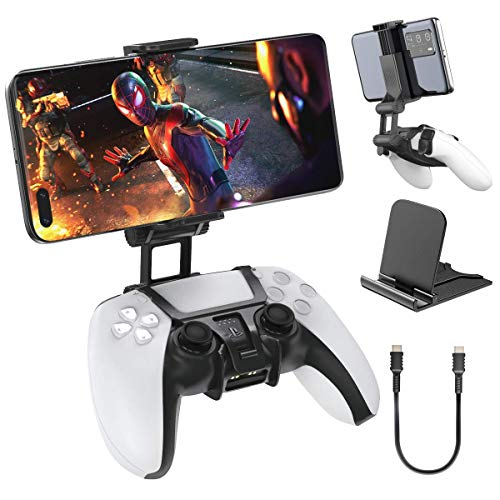
The OIVO PS5 Controller Phone Mount Clip is designed to securely attach your phone to a PlayStation 5 DualSense controller for remote play. It solves the hassle of balancing your phone or searching for a stand, letting you turn your PS5 controller into a mobile gaming setup.
The dual adjustable valve allows for a wide viewing angle and comfortable distance, making gaming on the go much easier.
Using the mount feels stable and reliable, thanks to its sturdy ABS material and closed lock structure. You get a consistent gaming experience without worrying about your phone slipping or the controller dropping. Adjusting the angle is quick, and it fits naturally in your hands, so longer sessions are comfortable.
Whether gaming at home or while traveling, setup is fast and stress-free.
Game-ready Benefits
- Secure fit for PS5 DualSense controller
- Wide 320-degree adjustable viewing angle
- Comfortable distance with 1.5-inch extension
- Durable ABS build reduces drops and slips
- Quick, tool-free setup
- Ideal for remote play with PlayStation services
- Affordable alternative to PS Portal and Backbone
Points To Consider
- Not compatible with PS5 Edge controllers
- Only fits phones with standard sizes
- No built-in charging support for phone
Where This Shines
This mount is best for gamers who want a simple, portable way to play PlayStation games on their mobile device using a PS5 controller. It removes the guesswork of finding the right angle or worrying about your phone falling during gameplay.
For remote play fans, it makes gaming smoother and more consistent.
A quick tip: adjust the dual valve before starting your session for the perfect angle and distance—it saves time and keeps your setup stable. With its solid lock and easy adjustment, you get peace of mind knowing your phone stays secure even during intense gaming. I like how it keeps everything together, so you can focus on the game, not your gear.
| Best for | Why |
|---|---|
| Remote Play with PS5 DualSense | Designed specifically for PS5 controllers, ensures a tight fit and easy use. |
| Mobile Gaming on the Go | Compact, lightweight, and quick to set up for travel or home. |
| Comfortable Long Sessions | Wide angle adjustment and extension reduce hand strain. |
| Budget-Friendly Alternatives | Affordable option compared to PS Portal or Backbone for similar functionality. |
Arvin Wireless Mobile Gaming Controller
The Best Mobile Controller for Ps Remote Play offers seamless gameplay for users who want flexible device compatibility and reliable streaming.

The arVin Wireless Mobile Gaming Controller is designed for gamers who want to use PS Remote Play on multiple platforms. It solves the frustration of juggling different controllers or struggling with touch controls, letting you play games easily across iPhone, Android, Switch, and PC.
Using this controller feels smooth and intuitive for streaming PS, Xbox, or PC games to your mobile device. It’s easy to connect, and the controls are responsive, giving you confidence during gameplay. The built-in features support consistent performance, so you spend less time troubleshooting and more time enjoying your games.
Key Gaming Advantages
- Works with iOS, Android, Switch, PC, and Mac devices
- Supports PS Remote Play, Xbox Remote Play, and Steam Link
- Lets you play cloud gaming and MFi games smoothly
- Dual vibration and 6-axis gyroscope for console/PC (enhanced immersion)
- Turbo function for faster action in shooters and fighting games
- Easy switch between devices without hassle
Things To Consider
- Vibration and gyroscope features not supported on iOS/Android
- PS5 compatibility limited to playing PS4/PS3 games
- LAN network required for remote play streaming
What I’d Tell A Friend
This controller is ideal for gamers who want to stream console or PC games to their phone without missing out on real controls. It cuts out the stress of device compatibility and gives you reliable performance, especially if you switch between platforms often.
If you’re tired of awkward touch controls or constantly changing devices, the arVin controller makes life easier. For best results, make sure your phone and console are on the same network when using remote play. You’ll appreciate the stable connection and responsive buttons, which reduce surprises during intense sessions.
I found that setting up turbo mode is a quick way to improve your gaming edge.
| Best for | Why |
|---|---|
| Remote streaming PS4/PS3 games | Simplifies gameplay with full controller support |
| Multi-device gamers | No need for separate controllers for each platform |
| Cloud gaming users | Works well with popular cloud gaming apps |
| Mobile shooter and fighting fans | Turbo function gives an edge in fast-paced games |
Dinosoo Rgb Wireless Controller
This controller stands out as the Best Mobile Controller for Ps Remote Play with its seamless multi-platform connectivity and responsive Bluetooth design.

The Dinosoo RGB Wireless Controller is designed for gamers who want a reliable and versatile gamepad that works smoothly with PS5, PC, and mobile devices. Its Bluetooth connectivity and quick pairing make it easy to switch between devices, solving the hassle of juggling multiple controllers.
The built-in 6-axis gyro and dual vibration motors add precision and immersive feedback to your gaming sessions.
Using this controller feels comfortable and consistent, with Hall Effect joysticks that prevent drift and improve accuracy. The RGB lighting offers a customizable look, while the built-in speaker and audio jack provide flexible sound options. Its 1000mAh battery ensures long gaming hours without frequent recharging, making it a dependable choice for remote play and beyond.
Key Advantages For Remote Play
- Instant Bluetooth connection for PS5 and mobile devices after initial USB-C setup
- Customizable RGB lighting with memory for personalized gaming ambiance
- Macro and Turbo functions for easier execution of complex commands
- Dual vibration motors and 6-axis gyro for immersive, precise controls
- Hall Effect joysticks reduce stick drift for long-term accuracy
- 3.5mm audio jack and built-in speaker for versatile sound options
- Long-lasting 1000mAh battery supports extended gaming sessions
Considerations Before Buying
- Initial USB-C pairing is required to connect with PS5
- Microphone support is limited to TRRS headphones, not compatible with Apple 3.5mm headsets
- Designed primarily for PS5 and PC, so some mobile games may have limited compatibility
Where The Dinosoo Controller Excels
This controller is best suited for gamers who frequently switch between PS5, PC, and mobile gaming and need a seamless connection without driver hassles. It removes the guesswork of compatibility and the stress of battery life interruptions, letting you focus on the game itself.
For better results, take advantage of the macro and turbo features to simplify complex inputs during competitive play. You can trust this controller for consistent performance and comfortable handling during long remote play sessions. Its customizable lighting and audio options also add a personal touch without complicating the setup.
| Best for | Why |
|---|---|
| PS5 remote play users | Quick Bluetooth connection and gyro controls enhance gameplay on mobile |
| Multi-platform gamers | Easy switching between PS5, PC, and mobile without driver installs |
| Competitive players | Macro and turbo functions simplify complex button combos |
| Long gaming sessions | 1000mAh battery supports extended play without frequent charging |
Brhe Ps4 Controller Phone Clip
As the Best Mobile Controller for Ps Remote Play, this mount makes it easy to connect your phone to a PS4 controller for smooth gaming anywhere.
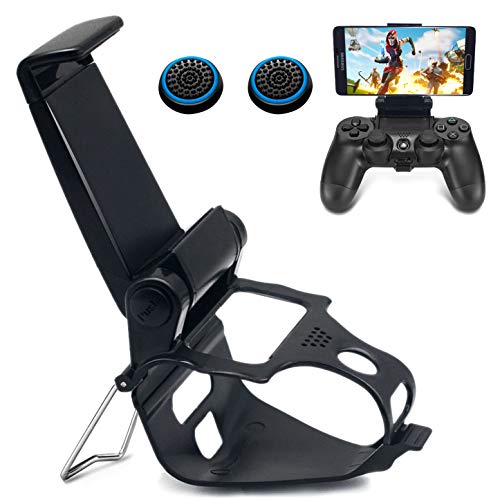
The BRHE PS4 Controller Phone Clip is a simple mount that attaches your smartphone to your PlayStation 4 controller. It helps you play remote games without juggling your phone and controller, keeping both steady and close together. The design includes a sturdy metal stand for extra stability, so your phone stays safe even during intense gaming sessions.
Using this clip, your phone sits at a comfortable angle right above your controller. Adjusting the viewing angle is quick with one hand, letting you set it up for long play sessions at home or on the go. It makes mobile remote play less of a hassle and gives you more confidence that your device won’t slip or tip.
The compact design also means it’s easy to store when not in use.
Why Gamers Like This Mount
- Works with most Android and iOS phones up to 3.4” wide
- Strong grip for both phone and controller
- Sturdy metal stand prevents backward tipping
- Adjustable 160° viewing angle for comfort
- Easy one-handed setup and foldable design
- Keeps your phone secure during active play
Consider Before You Buy
- Not compatible with phones wider than 3.4”
- Controller and phone are not included
- Requires checking your device OS for compatibility
Who This Fits Best
This clip is ideal for gamers who regularly use PS Remote Play and want a secure way to mount their phone to a PS4 controller. It removes the hassle of balancing your phone on a table or holding it awkwardly while you play. A quick tip: double-check your phone’s width and operating system to ensure compatibility for smooth setup.
Because of its stable grip and adjustable angle, you can play with fewer worries about your phone slipping or falling—even during energetic gaming sessions. If you want a simple and reliable solution for mobile console gaming, this mount will fit your needs without surprises.
| Best for | Why |
|---|---|
| Remote PS4 gaming on mobile | Keeps phone and controller together for easier play |
| Gamers with different phone sizes | Fits most Android and iOS models up to 3.4” wide |
| Travel or couch gaming | Foldable and portable design for convenience |
| Anyone needing a stable phone mount | Metal bracket adds extra safety and confidence |
Megadream Wireless Mobile Game Controller
If you want the Best Mobile Controller for Ps Remote Play that works across many platforms, this Megadream model delivers versatile control for gaming on the go.
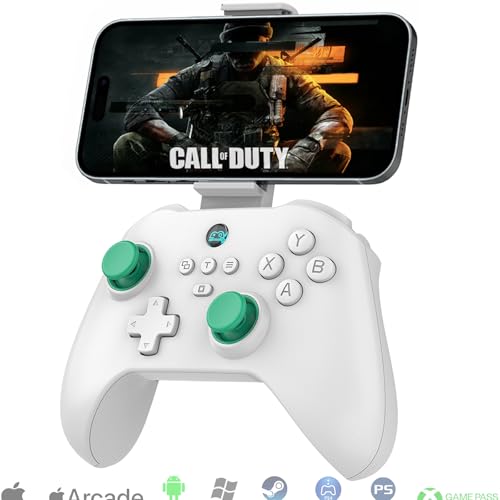
The Megadream Wireless Mobile Game Controller offers an easy way to play on iPhone, Android, and more, eliminating the need for multiple controllers. Its ability to connect directly or work through remote play means less hassle when switching between devices.
Swappable triggers let you customize response for different game types, which helps if you play both shooters and racers.
In daily use, this controller feels responsive and lets you focus on your game instead of setup headaches. Button mapping and vibration add to the experience, making actions precise and immersive. The included phone clip is helpful for mobile sessions.
Battery life is long enough for all-day play, so you don’t worry about running out of power mid-game.
What Makes It Stand Out
- Works with iPhone, Android, PC, and more
- Supports PS Remote Play and cloud gaming apps
- Switchable Hall linear and micro triggers for better control
- Customizable ABXY layout for game compatibility
- Back macro buttons for advanced moves
- Dual vibration and 6-axis gyro on supported platforms
- Long battery life—over 18 hours per charge
Consider Before You Buy
- Vibration and gyro only work on PC, PS3, PS4, and Switch
- No bundled storage or carrying case
- Some features require initial button setup
Who This Fits Best
This controller is a smart pick for gamers who play on different devices and want one accessory that just works. If you use PS Remote Play or bounce between mobile, tablet, and PC, it removes the stress of constant pairing and compatibility checks.
The customizable triggers and button mapping save you from menu digging and make switching game styles easier.
A quick tip: take a few minutes to set up the ABXY layout and macro buttons for your favorite games—it’s worth it for smoother sessions. With strong battery life and wide platform support, you can expect reliable performance and fewer surprises, whether you’re at home or traveling. Personally, I like how it keeps my gaming setup simple and clutter-free.
| Best for | Why |
|---|---|
| PS Remote Play users | Direct compatibility and simple setup for PlayStation streaming |
| Gamers who switch devices | Multi-platform support means no need for multiple controllers |
| Cloud gaming fans | Works with GeForce Now, Xbox Game Pass, and more |
| Mobile players who want console feel | Phone clip and precise triggers bring a familiar gaming experience |
How To Choose The Right Mobile Gaming Controller
Platform Compatibility
Check your devices before you buy. Most controllers support iOS, Android, and sometimes Switch or PC, but not all work equally well on every platform. Make sure the controller matches your main gaming device.
Controller Layout And Features
Some controllers mimic PlayStation or Xbox layouts. Choose what feels familiar to you. Decide if you need extras like programmable buttons, RGB lighting, or vibration feedback. Simpler designs may be lighter and easier to travel with.
Connection Type
Bluetooth is standard but can introduce latency. Some devices support wired connections or have a clip for your phone. Consider how important instant response is for your games.
Comfort And Portability
Ergonomics matter for long sessions. Telescopic designs hold your phone in place but add bulk. Stand-alone controllers work on desktops but may be awkward on the go. Check grip texture and size if you have large or small hands.
Battery And Charging
Internal batteries can last from 6 to 18 hours. If you play for long stretches, look for higher capacity or USB-C charging. Removable batteries are rare but easy to swap.
Common Buyer Mistakes
- Forgetting to check if their phone case fits in clamp-style controllers.
- Expecting console-level haptics or features on mobile—some features do not transfer between platforms.
- Assuming all controllers support cloud gaming or remote play services without extra setup.
- Not updating firmware or using the correct app for advanced features.
Who Should Avoid These Products
- Gamers who only play touch-based mobile games without controller support.
- People who prefer ultra-portable or pocket-sized accessories.
- Anyone expecting full compatibility with all games or consoles—always check supported platforms.
Setup And Usage Tips
- Pair your controller using the recommended Bluetooth profile for your system (often named differently for iOS and Android).
- Update the controller firmware if an app is provided. This can fix bugs and add features.
- Test button mapping and sensitivity in a simple game before playing something competitive.
- Adjust RGB or vibration settings to save battery if needed.
- Store telescopic or clamp-style controllers in a case to avoid damage.
Faqs
Will These Controllers Work With All Games On My Phone?
No. Only games with controller support or remote play features will recognize these controllers. Check each game’s compatibility list.
Do I Need To Remove My Phone Case To Use Clamp Controllers?
Some clamps fit over slim cases, but thicker or rugged cases may not fit. Always check the maximum supported phone width before buying.
Is There Noticeable Input Lag With Bluetooth Controllers?
Most recent models offer low-latency connections, but some lag may occur, especially with cloud gaming. Wired connections generally have less lag.
Can I Use These Controllers With My Pc Or Mac?
Many controllers support PC or Mac via Bluetooth or USB, but advanced features like vibration or macros may not work on all systems.
How Do I Program Back Buttons Or Macros?
Follow the included manual or use the brand’s app if available. The process varies, but usually involves button combinations or software settings.
What Should I Do If My Controller Stops Responding?
Restart your device and controller. Re-pair the Bluetooth connection, and check for firmware updates. If problems persist, consult the manufacturer’s support.
Final Thoughts
Choosing a mobile gaming controller depends on your device, preferred games, and how you like to play. Consider compatibility, comfort, and the features you will actually use. Taking a few minutes to confirm these points helps avoid returns and ensures a better gaming experience.