
Filming in low light is frustrating. Details disappear, colors fade, and you’re left wondering if a better camera would fix it—or if you just need better lighting. Maybe you’ve tried to stream an event, monitor a driveway, or run a hybrid meeting, only to find your camera can’t keep up when the lights are down.
Finding a PTZ camera that really works in low light isn’t simple. There are lots of types—some for security, some for video calls, some for live events. You’ll see big promises around sensors, zoom, and “AI tracking,” but it’s not always clear what matters for your setup.
Trade-offs exist between image quality, price, ease of use, and how much manual control you want.
This guide will help you sort through the noise and figure out which type of PTZ camera fits your real needs in low light.
What Makes Choosing A Ptz Camera For Low Light Tricky?
Most people focus on zoom or resolution. But for low light, sensor size and processing matter more than specs on the box. Some cameras are built for security and always-on recording, while others are tuned for live streaming or meetings.
Features like AI tracking sound nice, but not everyone needs them. It’s also easy to get stuck comparing outputs (HDMI, SDI, USB, PoE) and miss how the camera actually performs in your space.
Who Should Consider Each Type?
If you’re covering large rooms or need professional streaming, you’ll want reliable PTZ controls and better low-light sensors. For home security, smart features and easy installation are key. If you just need a better webcam for calls, look for simple setup and clear video in dim rooms.
Budget also shapes the options—some low-light performers cost much more, while affordable picks make compromises elsewhere.
Below, you’ll find a range of PTZ cameras chosen for their ability to handle low light. Each one fits a different use case or budget, so you can weigh what actually matters to you before making a choice.
Prisual 30x Optical Zoom Ptz Camera
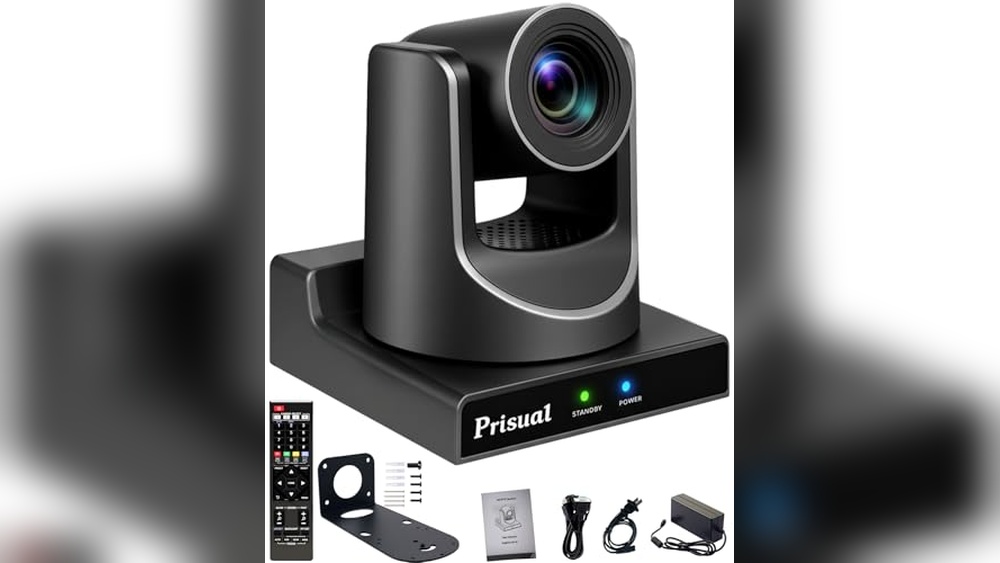
The Prisual 30X Optical Zoom PTZ Camera stands out as a Best Ptz Camera for Low Light by delivering sharp clarity and reliable AI tracking for events, churches, and live productions.

The Prisual 30X Optical Zoom PTZ Camera is designed for those who need dependable live streaming and recording in challenging lighting. Its advanced auto-focus and AI tracking ensure clear, crisp images even when lighting is less than ideal. This camera is especially suited for churches, events, and education, where capturing every detail matters.
Setup is straightforward thanks to Power over Ethernet, which means fewer cables and less hassle. Once in use, you can trust the camera to follow presenters smoothly, minimize manual adjustments, and let you focus on running your event. The intuitive menu makes tweaks simple, and the versatile outputs fit right into most streaming setups.
Why It’s A Standout For Live Streaming
- Excellent clarity at 30x optical zoom, even in low light
- Reliable AI tracking for presenters and moving subjects
- Flexible connections: HDMI, 3G-SDI, USB, and IP streaming
- Customizable focus and tracking zones
- Simple setup with Power over Ethernet
- Multiple control options, including joystick support
- 3-year local warranty and expert support in the U.S.
Things To Consider Before Buying
- NDI streaming requires a separate upgrade after trial
- No bundled accessories or controller included
- Higher price point than basic PTZ models
Who This Fits Best
This camera is a great fit for churches, schools, or event venues where lighting can be unpredictable and there’s no dedicated camera operator. It takes the stress out of capturing clear, professional video, even if you’re not a technical expert.
The AI tracking means less guesswork and more freedom for presenters to move naturally.
For best results, spend a few minutes customizing the focus zones and sensitivity to match your space. With its strong warranty and responsive support, you can expect reliable performance and fewer surprises during important broadcasts. If you want to focus on your message or event and not the tech, this camera is a reassuring choice.
| Best for | Why |
|---|---|
| Churches and Houses of Worship | AI tracking follows speakers and performers automatically |
| Live Event Streaming | Handles low-light stages and wide-to-close transitions smoothly |
| Lecture Capture & Education | Easy controls and set-and-forget operation for presenters |
| Multi-platform Broadcast Setups | Multiple outputs (HDMI, SDI, USB, IP) for flexible integration |
Insta360 Link 2 Pro 4k Ptz Webcam
As the Best Ptz Camera for Low Light, this webcam stands out for its exceptional video clarity and smooth subject tracking in challenging lighting.

The Insta360 Link 2 Pro 4K PTZ Webcam is designed for those who need sharp video and reliable tracking, even in dim spaces. With its large sensor and advanced low-light abilities, it solves the problem of grainy or blurry webcam feeds during video calls or streams.
Its AI tracking means you stay in frame without adjusting the camera manually.
Using this webcam feels seamless—meetings and streams look professional without extra lighting or fuss. The directional mics help your voice come through clearly, even if your workspace is busy. You can trust the camera to follow your movements and keep the focus on you, so you spend less time worrying about tech and more time communicating.
Why People Choose This Webcam
- Excellent clarity in low-light conditions
- AI-powered tracking keeps you centered
- Natural bokeh for a polished look
- Directional mics reduce background noise
- Compatible with major streaming and meeting apps
- Easy USB-C setup for multiple operating systems
Consider Before Buying
- Not compatible with ARM-based Windows systems
- No support for Windows Hello Face Recognition
- Requires USB-C port for optimal use
Who This Fits Best
If you often find yourself in low-light rooms or want clear, pro-looking video for meetings and streams, this webcam is an easy pick. It removes the hassle of manual camera adjustment and reduces stress about appearing grainy or out of focus.
To get the best results, explore the camera’s software settings to fine-tune the bokeh and tracking features to your space.
You’ll appreciate the reliability in video calls and the confidence that your audio is clear, even when there’s background noise. For me, knowing the camera quietly follows movement means fewer surprises and a more relaxed workday. It’s a smart fit for anyone who values consistency and a polished presence on camera.
| Best for | Why |
|---|---|
| Low-light video calls | Large sensor delivers clear, bright images in dim spaces |
| Active presenters | AI tracking keeps you in frame as you move |
| Streaming with natural background blur | Software-based bokeh effect gives a professional look |
| Busy work environments | Directional mics focus on your voice, reducing distractions |
Obsbot Tiny Se Ptz Webcam
The OBSBOT Tiny SE stands out as the Best Ptz Camera for Low Light, giving streamers and professionals reliable performance even in dim environments.

The OBSBOT Tiny SE PTZ Webcam is a compact streaming camera designed for those who want clear, smooth video in any lighting. Its standout low-light performance, thanks to a large 1/2. 8” CMOS sensor and advanced HDR, makes it a strong choice for home offices and content creators.
The camera tracks movement using AI, so you stay centered even if you shift around during calls or streams.
Daily use feels effortless with gesture controls and easy preset scenes, so you don’t have to fumble with software or settings. The video quality stays consistent, whether you’re recording in a dim room or switching between different setups. Using this camera means less stress about lighting and more confidence that you’ll look professional on every call or stream.
Where This Camera Excels
- Excellent clarity in low-light environments
- AI-powered tracking keeps subjects in frame automatically
- Customizable presets for quick scene changes
- Gesture control for hands-free adjustments
- Smooth video at up to 1080p 100fps
- Wide dynamic color range for natural-looking video
Points To Consider
- Requires PC or laptop—no standalone use
- PTZ range is for desktop use, not large rooms
- Best performance relies on using the latest software features
What I’d Tell A Friend
If you work in mixed lighting or stream from spaces with unpredictable brightness, the OBSBOT Tiny SE PTZ Webcam is a smart pick. It removes worries about poor image quality or awkward framing, letting you focus on your content or conversation.
For the best experience, try setting up a few preset positions to switch angles quickly during meetings or streams.
Using this webcam means fewer video surprises and a smoother workflow, especially in low light. The AI tracking and gesture controls add real convenience, so you won’t need to adjust your camera mid-session. I like that it just works—no need to stress about how you’ll look on screen.
| Best for | Why |
|---|---|
| Low-light streaming setups | Superior sensor and HDR keep video clear in dim rooms |
| Dynamic video calls or webinars | AI tracking keeps you centered even if you move |
| Content creators with multiple angles | Customizable presets allow fast scene changes |
| Hands-free camera control | Gesture commands adjust framing without touching the device |
Jcmnete 2k Hd Light Bulb Ptz Camera
For those seeking the Best Ptz Camera for Low Light, this model excels with reliable color night vision and flexible placement for home security.
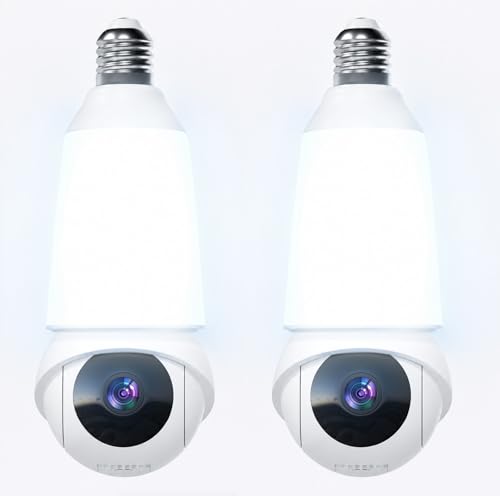
This is a smart PTZ light bulb camera that screws into any standard bulb socket. With 2K HD resolution and color night vision, it provides clear footage even in dim outdoor or indoor settings. It combines lighting and security, so you don’t need extra wiring or complicated setups.
Using it day-to-day means you get instant alerts and peace of mind, knowing the AI will spot people, pets, or vehicles—not just random movement. The camera’s 355° pan and 90° tilt help you keep an eye on every corner, and emergency features make it easy to call for help if needed.
What Sets It Apart
- Color night vision for reliable low-light clarity
- No wiring—installs in any regular bulb socket
- Smart AI detection reduces false alarms
- Dual-band WiFi for smoother streaming
- Wide PTZ coverage eliminates blind spots
- Integrated 1000-lumen lighting for added security
- 911 emergency calling built into the system
What To Consider Before Buying
- Requires a compatible E26/E27 light fixture
- May not suit those needing discreet camera placement
- Dependent on WiFi signal strength for smooth performance
Where This Shines
This camera is best for homeowners who want easy, all-in-one security and lighting—especially where traditional cameras struggle at night. It’s ideal for porches, garages, and backyards where you don’t want extra wires or complicated installations. The AI detection removes the hassle of constant false alarms, letting you focus only on real alerts.
For best results, place it where the built-in lighting can also illuminate the area you want to monitor. This will further boost night vision clarity. You’ll gain consistent coverage and can check in anytime with less worry about missing important events—giving you peace of mind, even when you’re away.
| Best for | Why |
|---|---|
| Porches and entryways | Simple bulb socket installation and wide-angle PTZ coverage |
| Garages and backyards | Reliable motion detection and bright 1000-lumen lighting |
| Low-light security needs | Color night vision and 2K HD clarity after dark |
| Users needing emergency response | 911 calling feature and real-time alerts for safety |
Tongveo 20x Optical Zoom Ptz Camera
A top choice for the Best Ptz Camera for Low Light needs, this model delivers smooth tracking and clarity for demanding professional setups.
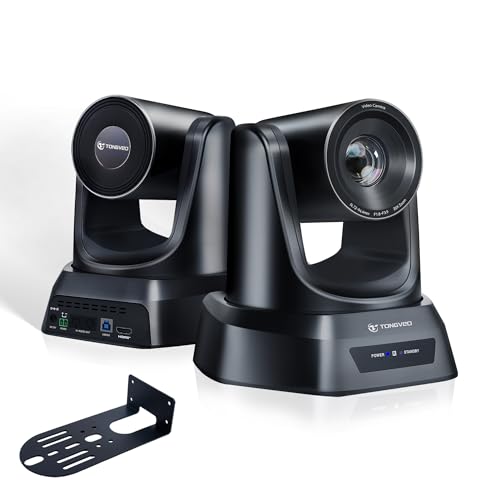
The TONGVEO 20X Optical Zoom PTZ Camera is designed for anyone needing clear video in large rooms or low-light conditions. Its AI auto tracking and multiple framing modes help keep the subject centered, so you don’t have to worry about manual adjustments.
With HDMI and USB connectivity, setup is straightforward and flexible.
Using this camera feels effortless, especially in situations like church streaming or conference calls where you want consistent video without technical distractions. The quiet motor and fast preset recall make switching angles smooth, while stable HD video keeps presentations professional.
The remote control makes it easy to manage during live events without leaving your seat.
What Sets This Camera Apart
- AI auto tracking keeps presenters in focus automatically
- 20X optical zoom maintains clarity even from a distance
- Full HD 1080p at 60fps for smooth, clear streaming
- Plug-and-play HDMI and USB connections, no drivers needed
- Near-silent PTZ operation for distraction-free use
- Supports up to 255 preset positions for quick angle changes
- Works with popular platforms like Zoom and OBS
Things To Consider Before Buying
- Not designed for handheld or portable use—best for mounted setups
- Requires remote for most quick adjustments
- May be more than needed for small, simple rooms
Who This Fits Best
If you’re running a church stream, conference room, or large event where lighting isn’t always ideal, this camera removes the hassle of constant manual camera work. It helps you focus on your message, not the tech, by keeping subjects centered and video steady. A quick tip: set up your most-used angles as presets to save even more time during live events.
You’ll gain confidence knowing your video stays crisp and reliable, with fewer surprises from lost focus or awkward framing. I appreciate how the remote lets you adjust on the fly, so you’re never scrambling mid-stream. This model is most rewarding for those who value automation and reliable video in dynamic, low-light environments.
| Best for | Why |
|---|---|
| Church streaming in low light | AI tracking and 20X zoom keep subjects clear and well-framed |
| Large video conferences | Smooth PTZ and preset positions enable seamless multi-angle coverage |
| Live event streaming | Plug-and-play setup and remote control support quick changes |
| Hybrid classrooms or auditoriums | Consistent HD video and automatic framing for dynamic teaching environments |
Jennov 4k Outdoor Ptz Security Camera
The Jennov 4K Outdoor PTZ Security Camera stands out as the Best Ptz Camera for Low Light thanks to its long-range night vision and reliable tracking features for large properties.

The Jennov 4K Outdoor PTZ Security Camera is built for those who need to clearly monitor wide areas in challenging light. It solves the problem of blurry or missed details at night, thanks to powerful infrared LEDs and 20X optical zoom.
If you want to recognize faces or license plates from a distance, its clarity stands out.
Using this camera day-to-day means fewer blind spots and fewer worries about missing important activity. Setup is simplified with Power over Ethernet, so you only need one cable. Customizable alerts and auto-tracking help you keep tabs on specific areas, making it easy to check in from anywhere and share access with family.
Why It’s Worth Considering
- Exceptional night vision up to 320 feet in full darkness
- 20X optical zoom keeps details sharp at long range
- Auto-tracking and human detection for focused alerts
- Simple installation with PoE—one cable for power and data
- Weatherproof design for reliable outdoor use
- Two-way audio for direct communication
- Advanced video compression saves storage space
Things To Note Before Buying
- Requires compatible ONVIF PoE NVR (not WiFi NVR)
- 4K streaming depends on having a strong network connection
- Tracks only one person at a time
- Mac users access features via browser, not client software
What I’d Tell A Friend
This camera is a great fit if you need serious coverage and clear images in low light—think large yards, parking lots, or long driveways. It takes away the uncertainty of what’s happening around your property at night, so you won’t have to second-guess missed motion or blurry footage.
To get the most out of it, make sure your network is stable and your NVR is ONVIF PoE compatible.
You’ll gain the peace of mind that comes from knowing your camera can see far and wide, even in total darkness, and alert you only when people—not random movement—are detected. If you want a surveillance camera that minimizes hassle and keeps you confidently in control, this is a solid pick.
I like that you can share access with others for extra backup.
| Best for | Why |
|---|---|
| Monitoring large outdoor spaces | Covers wide areas with 360° pan, 90° tilt, and long night vision range |
| Identifying details at a distance | Sharp 4K clarity and 20X optical zoom reveal important details |
| High-traffic entry points | Auto-tracking and custom patrols ensure nothing goes unnoticed |
| Outdoor use in tough weather | IP66 waterproof housing handles rain, dust, and temperature swings |
Zupirol 2k Color Night Vision Dome Camera
For buyers seeking the Best Ptz Camera for Low Light, this camera offers vivid color night vision and flexible manual coverage for reliable home security.

This dome camera from ZUPIROL is designed for simple setup and strong performance in low-light conditions. It screws directly into standard light bulb sockets, eliminating the need for complicated wiring. The telescoping rod helps fit deep outdoor fixtures, making it suitable for porches, garages, and entryways.
Day or night, the wide 160° lens and color night vision up to 32 feet give you clear coverage of your property. Using the Vicohome app, you can adjust the motion-triggered floodlight and communicate instantly with anyone at your door.
The camera’s manual pan and tilt let you customize the view before installation, ensuring confidence in what you monitor.
Key Advantages For Security Buyers
- Sharp 2K HD resolution for detailed footage
- Color night vision up to 32 feet for low-light clarity
- Easy installation in standard light bulb sockets
- Wide 160° field of view covers more area
- Dimmable, motion-activated LED floodlight for added deterrence
- Flexible storage options: SD card or free 30-day cloud trial
- Instant two-way audio and remote siren for quick response
Things To Consider Before Buying
- Manual pan and tilt—view angle must be set by hand, not remotely
- Requires socket with constant power; wall switch must stay on
- Micro SD card not included for local storage
Where This Shines
This camera suits homeowners who want hassle-free setup and reliable monitoring in areas with limited lighting. It’s especially good for entryways, garages, and porches where you need color night vision and the option to speak or trigger alarms remotely. By eliminating complex wiring and offering flexible storage, it removes much of the stress and guesswork from home security.
For best results, manually set your preferred viewing angle before use and keep your wall switch always on for uninterrupted camera and lighting function. The motion-activated floodlight and instant two-way audio add peace of mind, giving you control even when you’re away.
I appreciate how it combines lighting and security in one device, making it practical for everyday use.
| Best for | Why |
|---|---|
| Porch and garage monitoring | Simple installation and wide field of view |
| Low-light entryways | Color night vision ensures clear footage at night |
| Remote communication with visitors | Two-way audio and siren for quick interaction |
| Flexible recording needs | Choose SD card or cloud storage as preferred |
Gianteye 2k Ptz Light Bulb Camera
If you’re searching for the Best Ptz Camera for Low Light, this model stands out for its color night vision and seamless motion tracking—ideal for reliable home security.
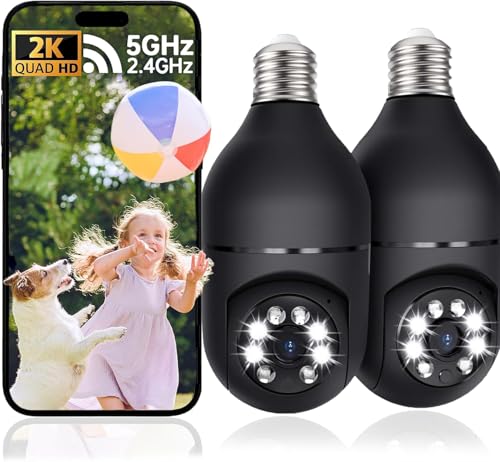
The Gianteye 2K PTZ Light Bulb Camera is a dome-style outdoor security camera that fits into standard light sockets. Its 360° pan and tilt coverage, along with AI human detection, help reduce false alerts and ensure you only get notified about real activity.
With color night vision, it tackles the challenge of poor lighting and gives you clear footage even after dark.
Using this camera feels simple and secure—live streaming is smooth thanks to dual-band WiFi, and sharing access with family is easy through the app. The two-way talk feature lets you interact with visitors or scare off intruders, making your home feel safer.
Installation is quick, with no drilling or wiring required, which saves time and hassle.
Key Security Advantages
- 360° pan and tilt for full-area coverage
- AI human detection minimizes false alerts
- Color night vision for clear low-light footage
- Dual-band WiFi ensures stable connection
- Two-way talk for real-time communication
- Easy socket installation—no tools needed
- Flexible storage options (microSD or cloud)
Things To Consider
- MicroSD card not included for local storage
- Requires standard E27 socket for setup
- App access needed for full feature control
Who This Fits Best
This camera is ideal for homeowners wanting a security upgrade without the hassle of traditional installation. It removes the stress of wiring and offers reliable monitoring in low-light areas, making it a strong option for porches, driveways, and backyards.
With AI tracking and color night vision, you can confidently filter out unwanted alerts and focus only on what matters. For best results, place the camera in a spot with a clear view and connect to the EseeCloud app for easy sharing and setup.
You’ll gain peace of mind with consistent performance and quick access to footage.
| Best for | Why |
|---|---|
| Outdoor low-light areas | Color night vision captures activity clearly after dark |
| Quick, tool-free installation | Fits into standard light sockets—no drilling required |
| Families needing shared access | App lets multiple users monitor and get alerts |
| Reducing false motion alerts | AI detection filters out pets and minor movement |
Fomako 4k Ndi Ptz Camera
Best Ptz Camera for Low Light for those who need sharp, clear video in dim venues or large rooms without manual adjustments.

The FoMaKo 4K NDI PTZ Camera is built for challenging low light spaces like churches, conference halls, and lecture rooms. It uses a large 1/1. 8-inch CMOS sensor and advanced noise reduction to keep images clean and sharp, even when lighting is poor.
With powerful optical and digital zoom, you can cover big areas or zoom in on details without moving the camera.
In daily use, it feels reliable—AI auto-tracking and auto-framing mean you don’t need to constantly adjust the shot. The camera quickly locks onto a speaker and keeps them in frame, so you can focus on your event or stream instead of camera settings.
Setup is quick with a single cable for power and control, reducing clutter and headaches.
Why People Choose This Camera
- Delivers crisp video in very low light environments
- AI auto-tracking keeps subjects centered hands-free
- One-cable setup for video, power, and control
- Quiet PTZ motor won’t distract audiences
- Works with major streaming and meeting software
- Multiple zoom options for flexible coverage
- Built-in LCD shows IP address for easy network setup
Consider Before You Buy
- Larger size and weight may not fit all installations
- High-end features might be more than needed for basic video calls
- No built-in microphone—external audio needed
Where This Shines
This camera is best for anyone managing video in dark or unpredictable lighting—think live streams from churches, hybrid conferences, or big lecture halls. It takes the guesswork out of capturing a good image, so you won’t have to worry about grainy video or losing track of the speaker during events.
You’ll save time on setup with PoE and network control, and the auto-framing means less stress during broadcasts. For best results, preset your main camera angles in advance—switching is instant and smooth. The peace of mind comes from knowing every shot will be clear and stable, no matter the room or lighting.
If you want to focus on your content instead of your camera, this is a solid pick.
| Best for | Why |
|---|---|
| Live streaming from churches or sanctuaries | Excels in low-light, silent operation, and reliable speaker tracking |
| Hybrid or large conference rooms | Covers wide areas with auto-framing and smooth PTZ |
| Professional education or lectures | Keeps instructors in focus without manual controls |
| Multi-camera broadcast setups | Ensures color and white balance match across production |
Reolink Trackmix Dual-lens Ptz Camera
For anyone seeking the Best Ptz Camera for Low Light, this model stands out with its dual-lens design and smart auto-tracking for all-around security.

The Reolink TrackMix Dual-Lens PTZ Camera is an outdoor security solution designed to keep tabs on every angle of your property. Its unique dual-lens system offers both a wide panoramic view and a close-up zoom, helping you catch important details without missing the bigger picture.
For users wanting a camera that can automatically track movement and simplify monitoring, this model addresses those needs directly.
Using this camera is straightforward—motion is tracked without the need for constant manual control, and alerts keep you informed instantly. The PoE setup means fewer cables and a more reliable connection, which adds confidence that your system will keep running.
The ability to filter and replay footage based on detection modes saves time and reduces hassle when reviewing events.
Why This Camera Stands Out
- Dual-lens gives both detailed zoom and full-area coverage at once
- Auto-tracking follows people, vehicles, and pets smoothly
- No subscription needed for playback or smart detection
- PoE connection for stable, high-quality 4K video
- Customizable tracking modes for flexible monitoring
- Instant notifications and built-in spotlights for real-time response
Consider Before You Buy
- Requires compatible PoE switch or NVR (not included)
- Firmware update needed for some Reolink NVRs to use dual-lens view
- Not ideal for locations without PoE infrastructure
The Simple Use Case
This camera is ideal for homeowners or small business owners who want reliable security without constant manual monitoring. It takes the guesswork out of tracking activity—just set it up and let the smart detection do the work. You’ll spend less time reviewing endless footage, and get only the alerts that matter.
If you want to get the most from it, make sure your network setup supports PoE for an easy installation. The result is a security system that feels dependable, sends fast alerts, and makes it easy to check in on your property anytime.
I appreciate how it combines wide and zoomed views, which means fewer blind spots and more peace of mind.
| Best for | Why |
|---|---|
| Outdoor home surveillance | Covers wide areas and zooms in on details automatically |
| Monitoring driveways or entrances | Auto-tracks vehicles and people for clear identification |
| Users wanting subscription-free playback | Smart detection and playback features with no ongoing fees |
| Those with PoE infrastructure | Simple, stable setup using a single cable |
How To Choose The Right Ptz Or Security Camera
- Intended Use: Consider whether you need a camera for streaming, meetings, or property security. Webcams with AI tracking are best for presentations and video calls, while PTZ and bulb cameras suit surveillance.
- Location and Lighting: Indoor cameras may not withstand weather, while outdoor models offer weatherproofing and night vision. For low-light environments, look for cameras with enhanced night performance.
- Connection and Power: Some cameras use Power over Ethernet (PoE), others need WiFi or USB. Match the camera to your existing infrastructure to avoid installation surprises.
- Automation vs. Manual Control: PTZ and AI tracking reduce manual effort but may require initial setup. Consider if you want set-and-forget automation or prefer to adjust views manually.
Common Setup And Usage Mistakes
- Overlooking Compatibility: Not all cameras work with every NVR, app, or computer system. Double-check software and hardware compatibility before buying.
- Ignoring WiFi Band Requirements: Some models need dual-band routers or specific WiFi setups. Ensure your network supports the required standards, especially for 5GHz or Wi-Fi 6 devices.
- Poor Placement: Placing cameras behind glass or in areas with glare may impact motion detection or image quality. For outdoor use, ensure weatherproof ratings are adequate.
- Skipping Firmware Updates: Many issues are resolved with software updates. Check for new firmware after installation for best performance and security.
Who Should Avoid These Cameras
- Those who need plug-and-play simplicity and dislike any setup steps. PTZ and AI models often need some configuration.
- If you lack a stable network or power source at your intended camera location, installation may be challenging.
- Buyers wanting true privacy may prefer non-cloud or offline models to avoid remote access risks.
Faqs
Do I Need A Ptz Camera Or A Standard Webcam?
If you want automated tracking or need to cover large spaces, PTZ is helpful. For basic video calls or fixed views, a standard webcam is enough.
Can I Use These Cameras With My Mac Or Linux Computer?
Most webcams support Windows and Mac, but some features or software may be Windows-only. Check specific compatibility before purchase.
Is Internet Required For These Cameras?
For live streaming and remote access, yes. Some cameras can record locally without internet, but features like alerts or cloud storage need a connection.
How Does Ai Tracking Work?
AI uses visual recognition to follow people or objects in frame. It reduces manual adjustments but may need calibration for best results.
What’s The Difference Between Optical And Digital Zoom?
Optical zoom uses the lens for clear close-ups. Digital zoom crops and enlarges the image, which can reduce sharpness.
Can I Install Outdoor Cameras Myself?
Many outdoor models are designed for DIY installation, often using existing light sockets or PoE. Complex systems may need professional help.
Final Thoughts
Choosing the right camera depends on your space, usage needs, and technical comfort level. Consider future upgrades and your network setup before committing. A little planning ensures you get a system that works smoothly and meets your expectations.