
Everyone’s had a video call where the camera just doesn’t do the room justice. Maybe you’re cut off, the focus wanders, or the mic picks up every noise but your voice. Choosing a PTZ camera for Zoom meetings can feel overwhelming, especially with so many features and tech terms thrown around.
There are trade-offs between zoom, tracking, audio, and how these cameras connect to your setup. It’s not always obvious which details matter for your space or team. Some options look similar but perform very differently, and price doesn’t always make it clearer.
This guide will help you understand what actually matters when picking a PTZ camera for Zoom meetings, and how to match a camera to your real needs.
What Actually Matters For Zoom Meetings
Think first about your space and how you use Zoom. Larger rooms need wider angles or more zoom. If people move around a lot, tracking and smooth PTZ controls help. For simple setups, plug-and-play is key. If you already have good audio, camera mic quality may not matter.
Not every feature adds value for every meeting.
Mistakes To Avoid
It’s easy to focus on the highest zoom or the sharpest video, but not every meeting needs those. Compatibility and ease of use often matter more than raw specs. Also, don’t assume every PTZ camera comes with a built-in microphone, or that every model works with your existing hardware.
Below, you’ll find a range of PTZ cameras suited to different meeting spaces and priorities. Each was chosen to cover common needs, from hybrid classes to large team meetings. Read on to see which fits your situation best.
Nexigo 10x Ptz Conference Camera
A top pick for Best Ptz Camera for Zoom Meetings, this camera stands out for its smooth remote control and sharp zoom for group calls.

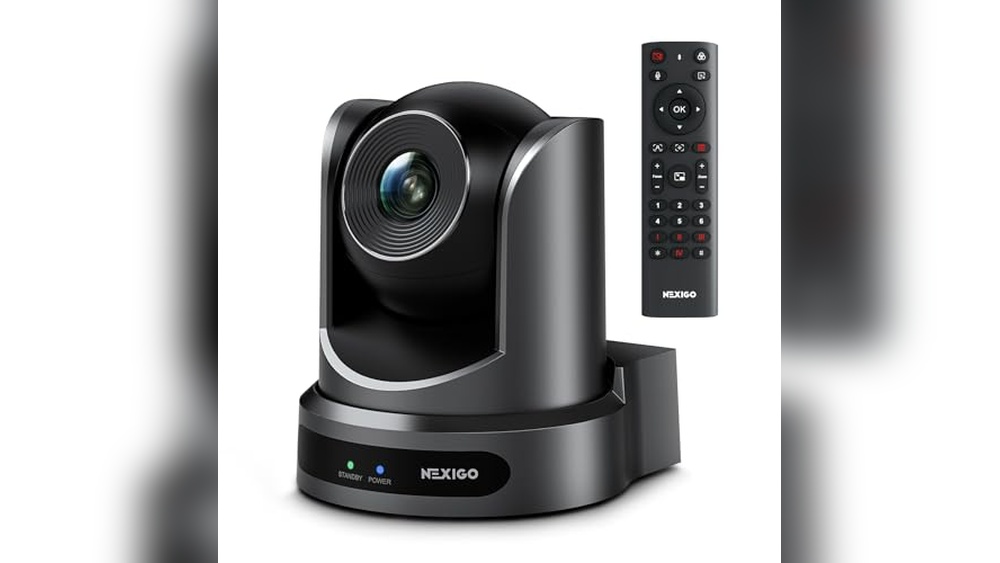
The NexiGo 10X PTZ Conference Camera is designed to improve video meetings for small to mid-sized rooms. With optical zoom and smooth pan/tilt via remote, it makes sure everyone is visible without manual adjustment. This camera helps teams avoid awkward framing or missed participants in group calls.
Using this camera feels professional and reliable, thanks to its silent movement and sharp 1080p video. You can quickly set up your preferred angles and switch between them, saving time and letting you focus on the meeting. The lack of a built-in mic is easy to work around if you already have a separate audio setup.
Why It’s Easy To Recommend
- Professional-grade 10x optical zoom for crisp close-ups
- Remote-controlled pan and tilt for flexible framing
- Silent operation prevents distractions during calls
- Autofocus and manual focus options suit different needs
- Multiple mounting methods for different room setups
- Full HD video with noise reduction for clear images
What To Know Before You Buy
- No built-in microphone—requires separate audio equipment
- Mounting hardware not included
- Designed mainly for small to medium conference spaces
My Practical Take
This camera fits best for teams who want dependable video clarity and effortless control during Zoom meetings or hybrid events. It removes the hassle of manually re-aiming webcams or missing key speakers, letting you concentrate on your agenda. Set up your presets ahead of time for smoother transitions during calls.
If you want fewer surprises and a consistent professional look, this camera gives you peace of mind. Just remember to add a good microphone, and you’ll have a reliable meeting setup. I like how the silent movement keeps things distraction-free even in smaller rooms.
| Best for | Why |
|---|---|
| Small to medium conference rooms | Wide-angle and zoom cover all participants easily |
| Hybrid or remote team meetings | Remote presets and FHD video improve visibility |
| Streaming events or lectures | Sharp focus and quiet movement suit live audiences |
| Rooms with existing audio setups | No built-in mic, so it works best alongside dedicated microphones |
Tongveo 4k Ptz Camera & Speakerphone Set
The TONGVEO 4K PTZ Camera & Speakerphone Set stands out as the Best Ptz Camera for Zoom Meetings by combining AI-powered tracking with hands-free gesture control for seamless remote collaboration.

The TONGVEO 4K PTZ Camera & Speakerphone Set is a professional video conferencing solution designed for teams that need reliable video and audio during meetings. Its AI auto-tracking and gesture control make it easy to focus on speakers without constant manual adjustments, solving the problem of staying in frame during dynamic discussions.
Using this camera feels effortless, whether you’re leading a group call or moving around a conference room. The wide-angle lens and built-in speakerphone mean you get clear visuals and sound, while setup is straightforward with USB plug-and-play. Meetings run more smoothly, and you spend less time worrying about technology.
Why Teams Choose This Camera
- 4K ultra HD video ensures sharp, professional quality
- AI auto-tracking keeps speakers in focus automatically
- Gesture controls allow hands-free camera adjustments
- Wide 120° field of view covers large meeting spaces
- Speakerphone with noise reduction for clear audio
- Compatible with Zoom, Teams, and other major platforms
- Multiple mounting options for flexible installation
Keep In Mind Before You Buy
- Digital zoom only (no optical zoom for larger spaces)
- Some features require using the included remote or gestures
- Not the most compact option for small desks
Who This Fits Best
If you run regular team meetings, hybrid calls, or need to present while moving, this set removes the hassle of staying in focus and being heard. It’s ideal for small and medium conference rooms where clarity and reliable tracking matter most.
You won’t need to fiddle with camera angles or worry about audio dropouts.
Setup is a breeze—just connect via USB, and you’re ready to go. For best results, try presetting your favorite camera positions with the remote before your meeting starts. You’ll gain peace of mind knowing your team looks and sounds their best, call after call.
I’ve found that the gesture controls really help keep things flowing without interruption.
| Best for | Why |
|---|---|
| Hybrid team meetings | AI tracking keeps all speakers visible, even as people move |
| Medium conference rooms | Wide-angle lens and clear speakerphone cover larger areas |
| Presenters who move around | Gesture controls and auto-tracking minimize manual adjustments |
| Multi-platform users | Works seamlessly with Zoom, Teams, and other common apps |
Tongveo 4k Ptz Conference Camera
A top pick for the Best Ptz Camera for Zoom Meetings, this model stands out for its easy AI auto-tracking and wide-angle clarity.
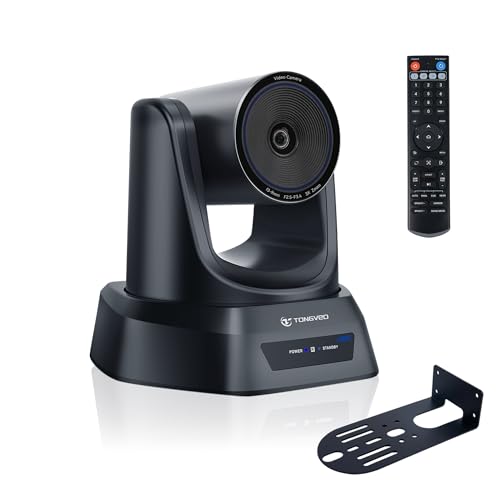
The TONGVEO 4K PTZ Conference Camera is designed to simplify group video meetings by automatically tracking the speaker and capturing everyone in the room with a wide 93° angle. It’s made for teams who want to avoid fiddling with camera angles and settings, focusing on smooth meetings instead.
The AI auto-tracking keeps one person in frame, making presentations or discussions more natural and uninterrupted.
In real use, it feels like the camera anticipates your needs—following the presenter without abrupt movements and switching between preset views at the touch of a button. Meetings are more relaxed because you don’t have to worry about manual adjustments.
The plug-and-play USB and HDMI connections make setup quick, whether for Zoom, YouTube, or OBS. Consistency and less technical hassle are what you get with this camera.
Why It’s Easy To Use In Meetings
- AI auto-tracking keeps the active speaker centered
- Wide 93° angle covers the whole room
- Quiet, smooth PTZ movement for distraction-free sessions
- Simple switching between preset camera positions
- Works seamlessly with Zoom, Teams, and streaming platforms
- Dual HDMI and USB3.0 outputs for flexible setup
What To Keep In Mind
- Tracks only one person at a time
- Not suitable for fast-moving activities
- No internal microphone (external mic needed for audio)
Where This Shines
This camera is best for conference rooms, church streaming, and hybrid classrooms where you want everyone seen and the active speaker automatically followed. It takes away the stress of manual camera control and lets you focus on the meeting itself.
If you often switch between presenters or need to capture both people and whiteboards, the preset positions save a lot of time.
A quick tip: Set up your most-used camera angles as presets before your meeting starts—this way, you can switch views instantly with the remote. The reliable, smooth tracking means fewer interruptions and more consistent results, giving you peace of mind for important calls. For anyone who wants to stop worrying about camera setup, this is a smart choice.
| Best for | Why |
|---|---|
| Medium to large conference rooms | Covers everyone with wide-angle view and preset positions |
| Hybrid meetings on Zoom or Teams | AI tracks speakers, reducing manual work and distractions |
| Live streaming events or classes | Delivers 4K clarity and flexible camera angles for dynamic content |
| Switching between multiple presenters | Preset memory lets you jump to different areas instantly |
Insta360 Link 2 Pro 4k Ptz Webcam
The Best Ptz Camera for Zoom Meetings for those who want sharp video and reliable subject tracking in every call.

The Insta360 Link 2 Pro 4K PTZ Webcam is designed to make remote meetings and streaming easy, clear, and professional. With its large 1/1. 3” sensor and AI tracking, this camera captures crisp video and keeps you in frame, solving common issues like blurry visuals and awkward camera angles.
It’s ideal for anyone wanting reliable video quality for Zoom, Teams, Twitch, or other platforms.
Using this webcam feels effortless, with automatic subject tracking and excellent low-light performance. Meetings run smoothly because your voice is picked up clearly even in noisy spaces, thanks to directional noise-canceling microphones. The natural bokeh effect adds a polished look to your video presence, and compatibility across operating systems means you can plug in and get started without worrying about setup.
Key Advantages For Video Calls & Streaming
- Sharp, detailed 4K video for clear presentations
- AI-powered PTZ tracking keeps you centered and visible
- Strong low-light performance for flexible room setups
- Directional microphones cut background noise for better audio
- Natural bokeh effect for professional-looking backgrounds
- Works with major software (Zoom, Teams, Twitch) and Stream Deck
- Easy USB-C connectivity for quick setup on PC or Mac
Things To Consider Before Buying
- Not compatible with ARM-based Windows systems or Windows Hello Face Recognition
- Requires USB-C port for optimal connectivity
- Weight may be slightly heavier than basic webcams
Who This Fits Best
This camera is a great match for professionals and content creators who want high-quality video and seamless subject tracking during Zoom meetings or live streaming. It eliminates the stress of adjusting your camera or worrying about poor lighting, letting you focus on your presentation or conversation.
If you often move around while presenting or work in environments with background noise, the advanced microphones and AI tracking will make your experience much smoother. For best results, use the built-in software to fine-tune bokeh and tracking settings. You’ll gain peace of mind knowing your video and audio will stay consistent, even in challenging conditions.
I found the setup surprisingly quick, which made transitioning between devices easy.
| Best for | Why |
|---|---|
| Remote Team Meetings | AI tracking keeps presenters in frame; clear audio for group calls |
| Live Streaming | 4K resolution and natural bokeh create a polished stream |
| Hybrid Work Setups | Strong compatibility across devices and platforms |
| Presenters Who Move | Physical pan and tilt follows movement, reducing camera adjustments |
Tongveo Ai Auto-tracking Ptz Conference Camera
The TONGVEO AI Auto-Tracking PTZ Conference Camera stands out as the Best Ptz Camera for Zoom Meetings thanks to its seamless tracking and wide coverage for larger rooms.

This camera is designed for conference rooms and group meetings where consistent video quality and speaker tracking matter. It solves the problem of missed moments and constant manual adjustments with its intelligent AI auto-tracking and smooth PTZ movement. The wide 75.
4° field of view and 12X optical zoom make it easy to capture everyone in the room, even in larger spaces.
Using this PTZ camera feels effortless—once set up, it quietly follows the speaker and switches to preset angles, letting you focus on the meeting instead of the tech. The plug-and-play HDMI and USB 3. 0 outputs mean you can connect to almost any system quickly, and compatibility with Zoom, OBS, and other platforms makes it flexible for hybrid teams or teaching.
You’ll notice less stress and fewer interruptions during calls.
Why People Choose This Camera
- AI auto-tracking keeps speakers centered without manual control
- Large 75.4° field of view covers more participants
- 12X optical zoom keeps image quality sharp, even at a distance
- Simultaneous HDMI and USB 3.0 outputs for easy setup
- Works with Zoom, OBS, WebEx, and more
- Multiple installation options (desk, wall, ceiling, tripod)
- Supports up to 255 camera presets for fast switching
Things To Consider
- No built-in microphone—requires external audio
- May be more camera than needed for small rooms
- Weighs over 6 pounds, so not ideal for frequent travel
Who This Fits Best
This camera is a smart pick for teams running important Zoom meetings, church worship, or blended classroom sessions where staying in frame and clear is crucial. If you’re tired of fiddling with camera angles or missing key moments, this model removes that hassle with its auto-tracking and preset features.
It’s especially useful for medium to large spaces where a normal webcam can’t cover everyone.
You’ll save time and avoid technical surprises, letting you focus on people and content instead of worrying about the camera. For smoother meetings, set your favorite presets before you start—this way, switching views is instant. If reliable video and easy setup matter to you, this camera brings real peace of mind.
I appreciate how it just works without fuss.
| Best for | Why |
|---|---|
| Medium to large conference rooms | Covers more people with wide view and zoom |
| Hybrid meetings on Zoom or OBS | Seamless integration with popular platforms |
| Church services and online learning | Auto-tracking captures speakers and audience smoothly |
| Users needing flexible mounting | Installs on desk, wall, ceiling, or tripod |
Tongveo 20x Zoom Ptz Conference Camera Bundle
For those seeking the Best Ptz Camera for Zoom Meetings, this all-in-one TONGVEO system delivers reliable video and audio for large rooms.

The TONGVEO 20x Zoom PTZ Conference Camera Bundle combines a high-resolution PTZ camera and a Bluetooth speakerphone, designed for seamless video and audio conferencing in larger meeting spaces. It tackles the challenge of clear communication by pairing optical zoom and a wide-reaching microphone, ensuring everyone is seen and heard without moving equipment.
Using this system in a meeting feels effortless. The camera’s flexible PTZ controls and the speakerphone’s omnidirectional pickup make group calls smoother, letting teams focus on discussion rather than setup. Consistent performance and simple connectivity mean less downtime and more confidence during important meetings.
Notable Benefits For Conference Rooms
- 20x optical zoom covers large rooms with ease
- PTZ camera rotates horizontally and vertically for flexible viewing
- Full HD video output at 60fps for crisp visuals
- Speakerphone picks up voices within 20 feet in all directions
- Connects via USB, HDMI, Bluetooth, or dongle—no driver needed
- Works with Zoom, Teams, WebEx, and other major platforms
- Built-in battery offers up to 17 hours of speakerphone use
Points To Consider Before Buying
- Best suited for medium to large rooms—smaller spaces may not need this reach
- Requires multiple devices for full setup (camera and speakerphone)
- Initial setup may involve cable management for USB/HDMI connections
Where This Shines
This bundle is ideal for teams running frequent Zoom meetings in rooms with up to 60 square meters, especially when clear video and audio are essential. It removes the hassle of juggling separate devices or worrying about coverage gaps, letting you focus on collaboration rather than tech troubleshooting.
For best results, position the speakerphone centrally and use the PTZ controls to frame the main area. You’ll notice fewer dropped voices and sharper video, bringing peace of mind to remote and in-person participants alike. I appreciate how consistent the audio pickup is, even when people move around.
| Best for | Why |
|---|---|
| Large conference rooms | 20x zoom and wide mic coverage handle spacious layouts |
| Hybrid work meetings | Dual USB/HDMI outputs and broad compatibility with platforms |
| Remote presentations | PTZ controls let you focus on speakers or audience |
| Multi-person online courses | Omnidirectional microphone ensures all voices are captured |
Tongveo Wireless Ai Ptz Camera
A top pick as the Best Ptz Camera for Zoom Meetings, this wireless AI camera makes remote presentations and group calls seamless and hands-free.
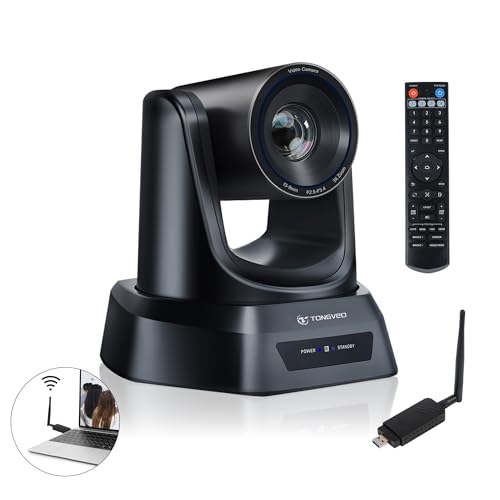
The TONGVEO Wireless AI PTZ Camera solves the hassle of keeping speakers in frame during online meetings or events. Its built-in AI automatically tracks movement, so you don’t need someone to adjust the camera. The wireless design means no messy cables, making it ideal for spaces where neatness and flexibility matter.
Using this camera feels effortless for hybrid meetings or classes. You simply plug in the USB dongle and the camera is ready—no drivers to install. It quietly follows the speaker, so the audience stays engaged and you don’t have to worry about technical distractions.
Why People Choose This Camera
- AI auto-tracking keeps presenters centered without manual control
- Completely wireless setup reduces cable clutter
- Clear 1080P video at 60fps for smooth streaming
- 3X optical zoom for flexible room coverage
- Quiet, smooth pan and tilt with wide angle coverage
- Simple plug-and-play connection—no software setup needed
- Works with major platforms like Zoom, Teams, and WebEx
Consider Before You Buy
- Wireless range is limited to around 33–50 feet
- Heavier than typical webcams, may need sturdy mounting
- No built-in microphone; requires separate audio setup
When I’d Pick This
This camera fits anyone running hybrid meetings, church services, or classes where speakers move around the room. It removes the stress of manual camera work and lets you focus on your message instead of tech details. If you’re tired of blurry, off-center video, the auto-tracking is a real game changer.
To get the most out of it, mount the camera where it has a clear view of the whole speaking area. That way, tracking is smooth and reliable, and your stream looks professional every time. You get the peace of mind that your audience always sees who’s talking—no surprises or missed moments.
| Best for | Why |
|---|---|
| Hybrid meetings with moving speakers | AI tracking keeps presenters in view automatically |
| Church services or worship events | Cable-free setup fits large, open spaces without running cords |
| Online classes or lectures | Plug-and-play design saves time for teachers and IT |
| Conference rooms with multiple presenters | Smooth pan/tilt and zoom cover the whole room |
Tenveo Vloop 11x Ptz Conference Camera
The Tenveo VLoop 11X is a top contender for Best Ptz Camera for Zoom Meetings, offering smooth remote control and crisp Full HD visuals for clear business communication.

The Tenveo VLoop 11X PTZ Conference Camera is designed for professional video meetings and live events where image quality and flexibility matter. With its 11X optical zoom and precise pan/tilt controls, it lets users capture wide group shots or zoom in on speakers, solving the problem of static, limited webcams.
Using this camera in a conference room feels seamless—remote control lets you adjust angles without walking up to the camera, and the full HD video ensures everyone looks clear. It’s compatible with popular meeting platforms, so setup is straightforward, and you can rely on smooth, consistent performance for every session.
Why Teams Choose This Camera
- Sharp 1080p video with 60fps for lifelike meetings
- 11X optical zoom covers both groups and close-ups
- Remote pan/tilt is smooth and silent for non-distracting adjustments
- Works with Zoom, Teams, OBS, and more across major operating systems
- Multiple mounting options for flexible room setups
- Long cable support (USB up to 15m, HDMI up to 30m)
- Three-year warranty and lifetime technical support
Things To Know Before Buying
- No built-in microphone—external audio required
- Best suited for medium-sized rooms (not large auditoriums)
- Professional remote control setup may require extra configuration
Where This Shines
This camera is ideal for teams and organizations that need reliable video quality and flexible camera control during Zoom meetings or live presentations. It removes the hassle of repositioning static cameras and reduces the stress of missing important moments thanks to its zoom and preset features.
If you want consistently sharp, professional-looking video for your conference space, this model will deliver peace of mind through its reliable hardware and broad compatibility. For best results, set up key camera presets in advance—this makes switching views effortless during meetings.
I appreciate not having to worry about blurry video or awkward angles.
| Best for | Why |
|---|---|
| Business meetings with remote participants | Clear visuals and flexible framing for all speakers |
| Hybrid classrooms or training sessions | Easy to switch between wide group and close-up shots |
| Church services or live worship events | Smooth remote control and reliable streaming output |
| Teams using multiple conferencing platforms | Broad compatibility with major video apps and systems |
How To Choose A Ptz Conference Room Camera
Consider Your Room Size And Layout
Room size determines how much zoom and field of view you need. Large rooms often require stronger optical zoom (12x, 20x) and wide-angle coverage. For smaller spaces, a modest zoom is enough, and a wide field of view prevents people from being left out of frame.
Wired Vs. Wireless Setup
Wired cameras provide stable connections but require running cables. Wireless models reduce clutter and are easier to install in rooms where wiring is difficult. Consider wireless if your setup changes often or cable management is an issue.
Integration With Meeting Platforms
Check if the camera works with the video software you use (like Zoom, Teams, or OBS). Most models support common platforms, but some features like AI tracking or gesture control may require extra setup.
Audio Requirements
Many PTZ cameras do not include built-in microphones. For clear sound, you may need a separate speakerphone or microphone system. Bundled kits can simplify this, but check if the included audio covers your space adequately.
Common Mistakes When Buying Ptz Cameras
- Overlooking microphone needs—many cameras lack built-in mics.
- Choosing too much or too little zoom for your room size.
- Assuming all mounting hardware is included—double-check what comes in the box.
- Not confirming compatibility with your operating system or meeting software.
- Ignoring the importance of easy setup, especially for non-technical users.
Who Should Avoid These Cameras
If you only need a simple webcam for solo video calls, these PTZ models are likely overkill. They are best for group meetings, hybrid classrooms, churches, or events needing wide coverage and remote control. For basic use, a standard USB webcam is simpler and more affordable.
Ptz Conference Camera Faqs
Do These Cameras Work With Mac And Windows?
Most models support both Mac and Windows, but check for specific OS requirements. Some advanced features might need extra drivers or may not work on all platforms.
Can I Use These Cameras For Live Streaming?
Yes, many models are compatible with streaming software like OBS and YouTube. HDMI or USB3. 0 outputs allow flexible setups for both meetings and broadcasts.
How Difficult Is Installation?
Most cameras offer plug-and-play over USB. Wall, ceiling, or tripod mounting is usually possible but may require purchasing mounts separately. Wireless options further simplify setup.
What Is The Difference Between Optical And Digital Zoom?
Optical zoom uses the lens for clear close-ups without loss in quality. Digital zoom crops the image, which can reduce clarity. For large rooms, prioritize optical zoom.
Is A Remote Control Always Included?
Most PTZ cameras include a remote for pan, tilt, and zoom. Advanced control via computer or joystick may require extra accessories.
Will These Cameras Pick Up Sound From The Whole Room?
Not all cameras have microphones. If clear audio is essential, consider a separate conference speakerphone or a camera bundle that includes one.
Final Thoughts
PTZ conference cameras offer flexible video coverage for group settings. Consider your room, installation needs, and audio setup before choosing. The right camera will fit your space and workflow, making meetings and events run smoothly.