
Most people have struggled with clunky remotes or awkward controls when using Kodi. Finding the right remote can make streaming and browsing feel effortless—or frustrating.
But picking a remote control for Kodi isn’t always straightforward. Some are simple and familiar, others combine keyboard and mouse functions. Compatibility, layout, and extra features all play a role. Choices aren’t obvious, and trade-offs are real: simplicity vs. versatility, traditional shape vs. mini keyboards, plug-and-play vs. learning curve.
This guide will help you see which type of remote fits your needs, without overcomplicating the decision.
What Actually Matters When Choosing A Kodi Remote?
- How you use Kodi: Casual viewing or lots of typing and navigation?
- Device compatibility: Does the remote work with your TV, PC, or streaming box?
- Comfort and ease of use: Familiar shape or more advanced controls?
- Extra functions: Do you need a backlit keyboard, air mouse, or just basic buttons?
- Plug-and-play vs. setup: Are you okay with learning new controls, or do you want instant use?
Common Confusion Points
- Remotes with keyboards look appealing, but can be awkward if you only need simple navigation.
- Some remotes claim wide compatibility but may lack support for certain devices or features.
- Plug-and-play promises easy use, but advanced remotes may require setup or adjustment.
- Price isn’t always a clear indicator of quality or compatibility.
Below you’ll find a range of remotes chosen for different Kodi setups. Each has strengths that suit certain users, whether you prefer traditional controls or extra features. Scan through to find what fits your style and devices.
Febite Mx3 Remote Pro For Kodi
Best Remote Control for Kodi if you want an all-in-one device to control your media center, type, and navigate without getting up.

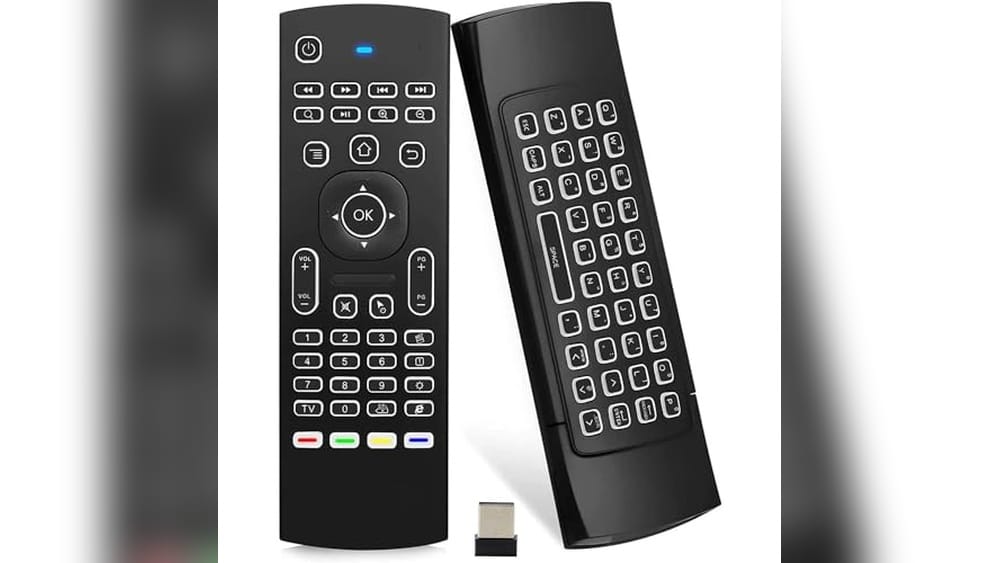
The FEBITE MX3 Remote Pro is a wireless mini keyboard and remote combo designed for Kodi setups. It helps you manage your TV box, HTPC, or mini PC with a single device, so you can skip juggling remotes or struggling with on-screen keyboards.
Its backlit keys and air mouse make controlling media and typing simple, especially in dim rooms.
Using it feels intuitive—navigation is smooth, and you can sit back on the couch while typing searches or switching apps. The plug-and-play setup means it’s ready in seconds, and the 10-meter range gives you freedom to move. The IR learning feature is handy for combining TV controls, reducing clutter and confusion.
Why People Like It
- Combines keyboard, air mouse, and IR remote in one unit
- Works with Android, Windows, Mac, Linux, iOS, PS3, and XBOX ONE
- Plug-and-play USB receiver—no drivers needed
- Backlit keyboard for easy use in the dark
- IR learning for controlling TV functions
- 10-meter wireless range for flexible placement
Consider Before Buying
- Mini keyboard may feel cramped for large hands
- No Bluetooth connectivity—USB dongle required
- Limited IR learning (up to 5 keys)
Who This Fits Best
The FEBITE MX3 Remote Pro is ideal for anyone who uses Kodi or other media center software on a TV box, HTPC, or mini PC. It’s especially good if you want to cut down on clutter and avoid reaching for different remotes or wireless keyboards.
This device removes hassle by unifying your controls and making text entry fast and simple.
A quick tip: map the most-used TV buttons to the IR learning keys right away, so you don’t have to switch remotes when adjusting volume or power. With its reliable wireless connection and easy setup, you’ll spend less time troubleshooting and more time enjoying your media. I find it makes movie nights feel smoother and less stressful.
| Best for | Why |
|---|---|
| Kodi and HTPC users | All-in-one control for media navigation, typing, and mouse input |
| Android TV Box owners | Plug-and-play compatibility with most TV boxes and projectors |
| Mixed-device setups (Windows/Mac/Linux) | Switches easily between platforms without extra software |
| People who want fewer remotes | IR learning merges TV and media controls into one device |
Dupad Story Mx3 Backlit Kodi Remote
The Best Remote Control for Kodi for those who want a wireless, backlit, all-in-one control for Android TV and media boxes.
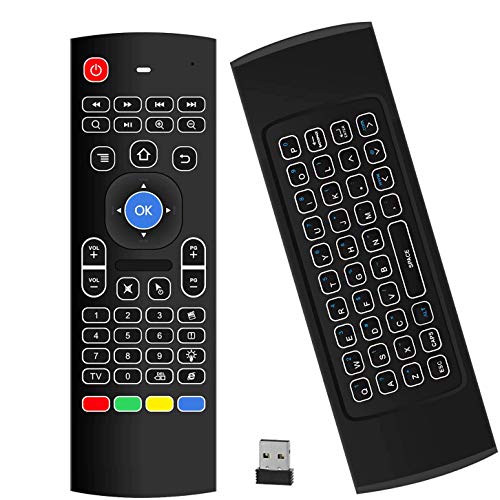
The Dupad Story MX3 Backlit Kodi Remote is a compact wireless remote and mini keyboard designed to make navigating Kodi and Android TV boxes easier. It combines a 2. 4 GHz remote, an air mouse, and a QWERTY keyboard, letting you control your device and type searches from the couch.
Its LED backlight and double-sided design mean you can use it comfortably, even in dark rooms.
Daily use feels natural thanks to the plug-and-play setup and the responsive air mouse. The six-axis motion sensor lets you move the pointer just by moving your hand, making menus and apps easy to access. You save time and skip frustration compared to standard remotes, especially if you type often or use multiple devices.
Key Advantages For Kodi Users
- Seamless plug-and-play with USB receiver
- Works up to 10 meters away—perfect for living rooms
- Backlit keyboard for easy use at night
- Air mouse with six-axis motion for precise control
- Can learn basic TV commands via IR
- Supports many devices: Android TV, Smart TV, PC, HTPC
What To Consider Before Buying
- Requires two AAA batteries (not included)
- Keyboard has only 38 keys, so complex typing may be slower
- Learning IR covers basic TV functions, not advanced ones
Who This Fits Best
This remote is ideal for Kodi or Android TV users who want a single device to handle searching, typing, and navigation from the sofa. It takes away the hassle of juggling multiple remotes and guessing which buttons work for each device.
To make setup smooth, keep spare AAA batteries on hand so you can get started right away.
Once set up, you’ll spend less time fumbling with controls and more time enjoying your shows, thanks to its reliable wireless connection and intuitive motion controls. If you want to simplify your media setup with fewer surprises, this remote offers that peace of mind.
Personally, I like how the backlight lets me use it without turning on the room lights.
| Best for | Why |
|---|---|
| Kodi and Android TV users | Combines air mouse, keyboard, and IR learning in one remote |
| Nighttime viewing | LED backlight makes buttons easy to see in the dark |
| Multi-device setups | Supports Smart TV, PC, HTPC, Android TV Box, and more |
| Users who type searches often | Mini QWERTY keyboard saves time over on-screen typing |
Re-flix Kodi Mbox Replacement Remote
The Best Remote Control for Kodi if you want immediate setup and a stress-free Kodi MBOX experience.

The Re-Flix Kodi MBOX Replacement Remote is designed as an instant, no-hassle solution for controlling your SAT/DTT Kodi MBOX. There’s no need for codes or complicated setup—just insert the batteries and it’s ready to go. This remote is especially useful if you need a backup or a simple replacement for your existing controller.
Using it feels straightforward and intuitive, with an ergonomic design that fits comfortably in your hand. It’s reliable for everyday TV and streaming control, removing the frustration of unresponsive or lost remotes. Dedicated buttons for popular streaming services (if present) make switching apps quick and easy.
Why It’s Easy To Live With
- Immediate use—no programming required
- Works directly with Kodi MBOX and SAT/DTT setups
- Designed for smart TVs
- Lightweight and comfortable to hold
- Practical as a backup or replacement
- Potential for dedicated streaming buttons
Things To Consider Before Buying
- Check if it has the streaming service buttons you need
- Not compatible with all TV models—meant for Kodi MBOX/SAT/DTT
- No advanced customization options
Where This Shines
This remote is perfect for anyone who wants a plug-and-play replacement for their Kodi MBOX or SAT/DTT setup. It eliminates the hassle of codes and confusing instructions, making it great for less tech-savvy users or busy households. If you’re tired of remotes that need programming, this is a real time-saver.
It gives peace of mind by providing instant, consistent control—so you won’t be left without TV access during movie nights or sports events. For the best results, double-check that your TV and streaming needs match the supported buttons. I appreciate how it makes daily use simple, with no surprises or hidden steps.
| Best for | Why |
|---|---|
| Kodi MBOX users needing a quick replacement | Works instantly with no setup steps |
| Households with multiple remotes | Easy as a secondary or backup remote |
| Smart TV owners wanting simplicity | Ergonomic and includes key streaming controls |
| Users who dislike programming remotes | No codes or pairing required—just add batteries |
Re-flix Replacement Remote For Koda Dvd2233
A strong contender for Best Remote Control for Kodi, this remote is ideal if you want hassle-free setup with your compatible Koda DVD2233 device.
The Re-Flix Replacement Remote for Koda DVD2233 is a lightweight, easy-to-use remote designed specifically for Koda DVD/BD DVD2233 devices. It solves the common issue of needing a secondary or replacement remote, especially if your original is lost or malfunctioning. With true plug & play operation, you just insert batteries—no codes, no programming, no headaches.
Day to day, this remote offers a straightforward, reliable experience. The ergonomic design makes it comfortable to hold and operate, and its simple button layout means you won’t waste time hunting for the right control. For anyone who wants a fuss-free, ready-to-use remote for their setup, it delivers consistent results every time.
What Sets This Remote Apart
- No programming or codes needed—works instantly after inserting batteries
- Custom-made for Koda DVD2233 devices for full compatibility
- Lightweight and ergonomic, easy to handle for long sessions
- Potential smart TV compatibility for streaming (check button layout)
- Ideal as a primary or backup remote
- Simple, clean interface for faster navigation
Points To Consider
- Designed specifically for Koda DVD2233—won’t work with other models
- Streaming service buttons may vary—double-check for your needs
- No advanced customization or learning features
The Simple Use Case
This remote is best for anyone who owns a Koda DVD2233 device and wants a zero-effort replacement or backup. It takes away the hassle of programming, so you can get back to your media without delay. You won’t need to second-guess compatibility or spend time looking up codes.
If you’re looking for a straightforward, dependable way to control your Koda DVD2233—or need a secondary remote for the family—this is a practical choice. My tip: check your device model and the remote’s button layout to ensure it matches your streaming habits. Once set up, you get the peace of mind of reliable operation and fewer surprises when you just want to relax and watch.
| Best for | Why |
|---|---|
| Koda DVD2233 owners needing a replacement | Plug & play operation with full compatibility |
| Households with multiple users | Easy to use as a backup remote—no confusion |
| Anyone wanting minimal setup | No programming or code entry required |
| Users seeking ergonomic design | Comfortable to hold and intuitive to operate |
Re-flix Replacement Remote For Koda Dra610
A top pick as the Best Remote Control for Kodi thanks to its plug & play setup and compatibility with smart TVs and streaming services.
The Re-Flix Replacement Remote for Koda DRA610 is a lightweight, ready-to-use remote that takes the frustration out of replacing lost or broken remotes. With true plug & play functionality, there’s no need for programming or complicated setup—just insert batteries and get started.
It’s designed specifically for the Koda DRA610 DVD/BD, making it a reliable match for your system.
Using this remote day-to-day is straightforward, even if you’re not tech-savvy. The ergonomic design feels comfortable in your hand, and the layout is intuitive. Dedicated buttons for popular streaming services like Netflix and YouTube (if present) make switching between entertainment options quick and effortless.
What Makes It Stand Out
- No programming required—just add batteries and go
- Ergonomic and lightweight for easy handling
- Works well as a primary or backup remote
- Designed for compatibility with Koda DRA610
- Potential for dedicated streaming service buttons
- Clear button layout for easy navigation
Consider Before You Buy
- Limited to devices compatible with Koda DRA610
- May not include all possible streaming app buttons—check model photos
- No advanced customization or universal remote features
Where This Shines
This remote is best for someone who wants to control their Kodi setup or compatible smart TV without any hassle. If you’ve lost your original remote or need a simple backup, it eliminates programming stress and works right away. The clear design means you spend less time searching for the right button and more time enjoying your media.
For best results, double-check if the streaming buttons match the services you use most. You’ll appreciate its reliability—once it’s set up, you can trust it to work every time, with no unexpected surprises. Personally, I like products that solve problems simply, and this remote does just that.
| Best for | Why |
|---|---|
| Quick replacement for Koda DRA610 | No setup required—works instantly |
| Secondary remote for smart TV | Lightweight and easy to keep as a backup |
| Simple control for streaming apps | Direct access to services like Netflix and YouTube (if buttons present) |
| Users who dislike complex remotes | Ergonomic layout and no programming needed |
Re-flix Replacement Remote For Koda Dvd268
Best Remote Control for Kodi users who want instant, hassle-free setup with no programming required.
This Re-Flix replacement remote is designed specifically for the Koda DVD268, letting you control your device right out of the box. There’s no need for programming or code entry—just add batteries and start using it. It solves the frustration of losing or damaging your original remote, offering a quick fix without technical hassle.
Using it feels natural, thanks to its ergonomic design that sits comfortably in your hand. The buttons are intuitive, so you can navigate menus or streaming services like Netflix and YouTube (if present) with minimal effort. Enjoying your media becomes smooth and reliable, reducing time spent fiddling with setup and letting you focus on watching your favorite content.
Why It’s Easy To Use
- No programming or codes required—true plug & play
- Ready for Koda DVD268 models out of the box
- Works well as a main or backup remote
- Supports Smart TV functions for modern setups
- Lightweight and ergonomic for comfortable handling
- Dedicated streaming service buttons (if present)
Things To Keep In Mind
- Specifically programmed for Koda DVD268—won’t work with other models
- Check for presence of streaming buttons before purchase
- No advanced customization or learning functions
Who This Fits Best
If you own a Koda DVD268 and want a remote that just works, this Re-Flix replacement is a smart pick. It’s ideal for anyone tired of complicated setups or searching for codes—simply insert batteries and you’re ready. This remote removes the stress of troubleshooting and keeps things simple for everyone in the household.
It’s especially handy as a backup or secondary remote, keeping your media center running smoothly if the original is lost or broken. For best results, check your device for dedicated streaming buttons you need, and always keep spare batteries on hand.
You’ll enjoy peace of mind knowing there’s no learning curve or surprises—just reliability every time you reach for the remote.
| Best for | Why |
|---|---|
| Koda DVD268 owners needing a replacement | Specifically programmed for this model, works instantly |
| Users who dislike setup steps | No programming or codes required |
| Families with multiple remotes | Can serve as a reliable backup for peace of mind |
| Smart TV viewers (Netflix/YouTube) | May feature dedicated buttons for streaming convenience |
Allimity Remote For Amiko Hd Series
The Best Remote Control for Kodi if you need instant compatibility with a wide range of Amiko HD devices, without any setup hassle.

The ALLIMITY Remote for Amiko HD Series is a straightforward replacement remote that covers all the basic functions of your original remote. If your old remote stopped working or went missing, this model gets you back in control quickly—just pop in alkaline batteries and it’s ready to go, with no programming needed for a long list of Amiko HD models.
Using this remote feels familiar and simple, especially if you’re already used to Amiko devices. Button layouts stay consistent, so you don’t have to relearn anything. It’s reliable for daily use, saving you the frustration of complex setup or compatibility worries.
Where This Remote Excels
- No programming required—works instantly with supported devices
- Replaces all essential functions of the original remote
- Compatible with a wide range of Amiko HD models
- Quick battery installation and immediate use
- Consistent, familiar button layout for Amiko users
- Lightweight and easy to handle
Things To Consider Before Buying
- Not universal—only works with specific Amiko HD models
- No advanced smart home or learning features
- Requires separate purchase of alkaline batteries
Who This Fits Best
This remote is a practical pick for anyone using Kodi on compatible Amiko HD devices who wants a no-fuss replacement. It’s ideal if you want to avoid the headache of setup, codes, or guessing which remote will work—just insert batteries and you’re done.
For families or tech-averse users, it removes confusion and lets everyone get back to watching without delay.
A quick tip: double-check your device model number before buying to make sure it’s supported. With this, you’ll enjoy peace of mind knowing your replacement remote will work reliably every time—no surprises. Personally, I appreciate how it brings back control without complicating my setup.
| Best for | Why |
|---|---|
| Amiko HD device owners needing a replacement | Immediate compatibility and no setup required |
| Kodi users who want reliable controls | Restores full function to your media setup |
| Households with multiple viewers | Easy for everyone to use, no learning curve |
| Anyone avoiding complex remotes | Simple, dependable, and familiar layout |
Re-flix Kodi Replacement Remote
Best Remote Control for Kodi users who want instant setup with no programming hassles.
The Re-Flix Kodi Replacement Remote is a lightweight, ready-to-use remote made for SAT/DTT KODI M8S-N200C-2. 0 devices. It solves the problem of complicated setup—just insert batteries and it works immediately, no codes or programming needed. If your original remote is lost or faulty, this is a simple fix that gets you back to streaming fast.
Using this remote feels straightforward and reliable. It’s comfortable in your hand, with an ergonomic design that makes it easy to control your TV or Kodi box. Dedicated buttons for streaming services like Netflix and YouTube (if present) make navigation quick.
There’s no learning curve, so you spend less time fiddling and more time watching.
Key Advantages For Kodi Users
- Plug & Play operation—no setup required
- Purpose-built for SAT/DTT KODI M8S-N200C-2.0
- Works well as a replacement or secondary remote
- Lightweight and ergonomic for comfortable use
- May include streaming service buttons for quick access
- Compatible with smart TVs
Points To Consider Before Buying
- Only programmed for specific Kodi models
- Check if streaming buttons (Netflix, YouTube) are present
- No advanced customization options
Who This Fits Best
This remote is ideal for Kodi users who need a fast, fuss-free replacement for their SAT/DTT KODI M8S-N200C-2. 0 system. It takes away the hassle of complicated setup, letting you get back to your media in seconds. If you want a backup remote for guests or family, it’s equally handy.
Because it’s pre-programmed, there’s no guesswork—just insert batteries and it’s ready. For best results, check your device model and look over the button layout to confirm streaming shortcuts are available. You can count on steady performance and no surprises, thanks to the simple design and reliable compatibility.
I find the ease of use makes it a stress-free addition to any living room.
| Best for | Why |
|---|---|
| Kodi M8S-N200C-2.0 owners | Plug & play with no setup needed |
| Lost or broken remote situations | Instant replacement, restores full function |
| Smart TV users | Ergonomic and may offer streaming shortcuts |
| Households needing a secondary remote | Easy for guests or as a backup option |
What To Consider Before Choosing A Remote Or Mini Keyboard
Device Compatibility
Not all remotes or mini keyboards work with every device. Confirm compatibility with your TV, set-top box, PC, or media player before buying. Look for mention of your platform or device in the supported list.
Functionality Needs
Decide if you need only basic remote control or advanced features. Some models offer air mouse, backlit keyboards, or programmable buttons. Choose only the features you’ll actually use to avoid clutter.
Setup Simplicity
Plug & Play options offer the simplest setup. If you want to avoid programming or pairing steps, focus on these models. If you need custom controls, be prepared for some learning curve.
Battery Requirements
Most remotes use standard AAA batteries, but some mini keyboards may need frequent charging or specific battery types. Check what’s required and consider your preference for replaceable vs rechargeable batteries.
Common Buyer Mistakes
- Overlooking device compatibility and ending up with non-functioning remotes.
- Assuming all remotes have learning or smart features.
- Choosing complex models when only basic navigation is needed.
- Forgetting to check if batteries are included or need to be purchased separately.
Who Should Avoid These Products
- If you need voice control or smart assistant integration, these products may not deliver.
- Users uncomfortable with small keys or extra features may find mini keyboards confusing.
- If your device is not listed as compatible, consider alternatives designed for your system.
Setup And Usage Tips
- Always check for a USB receiver if using a wireless mini keyboard or air mouse.
- Keep the manual for reference, especially for learning IR or advanced features.
- Try all buttons after setup to confirm full compatibility.
- For models with programmable keys, test programming on less-used functions first.
Care And Maintenance Notes
- Replace or recharge batteries when response becomes slow.
- Keep remotes and keyboards away from liquid and direct sunlight.
- Clean buttons gently with a soft, dry cloth to avoid damage.
- If keys stick, avoid using force; check for debris and clean carefully.
Faqs
Can These Remotes Be Programmed To Control More Than One Device?
Some models support limited IR learning, allowing control of specific functions on other devices. Full universal control is uncommon in this category.
Do I Need To Install Drivers Or Software?
Most products are plug & play and do not require extra software. For advanced features, consult the manual for any setup steps.
Will These Work With Streaming Services Like Netflix And Youtube?
Some remotes have dedicated buttons for popular streaming services, but not all do. Check product images to confirm button availability.
Is The Wireless Range Sufficient For A Living Room Setup?
Typical wireless range is up to 10 meters, which covers most home setups. Walls and obstacles can reduce performance.
What Should I Do If Some Buttons Do Not Work?
Test the remote on another compatible device if possible. If issues persist, consult the manual or contact support for troubleshooting.
Are Batteries Included?
Often, batteries are not included. Review product details or be prepared to purchase them separately.
Summary And Next Steps
Choosing a remote or mini keyboard comes down to compatibility, simplicity, and the features you need. Review your setup, avoid overbuying, and confirm details before deciding. With these points in mind, you can select the right accessory for a smoother experience.