
It’s easy to get frustrated trying to control a Raspberry Pi from the couch or across the room. Maybe you’ve juggled keyboards, struggled with a clunky mouse, or wished your Pi felt more like a true media center.
But picking the best remote control for Raspberry Pi isn’t simple. There are so many types—some look like TV remotes, some double as mini keyboards, some are made for gaming, and others are just modules for DIY builds. Each comes with trade-offs around ease of use, compatibility, and setup.
It’s normal to feel unsure about which path fits your project or habits.
This guide will walk you through what matters and help you find the right match for how you want to use your Raspberry Pi.
Why Choosing A Remote Control For Raspberry Pi Is Tricky
The biggest challenge is that “remote control” can mean many things. Some people just want to click through Kodi or a media app. Others need to type, use a touchpad, or even control power outlets. And some remotes are plug-and-play while others need extra setup—or only work with certain Pi models or cases.
It’s also easy to get sidetracked by features that sound great but don’t fit your real use. A fancy air mouse might be overkill for basic menu navigation, while a simple IR remote may not work well for gaming or searching.
Compatibility with your Pi model, OS, or even your TV can be a hidden headache.
How To Think About Your Choice
Start with how you use your Raspberry Pi most. Media streaming? Light gaming? Home automation? Classroom projects? If you mostly watch movies, simplicity and basic navigation might be enough. For typing or coding, a mini keyboard could make life easier.
If you want to automate lights or devices, you’ll need something that connects to external hardware.
Don’t assume every remote is universal, or that wireless always means Bluetooth. Some require USB dongles, others use IR, RF, or even Bluetooth pairing. It’s worth checking what your Pi supports out of the box, and whether you need to install extra drivers or scripts.
Below, you’ll find a range of remote options—each fitting different needs and styles of Raspberry Pi use. They were chosen to cover the main ways people control their Pi, from simple TV-style remotes to all-in-one keyboards and DIY modules. Take a look to see which approach matches your setup best.
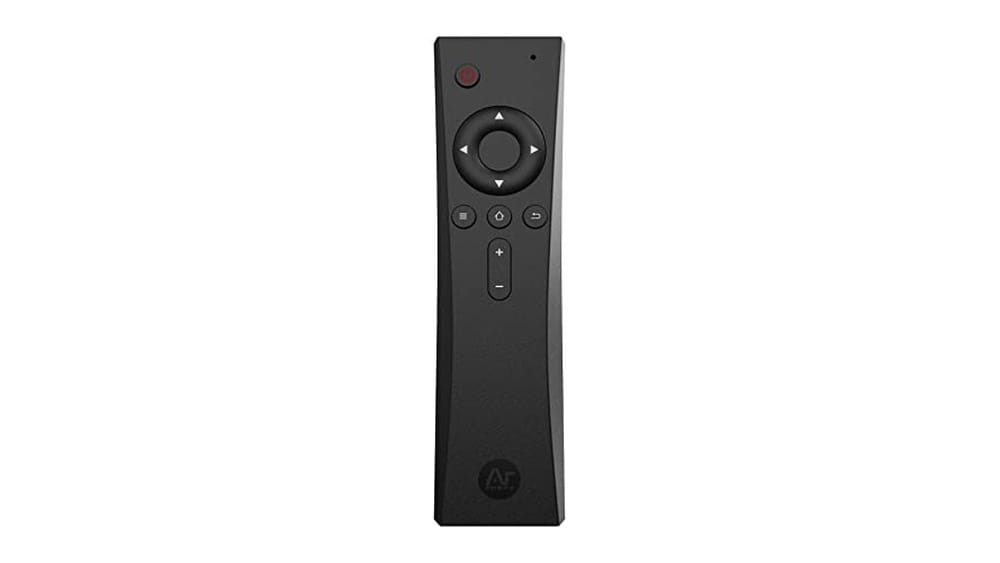
Argon Ir Remote For Raspberry Pi 4
Best Remote Control for Raspberry Pi users who want seamless, case-specific media and system control.

The Argon IR Remote for Raspberry Pi 4 is designed to make managing your Raspberry Pi-based media center or project much more convenient. It works directly with Argon’s compatible cases, providing an easy way to control playback, navigate menus, and power your system from a distance.
No need to juggle keyboards or rely on touchscreens—this remote brings familiar, couch-friendly control to your Raspberry Pi setup.
Using this remote feels intuitive, especially if you’re running Kodi or Raspberry Pi OS in a living room or classroom. Setup is straightforward when paired with Argon cases, and programmable buttons let you personalize controls for your own projects. You can count on a smooth, reliable response for daily media use or automation tasks, reducing the hassle of direct interactions with your Pi.
Why This Remote Stands Out
- Works seamlessly with Argon ONE V2, M.2, and EON cases
- Enables full remote control for Raspberry Pi 4 systems
- Programmable buttons for custom scripts or commands
- Supports safe shutdown to protect your files
- Ideal for Kodi, LibreELEC, and media center builds
- No keyboard or mouse required for basic operation
Things To Keep In Mind
- Requires compatible Argon case with built-in IR receiver
- AAA batteries are not included
- Not suited for non-Argon Raspberry Pi cases
What I’d Tell A Friend
If you’re setting up a Raspberry Pi as a media center or interactive project and you have an Argon case, this remote will streamline your daily use. It removes the need for constant plugging and unplugging of peripherals, letting you control everything from your seat.
Assigning custom commands to the programmable buttons can save even more time, especially for automation or specialized setups.
For best results, make sure your Argon case has the IR receiver and use Argon’s safe shutdown scripts to protect your data. This remote brings consistent, reliable control so you don’t have to worry about accidental shutdowns or corrupted files—giving you more confidence in your Pi projects.
I’d recommend it to anyone who values simplicity and wants their Pi to feel like a true set-top box.
| Best for | Why |
|---|---|
| Argon case owners | Direct compatibility and built-in IR support |
| Home media center setups | Simple, couch-friendly control of Kodi or LibreELEC |
| Raspberry Pi automation projects | Programmable buttons for custom commands |
| Users wanting safe shutdown | Supports Argon’s scripts to protect files and SD cards |
Kunsi Mx3 Pro Air Mouse
The KUNSI MX3 Pro offers a versatile and responsive Best Remote Control for Raspberry Pi users who want wireless ease combined with smart IR learning.

The KUNSI MX3 Pro Air Mouse is a wireless remote control designed to simplify navigation on devices like the Raspberry Pi. It uses a 2. 4G USB wireless connection that requires no drivers—just plug and play for quick setup. Its built-in motion sensor moves the cursor naturally with hand movements, enhancing ease of use.
Using this remote feels intuitive, especially with the mini keyboard on the back for typing. The IR learning feature lets you control multiple devices with a single remote, reducing clutter and confusion. Overall, it provides smooth and consistent control that saves time and effort when managing your Raspberry Pi or other compatible devices.
Key Benefits For Raspberry Pi Control
- Plug-and-play 2.4G wireless connection for hassle-free setup
- Motion sensor enables precise cursor movement via hand gestures
- Mini keyboard on the back simplifies text input and searching
- IR learning feature controls multiple devices with one remote
- Wide compatibility including Raspberry Pi, Android TV, and projectors
- Lightweight design (0.2 pounds) for comfortable handling
Considerations Before Buying
- Mini keyboard size may be small for users with larger hands
- Requires USB port for the wireless receiver, limiting compatibility with some setups
- No dedicated app support or advanced customization options
Who This Remote Suits Best
This remote is ideal for Raspberry Pi users who want to avoid complex setups and enjoy wireless control with motion sensing. It removes the guesswork of multiple remotes by allowing IR learning, so you can manage several devices with ease.
For best results, use it in environments where the USB receiver can stay plugged in continuously.
The MX3 Pro brings peace of mind through consistent, driver-free wireless operation and a compact design that fits comfortably in your hand. If you appreciate straightforward functionality with some smart extras like the mini keyboard, this remote is a practical choice for daily use.
| Best for | Why |
|---|---|
| Raspberry Pi media centers | Wireless cursor control and typing simplify navigation |
| Users with multiple devices | IR learning lets one remote manage TVs, projectors, and more |
| Android TV box owners | Wide compatibility ensures seamless integration |
| Compact space setups | Small, lightweight design reduces clutter and is easy to hold |
Kwmobile 433 Mhz Remote Module Kit
Best Remote Control for Raspberry Pi users seeking a flexible, wireless solution for various DIY and automation projects.
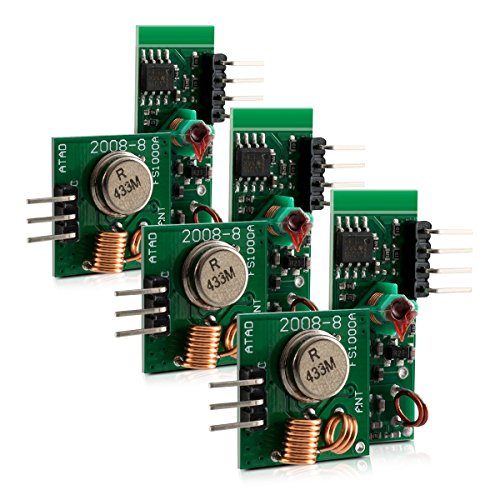
The kwmobile 433 MHz Remote Module Kit provides a simple way to add wireless control to your Raspberry Pi or Arduino projects. It is ideal for anyone looking to build remote-controlled systems, from turning on lights to activating alarms, without complicated setup.
Using this kit feels straightforward and reliable. The modules are compatible with popular boards, and you can boost their range by adding a copper wire antenna. It’s a handy solution for those who want consistent wireless performance and flexibility in their DIY builds.
Why This Module Stands Out
- Works with Raspberry Pi and Arduino
- Supports a range of wireless applications (outlets, lights, alarms)
- Easy to expand range with simple antenna hack
- Comes in a pack of 3 for multiple projects
- Flexible for creative, custom setups
- Clear instructions for extending range
Points To Consider Before Buying
- External antenna not included
- Requires basic soldering for best range
- No built-in remote or receiver case
My Practical Take
This kit is best for makers and tinkerers wanting to add wireless control to their Raspberry Pi setups, without investing in expensive or complex solutions. It removes the guesswork of compatibility and gives you the building blocks for many types of automation.
For a reliable connection, solder or plug a copper wire to the ANT contact—this simple tip can drastically improve range and reduce signal issues. If you want peace of mind and fewer surprises during your builds, this kit’s flexibility and clear compatibility make it a strong choice.
I appreciate how quickly you can move from idea to a working prototype.
| Best for | Why |
|---|---|
| DIY home automation | Simple setup for wireless lights or outlets |
| Alarm and sensor projects | Reliable range for custom security systems |
| Learning wireless electronics | Clear, compatible modules for hands-on practice |
| Prototyping remote controls | Pack of 3 supports multiple experiments or projects |
Energenie Pi-mote Remote For Raspberry Pi
The Energenie Pi-Mote stands out as the Best Remote Control for Raspberry Pi for those who want simple wireless automation of multiple devices.

The Energenie Pi-Mote Remote for Raspberry Pi lets you control up to four groups of sockets or extension leads from your Pi. It’s made for easy automation, ideal for anyone wanting to manage devices like lamps or appliances without getting up or messing with wires.
The Pi-Mote fits right onto the GPIO pins, so setup is straightforward and tidy.
In daily use, it brings a feeling of control and simplicity—just one command and your devices respond, even from across the room. The 433mHz RF range covers up to 30 meters, so you don’t need to be close by. It’s consistent, with no complicated programming required.
If you want a hassle-free way to automate your electronics, this gives you the confidence that things just work.
Why People Choose This Remote
- Works with all Raspberry Pi models
- Controls multiple sockets or extension leads at once
- Simple GPIO installation—no soldering needed
- Wireless range is strong enough for most homes (up to 30M)
- Great for automating power to devices
- Reduces cable mess and manual switching
What To Consider Before Buying
- Only works with compatible Energenie sockets or leads
- No included sockets—must purchase separately
- Not suitable for controlling devices beyond 13 Amp groups
Who This Fits Best
This remote is best for Raspberry Pi users who want to automate or remotely control their existing Energenie sockets without fuss. It removes the hassle of manual switching and lets you manage devices from your Pi—whether you’re across the room or in another part of the house.
If you dislike complicated setups, this fits right onto the GPIO, saving you time and guesswork.
For best results, check that your sockets are Energenie compatible before buying. You’ll get peace of mind knowing your devices respond reliably and safely, with no surprises. Personally, I like how it makes home automation feel easy for beginners and tinkerers alike.
| Best for | Why |
|---|---|
| Automating home electronics | Lets you remotely control multiple power sockets from your Raspberry Pi |
| Pi users with Energenie sockets | Designed specifically for use with Energenie power products |
| Simple, solder-free setup | Plugs straight into GPIO pins—no tools or wiring needed |
| Wireless device management | 433mHz RF range covers most homes for flexible placement |
Dweii Ir Remote Module Kit For Raspberry Pi
For anyone seeking the Best Remote Control for Raspberry Pi, this IR module kit stands out for easy DIY integration and reliable wireless control.

The DWEII IR Remote Module Kit for Raspberry Pi is a straightforward solution for adding wireless infrared control to your single board computer projects. This kit includes six sets of mini IR remotes and receivers, making it ideal for DIY enthusiasts who want to easily control their Raspberry Pi without complex wiring or programming.
The ultrathin design keeps your setup compact and neat.
In real-world use, this remote feels responsive and reliable, with a long effective life rated for 20,000 presses. The module’s consistent performance means you won’t waste time troubleshooting, and the included receiver plugs in with minimal fuss. The lack of a battery is a minor hiccup, but the CR2025 is easy to find.
Once set up, you’ll appreciate the freedom to operate your Pi from across the room.
Why It Works Well For Raspberry Pi Projects
- Designed for quick DIY installation
- Compatible with Raspberry Pi and Arduino
- Ultrathin, space-saving remote design
- Long-lasting remote with 20,000-use lifespan
- Reliable wireless IR control for automation
- Comes as a kit with multiple remotes and receivers
Points To Consider Before Buying
- No batteries included (requires CR2025)
- IR range may be limited compared to RF remotes
- Basic remote functionality (not for advanced control needs)
Who This Fits Best
This remote kit is best for Raspberry Pi users who want simple, reliable wireless control for their DIY projects. It removes the hassle of wiring and programming IR remotes from scratch, letting you focus on building and experimenting. If you’re setting up home automation or a media center and need basic on/off or function triggers, this kit is a solid fit.
With a responsive remote and durable build, you can count on consistent operation without unexpected failures. To get the most out of the kit, have CR2025 batteries on hand before starting your project. The peace of mind comes from knowing the remote will last through thousands of uses and won’t clutter your workspace.
I like how it keeps setups clean and straightforward.
| Best for | Why |
|---|---|
| DIY Raspberry Pi automation | Enables easy wireless control for custom projects |
| Media center setups | Provides basic IR remote functionality for playback and power |
| Classroom electronics demos | Simple to set up and use, ideal for teaching |
| Arduino-based experiments | Compatible with Arduino, expands project options |
Saffun Wireless Usb Controller
This controller stands out as the Best Remote Control for Raspberry Pi by offering simple plug-and-play wireless connectivity tailored for retro gaming enthusiasts.

The SAFFUN Wireless USB Controller is designed for retro gaming on multiple platforms including Raspberry Pi, Windows, Mac, and Linux. It solves the hassle of wired connections by using advanced 2. 4 GHz wireless RF technology, giving you a range of up to 10 meters and easy setup with a simple USB plug-and-play receiver.
Using this controller feels intuitive and responsive thanks to its super sensitive buttons, ensuring precise control during gameplay. The wireless feature adds freedom of movement, making long gaming sessions more comfortable without worrying about cables.
Key Benefits For Retro Gaming
- Reliable 2.4 GHz wireless connection with up to 10-meter range
- Plug-and-play USB receiver works on many operating systems including RetroPie and Raspberry Pi models
- Compatible with popular emulators like NES, SNES, Sega Genesis, and more
- Extended battery life up to 3 years with quick 1-hour charging
- Super sensitive buttons for accurate gameplay control
- Compact design with lightweight feel for comfortable use
Considerations Before Buying
- Not an original SNES controller, so some purists may notice slight differences
- Does not support Android TV Box devices
- Battery usage time per charge is about 3 hours, requiring periodic recharging
Where This Controller Excels
This controller is ideal for Raspberry Pi users who want a hassle-free, wireless gaming experience without complicated setup. It removes the stress of tangled wires and compatibility issues by supporting a wide range of retro emulators and operating systems.
To get the best performance, plug the USB receiver into a nearby port for strong signal reception and keep the controller charged regularly. This ensures consistent gameplay without interruptions or lag, providing peace of mind during long gaming sessions.
| Best for | Why |
|---|---|
| Retro gaming on Raspberry Pi | Wide compatibility with RetroPie and multiple Pi models |
| Wireless freedom | Up to 10-meter wireless range eliminates cable clutter |
| Multi-platform use | Supports Windows, Mac, Linux, and Android via USB OTG |
| Long battery life gaming | Battery lasts up to 3 years with quick recharge |
Mx3 Pro Backlit Air Mouse Remote
Best Remote Control for Raspberry Pi users who want simple plug-and-play control and a wireless keyboard in one compact device.
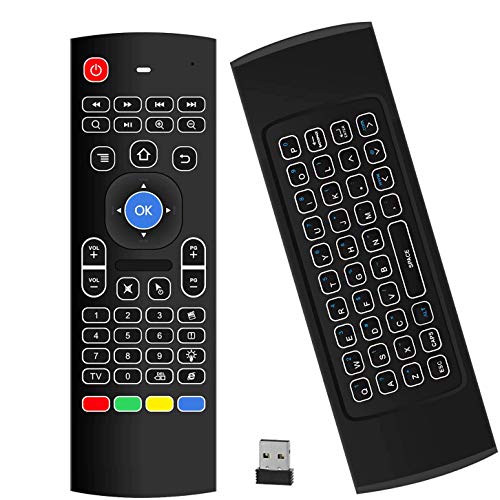
The MX3 Pro Backlit Air Mouse Remote combines a mini wireless keyboard with a multifunction remote for your Raspberry Pi. With its plug-and-play USB receiver and simple setup, it eliminates the hassle of juggling multiple controllers. The LED backlight and double-faced design let you type easily, even in low light.
Using this remote feels natural, whether you’re navigating menus or typing commands. The motion-sensing air mouse makes pointing and clicking quick, while the compact layout saves desk space. You get reliable control from a distance, making your Raspberry Pi experience smoother and more comfortable.
Key Advantages For Raspberry Pi Users
- Easy plug-and-play setup with no software needed
- Combined air mouse and mini keyboard for full control
- Bright backlight for nighttime use
- Programmable IR keys to control TV functions
- Works with multiple systems, including Windows, Mac OS, and Linux
- Wireless range up to 10 meters (environment-dependent)
- Compact and portable design
Things To Consider Before Buying
- Not compatible with most Samsung, Sony, LG, TCL, or Roku Smart TVs
- Requires 2xAAA batteries (not included)
- 38-key layout may take time to get used to for heavy typing
Where This Shines
This remote is ideal for Raspberry Pi enthusiasts who want to control their device from the couch without switching between a mouse and keyboard. It removes the hassle of tangled wires and multiple remotes, streamlining your setup for media centers, projectors, or HTPCs.
If you often use your Raspberry Pi in dark rooms, the backlit keys are a real lifesaver.
To get the most out of the MX3 Pro, program the IR keys for your TV’s volume and power—this cuts down on clutter even further. You’ll appreciate the consistency and convenience, knowing your controls will work reliably across different systems.
Personally, I like how the air mouse makes navigation feel more intuitive.
| Best for | Why |
|---|---|
| Media Center Raspberry Pi setups | Controls navigation and typing from the couch with one device |
| Projector and HTPC users | Wireless range and air mouse simplify presentations and video control |
| Multi-system environments | Works on Windows, Mac OS, Linux, and Android TV boxes |
| Low-light workspaces | Backlit keyboard makes typing easy without extra lights |
Mini Wireless Keyboard With Touchpad
A top pick for Best Remote Control for Raspberry Pi, offering flexible wireless control and smooth navigation for versatile setups.

This compact wireless keyboard from WirelessFinest combines a full QWERTY layout with a built-in touchpad, solving the hassle of juggling multiple remotes and keyboards for your Raspberry Pi or media devices. With dual wireless connection options—Bluetooth and 2. 4GHz RF—you can switch between devices smoothly, making it easy to control everything from your TV to your PC without extra adapters.
Using it feels natural and comfortable, especially when typing from the couch or browsing through menus in a dark room thanks to the adjustable 7-color backlit keys. The touchpad is sensitive enough for precise navigation, so you don’t need a separate mouse.
The lightweight design adds to the convenience, making it easy to handle and store when not in use.
Why Users Like It
- Switches easily between Bluetooth and 2.4GHz RF for multiple devices
- Compact layout saves space and reduces clutter
- Integrated touchpad eliminates need for a separate mouse
- Backlit keys improve visibility in low light
- Works with a wide range of devices including Raspberry Pi
- Rechargeable—no need for disposable batteries
- Stable wireless range up to 33ft (10m)
Things To Consider
- Small key size may not suit heavy typing tasks
- Touchpad can take practice for precise movements
- No dedicated function row for advanced shortcuts
Where This Shines
This remote keyboard is ideal for anyone who wants a simple, all-in-one way to control their Raspberry Pi or media center from across the room. It reduces the stress of switching remotes and guessing which device is connected, making streaming or browsing more enjoyable.
If you want the best experience, pair the keyboard with your device using Bluetooth for greater flexibility.
You’ll appreciate its reliability and straightforward design, especially if you don’t want surprises when switching between your TV, Pi, or PC. My tip: keep it charged and use the backlight color that’s easiest on your eyes at night. It’s a practical pick for making your home setup smoother and less cluttered.
| Best for | Why |
|---|---|
| Raspberry Pi media control | Seamless wireless navigation and typing from the couch |
| Home theater PC setups | Controls streaming devices without multiple remotes |
| Multi-device users | Switches between Bluetooth and RF for various systems |
| Low-light environments | Backlit keys make late-night use comfortable |
8bitdo Micro Bluetooth Gamepad (green)
Best Remote Control for Raspberry Pi for those who want a compact, multi-platform controller that’s easy to carry anywhere.

The 8Bitdo Micro Bluetooth Gamepad (Green) is a mini controller designed for those who want to control their Raspberry Pi, Switch, or Android device with minimal bulk. Its ultra-portable size and lightweight build make it easy to toss in your pocket or bag, solving the problem of bulky remotes for on-the-go use.
The dedicated mode switching button lets you quickly adapt to different devices, so you can switch tasks without hassle.
In everyday use, this remote feels effortless to handle thanks to its 24. 8g weight and compact design. It gives you the confidence to manage media, games, or basic navigation without searching for a full-sized controller. The button mapping feature (in Keyboard mode via the mobile app) adds flexibility, letting you personalize controls for your Raspberry Pi setup.
There’s no fumbling with extra accessories—just connect and go.
Why It Stands Out For Raspberry Pi Users
- Pocket-sized and ultra-light for easy portability
- Works with Raspberry Pi, Switch, and Android devices
- Mode switching button for quick device changes
- Customizable button mapping in Keyboard mode
- Firmware updates keep it current
- Simple, clean design with 16-button layout
Consider Before You Buy
- Keyboard mode customization only via 8BitDo mobile software
- Mini size may not suit users with larger hands
- No advanced gaming features (basic controls only)
Where This Shines
This gamepad makes sense for Raspberry Pi enthusiasts who want a minimal, portable remote that’s ready for quick sessions and multi-device use. It removes the hassle of carrying or setting up larger controllers, and you won’t waste time switching between devices thanks to the dedicated mode button.
For casual control, media browsing, or retro gaming, it keeps things simple and reliable.
To get the most out of the button mapping feature, install the 8BitDo Ultimate Software on your mobile device and set your preferred shortcuts before use. With its lightweight build, you’ll always have a control option on hand—perfect for travel or spontaneous projects.
The peace of mind comes from its consistent Bluetooth connection and future-proof firmware updates.
| Best for | Why |
|---|---|
| Portable Raspberry Pi setups | Ultra-compact and lightweight for mobile use |
| Multi-device users | Mode switching supports quick transitions between platforms |
| Custom keyboard control needs | Button mapping in Keyboard mode via mobile app |
| Minimalist gaming or media navigation | Simple 16-button layout for essential functions |
Ipazzport Air Mouse & Bluetooth Remote
The best remote control for Raspberry Pi combines air mouse precision with dual wireless modes for smooth, versatile use.

The iPazzPort Air Mouse & Bluetooth Remote is a compact wireless device designed to replace multiple remotes with one. It combines an air mouse, a mini keyboard, and an IR learning function, making it ideal for controlling Raspberry Pi devices as well as PCs and smart TVs.
Using this remote feels natural and efficient, with smooth cursor control and a backlit keyboard for low-light conditions. The dual Bluetooth and 2. 4G USB connection modes help maintain a reliable connection without lag, which saves time and frustration when navigating menus or typing.
Key Advantages For Raspberry Pi Users
- All-in-one device combining air mouse, keyboard, and IR remote functions
- Dual-mode wireless connection (Bluetooth and 2.4G USB) for stable performance
- 7-color adjustable backlight ensures visibility in dark environments
- IR learning key lets you program power and basic TV functions
- Compact and lightweight design fits comfortably in hand
- Rechargeable battery with USB Type-C charging for convenience
- Wide compatibility including Raspberry Pi, Windows, Mac, and Android devices
Considerations Before Buying
- IR learning function requires manual setup before use
- Small size may be less comfortable for users who prefer full-size keyboards
- Backlight activation requires a key combination, which might not be intuitive
Who This Works Well For
This remote is best for Raspberry Pi users who want to consolidate control of multiple devices into one compact tool. It removes the hassle of juggling separate remotes and keyboards, streamlining your setup.
To get the most from it, take a few minutes to program the IR learning key for your TV’s power and volume controls. This boosts convenience and reduces the chance of needing extra remotes.
Its reliable wireless connection and backlit keys provide peace of mind during extended use, whether for media streaming, light typing, or presentations. It’s a practical choice for tech-savvy users who appreciate multifunctional tools.
| Best for | Why |
|---|---|
| Raspberry Pi media centers | Combines mouse and keyboard functions for easy navigation and typing |
| Smart TV setups | IR learning lets you control TV power and volume with one remote |
| Portable computing | Lightweight and rechargeable, ideal for travel or on-the-go use |
| Multi-device users | Supports Bluetooth and 2.4G USB for broad compatibility |
Key Considerations For Choosing A Raspberry Pi Remote Or Controller
- Usage Scenario: Decide if you need a remote for media control, gaming, automation, or general device navigation. Each product suits a different purpose.
- Connection Type: Options include IR, RF (2.4GHz), Bluetooth, or direct GPIO. Wireless solutions offer flexibility, but check compatibility with your device and operating system.
- Device Compatibility: Not all remotes work with every Raspberry Pi model or OS. Verify the product supports your intended setup (e.g., Kodi, Android TV, RetroPie).
- Extra Features: Look for programmable buttons, built-in keyboards, touchpads, or backlighting if you need advanced control or easier typing.
- Power Requirements: Some remotes use AAA batteries, others have rechargeable batteries. Consider convenience and battery life for your usage pattern.
Common Mistakes When Buying Raspberry Pi Remotes
- Overlooking Compatibility: Many buyers assume all remotes work with any Raspberry Pi. Double-check supported models and operating systems.
- Ignoring Connection Type: Choosing IR when your Pi lacks an IR receiver, or wireless when you lack USB ports, can lead to frustration.
- Missing Programmable Functions: Not all remotes offer custom button programming. If you need automation or script triggers, verify this feature.
- Confusing Gaming vs. Media Control: Gamepads and media remotes serve different needs. Select based on your primary use case.
Who Should Avoid These Products
- Users with only basic needs who prefer a standard keyboard and mouse.
- If your Raspberry Pi setup is headless, or you rarely interact directly, a remote may not offer much value.
- Those using smart TVs, streaming boxes, or devices not compatible with USB or IR peripherals.
- If you require professional-grade automation or industrial reliability, these consumer remotes may not suffice.
Setup And Usage Tips
- Check Drivers: Most remotes are plug-and-play, but some may need drivers or scripts—especially for custom functions.
- Battery Management: Rechargeable models benefit from regular charging. For battery-powered remotes, keep spares handy.
- IR and RF Range: Position your Raspberry Pi and remote receiver for clear line-of-sight, especially for IR models. Wireless range varies by environment.
- Programming Buttons: Refer to manufacturer instructions for customizing buttons or learning IR codes.
Frequently Asked Questions
Will These Remotes Work With All Raspberry Pi Models?
No. Compatibility varies by remote and Raspberry Pi version. Check the manufacturer’s list before purchase.
Do I Need Special Software To Use Programmable Buttons?
Some remotes require scripts or software for custom button programming. Basic navigation usually works out-of-the-box.
Can I Use These Remotes For Gaming?
Only gamepads or controllers are suitable for gaming. Media remotes and air mice are not ideal for games.
Is Ir Or Wireless Better For Raspberry Pi?
Wireless (RF/Bluetooth) generally offers more flexibility and range. IR requires line-of-sight and an IR receiver.
Are Batteries Included With The Remotes?
Most remotes do not include batteries. Rechargeable options have built-in batteries, but others require AAA or coin cells.
Will These Remotes Work With Non-raspberry Pi Devices?
Many remotes support Android TV, Smart TVs, PCs, and other devices, but compatibility is not universal. Check product specs.
Final Thoughts
Choosing a remote or controller for your Raspberry Pi depends on your intended use and environment. Consider compatibility, connection type, and feature set before making a decision. With clear priorities, you can find a device that enhances your setup and streamlines control.