
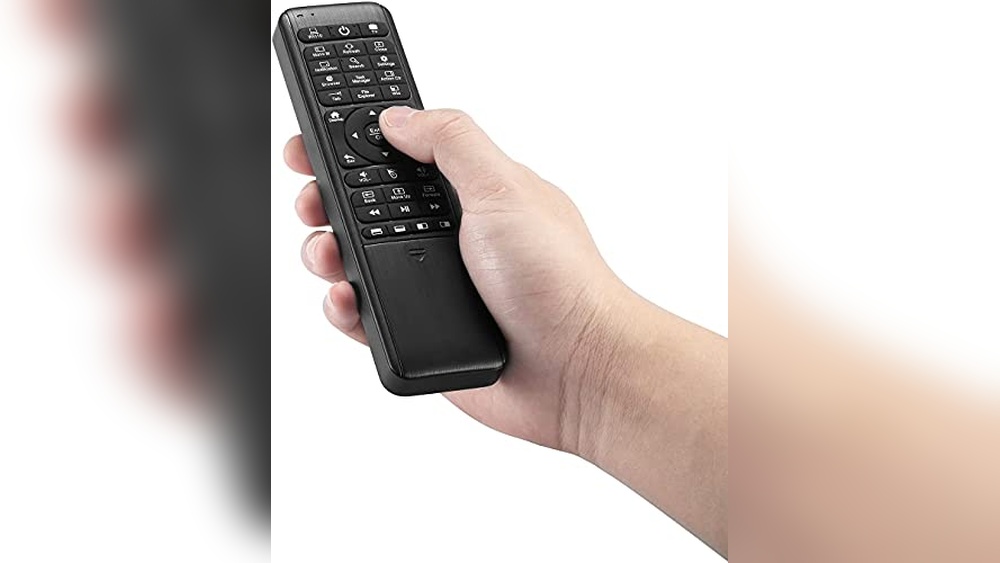
Trying to control your Windows 10 PC from across the room can get frustrating. Maybe you’ve juggled multiple remotes, or tried typing from the couch and wished for something simpler. It’s easy to assume any remote or controller will work, but finding one that fits your setup and habits isn’t so straightforward.
The confusion comes from how many types there are—some act like game controllers, others mimic a mouse or keyboard, and a few try to do everything at once. Wireless standards, extra features, and even compatibility with other devices add more choices.
The trade-offs aren’t obvious until you’ve lived with a remote that’s just not quite right.
This guide is here to help you sort through the options and avoid common pitfalls. You’ll get a clearer sense of which remote controls actually make life easier on Windows 10, and what to look for based on how you use your PC.
What Actually Matters When Choosing A Remote For Windows 10?
Think about how you’ll use it. Some people want to browse and type from the sofa, others just need media controls or a pointer for presentations. For gaming, a familiar controller shape can make a big difference. If you switch between devices or want voice control, not every model will work equally well.
Comfort, battery life, and setup process also change the day-to-day experience more than specs on paper.
Common Mistakes Buyers Make
It’s easy to buy based on feature lists, only to find out that setup is a hassle or it won’t connect to your PC without extra steps. Some remotes require open USB ports, while others rely on Bluetooth or have limited compatibility.
Backlighting, rechargeable batteries, and learning functions sound great, but may not matter for your use. Make sure to match the remote’s strengths to what you actually do most often.
The products below were chosen for their different approaches and strengths. Each one fits certain needs or styles of use. Read on to see which matches how you want to control your Windows 10 PC.
Pepper Jobs Fly Mouse Air Remote
The Best Remote Control for Windows 10 users who need seamless switching between mouse, keyboard, and TV control in one device.
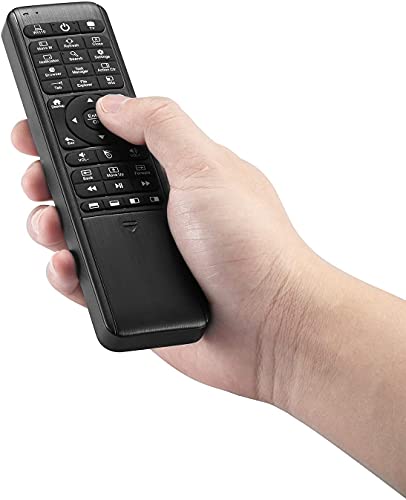
The Pepper Jobs Fly Mouse Air Remote is a compact wireless controller that combines a full QWERTY keyboard, air mouse, and TV remote functions. It solves the hassle of juggling multiple remotes or trying to type on awkward on-screen keyboards.
Its double-sided design and backlit keys make it especially useful in low-light environments.
Using it feels intuitive—switching between typing, navigating, and controlling media is smooth and quick. The 6-axis gyroscope lets you move the cursor with a natural hand motion, while the IR learning feature means you can control your TV and PC together.
The plug-and-play setup means no drivers to worry about, so you can start using it right away without stress.
What Sets It Apart
- True 3-in-1 design: Remote, mouse, and keyboard in one
- Optimized hotkeys for Windows 10 and 11
- Backlit double-sided keyboard for dark rooms
- IR learning for combining TV and PC controls
- Plug-and-play USB receiver, no drivers needed
- Long wireless range up to 10 meters
- Lightweight and compact for easy handling
Things To Consider Before Buying
- Not ideal for users who prefer traditional full-size keyboards
- Learning curve for mastering all functions and shortcuts
- Battery life may be affected by frequent LED use
My Practical Take
This remote is best for people running a Windows 10 media PC, HTPC, or living room setup who want one device to do it all. It removes the hassle of constantly switching between remotes and makes typing, navigating, and controlling media much less stressful.
If you often use your PC in the dark or from the couch, the backlit keys and air mouse are a real advantage.
To get the most out of it, take a few minutes to learn the IR learning feature so you can control both your TV and PC without hunting for another remote. Once set up, you can expect fewer surprises and a more reliable, unified control experience.
Personally, I like how it saves time and keeps my coffee table uncluttered.
| Best for | Why |
|---|---|
| Windows 10/11 media PC users | Optimized hotkeys and air mouse simplify control |
| Home theater setups | Controls both PC and TV devices with IR learning |
| Low-light environments | Backlit keyboard is easy to see at night |
| Anyone who wants fewer remotes | Combines mouse, keyboard, and remote in one unit |
Voyee Wired Pc Controller (black)
A top pick for Best Remote Control for Windows 10 users seeking a familiar, plug-and-play gaming experience with reliable compatibility.

The VOYEE Wired PC Controller (Black) offers a simple way to play games on Windows 10, Xbox 360, or Slim without worrying about pairing or batteries. Its plug-and-play setup means you can connect and start playing right away, making it especially appealing if you just want things to work.
The improved joystick and trigger buttons make controls feel responsive and accurate, which is great for most genres except FPS games.
In daily use, the controller feels comfortable thanks to its ergonomic design and long cord—no awkward stretching or frequent unplugging. Rumble feedback adjusts to what’s happening in your game, adding a layer of immersion. Consistency and reliability stand out; you don’t need to troubleshoot or worry about wireless issues.
Gaming becomes more about enjoyment and less about setup.
What Sets It Apart
- Works instantly with Windows 10 and Xbox 360—no extra software needed
- Improved triggers and joysticks for smoother control
- Customizable vibration feedback for immersive play
- Ergonomic grip for comfortable long sessions
- Long 7.2ft cable for flexible setups
- Includes a 45-day money-back option and 1-year guarantee
Consider Before Buying
- Not recommended for FPS (First-Person Shooter) games
- Wired connection only—no wireless freedom
- Designed for classic controller feel, not a media remote
Where This Shines
This controller is ideal if you want a reliable, classic gamepad for Windows 10 that just works. It eliminates the hassle of drivers, pairing, or frequent charging—making it a good fit for casual gaming, retro titles, and situations where you need quick, consistent controls.
You can focus on the game, not the setup.
If you’re looking to upgrade from an old Xbox 360 controller or want something that feels familiar, this fits well. My tip: Take advantage of the customizable vibration to match your preferred feedback level for each game. With the included guarantee and responsive support, you can play confidently, knowing help is available if needed.
| Best for | Why |
|---|---|
| Windows 10 plug-and-play gaming | Works without extra setup or drivers |
| Xbox 360 & Slim users | Direct compatibility and familiar layout |
| Long gaming sessions | Comfortable grip and long cable prevent fatigue |
| Players wanting rumble feedback | Adjustable vibration enhances immersion |
Rii Mx3 Mini Wireless Remote For Windows 10
A top pick for Best Remote Control for Windows 10, offering seamless wireless control and flexibility for PCs and media setups.

The Rii MX3 Mini Wireless Remote is a compact controller that combines keyboard, mouse, and infrared functionality for Windows 10 and other devices. It solves the hassle of juggling multiple remotes and input devices by offering one all-in-one solution. Its motion sensor lets you control the cursor with simple hand movements, making navigation straightforward.
Using this remote feels natural, whether you’re typing, browsing, or playing games. The plug-and-play setup eliminates guesswork—just insert the USB dongle, and you’re ready. Consistent performance and intuitive controls mean you spend less time troubleshooting and more time enjoying your media or productivity tasks.
What Makes This Remote Stand Out
- Combines wireless keyboard, mouse, and IR remote in one device
- Easy plug-and-play setup for Windows 10 PCs
- Motion sensor lets you control cursor with hand movements
- Universal compatibility with TVs, mini PCs, HTPCs, and more
- IR learning feature for basic TV remote functions
- Lightweight and compact for comfortable use
- Responsive customer support for troubleshooting
Consider Before Buying
- Some keys may not work with all devices due to universal design
- IR learning limited to remotes supporting NEC protocol
- No dedicated software for customizing button functions
- Mini size may be less comfortable for larger hands
Where This Shines
This remote is best for users who manage a Windows 10 PC for media, presentations, or casual browsing and want a single tool for all controls. It removes the confusion of switching between keyboard, mouse, and remote, and cuts down on clutter and setup time.
For anyone tired of juggling devices, it’s a simple fix.
To get the most out of it, start by pairing the remote with your PC and try the motion-controlled mouse for quick navigation. If your TV remote supports NEC protocol, use the IR learning function to unify controls even further.
The lightweight design means you can keep it nearby without fuss, and the solid build helps avoid unexpected breakdowns.
If you value reliability and easy setup, this remote delivers peace of mind. I appreciate how it keeps my media experience seamless, especially during movie nights or presentations.
| Best for | Why |
|---|---|
| Windows 10 Media PC Users | Combines typing, navigation, and remote control in one compact device |
| Home Theater Enthusiasts | Controls multiple devices, reducing remote clutter |
| Presenters and Streamers | Quick, wireless input and cursor control for presentations |
| Mini PC and Android TV Box Owners | Universal compatibility and easy setup for diverse devices |
Easysmx Wireless Gamepad For Windows
As the Best Remote Control for Windows 10, this controller stands out for its reliable wireless connection and plug-and-play simplicity.

The EasySMX Wireless Gamepad for Windows is designed to make gaming and remote control on your PC simple and frustration-free. It connects through a 2. 4GHz USB receiver (not Bluetooth), so you just plug it in and start playing—no extra setup needed.
Programmable back paddles add flexibility for complex games or custom shortcuts.
Using this controller feels natural and steady, with a comfortable grip and responsive buttons. The dual vibration and adjustable LED lighting make it enjoyable for longer sessions. Switching between devices like your Windows 10 PC, Steam Deck, or Android TV Box is seamless, letting you stay focused on the action instead of troubleshooting connections.
What Makes It Stand Out
- Stable 2.4GHz wireless connection with long range
- No drivers required—true plug-and-play for Windows 10
- Four programmable back buttons for custom shortcuts
- Works with Windows, PS3, and Android TV Box
- Adjustable LED lighting for better visibility
- Comfortable design for extended use
- Up to 14-hour battery life per charge
Consider Before You Buy
- Not compatible with Bluetooth—USB receiver required
- No support for Mac or iOS devices
- Some features limited on non-Windows systems
Who This Fits Best
This controller is ideal for anyone seeking a no-fuss way to control games or media on Windows 10, especially if you want to avoid the hassle of installing drivers or troubleshooting Bluetooth. It’s perfect for gaming, but also works well for navigating streaming apps or other PC tasks from across the room.
The plug-and-play setup eliminates guesswork and lets you get started fast. For the best experience, keep the USB receiver in an accessible port and program the back paddles for your most-used shortcuts. The consistent wireless signal means you can count on fewer disconnects and smoother sessions.
If you want an easy, reliable remote control for your Windows 10 PC—and like a gamepad feel—this is a practical pick. It’s the one I’d keep by the couch.
| Best for | Why |
|---|---|
| Windows 10 gaming sessions | No drivers needed, stable wireless, and programmable buttons |
| Controlling media on a PC or Android TV Box | Plug-and-play simplicity and long battery life |
| Users who want to avoid Bluetooth pairing | Dedicated USB receiver means no Bluetooth confusion |
| Switching between devices | Easy compatibility with Windows, PS3, and Android devices |
Reiie H9+ Mini Wireless Keyboard Remote
As the Best Remote Control for Windows 10, this mini wireless keyboard offers effortless navigation and typing for anyone needing a smart remote solution.

This compact wireless keyboard remote is designed to make controlling your Windows 10 PC or media device much simpler. It combines a QWERTY keyboard and a touchpad, so you can easily type, navigate menus, and scroll without needing multiple gadgets.
The backlit keys make it easy to use even in low-light spaces.
Using the REIIE H9+ feels intuitive—just plug the USB receiver into your device and start using it right away. The soft white backlight and multi-finger touchpad give you confident control whether you’re browsing, streaming, or working. You don’t have to move from your couch or desk to get things done.
What Makes It Stand Out
- Full QWERTY keyboard and touchpad for easy navigation
- White soft backlight for comfortable use in the dark
- Plug-and-play setup—no software required
- Multi-finger touchpad for versatile mouse functions
- Lightweight and handheld design
- Works with Windows 7, 8, and 10
- Reliable 2.4GHz wireless connection
Consider Before Buying
- Requires an available USB port—won’t work if your device lacks one
- Does not support Bluetooth
- Needs to be recharged for an hour before first use
- Connection may be unstable if battery is low
Who This Fits Best
If you want a simple, all-in-one remote for Windows 10 that lets you type and control your PC from anywhere, this keyboard remote is a smart pick. It cuts out the hassle of juggling separate mouse and keyboard, making it ideal for home media setups, presentations, or casual browsing.
By relying on a stable wireless connection and plug-and-play USB receiver, you save time and avoid technical headaches. Just remember to charge the battery before first use for a smooth experience. This device is reliable and consistent, so you won’t face unexpected interruptions.
For anyone who likes a single, compact gadget for remote PC control, this fits right in. I especially appreciate the backlight for late-night use.
| Best for | Why |
|---|---|
| Windows 10 media center control | Combines keyboard and touchpad for easy navigation and typing |
| Presentations and remote desktop work | Lightweight and plug-and-play, no setup required |
| Use in dim lighting | Soft backlit keys make typing easy in low-light rooms |
| Multiple device compatibility | Supports PC, Raspberry Pi 2, Android TV Box, and Smart TV with USB |
Anycommand Universal Ac Remote Control
As the Best Remote Control for Windows 10 air conditioners, this device makes managing multiple brands simple and stress-free.

This universal AC remote control from AnyCommand is designed for users who own electronic window air conditioners and want an easy way to manage different brands without confusion. Its compatibility with over 60 brands and simple programming removes the hassle of juggling multiple remotes.
Using this remote feels effortless, thanks to its lightweight build, clear buttons, and magnetic backing that keeps it handy. Switching modes, setting timers, and sticking it to an appliance for quick access add a layer of convenience and reliability many users appreciate.
Key Benefits For Air Conditioner Owners
- Works with most electronic window AC brands
- Magnetic back prevents losing the remote
- Easy-to-read buttons and straightforward programming
- Multiple modes: Fan, timer, auto speed, and sleep timer
- Compact and lightweight for comfortable daily use
- Reduces clutter by replacing multiple remotes
What You Should Consider
- Not compatible with non-window or non-electronic AC units
- No advanced smart features or app integration
- Only available in white
What I’d Tell A Friend
This remote is ideal for anyone with several window AC units from different brands, especially if you’re tired of searching for the right remote or dealing with confusing controls. It cuts out the guesswork, making everyday cooling simple and consistent.
The magnetic backing is a small touch that saves a lot of stress.
To get the best results, take a moment to program it for each AC brand you use and stick it where you always reach. You’ll get reliable performance and easy access without worrying about losing track. I like how it adds confidence and simplicity to managing home comfort.
| Best for | Why |
|---|---|
| Homes with multiple window AC brands | Handles over 60 brands, so no need for separate remotes |
| People prone to losing remotes | Magnetic back keeps remote attached to appliances |
| Users wanting simple, clear controls | Easy-to-read buttons and basic modes remove confusion |
| Anyone needing sleep and timer functions | Built-in timer and sleep mode for added convenience |
Dupad Story Bluetooth Air Mouse Remote
The Best Remote Control for Windows 10 users who want voice input, a backlit keyboard, and seamless wireless connectivity in one compact device.

This remote combines a wireless mini keyboard, air mouse, and voice input for easy control of Windows 10 PCs and more. It solves the hassle of juggling multiple remotes or using a standard keyboard in your media setup. The built-in backlight makes it usable even in low-light rooms.
Using it feels intuitive—switching between apps or searching with your voice is simple and quick. The touchpad lets you control the cursor smoothly, and you can chat or type without reaching for your laptop. It’s designed to cut down on setup time and make navigating your PC or TV box more relaxed.
Key Advantages For Pc Users
- Dual-mode: Bluetooth 5.0 and 2.4G for flexible connection
- Works with Windows, macOS, Linux, and more
- Voice input for easy searching and chatting
- Backlit keyboard for dark environments
- Touchpad with gesture support
- Air mouse and 6-axis gyroscope for precise control
- IR learning to replace old remotes
Potential Limitations
- Voice search works only with built-in apps, not across all platforms
- No dedicated Alexa integration
- Some setup required for IR learning
Who This Fits Best
This remote is ideal for anyone using their Windows 10 PC as a media center, or for those who connect their computer to a projector or smart TV. It’s especially helpful for people who want to avoid the hassle of switching between multiple input devices and want a single tool that just works.
It removes the guesswork from device compatibility and makes controlling your setup less stressful. For best results, pair it with your device using Bluetooth for a reliable connection, and take a moment to learn the gestures on the touchpad. The peace of mind comes from knowing you have both keyboard and remote functions in one rechargeable device.
| Best for | Why |
|---|---|
| Windows 10 HTPC setups | Combines keyboard, mouse, and remote in one |
| Media center control in dark rooms | LED backlit keyboard improves visibility |
| Switching between devices | Dual wireless modes and broad OS support |
| Replacing old remotes | IR learning feature covers legacy devices |
Lenovo Portable Bluetooth Presentation Remote
Best Remote Control for Windows 10 users who want a compact and versatile clicker for seamless presentations.

The Lenovo Portable Bluetooth Presentation Remote is a lightweight, pocket-sized tool designed for professionals who need reliable control during presentations. It connects via Bluetooth 5. 3 and features a digital pointer, making it easy to highlight and guide your audience without being tied to your laptop.
Its compact design means you can take it anywhere without hassle.
Using this remote feels intuitive and stress-free, especially in environments where moving around the room is important. The controls are responsive, and customizable buttons help streamline your workflow. Presenters can focus more on delivering their message instead of worrying about technical interruptions or battery life.
Why Presenters Love This Remote
- Ultra-lightweight and easy to carry
- Works reliably with Windows 10 and macOS 12 or later
- Digital pointer with highlight, magnify, and marker modes for engagement
- Stable Bluetooth 5.3 connection with up to 30m range
- Rechargeable battery with USB-C charging (up to one month per charge)
- Customizable controls via Lenovo Accessories and Display Manager app
What To Keep In Mind
- Requires Windows 10 or newer, not compatible with older systems
- No built-in physical laser pointer (digital only)
- Customization app may need setup time
Where This Shines
This remote is ideal for educators, business professionals, or anyone who presents regularly and wants to move freely during talks. It removes the stress of being tethered to your computer and eliminates the hassle of disposable batteries thanks to its rechargeable design.
If you’re often presenting in different locations, its size and wireless reliability mean fewer surprises and easy packing.
To get the most out of it, set up your preferred controls using the Lenovo Accessories and Display Manager app before your first big presentation. That way, your favorite features are just a click away and you can focus fully on your audience.
Peace of mind comes from knowing you won’t run out of battery or lose your connection mid-talk.
| Best for | Why |
|---|---|
| Mobile presenters | Ultra-lightweight and fits easily in bags or pockets |
| Classroom or business settings | Digital pointer and advanced modes boost engagement |
| Long presentations or events | Rechargeable battery lasts up to a month per charge |
| Windows 10 and macOS 12+ users | Designed for the latest operating systems for seamless compatibility |
Yaeye Wired Controller For Pc & Xbox 360
Best Remote Control for Windows 10 users who want reliable wired performance and instant plug-and-play setup for gaming or media control.
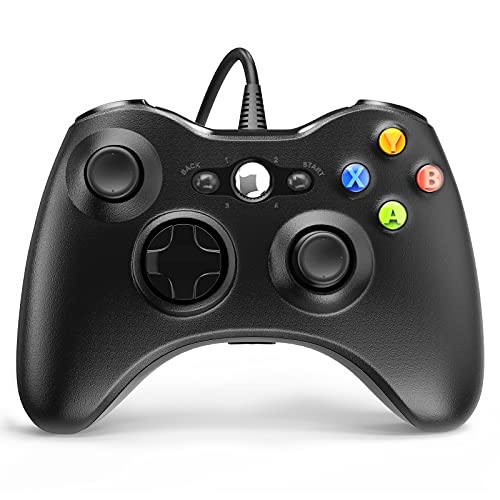
The YAEYE Wired Controller for PC & Xbox 360 is a USB gamepad that works with Windows 10 and older PCs, as well as Xbox 360 consoles. It solves the hassle of driver installs and wireless pairing—just plug it in and start controlling games or media apps.
Its long 7. 2 ft cable gives you plenty of room to move around your desk or living room.
Using this controller feels natural and comfortable thanks to its ergonomic grip and instant button response. The dual-vibration motors make gaming more immersive, while the simple wired connection ensures you never worry about battery life. Overall, it’s a stress-free, consistent way to control your PC or console.
Why People Choose It
- Works out of the box with Windows 10 (no drivers needed)
- Comfortable, ergonomic grip for long sessions
- Reliable wired connection—no lag or batteries to manage
- Dual-vibration feedback for immersive gaming
- Extra-long USB cable for flexible setup
- Supports up to 4 controllers for multiplayer fun
- Fits hands well with responsive buttons
What To Consider Before Buying
- Wired only—no wireless option
- Basic black design with no color choices
- Not compatible with PlayStation or Mac systems
When I’d Pick This
This controller is a smart pick for anyone who wants a straightforward, reliable way to control their Windows 10 PC or Xbox 360. It’s ideal for gamers, families, or anyone tired of fiddling with wireless connections and batteries. If you want to jump into games or media apps without delay, this removes the hassle entirely.
The ability to connect up to four controllers means it’s also great for multiplayer sessions with friends. For best results, keep your USB ports easily accessible and consider using a USB extension if your setup is spread out. You get steady performance with fewer surprises, which makes for a worry-free experience.
I appreciate knowing I won’t lose connection mid-game.
| Best for | Why |
|---|---|
| Windows 10 PC gaming | Instant plug-and-play, no extra drivers |
| Xbox 360 multiplayer | Supports up to 4 controllers at once |
| Media control on PC | Reliable wired connection and easy setup |
| Users who want no battery worries | No charging or battery swaps required |
Wirelessfinest Mini Remote Keyboard
Best Remote Control for Windows 10 if you want a compact, all-in-one wireless keyboard and touchpad for your PC or smart devices.

This mini wireless keyboard with touchpad by WirelessFinest is designed to simplify how you control your Windows 10 PC, Smart TV, or streaming box. The integrated keyboard and mouse combo connects via a 2. 4GHz USB dongle, so setup is quick and you don’t have to worry about Bluetooth compatibility.
The RGB backlit keys make it easy to use in dim rooms, and its compact size keeps your space clutter-free.
Using it feels intuitive—type, browse, and navigate without switching devices or reaching for a mouse. The rechargeable battery and auto-sleep function mean fewer interruptions and more consistent performance. It’s a relief not having to juggle multiple remotes or struggle with on-screen keyboards.
The three-color backlight is a small touch that makes late-night use more comfortable.
Why Users Like It
- All-in-one keyboard, mouse, and touchpad for easy control
- Simple 2.4GHz USB dongle connection—no Bluetooth needed
- Works with Windows 10, Smart TVs, Android TV boxes, and more
- Backlit keys for use in low-light rooms
- Rechargeable battery with auto-sleep saves power
- Compact and portable for flexible setups
What To Consider
- Not compatible with Bluetooth-only devices
- Some Smart TVs may require checking compatibility list
- No dedicated number pad for heavy typing tasks
The Simple Use Case
This remote keyboard combo is best for anyone who wants a straightforward way to control a Windows 10 PC or media device from the couch, bed, or across the room. It removes the hassle of using multiple remotes or struggling with on-screen keyboards, especially for streaming, web browsing, or light gaming.
You won’t have to guess if it will work, as the USB dongle connection is reliable for most PCs and smart devices.
For best results, make sure your device has a standard USB port and review the compatibility list before buying. The backlit keys are handy for nighttime use and add comfort to your setup. You’ll gain peace of mind knowing you have a single, easy-to-use tool that just works—no surprises or tech headaches.
I appreciate how it streamlines the whole experience.
| Best for | Why |
|---|---|
| Windows 10 PC users | Seamless wireless control without Bluetooth setup |
| Media center or HTPC setups | All-in-one keyboard and touchpad reduces clutter |
| Smart TV and streaming box owners | Simple navigation and typing from the couch |
| Portable device users | Compact, rechargeable, and easy to carry anywhere |
How To Choose The Right Remote Or Controller For Your Setup
- Device Compatibility: Check if the remote or controller supports your operating system and hardware. Some only work with Windows, Android TV boxes, or specific consoles. Review connection type—Bluetooth and 2.4GHz wireless are not interchangeable.
- Intended Use: Decide if you need a device for gaming, presentations, smart TV navigation, or multiple tasks. Combo remotes with keyboards suit media PCs; dedicated controllers may serve gamers better.
- Ergonomics and Layout: Look for button placement and grip comfort, especially for extended use. Mini keyboards can be less comfortable for typing large amounts of text, while full-size controllers are bulkier but better for gaming.
- Features That Matter: Backlighting, programmable buttons, voice input, and IR learning are useful for some users but may add complexity. Think about which features you will actually use.
- Power and Charging: Consider whether the device is rechargeable or requires replaceable batteries, and what battery life to expect based on your usage habits.
Common Mistakes When Buying Remotes And Controllers
- Assuming Bluetooth and 2.4GHz devices are interchangeable. Many require a USB dongle and do not support Bluetooth.
- Overlooking compatibility details for smart TVs, consoles, or OS versions.
- Ignoring power requirements—some units need charging before first use or have batteries nearly empty out of the box.
- Not checking for missing features like IR learning or voice input if you need them for your setup.
- Assuming all buttons work with every device. Some keys may not function depending on your hardware or software.
Setup And Usage Tips
- Always charge rechargeable devices before first use to ensure stable connection.
- Keep the USB receiver accessible and avoid misplacing it—many devices will not work without it.
- For IR learning remotes, follow the manufacturer’s process carefully; not all remotes support all IR protocols.
- Test all functions (keyboard, mouse, voice, special buttons) after setup to confirm compatibility.
- For optimal range, avoid physical obstacles between the remote/controller and receiver.
Who Should Avoid These Products
- If your device lacks a USB port or only supports Bluetooth, avoid 2.4GHz-only models.
- Users needing universal compatibility with all smart TV apps may find limitations with voice or button mapping.
- Those seeking seamless integration with Apple TV, iOS, or non-standard systems should check compatibility closely.
- If you dislike frequent charging or changing batteries, look for models with long battery life or wired alternatives.
Frequently Asked Questions
Do These Remotes And Controllers Work With All Smart Tvs?
No. Many are only compatible with certain brands or require an Android TV operating system. Check your TV’s specifications before purchasing.
What Is The Difference Between Bluetooth And 2.4ghz Wireless?
Bluetooth pairs directly with devices that support it. 2. 4GHz wireless requires a USB receiver. They are not interchangeable.
Can I Control Multiple Devices With One Remote?
Some remotes support IR learning or multi-device control, but not all. Review the product details to confirm this feature.
Do All Functions (like Voice Search Or Backlight) Work On Every Device?
No. Features such as voice input or backlighting may only be available on certain devices or within specific apps.
Is Setup Complicated?
Most devices are plug-and-play, but features like IR learning or voice control may require extra steps. Always refer to the included manual.
Can I Use These Controllers For Gaming On All Platforms?
Not always. Some are designed for PC or specific consoles. Confirm platform compatibility before purchase.
Final Thoughts
Choosing a remote or controller depends on your devices, usage needs, and comfort with setup. Review compatibility and key features carefully. Consider how you will use the device day to day. With a clear sense of your needs, selecting the right option becomes much simpler.