
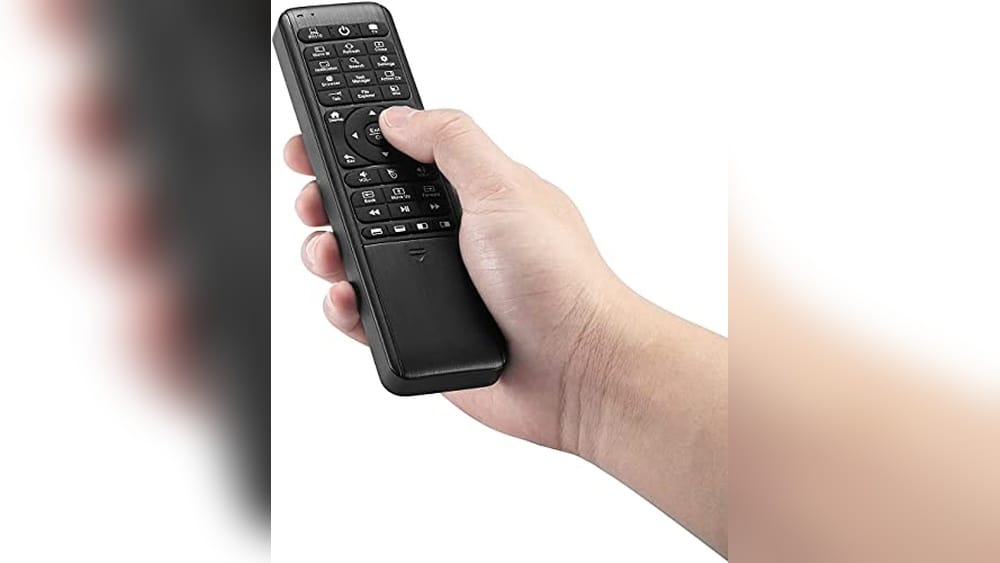
Trying to relax on the couch but your PC is just out of reach? Or maybe you’ve fumbled with a clunky keyboard in the dark, wishing for something simpler. Finding the right remote control for Windows Media Center often feels more complex than it should.
There are so many ways to control your setup—remotes, mini keyboards, air mice, even combo devices. Some are tiny and simple, others pack in features but bring extra buttons and confusion. What works for one person might feel awkward for another.
Trade-offs between ease of use, compatibility, and extra features can be subtle and easy to miss.
This guide will help you cut through the noise and pick the remote that actually fits how you watch, listen, or present.
How To Think About Choosing A Remote
Start with your real use case. Do you mostly watch movies, stream music, or run presentations? Some remotes focus on media playback, others add mouse or keyboard features. If you need to type passwords or search a lot, a built-in keyboard matters.
If you only want to play and pause, simplicity is better.
Common Confusion Points
Compatibility is a big one. Not every remote works with every PC, TV box, or app—even if they say “universal. ” Some are plug-and-play, others may need setup or won’t support all features. Backlighting, rechargeable batteries, and learning functions sound good, but may add bulk or complexity you don’t need.
Below, you’ll find a range of options covering different needs and preferences. Each was chosen to highlight a distinct approach—whether you want something straightforward or a device with more control. Read on to see which style fits you best.
Pepper Jobs Fly Mouse Air Remote
The Best Remote Control for Windows Media Center for those who want smooth navigation and integrated keyboard functions in one compact device.
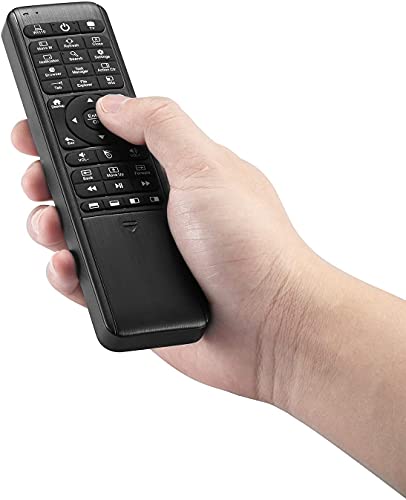
The Pepper Jobs Fly Mouse Air Remote brings together a wireless air mouse, full QWERTY keyboard, and IR learning in a single, easy-to-hold unit. It’s made for Windows users who want one remote to control their HTPC or media center without juggling multiple devices.
The double-sided, backlit keyboard means you can type and search even in low light, while the plug-and-play setup keeps things simple.
Using this remote feels intuitive—switching from mouse to keyboard is quick, and the 6-axis gyroscope helps you point and click naturally from your couch. The backlit keys save time when navigating in a dark room, and IR learning means you can control your TV as well.
Everything is designed to reduce hassle, giving you more time to enjoy your content without interruptions.
What Sets It Apart
- Optimized for Windows 11 and 10 controls
- Switches easily between remote, mouse, and keyboard modes
- Double-sided, full QWERTY backlit keyboard for night use
- IR learning supports up to 34 TV remote keys
- Plug-and-play setup—no drivers needed
- 10-meter wireless range for flexible control
- Lightweight and compact design
Consider Before You Buy
- No dedicated media center shortcut keys beyond Windows hotkeys
- Backlight timer turns off after 5 seconds of inactivity
- IR learning requires initial manual setup
Who This Fits Best
This remote is ideal for anyone running a Windows Media Center setup who wants to combine mouse, keyboard, and TV controls into a single device. It removes the hassle of switching between remotes and guessing which button does what, letting you focus on your entertainment.
If you set up the IR learning feature early, you’ll get the most complete experience.
The peace of mind comes from its plug-and-play reliability and universal compatibility with Windows 10 and 11. You won’t be left hunting for drivers or struggling with complicated setup. If I were recommending to a friend, I’d highlight how much easier late-night browsing becomes with the full backlit keyboard.
| Best for | Why |
|---|---|
| Windows Media Center PCs | Optimized hotkeys and seamless control for Windows 10/11 |
| Home theater setups | Combines mouse, keyboard, and TV remote in one |
| Dark room navigation | Double-sided backlit keyboard simplifies input |
| Controlling multiple devices | IR learning lets you add TV remote functions |
Pryznal Universal Usb Remote
This is one of the Best Remote Control for Windows Media Center, offering easy plug-and-play media control for PC and HTPC users.
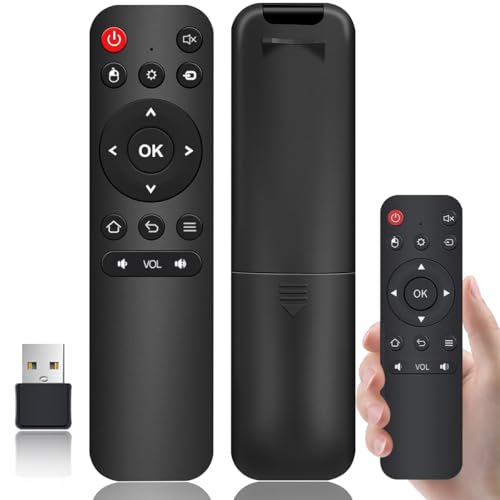
The Pryznal Universal USB Remote is a compact media remote designed to plug directly into any USB port on a computer, laptop, or smart TV without needing drivers. It solves the hassle of complicated setups, making it easy to control media playback and presentations quickly and reliably.
Using this remote feels straightforward and comfortable with tactile buttons that respond well. It allows seamless control of popular media players and presentation software from a distance, reducing interruptions and letting you relax or focus on your content.
Key Benefits For Media And Presentation Control
- Works instantly with plug-and-play on PCs, Macs, and Smart TVs—no driver needed
- Controls popular media players like VLC, Windows Media Player, iTunes, and Spotify
- Advances slides in PowerPoint and Keynote smoothly from anywhere in the room
- Compact, lightweight design fits comfortably in hand and travels easily
- Durable build with user-friendly buttons for precise operation
- Supports HTPC setups for Kodi, Plex, and other media centers
Considerations Before Buying
- Limited to USB connection—no wireless or Bluetooth option
- Does not include volume control for all devices; functionality depends on media player support
- Black color only, which may not match all decor preferences
Who This Remote Works Best For
This remote is ideal for users who want a simple, no-fuss way to control Windows Media Center and other media software without driver installation. It removes the stress of compatibility issues and setup time, letting you focus on your entertainment or presentation.
A quick tip: plug it in before your session to ensure immediate recognition by your device. This guarantees smooth control and fewer surprises during use. For anyone who values reliability and ease, this remote offers peace of mind with consistent performance.
| Best for | Why |
|---|---|
| HTPC users | Seamlessly control Kodi, Plex, and other home theater software from a distance |
| Presentation professionals | Advance PowerPoint or Keynote slides without being tethered to the computer |
| Windows Media Center fans | Instant plug-and-play control of media playback on Windows PCs |
| Traveling business users | Ultra-compact design fits easily in laptop bags for on-the-go presentations |
Mypin Infrared Remote For Media Players
A practical pick as the Best Remote Control for Windows Media Center for those using compatible MYPIN or AGPTEK media players.

The MYPIN Infrared Remote for Media Players is a straightforward solution for controlling your compatible MYPIN or AGPTEK devices. Designed for simplicity, it helps users manage their media player from a distance, reducing the need to get up or fumble with buttons on the device itself.
Its infrared functionality works up to 7 meters, making it easy to operate across most living rooms.
Using this remote feels intuitive and reliable for routine playback and navigation. The lightweight build makes it comfortable to hold, and its basic design means fewer distractions or learning curves. It’s a dependable tool for those who value consistent performance and uncomplicated operation when relaxing with media content.
Why This Remote Stands Out
- Works seamlessly with select MYPIN and AGPTEK media players
- Infrared signal covers typical living room distances
- Simple and lightweight for everyday use
- No setup required with compatible devices
- Easy to replace AAA batteries (not included)
- Minimalist design avoids button clutter
Points To Consider Before Buying
- Only compatible with MYPIN or AGPTEK media players
- Requires AAA batteries, which are not included
- No extra features or accessories provided
Who This Fits Best
This remote is best for anyone who owns a compatible MYPIN or AGPTEK media player and wants a no-nonsense way to control it from the couch. It cuts out the hassle of complex setups or overloaded buttons, so you can focus on watching your favorite content without interruptions.
If you have struggled with universal remotes that just don’t work right, this single-purpose remote will bring peace of mind and consistency.
For best results, make sure you have fresh AAA batteries on hand when your remote arrives. The straightforward design means fewer surprises and long-term reliability—perfect for casual users or anyone who wants things to “just work. ” If you value a clutter-free approach, this remote should feel like a natural fit for your media setup.
| Best for | Why |
|---|---|
| MYPIN/AGPTEK media player owners | Specifically designed for these devices, ensuring direct compatibility |
| Simple, everyday control | No setup or learning curve—just point and press |
| Living room or home theater use | Effective range and angle for typical viewing setups |
| Users who dislike complex remotes | Minimalist design avoids unnecessary features or confusion |
Zdalamit Replacement Remote For Global Media Plus Tv Box
A reliable choice as the Best Remote Control for Windows Media Center users seeking a simple replacement for their TV box remote.

The ZdalaMit Replacement Remote is designed for Global Media Plus TV Pro TV Box owners who need a no-fuss substitute for a lost or broken controller. This remote solves the hassle of complicated setups by offering a straightforward replacement that works without any manual programming.
The familiar layout and design make it a practical solution for quick, reliable control of your media experience.
Day-to-day use is simple—just insert two AAA batteries and you’re ready to go. With a lightweight build and a comfortable size, the remote sits easily in the hand and is easy to operate for all ages. The consistent response lets users switch channels or manage media with confidence, saving time and reducing frustration during everyday use.
Why It Stands Out For Media Center Users
- Direct replacement—no setup or pairing required
- Lightweight and comfortable for long sessions
- Black color blends easily with other electronics
- Simple controls keep operation easy for everyone
- Reliable performance with compatible TV boxes
- Compact size fits easily on a side table or couch arm
Consider Before You Buy
- Only works with Global Media Plus TV Pro TV Box—no universal support
- Batteries and instruction manual are not included
- Not designed for advanced customization or extra features
Who This Fits Best
If you’ve misplaced or worn out your original Global Media Plus TV Pro TV Box remote, this replacement is a straightforward answer. It’s ideal for those who want to remove stress and guesswork from their home media setup—no need to learn new buttons or struggle with compatibility issues.
Just insert batteries and you’re back in control.
For best results, keep a spare pair of AAA batteries on hand so you’re never caught off guard. This remote helps ensure your viewing experience remains reliable and hassle-free, giving you peace of mind during family movie nights or when sharing your system with guests.
Sometimes, the simplest solutions are the ones that work best.
| Best for | Why |
|---|---|
| Replacing lost or broken remotes | No programming needed—just insert batteries |
| Users of Global Media Plus TV Pro TV Box | Designed for direct compatibility |
| Simple, everyday TV control | Easy to use with clear, familiar button layout |
| Minimalist setups | Compact and blends in with most living rooms |
Easytry123 Hp Media Center Remote
The Easytry123 HP Media Center Remote stands out as a Best Remote Control for Windows Media Center by offering a straightforward replacement option for lost or broken remotes.

The Easytry123 HP Media Center Remote is a replacement infrared controller designed to work with select HP Hewlett-Packard MCE Media Center systems. It’s an easy fix for anyone who has misplaced or damaged their original remote and needs a quick solution to restore media center control.
If you’re unsure about compatibility, you should confirm with the seller before buying.
Using this remote is simple and familiar—it works as expected for basic functions, letting you get back to browsing, pausing, or playing content without a learning curve. You won’t get overwhelmed by extra buttons or settings, and it feels reliable for everyday TV or PC media use.
You can expect consistent performance as long as your device matches the compatible models.
Why People Choose This Remote
- Direct replacement for lost or broken HP Media Center remotes
- Simple infrared operation—no setup required for compatible systems
- Clear product images to match with your old remote
- Removes hassle of searching for discontinued models
- Uncluttered design for easy use
- Available support if you have compatibility questions
Points To Consider Before Buying
- No user manual included—some may need help with setup
- Compatibility limited to certain HP Media Center models
- May not support every function of your original remote
Who This Fits Best
This remote is best for someone who has an HP Windows Media Center system and just wants a straightforward replacement without extra features. If you’re tired of dealing with a missing or broken remote, this product eliminates that daily frustration.
It’s ideal if you want a no-fuss solution and don’t need advanced setup.
You avoid the guesswork and stress of matching obscure model numbers, especially since you can message the seller for confirmation. For best results, double-check your device compatibility before ordering. Once paired, you can relax knowing your media center is fully controllable again—no more surprises or interrupted movie nights.
Personally, I appreciate the peace of mind that comes from a remote that simply works.
| Best for | Why |
|---|---|
| Replacing lost HP Media Center remotes | Direct infrared replacement with matching design |
| Users wanting a simple, no-setup remote | Works out of the box for compatible systems |
| People with older HP Windows Media Center PCs | Easier to find than original discontinued models |
| Anyone needing basic media controls | Simple layout without unnecessary features |
Logitech K400 Plus Wireless Keyboard
The Logitech K400 Plus stands out as the Best Remote Control for Windows Media Center, offering seamless wireless control for PC-to-TV setups.

The Logitech K400 Plus is a wireless touch TV keyboard designed to simplify controlling your media center from a distance. It eliminates the need for separate keyboard and mouse clutter by integrating a touchpad and media controls into one compact device.
Using this keyboard feels natural and convenient with its quiet keys and responsive touchpad, allowing easy navigation from your couch. Its long wireless range and battery life give confidence that you won’t be interrupted during your entertainment sessions.
Key Advantages For Media Control
- Integrated touchpad and media buttons reduce the need for multiple devices.
- Plug-and-play setup via Unifying receiver makes installation hassle-free.
- Long battery life up to 18 months with an on/off switch for power saving.
- Wireless range up to 33 feet supports flexible placement in living spaces.
- Quiet keys promote a distraction-free viewing experience.
- Broad compatibility with Windows, Android, and Chrome OS devices.
Considerations Before Buying
- Not designed for gaming or high-speed typing tasks.
- Limited color options, only available in black.
- Does not include backlit keys for low-light use.
Why This Works For Media Enthusiasts
This keyboard is ideal for users who want a straightforward, reliable remote for navigating Windows Media Center or similar PC-to-TV setups. It removes guesswork and clutter by combining essential controls in one device, making it easier to switch between typing and media navigation.
To get the best results, keep the receiver within line of sight for uninterrupted wireless connection. Its dependable battery life and quiet operation provide peace of mind for uninterrupted viewing. Personally, I appreciate how it keeps my setup simple without compromising control.
| Best for | Why |
|---|---|
| Home theater PC users | Integrated touchpad and media keys streamline TV control. |
| Windows Media Center setups | Broad compatibility ensures seamless operation with Windows versions. |
| Living room entertainment control | Wireless range and quiet keys enhance comfort and convenience. |
| Android and Chrome OS users | Works well across multiple operating systems for versatile use. |
Easytone Mini Wireless Keyboard Remote
For those seeking the Best Remote Control for Windows Media Center, this compact Easytone remote offers seamless navigation and easy setup.
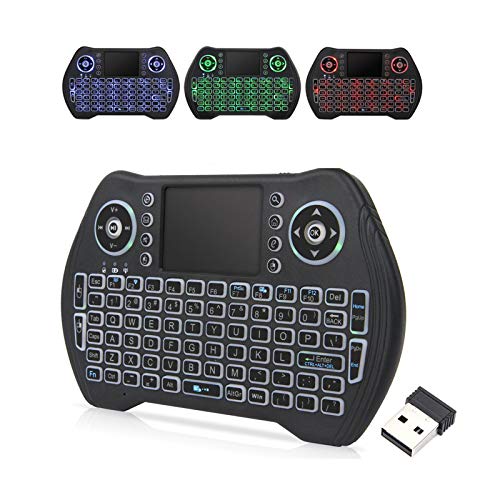
The Easytone Mini Wireless Keyboard Remote is a compact keyboard and touchpad combo designed to control your Windows Media Center and more from your couch. It connects via a USB receiver for simple, plug-and-play use—no software needed. With its backlit keys and handheld size, it makes browsing, gaming, and streaming much more comfortable, especially in low light.
Using this remote feels effortless, as you can quickly type, navigate menus, and control playback without juggling multiple devices. The rechargeable battery and auto-sleep function mean you won’t be constantly swapping batteries or worrying about power. Its multi-finger touchpad and dedicated hotkeys make everyday tasks smoother and quicker.
Key Benefits For Media Center Users
- Plug-and-play setup works instantly with Windows Media Center
- Compact and lightweight—easy to handle and store
- Backlit keys for comfortable use in dark rooms
- Rechargeable battery reduces need for replacements
- Integrated touchpad for precise mouse control
- Multiple hotkeys for fast access to media functions
- Wide compatibility with many devices, including PCs and smart TVs
Things To Consider
- Requires a USB port; OTG adapter needed for some devices
- Petite size may not suit those who prefer full-sized keyboards
- No dedicated volume wheel or traditional remote layout
What I’d Tell A Friend
This remote is a solid pick for anyone wanting to control their Windows Media Center from the sofa without hassle. It cuts down on clutter by combining keyboard and mouse functions, so you don’t have to switch between devices or fumble for a pointer.
The backlighting is especially useful if you often watch movies or work in dim light.
If you want to get the most out of it, keep the USB receiver in your PC or media box for instant access, and remember to charge it every few days for uninterrupted use. The peace of mind comes from its reliable connection and the feeling that you’re always in control, even from across the room.
Personally, I find the petite size handy for travel or moving between rooms.
| Best for | Why |
|---|---|
| Windows Media Center users | Simple plug-and-play control with keyboard and touchpad in one |
| Home theater setups | Backlit keys and compact design fit dark, entertainment spaces |
| Multi-device households | Works with PCs, smart TVs, Android boxes, and more |
| Travel or portable use | Lightweight and petite for easy carrying between rooms or locations |
Usarmt 4-in-1 Backlit Media Remote
Best Remote Control for Windows Media Center users seeking easy multi-device control with clear button labeling and full backlighting.

The USARMT 4-in-1 Backlit Media Remote is designed for users who want one remote to control multiple devices, including Windows Media Center, Apple TV, Xbox One, and Roku. It comes pre-programmed for these devices, so you can start using it right away without complex setup.
The full LED backlighting on every button makes it easy to use in dim rooms—a helpful touch for late-night streaming or movie sessions.
Day-to-day, this remote stands out for its clear button labels and intuitive layout, making it less likely you’ll press the wrong button. The included adhesive labels let you customize functions and keep track of what each button does, which removes confusion when switching between devices.
Overall, it delivers dependable control and convenience for anyone managing a mixed-media setup.
Where This Remote Excels
- Works out of the box with Media Center, Apple TV, Xbox One, and Roku
- Full-button LED backlighting for easy use in the dark
- Customizable button labels help prevent confusion
- Key Punch Through feature simplifies multi-device setups
- Allows reprogramming for other devices if needed
- Large, clearly marked buttons for quick access
Potential Limitations To Consider
- Not compatible with Bluetooth-only or RF-only devices
- Adhesive labels require some manual setup and cutting
- Does not include advanced smart home controls
Who This Fits Best
This remote is best for someone who uses Windows Media Center alongside a few major streaming devices and wants one simple tool for all of them. If you’re tired of hunting for different remotes or memorizing button layouts, this model removes the hassle and guesswork.
The customizable stickers are a small step but make a big difference in everyday clarity.
A quick tip: spend a few minutes applying the provided labels above your most-used buttons—this will save you from pressing the wrong keys, especially in the dark. With its reliable IR learning and clear button design, you can expect consistent performance and less frustration, even if you’re switching between devices often. I’d reach for this if I wanted a no-nonsense, dependable remote that just works.
| Best for | Why |
|---|---|
| Windows Media Center users | Pre-programmed and ready to control Media Center immediately |
| Multi-device home theaters | Controls Apple TV, Xbox One, Roku, and Media Center from one remote |
| Low-light environments | Full LED backlighting for all buttons |
| Custom button labeling | Adhesive labels help avoid confusion between devices |
Frisby Media Center Remote & Card Reader
The Best Remote Control for Windows Media Center for users who want seamless wireless PC control and multi-card reading in one device.

The Frisby Media Center Remote & Card Reader combines a wireless remote with a 3. 5-inch internal card reader for your PC. It solves the hassle of juggling multiple devices by allowing you to control your Windows Media Center and access up to four memory cards at once.
This is ideal for anyone who wants to streamline their media setup without adding clutter.
Using it feels smooth and intuitive—switching between remote control and card reading is quick, and the four-direction wireless mouse function adds even more convenience. Everything works wirelessly, so you can relax and manage your media from across the room. The device’s SDHC support means you won’t run into issues with newer, larger cards.
Why Users Appreciate This Combo
- Wireless remote control simplifies PC and media center operation
- Reads up to four memory cards simultaneously
- Integrated wireless mouse for easy navigation
- Supports SDHC cards up to 32GB for modern compatibility
- Reduces desktop clutter by combining two devices in one
- Easy to install in most PC cases
Consider Before Buying
- Requires internal 3.5-inch bay for installation
- Remote is designed for Windows Media Center, not other platforms
- No external USB ports on the front panel
Where This Shines
This combo is best for anyone building or upgrading a Windows Media Center PC who values wireless convenience and multi-card support. It removes the guesswork of finding compatible remotes and card readers, saving you time and desk space. If you work with photos or videos, having four cards accessible at once is a subtle but powerful advantage.
To get the most out of it, make sure your PC has a free 3. 5-inch bay. Once installed, you can trust it to handle both control and file transfers reliably, so there are fewer surprises during daily use. I like how it keeps everything simple and avoids the mess of extra dongles or cables.
| Best for | Why |
|---|---|
| Windows Media Center PC users | Direct compatibility and easy wireless media control |
| Photographers transferring multiple card files | Reads up to four memory cards at the same time |
| Home theater PC setups | Combines remote and card reader for less clutter |
| Users needing SDHC card support | Handles modern cards up to 32GB with no issues |
Ipazzport Backlit Air Mouse Remote
The iPazzPort Backlit Air Mouse Remote is a versatile choice as the Best Remote Control for Windows Media Center, offering smooth cursor navigation and universal compatibility for media center users.

This remote combines an air mouse and a keyboard, designed to replace traditional remotes and simplify control of media centers like Windows Media Center. Its built-in motion sensor allows you to move the cursor freely by pointing the remote in any direction, eliminating the need for flat surfaces or directional buttons.
Using this remote feels intuitive and natural, especially for navigating apps and streaming menus. Its compact size and rechargeable battery make it easy to handle during extended viewing, while the backlit buttons help maintain control in dark rooms.
Key Features For Media Center Users
- Air mouse navigation allows smooth cursor control without needing a desk.
- Universal compatibility with Android TV boxes, Windows/Mac PCs, HTPCs, and projectors.
- RGB backlit buttons improve usability in low-light environments.
- Programmable infrared button reduces the number of remotes needed.
- Rechargeable battery with included Type-C cable for easy power-up.
- Plug-and-play setup with USB receiver for immediate use.
- Compact and lightweight for comfortable long-term use.
Considerations Before Buying
- Not compatible with Amazon Fire TV devices, Samsung TVs, or LG webOS TVs.
- Motion sensor may require some initial adjustment to get used to cursor control.
- Requires USB receiver, which may not fit all device layouts conveniently.
Who This Remote Works Well For
This remote suits media center users who want a single device to navigate streaming apps and control their Windows Media Center setup without multiple remotes. It removes the hassle of directional buttons by using air mouse technology, saving time and effort when browsing content.
For best results, take a moment to familiarize yourself with the motion sensor sensitivity to achieve smooth control. Its reliable rechargeable battery and universal compatibility offer peace of mind for consistent performance.
| Best for | Why |
|---|---|
| Windows Media Center users | Offers intuitive air mouse control tailored for media navigation. |
| Android TV box owners | Plug-and-play compatibility with various Android streaming devices. |
| Users needing backlit controls | Seven-color backlight makes buttons visible in dark rooms. |
| Those wanting fewer remotes | Programmable IR button integrates TV power or input control. |
How To Choose The Right Media Center Remote Or Keyboard
- Intended Use: Decide if you need a simple remote for playback and navigation or a keyboard/mouse combo for typing and browsing. HTPC and smart TV users often benefit from integrated keyboards.
- Compatibility: Check device compatibility—some remotes work only with specific brands or operating systems. Universal models offer broad support but may lack specialized functions.
- Wireless Range and Setup: Consider your room size and setup. RF and Bluetooth models provide longer range and better reliability than infrared, which requires line of sight.
- Power Source: Rechargeable models reduce ongoing costs and waste but need regular charging. Remotes with standard batteries are convenient for infrequent use.
- Backlighting and Accessibility: Backlit keys or buttons help in low light. Evaluate if you often use your setup at night or in dark rooms.
Common Mistakes When Selecting A Media Center Remote
- Overlooking compatibility with your TV, streaming box, or PC.
- Assuming all remotes support advanced features like air mouse or IR learning.
- Ignoring battery requirements or forgetting to check if batteries are included.
- Choosing an overly complex device when only basic controls are needed.
- Forgetting to verify wireless range for larger living spaces.
Who Should Avoid These Products
- If you use only streaming sticks (like Fire TV or Roku), some remotes may not support your device.
- Those seeking voice control or smart assistant integration should look elsewhere.
- Users who want a fully integrated universal remote for many legacy devices may find these options limited.
Setup And Usage Tips
- Always check the included manual for pairing or IR learning steps.
- For rechargeable models, fully charge before first use to maximize battery life.
- Keep firmware or software updated if your remote offers configuration tools.
- Label programmable buttons if supported to avoid confusion later.
- Store USB receivers in a safe place when not in use, as they are small and easy to misplace.
Frequently Asked Questions
Will These Remotes Work With All Smart Tvs?
No, compatibility varies. Some models work only with PCs or specific TV brands. Always check the product listing for supported devices.
What Is Ir Learning And Do I Need It?
IR learning lets a remote copy functions from another remote. It’s useful if you want to control multiple devices with one remote, but not essential for everyone.
How Do I Know If I Need A Keyboard Or Just A Remote?
If you plan to type passwords, search terms, or browse the web, a keyboard is helpful. For basic playback and navigation, a remote is enough.
Is Backlighting Important?
Backlighting helps in dark rooms, especially for keyboard combos. If you often use your devices at night, it can be a valuable feature.
Do I Need Special Drivers Or Software?
Most models are plug-and-play. Some advanced remotes or keyboards may offer optional software for customization, but it is not usually required.
Can I Use One Remote For Multiple Devices?
Universal or IR learning remotes can often control several devices. However, check the limitations—some only support a few brands or functions.
Final Thoughts
Choosing the right remote or keyboard combo depends on your devices, how you use them, and your preference for features like backlighting or programmability. Take a moment to match your needs with the options available. With a clear sense of your requirements, selecting a suitable control solution becomes straightforward.