
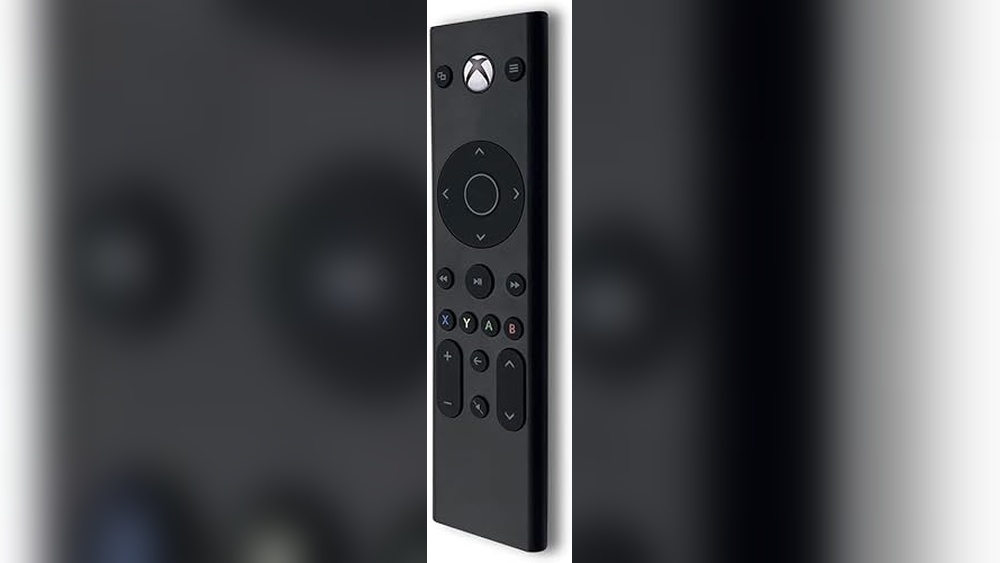
Trying to watch a movie or stream a show on your Xbox One can get frustrating if you’re stuck using a bulky game controller. Many people want a simple remote that makes everything easier, but it’s rarely clear which one to buy.
There are lots of options out there. Some work with all Xbox models, some don’t. Features like backlighting, TV control, and setup can be confusing. It’s not always obvious what you’re giving up or gaining with each choice.
This guide will help you understand what matters and how to pick the right remote for your needs—without wasting time or money.
What Really Matters When Picking An Xbox One Remote?
Think about how you’ll actually use the remote. If you mostly watch streaming apps, you might want something with clear buttons and easy navigation. If you care about controlling your TV volume or power, double-check compatibility. Battery life and how the remote feels in your hand can also make a difference.
Common Mistakes When Shopping
Many people assume every remote will work with their exact Xbox or TV model, but that’s not always true. It’s also easy to pick something with extra buttons you’ll never use, or miss out on backlighting if you often watch in the dark.
Know what you need before you decide.
Below you’ll find a range of Xbox One remote options. Each was chosen to cover different needs and budgets, so you can see the trade-offs and pick what fits best for you.
Tyadas Media Remote For Xbox
The Best Remote Control for Xbox One offers simple, reliable navigation for your console and media with easy button access.

The Tyadas Media Remote is designed for Xbox One and Xbox Series X|S users who want straightforward control over their consoles and other media devices. Its simple layout and soft rubberized texture provide comfortable use without unnecessary complexity.
Using this remote feels intuitive, especially with its motion-activated backlighting that allows easy button location in dim environments. It plugs and plays right away, saving time on setup and reducing frustration during media navigation.
Key Benefits For Media Control
- Soft rubberized texture offers a comfortable, non-slip grip.
- Motion-activated backlighting makes button finding simple in the dark.
- Secure battery cover prevents accidental battery loss.
- Plug-and-play functionality requires no complicated setup.
- Compatible with multiple devices including TV and Blu-ray players.
- Manufacturer provides replacement within warranty period.
Considerations Before Buying
- TV control features depend on your TV model and require manual setup.
- Basic design may not suit users wanting advanced or customizable controls.
- Limited color options; only available in black.
Who This Remote Works For
This remote is ideal for Xbox users who prioritize ease of use and quick access to media controls without extra features getting in the way. It removes confusion by offering familiar button layouts and reliable backlighting for nighttime use.
To get the best experience, ensure your TV settings are compatible for remote control functions beyond the console. Its secure battery cover and simple operation deliver peace of mind for everyday use without surprises.
If you prefer a straightforward remote with no fuss, this is a solid choice that blends comfort with functionality.
| Best for | Why |
|---|---|
| Xbox One and Series X|S owners | Designed specifically to navigate these consoles and related media devices. |
| Users needing backlit buttons | Motion-activated backlighting aids use in low light without extra effort. |
| People seeking plug-and-play simplicity | No complicated setup required; ready to use out of the box. |
| Those wanting a secure remote battery cover | Improved hook design keeps the battery cover firmly attached. |
8bitdo Media Remote For Xbox One
The Best Remote Control for Xbox One if you want simple, direct control with quick access to all your media apps.

The 8Bitdo Media Remote for Xbox One is a compact infrared remote built for quick navigation of your Xbox’s menus and apps. It solves the hassle of juggling controllers when you want to watch shows or browse streaming services by giving you dedicated Xbox buttons and a simple Home button to wake your console.
Using it feels natural, especially with motion-activated backlit buttons that make finding controls easy in low light. You get reliable, consistent access to all your media without the learning curve of a game controller, making downtime more relaxing and less fiddly.
Why It’s Easy To Use
- Works instantly with Xbox One, Series X, and Series S
- Dedicated Home button wakes console fast
- Simple layout for navigating apps and menus
- Motion-activated backlighting for dark rooms
- Compact, lightweight design fits any setup
- Infrared control for quick response
Consider Before You Buy
- Requires direct line of sight to the Xbox (infrared only)
- No programmable or universal remote features
- Not compatible with non-Xbox devices
Where This Shines
The 8Bitdo Media Remote is best for anyone who wants to simplify watching TV and streaming on their Xbox without using a game controller. If you’re often frustrated by fumbling with the controller for basic functions, this remote cuts out the hassle and guesswork.
Just remember to keep it pointed at your console for best results, and take advantage of the backlit buttons for easy late-night use. You’ll spend less time trying to figure out controls and more time relaxing, with the peace of mind that every button does exactly what you expect.
| Best for | Why |
|---|---|
| Xbox owners who watch lots of media | Quick, dedicated media controls save time |
| Users tired of using a gamepad for streaming | Simple remote replaces bulky controller hassle |
| Households with frequent media switching | Fast access to menus and apps with dedicated buttons |
| Anyone needing easy controls in the dark | Motion-activated backlight helps in low light |
Ubay Xbox One Media Remote (white)
This UBay remote is the Best Remote Control for Xbox One for users seeking effortless media access without setup hassles.

The UBay Xbox One Media Remote (White) is designed for anyone who wants a simple way to control their Xbox One, Series X, or Series S media functions. With no setup required, you just insert batteries and start using it right away.
The remote is a practical solution for those tired of juggling controllers for basic tasks like watching movies or adjusting volume.
Using this remote feels smooth and intuitive. The LED backlighting makes buttons easy to find in the dark, and you can quickly navigate apps, TV shows, and music with familiar Xbox controls. It reliably handles everyday media needs, helping you switch channels or manage volume without fuss.
Everyday Media Advantages
- No setup required—works instantly
- Full compatibility with Xbox One, Series X, and Series S
- Backlit buttons for easy night use
- Direct access to Xbox apps and media controls
- Controls TV channel and volume from one device
- Compact and lightweight design
Consider Before Buying
- Batteries and user manual are not included
- Does not support advanced gaming controls
- Designed mainly for media—not gaming
Who This Fits Best
This remote is ideal for users who mainly use their Xbox for streaming, watching movies, or browsing apps, and who want a hassle-free, dedicated media controller. It eliminates the guesswork and hassle of pairing, so you can spend less time setting up and more time enjoying content.
If you often find yourself fumbling with a game controller just to pause Netflix, this remote will make your routine easier.
For best results, keep spare batteries handy since none are included in the box. Once set up, you get peace of mind knowing your media controls will work every time, with no unexpected surprises or complicated instructions. I appreciate how this remote keeps things straightforward for everyday entertainment.
| Best for | Why |
|---|---|
| Media streaming on Xbox One | Instant access to apps, movies, and music |
| Quick TV volume/channel control | Handles TV functions alongside Xbox controls |
| Nighttime viewing | Backlit buttons make navigation simple in the dark |
| Non-gamers or casual users | No setup, just insert batteries and start using |
Pdp Universal Xbox Media Remote
A top pick for those seeking the Best Remote Control for Xbox One who want easy, reliable media navigation on their console.

The PDP Universal Xbox Media Remote is designed to simplify how you control movies, streaming apps, and TV on your Xbox One or Xbox Series X|S. It replaces clunky controller navigation with a traditional, compact remote that’s easy for anyone in the house to use.
Motion-activated backlit buttons help you find controls even in a dark room.
Using this remote feels intuitive—like a regular TV remote but for your Xbox. Navigating menus and adjusting volume becomes quick and frustration-free. The compact size fits comfortably in your hand and the button layout means fewer accidental presses. Overall, it makes media consumption on Xbox more enjoyable and less of a chore.
Why People Choose This Remote
- Simple, familiar TV remote feel
- Motion-activated backlight for dark rooms
- Effortless navigation through Xbox media apps
- Controls volume, power, and more without a game controller
- Officially licensed for Xbox, ensuring compatibility
- Compact design saves space and is easy to handle
What To Consider Before Buying
- Not intended for gaming control—media use only
- Small size may be less ideal for large hands
- No advanced smart home integration
When I’d Pick This
This remote is perfect if you mostly use your Xbox for streaming, watching movies, or controlling media with family and friends. It takes away the hassle of using bulky controllers just to pause a show or adjust the volume, making movie nights smoother and more relaxing.
A quick tip: keep the remote within reach and you’ll never have to fumble for the Xbox controller just to skip a scene. Its motion-activated backlight is especially handy for late-night viewing—no more pressing the wrong button in the dark. If you want a reliable, straightforward way to control Xbox media, this remote offers peace of mind and a simpler daily routine.
| Best for | Why |
|---|---|
| Xbox owners who stream movies and TV | Makes navigating apps and playback effortless |
| Families sharing one console | Anyone can use it without gaming knowledge |
| Nighttime or dark-room viewing | Backlit buttons help you see controls easily |
| Minimalist setups | Compact design and fewer devices needed |
Muddlepaw Xbox Media Remote
This Best Remote Control for Xbox One simplifies managing your Xbox and TV with motion-activated backlighting and easy button access.

The Muddlepaw Xbox Media Remote is designed to control Xbox consoles and compatible TVs effortlessly. It addresses the hassle of juggling multiple remotes by combining console, TV, and Blu-ray player control into one compact device with a motion-activated backlight for easy use in dim settings.
Using this remote feels straightforward and reliable, giving you clear button visibility even in the dark. Its secure battery cover and upgraded hook design add stability, so you won’t worry about it slipping or losing power unexpectedly during your gaming or media sessions.
Key Benefits For Xbox Users
- Works with multiple Xbox console models including Series X/S and One variants
- Motion-activated backlight helps locate buttons easily in low light
- Controls TV, Blu-ray players, and apps alongside the Xbox
- Secure battery cover and upgraded hook design prevent slipping
- Simple plug-and-play setup with two AAA batteries (not included)
Considerations Before Buying
- Requires direct aim at the Xbox console for optimal response
- TV control features may vary depending on your TV model and settings
- Batteries are not included with the remote
Who This Remote Works Best For
This remote is ideal for gamers who want a single device to control their Xbox and entertainment system without confusion. It removes the guesswork of multiple remotes and adds convenience with backlit buttons for nighttime use.
To get the best experience, make sure to aim the remote directly at your powered-on Xbox. This small step ensures smooth operation and fewer interruptions. The sturdy design also offers peace of mind that the remote won’t easily slip or lose power during use.
| Best for | Why |
|---|---|
| Xbox Series X/S and One owners | Compatible with multiple Xbox console models for versatile use |
| Users who watch TV and Blu-ray on Xbox | Controls TV and Blu-ray player functions alongside Xbox apps |
| Gamers who prefer easy nighttime use | Motion-activated backlight makes button navigation simple in the dark |
| People wanting a stable, secure remote | Upgraded hook design and battery cover reduce slipping and battery issues |
Wdzp Xbox Media Remote With Backlit Buttons
As the Best Remote Control for Xbox One, this WDZP remote makes media browsing simple and comfortable for anyone wanting hassle-free access to entertainment.

This remote from WDZP is designed for Xbox One and Xbox Series X|S, allowing you to control movies, TV, music, and apps without reaching for a game controller. The backlit buttons make it easy to use in dim rooms, and the improved battery cover means you won’t deal with sliding or loose parts.
Using this remote feels straightforward—it responds quickly and doesn’t require any setup. It’s comfortable in hand and lets you confidently jump from watching shows to browsing apps with simple button presses. You’ll save time and avoid frustration compared to using standard controllers for media control.
Media Control Features That Matter
- Works with Xbox One and Xbox Series X|S
- Backlit buttons for easy nighttime use
- Direct access to Xbox controls (A, B, X, Y keys)
- No programming needed—just add batteries
- Battery cover locks securely
- Lifetime warranty with free exchange or refund
Points To Consider Before Buying
- Batteries not included (requires 2 AAA)
- Remote is only for media and app control—not gaming
- Color may be listed as “Blakc” (spelling variation)
Who This Fits Best
This remote is ideal for families or anyone who uses their Xbox mostly for streaming and media. It takes away the hassle of fumbling with a bulky game controller just to pause a movie or open an app. The lifetime warranty means you don’t have to worry about reliability.
If you want to make the most of this remote, keep spare AAA batteries nearby so you never miss a movie night. You’ll enjoy consistent performance and peace of mind, knowing the remote is made for quick access and easy use.
Personally, I like how the backlit buttons make late-night browsing simple.
| Best for | Why |
|---|---|
| Media streaming on Xbox | Faster access to movies, TV, and apps than with a controller |
| Nighttime use | Backlit keys make navigation easy in the dark |
| Families with kids | No setup needed, simple controls for everyone |
| Frequent app switching | Direct Xbox key access streamlines browsing |
Ubay Xbox One Replacement Remote
Best Remote Control for Xbox One users who want instant plug-and-play convenience without setup hassles.

The UBay Xbox One Replacement Remote is a straightforward remote designed for Xbox One, One S, and One X systems. It solves the problem of complicated pairing—just insert batteries and it’s ready to use, making it ideal for those who want a simple, no-fuss setup.
With LED backlit buttons, it’s easy to control your Xbox media in any lighting.
Using this remote feels natural and immediate. You can quickly access movies, TV shows, music, and apps with familiar Xbox controls and dedicated A, B, X, Y keys. The remote also lets you adjust your TV’s channel and volume, reducing the need to juggle multiple remotes.
What Stands Out For Everyday Use
- No programming or setup required—just add batteries and go
- Works with Xbox One, Series X, and Series S consoles
- Backlit buttons for easy use in the dark
- Access to all main Xbox media and app controls
- Controls TV volume and channels directly
- Familiar button layout with A, B, X, Y keys
Things To Keep In Mind
- Batteries and user manual are not included
- Does not support advanced programming or customization
- Plastic build may feel basic to premium users
Who This Fits Best
This remote is best for Xbox owners who want a quick, reliable way to control their media without technical steps or pairing struggles. It’s especially suited for shared living spaces or for users who frequently misplace original remotes and need a dependable backup.
By removing the guesswork and setup hassle, it lets you get straight to streaming or gaming. A quick tip: keep extra AAA batteries on hand since none are included. The LED backlighting brings peace of mind for late-night use, reducing button-mashing mistakes.
If you prefer simplicity over extra features, this remote quietly does its job—no surprises, just steady performance.
| Best for | Why |
|---|---|
| Instant Xbox media control | No setup—just insert batteries and use |
| Nighttime viewing | All buttons have LED backlighting |
| Replacing lost or broken remotes | Works right out of the box with Xbox One/Series X/S |
| Controlling TV volume from Xbox remote | Reduces the need for multiple remotes |
Ubay Xbox One Media Remote – Blue
As the Best Remote Control for Xbox One, this UBay model makes media navigation simple and seamless for Xbox users.

This remote from UBay is designed specifically for controlling media on Xbox consoles. It solves the problem of awkwardly switching between controllers and remotes, offering familiar navigation with A, B, X, Y keys. If you want quick access to movies, music, and apps without fuss, this remote makes it possible.
Using it feels effortless—just pop in the batteries and start controlling your Xbox One, Series X, or Series S. The full backlighting on all buttons helps in dim rooms, and the remote lets you adjust TV volume and channels without juggling multiple devices.
It’s a straightforward tool for anyone tired of clutter or complex setups.
What Makes Media Control Easy
- Works instantly—no setup or programming required
- Compatible with Xbox One, Series X, and Series S
- Full LED backlighting for all buttons
- Controls TV channel and volume alongside Xbox
- Simple access to movies, TV shows, music, and apps
- Familiar A, B, X, Y keys for intuitive navigation
- Compact and lightweight design
Things To Consider Before Buying
- Batteries and user manual are not included
- Only available in blue color
- Designed mainly for media control—not gaming
Where This Shines
This remote is ideal for Xbox owners who stream content often and want hassle-free control. It removes the stress of switching devices and guessing which button does what. The instant setup means no wasted time or frustration—just put in batteries and you’re ready.
For best results, keep extra batteries handy since the package doesn’t include them. The backlit buttons add peace of mind for late-night viewing, ensuring you never hit the wrong key in the dark. If you’re tired of complex remotes, this feels refreshingly simple.
| Best for | Why |
|---|---|
| Xbox One media streaming | Direct access to movies and apps with familiar keys |
| TV control alongside Xbox | Manages TV channel and volume without extra remotes |
| Quick, fuss-free setup | No programming—just insert batteries and use |
| Low-light environments | Full backlighting makes buttons easy to see at night |
Senboma Media Remote For Xbox
The best remote control for Xbox One that simplifies media navigation with motion-activated backlit buttons and compact design.

This SENBOMA media remote is designed specifically for Xbox One and Xbox Series X|S, providing an easy way to control media apps without needing the standard game controller. Its motion-activated backlit buttons help you find the right controls in low light, making navigation smoother.
Using this remote feels natural with its compact, traditional TV remote design, allowing quick access to volume, power, and media controls. It reduces the hassle of switching inputs and gives a consistent, simple way to handle your Xbox media experience.
Key Benefits For Xbox Media Control
- Simplifies navigation of Xbox media apps for quick control.
- Motion-activated backlit buttons improve visibility in dark rooms.
- Compact design fits comfortably in hand for easy use.
- Controls volume and power without switching remotes.
- Original IC chip enhances reliable communication with Xbox.
Considerations Before Buying
- Not designed for gaming functions—media control only.
- Limited to Xbox One and Xbox Series X|S compatibility.
- Does not include advanced smart TV features or voice control.
Who This Works Well For
This remote is ideal for Xbox users who primarily use their console for streaming and media playback and want a dedicated, easy-to-use controller for those tasks. It removes the frustration of navigating apps with a gamepad and reduces guesswork with illuminated buttons.
For best results, use it in dim environments to take advantage of the motion-activated backlight, which helps avoid fumbling in the dark. Its reliable connection ensures fewer interruptions, giving you peace of mind during your viewing sessions.
| Best for | Why |
|---|---|
| Xbox One media users | Streamlined control of apps without a gamepad |
| Low-light viewing environments | Motion-activated backlit buttons improve visibility |
| Users wanting compact remotes | Small, traditional design fits comfortably in hand |
| Volume and power control seekers | Integrated control of essential functions without extra devices |
Ubay Xbox One Media Remote
A Best Remote Control for Xbox One that gives you quick, no-fuss access to your console, TV, and streaming apps.

This is a simple media remote made for the Xbox One. It replaces the need to juggle multiple remotes, letting you control your console, TV, and streaming services with one device. The motion-activated LED backlighting makes all buttons easy to see, even in dark rooms.
Using the UBay Xbox One Media Remote feels straightforward and comfortable. You don’t need to set anything up—just insert batteries and it works. The familiar Xbox buttons make navigation smooth, so you spend less time fiddling and more time watching or playing.
It’s a reliable way to streamline your media setup.
What Makes It Stand Out
- Works instantly—no programming needed
- Controls Xbox One, TV, Blu-ray, and streaming apps
- Motion-activated LED backlighting for visibility
- Includes familiar A, B, X, Y and numeric buttons
- Simple, multipurpose design reduces remote clutter
- Comfortable to hold and use
Things To Keep In Mind
- Batteries are not included
- No user manual in the box
- Designed specifically for Xbox One systems (not for newer consoles)
What I’d Tell A Friend
This remote is best for anyone who wants all-in-one control over their Xbox One and home entertainment without dealing with setup steps. It removes the guesswork from switching between devices and saves time, especially for families or shared spaces.
If you’re tired of searching for different remotes or trying to remember which button does what, this simple controller just works. For best results, keep spare AAA batteries handy since none are included. Its straightforward design brings peace of mind—nothing to program, nothing to troubleshoot, and your movie nights run smoother.
| Best for | Why |
|---|---|
| Xbox One owners who watch a lot of streaming content | Switches easily between TV, Blu-ray, and apps with one remote |
| Users who want zero setup | Works out of the box—just add batteries |
| People needing backlit buttons | Motion-activated LED backlight helps in dark rooms |
| Anyone replacing a lost or broken Xbox One remote | Gives full control without extra accessories |
Key Considerations When Choosing An Xbox Media Remote
- Compatibility: Check if the remote supports your exact console model, including Series X|S or older One versions. Some remotes also control TVs or Blu-ray players.
- Button Layout: Look for clear Xbox control buttons (A/B/X/Y, Home) and easy access to media functions. Backlit buttons help in dark rooms.
- Setup Simplicity: Most remotes are plug-and-play, but some TV controls may require manual setup. Make sure you understand if batteries are included and if any programming is needed.
- Build Quality: Battery cover security and durability matter if you use the remote often. Compare how stable and comfortable the remotes feel.
- Warranty & Support: Some brands offer replacement or support periods. This can be reassuring for frequent users.
Common Mistakes To Avoid
- Buying a remote without checking console compatibility.
- Assuming all remotes control TV volume or channels—some only work for Xbox media.
- Missing out on backlight features if you watch media at night.
- Overlooking battery requirements—most remotes need AAA batteries, often not included.
- Ignoring the need for a secure battery cover for high-use households.
Who Should Skip Xbox Media Remotes?
- Gamers who use only controllers and never watch media on their console.
- Households with universal remotes that already handle Xbox and TV functions.
- Anyone needing advanced smart home integration; these remotes focus on basic media navigation.
Setup And Usage Tips
- Insert batteries before first use. If the remote does not respond, check polarity and battery cover placement.
- For TV control, consult the user manual—some remotes require manual pairing or specific TV settings.
- If using motion-activated backlighting, ensure the remote is positioned where movement can trigger the light.
- Store the remote somewhere accessible but out of direct sunlight or heat.
Care And Maintenance Notes
- Clean the remote regularly with a dry cloth; avoid liquids near the battery compartment.
- Replace batteries as soon as performance drops. Remove batteries if storing for long periods.
- Check for firmware updates if your remote is brand-linked and supports them.
Frequently Asked Questions
Do Xbox Media Remotes Work With Both Old And New Consoles?
Most remotes support Xbox One and Series X|S, but always check the product description for compatibility.
Can These Remotes Control Tvs As Well As Xbox Consoles?
Some models allow basic TV control, but others are limited to Xbox media functions. Refer to the manual for details.
Are Batteries Included With Xbox Media Remotes?
Usually, batteries are not included. Check packaging or product details before purchase.
How Does Motion-activated Backlighting Work?
The remote detects movement and lights up the buttons for easy use in the dark. Placement and movement sensitivity may vary.
Is Programming Or Setup Required?
For Xbox functions, most remotes are plug-and-play. TV controls may need manual setup or pairing.
What If My Remote’s Battery Cover Falls Off?
Some remotes feature improved hook designs for secure covers. If issues persist, contact the manufacturer for support.
Can I Use Multiple Remotes For One Console?
Yes, you can use more than one remote, but only one will control the console at a time.
Final Thoughts
Xbox media remotes offer convenient navigation for streaming and media playback. Choosing the right remote depends on your console model, desired features, and household needs. Review compatibility and setup steps to avoid frustration. With basic care, these remotes should provide reliable control for everyday use.