
Setting up security cameras feels good—until you start worrying about the Wi-Fi holding up. You want to check your cameras from anywhere, but the connection drops or feels slow. Maybe you’re not sure if your footage is safe from hackers.
You’re not alone.
Picking the right router for security cameras is confusing. Some are fast but lack good coverage. Others promise safety but come with a tricky setup. There are routers with every new feature, but you might not need half of them.
Prices range from simple and affordable to high-end and complex. It’s hard to know what actually matters for your home or business.
This article will help you see the differences and decide what fits your setup, so your cameras stay connected and secure.
What To Think About First
Reliable coverage and security are key. If your cameras are far from the router or outside, a strong signal matters more than speed. For some, simple setup is best, while others need advanced controls. Decide what’s most important before you choose.
Below, you’ll find a range of routers compared by the qualities that matter for security cameras—like coverage, security features, and ease of use. Each has strengths for different needs, so you can match one to your own situation.
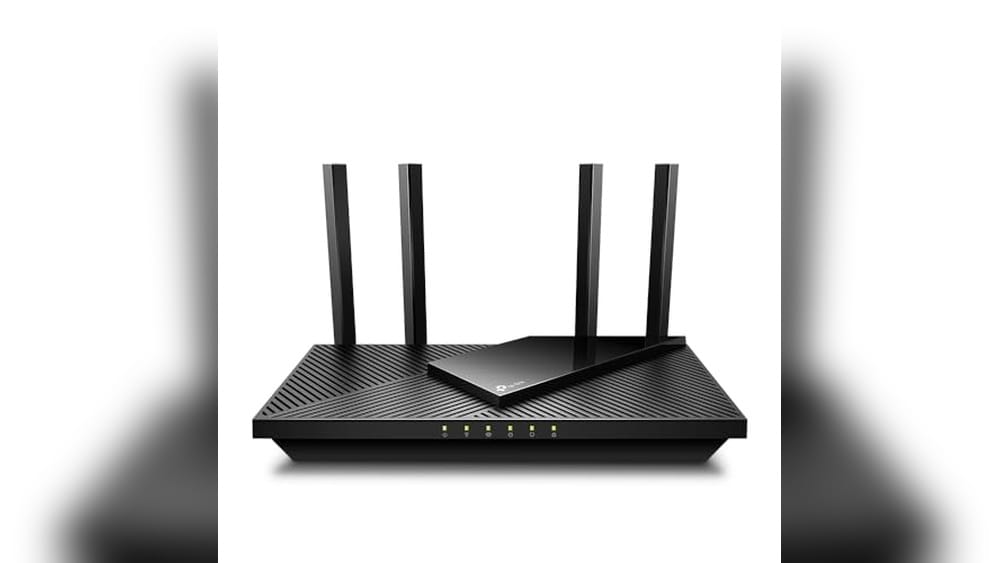
Tp-link Ax1800 Wifi 6 Router
Best Router for Security Cameras seekers who want reliable, high-speed, and secure WiFi for multiple devices will find this model a smart fit for home or small business setups.

The TP-Link AX1800 WiFi 6 Router is a dual-band wireless router designed to offer faster speeds, high device capacity, and reduced network congestion. It’s especially suitable for setups where security cameras and multiple smart devices demand stable, uninterrupted connections, thanks to its WiFi 6 (802.
11ax) technology and advanced Beamforming coverage.
Setting up the Archer AX21 feels straightforward, and day-to-day use is hassle-free, even if you have many cameras and smart devices online at once. The router’s robust security commitment and reliable range mean you can confidently monitor your cameras without worrying about dead zones or lag during critical moments.
- Strengths:
- WiFi 6 support for efficient streaming and device management
- Excellent coverage with 4 high-gain antennas
- Built with advanced security as a core requirement
- Easy Mesh and Alexa compatibility
- Considerations:
- Requires a separate modem (not included)
- Does not support the 6 GHz band
Is This The Right Router For You?
If you want a router that can keep up with several security cameras and other smart home devices, the Archer AX21 is an excellent choice—especially if you value coverage, security, and ease of use. It’s ideal for homes or small offices where WiFi reliability and device management are top priorities.
However, if you’re seeking the latest 6 GHz WiFi band or want an all-in-one modem/router unit, this model won’t fit your needs.
Setting it up is simple for most users, but make sure you have a compatible modem ready. Rest assured, TP-Link’s focus on security and support means fewer headaches and more peace of mind as you expand your camera network.
Tp-link Archer Axe75 Wifi 6e Router
Best Router for Security Cameras for homeowners and small businesses needing reliable, high-capacity connectivity and advanced security features.

The TP-Link Archer AXE75 is a tri-band WiFi 6E router designed to offer high-speed and secure connections for demanding setups, such as multiple security cameras. Its true tri-band technology and new 6 GHz band ensure smooth streaming and low latency, helping eliminate bottlenecks when you have several cameras and devices operating simultaneously.
With a robust quad-core processor and unique heat-dissipating design, the AXE75 delivers reliable performance even during peak usage. Setting it up is straightforward, and once running, it feels stable and effortless—letting you focus on monitoring your cameras without worrying about dropped connections or lag.
- Strengths:
- Handles multiple devices with ease—ideal for camera systems and smart home setups
- Advanced WPA3 security and VPN support for privacy and data protection
- OneMesh capability for seamless coverage across large spaces
- 160MHz channel support and 5400 Mbps speeds for fast video streaming
- Limitation:
- To fully utilize the 6 GHz band, connected devices must support WiFi 6E
Is This Router Right For You?
If you need a reliable, high-capacity router to support a network of security cameras and smart devices, the Archer AXE75 is a strong choice. It makes managing multiple video feeds straightforward, minimizing interruptions and security risks. Those with older devices may not benefit from the newest 6 GHz band, but the router’s backward compatibility and robust performance ensure your cameras stay connected.
It’s best for users who want peace of mind with their home or office monitoring systems. For optimal coverage, consider pairing it with TP-Link OneMesh extenders. You can confidently set it up and trust that your network will stay stable and secure.
Tp-link Ac1200 Dual Band Router
The Best Router for Security Cameras for homeowners or small businesses seeking reliable, secure Wi-Fi coverage for their surveillance systems.

The TP-Link AC1200 Dual Band Router is a budget-friendly networking solution designed to provide fast and stable Wi-Fi for homes and small businesses, especially those running multiple security cameras. With its advanced WPA3 security protocol, it offers improved protection for your surveillance feeds and connected devices, reducing the risk of unauthorized access.
In day-to-day use, this router stands out for its broad 1,000 sq. Ft. coverage and four external antennas, which help maintain a strong connection to your security cameras—even when placed at a distance. Setup is straightforward, and its reliability means you can monitor your property with fewer connectivity worries or dead zones.
- Strengths:
- Dual-band speeds up to 1200 Mbps keep camera streams smooth
- WPA3 ensures your surveillance network is more secure
- Guest WiFi and Access Point Mode add flexibility for other devices
- EasyMesh compatibility for future expansion
- Limitations:
- Ethernet ports are Fast Ethernet (not Gigabit)
- Not suitable for extremely large properties or heavy enterprise use
Is This Router Right For Your Security Cameras?
If you want a straightforward, secure router that keeps your security cameras reliably online and protected, the TP-Link AC1200 is a practical choice. It’s ideal for apartments, homes, or modest-sized offices where coverage and security matter more than maximum wired speeds.
Tech novices will appreciate its simple setup and management, while security-conscious users can rest assured with WPA3 protection in place.
However, if you require gigabit speeds for wired devices or need coverage for a very large area, you might want to consider a higher-end model. For most users looking to minimize camera downtime and network headaches, this router eliminates a lot of stress. Tip: Place it centrally and slightly elevated for the best camera coverage and reliability.
Tp-link Archer A8 Smart Wifi Router
Best Router for Security Cameras for homeowners and small businesses seeking reliable, high-speed WiFi coverage and efficient device management.

The TP-Link Archer A8 is a dual-band smart WiFi router designed to deliver fast, dependable wireless connections—ideal for supporting multiple security cameras at home or in a small office. With MU-MIMO technology and beamforming, it efficiently manages several devices at once and maintains strong signals across up to 1,200 square feet, helping to eliminate WiFi dead zones.
Installation is straightforward, and the router offers a reassuring sense of reliability for continuous video streaming from your security cameras. You won’t have to worry about complicated setup or unstable connections—once in place, it quietly does its job so you can focus on monitoring your property with confidence.
- Strengths:
- Excellent multi-device management with MU-MIMO—perfect for several security cameras streaming at the same time.
- Beamforming helps maintain strong coverage through walls and around obstacles.
- Four Gigabit LAN ports support fast wired connections for NVRs or key devices.
- OneMesh compatibility offers easy WiFi expansion if you need more coverage.
- Limitations:
- No USB port for direct storage or printer sharing.
- Does not support the 6GHz WiFi band.
Is This The Right Router For You?
If you want a dependable WiFi router that can easily handle the demands of multiple security cameras and smart devices, the Archer A8 is a solid choice. It’s especially well-suited for apartments, homes, or small offices that don’t require advanced enterprise features or USB connectivity.
However, if you need cutting-edge WiFi 6 speeds or plan to connect USB drives directly to your router, you may want to consider a higher-end model. For most users looking to boost their security camera performance and reduce network headaches, this router will take care of the basics—quietly and efficiently.
Don’t forget to position it in a central spot for the best camera coverage throughout your property.
Tp-link Archer Be230 Wi-fi 7 Router
Best Router for Security Cameras seekers who want reliable, high-speed coverage for multiple devices will find the Archer BE230 an ideal choice.

The TP-Link Archer BE230 is a dual-band Wi-Fi 7 router designed to power smart homes and handle demanding security camera setups. With advanced Wi-Fi 7 technology and two 2. 5G ports, it ensures ultra-fast connections and consistent streaming even if you have multiple cameras and smart devices running at once.
In real-life use, its coverage of up to 2,000 sq. Ft. means you won’t worry about blind spots or dropouts, even with up to 60 devices connected. Setting it up is straightforward, and the router’s robust processor keeps everything running smoothly, so you can check feeds or receive alerts without lag or frustration.
- Strengths:
- Excellent coverage with four antennas and beamforming
- Multi-gig ports for future-proofed connections
- Handles dense device environments (smart home + cameras)
- EasyMesh and HomeShield support for security and expandability
- Limitations:
- No 6 GHz band (dual-band only)
- Size may be large for some spaces (13.52″ x 10.7″)
Should You Choose The Archer Be230?
If you’re setting up several security cameras and want to avoid network slowdowns, this router is a strong fit—especially for homes with lots of smart devices competing for bandwidth. Anyone who wants simple, worry-free coverage without fiddling with advanced settings will appreciate how easy it is to get started and stay connected.
However, if you need 6 GHz support for future Wi-Fi 7 devices, or if you have a very small space, you might want to look at more compact or tri-band options. For most users, though, this router removes confusion around device overloads and dead zones. Tip: Position it centrally for best camera coverage, and rest easy knowing your streams will stay clear and reliable.
Gl.inet Opal Portable Wifi Router
The Best Router for Security Cameras for anyone needing a compact, secure, and travel-ready solution to keep surveillance feeds reliable and private.

The GL. iNet Opal Portable WiFi Router is a compact, dual-band router designed to provide secure, stable internet—ideal for connecting security cameras at home, in a business, or on the go. Its standout feature is built-in VPN support (OpenVPN & WireGuard) and compatibility with 30+ VPN providers, adding a strong privacy layer for your surveillance network.
Using this router feels refreshingly simple, with easy setup instructions and a lightweight, travel-friendly design. Whether you’re setting up cameras at a remote property or ensuring your RV’s security system stays online, it brings peace of mind and saves time otherwise spent troubleshooting unreliable connections.
- Strengths:
- Pocket-sized and portable—great for travel or temporary setups
- Dual-band speeds (2.4GHz & 5GHz) for smooth video streaming and camera feeds
- Full Gigabit ports for reliable wired connections
- Advanced security with VPN and Cloudflare encryption support
- Limitations:
- No built-in cellular connectivity—requires WiFi or Ethernet source
- May not suit very large or complex installations
Is This The Right Router For Your Security Cameras?
If you want a straightforward, secure, and highly portable router for your security cameras—especially for travel, business, or temporary locations—the GL. iNet Opal is an excellent choice. Its VPN features add a layer of privacy that’s hard to find in most travel routers, making it ideal for anyone concerned about secure camera access.
On the other hand, if you need to cover a large property or require advanced, enterprise-level routing features, you might need a more robust solution. For most home, small business, or mobile setups, this router removes the usual stress of unreliable connections and confusing setups. Tip: Pair it with a reliable power source for uninterrupted camera streaming, and rest easy knowing your footage is well protected.
Netgear Nighthawk Wifi 7 Dual-band Router
Best Router for Security Cameras, ideal for homeowners or small business owners seeking reliable, high-speed coverage for multiple surveillance devices.

The NETGEAR Nighthawk WiFi 7 Dual-Band Router is a powerful solution for anyone needing seamless, high-speed connectivity for their security cameras. With coverage for up to 2,500 sq. Ft. and support for 80 devices, it solves the problem of network congestion and signal drops in larger spaces or busy environments.
Its WiFi 7 technology ensures ultra-fast speeds, making it a smart choice if you want reliable streaming and instant access to camera feeds.
In real-life use, setting up this router is straightforward, and its sleek design fits unobtrusively into most homes or offices. You’ll notice a smoother experience when checking security camera footage, with little lag and dependable signal strength even in challenging spots.
The robust antennas and multi-gig port add confidence that your devices, from security cameras to smart TVs, remain connected and responsive.
- Strengths: Wide coverage, handles many devices, future-proof WiFi 7 speeds, easy to set up.
- Limitations: Requires a separate cable modem; not for users seeking an all-in-one modem/router.
| Feature | Benefit for Security Cameras |
|---|---|
| 6.5 Gbps Wireless Speed | Supports HD camera streams without lag |
| 2,500 sq. ft. Coverage | Reliable signal for cameras indoors and out |
| 80 Device Support | Handles multiple cameras and smart devices |
| 2.5 Gig Internet Port | Ready for multi-gig internet plans |
Is This Router Right For You?
If you have several security cameras or other smart devices and want peace of mind that your network can handle the load, this router is a sensible pick. It removes the stress of dropped connections and buffering, especially in larger homes or offices.
Those with basic internet needs or looking for a built-in modem may find better fits elsewhere.
For anyone managing multiple cameras, you’ll appreciate the ease and reliability—just ensure you have a compatible cable modem ready. A practical tip: place the router centrally to maximize coverage and keep your security feeds clear. Rest assured, NETGEAR’s design and expert support mean you won’t have to worry about everyday connectivity issues.
How To Weigh Your Priorities When Picking A Router
Start by considering the size of your space and the number of devices you need to support. Think about whether you value speed, range, or features like mesh support and parental controls more. Decide if you want future-proofing for new WiFi standards or if a basic, stable connection is enough.
Trade-offs are natural—no router is perfect for every home or use case. Your habits and setup matter more than chasing the latest technology.
Common Missteps And Who Might Want To Pass
- Expecting any router to fix weak internet service from your provider.
- Choosing a high-end model for a small apartment with just a few devices.
- Assuming all routers offer the same security or parental controls.
- Overlooking compatibility with existing modems or network gear.
- Buying for features you’ll never use, or ignoring your actual coverage needs.
Frequently Asked Questions: Best Router For Security Cameras And Everyday Needs
Will Any Router Work Well With Security Cameras?
Not all routers handle high device counts or constant video streaming equally. Look for models that mention strong multi-device support and stable coverage.
Is Wifi 6 Or 7 Necessary For Most Homes?
WiFi 6 or 7 offers benefits for many devices or fast internet plans, but older standards may be enough for basic needs. Consider your current and future devices before upgrading.
Do I Need A Mesh System For Security Cameras Outside?
Mesh systems help extend coverage to outbuildings or yards. For apartments or single-floor homes, a single router may suffice.
How Do I Know If A Router Is Compatible With My Internet Service?
Check if your router supports your internet speed and uses a compatible connection type. Most routers require a separate modem for cable or DSL service.
What Security Features Matter Most For Smart Home Devices?
Look for WPA3 support, regular firmware updates, and basic network isolation. These features help protect cameras and other smart devices from vulnerabilities.
Can I Use A Travel Router As My Main Network?
Travel routers are designed for portability and small setups. They can handle light use but may struggle with larger homes or many connected devices.
What Is The Best Router For Security Cameras?
The best router balances solid coverage, reliable multi-device performance, and good security features. Choose one based on your camera placement and network demands.
Finding Your Best Fit In A Crowded Router Market
With so many router options, it’s normal to feel uncertain. Taking your time to match your real needs to the right product leads to fewer regrets and a smoother setup. Remember that your home, devices, and habits are unique, and the best router is the one that fits your reality—not just the latest trend.
You have what you need to make a thoughtful decision. Trust your priorities and know that any upgrade can bring meaningful improvements to your network life.