
Finding the best smart lock for Airbnb can make a big difference in managing your rental property. It’s all about convenience and security without the hassle of physical keys. A good smart lock lets you control access remotely and easily share entry codes with guests. It also offers peace of mind knowing you can change codes anytime and track who comes and goes. Whether you want simple setup or advanced features, the right lock fits your needs and makes hosting smoother. Let’s look at some options that stand out for reliability and ease of use.
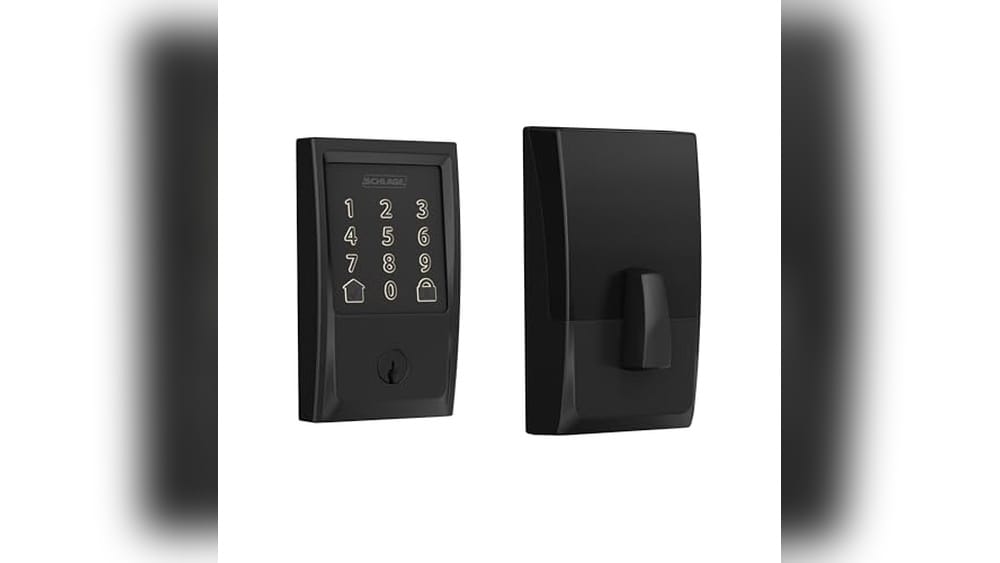
Schlage Encode Smart Deadbolt Lock
The Best Smart Lock for Airbnb hosts who want secure, keyless entry with remote control and easy management.

Everyday Experience with Schlage Encode
- Remote access allows you to lock or unlock from anywhere via the app.
- Easy to set up without any wiring, fitting most standard doors quickly.
- Supports up to 100 unique access codes, ideal for managing guests.
- Works with Alexa and Google Home for hands-free control.
- Touchscreen resists fingerprints and alerts you on forced entry attempts.
Considerations Before Buying
- Requires a stable Wi-Fi connection for full remote functionality.
- Heavier than some other smart locks, weighing 3.4 pounds.
- App and voice control depend on compatible smart home devices.
- Limited to single deadbolt door thickness and backset sizes.
Thoughts for Airbnb Hosts
This lock fits hosts who want a blend of security and convenience without complicated installation. The ability to create and manage multiple access codes remotely is a strong plus for short-term rentals. It gives peace of mind knowing you can check lock history and control access from anywhere.On the downside, if your Wi-Fi is spotty, some features might not work reliably. Also, if you prefer a lighter or more compact lock, this model’s weight and size might feel bulky. Still, the solid build and security certifications offer reassurance for both hosts and guests.Practical Advice for Smart Lock Buyers
If you manage several Airbnb properties or frequently change guests, this lock’s remote code management is very helpful. However, those without consistent Wi-Fi or who want a simpler keyless lock might want to explore other options. Before installing, double-check your door’s dimensions to ensure compatibility.Overall, it’s a dependable choice that balances technology and ease of use, helping you feel confident in your property’s entry security.Philips Wi-fi Smart Deadbolt Lock
This Best Smart Lock for Airbnb is designed for hosts who want secure, flexible, and remote access control for their rental property.

Everyday Use Highlights
- Unlock with fingerprint, app, passcode, physical key, or voice for versatile access.
- Remote control via built-in Wi-Fi, no extra hub needed—ideal for managing guests from anywhere.
- Supports up to 100 custom passcodes, simplifying guest and cleaner access without physical keys.
- Auto locking feature adds convenience and security without extra effort.
- Works with Alexa and Google Assistant for hands-free control at home.
Considerations Before Buying
- Requires a 2.4GHz Wi-Fi network and close router proximity (within 65 feet) for optimal remote use.
- Batteries are not included, so you need to prepare for power supply.
- Some users may find setting up voice control requires app updates and stable network connection.
Thoughtful Choice for Airbnb Hosts
This Philips Wi-Fi Smart Deadbolt Lock fits hosts who value flexibility in guest access and want to manage entry remotely without extra hardware. It’s a solid option for those who need multiple guest codes and appreciate voice assistant integration to ease daily routines.
However, if your property’s Wi-Fi does not reliably cover the door area or you prefer a lock with included batteries, this might not be the best fit. Keep in mind that voice control features depend on app updates and network stability, so some tech comfort is helpful.
For smooth operation, ensure your router is within range and use scheduled codes to streamline guest turnover. With this setup, you can enjoy more control and peace of mind over your Airbnb access.
Ghome Smart Fingerprint Deadbolt
For Airbnb hosts seeking the Best Smart Lock for Airbnb, this model offers secure, flexible access control and easy installation.

The GHome Smart Fingerprint Deadbolt is a versatile keyless entry lock designed for front doors. It solves the common problem of managing guest access, especially for Airbnb hosts, by offering multiple unlocking options including fingerprint, PIN codes, temporary passwords, and app control. A standout feature is its biometric fingerprint recognition that works within 0.2 seconds with high accuracy, enhancing both security and convenience.
Using this lock feels straightforward and reliable. Installation is simple and doesn’t require special tools, which saves time and hassle. The customizable auto-lock and one-touch lock functions add peace of mind, ensuring the door is secure without extra steps. I found that managing guest codes through the app made turnover smoother and less stressful.
Day-to-Day Use Highlights
- Fast fingerprint recognition for quick, secure entry.
- Multiple access methods simplify guest management.
- Easy installation compatible with most doors.
- Auto-lock feature provides consistent security without manual effort.
- Low battery alerts and USB-C emergency port reduce lockout risk.
Considerations Before Buying
- Requires a smartphone app for full access management features.
- Battery-powered; frequent travelers may need to monitor battery life closely.
- Advanced features may have a learning curve for less tech-savvy users.
Useful Insight for Airbnb Hosts
This smart lock fits hosts who want flexible, secure access options without frequent key exchanges. It’s ideal for properties where guests come and go regularly and ease of managing temporary access is a priority. However, if you prefer traditional keys or dislike managing an app, this might feel like an extra step.
For better experience, regularly update guest codes and monitor battery status to avoid entry issues. The lock’s silent mode is handy for night-time arrivals or departures. Overall, it offers a good balance of security and convenience tailored for short-term rental needs.
Wyze Fingerprint Smart Lock
The Best Smart Lock for Airbnb hosts who want secure, keyless entry with smart features and easy management.

The Wyze Fingerprint Smart Lock is a keyless entry deadbolt designed to simplify access control for Airbnb rentals. It solves the common problem of managing physical keys by offering quick fingerprint unlocks, backed by AI that improves recognition over time. This feature alone can help hosts avoid guest entry delays and security concerns.
Using the lock feels intuitive and reliable. The fingerprint scanner is fast and resistant to smudges, so I rarely had to repeat scans. Managing the lock remotely through the app adds a layer of convenience and confidence, especially when coordinating check-ins from afar.
Practical Insights for Airbnb Hosts
- Fingerprint unlock takes just half a second, speeding up guest arrivals.
- AI learning scanner reduces failed attempts over time, improving reliability.
- Backup access via keypad code, app, or physical keys adds flexibility.
- App integration allows remote lock status checks and control.
- Battery lasts up to 8 months with emergency USB-C power option.
What to Consider Before Buying
- Requires Wi-Fi for remote features; limited offline functionality.
- Physical size might not fit all door types without checking dimensions.
- Initial fingerprint setup may take some patience for multiple users.
Choosing This Lock for Your Airbnb
This lock fits hosts who want a blend of biometric security and remote management without relying on physical keys. It suits rentals where quick guest access and flexible unlocking methods matter most. However, if you prefer a simpler, offline-only lock or have a very small door frame, this might not be ideal.
Before purchasing, verify your door’s compatibility with the lock’s dimensions and prepare for a short setup period to enroll fingerprints. Once set up, the system brings peace of mind by giving you control and insight into your rental’s entry.
A Thoughtful Choice for Secure Access
If you manage Airbnb properties and want to minimize key exchanges while keeping control tight, this smart lock offers a balanced solution. Hosts who need remote access and fast guest entry will find it especially useful.
On the other hand, those uncomfortable with Wi-Fi reliance or looking for a more basic lock might find it too complex. My tip: take time to enroll fingerprints carefully and test the app features before relying on it fully. This lock’s adaptive AI and multiple entry options provide steady confidence without fuss.
Ultraloq Bolt Se Smart Lock
The ULTRALOQ Bolt SE is designed for Airbnb hosts seeking the Best Smart Lock for Airbnb that offers flexible, keyless access and smart home integration.

The ULTRALOQ Bolt SE Smart Lock is a versatile keyless deadbolt that simplifies door access for Airbnb hosts. It solves the hassle of managing physical keys by providing seven different entry methods, including fingerprint ID and remote control via built-in Wi-Fi. Its Matter over Thread support also ensures smooth integration with Apple Home and other smart home systems, making it a future-proof choice.
In daily use, this lock feels reliable and easy to manage. Setting up access codes or sharing ekeys remotely saves time and adds convenience, especially for managing guest turnover. The long battery life means fewer interruptions, and the variety of unlocking options offers peace of mind whether you’re home or away.
Practical Insights for Airbnb Hosts
- Multiple access methods reduce the need for physical keys and improve guest check-in flow.
- Remote control via Wi-Fi allows flexible and secure access management from anywhere.
- Integration with Apple Home and voice assistants simplifies smart home automation.
- Long 18-month battery life minimizes maintenance interruptions.
- Supports up to 50 access codes, ideal for frequent guest changes.
- Requires 2.4GHz Wi-Fi and proximity to the router for best connectivity.
Choosing This Lock for Your Airbnb
This smart lock fits Airbnb hosts who want a secure, flexible entry system with smart home compatibility and remote management. It works well for those comfortable with tech setups and who value convenience in guest access control.
Hosts who prefer simpler locks without multiple entry options or those with Wi-Fi challenges might find this lock less suitable. Also, if you need a hub-free setup, keep in mind the Matter features require a compatible hub or Thread border router.
Thoughtful Considerations Before Buying
If you host frequently and want to streamline guest access while integrating with your smart home, the ULTRALOQ Bolt SE offers a well-rounded solution. For less tech-savvy hosts or those in homes with limited Wi-Fi, it may require some patience during setup.
A practical tip: keep your router within 70 feet of the lock for reliable remote control. This lock provides confidence in managing Airbnb stays without constant physical key exchanges.
Yale Black Suede Wi-fi Deadbolt
The Best Smart Lock for Airbnb hosts who want flexible key-free access and remote control for their rental properties.

This is a smart deadbolt designed to replace your standard door lock with ease, offering key-free entry options like a keypad, voice assistant, and smartphone app control. It helps Airbnb hosts manage guest access remotely and ensures the door locks automatically when closed, removing the worry about security after check-in.
Using this lock feels straightforward and reliable. Setting up takes just a screwdriver, and the auto-unlock feature lets you approach the door hands-free, which adds convenience. Managing guest codes or sharing access remotely through the app saves time and gives peace of mind.
Daily Use Insights for Airbnb Hosts
- Multiple entry methods fit different guest preferences without hassle.
- Auto-lock feature helps avoid forgotten locked doors after guest arrivals.
- Remote app control allows easy management of guest access from anywhere.
- Simple installation means no need for professional locksmith services.
- Works only on 2.4 GHz Wi-Fi and in U.S. and Canada, which limits some users.
- Keypad and voice assistant options add flexible convenience.
Choosing This Lock for Your Airbnb
This lock is ideal for hosts who want to simplify guest entry and security without complicated installation. It works well if your rental is in the U.S. or Canada and you have reliable 2.4 GHz Wi-Fi.
If you are outside these regions or require compatibility with 5 GHz networks, this model might not meet your needs. Also, those who prefer fully hands-free access without app interaction might find the setup slightly limiting.
Thoughtful Access Control for Hosts
This lock suits Airbnb hosts who value flexibility and remote access control. It eases guest management by allowing personalized entry codes and remote locking/unlocking. However, keep in mind the Wi-Fi limitation and regional restrictions before purchasing.
For hosts who want a balance of convenience and security with straightforward installation, this lock offers practical features without overwhelming complexity. A good tip is to familiarize yourself with the Yale Access App to fully leverage remote access and notifications.
If you prioritize steady and secure key-free entry with minimal fuss, this lock can be a solid addition to your rental setup.
Sifely Fingerprint Smart Deadbolt
The Best Smart Lock for Airbnb hosts seeking secure, easy-to-manage access for guests and family members.

Using This Lock Day-to-Day
- Multiple unlocking methods—fingerprint, keypad, app, fob, and key—offer flexibility for different users.
- Auto-locking feature adds security without extra steps after every entry.
- Easy installation fits most doors and requires no locksmith, saving time and hassle.
- Works with Alexa and Google for hands-free locking commands, adding convenience.
- Privacy and passage modes adapt to various situations like guests or family needs.
Considerations Before Choosing
- Remote app control requires purchasing the separate Sifely Gateway device.
- The lock’s weight and size may feel bulky on thinner or non-standard doors.
- Some users might need time to get familiar with managing codes and fingerprints.
Who Benefits Most from This Lock
This smart deadbolt fits Airbnb hosts or rental property owners who want a reliable, versatile way to manage guest access without physical keys. It’s especially useful when multiple users need custom codes or fingerprints for entry.
It might not suit those who want built-in remote control immediately, as that requires an extra purchase. Also, if you prefer a minimalist lock design, this model’s size could be a drawback.
Thoughts on Practical Use
The Sifely fingerprint lock feels solid and dependable. Setting up fingerprints and codes is straightforward, and the keypad is responsive. I appreciated the auto-lock feature, which keeps the property secure without needing to remember locking the door manually.
The integration with smart home assistants adds a layer of convenience, though it does rely on additional hardware for full remote access. Overall, it strikes a good balance between security and ease of use for busy hosts.
Final Notes for Potential Buyers
If you manage an Airbnb or rental and want simple, flexible access control, this deadbolt offers practical features without complexity. Skip it if you want remote app control included out of the box or prefer a smaller lock profile.
One tip is to plan your user codes and fingerprints ahead to keep access organized. Rest assured, this lock is built to handle multiple users smoothly while providing peace of mind with its auto-lock and security modes.
Philips Wifi Keypad Door Lock
If you manage Airbnb rentals, the Philips WiFi Keypad Door Lock is a solid choice for a Best Smart Lock for Airbnb, designed for hosts who want simple, remote access control.

Everyday Use and Access Control
- Connects directly to 2.4GHz WiFi without needing a hub, simplifying setup and remote management.
- Allows multiple access methods—app, fingerprint, voice commands, and PIN codes—making it flexible for different users.
- App provides real-time status updates and access history, helping hosts keep track of guests easily.
- Fingerprint unlocking is quick (0.3 seconds), which feels seamless when entering frequently.
- Supports diverse PIN code types, useful for temporary Airbnb guests or recurring visitors.
Considerations for Hosts
- Requires a stable 2.4GHz WiFi network; performance may suffer with weak signals.
- The matte black finish may show fingerprints or smudges more visibly.
- Learning curve in managing multiple user codes and app controls, especially for non-tech-savvy hosts.
- No physical key option mentioned, which might concern some users preferring backup access methods.
Suitable for Airbnb Hosts Who Value Convenience
This smart lock fits hosts who want easy remote control without extra hardware like hubs. It works well when you need to grant access quickly and securely to different guests and want a clear record of entries.
Hosts who want a simple, all-in-one solution will appreciate the fingerprint and voice control features. However, if you have unreliable WiFi or prefer a mechanical backup key, this might not fully meet your needs.
Keep your WiFi reliable for best results and take some time to set up user codes carefully to avoid confusion.
Overall, it offers a calm, efficient way to manage access for your Airbnb property.
Sifely Wifi Fingerprint Smart Lock
The Best Smart Lock for Airbnb hosts who want easy remote access and flexible entry options for their guests.

This is a smart door lock designed specifically for homes and rentals like Airbnb. It solves the common hassle of managing physical keys by allowing remote access through built-in WiFi. One standout feature is the 6-in-1 unlocking system, which includes fingerprint, keypad, app, card, key, and voice commands, giving hosts and guests multiple flexible entry options.
Using this lock feels straightforward and secure. I found setting up codes and managing guest access from the app very convenient, especially the ability to send time-limited codes remotely. It helps save time and reduces the stress of in-person key exchanges, making property management smoother overall.
Real Use Highlights and Considerations
- Remote control and monitoring of lock status from anywhere.
- Multiple unlocking methods suit different users and situations.
- Easy DIY installation without special tools.
- Stores many user codes and fingerprints for busy rental properties.
- Long battery life with backup charging ensures reliability.
- Requires WiFi for full remote features, which may not suit all locations.
- Physical key is still needed as a backup in emergencies.
- The app interface could have a learning curve for some users.
Finding the Right Fit for Your Airbnb
This lock suits Airbnb hosts who want to simplify guest check-ins and reduce key handling. It works best for properties with stable WiFi and hosts comfortable with app management. The variety of unlock options supports guests of all ages and tech comfort levels.
Hosts who prefer traditional locks or have unreliable internet might find this lock frustrating. Also, those looking for a very basic lock without smart features should consider other options.
- Ideal for hosts managing multiple doors remotely.
- Great for guests needing flexible entry methods.
- Not the best choice for off-grid or low-connectivity homes.
A Thoughtful Choice for Easy Access Control
If you manage an Airbnb and want to cut down on key exchanges, this lock offers a practical solution with solid remote access and multiple entry options. It’s well suited for hosts who value convenience and guest flexibility.
However, if your property struggles with WiFi or you prefer simpler locks, this may not be the perfect match. Before buying, consider your internet setup and how comfortable you are with app-based management.
One tip: familiarize yourself with the app’s features early to get the most from your lock. Overall, this product provides reliable peace of mind in managing rental access without constant in-person interaction.
Anyfirm Wifi Smart Lock With Handleset
The Best Smart Lock for Airbnb hosts who want secure and versatile access control for their rental properties.

This is a deadbolt smart lock designed with built-in WiFi, allowing hosts to control access remotely without needing a hub. It solves the common Airbnb challenge of managing guest entry by offering seven ways to unlock, including fingerprint and voice commands via Alexa or Google Assistant. The ability to store numerous fingerprints and passcodes means you can easily manage access for multiple guests.
In daily use, the lock feels reliable and intuitive. Setting up auto-lock timing and receiving battery alerts through the app adds peace of mind. It saves time by letting you grant or revoke access instantly, without physical key exchanges. The fingerprint sensor works smoothly, making entry quick and secure.
Daily Use Highlights and Considerations
- Multiple unlocking options suit different guest preferences.
- Built-in WiFi removes the need for extra hubs or complicated setups.
- Customizable auto-lock feature ensures the door stays secure after use.
- Battery life is long, with app alerts to avoid unexpected lockouts.
- External Type-C charging allows emergency power if batteries die.
- Requires 2.4GHz WiFi; no 5GHz support.
- Battery installation and replacement need some care.
- May be more complex than traditional locks for some users.
Choosing This Lock for Your Airbnb
This lock fits hosts who value flexible, secure guest access and want to avoid physical key handoffs. Its multiple unlocking methods and remote control features make hosting smoother, especially for busy or remote Airbnb owners.
If you prefer a very simple lock without app control or fingerprint access, this might feel unnecessarily complex. Also, if your property lacks reliable 2.4GHz WiFi, setup could be challenging.
- Ideal for tech-savvy hosts managing multiple guests.
- Best where WiFi is stable and accessible.
- Less suited for minimalists wanting straightforward key-based locks.
A Thoughtful Choice for Smart Access
The Anyfirm WiFi Smart Lock offers a balanced mix of security and convenience tailored for Airbnb hosts. It allows you to manage guest access without physical keys, which can reduce stress and save time. However, it requires some willingness to work with technology and WiFi setup.
If you maintain a good WiFi connection and want multiple ways to let guests in, this lock can be a reliable part of your rental strategy. Just keep spare batteries handy and familiarize yourself with the app to get the most out of its features.
Finding The Right Smart Lock For Your Airbnb Rental
Choosing a smart lock for Airbnb rentals means balancing security, ease of use, and guest convenience. Start by considering how you manage guest access remotely and if voice control matters to you. Think about the number of access codes or fingerprints you may need to share. Most people miss checking battery life and emergency power options, which are critical for uninterrupted access. Also, look at installation ease, especially if you want to avoid professional help. Narrow your choices by focusing on compatibility with your current smart home setup or Airbnb platform. This approach helps cut through the noise and find a lock that fits your rental’s unique needs.
The 30-second Checklist For A Smart Lock That Works
- Does the lock support remote access through a smartphone app?
- Can you easily add and manage multiple guest codes or fingerprints?
- Is the lock compatible with your home’s Wi-Fi network and smart assistants?
- Will the lock fit your door without complex installation?
- Does it offer reliable battery life with clear low-battery alerts?
- Is there a backup entry method in case of power or tech failure?
Common Buyer Regrets And How To Avoid Them
Regret #1: Choosing a lock without remote access. Without the ability to control the lock remotely, managing guest check-ins becomes a hassle. Fix this by prioritizing models with built-in Wi-Fi and app control.
Regret #2: Overlooking installation complexity. Some locks require professional installation, which adds cost and delay. Choose a lock designed for easy DIY setup with standard door compatibility.
Regret #3: Ignoring battery life and backup power. A dead battery can lock out guests and cause stress. Look for long battery life and emergency power options like USB-C ports or physical keys.
Best Smart Lock For Airbnb: Quick Decision Table
| If you want… | Look for this | Avoid this |
|---|---|---|
| Easy remote guest management | Built-in Wi-Fi and app with guest code sharing | Locks that need extra hubs or manual code changes |
| Simple, no-fuss installation | Locks with screwdriver-only setup and standard door fit | Locks requiring drilling, wiring, or professional help |
| Multiple ways for guests to enter | Fingerprint, keypad, app, and physical key options | Locks with only one or two entry methods |
| Long battery life and backup power | Models with low battery alerts and emergency USB charging | Locks lacking backup power solutions or alerts |
| Voice assistant compatibility | Alexa, Google Home, or Apple HomeKit integration | Locks without smart home voice support |
Practical Tips For Setting Up And Using Your Smart Lock
- Measure your door thickness and backset before buying to ensure compatibility.
- Test fingerprint and code registration during setup to avoid future access issues.
- Keep backup physical keys accessible for emergencies or battery failure.
- Regularly update the lock’s firmware and app to maintain security and features.
- Establish clear guest access schedules and temporary codes through the app.
- Place your Wi-Fi router near the lock or use extenders for reliable remote connectivity.
Best Smart Lock For Airbnb: Frequently Asked Questions
Will the smart lock fit any standard Airbnb door?
Most smart locks fit standard door thicknesses between 1-3/8 to 1-3/4 inches and common backsets. Check the product specs carefully before purchase to ensure compatibility with your door.
Can I manage guest access remotely without being on site?
Yes, locks with built-in Wi-Fi and app control let you share codes or unlock doors remotely. This is ideal for Airbnb hosts managing multiple guests or properties.
What happens if the smart lock’s battery dies?
Many smart locks include low battery alerts and emergency power options like USB-C ports or physical keys to prevent lockouts. It’s important to know your lock’s backup methods.
Are these smart locks compatible with Alexa or Google Home?
Several models support voice assistants, allowing hands-free locking and unlocking. Verify compatibility with your preferred smart home system before buying.
Is installation complicated for these smart locks?
Most models are designed for easy DIY installation using just a screwdriver. However, some locks may require more work, so check installation instructions and choose accordingly.
How secure are smart locks compared to traditional deadbolts?
Smart locks often have multiple security features like encrypted connections, alarms, and user management. While no lock is foolproof, these offer strong protection when used properly.
Can I use the smart lock if I lose internet or power?
Yes, most smart locks allow local unlocking via keypad, fingerprint, or physical key even without internet. Remote functions may be limited during outages.
Wrapping Up Your Best Smart Lock For Airbnb Choice
Choosing the best smart lock for Airbnb means focusing on features that simplify guest access and enhance security without complexity. Prioritize easy installation, multiple entry methods, and reliable remote control.
When in doubt, opt for a lock that offers backup power and physical keys. This simple rule helps avoid common hassles and ensures smooth hosting experiences every time.