
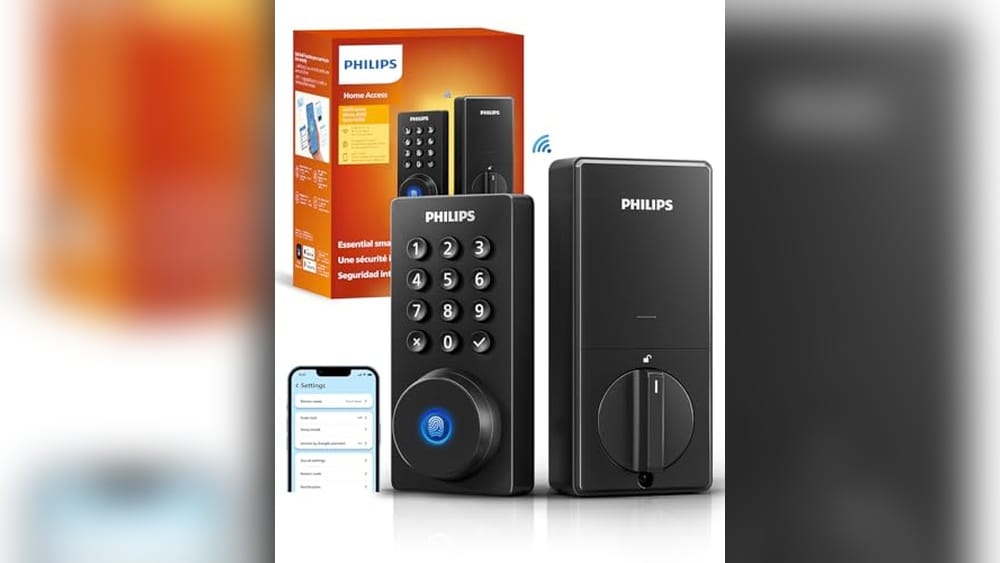
Upgrading to the best smart lock for your front door brings a new level of convenience and security. These locks offer keyless entry, allowing you to lock and unlock your door with a code or app. They fit easily on most doors and often include features like temporary access codes for guests. Choosing the right one means thinking about ease of use, compatibility with your home system, and how you want to control access. A good smart lock keeps your home safe without making you jump through hoops every time you come or go.
Philips Wi-fi Smart Deadbolt
The Best Smart Lock for Front Door for homeowners who want versatile unlocking options and remote access without extra hubs.

Day-to-Day Benefits and Considerations
- Multiple unlocking methods let everyone in the family use what suits them best.
- Remote locking/unlocking adds peace of mind when away from home.
- Fingerprint access speeds up entry during busy mornings.
- Voice control works well but requires app updates and stable Wi-Fi.
- Setup requires being within 65 feet of a 2.4GHz Wi-Fi router for reliable connection.
- Batteries are not included, so plan ahead for power needs.
- Limited to 2.4GHz Wi-Fi, which might be slower than 5GHz networks.
- Advanced features depend on app updates and network stability.
Thoughtful Choice for Modern Entry
The Philips Wi-Fi Smart Deadbolt offers a solid balance between security and convenience. Its flexible unlocking options make daily use straightforward, especially if you juggle different family members’ preferences. The fingerprint feature eliminates fumbling with keys, which can be a real time saver.However, the reliance on a 2.4GHz Wi-Fi network and the need to keep the lock within range might be a minor limitation for some homes. Still, once connected, the remote control and voice commands add a modern touch that feels reliable and practical for everyday life.When to Consider This Lock
This lock fits well for homeowners who want straightforward smart features without complicated hubs. If you need flexible access methods and the ability to manage codes remotely, it’s worth considering. Those who prefer the latest Wi-Fi standards or dislike managing app updates might find it less ideal.Keep in mind the battery requirement and Wi-Fi range when planning installation. If these points are manageable, this lock can add both convenience and control to your front door. A simple tip: update the app regularly to ensure smooth voice control and remote functions.Overall, it’s a dependable choice for a smart deadbolt that balances ease of use with practical features.Teeho Matte Black Smart Deadbolt
The Best Smart Lock for Front Door users who want reliable keyless entry with simple features and strong security.

The TEEHO Matte Black Smart Deadbolt is a keypad-operated lock designed for front doors, eliminating the need for physical keys. It solves the problem of fumbling for keys or worrying about lost copies by allowing up to 20 unique passcodes and even temporary one-time codes for visitors. The auto-lock feature adds convenience and security by locking the door automatically within a set time frame.
Using this lock feels straightforward and dependable. Installation is simple, and the keypad responds well. The battery life is impressive, lasting up to a year with a clear low battery alert. I appreciated the anti-peeping code feature, which adds a layer of privacy when entering passcodes. Overall, it offers confidence without complicated app setups or smart home integrations.
What to Expect from Daily Use
- Easy to program multiple user codes for family and guests
- Auto-lock saves you from forgetting to secure the door
- Durable matte black finish resists weather and wear
- Clear low battery indicator avoids unexpected lockouts
- Simple keypad interface without complicated apps
- Includes two physical keys for backup access
Consider Before Buying
- No smartphone app or remote locking features
- Requires 4 AA batteries, which are not included
- Auto-lock timing needs manual adjustment if desired
- Limited to basic keypad functionality without advanced smart home integration
Choosing This Lock for Your Front Door
This lock fits well if you want straightforward keyless entry with strong basic security, without the fuss of connecting to apps or home networks. It’s great for households that value simple code sharing and automatic locking features. On the other hand, if you expect remote control or voice assistant compatibility, this model might feel too limited.
People who dislike frequent battery changes will find the long battery life reassuring, but those who want extensive remote features should look elsewhere. The included physical keys add peace of mind for emergencies.
A Practical Choice for Secure Simplicity
The TEEHO Matte Black Smart Deadbolt is a solid pick for anyone who needs dependable keypad access and a reliable auto-lock feature on their front door. It suits users who prefer simplicity over smart home bells and whistles.
If you require remote management or app control, this lock may not meet those needs. Remember to keep spare batteries handy to maintain uninterrupted use. The build quality and anti-peeping code function provide a calm sense of security without overcomplication.
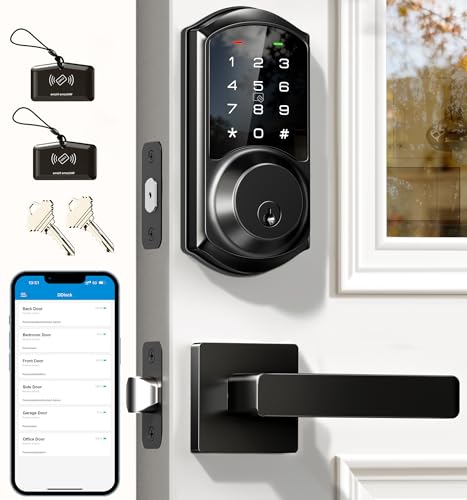
Veise Matte Black Front Door Lock
The Best Smart Lock for Front Door for homeowners who want flexible access control and easy management of guests and tenants.
Everyday Convenience and Security Features
- Multiple unlocking methods including app, codes, and Apple Watch for versatile access.
- Auto-lock feature adjustable between 5 and 900 seconds for peace of mind.
- Stores over 250 user codes with anti-peeping protection to enhance security.
- Remote management via app and web portal without any subscription fees.
- Durable zinc alloy build with waterproof design suits various front door conditions.
Considerations for Use
- Remote features need the G2 gateway sold separately to integrate with smart home systems.
- The weight and size may require careful installation on certain door types.
- Initial setup of codes and permissions may take some time for first-time users.
Insight for Choosing This Lock
This lock fits best for those who want comprehensive control over who can enter their home, especially useful in rental properties or for families with frequent visitors. The ability to create scheduled or temporary codes adds flexibility without physical keys. It feels reliable and well-made, giving a solid sense of security.
Those who prefer a simple lock without app-based controls might find this model more complex than needed. Also, if you don’t plan on adding remote access, some features might go unused.
Guidance for Front Door Security
If you want a smart lock with strong access management and multiple unlocking options, this Veise model is worth considering. It’s especially practical for managing guest access without handing out keys. However, if you dislike dealing with apps or smart home setups, this might not be the best fit.
One tip: take your time to set up user codes carefully to get the most from its security features. Rest assured, this lock’s build quality and thoughtful features mean it can serve well without constant fuss.
Wyze Fingerprint Smart Lock
The Best Smart Lock for Front Door for homeowners seeking a reliable, adaptive keyless entry with fingerprint access and app control.

Daily Experience Highlights
- Fingerprint scanner unlocks the door in just 0.5 seconds, making entry quick and seamless.
- AI learning improves fingerprint recognition accuracy with use, reducing failed attempts.
- Wi-Fi connectivity allows remote lock management and integration with Wyze Video Doorbell.
- Multiple unlocking options: fingerprint, app, code, or physical keys for backup flexibility.
- Long battery life with 8 months of use and USB-C emergency power support.
Considerations Before Buying
- Requires Wi-Fi for full remote control features; limited offline capability.
- Physical size and weight may require compatible door configurations.
- App-based features depend on Wyze ecosystem, which might not suit all users.
Thoughts on the Wyze Smart Lock
This smart lock stands out for its fast and reliable fingerprint access, which feels like a natural upgrade from traditional keys. The AI learning aspect means it adapts to your fingerprint over time, improving convenience without extra effort.
However, the lock relies heavily on Wi-Fi for remote features, so if your home network is unstable, some functionalities could be limited. The physical presence is noticeable but solid, fitting well on most standard doors.
A Practical Choice for Keyless Entry
The Wyze Fingerprint Smart Lock suits homeowners who want quick, keyless front door access with smart home integration. If you value a lock that learns and adapts to your habits, this one fits well. On the other hand, those who prefer simple mechanical locks or lack reliable Wi-Fi may find it less ideal.
Before purchasing, make sure your door can accommodate the lock’s size and that you’re comfortable managing it through the Wyze app. Rest assured, the multiple backup options mean you won’t be locked out if tech issues arise.
Philips Wifi Keypad Smart Lock
For homeowners seeking the Best Smart Lock for Front Door with easy app control and fingerprint access.

This product is a smart lock designed to secure your front door with advanced technology. It solves the hassle of traditional keys by offering multiple ways to unlock, including fingerprint and app control. The built-in WiFi connection lets you manage access remotely without needing extra hubs.
Using this lock feels straightforward and reassuring. The fingerprint sensor is fast, letting you in within seconds, and the app provides real-time status updates. I found it convenient to share access codes for guests and monitor usage, giving a sense of control and security.
Daily Experience Highlights
- Fast and reliable fingerprint unlocking takes less than half a second.
- Remote app control enables locking or unlocking from anywhere.
- Voice assistant compatibility adds hands-free convenience.
- Easy to manage multiple users with varied passcode options.
- Auto-lock feature adds a layer of safety after door closure.
- Matte black finish complements modern front doors discreetly.
Considerations Before Buying
- Requires 2.4GHz WiFi; no support for 5GHz networks.
- May need familiarity with app setup for full functionality.
- Fingerprint sensor might need occasional cleaning for best results.
- Size and handle design should fit your door specifications.
Finding the Right Fit
This smart lock fits homeowners who want seamless keyless entry with strong security features and remote management. It suits families or hosts who often share access codes and appreciate biometric convenience.
It might not be ideal for users uncomfortable with app-based controls or those without stable 2.4GHz WiFi. If you prefer simple mechanical locks without tech involvement, this may feel unnecessarily complex.
- Perfect for tech-savvy households and rental property owners.
- Not recommended if you lack reliable WiFi or dislike managing digital access.
- Consider door compatibility before purchasing.
Thoughts on Practical Use
If you want a smart lock that balances convenience and security without complicated setups, this Philips model is worth considering. It combines fast biometric entry with thorough remote controls, which can simplify daily routines.
Keep in mind that it relies heavily on WiFi and app management, so a stable connection is essential. Once set up, it offers peace of mind by letting you monitor and control access from anywhere.
Schlage Encode Matte Black Deadbolt
The Best Smart Lock for Front Door for homeowners wanting secure, keyless entry with app control and voice assistant compatibility.

The Schlage Encode Matte Black Deadbolt is a smart lock designed to replace your front door deadbolt with keyless entry and remote control. It solves the hassle of physical keys by letting you lock and unlock your door from anywhere using the app. Its built-in WiFi means no extra hubs are needed, making setup straightforward and reliable.
Using this lock feels seamless and secure. The touchscreen is fingerprint-resistant, and managing up to 100 access codes means you can easily share access without worrying about lost keys. I found the installation to be quick, and voice control options with Alexa and Google Home add a layer of convenience for daily use.
Everyday Use Insights for Front Door Security
- Remote locking/unlocking gives control when away from home.
- Easy to manage multiple users with customized access codes.
- Alerts notify you of door activity, enhancing security awareness.
- Fingerprint-resistant touchscreen stays clean and responsive.
- Installation is tool-light and fits standard door sizes without hassle.
- Voice assistant compatibility offers hands-free operation.
- Secure connection with built-in alarms deters forced entry attempts.
Thoughtful Choice for Smart Lock Buyers
This lock is well suited for those who want a robust, app-controlled front door solution without extra hubs or complex wiring. It fits homeowners who appreciate detailed access management and remote monitoring.
It might be less ideal for users who prefer biometric unlocking methods like fingerprint sensors or need integration with less common smart home systems. Also, those without stable WiFi may find some features limited.
Considerations Before You Buy
If you often give temporary access to guests or service providers, this lock’s code management and history tracking will be useful. On the other hand, if you prefer a simpler keypad lock without app control, this could feel more complex than needed.
One tip: ensure your WiFi signal at the door is strong for reliable remote access. This lock offers peace of mind through its security features and ease of daily use, making it a practical choice for modern front doors.
Teeho Satin Nickel Front Door Lock
The Best Smart Lock for Front Door for homeowners wanting simple, keyless access and reliable security.

This smart deadbolt lock replaces traditional keys with a keypad, offering keyless entry for front doors. It solves the common issue of lost or forgotten keys by allowing up to 20 personal access codes and temporary one-time codes for guests. The feature that stands out is its automatic locking option, which can be customized to lock the door between 10 to 99 seconds after closing, enhancing security without extra effort.
Using this lock feels straightforward and secure. Installation is easy, and managing passcodes is intuitive, which means less hassle for the whole family. I appreciate the low battery indicator and the long battery life that can last up to a year, so I rarely worry about power running out unexpectedly.
Everyday Use Highlights
- Multiple access codes support family members and visitors easily.
- Auto-locking feature adds a layer of security without manual locking.
- Durable aluminum alloy withstands weather and daily wear.
- Low battery alert gives peace of mind to avoid lockouts.
- Simple keypad interface with anti-peeping code protection.
- Comes with two mechanical keys as a backup option.
Considerations Before Buying
- Requires 4 AA batteries, which are not included.
- Auto-lock is off by default and needs manual activation.
- Does not support smartphone app control or remote locking.
- The satin nickel finish may show fingerprints over time.
Thoughts for Your Front Door Security
This lock is a practical choice for anyone seeking straightforward, keyless entry without extra smart home complexity. Its keypad and auto-lock features work well for families and frequent guests, providing flexibility and reliable protection. The lack of app connectivity might be a downside for those wanting remote access, but it also means fewer technical issues and easier use.
Installation is hassle-free and the solid build feels reassuring. The one-time guest code is a thoughtful touch for occasional visitors. Just keep in mind the need to replace batteries yearly and activate auto-lock if you want that feature.
Which Front Door Users Will Benefit Most?
Homeowners who want a no-nonsense smart lock that simplifies access while enhancing security will appreciate this model. It fits well for families and those who prefer physical keypad control over smartphone apps.
If you need remote unlocking or integration with smart home systems, this lock might not meet your expectations and could feel limiting.
- Ideal for families with multiple users needing easy code management.
- Good for anyone who wants a sturdy, weather-resistant lock.
- Less suited for tech-savvy users wanting app or voice control.
- Not the best option if you prefer keyless entry via phone.
Practical Security Made Simple
This lock fits well when you want straightforward keyless access and reliable auto-locking without fuss. If you are comfortable managing passcodes and prefer physical controls, it can be a solid addition to your front door.
It’s not designed for remote management, so skip it if that’s essential for you. Otherwise, keep a few spare batteries on hand and activate the auto-lock feature to get the most out of this lock’s security benefits. This product offers calm assurance through solid build quality and easy daily use.
Veise Fingerprint Smart Lock
The Best Smart Lock for Front Door for families and busy households seeking secure, quick, and keyless access without hassle.

Practical Use Insights for Front Door Security
- Fingerprint sensor unlocks in 0.3 seconds, saving time during busy moments.
- Multiple entry modes including codes, keys, and temporary passes suit all household members.
- Auto-lock feature adds convenience and peace of mind by securing the door automatically.
- Durable matte black zinc alloy handles feel sturdy and comfortable to operate.
- Water and temperature resistance ensure reliable performance outdoors.
Considerations Before Choosing
- Setup may require careful attention to programming fingerprints and codes.
- Limited to 20 fingerprints and codes; larger families or shared properties might find this restrictive.
- Some users may prefer integration with smart home systems, which this lock does not emphasize.
Thoughts on the Veise Fingerprint Lock
This lock stands out for its quick fingerprint recognition and flexible access options, balancing security and ease effectively. The auto-lock and one-touch lock features add a layer of convenience that suits daily routines well.
While installation and initial setup take some time, the overall use is straightforward and gives a confident feeling of safety. A small trade-off is the limited capacity for stored fingerprints and codes, which might challenge larger households.
Who Benefits Most and Who Might Look Elsewhere
This smart lock fits families or individuals who value quick entry and multiple ways to access without traditional keys. It’s especially good for households with kids, elders, or frequent visitors needing temporary codes.
Those requiring extensive integration with home automation or needing to store many user credentials may find this lock limiting. Also, if you prefer smartphone app control, this model might not meet that need fully.
- Ideal for medium-sized families or rental property owners.
- Good for users wanting a robust and weather-resistant lock.
- Less suitable for smart home enthusiasts expecting app control.
- Not recommended if you need more than 20 user codes or fingerprints.
Balanced Choice for Secure and Easy Front Door Access
The Veise Fingerprint Smart Lock works well for those who want a straightforward, reliable keyless solution that doesn’t overcomplicate daily use. It’s practical for families juggling multiple users and visitors, providing quick entry without sacrificing security.
If you need extensive smart integrations or a very high user capacity, you may want to consider other options. However, for typical home use, this lock offers solid performance with easy-to-understand features.
One tip: spend time during setup to register fingerprints and codes carefully to avoid future access issues. Once programmed, this lock offers calm reassurance that your door is secure and easily accessible.
Veise Matte Black Smart Lock
The Best Smart Lock for Front Door for homeowners wanting flexible, secure access control without fuss.

Everyday Convenience and Security Details
- Multiple access modes: app, codes, fobs, keys, thumb turn
- Manage up to 250 user codes remotely via app
- Auto-lock and privacy modes enhance home security
- Touchscreen keypad designed to prevent peeping and hacking
- Optional smart home integration with voice control
Considerations for Use
- Smart home gateway required separately for remote voice control
- Installation requires some basic door hardware knowledge
- Battery alerts help but require periodic replacement
Thoughts on the Veise VE06-H Smart Lock
This lock brings a solid balance of security and flexibility. The multiple ways to enter mean you can tailor access easily for family, guests, or service people. The anti-peeping keypad is a thoughtful feature for privacy and safety.
Using the app to generate and manage codes adds convenience, though setting everything up takes a little time. The lock feels sturdy and reliable on the door, giving confidence that it won’t fail at critical moments.
Choosing the Right Smart Lock for Your Front Door
If you want a secure deadbolt with diverse access options and don’t mind managing codes and occasional battery changes, this lock fits well. It suits busy households and small offices where multiple users need controlled entry.
However, if you prefer a fully integrated smart home device out of the box or want voice control without extra hardware, this might not meet your needs. Also, those who dislike app-based management may find it cumbersome.
- Ideal for households with frequent visitors
- Good for those wanting strong security with easy sharing
- Less suitable for users seeking plug-and-play smart home integration
- Not recommended for non-technical users uncomfortable with setup
Practical Thoughts Before Buying
This lock is well suited for anyone wanting a keyless, flexible front door solution without overcomplicated features. If you often need to grant temporary access, the app makes it straightforward. On the other hand, if you dislike managing multiple codes or devices, this could feel like extra work.
When installing, take your time to follow instructions carefully for smooth operation. Once set up, you can trust the lock to keep your front door secure while simplifying access for all authorized users.
Veise Matte Black Wifi Smart Lock
The Best Smart Lock for Front Door for homeowners seeking flexible, secure, and remote keyless access control.

Daily Use and Access Features
- Multiple ways to unlock: fingerprint, app, PIN, voice, key, and more for user convenience.
- Remote control and monitoring via Wi-Fi without the need for an extra hub.
- Auto-lock feature adjustable between 10 to 180 seconds for added security.
- Supports integration with Alexa and Google Assistant for voice commands.
- Waterproof design rated IP65, suitable for outdoor front door use.
Considerations Before Purchase
- Requires smartphone app setup and Wi-Fi connectivity for full remote features.
- Fingerprint sensor speed and recognition may vary depending on conditions.
- Installation may be more complex than traditional locks and might need some DIY skills.
Choosing This Lock for Your Front Door
This smart lock fits homeowners who want secure, versatile access options and remote management. It is ideal for families or shared living situations where multiple users need easy entry without physical keys. The waterproof feature ensures durability against weather.
However, if you prefer a simple mechanical lock or have limited tech comfort, this model may feel overwhelming. Also, the need for Wi-Fi means it’s less suited for locations with poor internet coverage.
- Great for tech-savvy users and families.
- Less suited for those wanting a purely mechanical lock.
- Best if you have reliable home Wi-Fi.
- Useful for those who want to monitor and control access remotely.
Practical Thoughts on the Veise Smart Lock
The Veise Matte Black Smart Lock delivers a solid balance of convenience and control. Its multiple unlocking methods provide flexibility, and the remote app management adds peace of mind when away from home. In daily use, the lock feels responsive and easy to handle.
The trade-off is the need to set up and maintain the app and Wi-Fi connection, which might be a hurdle for some. Overall, it’s a dependable choice for users ready to embrace smart home technology without complexity.
How To Choose The Best Smart Lock For Front Door Without Overthinking
Start by thinking about how you usually enter your home. Do you want quick fingerprint access or prefer keypad codes? Consider if remote control from your phone matters to you. Most people miss checking compatibility with their home Wi-Fi and voice assistants. Also, check if you need a lock with auto-lock features for convenience. Size and door type should match your lock choice. Keep it simple and focus on features that fit your daily routine.
The 30-second Checklist
- Does the smart lock fit your door’s thickness and backset?
- Can you easily unlock it the way you prefer (fingerprint, code, app)?
- Is the lock compatible with your home Wi-Fi network (2.4GHz vs 5GHz)?
- Does it support voice assistants you use, like Alexa or Google Assistant?
- Is battery life sufficient and does it have low battery alerts?
- Can you set multiple user codes or fingerprints for family and guests?
Regret Prevention When Picking Your Smart Lock
Regret #1: Choosing a lock that doesn’t fit your door properly. Before buying, measure your door thickness and check the lock’s size and compatibility. This prevents installation headaches and returns.
Regret #2: Overlooking Wi-Fi compatibility. Many locks only support 2.4GHz networks. Ensure your home network matches to avoid connectivity issues and loss of remote control features.
Regret #3: Forgetting to consider user access needs. If you share your home often, pick a lock that allows multiple fingerprints or passcodes. This avoids the hassle of sharing keys or resetting codes frequently.
Quick Pick Table For Best Smart Lock For Front Door
| If you want… | Look for this | Avoid this |
|---|---|---|
| Easy remote control from anywhere | Built-in Wi-Fi with no extra hub needed | Locks that require separate hubs or bridges |
| Quick fingerprint access | High DPI fingerprint sensor with fast recognition | Basic fingerprint scanners with slow response |
| Multiple user access options | Supports multiple fingerprints and passcodes | Locks limited to one or two user codes only |
| Voice assistant compatibility | Works with Alexa, Google Assistant, or both | Locks without any voice control support |
| Durable and weather-resistant lock | IP54 or higher waterproof rating and sturdy materials | Indoor-only locks without weather protection |
Tips For Setup And Daily Use Of Smart Locks
- Measure your door thickness and backset before purchase.
- Connect the lock to your 2.4GHz Wi-Fi for reliable remote access.
- Register fingerprints and passcodes for all regular users early on.
- Keep backup physical keys accessible in case of battery failure.
- Regularly check battery levels and replace batteries before they get low.
- Use the app to monitor access logs and manage user permissions.
Faqs About Best Smart Lock For Front Door
Will this smart lock fit my front door?
Check your door’s thickness and backset measurements. Most smart locks fit standard doors, but always verify the product specs to ensure a proper fit.
Are these smart locks compatible with all Wi-Fi networks?
Most smart locks support only 2.4GHz Wi-Fi networks. They do not work with 5GHz networks. Confirm your home Wi-Fi frequency before buying.
Can I use voice commands to lock and unlock the door?
Many smart locks work with Alexa and Google Assistant for voice control. Check the product details to see if voice assistant compatibility is included.
How long do the batteries last in these locks?
Battery life varies but typically lasts from several months up to 8 months. Most locks have low battery alerts to remind you when to replace them.
Is it easy to add or remove user codes and fingerprints?
Yes, smart locks generally allow easy management of user access through the app or keypad. You can add, delete, or schedule codes and fingerprints as needed.
Are these locks weather-resistant for outdoor use?
Look for locks with an IP54 rating or higher for good weather resistance. This ensures durability for front door exposure to elements.
What if the lock malfunctions or I lose connectivity?
Most smart locks include physical keys as a backup. Also, some allow temporary codes for emergencies. Regular firmware updates and good Wi-Fi help reduce issues.
Closing Thoughts On Choosing The Best Smart Lock For Front Door
Choosing the best smart lock for your front door means focusing on how you want to use it every day. Prioritize ease of access, compatibility with your home systems, and reliable security features. Think about who will use the lock and how often remote control matters.
If you are unsure, let your preferred unlocking method be your tie-breaker. Whether that is fingerprint speed, app control, or keypad convenience, selecting a lock that fits your lifestyle will reduce hassles and improve home security.