
Most meeting rooms are full of distractions. Touch panels promise to make things smoother, but finding the right one isn’t simple. Maybe you’ve struggled with confusing controls, clunky interfaces, or tech that doesn’t quite fit your team’s style.
Choosing a touch panel for a meeting space is rarely straightforward. There are a lot of choices, and they all look similar at a glance. Some focus on simple scheduling, while others combine video calls, whiteboarding, and more. Prices range widely.
What’s best for a small huddle room may not suit a big boardroom or classroom. It’s easy to get lost in details that don’t actually matter for daily use.
This guide will help you sort through the noise and focus on what actually matters for your meetings and spaces.
How To Think About Meeting Room Touch Panels
Start with your real needs. Do you want an easy way to book rooms, or do you need full video collaboration? Will everyone use the panel, or just IT staff? Consider how your team works now, and what would actually make their meetings easier—not just what’s newest or most advanced.
Common Buyer Mistakes
Many people buy touch panels based on features they won’t use. Others choose the cheapest option, only to find it’s slow or awkward. Some overlook compatibility with the meeting platforms they already use. It’s worth thinking about day-to-day experience, not just the spec sheet.
The options below cover a range of needs, room sizes, and budgets. Each was chosen for a clear use case, so you can match your workflow to the right type of panel.
Yealink Meetingbar A10 With Ctp18 Touch Panel
A top pick among Best Touch Panels for Meeting Rooms, this Yealink bundle makes meeting control easy and reliable for small conference spaces.

The Yealink MeetingBar A10 with CTP18 Touch Panel is an all-in-one video conferencing solution designed for small meeting rooms. It combines a 4K camera, powerful microphones, a built-in speaker, and a smart touch controller in a compact device. This system solves the hassle of juggling multiple devices and cables, offering a seamless experience for Microsoft Teams and Zoom Rooms.
Using the CTP18 touch panel feels intuitive, making it easy to manage meetings and adjust settings without confusion. The noise cancellation and auto framing features help everyone stay focused, regardless of distractions in the room. With everything integrated, meetings start faster and run more smoothly, giving you consistency and peace of mind every time.
Why Teams Choose This Setup
- One device covers camera, mic, speaker, and control panel
- Touch panel makes meeting management simple
- Native support for Microsoft Teams and Zoom
- AI-powered video keeps everyone visible
- Advanced noise cancellation improves audio clarity
- Quick installation with plug-and-play design
- Flexible connectivity: Wi-Fi or wired network
Consider Before Buying
- Optimized for small rooms, not large spaces
- Heavier than some alternatives at nearly 10 lbs
- No mention of battery operation—needs power outlet
Who This Fits Best
This Yealink bundle is ideal for teams setting up dedicated small meeting spaces and wanting a hassle-free, unified system. It removes the stress of complicated hardware setups and makes switching between Teams and Zoom effortless. If you want to skip technical guesswork and standardize your meeting tech, this fits perfectly.
A quick tip: mount the MeetingBar at eye level for the best auto framing results and make sure your Wi-Fi or Ethernet connection is stable before important meetings. With its reliable design and intuitive control, you’ll experience fewer surprises and more productive sessions. Personally, I appreciate how much time it saves compared to piecing together separate devices.
| Best for | Why |
|---|---|
| Small meeting rooms | Optimized camera framing and sound for compact spaces |
| Teams using Microsoft Teams or Zoom Rooms | Native integration for seamless scheduling and control |
| Quick conference room setup | Plug-and-play design with included cables and mounting options |
| Noise-prone office environments | Advanced noise cancellation ensures clear audio for all |
Rocware Rt13 Room Scheduling Touch Panel
One of the Best Touch Panels for Meeting Rooms for those wanting easy room scheduling with a simple touch interface.

The ROCWARE RT13 Room Scheduling Touch Panel offers a straightforward solution for managing meeting room bookings. Its touch screen lets users reserve rooms and control meeting schedules with minimal effort. This is a practical option for offices needing a dedicated panel for quick scheduling.
Daily use feels intuitive, with reliable touch response and a clear interface. The panel’s compact size fits well on walls or desks, making it easy for anyone to access. It helps reduce confusion about room availability and keeps meetings on track without extra hassle.
Key Advantages For Meeting Rooms
- Simple touch interface for fast scheduling
- Reduces booking conflicts and confusion
- Fits easily in most spaces
- Clear, easy-to-read display
- No need for complicated setup
- Consistent performance for daily use
Consider Before Buying
- Only offers touch screen (no advanced features)
- May not integrate with all booking systems
- Limited customization options
Who This Fits Best
This panel is a strong match for offices or shared spaces where meeting room scheduling causes delays or confusion. It removes the need for paper sign-ups or manual tracking, saving time and reducing stress for staff and guests.
For best results, place the panel in a visible spot near your meeting rooms. Once installed, you gain reliable, consistent booking with fewer surprises and last-minute changes. Using it feels natural, and it quickly becomes part of the routine.
If you want something simple that just works, this panel is worth considering.
| Best for | Why |
|---|---|
| Office meeting rooms | Makes scheduling and booking visible and easy |
| Co-working spaces | Reduces conflicts between users |
| Small conference areas | Fits compact spaces and keeps schedules organized |
| Teams with basic needs | No extra setup or training required |
Yealink Roompanel E2 Meeting Room Panel
A standout in Best Touch Panels for Meeting Rooms, this Yealink panel helps teams manage room schedules with clarity and ease.

The Yealink Roompanel E2 Meeting Room Panel is designed to streamline scheduling for busy workplaces. It makes it easy to see which rooms are booked and when they’re available, reducing confusion and double-bookings. Its clear display and all-in-one design are aimed at keeping office communication smooth.
Using this panel in a meeting space means less time spent figuring out room logistics. The interface is straightforward, so teams can quickly check schedules and get on with their day. For those managing multiple meeting rooms, it brings a sense of order and reliability to daily operations.
Why Offices Choose This Panel
- Reduces booking conflicts in shared spaces
- Easy to install and fits most meeting rooms
- All-in-one panel minimizes hardware clutter
- Clear, readable display for fast checks
- Sleek black design suits professional environments
- Sturdy build feels reliable in daily use
What To Consider Before Buying
- May be heavier than some wall-mount panels
- Feature set is basic compared to advanced smart panels
- No built-in price or user review data to help with comparisons
Who This Fits Best
This panel is best for offices that need simple, reliable meeting room scheduling without unnecessary complexity. If you want to avoid the hassle of double-booked spaces and time wasted searching for open rooms, this solution delivers clarity at a glance.
It’s especially useful for organizations with multiple shared rooms where clear status is key.
To get the most from it, mount the panel where it’s easily visible outside each meeting room. This small step means fewer interruptions and more efficient meetings. You can expect fewer surprises and greater confidence that your room schedule will stay on track.
I appreciate how it keeps things straightforward for everyone using the space.
| Best for | Why |
|---|---|
| Busy offices with shared meeting spaces | Reduces confusion and double-bookings |
| Facilities teams managing multiple rooms | Makes room status visible and consistent |
| Companies wanting clutter-free installations | All-in-one panel design saves space |
| Modern workspaces valuing style and reliability | Sleek look fits professional environments |
Specialtouch 60-inch Multi-touch Ir Panel
As one of the Best Touch Panels for Meeting Rooms, this overlay offers reliable, driver-free multi-touch for smooth meeting interactions.

The SpecialTouch 60-Inch Multi-Touch IR Panel is an interactive overlay that transforms ordinary displays into responsive touch surfaces. Designed to eliminate the hassle of complicated installs, it connects via USB and calibrates automatically—making it a practical choice for conference rooms where time matters.
The aluminum alloy frame offers durability for daily use in shared spaces.
Using it feels intuitive and smooth, thanks to fast touch response and no noticeable lag. It brings confidence to group sessions, since everyone’s input is recognized accurately, with no jumpy or missed touches. Maintenance is minimal, letting teams focus on collaboration instead of troubleshooting hardware.
Why Teams Choose This Panel
- Simple USB plug-and-play setup
- Works with Windows, Android, and Linux
- Accurate, lag-free touch response (≤10ms)
- Resistant to ambient light—suitable for different rooms
- Durable aluminum alloy frame
- No driver installation required for most systems
Points To Consider Before Buying
- Does not include monitor or glass—overlay only
- Not compatible with Smart TVs
- Requires HID driver installation for Mac OS
Who This Fits Best
This panel suits meeting spaces where different devices and users cycle through, and there’s no time for complicated setups. It removes the stress of frequent troubleshooting and compatibility checks—just plug in and start. For a seamless experience, review the installation guide images before setting up.
Teams gain peace of mind knowing the touch panel responds quickly and accurately, even in rooms with changing light. If you want reliable touch input without constant IT help, this overlay delivers. I like that it’s maintenance-free and driverless for most systems.
| Best for | Why |
|---|---|
| Conference room upgrades | Quickly adds touch to existing large displays |
| Multi-user brainstorming | Accurate, simultaneous input recognition |
| Shared tech spaces | Driver-free setup reduces support needs |
| Environments with varied lighting | Light-resistant design keeps touch consistent |
Yealink A30 Meeting Bar With Touch Panel
A top choice in Best Touch Panels for Meeting Rooms, this Yealink setup streamlines medium-sized room meetings for effortless collaboration.
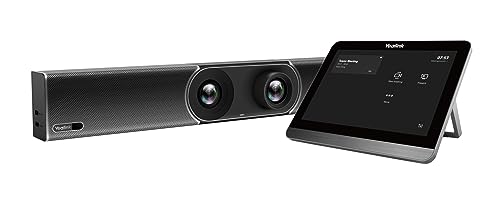
The Yealink A30 Meeting Bar with CTP18 Touch Panel is an all-in-one Android video collaboration solution designed for medium-sized meeting rooms. It combines video, audio, and touch control in a single package, making setup quick and management straightforward. The included touch panel puts meeting controls right at your fingertips, reducing clutter and complexity.
Using this meeting bar feels intuitive and consistent. Meetings start on time, and controls are easy to navigate, which helps teams focus more on discussion and less on technology. The hardware is compact, and the touch panel responds quickly, creating a seamless experience for both scheduled and spontaneous meetings.
Key Advantages For Meeting Rooms
- All-in-one design reduces equipment needs
- Touch panel allows for easy meeting control
- Quick setup streamlines installation
- Fits medium-sized rooms perfectly
- Android-based system simplifies operation
- Minimal cabling keeps the space tidy
Things To Consider Before Buying
- Not ideal for larger or very small rooms
- No detailed features listed for advanced users
- Limited to Android ecosystem
Who This Fits Best
This product is ideal for teams who want reliable, easy-to-use touch panels for meeting rooms without dealing with complicated setups or multiple devices. It takes away the hassle of managing separate audio, video, and control systems and helps meetings run smoothly from the start.
For anyone who values simplicity and consistency, this solution delivers peace of mind.
To get the best results, place the touch panel within easy reach of all participants. Once it’s set up, you can expect fewer technical surprises and more productive meetings. If I were setting up a medium meeting room, I’d want this for its straightforward approach and dependable performance.
| Best for | Why |
|---|---|
| Medium-sized meeting rooms | Designed for optimal coverage and user access |
| Teams needing quick setup | All-in-one package minimizes installation time |
| Users preferring touch controls | Intuitive panel reduces learning curve |
| Workspaces aiming for tidy tech | Minimal cabling and compact hardware |
Yealink Meetingbar A25 With Touch Panel
One of the Best Touch Panels for Meeting Rooms, the Yealink MeetingBar A25 streamlines video conferencing and control in small spaces.

The Yealink MeetingBar A25 with CTP25 Touch Panel is a compact all-in-one video conferencing solution, designed to simplify meetings in small rooms. Its triple-camera system with a 151° ultra-wide field of view ensures everyone in the room is visible, making remote calls more inclusive and natural.
With built-in microphones and intelligent noise reduction, it delivers clear audio without the need for extra devices.
Using the touch panel is straightforward and fast. Logging in is a one-time process, so you spend less time setting up and more time focusing on your meeting. The system’s support for Microsoft Teams, Zoom, and BYOD mode makes it flexible for different workplaces and easy to rely on for consistent performance every day.
Key Advantages For Meeting Room Teams
- Triple-camera system covers all participants in small rooms
- Ultra-wide 151° field of view for complete visibility
- 8-microphone array with 5-meter voice pickup reduces missed speech
- Intelligent noise reduction improves clarity during calls
- Direct login with CTP25 Touch Panel speeds up room setup
- Compatible with Microsoft Teams, Zoom, and BYOD for flexibility
- Simple deployment minimizes IT involvement
Potential Limitations To Consider
- Optimized for small rooms—may not suit larger spaces
- Relatively heavy compared to some alternatives (14.15 lbs)
- Requires initial investment in both hardware and platform licensing
When I’d Pick This
This solution shines when you need reliable, all-in-one control for small meeting rooms and want to avoid the hassle of managing multiple devices. It’s best for teams using Microsoft Teams or Zoom who prioritize ease of use and want everyone in the room to be seen and heard clearly.
If you want to remove setup stress and make meetings start on time, the direct login with the CTP25 Touch Panel is a real time-saver. My tip: connect it to your preferred platform first, then show your team the single-login process—this simple step reduces confusion and makes recurring meetings smooth. You’ll gain peace of mind knowing your room tech is easy to use and reliable, with fewer surprises before calls.
| Best for | Why |
|---|---|
| Small conference rooms | Covers all participants with wide 151° camera and clear pickup |
| Teams switching between Zoom and Teams | Native compatibility streamlines platform transitions |
| Offices needing fast setup | Single login via touch panel saves time and reduces errors |
| Spaces with frequent remote meetings | Triple-camera and advanced microphones improve remote experience |
Promethean Activpanel 10 Digital Whiteboard
A smart choice among Best Touch Panels for Meeting Rooms for buyers needing flexible device options and smooth meeting experiences.

This digital whiteboard is designed for meeting rooms and classrooms where collaboration matters. The Promethean ActivPanel 10 solves the hassle of switching devices by letting you interact with two connected sources at once, making meetings flow without interruption.
Using it feels intuitive and reliable, especially when running familiar apps like Teams, Zoom, or Meet. The built-in soundbar and microphone array make voices clear, so everyone is heard. You get flexible options to make the panel work just how you like, keeping your work consistent and easy.
Why Teams Choose This Panel
- Flexible device and OS options for familiar workflows
- Picture-in-picture for efficient multitasking
- Works with Teams, Zoom, and Meet out of the box
- Built-in soundbar and 8-array microphone for clear audio
- Customizable setup to fit various meeting room needs
- Three years onsite support included
Things To Keep In Mind
- Large size requires ample wall space
- Setup may need IT support for full customization
- No price transparency in product data
Where This Shines
The Promethean ActivPanel 10 Digital Whiteboard is ideal for offices or meeting rooms where teams need to switch between devices without losing time. It takes away the stress of juggling sources and lets you focus on the discussion. If your group often uses video calls or presents from different laptops, this panel keeps things running smoothly.
One tip: take time to explore the different panel configurations and OS options before your first meeting—this helps you set up a workspace that feels right for your team. With onsite support and a reliable interface, you’ll spend less time troubleshooting and more time collaborating. I like that it’s designed for both classrooms and professional environments, making it a versatile choice for many workplaces.
| Best for | Why |
|---|---|
| Meeting rooms with device variety | Switches easily between Windows, Chrome, and Android OPS |
| Teams using video conferencing | Supports Teams, Zoom, and Meet natively with strong audio |
| Offices needing flexible panel setup | Customizable configuration for different spaces and needs |
| Training sessions and interactive lessons | Brings presentations and group work to life with touch and audio features |
Avocor 86″ Interactive Display
This premium choice in Best Touch Panels for Meeting Rooms delivers lifelike clarity and seamless collaboration for executive boardrooms.

The Avocor 86″ Interactive Display is a large-format touch panel designed for high-end meeting rooms. It solves the challenge of getting everyone engaged in collaborative sessions by offering a crystal-clear 4K display and ultra-precise InGlass touch response. The anti-glare glass reduces distractions and makes it easy to see content from anywhere in the room.
Using this panel feels intuitive—writing and drawing on the surface is smooth, like pen on paper, and you don’t have to worry about accidental marks thanks to palm rejection. Meetings flow more naturally, with integrated audio that fills the space and reliable connectivity options for quick setup.
It brings confidence to presenters and participants, removing technical hassles.
Why Teams Choose This Display
- Ultra-responsive InGlass touch makes writing effortless
- Large 86″ 4K UHD screen suits big boardrooms
- Edge-to-edge anti-glare glass reduces reflections
- Integrated dual speakers—no need for extra audio gear
- Multiple connectivity options streamline AV and IT integration
- Modern, clean design fits executive environments
Consider Before Buying
- Large size may not suit small rooms or limited wall space
- High weight (162 lbs) requires careful installation
- No built-in video conferencing camera
Where This Shines
This display is best for executive teams needing a reliable, interactive centerpiece for high-stakes meetings and strategy sessions. It removes the guesswork from presentations by providing instant touch accuracy and clear visuals, so you can focus on the discussion—not the tech.
If you want consistent performance with minimal setup, this panel delivers peace of mind for every session.
To get the most out of it, connect your preferred device via the built-in USB hub or HDMI and make use of the integrated speakers for a clutter-free setup. You’ll feel more prepared and less distracted, knowing the tech just works.
I find that having a trusted touch panel like this reduces last-minute meeting stress and helps keep teams engaged.
| Best for | Why |
|---|---|
| Executive boardrooms | Large display and premium design support high-level meetings |
| Team collaboration spaces | Ultra-precise touch enables smooth whiteboarding and brainstorming |
| AV-integrated meeting rooms | Comprehensive connectivity makes setup seamless |
| Environments with ambient light | Anti-glare glass keeps content visible from any angle |
Yeah Places 110″ Interactive Touch Panel
A top pick among Best Touch Panels for Meeting Rooms, it stands out for seamless multi-user collaboration and flexible system integration.

This is a large-format interactive flat panel designed to bring digital clarity and hands-on engagement to conference rooms and classrooms. Its 110-inch 4K touch display with anti-glare glass helps everyone see and interact, even in bright spaces. For teams needing to share content or notes instantly, the built-in wireless screen sharing and smart pen are game changers.
Using it feels intuitive, whether you’re leading a meeting or brainstorming ideas together. Multi-touch and split-screen features let people work side by side without hassle. The integrated camera and speakers support smooth video calls, so you won’t worry about being seen or heard clearly.
There’s a sense of reliability that meetings will run without technical hiccups or wasted time.
Where It Excels In Real Workspaces
- Very large 4K anti-glare screen suits group work and presentations
- Dual Windows and Android systems fit various software and app needs
- Wireless casting supports up to 4 devices at once
- Smart pen makes note-taking and annotations feel natural
- Integrated 48MP camera and speakers simplify video meetings
- Split-screen and reverse touch control for interactive teamwork
Things To Consider Before Buying
- Large size (110″) may not fit smaller rooms or standard wall mounts
- Heavy unit (242 lbs) requires professional installation
- No built-in price or sales info—may need to check for budget fit
Who This Fits Best
This touch panel is best for large meeting rooms or classrooms where teams need to collaborate, share ideas, and run hybrid meetings with minimal fuss. It removes the stress of technical setup, so meetings start on time and run smoothly.
If you regularly switch between Windows and Android, the dual system saves you hassle and guesswork.
A quick tip: take advantage of the smart pen and built-in whiteboard features to capture every idea, then share notes instantly using the QR code function. That way, nothing gets lost after your session. You can count on the system for stable performance, reducing surprises and technical interruptions. If you value easy teamwork and clear communication, this panel makes meetings less stressful and more productive.
| Best for | Why |
|---|---|
| Large conference rooms | 110″ screen ensures visibility and engagement for big groups |
| Hybrid and remote meetings | Integrated 48MP camera and audio simplify video conferencing |
| Collaborative brainstorming | 20-point multi-touch and split-screen support team interaction |
| Flexible software needs | Dual OS lets you run both Windows and Android apps |
Cryonavis 65″ Interactive Smart Board
A top pick among Best Touch Panels for Meeting Rooms, this smart board offers seamless collaboration for teams and presenters.

The Cryonavis 65″ Interactive Smart Board is an all-in-one digital whiteboard designed for modern offices and classrooms. It helps teams share ideas, present, and interact without messy cables or extra devices. The built-in 4K UHD touchscreen makes visual work clear and engaging.
Using it feels natural—writing, zooming, and sharing screens is quick and smooth. Meetings and lessons become more efficient, as participants can easily connect from laptops or phones. The integrated camera and mic simplify hybrid calls, reducing the setup time and keeping everyone focused.
Reasons To Choose This Board
- 20-point touch supports multiple users at once
- Built-in HD camera and microphone for quick video calls
- Easy wireless screen sharing from any device
- Large, vibrant 4K display for clear presentations
- Runs on Android 13 for app flexibility
- All-in-one design reduces clutter and setup time
Consider Before You Buy
- Large size needs enough wall or floor space
- No mention of whiteboard cloud integration
- May be more than needed for very small meeting rooms
Who This Fits Best
If your team often collaborates in person or needs to connect remote members, this smart board is a solid fit. It streamlines meetings by combining video, sharing, and annotation into one device—no need to juggle adapters or separate hardware. You can focus on running the meeting, not on tech setup.
A tip: try the wireless mirroring feature for sharing content quickly from any device—this makes switching presenters effortless. With its reliable touch response and built-in video tools, you’ll avoid common tech surprises and keep meetings on track. Personally, I appreciate how it cuts down on pre-meeting stress.
| Best for | Why |
|---|---|
| Mid-sized meeting rooms | Large screen and multi-user touch support group sessions |
| Hybrid video conferences | Built-in camera and mic minimize setup hassle |
| Interactive presentations | Smooth touch and wireless sharing keep meetings engaging |
| Training sessions | Annotate and save notes easily for group learning |
Key Considerations Before Choosing An Interactive Panel Or Meeting Bar
- Intended Use: Decide whether your main need is video conferencing, collaboration, teaching, or scheduling. Some panels focus on whiteboarding and lesson delivery, while others excel in remote meetings.
- Room Size: Match device size and camera/audio capability to your space. Large rooms need bigger displays and wider audio pickup; small rooms may only need a compact bar.
- Compatibility: Ensure the device integrates with the platforms you use most, such as Teams, Zoom, or Google Meet. Some solutions are optimized for specific platforms.
- Installation & Setup: Consider how much time and expertise you have for setup. All-in-one units are typically easier to deploy, while larger panels may need more planning.
- Ongoing Maintenance: Touchscreens and complex systems require occasional cleaning and software updates. Consider your team’s ability to maintain the device.
Common Mistakes When Selecting Meeting Room Technology
- Overestimating Features: It’s easy to be drawn to advanced capabilities you may never use. Focus on your core needs.
- Ignoring Compatibility: Not every device works seamlessly with every video platform or operating system.
- Forgetting Room Acoustics: Great microphones can’t always compensate for a noisy or echoing room.
- Neglecting Training: Even intuitive touch panels can frustrate users if not introduced properly.
Who Might Want To Avoid These Products
- Small teams that only need basic video calls and don’t require touch or collaboration features.
- Organizations with strict IT or security policies that may not allow external devices or cloud-linked hardware.
- Anyone looking for a portable, lightweight solution—most panels and bars are designed for fixed installations.
Setup And Usage Tips
- Test your network connection before installation. Wired is usually more reliable than Wi-Fi for meetings.
- Calibrate touch panels as soon as setup is complete for best accuracy.
- Update firmware regularly to access new features and security patches.
- Position cameras at eye level for more natural video calls.
- Clean screens and microphones with appropriate materials to avoid damage.
Frequently Asked Questions
Can I Use These Panels With Both Windows And Mac Devices?
Most interactive panels support Windows and Mac for screen sharing, but some features may work best on Windows. Check compatibility details for your main use case.
Do I Need Special Software To Run Meetings?
Many devices come with built-in support for Teams or Zoom. For other platforms, you may need to connect via BYOD (bring your own device) mode or install additional apps.
How Difficult Is Installation?
All-in-one bars are usually plug-and-play. Large panels may need wall mounting and professional setup, especially in classrooms or boardrooms.
Are These Solutions Suitable For Hybrid Teams?
Yes, most are designed for hybrid work, with features for remote participation and content sharing. Make sure your space has adequate connectivity.
Can I Write Directly On The Screen?
Interactive panels allow direct writing and drawing, usually with a finger or included stylus. Some bars or scheduling panels do not offer this feature.
What Maintenance Is Required?
Regular cleaning and occasional software updates are recommended. For panels with cameras and mics, check for dust or obstructions.
Final Thoughts
Choosing the right meeting room technology depends on your team’s specific needs, room size, and existing workflows. Take time to match features to your priorities, consider long-term maintenance, and plan setup carefully. With a clear understanding of your requirements, you can select a solution that streamlines collaboration without unnecessary complexity.