
Filming indoor basketball is exciting, but it can be tricky to capture every moment. Maybe you’re a parent recording your child’s game, a coach wanting to review plays, or a player looking to build a highlight reel.
Choosing the right video camera for indoor basketball isn’t simple. Lighting inside gyms varies, action moves fast, and you might want to shoot from the stands, a tripod, or even attach a camera to a fence. Some cameras are easy to use but miss details, while others offer pro-level features that take time to learn.
You also face choices about zoom, stabilization, battery life, and whether you need something lightweight or more robust. There are basic models for tight budgets, but premium gear can cost much more.
This guide will help you find the type of video camera setup that matches your real needs, so you can record games without stress or surprises.
What Matters Most When Filming Indoor Basketball?
Low light performance, zoom range, and how steady your shots are tend to make the biggest difference. If you want to film from far away or cover the whole court, think about zoom and stabilization. If you prefer simple setup and sharing, look for easy controls and wireless features.
Accessories like tripods or mounts can help, but not everyone needs them.
Below, you’ll find a range of options for different filming styles and budgets. Each one has strengths and limits, so you can pick what fits you—not just what’s popular.
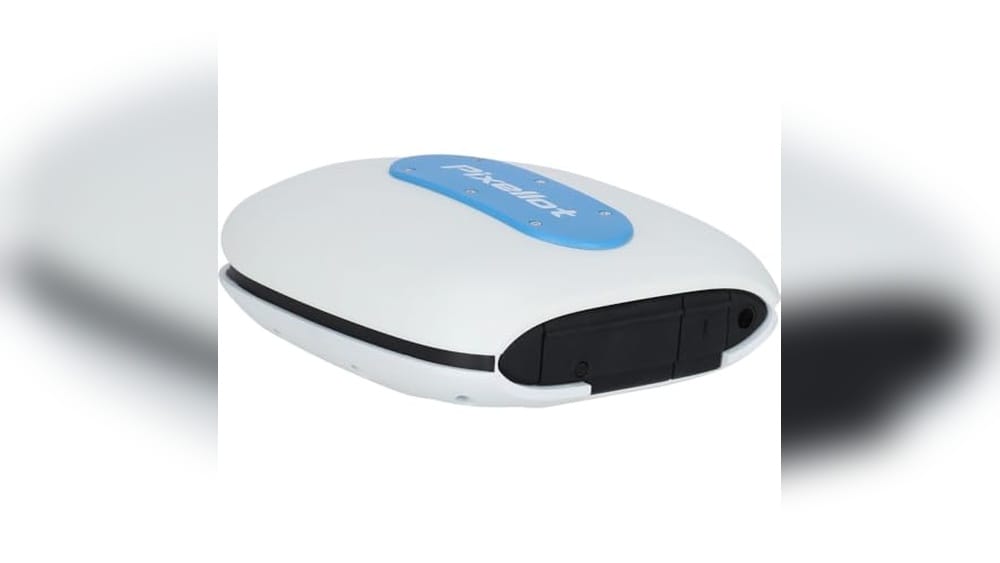
Pixellot Air Nxt Indoor Basketball Camera
Best Video Camera for Indoor Basketball for coaches, teams, and parents seeking effortless automated game recording and analysis.

The Pixellot Air NXT is a portable, AI-powered video tracking camera built for sports like basketball. It automatically records every moment with a dual 4K 12MP camera array, making it easy to capture and analyze games without manual camerawork. If you want a hands-off solution that delivers high-quality footage for review and sharing, this is a strong contender.
In practice, it’s straightforward—set it up courtside, and the camera handles everything from tracking the action to uploading footage over Wi-Fi or cellular data. This means less time fiddling with equipment and more time focusing on the game, giving coaches, players, and families reliable game coverage with minimal fuss.
- Strengths:
- AI-automated tracking removes the need for a dedicated camera operator
- Dual 4K cameras provide detailed, wide-angle video
- Works for both indoor and outdoor basketball
- Up to 512GB local storage for long tournaments or multiple games
- Limitations:
- Requires an ongoing Pixellot subscription for full functionality
- Upfront setup and subscription cost may be a barrier for some users
Is It Right For Your Team?
If you’re a coach, athletic director, or basketball parent who wants to capture every play automatically and analyze performance without extra staffing, this camera is a fit. It removes the stress of missed moments and the hassle of manual video editing.
However, if you’re looking for a simple consumer camcorder or don’t want to manage a subscription, you might want to look elsewhere.
For the best results, set the Pixellot Air NXT up in a spot with a clear view of the court and stable Wi-Fi. Once it’s running, you can trust it to handle recording and sharing so you can focus on coaching or enjoying the game.
The peace of mind from automated, reliable footage is a welcome relief for busy teams and event organizers.
Minolta Mn40z 20mp Fhd Camera
Best Video Camera for Indoor Basketball fans seeking sharp action shots and easy video capture in challenging lighting.

The Minolta MN40Z is a compact digital camera designed to address the challenges of indoor sports photography, especially fast-paced basketball games. Its standout 40x optical zoom lens helps you capture close-up action even from the stands, ensuring you don’t miss a single play.
Using this camera feels intuitive, thanks to a bright 3. 0″ LCD that makes framing and reviewing shots straightforward, even in gym lighting. The built-in Wi-Fi means you can quickly share highlights or transfer videos to your phone without hassle, saving you time and keeping you in the moment.
- Strengths:
- 40x optical zoom for detailed mid-court and close-up shots
- Full HD 1080p video perfect for reviewing plays or sharing with friends
- Wi-Fi app support for fast sharing and remote control
- Lightweight and portable for easy transport to and from games
- Limitations:
- No 4K video recording
- Best suited for casual or enthusiast use, not professional sports broadcasting
Is This Camera Right For You?
If you want a reliable way to capture indoor basketball without the complexity of a DSLR, the Minolta MN40Z offers a balance of zoom power, image clarity, and sharing convenience. It’s ideal for parents, coaches, or players who need clear photos and smooth videos in unpredictable lighting.
Those needing advanced manual controls or broadcast-quality video might want to look elsewhere. For most, though, this camera removes the stress of blurry or missed shots. A practical tip: use the Wi-Fi app for group photos or remote recording, so you can enjoy the game while still capturing memories. Take comfort in knowing the MN40Z is built for ease, so you can focus on the action, not the settings.
Minolta Mnd20 Compact Digital Camera
As one of the Best Video Camera for Indoor Basketball picks, this camera is ideal for casual videographers and parents looking to capture clear action moments indoors.

The Minolta MND20 Compact Digital Camera is a lightweight point-and-shoot that brings high-resolution 44MP photos and 2. 7K Ultra HD video to indoor sports recordings. Its built-in anti-shake stabilization helps reduce motion blur, making it a practical choice for capturing fast-paced basketball action under less-than-ideal lighting.
Carrying this camera courtside is effortless thanks to its slim, under-one-pound build and simple controls. The articulating 2. 9-inch LCD lets you frame shots from tricky angles, so you won’t miss a key basket or a quick pass, and the camera’s ease of use means you can focus on the game—not the settings.
- Strengths:
- High-resolution stills (44MP) for crisp action shots
- Lightweight and compact—easy to carry to games
- Anti-shake feature helps with handheld video indoors
- Articulating screen for flexible framing
- Limitations:
- Relies on digital (not optical) zoom—image quality may decrease at max zoom
- 2.7K video is clear, but not true 4K
- No advanced manual controls for pro shooters
Is This The Right Fit For Your Needs?
If you want a straightforward, portable camera for recording indoor basketball games without a steep learning curve, the Minolta MND20 is a stress-free pick. It’s best for parents, coaches, or casual fans who want better quality than a phone but don’t need a bulky, complex camera.
Serious videographers or those seeking advanced manual features might find it limiting, especially in tough lighting or for professional sports analysis. For everyone else, the MND20 keeps things simple and reliable—just charge it, point, and shoot. For best results, try shooting from well-lit spots in the gym to maximize clarity.
Rawiemy 1080p Camcorder With Flip Screen
Best Video Camera for Indoor Basketball — perfect for parents, coaches, or amateur players wanting clear, reliable game footage indoors.
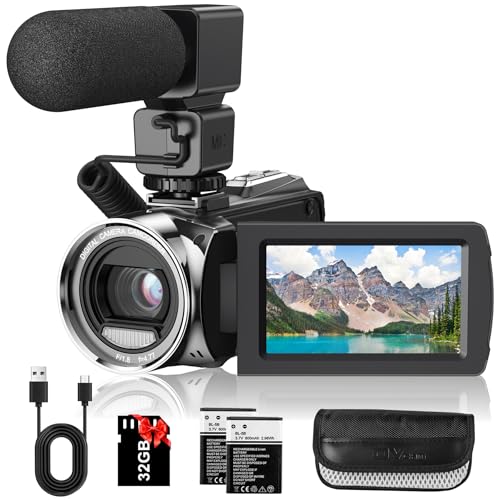
This camcorder from Rawiemy offers full HD 1080P recording, capturing crisp action footage indoors. Its 3. 0-inch 270° flip screen makes it easy to follow fast-paced basketball games from different angles, so you never miss a key moment. The external microphone helps ensure your recordings catch clear sounds, even in noisy gyms.
In practice, the lightweight design and included wrist strap make it comfortable to carry through a full match. With two rechargeable batteries and a 32GB SD card, you can film multiple games without worrying about running out of power or space.
Switching scenes is simple thanks to the pause function, and I found setup to be straightforward for beginners.
- Strengths:
- Flip screen for flexible filming angles
- External mic for better audio in loud environments
- Long battery life for extended events
- Comes with SD card and accessories
- Limitations:
- Not true 4K; best results are at 1080P
- Digital zoom only, not optical
Should You Choose This Camera?
If you’re looking for a straightforward, reliable camera to record indoor basketball games, this Rawiemy camcorder is a solid choice. It’s ideal for parents capturing youth games, coaches reviewing plays, or anyone wanting video without fuss. You won’t need to worry about battery swaps during halftime or missing the action because of complicated controls.
Skip this model if you’re after professional-grade 4K or optical zoom capabilities. For everyone else, especially those new to filming sports, it’s a friendly option. To get the most out of it, format the SD card before use—this avoids any recording hiccups.
You can feel confident that the essentials are covered, letting you focus on the game.
Swifsen Mini Drone With Camera
The Swifsen Mini Drone is a smart pick for families searching for the Best Video Camera for Indoor Basketball, especially for kids and beginners looking to capture action in small spaces.

The Swifsen Mini Drone is a compact quadcopter designed for indoor environments, making it an approachable option for capturing basketball games or practice sessions from unique angles. Its beginner-friendly controls and headless mode mean even children can confidently fly and record without worrying about orientation or complex setup.
In real use, the Swifsen feels lightweight and safe thanks to protective features around its blades. You can expect simple handling and quick take-off with one click, which makes it ideal for spontaneous footage or playful experimentation during indoor sports.
The modular battery system means you spend more time flying and less time fumbling with charging cables.
- Strengths:
- Easy for beginners and kids to operate
- Fan blade protection for added safety indoors
- Headless mode keeps flight intuitive
- Fun flight modes (loop, flip, throw go)
- Compact size perfect for indoor basketball courts
- Limitations:
- Recommended to stay within 60 feet to avoid losing the drone
- Camera suited for playful recording, not professional video
Who Will Appreciate This Drone?
This drone is ideal for parents, coaches, or kids who want a safe, easy, and entertaining way to record indoor basketball action. If you’re looking for something robust and simple to use, it removes the stress of complicated controls and fragile parts.
However, those who need high-definition footage or professional-grade features may find it limited for advanced video needs.
If you’re new to drones, start by practicing in a clear space and keep the drone within sight. Its protective features give peace of mind, so you can focus on capturing moments rather than worrying about safety. For best results, use the modular batteries and calibrate as suggested—this makes flights smooth and reliable every time.
Aureday 82″ Flexible Phone Tripod
For anyone searching for the Best Video Camera for Indoor Basketball setups, this tripod is ideal for players, coaches, and parents who want flexible, hands-free filming from any angle.

The Aureday 82″ Flexible Phone Tripod is a tall, adaptable tripod designed for capturing dynamic moments, especially when filming basketball games indoors. Its standout feature—a 15-inch flexible gooseneck—lets you easily adjust your camera or phone to any angle, perfect for following fast-paced action or getting creative shots from low or high vantage points.
In practice, this tripod feels sturdy and remarkably simple to set up, so you can focus on the game instead of fussing with your gear. The included wireless remote makes it easy to start and stop recording from the sidelines, letting you coach, cheer, or play without interruption.
Whether you’re filming a solo session or recording a whole team, this tripod provides reliable, shake-free footage every time.
- Strengths: Extra-tall height (up to 82″), stable aluminum build, flexible gooseneck for creative angles, and broad device compatibility.
- Limitations: Not a camera itself—works as an accessory for your phone or camera; may be too large for extremely small spaces.
- Use Case: Best for users who want to film basketball practices or games hands-free, with the flexibility to adjust shooting angles quickly.
Is This Tripod Right For Your Basketball Videos?
If you need a reliable, easy-to-adjust tripod to record basketball indoors—whether for coaching, reviewing plays, or sharing highlights—this Aureday model is a strong choice. It’s especially helpful for those who want to switch between portrait and landscape shots or need height flexibility for different gym setups.
However, if you’re looking for a dedicated video camera or something ultra-compact, you may want to look elsewhere. This tripod is best for users who already have a phone or camera and want to get the most out of it during indoor sports. A practical tip: use the remote to start recording from across the court so you never miss a play. Rest assured, setup is straightforward and the tripod’s stability will keep your footage smooth, even during the most intense games.
Yubiubiu Compact 1080p Zoom Camera
The Best Video Camera for Indoor Basketball for kids, teens, and beginners who want an easy, portable way to capture action and memories indoors.

This ultra-compact camera from yuBiuBiu is a smart pick for anyone looking to film indoor basketball games without complicated setup. The 8X digital zoom and a clear 2. 4″ screen help you capture the fast action on the court, making it a hassle-free solution for kids, teens, or parents wanting quick, memorable shots.
Using this camera feels simple and reliable—just point, shoot, and review your video instantly. The intuitive controls mean you can hand it to a young player or sibling without worry, and the rechargeable battery keeps filming through a whole game or practice session with minimal fuss.
- Strengths:
- Lightweight and easy for children to handle
- Timed shooting mode for group or action shots
- Includes 32GB SD card for plenty of video storage
- HD 1080P video recording suitable for indoor sports
- Limitations:
- No advanced manual controls for serious videographers
- Best in well-lit indoor settings
Is This The Right Camera For You?
If you want a straightforward, dependable camera for casual indoor basketball video, especially for young users or beginners, this yuBiuBiu model is a solid choice. It takes the stress out of learning complicated features, letting you focus on capturing the fun of the game.
Families and coaches will appreciate the quick start-up, while kids can safely experiment with shooting their first highlight reels.
However, if you’re after professional-level footage or need advanced controls, you’ll want to look elsewhere. For everyone else, my tip is to keep the camera charged and ready in your sports bag—its size means you’ll hardly notice it’s there until you need it.
You can confidently hand it off to a child or friend, knowing it’s both sturdy and simple to use.
Canon Ef 70-200mm F/2.8l Is Iii Telephoto Lens
Best Video Camera for Indoor Basketball seekers will find this lens ideal for capturing fast-paced court action with clarity and precision.

The Canon EF 70-200mm f/2. 8L IS III Telephoto Lens is a premium zoom lens built for Canon digital SLRs, designed to deliver sharp, high-contrast images in dynamic indoor environments. Its constant f/2. 8 aperture is especially valuable for indoor basketball, allowing you to shoot in lower light while freezing fast movements with confidence.
Using this lens feels reassuringly professional—you can focus quickly and silently, track players across the court, and rely on the optical image stabilization to reduce blur from shaky hands or sudden shifts. The solid construction also means you won’t worry about dust or fingerprints, keeping you focused on capturing the game instead of fiddling with your gear.
- Strengths:
- Constant f/2.8 aperture for reliable low-light performance
- Image stabilization helps ensure clear, blur-free shots
- Durable and resistant to dust and water—great for busy gyms
- Quick and quiet autofocus keeps up with fast-moving subjects
- Limitations:
- Heavier and longer than standard lenses—may require a monopod for extended use
- Lens only—requires a compatible Canon SLR camera body
Who Will Benefit Most
This lens is best for parents, coaches, or sports enthusiasts who want crisp, action-packed basketball footage without the frustration of blurry images or missed moments. If you’re shooting from the sidelines and need reliable reach and clarity, it’s a top-tier choice.
However, if you need something lightweight or are looking for an all-in-one video solution, you might want to consider a dedicated camcorder or a lighter lens. Still, for those committed to quality and flexibility, this Canon lens takes the stress out of fast action and low-light challenges. A quick tip: pair it with a sturdy monopod to keep your footage steady through every quarter.
3-in-1 Chain Link Fence Camera Mount
The Best Video Camera for Indoor Basketball setups who want stable, hands-free recording from the sidelines or behind the basket.

This 3-in-1 Chain Link Fence Camera Mount by Pmsanzay is a versatile accessory for anyone looking to record basketball games indoors, especially when you need a steady, unobstructed view. Its universal design lets you attach a digital camera, action camera (like GoPro), or smartphone directly to the fence—no tools required—solving the common problem of shaky or limited angles during fast-paced games.
In practice, the mount is lightweight and easy to adjust, so you can quickly secure it to any chain-link fence and start recording without missing the action. Whether you’re capturing game footage for player development, sharing highlights, or reviewing plays, this mount keeps your device stable and your hands free, making filming straightforward and stress-free.
- Strengths:
- Three mounting options: digital camera, action camera, or smartphone
- No tools needed for installation
- Angle adjustable for optimal framing
- Lightweight and portable
- Limitations:
- Does not include the camera or smartphone
- Requires a chain-link fence for mounting
Is This The Right Mount For Your Basketball Recording Needs?
If you regularly record indoor basketball games and need a reliable, fuss-free way to stabilize your camera or phone, this mount is an easy win—especially for coaches, parents, or players who want to analyze gameplay or create highlight reels. It’s best for those with easy access to chain-link fences around the court.
However, if your gym doesn’t have accessible fencing, or you’re looking for a tripod solution, you might want to consider other options. For everyone else, this mount removes the stress of shaky handheld footage and lets you focus on the game. Tip: double-check your device’s compatibility with the mount before game day for peace of mind.
Universal Action Camera Fence Mount
The Best Video Camera for Indoor Basketball setup for coaches, parents, and players wanting steady, hands-free game recordings from the sidelines or behind the basket.

The Universal Action Camera Fence Mount by Pmsanzay is a versatile holder designed to securely attach your action camera, digital camera, or smartphone to any chain link fence. This simple solution helps you capture high-quality footage of basketball games indoors without worrying about shaky hands or obstructed views.
Its standout feature is the three-in-one installation method, which makes it compatible with a variety of recording devices.
Setting up is fast and tool-free—just secure the mount to the fence with the included rubber bands, attach your device, and angle your lens. Whether you’re coaching, analyzing plays, or sharing highlights, this mount lets you focus on the action instead of fiddling with tripods.
You’ll appreciate how easy it is to get a reliable, repeatable recording spot every time.
- Strengths: Compatible with most cameras and smartphones; lightweight and adjustable; no tools required; ideal for consistent game footage.
- Limitations: Requires a fence or grate for mounting; does not include camera or phone.
Who Will Benefit Most
This mount is especially helpful for basketball coaches, parents, or players who want hands-free, steady footage of games and practice sessions. If you’re often frustrated by unstable or poorly positioned recordings, this holder eliminates the hassle and gives you a professional vantage point every time.
However, if your gym doesn’t have accessible fencing, you’ll need to look for alternative mounting solutions.
For best results, pick your spot before the game starts and double-check the mount’s stability after setup. You can trust that your device will stay secure, letting you focus on the game rather than the gear.
How To Weigh Your Options For Video Cameras And Accessories
Consider how and where you’ll use your camera or accessory before choosing. Think about whether portability, ease of use, or specialized features matter most for your needs. Balance convenience with image quality and decide if you need advanced capabilities or something simple.
Trade-offs often involve storage, connectivity, and compatibility with your existing gear. Take a moment to reflect on your main purpose—sports, vlogging, family, or creative projects.
Common Pitfalls And Who Should Rethink Buying
- Expecting professional results without learning basic camera handling.
- Assuming all mounts or accessories fit every device without checking compatibility.
- Wanting advanced features but only using basic functions.
- Buying for kids or beginners and overlooking ease-of-use or durability.
- Ignoring subscription requirements or ongoing costs.
Best Video Camera For Indoor Basketball: Real Questions Buyers Ask
Is A Sports Camera Always Better Than A Camcorder For Indoor Basketball?
Not always. Sports cameras offer tracking and automation, but camcorders can be easier for beginners and offer more manual control.
Do I Need A Tripod For Recording Basketball Games?
A tripod improves stability and shot quality, especially for longer recordings. It’s useful for both phones and traditional cameras.
Will A Drone Camera Work Indoors For Basketball?
Drones are often limited indoors due to space and safety concerns. Most buyers prefer mounted or handheld cameras for indoor use.
How Important Is Zoom For Indoor Sports Recording?
Zoom helps capture distant action, but wide angles are also useful. Consider your usual distance from the court before prioritizing zoom.
Are There Ongoing Fees Or Subscriptions For Video Tracking Cameras?
Yes, some automated cameras require subscriptions for full features. Check for hidden costs before deciding.
Can Any Camera Mount Fit All Action Cameras And Smartphones?
No, compatibility varies. Always confirm your device size and mounting options before buying accessories.
Is A Basic Point-and-shoot Camera Good Enough For Indoor Basketball?
It can work for casual recording, but may struggle with fast movement or low light. For clear action shots, consider more specialized models.
Settling Your Choice For Cameras And Recording Accessories
Once you understand your main needs and environment, the decision becomes easier. Whether you want simplicity, flexibility, or advanced functions, there are clear paths for different buyers.
Take your time, match your expectations with what each option offers, and trust your judgment. The right camera or accessory will fit naturally into your routine.