
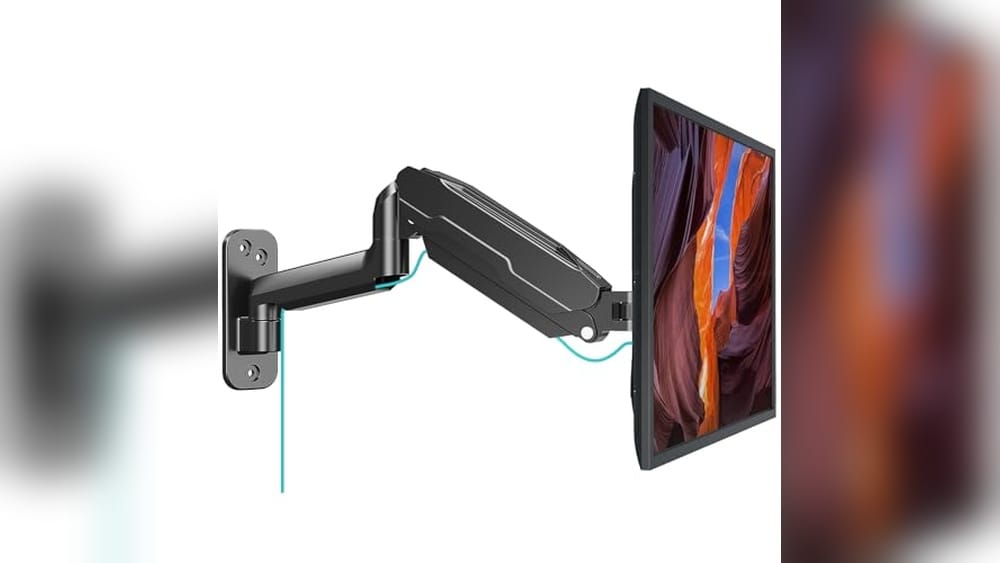
Your desk is getting crowded and the monitor takes up too much space. You want things tidy, but you also need your screen at a good height.
Choosing the best wall mount for a computer monitor is not as simple as it sounds. There are many designs and features. Some let you move the screen in all directions, while others stay in one spot. Some mounts hold heavy or very wide monitors, but may cost more or need careful installation.
Lighter, basic mounts are easier, but may not work for every setup. It is easy to get lost in the details, especially with so many brands and options.
This guide will help you sort through the main types and pick what fits your space, screen, and how you like to work.
Below you’ll see a range of wall mounts, each with strengths for different setups and needs. Take a look and see which style matches your space and monitor.
Mount Pro Single Monitor Wall Mount
The Best Wall Mount for Computer Monitor for remote workers, gamers, and professionals seeking a clutter-free, adjustable workspace.

This wall mount arm from MOUNT PRO is designed to securely hold computer monitors between 13 and 32 inches, freeing up your desk and letting you position your screen exactly where you need it. Its standout feature is the full range of motion—tilt, swivel, and rotate—so you can easily switch between portrait and landscape or share your screen with a colleague.
In real-world use, the mount feels sturdy and smooth, even when adjusting the height or angle frequently. The cable management system keeps everything tidy, and the straightforward installation means you’ll spend less time setting up and more time enjoying a clutter-free workspace.
- Strengths:
- Wide compatibility with flat screens from 13″ to 32″
- Flexible full-motion adjustments for ergonomic comfort
- Integrated cable management keeps desks neat
- Tested for long-term durability and stability
- Limitations:
- Not compatible with curved monitors (1000R/1500R/1800R)
- Requires wall mounting—check wall type before installation
Is This Wall Mount Right For You?
If you want to reclaim your desk space and enjoy easy, flexible monitor positioning, this mount is a practical choice for home offices, gaming setups, and creative workstations. It’s ideal for anyone who frequently adjusts their monitor or switches between tasks and values a clean, organized environment.
If you use a curved monitor or don’t want to install hardware in your wall, you may want to consider a different style. For everyone else, setup is straightforward—just double-check your wall type and monitor size first. Once installed, you can work confidently knowing your screen is secure and your workspace is streamlined.
Wali Adjustable Monitor Wall Mount
The Best Wall Mount for Computer Monitor for anyone who wants to free up desk space and create a flexible, ergonomic workspace at home or in the office.

The WALI Adjustable Monitor Wall Mount is a sturdy, flexible mounting solution for screens between 17 and 32 inches. It’s designed to clear off your desk and give you total control over your monitor’s position, including tilt, swivel, and full rotation, all while supporting up to 22lbs securely on most wall types.
Mounting your monitor to the wall with this arm delivers a more organized workspace and lets you find the perfect ergonomic viewing angle. Once installed, it’s easy to adjust the monitor whenever you need, whether you’re working, gaming, or streaming, so you can work comfortably and reduce neck or eye strain.
- Strengths:
- Compatible with most monitors up to 32” (VESA 75x75mm or 100x100mm)
- Wide range of movement: extend, retract, tilt, swivel, and rotate
- Works with both brick and wood walls
- Simple to install with included hardware and user manual
- Frees up valuable desk space
- Limitations:
- Single monitor support only
- Requires wall drilling for installation
Is This Wall Mount Right For You?
If you want to reclaim desk space, create a more organized setup, or just need a monitor at the right height, this wall mount makes daily work easier and less cluttered. It’s a great choice for home offices, small workspaces, or anyone who frequently changes their monitor position.
However, if you plan to mount multiple screens or can’t drill into your walls, you may need a different solution. For most single-monitor users, installation is straightforward, and the included instructions and hardware make the process as stress-free as possible.
Remember to double-check your wall type and monitor compatibility for a smooth setup, and enjoy the extra room and flexibility this mount provides.
Wali Articulating Monitor Wall Mount
This Best Wall Mount for Computer Monitor is ideal for anyone who wants a flexible, space-saving solution for mounting 13 to 32 inch displays at home or in the office.
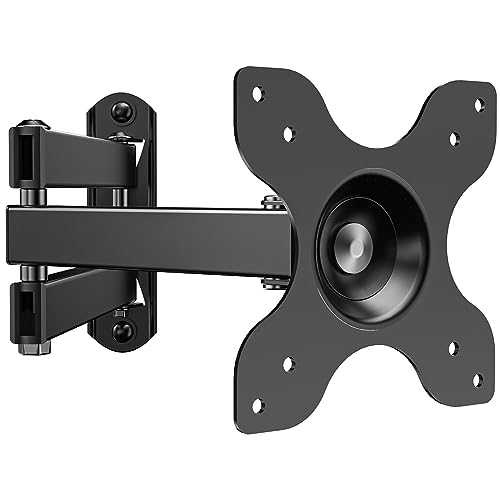
The WALI Articulating Monitor Wall Mount is a full-motion arm designed to hold computer monitors or small TVs sized 13 to 32 inches. It’s a great fix if you need to free up desk space, want a cleaner setup, or need better viewing flexibility without investing in a bulky stand.
The standout feature is its 15-inch extension arm, which gives you plenty of freedom to tilt, swivel, and rotate your screen until it’s just right.
In everyday use, this mount feels sturdy and reliable, and you can easily move your monitor to suit your posture or switch from work to entertainment. Installation is straightforward, and the included hardware kit covers most mounting needs. I found the compact design keeps your setup neat while the strong arm holds firm, so you don’t need to worry about accidental bumps or drooping screens.
- Strengths:
- Fits most monitors and small TVs (13–32 inches, up to 33 lbs)
- Flexible positioning with tilt, swivel, and rotation
- Space-saving—extends 15 inches, retracts to 2 inches
- Easy installation with included hardware kit
- Limitations:
- Not compatible with drywall-only mounting
- Single-arm design—best for individual monitors
Is This Wall Mount Right For You?
If you need to keep your workspace tidy and want the flexibility to adjust your screen easily, this WALI mount is a safe bet. It’s especially helpful for people with limited desk space or those who want a cleaner look for their setup.
However, if you need to mount your monitor on drywall alone, you’ll want to look elsewhere—this one requires a stud, brick, or concrete for secure installation.
The included hardware and clear instructions take the guesswork out of setup, and the sturdy build means you can trust it to hold your display without worry. For best results, take a moment to confirm your wall type and mounting hole measurements before you start.
If you want a flexible, reliable wall mount for a single monitor, this model is a practical choice.
Montek Single Monitor Wall Mount
The Best Wall Mount for Computer Monitor users who want a sturdy, flexible arm for their workspace or gaming setup.

The monTEK Single Monitor Wall Mount is a versatile wall-mounted arm designed for 17 to 32 inch flat or curved screens. It solves the common problem of limited desk space and awkward monitor positioning, with a full motion adjustable mechanical spring arm that supports up to 19.
8 lbs.
In daily use, this mount stands out for its flexibility and stability. You can easily tilt, swivel, or rotate your screen to find the most comfortable viewing angle, while the cable management keeps your setup tidy and distraction-free. Installation is straightforward, and once mounted, it gives a reliable sense of durability and neatness.
- Strengths:
- Wide compatibility with VESA 75x75mm & 100x100mm
- Sturdy steel and aluminum construction reduces wobble
- Full motion range: tilt, swivel, and 360° rotation
- Integrated cable management for a clutter-free look
- Arm retracts close to wall when not in use
- Limitations:
- Not for drywall-only mounting—requires wood studs, brick, or concrete
- VESA adapter not included if your monitor lacks compatible holes
Is This Wall Mount Right For You?
If you’re looking to maximize your desk space and keep your monitor secure and ergonomic, this monTEK wall mount is a great fit—especially for home offices, studios, and gaming setups. It’s ideal for anyone who wants to keep their workspace organized and values flexibility in adjusting their screen’s position.
However, if you only have drywall or your monitor lacks standard VESA holes, you’ll need to consider these limitations or prepare the necessary adapters.
Overall, this mount eliminates desk clutter and removes the hassle of constant monitor readjustment. For the smoothest installation, double-check your wall type before buying, and rest assured that setup is quick with the included quick-release plate.
Mount Pro Extra Long Monitor Wall Mount
Best Wall Mount for Computer Monitor users who want maximum adjustability and desk space savings for screens up to 32 inches.
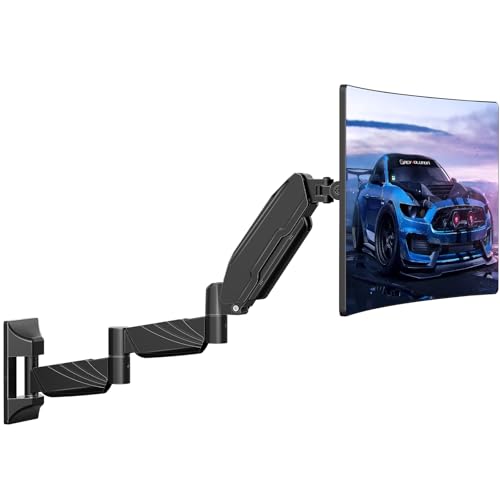
The MOUNT PRO Extra Long Monitor Wall Mount is designed for anyone needing a flexible, space-saving solution for mounting computer monitors between 13 and 32 inches. Its standout extra-long arm extends up to 25. 67 inches from the wall, making it ideal for corner setups or changing viewing angles without moving your desk.
This feature alone makes a huge difference if you want to maximize your workspace or share your screen easily.
Using this wall mount feels reliable and intuitive, thanks to its full-motion adjustability and pneumatic height adjustment. It’s a genuine relief to have more desk space, and the built-in cable management keeps everything tidy. Whether you’re gaming, working, or just want a clutter-free setup, this mount adapts smoothly to your daily needs.
- Strengths:
- Extends far from the wall for versatile placement
- Supports both flat and curved screens up to 17.6 lbs
- 360° rotation and wide tilt/swivel range
- Easy to install on wood, concrete, or brick walls
- Built-in cable management keeps things neat
- Limitations:
- Not suitable for very heavy monitors or ultra-wide screens
- Cannot be installed directly into drywall alone
- Not compatible with 1000R/1500R/1800R extreme curved screens
Is This The Right Wall Mount For You?
If you want a wall mount that gives you maximum flexibility and helps free up your desk, this model is hard to beat—especially for home offices, gamers, and anyone who likes to keep their workspace organized. It’s also great for corner setups or shared spaces where you need to adjust your monitor position regularly.
This mount isn’t the best fit for those with ultra-heavy or very large screens, or for users who can only mount to drywall. For everyone else, it removes a lot of stress around clutter, cable mess, and uncomfortable viewing angles. Tip: Double-check your wall type before installing for the smoothest experience—once up, you’ll appreciate how much more usable your workspace becomes.
Vivo Adjustable Single Monitor Wall Mount
Best Wall Mount for Computer Monitor users who want a clean, ergonomic display solution for 17” to 32” screens in their workspace or home office.

The VIVO Adjustable Single Monitor Wall Mount is a space-saving solution designed for screens between 17 and 32 inches, making it an excellent choice for both compact home offices and professional workstations. It helps eliminate desk clutter by securely mounting your monitor to the wall, freeing up valuable workspace and offering a modern, minimalist look.
The standout feature is its instant height adjustment, which lets you quickly set your screen at the perfect level for comfortable viewing.
In everyday use, the smooth articulation and low-profile design mean you can tilt, swivel, or rotate your monitor with minimal effort, adapting easily between sitting and standing setups. Setup is straightforward, and once installed, you can trust the sturdy steel construction to keep your monitor stable—reducing wobble and giving you the confidence to focus on work, not your equipment.
- Strengths:
- Fits a wide range of monitor sizes (17”–32”).
- Very slim profile—sits just 5.1cm from the wall.
- Quick and simple height adjustment.
- Full range of articulation: tilt, swivel, and rotation.
- Backed by a 3-year manufacturer warranty.
- Considerations:
- Requires wall mounting—best for permanent setups.
- Not compatible with monitors with curved or recessed backs unless you have the correct hardware.
Who Will Appreciate This Mount?
If you want to reclaim desk space, improve your posture, or create a cleaner look in your workspace, this wall mount is a practical choice. It’s especially good for those who need to frequently adjust their monitor height or switch between portrait and landscape orientations.
However, if you move your setup often or have an unusual monitor back, a traditional desk arm or checking your monitor’s compatibility may be better.
For first-time installers, take a moment to measure your wall and confirm stud placement for the safest, sturdiest installation. With this mount, you can trust that your monitor will stay secure and easy to adjust, allowing you to focus on your work instead of constantly fiddling with your setup.
Ergofocus Extra Long Monitor Wall Mount
As the Best Wall Mount for Computer Monitor, this is ideal for anyone needing flexible placement and maximum desk space, especially in compact work areas.
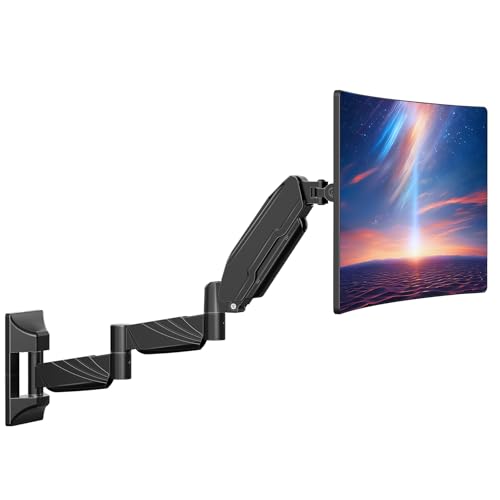
The ErgoFocus Extra Long Monitor Wall Mount is a single-arm wall bracket designed to support monitors up to 32 inches and 17. 6 pounds. Its standout feature is the extra-long 27. 97″ adjustable arm, which makes it perfect for small desks and lets you reclaim over half your workspace by getting your monitor up off the surface.
In daily use, this mount feels impressively solid and smooth. You can easily tilt, swivel, or rotate your screen for sharing or switching between portrait and landscape modes. Installation is straightforward—even if you’ve never mounted a monitor before, the included tools and clear instructions help you get set up without stress.
- Strengths:
- Fits wide range of monitors (17–32″, flat or slightly curved)
- Full-motion: tilt, swivel, rotate as needed
- Integrated cable management keeps things tidy
- Extra-long arm offers more flexible placement than standard mounts
- Limitations:
- Not compatible with ultra-curved screens (1000R/1500R/1800R)
- Should not be mounted on drywall alone for safety
Is This Wall Mount Right For You?
If you’re working in a tight space or simply want a cleaner, more flexible setup, this wall mount is a practical choice. It’s especially helpful for people who frequently adjust their screen for meetings, multitasking, or switching between coding and design work.
The extra arm length is a genuine advantage over typical mounts, letting you position your monitor exactly where you need it.
Those with ultra-curved monitors or who prefer a desk-mounted solution may want to look elsewhere. For everyone else, installation is simple—just be sure to anchor it securely—and the cable management keeps your workspace clean. If you’re tired of clutter and limited movement, this mount reliably solves those issues, freeing up your desk and your workflow.
Tip: Take a moment to plan your wall placement before installation for the best ergonomic comfort, and enjoy the peace of mind knowing your monitor is safely supported.
Mountup Monitor Wall Mount Arm
The Best Wall Mount for Computer Monitor is ideal for anyone seeking to save desk space and achieve ergonomic comfort in their workspace.

This wall mount arm from MOUNTUP lets you securely attach your computer monitor to the wall, instantly freeing up desk space and offering a clean, modern look. It’s designed for screens from 17 to 32 inches and supports a wide range of popular brands, making it a flexible solution for home offices or workspaces with limited room.
Using this mount feels effortless: the arm’s full motion allows you to tilt, swivel, rotate, or adjust your monitor’s height with ease. The installation is straightforward, thanks to clear instructions and included hardware, so you can quickly get back to work with improved comfort and posture.
- Strengths:
- Fits most monitors and small TVs (VESA 75x75mm & 100x100mm).
- Flexible positioning for ergonomic adjustment.
- Sturdy, reliable build with a foldable arm for tight spaces.
- Easy installation with clear instructions and included level.
- Limitations:
- Supports monitors weighing between 4.4 and 17.6 lbs only.
- Wall installation may not suit renters or those unable to drill.
Who Will Benefit Most
If you have a compact workspace or simply want to keep your desk clutter-free, this wall mount is a smart choice. It’s especially helpful for people who spend hours at the computer and need flexible screen adjustment for better posture.
However, if your monitor is heavier than 17. 6 lbs or you can’t install fixtures in your wall, this mount won’t be the best fit.
Installing the mount is quick and painless—just follow the instructions, use the included level for accuracy, and enjoy a more organized work area. You can rest assured that your screen will stay securely in place. For best results, double-check your monitor’s VESA compatibility and weight before purchasing.
Ares Wing Ultrawide Monitor Wall Mount
The Best Wall Mount for Computer Monitor users who need heavy-duty support for large ultrawide or curved screens and want to keep their workspace clean and ergonomic.

The ARES WING Ultrawide Monitor Wall Mount is a robust single-arm solution for anyone using monitors between 17 and 49 inches, including heavy 1000R curved screens. It’s built to solve the problem of securely mounting large, wide, or heavy monitors while freeing up valuable desk space—especially useful if you’re working in a compact area or want a minimalist setup.
The fully adjustable gas spring arm stands out for its +50° to -20° tilt, 180° swivel, and 360° rotation, allowing precise positioning for maximum comfort.
In daily use, this mount feels exceptionally solid and reliable. Adjusting monitor height or angle is smooth and effortless, making it easy to maintain a comfortable posture throughout long work or gaming sessions. The built-in cable management keeps everything tidy, so your workspace stays organized and distraction-free.
Installation is straightforward with the included hardware and clear instructions, offering peace of mind for both first-timers and experienced DIYers.
- Strengths:
- Holds up to 44 lbs—ideal for ultrawide and curved monitors
- Highly adjustable for perfect ergonomic setup
- Reclaims desk space and keeps cables hidden
- Durable steel and aluminum construction with proven gas spring reliability
- Fits both 75x75mm and 100x100mm VESA mounts
- Limitations:
- Requires a solid wall (wood stud, brick, or concrete)—not suitable for drywall alone
- Monitors without VESA holes need a separate adapter
Is This The Right Wall Mount For You?
If you have a larger or curved monitor and want a cleaner, more flexible workspace, the ARES WING mount is a dependable choice. It’s especially well-suited for gamers, creators, or remote workers who need to adjust screen position regularly and value both strength and style.
However, if your wall isn’t suitable for heavy mounting, or your monitor lacks VESA compatibility (and you don’t want to buy an adapter), you may need to consider alternatives. For most users, the installation is simple, and the payoff is a more ergonomic, organized environment.
Remember to double-check your wall type before drilling, and you can set up your monitor with confidence knowing this arm is built to last.
What Matters Most When Selecting A Monitor Wall Mount
Think about how and where you work before choosing a mount. Wall mounts differ in arm reach, movement, and installation style. There’s a balance between flexibility and stability—more movement can mean more adjustment required. Consider your monitor size, weight, and the wall type in your space.
Reflect on your daily habits to find a setup that matches your needs and avoids regret later.
Common Mistakes And Who Should Look Elsewhere
- If you move your monitor often, a wall mount can feel restrictive compared to a desk arm.
- Wall mounting is not suitable for renters or those unable to drill into walls.
- Expecting a universal fit can lead to problems—always check VESA compatibility and weight limits.
- Ultra-curved or oversized monitors may require special mounts; not all models support them.
- If you need to reposition your setup frequently, a wall mount may not be the best choice.
Best Wall Mount For Computer Monitor: Common Questions Answered
Can A Wall Mount Support Curved Or Ultrawide Monitors?
Some mounts support curved and ultrawide screens, but not all. Always check size and weight specifications, as well as VESA pattern compatibility.
What If My Monitor Doesn’t Have Standard Vesa Holes?
You’ll need a VESA adapter if your monitor lacks standard mounting holes. Verify compatibility before purchasing any adapter or mount.
Is It Safe To Mount On Drywall Alone?
Mounting directly into drywall without studs or anchors is risky. Use wood studs, brick, or concrete for safety and stability.
How Much Adjustment Do These Mounts Offer Once Installed?
Adjustment varies by model. Some allow full rotation and tilt, while others are more fixed. Decide how much flexibility you really need.
Can I Install A Wall Mount By Myself?
Most mounts are designed for straightforward installation with basic tools. However, larger monitors or heavy-duty arms may require a second person for safety.
Will A Wall Mount Help With Cable Management?
Many mounts have built-in cable guides or channels. This helps keep your workspace organized, but you may still need to plan your cable routing.
Is Wall Mounting Permanent?
Wall mounting leaves holes and requires more effort to move later. Consider this if you plan to rearrange your workspace often.
Making A Clear Choice For Your Monitor Wall Mount
Choosing a wall mount for your computer monitor is about matching your space, habits, and needs—not just specs. The right decision feels simple once you’ve thought through how you’ll use it and what you expect day to day.
Give yourself time to imagine the setup in your space, and trust that any well-matched, solidly installed mount will serve you well. The best choice is the one that fits your routine and keeps your workspace comfortable.