
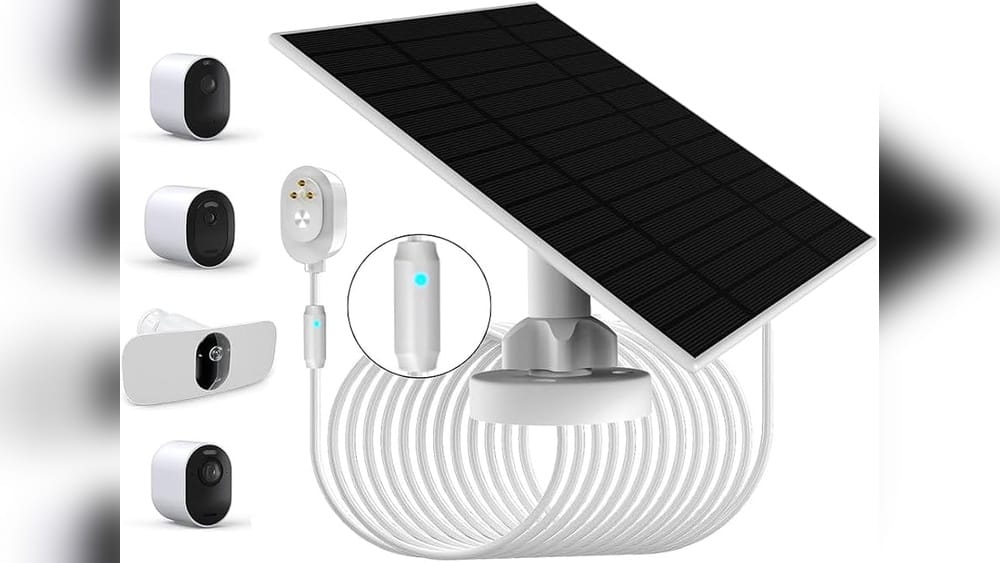
Is it possible for one Arlo solar panel to charge two cameras at the same time? Many people who use Arlo security cameras want to find ways to make their setup easier and cheaper. Solar panels promise a way to keep cameras running without the hassle of changing batteries. But can a single panel handle more than one camera? This question seems simple, but the answer depends on several important factors — including power needs, cable length, panel design, and even your local weather.
In this article, you’ll discover everything you need to know about powering Arlo cameras with solar panels. We’ll look at how Arlo solar panels work, why manufacturers design them for one device, what happens if you try to charge two cameras, and the real-world results people have seen.
You’ll also find practical tips, mistakes to avoid, and clear data to help you make the best decision for your home or office. Whether you’re trying to save money or just want fewer wires, this guide will help you understand the possibilities and limits of solar charging for Arlo cameras.
How Arlo Solar Panels Work
To understand if one panel can charge two cameras, it’s important to know how Arlo solar panels are designed. These panels are made specifically for Arlo outdoor cameras, like Arlo Pro, Arlo Pro 2, Arlo Ultra, and Arlo Essential.
Each panel has a small solar cell, a mounting bracket, and a weather-resistant cable. The panel collects sunlight and turns it into electricity, which charges the camera’s battery. The cable plugs directly into the camera’s charging port.
Most Arlo solar panels produce about 2W–5W of power in direct sunlight. This is enough to keep a single camera running if the weather is good and the camera isn’t recording nonstop.
Why Only One Camera?
Arlo recommends using one solar panel per camera. The reason is simple: each camera needs a steady, reliable power source. If you connect two cameras to one panel, both devices will share the available power. This can cause problems:
- Not enough charging: The panel may not produce enough electricity for both cameras, especially if they record often or the weather is cloudy.
- Voltage drop: Splitting the cable can reduce the voltage, which can make charging slower or stop it altogether.
- Warranty risk: Arlo’s warranty does not cover setups with splitters or extra devices.
Most panels have only one cable, and they are not designed for splitting. Trying to change this setup can lead to unstable charging, device errors, or even damage.
Camera Power Needs: Real Data
Arlo cameras use rechargeable batteries with different capacities. Here’s a look at typical battery sizes and power needs:
| Camera Model | Battery Capacity | Average Power Use | Recommended Panel Wattage |
|---|---|---|---|
| Arlo Pro | 2440 mAh | 1.6W | 2W+ |
| Arlo Pro 2 | 2440 mAh | 1.8W | 2W+ |
| Arlo Ultra | 4800 mAh | 2.5W | 4W+ |
| Arlo Essential | 3600 mAh | 1.8W | 2W+ |
If you try to charge two cameras with one panel, the available power must be enough for both. For example, two Arlo Pro 2 cameras would need at least 3.6W together. Most solar panels in the Arlo lineup max out at about 2–5W under perfect conditions.
What Happens If You Try?
If you connect both cameras to one panel, several things may happen:
- One camera may charge while the other does not.
- Both may charge slowly, or not at all.
- You may see battery warnings or errors.
In tests, most users find that on cloudy days or when both cameras are active, the batteries drop quickly. On sunny days, the charging may keep up, but only if the cameras are used rarely.

Credit: www.amazon.com
Technical Limitations
Arlo solar panels are designed to be plug-and-play. The cable is made for one camera. The connector is shaped to fit one port. The panel’s electronics regulate power for a single device.
If you try to split the cable, several technical issues arise:
- Cable resistance: Longer cables or splitters cause power loss.
- Current limits: The panel can only deliver a certain amount of current.
- Charging errors: Arlo cameras may refuse to charge if voltage drops below a safe level.
Some users try to use Y-splitters or custom cables to connect two cameras. This usually leads to slow charging and unreliable operation. Arlo does not support these setups.
| Scenario | Power Delivery | Charging Speed | Reliability |
|---|---|---|---|
| One camera, one panel | Optimal | Normal | High |
| Two cameras, one panel (splitter) | Shared/Reduced | Slow | Low |
| Cloudy weather | Reduced | Very slow | Low |
| Sunny, low use | Possible | Moderate | Medium |
The Role Of Sunlight And Environment
Solar panels work best in direct sunlight. In shaded areas, cloudy weather, or winter months, the output drops. The amount of sunlight your location receives changes the performance.
For example:
- In California or Florida, panels get more sun, so charging is more reliable.
- In northern states or rainy climates, output is much lower.
If you have two cameras, both will need power even on low-light days. Sharing one panel increases the risk that neither will charge enough.
Panel placement is also key. Facing the panel south in the US, tilting it at the right angle, and keeping it clean improves performance. If you place the panel in a shaded area or behind an object, charging will be poor.
Real-world Experiences
Many Arlo users have tried connecting two cameras to one solar panel. Online forums and reviews show mixed results:
- Some report that both cameras charge, but only in summer and with low activity.
- Most say one camera’s battery drops while the other stays steady.
- Some users see charging errors or battery warnings.
One user in Texas connected two Arlo Pro 2 cameras with a Y-splitter. In July, both cameras charged, but only if they recorded less than 10 clips per day. In October, both batteries dropped below 40% after a week.
Another user in Seattle tried the same setup. Both cameras stopped charging after three cloudy days.
Non-obvious insight: Even if the panel can charge two cameras in perfect conditions, any change in weather or camera activity can make the setup unreliable. Over time, batteries may degrade faster if they don’t charge properly.
Can You Use A Larger Solar Panel?
Some people ask if a bigger, third-party solar panel can charge two cameras. Technically, yes — if the panel produces enough power and matches the voltage needed by the cameras.
However, several risks exist:
- Voltage mismatch: If the panel supplies too much or too little voltage, it can damage the camera.
- Cable compatibility: Arlo’s connectors are proprietary. Third-party panels may not fit.
- Warranty issues: Using non-Arlo panels can void your warranty.
Most experts recommend using only approved Arlo panels. If you choose a third-party panel, make sure it matches the camera’s voltage (usually 5V) and has the right cable.
Practical tip: If you want to use a larger panel, buy one that delivers at least 4W–5W per camera. Always check the connector type and voltage.
Cost And Convenience Comparison
Is it cheaper to use one panel for two cameras? Let’s compare the costs and benefits.
Cost Analysis
- One panel per camera: Each Arlo panel costs about $49–$59. Two panels for two cameras: $98–$118.
- One panel for two cameras: One panel ($49–$59) plus a splitter ($10–$20). Total: $59–$79.
The cost savings are about $39 per setup. But the risk of unreliable charging is high.
Convenience
- Using one panel means fewer wires and less installation.
- However, if charging fails, you must check batteries often.
Non-obvious insight: If your cameras are far apart, using one panel may actually require longer cables or more splitters, which increases complexity and power loss.
Common Mistakes And Problems
Many beginners make mistakes when trying to use one solar panel for two cameras. Here are the most frequent problems:
- Using cheap splitters: Low-quality splitters cause power loss and may damage the cameras.
- Long cable runs: Cables over 10 feet can drop voltage, especially when split.
- Ignoring weather: Cloudy days reduce power. Both cameras may drain quickly.
- Wrong panel size: Using a small panel for two big cameras never works.
- Mixing camera models: Different cameras have different power needs.
Pro tip: If you must try charging two cameras, use the shortest cable possible, a high-quality splitter, and place the panel in direct sunlight.

Credit: us.arlo.com
Alternatives For Multi-camera Charging
If you want to power several cameras without buying many panels, there are safer options:
- Use multiple panels: The most reliable method. Each camera gets its own power source.
- Install a larger battery: Some users connect a bigger battery to each camera, charged by a panel.
- Hardwire cameras: If possible, connect cameras to AC power.
- Schedule camera activity: Reduce recording times to lower power needs.
| Charging Option | Reliability | Cost | Installation Complexity |
|---|---|---|---|
| One panel per camera | High | Moderate | Easy |
| One panel, two cameras | Low | Low | Medium |
| Larger battery + panel | Medium | High | Medium |
| Hardwired | Very High | High | Hard |
When Can One Panel Work For Two Cameras?
There are rare cases where one Arlo solar panel can charge two cameras:
- Both cameras are used rarely (less than 10 clips per day).
- The panel is placed in perfect sunlight.
- The weather is sunny most of the year.
- Both cameras are close together, so cable runs are short.
Even then, results are not guaranteed. Batteries may drop during cloudy weeks or heavy use.
Friendly mentor’s advice: If you want peace of mind, use one panel per camera. If you must try sharing, monitor battery levels daily and prepare to add a second panel if needed.
Manufacturer Recommendations And Warranty
Arlo’s official guidance is clear: one panel per camera. Their warranty does not cover damage caused by splitters or third-party panels. If you connect two cameras to one panel and something goes wrong, support may not help you.
You can read more about Arlo’s recommendations at their official site: Arlo Official Solar Panel.
Straight-to-the-point helper tip: Always follow manufacturer guidelines. Saving a little money up front can cost much more later if devices fail.
Practical Tips For Solar Charging
If you want the best results from your solar panels, follow these practical tips:
- Mount panels facing south in the US, at a 30–45 degree angle.
- Keep panels clean to avoid dust and dirt blocking sunlight.
- Check battery levels weekly to catch problems early.
- Avoid long cables; shorter runs mean less power loss.
- Use only Arlo-approved panels and cables for safety.
If you must try charging two cameras from one panel, start in summer, monitor batteries, and have a backup plan.
Expert Opinions
Security experts and solar installers agree: dedicated power sources are best for reliability. Sharing one panel increases risks. If you want your cameras to work 24/7, invest in multiple panels.
Some experts suggest buying a larger, professionally-installed solar panel system if you want to power many cameras. This is more expensive but works well for large properties.
Example Setups
Let’s look at two real-world example setups:
Example 1: Two Arlo Pro 2 Cameras, One Panel
- Location: Southern California
- Panel: Arlo solar panel, 2W
- Cameras: Both record about 8 clips per day
- Setup: Y-splitter, 3-foot cable to each camera
Result: Both cameras charged in summer. In winter, one camera’s battery dropped to 35% after two weeks.
Example 2: Two Arlo Ultra Cameras, One Panel
- Location: New York
- Panel: Third-party solar panel, 10W, custom cables
- Cameras: Both record about 15 clips per day
Result: Both cameras charged well in summer. In fall, charging slowed. One camera stopped charging after one week of cloudy weather.
Experience-based guide insight: Even with a larger panel, weather and activity matter. Always plan for worst-case scenarios.

Credit: www.arlo.com
Is It Worth Trying?
If you’re willing to risk some reliability for cost savings, you can try connecting two cameras to one panel. However, most users report problems over time. You may need to check batteries often, and your cameras may miss important events if batteries drop.
Calm expert’s advice: For security, reliability matters more than saving a few dollars. Use one panel per camera unless you are testing the setup and can check batteries often.
Frequently Asked Questions
Can One Arlo Solar Panel Charge Two Cameras At Once?
No, Arlo panels are designed for one camera. If you connect two, both may charge slowly or not at all. Only in perfect sunlight and low use could it work, but results are unreliable.
Will Using A Splitter Void My Arlo Warranty?
Yes, using splitters or connecting more than one camera to a panel can void your warranty. Arlo recommends only one panel per camera for safe operation.
Can I Use A Third-party Solar Panel For Two Cameras?
You can, but only if the panel matches the cameras’ voltage and has compatible connectors. This setup may still be unreliable, and warranty support is not guaranteed.
What Happens If Both Cameras Record Often?
If both cameras record often, they use more power. One panel will likely not keep up, and batteries will drain quickly. You may miss important footage if cameras shut down.
Is It Cheaper To Use One Panel For Two Cameras?
You might save about $40, but the risk of unreliable charging and battery problems is high. For most users, the extra cost of a second panel is worth it for peace of mind.
If you want a reliable security setup, using one Arlo solar panel per camera is the safest and most effective choice. Sharing a panel may work briefly in perfect conditions, but it often leads to problems and risks. Always follow manufacturer guidelines, check your batteries regularly, and prioritize security over small savings.
With the right setup, your Arlo cameras will keep your home or business safe with less worry.