
If you have ever found yourself frustrated with Wi-Fi dead zones or weak connections in your home or office, you might have considered upgrading to a mesh Wi-Fi system. Mesh routers are designed to cover large areas with fast and stable wireless signals. But what if you already own a mesh router from one brand and want to expand your network with nodes or satellites from another brand? Or maybe you’re moving into a place with an existing mesh network and want to add your own device to boost coverage. This leads to a vital question: Can different brand mesh routers work together?
This question is more than just a technical curiosity. The answer has real impact on your wallet, your network’s flexibility, and even your home’s future-proofing. Let’s dive deep into how mesh Wi-Fi systems work, the compatibility issues between brands, the technical standards behind them, and what you can do to build the best network for your needs.
What Is A Mesh Router System?
A mesh router system is a set of two or more devices (nodes) that work together to create a seamless wireless network. Unlike traditional routers that broadcast from a single point, mesh routers spread the Wi-Fi signal across multiple hubs. These nodes communicate with each other wirelessly (or sometimes via Ethernet), passing data efficiently from point to point, and handing off your device as you move.
The main advantages of mesh networks include:
- Wider coverage: They fill in Wi-Fi dead spots.
- Seamless roaming: Devices switch between nodes without dropping connection.
- Easy management: Most mesh systems are managed by simple apps.
Common brands for home mesh routers include Google Nest Wifi, Eero, Netgear Orbi, TP-Link Deco, Linksys Velop, and ASUS ZenWiFi.
How Mesh Routers Communicate
Mesh networks rely on proprietary protocols or standardized protocols for the nodes to talk to each other. Proprietary means the manufacturer creates its own way for devices to communicate, often locking out other brands.
For example:
- Google Nest Wifi uses Google’s proprietary protocol.
- Eero (owned by Amazon) uses its own protocol.
- Netgear Orbi uses proprietary communication.
- ASUS AiMesh is proprietary to ASUS routers.
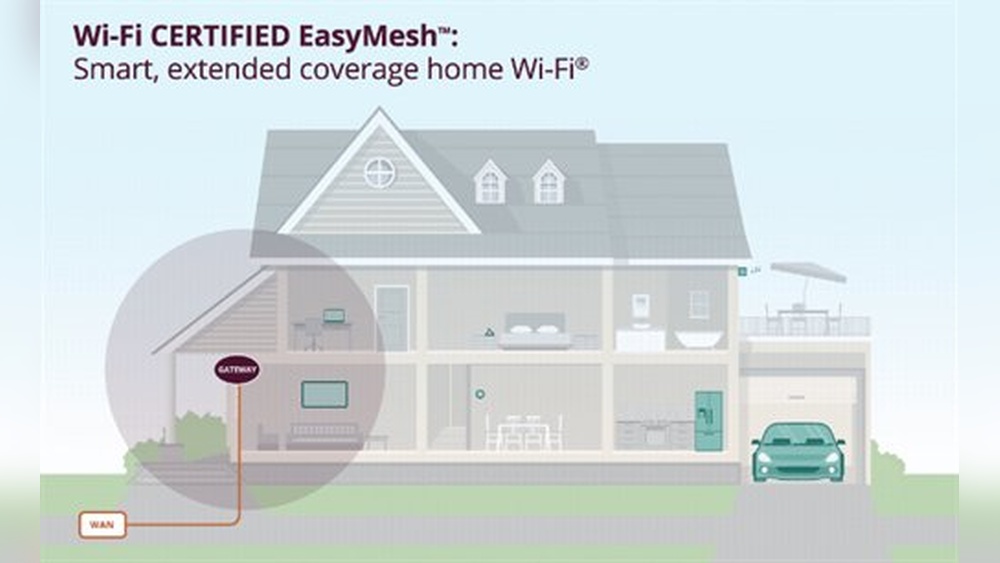
There is, however, a universal standard called Wi-Fi EasyMesh, created by the Wi-Fi Alliance. EasyMesh aims to let mesh devices from different brands work together, but adoption is slow and uneven.
Why You Might Want Different Brand Mesh Routers
It’s easy to wonder why you’d mix brands at all. Here are some common scenarios:
- Upgrading or expanding: You already have a mesh router, but a different brand has a better deal or features.
- Inherited equipment: Moving into a new place with an existing mesh system.
- Trying to save money: Refurbished or second-hand nodes from another brand are cheaper.
- Better features: Some brands have better parental controls, security, or smart home integration.
Mixing brands sounds great in theory, but there are technical and practical barriers.
The Reality: Can Different Brand Mesh Routers Work Together?
In most cases, mesh routers from different brands do not work together in a true mesh network. Each company uses its own way for devices to communicate, which is rarely compatible with others. Adding a Netgear Orbi satellite to a Google Nest system, for example, simply won’t work.
Why Don’t Different Brands Play Nice?
- Proprietary software: Mesh systems run custom firmware and software that expects to talk to the same brand.
- Authentication and setup: Pairing or adding a node often requires a brand-specific app.
- Network management: Features like seamless roaming and device hand-off rely on deep integration.
There are a few exceptions and workarounds, but they come with limitations.

Credit: www.popularmechanics.com
When Is Mixing Mesh Brands Possible?
Let’s look at the few ways that different brands might work together, and the challenges you’ll face.
1. Using Ethernet Backhaul And Access Point Mode
Some mesh systems allow you to use access point (AP) mode. In this setup, you connect different brand routers or mesh nodes to your main router via Ethernet cables. Each device creates its own Wi-Fi network with the same SSID (network name) and password.
This is not a “true mesh”—devices do not pass traffic between nodes wirelessly, and you lose seamless roaming. It’s more of a network of overlapping access points.
Example
- Your main router is a Netgear Orbi.
- You add a TP-Link Deco node via Ethernet and set it to AP mode, using the same SSID/password.
- Devices will connect to whichever signal is stronger, but won’t hand off seamlessly.
2. Wi-fi Easymesh Standard
Wi-Fi EasyMesh is a standard that aims to let different brands work together. If both your router and additional nodes support EasyMesh, they should be able to form a mesh network.
However, most popular mesh brands do not fully support EasyMesh yet, or only do so on specific models or firmware versions.
Example
- The TP-Link Deco X60 and some D-Link routers support EasyMesh.
- If both devices have EasyMesh certified firmware, you can pair them.
- Features may still be limited compared to using all nodes from the same brand.
3. Daisy-chaining Via Wi-fi Extender Mode
Some mesh routers or satellites can act as Wi-Fi extenders for a different brand’s network. You connect them to your existing Wi-Fi as a client, then re-broadcast the signal.
Again, this does not create a real mesh. There is no seamless handoff, and performance can drop due to double NAT or reduced bandwidth.
Comparing Mesh Network Compatibility
Here’s a look at how some popular mesh systems handle mixing brands:
| Brand | Proprietary Mesh? | EasyMesh Support | Can Mix Brands? |
|---|---|---|---|
| Google Nest Wifi | Yes | No | No |
| Netgear Orbi | Yes | Limited (some models) | No (except w/ EasyMesh) |
| TP-Link Deco | Yes | Yes (select models) | Possible w/ EasyMesh |
| Eero | Yes | No | No |
| Linksys Velop | Yes | No | No |
| ASUS ZenWiFi | Yes (AiMesh) | Yes (some models) | Possible w/ EasyMesh |
As you can see, mixing brands is almost never supported unless you use EasyMesh-certified devices.
What Is Wi-fi Easymesh?
Wi-Fi EasyMesh is a certification program by the Wi-Fi Alliance. It allows mesh routers and satellites from different brands to work together, using a common language for communication.
How Does Easymesh Work?
- Controller: One device acts as the main controller (usually your main router).
- Agents: Other devices (nodes) act as agents, extending the network.
- Automatic setup: Devices discover each other and configure automatically.
Easymesh Benefits
- Mix and match brands: Flexibility to expand your network with devices from different companies.
- Future-proofing: Easier to upgrade or replace parts of your network.
- Consumer choice: Lets you pick devices based on features or price, not just brand.
Easymesh Drawbacks
- Limited support: Not all mesh routers offer EasyMesh, and some brands only support it on specific models.
- Feature limitations: Some advanced features (parental controls, security, app management) may not work across brands.
- Firmware requirements: Devices need specific firmware versions—older models may not get updates.
Practical Example: Setting Up An Easymesh Network
Suppose you have a TP-Link Deco X60 and want to add a D-Link EasyMesh router.
- Check for EasyMesh certification on both devices.
- Update firmware to the latest version.
- Set one device as the controller (usually your main router).
- Use the app or web interface to add the agent device.
- Wait for devices to sync and create a mesh.
Not all features will be available, but you’ll get expanded coverage and some automatic handoff between nodes.
Mesh Vs. Traditional Range Extenders
People sometimes confuse mesh systems with traditional Wi-Fi range extenders. Here’s a comparison:
| Feature | Mesh System | Range Extender |
|---|---|---|
| Network Name (SSID) | Single, seamless | Often different |
| Roaming | Automatic, seamless | Manual (may drop connection) |
| Performance | Optimized | Can halve bandwidth |
| Setup | Easy, app-based | May require manual settings |
| Mixing Brands | Rare, except EasyMesh | Common, but not mesh |
Mesh is usually the better option for whole-home coverage, but only if you use compatible devices.
Common Mistakes When Trying To Mix Mesh Brands
If you’re thinking about mixing mesh router brands, avoid these common mistakes:
- Assuming all mesh is compatible: Just because devices say “mesh” doesn’t mean they work together.
- Ignoring firmware requirements: EasyMesh only works if both devices have the right firmware.
- Expecting full feature parity: Even with EasyMesh, you might lose brand-specific features.
- Not checking app compatibility: Managing your network from a single app is rarely possible with mixed brands.
- Overlapping coverage: Adding more nodes than needed can cause interference, not better performance.

Credit: www.amazon.com
Expert Tips For Expanding Your Mesh Network
Building a reliable, flexible mesh Wi-Fi network is possible if you plan carefully. Here are some expert tips:
- Stick to one brand if possible: This ensures seamless roaming and full feature access.
- If mixing, use EasyMesh-certified models: Always confirm certification and firmware version.
- Position nodes wisely: Place them halfway between your main router and dead zones, not too close or too far.
- Use Ethernet backhaul if you can: Wired connections between nodes increase speed and reliability.
- Don’t mix Wi-Fi standards: Avoid adding an older Wi-Fi 5 node to a newer Wi-Fi 6 mesh system—it can slow the whole network.
- Check for software updates: Mesh features improve over time, so keep your devices updated.
Real-world Example: Mixing Brands With And Without Easymesh
Let’s consider two scenarios to illustrate the difference:
Scenario 1: No Easymesh Support
You have a Google Nest Wifi system and want to add an Eero node. Neither supports EasyMesh. If you try to add the Eero as a mesh node, it will not connect. The only option is to set the Eero in bridge or access point mode, connecting via Ethernet. But you lose mesh features and seamless roaming.
Scenario 2: Easymesh Support
You have a TP-Link Deco X60 and a D-Link DIR-X1860. Both are EasyMesh certified. You follow the setup process to add the D-Link as an agent to the TP-Link controller. The devices create a single mesh network. You get basic mesh benefits, though some advanced app features may not work on both.
Security Considerations When Mixing Mesh Brands
Security is a major factor when building a home network. Mixing brands, even with EasyMesh, can introduce unexpected risks:
- Firmware update delays: One brand may update security faster than another.
- Feature mismatches: Security settings may not sync perfectly.
- App fragmentation: More apps means more places a vulnerability can appear.
Always keep all routers updated and use strong passwords.
Troubleshooting Mixed Mesh Networks
If you try to build a mesh with different brands and run into issues, here are some steps to troubleshoot:
- Confirm compatibility: Check both brands’ documentation for EasyMesh support.
- Update firmware: Outdated software is a common cause of issues.
- Reset and retry: Sometimes, starting setup from scratch helps.
- Use Ethernet if wireless fails: If wireless mesh won’t work, try wired backhaul in AP mode.
- Contact support: Some brands offer guidance for mixed networks.
Future Trends: Will Mesh Router Brands Become More Compatible?
There is hope for better compatibility in the future. As more brands adopt Wi-Fi EasyMesh, you’ll have more freedom to mix and match devices. Some industry experts predict that by 2025, most new mesh routers will support EasyMesh or similar standards.
However, for now, proprietary systems still dominate.
If you’re planning a new mesh network, prioritize EasyMesh support if brand flexibility is important to you. Keep in mind that firmware updates and certification are crucial.
Advantages And Disadvantages Of Mixing Mesh Brands
Let’s weigh the pros and cons of mixing mesh routers from different brands.
Advantages
- Flexibility: Choose devices based on features, price, or design.
- Upgrade options: Replace one node at a time.
- Potential cost savings: Take advantage of sales or refurbished units.
Disadvantages
- Limited compatibility: Most brands do not work together.
- Feature loss: Some advanced features may be missing.
- Complex management: Multiple apps, more settings to adjust.
- Potential for instability: Mismatched devices may cause drops or slowdowns.
Non-obvious Insights Most Beginners Miss
- Firmware matters more than hardware: Even if two routers are both EasyMesh certified, they may need a specific firmware version to work together. Always check the manufacturer’s release notes before buying.
- Mixing Wi-Fi standards can bottleneck your network: If you add a Wi-Fi 5 node to a Wi-Fi 6 mesh, your network may slow to the speed of the oldest device. Consistency matters.
- Ethernet backhaul can “fake” a mesh, but not fully: Wired connections between different brand routers can give you multiple strong signals, but you won’t get true mesh benefits like seamless roaming or centralized management.
Steps To Take Before Mixing Mesh Brands
If you’re set on trying to mix brands, follow these steps to maximize your chances of success:
- Research device compatibility: Look for EasyMesh certification on both devices.
- Check firmware versions: Make sure both are up to date.
- Plan your network layout: Decide which device will be the controller, and where nodes will go.
- Prepare for fallback: Have a plan if the devices don’t work together—can you return one, or use it as a standalone access point?
- Test performance: After setup, walk around with a Wi-Fi analyzer app to check signal strength and roaming.
Data: Mesh Router Market And Easymesh Adoption
According to a 2023 report by Statista, the global mesh router market is expected to reach $11.4 billion by 2027, with an annual growth rate of 8.7%. However, only about 18% of consumer mesh routers sold in 2023 offered full EasyMesh support.
Brands like TP-Link, D-Link, and ASUS are leading EasyMesh adoption, while Google, Netgear, and Eero remain mostly proprietary.
A recent user survey found that over 65% of mesh router owners believed they could mix brands, but only 12% actually succeeded—usually by using Ethernet backhaul, not true wireless mesh.
Alternatives To Mixing Mesh Router Brands
If you need to expand your mesh network but can’t mix brands, here are your options:
- Buy same-brand nodes: The simplest, most reliable way.
- Use range extenders: Accepts trade-offs in performance and seamless roaming.
- Upgrade to a new EasyMesh system: Replace your current mesh with a modern, compatible system.
- Powerline adapters: Use your home’s electrical wiring to extend the network.

Credit: www.theverge.com
External Resource
For a deep dive into Wi-Fi EasyMesh and certification, you can visit the Wi-Fi Alliance’s official EasyMesh page.
Frequently Asked Questions
Can I Use A Netgear Orbi Satellite With A Google Nest Wifi Router?
No, you cannot directly connect a Netgear Orbi satellite to a Google Nest Wifi router in a mesh network. Both use proprietary protocols and do not support cross-brand mesh. Your only option is to set one device as a standalone access point via Ethernet, but you will not get mesh benefits.
What Is The Difference Between Easymesh And Proprietary Mesh Systems?
EasyMesh is an industry standard that allows different brands to work together, while proprietary systems only work within the same brand. EasyMesh offers more flexibility but may lack advanced features and app integration found in proprietary systems.
Will Using Two Different Brand Routers Slow Down My Wi-fi?
If you use two different brand routers in access point or extender mode, you may face reduced speeds, double NAT, and loss of seamless roaming. For the best performance, use the same brand or EasyMesh-certified devices with matching Wi-Fi standards.
Can I Manage A Mixed-brand Mesh Network From One App?
Usually not. Most mesh systems require you to use the brand’s own app for setup and management. Even with EasyMesh, you may need to use the main brand’s app for basic settings, but advanced features may not be available for mixed nodes.
Is It Worth Waiting For More Brands To Support Easymesh?
If flexibility and future-proofing matter to you, it can be wise to wait or choose devices with EasyMesh certification. As adoption grows, your options to mix and match brands will increase, making network expansion easier and more affordable.
Building a mesh Wi-Fi system is one of the best ways to solve coverage issues in your home or office. For now, mixing different brand mesh routers is limited, but with careful planning and attention to certification, you can create a network that fits your needs.
Always check compatibility, keep your hardware updated, and consider future trends as the industry moves toward more open standards.