
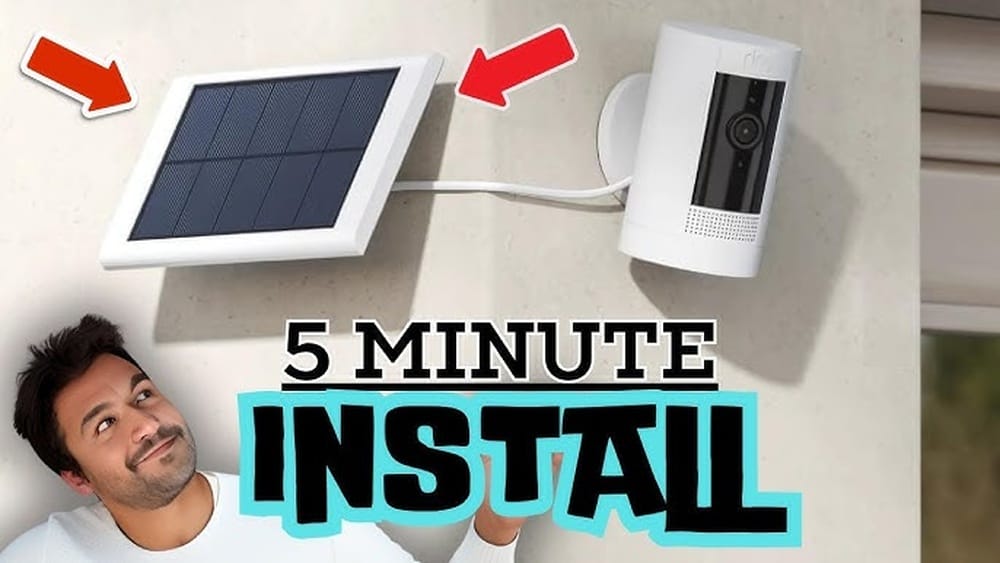
Adding a solar panel to your Ring camera sounds like a smart idea. It promises less hassle with charging, fewer worries about dead batteries, and the chance to use clean energy. But is it as easy as plugging in any panel?
Are there risks? How do you make sure it works well, and is it worth the cost? Many homeowners and renters ask these questions as they look for ways to make their homes smarter and greener.
Ring cameras are popular for home security. They are easy to install and give you peace of mind by letting you watch your property from anywhere. But battery life can be a concern, especially if your camera is in a busy area and records a lot of motion.
This is where solar panels come in. They can keep your camera powered with sunlight, reducing the need to change or charge batteries. However, not all solar panels are the same, and not every Ring camera works with every solar panel.
In this article, you’ll learn if you can add a solar panel to your Ring camera, how to do it right, what to consider before buying, and what real users experience. We’ll also look at mistakes to avoid, compare products, and answer common questions.
By the end, you’ll know if a solar panel is the right upgrade for your Ring camera, and how to set it up for the best results.
How Ring Cameras Get Power
Ring cameras come in different models. Some use rechargeable batteries, others are wired to your home’s electricity, and a few work with Power over Ethernet (PoE). Each power option has pros and cons.
- Battery-powered Ring cameras are the most flexible. You can put them almost anywhere. But you must charge or swap the battery every few weeks or months, depending on usage.
- Wired Ring cameras get power from your home’s electrical system. They are more reliable but harder to move.
- PoE cameras are usually for advanced users. They use a network cable for both data and power.
Most people asking about solar panels have the battery-powered models. These include the Ring Stick Up Cam Battery, Ring Spotlight Cam Battery, and the Ring Video Doorbell (battery version).
Wired cameras do not need a solar panel. PoE cameras also do not benefit from solar panels.
Can You Add A Solar Panel To A Ring Camera?
The short answer: Yes, you can add a solar panel to many Ring cameras, but not all. Let’s break down what you need to know.
Which Ring Cameras Work With Solar Panels?
Ring makes its own official solar panels designed for certain cameras. These are plug-and-play and safe to use. Here are the main compatible models:
- Ring Stick Up Cam Battery
- Ring Spotlight Cam Battery
- Ring Spotlight Cam Plus (Battery)
- Ring Video Doorbell 2, 3, 3 Plus, 4 (battery)
- Ring Video Doorbell Plus (battery)
- Ring Video Doorbell (2nd Gen, battery)
- Ring Video Doorbell Pro 2 (with battery backup)
Not all models work with solar. For example, wired-only cameras and most indoor models do not have a plug for a solar panel.
If you use a Ring camera with a removable battery, check the product page or manual to confirm compatibility.
Using Third-party Solar Panels
You might see many solar panels online that claim to work with Ring cameras. Some do, but not all are safe or reliable. The official Ring solar panel is tested for quality, safety, and compatibility.
Third-party panels may work if they have:
- The correct plug (usually a micro-USB or barrel connector)
- The right voltage (typically 5V for Ring cameras)
- Stable, regulated power output
But using a non-official panel can void your warranty and may not charge the battery well. Sometimes, cheap panels do not produce enough power, especially on cloudy days.
What About Diy Solutions?
Some people try to connect any solar panel with a USB output to their Ring camera. This is risky. If the panel gives too much or too little voltage, it can damage your camera or fail to charge it. Unless you know how to regulate voltage and wiring, stick with products made for your camera.

Credit: www.blackwiredesigns.com
How Ring Solar Panels Work
A solar panel for a Ring camera is a small photovoltaic panel. It converts sunlight into electricity, which goes through a wire into your camera’s battery port. The power from the panel charges the battery during the day, so the camera keeps working at night or during rain.
Most Ring solar panels are about 6-8 inches wide and produce around 2-3 watts of power. This is enough to keep the battery charged in most locations with good sunlight, as long as your camera is not recording all the time.
Key Features Of Ring Solar Panels
- Weather-resistant: Built to handle rain, snow, and heat
- Easy installation: Mounts on a wall, roof, or post with simple tools
- Long cable: Usually 11-13 feet, so you can place the panel in the best sun
- Plug-and-play: No hard wiring, just plug into the camera’s port
How Much Sunlight Do You Need?
A common mistake is thinking the panel will always keep your battery full. In reality, you need at least 3-4 hours of direct sunlight daily for the panel to work well. If your camera is in a shady spot or you live in a cloudy area, the panel may not keep up with battery drain.
Comparing Ring Solar Panels And Third-party Options
It’s tempting to buy a cheaper panel or a kit that works with many devices. Here is a side-by-side comparison to help you decide.
| Feature | Official Ring Solar Panel | Third-Party Solar Panel |
|---|---|---|
| Compatibility | Guaranteed with listed Ring models | Varies, may not always work |
| Warranty | Keeps Ring warranty valid | Can void warranty |
| Build Quality | Weatherproof, tested for outdoor use | Quality varies |
| Power Output | Optimized for Ring cameras | May be too low or too high |
| Installation | Easy, clear instructions | Instructions may be unclear |
| Cost | Usually $40-60 | $20-50 |
Two non-obvious insights:
- Cable length matters more than you think. A longer cable lets you position the panel for the best sunlight, even if your camera is in a shady spot.
- Panel angle is key. Many users do not adjust the panel’s tilt to match their latitude, losing up to 30% charging power.
Steps To Add A Solar Panel To Your Ring Camera
If you’ve decided a solar panel is right for you, follow these steps to set it up safely and effectively.
1. Choose The Right Solar Panel
- Check your Ring camera model for compatibility.
- Decide between an official Ring panel or a trusted third-party option.
- Make sure the panel’s output matches your camera’s needs.
2. Pick The Best Location
- Look for a spot with at least 3-4 hours of direct sunlight daily.
- Avoid places with shade from trees, buildings, or overhangs.
- South-facing walls or roofs get the most sun in North America.
3. Mount The Solar Panel
- Use the included mounting bracket and screws.
- Set the panel angle to match your location (about 30°-45° tilt for most US locations).
- Some panels have adjustable mounts for better positioning.
4. Run The Cable
- Use the provided cable clips to secure the wire along walls or fences.
- Avoid pinching or bending the cable sharply.
- Leave a drip loop (a small dip in the cable near the camera) to stop water from running into the port.
5. Connect To The Camera
- Plug the connector into the camera’s battery or solar port.
- Make sure the connection is tight and weather-sealed.
- For some doorbells, you may need to remove a rubber plug.
6. Check Charging Status
- Open the Ring app and go to your camera’s device settings.
- Look for the Solar Status or battery status. It should say “Connected” if everything is working.
- The app will show if the panel is charging the battery.
7. Monitor Performance
- After a few days, check battery levels. If the battery stays above 90%, the panel is doing its job.
- If levels drop, check the panel angle, cable connections, and sunlight exposure.
Common Mistakes To Avoid
Many users make simple errors that stop their solar panels from working well.
- Wrong panel for your model: Not every panel fits every camera. Always double-check compatibility.
- Poor sunlight: Panels need direct sun. Even small shadows can cut charging by half.
- Bad cable management: Loose or damaged cables let in water or break the connection.
- Wrong installation angle: A flat panel collects less sunlight, especially in winter.
- Ignoring battery drain: If your camera records all day, the panel may not keep up. Reduce motion sensitivity or recording length if needed.
- Not cleaning the panel: Dust and bird droppings block sunlight. Wipe the panel clean every few months.
- Forgetting firmware updates: Sometimes, Ring releases updates that improve solar charging. Keep your app and device up to date.

Credit: ring.com
Performance: What To Expect
Adding a solar panel does not mean you will never charge your battery. Here’s what real-world users and tests show:
- In sunny climates (California, Arizona), the battery can stay fully charged most of the year.
- In northern or cloudy areas (Seattle, New York in winter), the battery may still drain, but much slower.
- If your camera records lots of motion (busy street, front porch), you may still need to charge the battery a few times a year.
- For low-traffic areas, a solar panel can keep the battery topped up all year.
Sample Charging Data
Here’s a look at how much power a typical Ring solar panel produces under different conditions:
| Condition | Average Output (Watts) | Estimated Battery Life |
|---|---|---|
| Full Sun (4+ hours) | 2.5 W | Battery remains charged |
| Partial Sun (2 hours) | 1.2 W | Battery drains slowly |
| Shade/Cloudy | 0.5 W | Battery may drain over weeks |
Key insight: The panel is a “trickle charger.” It does not power the camera directly. It keeps the battery topped up over time, so the battery lasts longer between charges.
Costs And Value
Is it worth adding a solar panel to your Ring camera? Let’s look at the costs and long-term value.
- Official Ring Solar Panel: $40–$60
- Third-Party Panels: $20–$50
- Installation time: 15–30 minutes
If you change or charge your battery every 1–2 months, a solar panel can save you several hours a year. This is especially true if your camera is in a hard-to-reach spot (e. g. , high wall or tree).
Pros
- Less battery swapping and charging
- More reliable camera operation
- Uses clean, renewable energy
- Simple setup for most homes
Cons
- Upfront cost
- May not work well in shady or cloudy locations
- Not a full replacement for charging if your camera is very busy
Real User Experiences
Many users report positive experiences with Ring solar panels, especially in sunny regions. Here are a few real-world examples:
- “I put the solar panel on my garage Ring camera. Battery went from needing a charge every 6 weeks to never dropping below 95%.” — Mike, Florida
- “In winter, my panel barely keeps up, but it still means I only have to charge once or twice a year, not every month.” — Sarah, Oregon
- “The first panel I bought was too small and didn’t work. Switched to the Ring brand and it fixed the problem.” — Daniel, Texas
Some users in cloudy or shaded areas say the panel only adds a few weeks of extra life. For them, it’s still a help, but not a complete solution.
Expert tip: If you have two or more battery-powered Ring cameras close together, you cannot share one solar panel between them. Each camera needs its own panel.
Environmental Benefits
Adding a solar panel to your Ring camera is a small step, but it makes your home security a bit more eco-friendly. It reduces the electricity needed to charge batteries and cuts down on trips up the ladder to swap them out.
Over a year, a single panel can save enough energy to power a light bulb for about 50–100 hours.
If many people switch to solar panels for cameras and smart devices, the impact adds up. It’s a simple way to use renewable energy at home, even if you don’t have a full solar system.
For more on solar power basics, see the U.S. Department of Energy.
When A Solar Panel Might Not Be Right
Solar panels are not the best choice for everyone. Here are situations where it might not work well:
- North-facing walls or heavy shade: Not enough sun for charging
- Deep winter in northern states: Short days and low sun angle limit output
- High-traffic cameras: Too many recordings can drain the battery faster than the panel can charge
- Apartment dwellers: If you cannot mount a panel outside or near a window
In these cases, consider using a wired power option if possible, or accept that occasional charging will still be needed.
Installation And Maintenance Tips
To get the most from your solar panel, follow these practical tips:
- Clean the panel regularly. Dust, dirt, and snow reduce efficiency.
- Check cable connections after storms. High winds or rain can loosen plugs or clips.
- Adjust the angle seasonally. In winter, tilt the panel more upright to catch low sun.
- Monitor battery status in the app. Set a reminder to check every few weeks.
- Use the full length of the cable. Don’t be afraid to mount the panel far from the camera if it means more sun.
- Protect from theft or vandalism. Place the panel out of easy reach if possible.
Solar Panel Vs. Wired Power: Which Is Better?
If you can run a power cable, should you skip the solar panel? Here’s a quick comparison for battery Ring cameras:
| Feature | Solar Panel | Wired Adapter |
|---|---|---|
| Installation | No electrician needed, simple tools | May need drilling, more setup |
| Location Flexibility | Anywhere with sunlight | Must be near a power outlet |
| Reliability | Depends on weather/sunlight | Always on, unless power outage |
| Cost | Low upfront | Low to medium upfront, may need extension cable |
| Eco-friendliness | Uses renewable energy | Uses grid electricity |
For most people, a solar panel is the easiest upgrade. If you have a spot with lots of sunlight, it’s usually the most convenient long-term solution.
Frequently Asked Questions
Do I Need To Remove The Battery If I Use A Solar Panel?
No. The solar panel charges the battery inside your Ring camera. You should leave the battery in place. The panel keeps the battery topped up, so you do not need to remove it unless you want to swap or replace it.
Will The Solar Panel Fully Power My Camera Without The Battery?
No. The Ring solar panel is designed as a trickle charger. It provides enough power to recharge the battery, not to run the camera by itself. If you remove the battery, the camera will not work.
How Do I Know If My Ring Camera Is Charging From The Solar Panel?
Open the Ring app and select your camera. In the device settings, you should see a “Solar Status” or similar message. It will say “Connected” if the panel is working. You can also watch the battery level over several days to see if it is staying full.
Can I Use More Than One Solar Panel For The Same Camera For Faster Charging?
No. Ring cameras are designed to accept only one solar panel per device. Adding extra panels or splitting cables can damage the camera or cause charging problems.
What If My Solar Panel Isn’t Charging The Camera?
Check that the panel is getting enough direct sunlight, the cable is plugged in tightly, and the camera is compatible. Clean the panel and make sure there are no obstructions. If it still does not work, contact Ring support or the panel manufacturer for help.
Adding a solar panel to your Ring camera is a simple upgrade that can save time and make your home security more reliable. It works best in sunny spots and with compatible cameras. By choosing the right panel, installing it carefully, and keeping it clean, you can enjoy peace of mind and less hassle with your Ring system.
Remember, solar is not magic—it needs sunlight, and it’s a helper, not a total replacement for charging. But for many users, it’s a smart way to keep watch, day and night.

Credit: www.youtube.com