
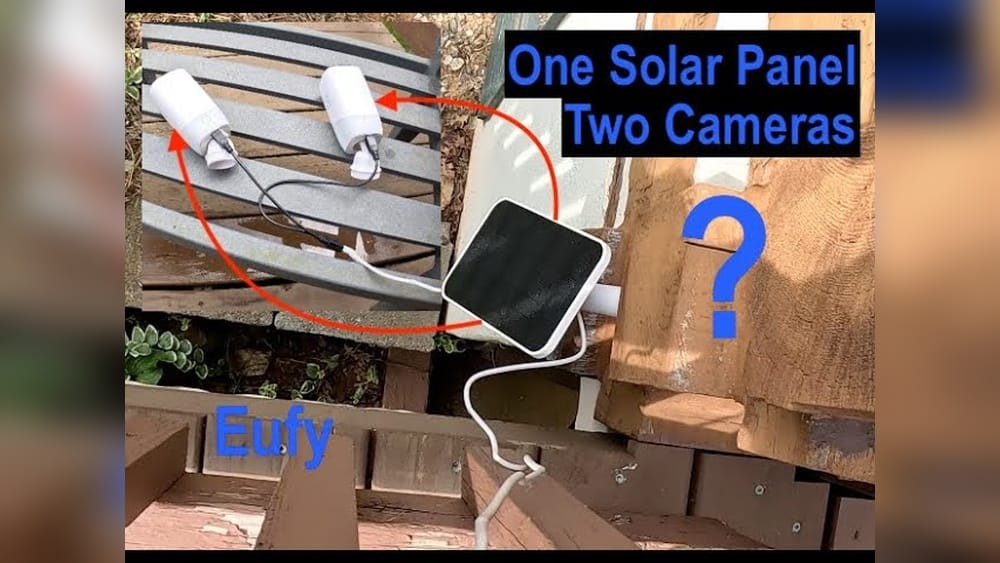
Can You Connect Two Ring Cameras To One Solar Panel?
Home security is now smarter and more energy-efficient than ever. Many people use Ring cameras to keep an eye on their property. These cameras often run on batteries, which can be charged by solar panels. This helps you avoid climbing a ladder to replace batteries every few months. But what if you want to power more than one camera in the same area? Can you connect two Ring cameras to one solar panel? Or do you need a separate solar panel for each device? The answer is not as simple as it might seem. In this guide, you’ll learn what works, what doesn’t, and how to get the most reliable setup for your Ring security system.
Understanding How Ring Cameras And Solar Panels Work
Before you try to connect two cameras, it’s important to know how Ring cameras and Ring solar panels are designed.
Ring cameras like the Stick Up Cam and Spotlight Cam are popular for their wireless, battery-powered design. The Ring Solar Panel is a small device that connects to your camera using a special cable. Its job is to keep your camera’s battery charged using sunlight. The panel does not power the camera directly; instead, it charges the battery. This means the camera still uses its battery to run, but the battery is recharged during the day.
Most Ring solar panels are rated for a single device. The cable and connector are made to fit one camera. The solar panel is designed to provide enough energy for just one camera’s battery—not two or more at the same time.
Some users think that because their solar panel has enough sunlight, it should be able to charge two cameras. But there are several technical and practical reasons why this is not usually supported.
Why Most Ring Solar Panels Support Only One Camera
There are three main reasons why Ring solar panels are made for only one camera:
- Power Output Limits: A standard Ring solar panel produces about 2–3 watts of power in good sunlight. This is enough to keep one camera battery topped up, but not two. If you try to share the output, both cameras may not charge well—especially on cloudy days or if they record a lot of motion.
- Cabling and Connectors: Each Ring solar panel comes with one connector that fits one camera. There’s no official splitter or Y-cable made by Ring to share power between two cameras.
- Ring Warranty and Support: Using third-party splitters or connecting two cameras to one solar panel may void your warranty. Ring’s customer support may not help if something goes wrong.
Let’s look at these points in more detail.
Power Output: How Much Do Ring Cameras Need?
A typical Ring Stick Up Cam Battery or Ring Spotlight Cam Battery uses about 0.5–1 watt when in standby and more during recording. When connected to a solar panel, the camera’s battery is trickle charged. If you connect two cameras, both will try to draw power, and the small panel cannot keep up.
Here’s a comparison of power needs and solar panel output:
| Device | Average Power Use (Standby/Active) | Solar Panel Output |
|---|---|---|
| Ring Stick Up Cam | 0.5–2W | 2–3W (max) |
| Ring Spotlight Cam | 1–2.5W | 2–3W (max) |
If both cameras are active, the panel can’t keep up. Both batteries will drain over time, especially in winter or low sunlight.
Connectors And Compatibility
Ring’s solar panels come with one cable, made for one camera. The connector fits only certain models. There is no official Y-splitter or double adapter. If you try to use a third-party splitter, you may damage the cameras or the panel.
Warranty And Support Concerns
Ring’s warranty covers only normal, approved use. If you modify the cable or use a non-approved splitter, you may lose warranty coverage. If your cameras stop working, Ring support may not help.
What Happens If You Try To Connect Two Cameras?
Some people try to use a Y-splitter or custom wiring to connect two cameras to a single solar panel. Here’s what usually happens:
- Both cameras charge slowly or not at all. On cloudy days, neither camera may get enough power.
- One camera gets power, the other does not. If the wiring is not balanced, one camera may always get less power.
- The solar panel overheats. Drawing too much power can damage the panel.
- Ring app shows “Not Charging.” Both cameras may give battery warnings.
In some cases, the setup may seem to work in summer when there’s lots of sun. But in winter or with heavy camera use, you’ll see problems. This is why Ring does not recommend this setup.
Are There Any Safe Ways To Connect Two Cameras?
If you want to connect two Ring cameras to one solar panel, there are a few options. Each has pros and cons.
1. Use A Larger Third-party Solar Panel (advanced Diy)
Some tech-savvy users build their own solar setups using a larger panel, a charge controller, and a bigger battery pack. They then run cables to two cameras. This can work, but it’s not simple:
- You must know about solar power and batteries.
- You need weatherproof parts and safe wiring.
- Warranty may not cover problems.
- You may need to use custom connectors.
This method is for advanced users only. For most homeowners, the risk and cost are higher than just buying a second Ring panel.
2. Place Two Panels Close Together
Some people try to place two solar panels next to each other, each charging one camera. This is simple, safe, and supported. If you have two cameras in the same area (for example, front and side of a house), you can mount two panels on the same roof or wall.
3. Use Wired Power Instead
If you can, running a power cable from an outlet to your camera is often more reliable. Ring makes plug-in adapters for many cameras. Wired power means you don’t have to worry about sunlight or battery charging.
Practical Examples And Real-world Scenarios
Let’s look at some common situations:
Example 1: Two Cameras Overlooking The Same Driveway
Suppose you have a Stick Up Cam and a Spotlight Cam both looking at your driveway. You want to power both with one solar panel.
- With one Ring solar panel, you can only connect to one camera.
- If you buy a second panel, you can power both.
- If you try to use a Y-splitter, you may lose warranty and get poor charging.
Best practice: Use one panel per camera.
Example 2: Large Property With Many Cameras
A farm owner wants to install four Ring cameras around a barn. The barn roof gets good sunlight. Could they use one large panel for all four?
- Technically possible with a custom solar system (not Ring-branded).
- Requires a larger panel, battery, charge controller, and custom wiring.
- Not supported by Ring; more complex and may be expensive.
Best practice: Use individual Ring solar panels or, if possible, wired power for each camera.
Example 3: Apartment Balcony With Limited Space
You have two cameras on a small balcony and only one spot for a solar panel. Can you share the panel?
- Ring does not support this.
- If you try, both cameras may get low power.
- Consider using plug-in power or moving one camera to a spot with more sunlight.
Comparing Ring Solar Panels And Alternative Options
How does the Ring solar panel compare to other options for powering multiple cameras? Here’s a quick look:
| Option | Pros | Cons |
|---|---|---|
| Ring Solar Panel (1 per camera) | Simple, warranty-safe, reliable for one camera | More cost if you have many cameras |
| Custom Large Solar Panel | Can power multiple cameras, flexible setup | Complex, not supported, needs extra hardware |
| Plug-in Power Adapter | Reliable, no sun needed, easy for indoor/outdoor use | Needs outlet, may require drilling or long cables |

Credit: www.amazon.com
Common Mistakes When Connecting Solar Panels To Cameras
Many beginners make errors when trying to power multiple cameras. Here are some common mistakes and how to avoid them:
1. Using A Simple Splitter Cable
It’s tempting to buy a Y-splitter online and plug two cameras into one panel. Most of these splitters are not made for low-voltage solar power. They may cause uneven charging or even short circuits.
2. Ignoring Power Ratings
Not all solar panels are equal. Even if a panel says “5W,” real output may be lower due to shade, dirt, or poor angle. Always check the panel’s specs and compare to your camera’s needs.
3. Overloading The Solar Panel
Trying to power more than one device from a small panel usually leads to both devices running out of battery. Don’t expect one panel to do the job of two.
4. Modifying Cables
Cutting or splicing cables may create a fire hazard, damage your cameras, and void your warranty. Use only approved cables and connectors.
5. Not Considering Sunlight Hours
If your panel gets only a few hours of sun per day, it may not charge even one camera well—let alone two. Place the panel where it gets the most sunlight.
How To Plan A Reliable Ring Camera Power Setup
For the best results, think ahead before installing your Ring system. Here’s a step-by-step guide:
1. Count Your Cameras
Make a list of all the Ring cameras you want to power outside. Note their locations.
2. Check Sunlight Availability
Look at each camera spot. Is there enough sunlight for a solar panel? Use a sun map app or check the area at different times of day.
3. Consider Panel Placement
Ring solar panels need direct sunlight for at least a few hours. Place them facing south (in the US) and tilt for your latitude. Avoid shade from trees or buildings.
4. Check Cable Lengths
Ring solar panels come with a cable about 13 feet long. Measure from the panel location to the camera. If it’s longer, you may need to move the panel or camera.
5. Plan For One Panel Per Camera
Unless you’re an expert with custom solar setups, plan to buy one panel per camera. This is the most reliable, supported method.
6. Think About Backup Power
If security is critical, consider using wired power or a battery backup. Solar panels help keep the battery charged, but can’t guarantee 24/7 power if there’s no sun for several days.
Real User Insights: What People Forget
Many first-time users miss a few important details:
- Solar panels only trickle charge batteries. They don’t power the camera directly. If you use Live View or record a lot, the battery may still drain over time.
- Weather affects charging. In winter, with short days and clouds, even one camera may not stay fully charged.
- Cleaning matters. Dirt or snow on the solar panel can cut power output by 50% or more. Wipe your panels every few months.
When A Custom Solar Power System Makes Sense
For businesses, farms, or large homes, a custom solar system can make sense. These setups use:
- A large solar panel (20W or more)
- A charge controller
- A 12V battery bank
- Voltage converters and weatherproof wiring
This system can power several cameras and other devices. However, it requires planning, electrical knowledge, and proper safety precautions. It is overkill for most home users but can pay off for remote areas with no outlets.
If you want to learn more about building custom solar systems, you can find guides and calculators on the Renogy Solar Power Calculator.
Alternative Solutions For Multi-camera Installations
If you need to power several cameras, but don’t want the hassle of many solar panels, consider these alternatives:
1. Wired Power
- Use Ring’s plug-in adapters to power cameras directly.
- Run cables through the attic, soffit, or along walls.
- No need to worry about sunlight or batteries.
2. Power Over Ethernet (poe)
- Some Ring cameras support PoE.
- One Ethernet cable provides both power and data.
- Best for new installations or during renovations.
3. Rechargeable Batteries
- Keep a spare battery charged and swap as needed.
- Not as convenient, but can be a backup for low-sun seasons.
4. Combination Approach
- Use solar panels for the sunniest locations.
- Plug-in adapters for shaded spots.
- Rechargeable batteries as a backup.
Data: Average Solar Panel Performance In Different Climates
The actual performance of a Ring solar panel depends on your location. Here’s how much energy you can expect in different US cities:
| City | Average Sun Hours/Day | Estimated Solar Panel Output |
|---|---|---|
| Phoenix, AZ | 6.5 | 13–19 Wh/day |
| Seattle, WA | 3.5 | 7–11 Wh/day |
| New York, NY | 4.5 | 9–13 Wh/day |
| Miami, FL | 5.5 | 11–16 Wh/day |
If your location gets less than 4 hours of full sun per day, even one camera may run out of battery in winter.
How To Maximize Solar Charging For Ring Cameras
To get the best results from your solar panels:
- Tilt the panel toward the sun. A 30–40 degree angle is usually best.
- Clean the panel regularly. Dust, snow, or bird droppings can reduce output.
- Check for shade. Even a small shadow can cut power by half.
- Keep cables secure and dry. Water in the connector can cause charging issues.
Safety Tips For Diy Solar Setups
If you decide to build your own solar system, keep these safety tips in mind:
- Use weatherproof cables and connectors. Water and electricity do not mix.
- Install a fuse. This prevents fires if there’s a short circuit.
- Mount panels securely. High winds can blow panels off roofs.
- Follow local codes. Some areas have rules about outdoor wiring.
Most people are better off using Ring’s approved panels and cables, unless they have electrical experience.

Credit: ring.com
The Bottom Line: Should You Connect Two Cameras To One Panel?
For almost all Ring users, the answer is no—you should not connect two Ring cameras to one solar panel. The panels are designed for one device. Sharing power leads to poor performance, short battery life, and possible warranty issues. For the most reliable setup:
- Use one solar panel per camera
- Place panels in full sun
- Consider plug-in or PoE power for cameras in shaded spots
If you need to power many cameras, consult a solar professional or electrician to design a safe system.
Frequently Asked Questions
Can I Use A Splitter To Connect Two Ring Cameras To One Solar Panel?
No, Ring does not recommend or support the use of splitters or Y-cables. Most splitters are not made for low-voltage solar power, and using them can cause charging problems and void your warranty.
Will A Larger Solar Panel Charge Two Cameras At Once?
A bigger panel may provide enough power, but Ring cameras are not designed for this setup. You would need to build a custom system with a charge controller and battery, which is not beginner-friendly and is not supported by Ring.
What Happens If Both Cameras Try To Charge At Once?
Both cameras will compete for the small amount of power. Usually, neither camera will get enough charge, especially in low sunlight. Over time, both batteries will drain.
Is It Better To Use Plug-in Power Or Solar Panels For Ring Cameras?
It depends on your location and needs. Plug-in power is the most reliable, but you need an outlet nearby. Solar panels are great for sunny spots without outlets. For shaded areas or heavy camera use, plug-in power is better.
How Many Hours Of Sunlight Does A Ring Solar Panel Need Per Day?
Ring recommends at least 3–4 hours of direct sunlight per day for the panel to keep one camera charged. Less sun means the battery may run low, especially if you use Live View or record many events.
Making your security setup both reliable and low-maintenance is possible with the right planning. While connecting two Ring cameras to one solar panel sounds convenient, it’s rarely the best choice. Stick with one panel per camera, use plug-in power where possible, and enjoy peace of mind knowing your cameras will work whenever you need them.

Credit: www.amazon.com