
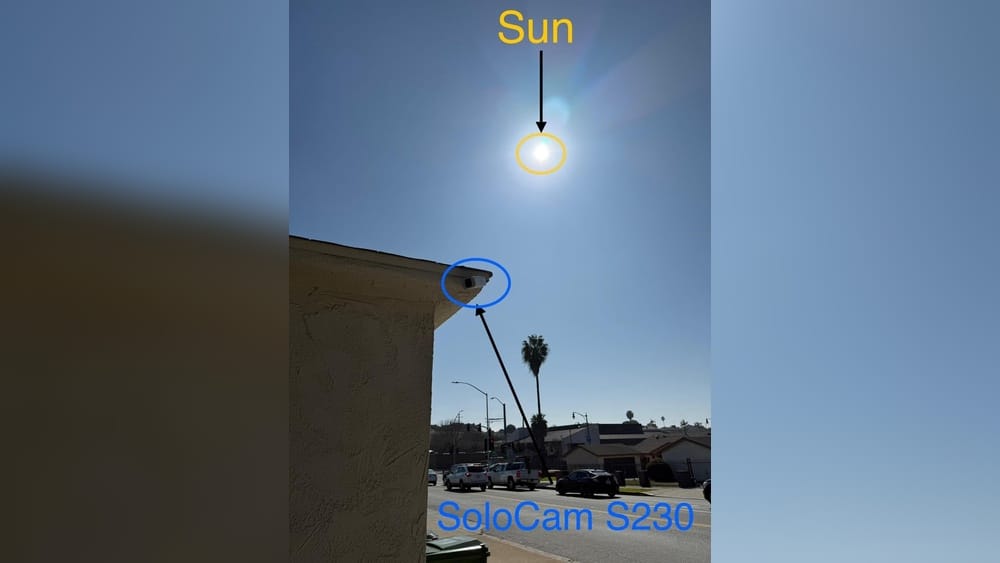
When you buy a solar-powered camera for your home or business, you expect convenience, security, and less worry about charging. Eufy solar cameras, popular for their wire-free design and easy setup, promise all this and more. But a key question often comes up: *Do Eufy solar cameras need direct sunlight to work properly?* If you’re considering one for your property, or you already own one, understanding this is crucial for reliable performance.
Many people believe solar means “always charged,” but reality is more complex. Weather, installation angle, and even tree shadows can make a big difference. This article explains how Eufy solar cameras use sunlight, what “direct sunlight” really means for these devices, and how you can get the most out of your investment.
By the end, you’ll know not only whether Eufy solar cameras need direct sunlight, but also how to set them up for the best results—even if your property isn’t always sunny.
How Eufy Solar Cameras Work
Eufy solar cameras combine two main parts: a wireless security camera and a solar panel. The solar panel collects sunlight and turns it into electricity, which charges the camera’s built-in battery. The battery then powers the camera, letting it record video, detect motion, and send alerts without needing a wired connection.
These cameras are designed for places where running wires is hard or unattractive. They’re popular for homes, farms, and even small businesses. Most Eufy solar cameras use rechargeable lithium batteries, which can last several months on a single charge if the solar panel keeps up with the camera’s energy use.
Why Solar Power?
Solar power gives continuous operation without frequent battery changes or complicated wiring. It’s also eco-friendly, since it uses renewable energy instead of electricity from the grid.
How The Solar Charging System Works
The solar panel generates electricity during the day. The amount depends on sunlight strength, panel size, and angle. This electricity charges the battery. At night, or on cloudy days, the camera runs on stored energy.
Key insight: Even with a solar panel, the camera’s battery is the main power source. The solar panel is just there to keep it topped up. If the battery drains faster than it charges, the camera will eventually shut down—no matter how big the battery is.
The Science Behind Solar Charging
Understanding how solar panels work will help you see why sunlight matters so much. Solar cells inside the panel absorb photons from sunlight. This energy knocks electrons loose, creating an electric current.
The amount of power created depends on:
- Sunlight intensity (more sun = more power)
- Angle of the panel (panels facing the sun collect more energy)
- Amount of shade (shadows reduce charging dramatically)
- Weather conditions (clouds, rain, and snow lower output)
What Counts As “direct Sunlight”?
Direct sunlight means sunlight that hits the solar panel without being blocked or filtered by objects (like trees, roofs, or glass). Indirect sunlight, or diffuse light, comes from rays that bounce around the sky and reach the panel from different angles.
Panels get the most power from direct sunlight. Indirect light, such as on a cloudy day or in the shade, charges the battery much more slowly.
Practical example: If your Eufy camera’s panel faces the open sky and the sun shines on it for four hours, it will charge much faster than a panel under a tree or on the shady side of your house.
Credit: www.reddit.com
Do Eufy Solar Cameras Need Direct Sunlight?
The short answer: Direct sunlight is best and often necessary for reliable, year-round operation. But the real answer depends on how you use the camera, local weather, and where you install the panel.
Why Direct Sunlight Matters
Eufy’s solar panels are small, usually between 2W and 5W. This is enough to keep a camera charged—if the panel gets at least 2–3 hours of strong, direct sunlight most days. If the panel is always in shade, or if you live in a cloudy area, the battery can slowly drain faster than it charges.
Data from Eufy support: Eufy recommends placing the panel where it gets at least 3 hours of direct sunlight per day for optimal charging. Less than this, and you may see warning messages or short battery life.
What Happens Without Direct Sunlight?
If your Eufy solar camera only gets indirect sunlight, it may still charge the battery—but much more slowly. On cloudy days, the solar panel may produce only 10–25% of its rated power.
If the camera uses more power than the panel creates, the battery will eventually run down. This might not matter for a few days, but over weeks or months, your camera could stop working—especially if you use high settings like:
- 24/7 recording
- High-resolution video
- Frequent motion alerts
Real-world Performance Table
The following comparison shows how direct vs. indirect sunlight affects charging speed for a typical Eufy solar panel.
| Sunlight Condition | Charging Efficiency | Expected Battery Life |
|---|---|---|
| Direct sunlight (4+ hrs/day) | 100% | Camera remains fully charged |
| Partial shade (2 hrs direct, rest indirect) | 50-70% | May stay charged, but can drop during heavy use |
| Mostly shade (no direct, all indirect) | 10-25% | Battery drains over weeks |
Factors That Affect Solar Charging
Many new users overlook how many things can impact a solar panel’s output. Even a great camera can stop working if the solar panel isn’t used right.
1. Panel Placement
Placement is the most important factor. The panel should face the sun—usually south in the northern hemisphere—and have a clear view of the sky. Avoid placing the panel:
- Under roof overhangs
- Next to trees or bushes
- On north-facing walls (in the US, Canada, Europe)
2. Angle And Tilt
Solar panels work best when angled toward the sun. In the US, a tilt angle equal to your latitude often gives the best year-round performance.
Practical tip: For most US homes, a tilt of 30–40° works well. Eufy’s panels come with adjustable mounts—use them to point the panel up toward the midday sun.
3. Weather And Seasons
Clouds, rain, snow, and fog all reduce sunlight. Winter months have shorter days, and the sun sits lower in the sky—meaning less energy. If you live in a northern state or region with long winters, expect less charging in December and January.
4. Shadows And Dirt
Even small shadows—like from a telephone wire or a tree branch—can cut power by 50% or more. Dust, bird droppings, or snow on the panel also block sunlight. Wipe panels clean regularly, especially after storms.
5. Camera Usage And Settings
More activity means more power used. If your camera sends many alerts, records for long periods, or uses features like night vision, it will need more sunlight to stay charged.
How Much Sunlight Do You Really Need?
Eufy says their solar panels need around 3 hours of direct sunlight per day for normal use. But what does “normal use” mean? It depends on how many times your camera is triggered and how long each recording lasts.
Average Camera Use
- Low activity (1–10 triggers/day): Battery stays charged with 2–3 hours of sun.
- Medium activity (11–30 triggers/day): Needs 3–4 hours for reliable charging.
- High activity (30+ triggers/day): May need 5+ hours, or may slowly lose charge if not enough sun.
Typical Power Usage Table
Here’s an overview of camera power needs in different scenarios.
| Activity Level | Triggers per Day | Recording Minutes | Recommended Sunlight |
|---|---|---|---|
| Low | 1–10 | 2–10 | 2–3 hrs direct |
| Medium | 11–30 | 11–30 | 3–4 hrs direct |
| High | 31+ | 31+ | 5+ hrs direct or battery backup |
Non-obvious insight: It’s not just the number of triggers that matters—the length of each video and the use of night vision or two-way audio also increase power drain.
What If You Can’t Get Direct Sunlight?
Many homes don’t have perfect spots for solar panels. But there are ways to make Eufy solar cameras work even if your property isn’t always sunny.
Using Longer Cables
Eufy solar panels can often be mounted away from the camera, using extension cables. This lets you put the panel in the sunniest spot—even if the camera needs to be in the shade.
Example: Mount the camera under a porch but run the solar panel up to the roof.
Supplement With Manual Charging
If your panel gets only a few hours of sun, you might need to top up the battery every few months with a USB charger. This is still easier than charging every week.
Reduce Camera Activity
Lowering sensitivity, shortening video clips, or disabling features like 24/7 recording can help the battery last longer between charges.
Consider An Extra Solar Panel
Some users add a second solar panel for more charging power. This is especially useful in cloudier climates or for high-traffic cameras.
Use Battery-only Mode Temporarily
If it’s winter and you know there will be little sunlight, you can switch to battery-only mode, reducing camera activity and disabling solar charging until spring.
Unexpected tip: Even if the panel isn’t in direct sun, placing it in a location that gets reflected sunlight (like near a white wall or fence) can boost charging slightly.
Common Installation Mistakes
Many Eufy solar camera issues come from installation errors. Avoiding these mistakes can make the difference between a camera that works all year and one that dies after a few weeks.
1. Ignoring Shadows
People often install panels during midday, when the sun is high, and forget that afternoon shadows from trees or buildings will block sunlight later in the day.
2. Wrong Angle
Panels left flat on a wall or roof can lose up to half their potential power. Always angle the panel toward the sun.
3. Dirt And Debris
Bird droppings or leaves can block the panel completely. Check and clean the panel every few weeks, especially after storms.
4. Overestimating Winter Sun
Solar power drops in winter, especially in northern areas. Panels that work great in July might struggle in January.
5. Too Many Cameras On One Panel
Each camera needs its own solar panel. Sharing panels between devices usually leads to undercharging.
Tips For Maximizing Solar Charging
You can improve your Eufy camera’s performance with a few practical adjustments.
1. Find The Sunniest Location
Walk around your property in the morning, noon, and afternoon. Notice where the sun hits for the longest time. Place your panel there—even if it means using an extension cable.
2. Adjust The Angle Seasonally
Tilt the panel higher in winter to catch the low sun; flatten it in summer. Adjustable mounts make this easy.
3. Minimize Shade
Trim nearby branches and avoid placing the panel near objects that cast shadows.
4. Keep Panels Clean
Wipe panels with a damp cloth every month. Avoid soap or harsh cleaners, as these can leave a film.
5. Monitor Battery Levels
Use the Eufy app to check camera battery health. If you see it dropping, try to improve sunlight exposure or reduce camera activity.

Credit: www.amazon.com
Comparing Solar Vs. Wired Eufy Cameras
Not sure if solar is the right choice? Here’s a quick comparison of solar-powered and wired Eufy cameras.
| Feature | Solar Eufy Camera | Wired Eufy Camera |
|---|---|---|
| Installation | Easy, no wires | May need electrician |
| Power Source | Sunlight + battery | Constant AC power |
| Maintenance | May need occasional charging/cleaning | Low, unless power outage |
| Best For | Remote/outdoor spots | High-activity, indoor/outdoor |
| Works in Shade? | Limited, battery drains | Yes, always powered |
Non-obvious insight: Solar cameras are best for spots where running power is hard. But if you need absolute reliability and have easy access to power, wired cameras still win.
How Eufy Solar Cameras Perform In Different Climates
Sunny, Dry Areas (e.g., Arizona, California)
Perfect for solar cameras. Panels get 5–8 hours of strong sun daily. You can often use high camera settings without worry.
Cloudy, Rainy Areas (e.g., Pacific Northwest, Uk)
Panels may only get 2–3 hours of weak sun. Cameras can still work, but you may need to lower settings or use manual charging in winter.
Cold, Snowy Areas (e.g., Midwest, Canada)
Winter brings short days, low sun, and snow that can cover panels. Clean panels often and tilt them up to let snow slide off. Expect to charge batteries manually a few times a year.
Urban Environments
Tall buildings and trees can block sunlight. Use extension cables to reach sunny spots, or consider wired cameras for shaded locations.
Surprising fact: Even in Alaska, solar cameras can work in summer, thanks to long daylight hours. But in winter, sunlight can drop to just a few hours a day.
Real User Experiences
Many users share their experiences online. Here are a few examples to help you set expectations:
- “My EufyCam S330 has been running for 9 months without needing a charge. The panel gets sun from 10 am to 3 pm, facing south. No issues so far.”
- “I placed my panel under the eaves on the north side of my house. Battery lasted 3 months, then died. Moved the panel to the roof—problem solved.”
- “In winter, I need to charge the camera once every two months. The rest of the year, the solar panel keeps up fine.”
Lesson: Proper placement and realistic expectations are key for solar camera success.
Should You Buy A Eufy Solar Camera If You Don’t Have Direct Sunlight?
If your property is mostly shaded, or you live in a region with many cloudy days, you may still use a Eufy solar camera, but you’ll need to adjust your expectations. The camera may not stay fully charged year-round, especially in winter or during periods of high activity.
Here are some scenarios where solar Eufy cameras work best:
- You can mount the panel in a sunny spot, even if the camera is in the shade.
- Your area gets at least 2–3 hours of strong sunlight most days.
- You’re okay with charging the battery manually a few times a year.
If none of these fit, consider a wired camera or a battery-only model that you recharge as needed.
Credit: www.reddit.com
Environmental Benefits
Using a solar camera reduces your carbon footprint. One Eufy camera with solar saves several kilowatt-hours of grid electricity each year. It also reduces waste from disposable batteries.
Non-obvious insight: Even if you sometimes charge the battery by hand, you still save energy overall compared to a wired camera.
Future Trends In Solar Security Cameras
Solar technology is improving. New panels are more efficient, and Eufy continues to upgrade their cameras’ battery life and low-power features. In the future, solar cameras may work even in less sunny environments.
Emerging trends:
- Bigger batteries for longer life
- More efficient solar cells
- Low-power modes for winter operation
If you’re interested in the latest advances, you can read more on Wikipedia.
Frequently Asked Questions
Do Eufy Solar Cameras Work In Winter?
Eufy solar cameras work in winter, but charging is slower. Shorter days and low sun mean less power. Clean panels often and consider manual charging if the battery drops below 20%.
Can I Use A Eufy Solar Camera Indoors?
Solar panels need sunlight, so using a Eufy solar camera indoors is not practical unless you have a very sunny window. Otherwise, you’ll need to charge the battery manually.
How Long Do Eufy Camera Batteries Last With Solar?
With 2–4 hours of direct sun daily, most Eufy cameras stay charged year-round. If sunlight is limited, batteries may last 1–3 months between charges, depending on activity.
What Happens If The Solar Panel Breaks?
If the solar panel breaks, the camera will continue on battery power until it runs out. You can charge the battery with a USB cable. Replacement panels are available from Eufy.
Can I Use Any Solar Panel With A Eufy Camera?
Not all solar panels are compatible. Use Eufy’s official panels or panels with the same voltage, connector, and output (usually 5V, 2W–5W). Check the manual before connecting third-party panels.
—
Eufy solar cameras are a smart choice if you want wire-free security and lower maintenance. But they’re not magic—they need direct sunlight to keep working reliably. With good placement and realistic expectations, they can last all year with little effort.
If you’re not sure, start with one camera and test it in your sunniest spot. With a bit of planning, you can enjoy hassle-free, solar-powered security for years to come.