

Apple’s iPhone is famous for its advanced technology, simple design, and focus on user privacy. But there’s one question many people still ask: Do iPhones have IR blasters? If you’ve ever wished to use your iPhone as a TV remote, control your air conditioner, or manage other home devices, you might have searched for this feature. In this article, you’ll discover everything you need to know about IR blasters, why Apple made certain design choices, what your options are, and how the iPhone compares to other smartphones regarding this technology.
What Is An Ir Blaster?
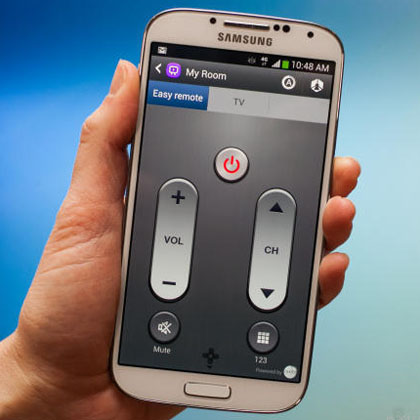
An IR blaster (infrared blaster) is a small hardware component that sends infrared signals. These signals are the same type used by most traditional remote controls for TVs, air conditioners, and set-top boxes. When you press a button on a remote, it sends a unique infrared code to the device. An IR blaster can do the same thing, turning your smartphone into a universal remote.
Key uses of IR blasters:
- Control TVs, DVD players, projectors, and more
- Adjust air conditioners, fans, and smart home devices
- Replace lost or broken remotes
IR blasters were once common on Android phones, and many users found them helpful for home entertainment.
Do Iphones Have Ir Blasters?
The simple answer is no, iPhones do not have built-in IR blasters. From the first iPhone in 2007 to the latest models in 2024, Apple has never included this hardware feature. This is true for all main iPhone models, including the iPhone SE, iPhone 6/7/8 series, iPhone X/XS/XR, iPhone 11/12/13/14/15, and the latest iPhone 15 Pro.
If you pick up any iPhone and look closely, you will not find an IR transmitter or receiver. Some people believe the black dot near the camera or speaker is an IR blaster, but it’s not—it’s usually a sensor for Face ID or proximity detection.

Credit: www.youtube.com
Why Doesn’t Apple Include Ir Blasters In Iphones?
Apple’s design choices are often the subject of debate. There are several reasons why Apple avoids adding IR blasters to iPhones:
Focus On Simplicity And Minimalism
Apple prefers to keep its devices clean and minimal. Adding extra hardware, especially one that many users may not need, goes against this philosophy. Every extra part increases production cost, size, and complexity.
Push Toward Smart Home Integration
Apple invests heavily in smart home technology, especially with the HomeKit platform. Instead of using infrared, HomeKit relies on Wi-Fi, Bluetooth, and other wireless standards. Apple wants users to control devices through these modern protocols, not outdated infrared.
Security And Privacy
Apple is known for strong privacy controls. Infrared can sometimes allow remote access to devices in ways that are hard to monitor. By avoiding IR blasters, Apple reduces certain security risks.
Low Consumer Demand In Key Markets
While IR blasters are popular in some countries, especially in Asia, Apple’s main markets (US, Europe) do not demand this feature as much. Apple’s market research suggests most users don’t miss it.
Encouraging Accessory Ecosystem
Apple supports a large third-party accessory market. By not including features like IR blasters, Apple opens the door for accessory makers to create add-ons for those who want them.
How Do Other Smartphones Compare?
Many Android phones once included IR blasters, especially from brands like Samsung, Huawei, Xiaomi, and LG. However, even among Android devices, IR blasters are becoming rare. Here’s a comparison of popular phone models and their IR blaster support:
| Brand / Model | Year | IR Blaster | Notes |
|---|---|---|---|
| iPhone 15 Pro | 2023 | No | None in any iPhone model |
| Samsung Galaxy S6 | 2015 | Yes | Last flagship Galaxy with IR blaster |
| Samsung Galaxy S23 | 2023 | No | Newer Samsung phones lack IR blaster |
| Xiaomi 13 Ultra | 2023 | Yes | Many Xiaomi models still include IR blaster |
| Huawei P50 Pro | 2022 | Yes | Huawei keeps IR blasters in some flagships |
| Google Pixel 7 Pro | 2022 | No | Never included IR blaster |
As the table shows, most current flagship phones, including iPhones, do not have IR blasters. Only a few brands, especially Xiaomi and Huawei, still offer this feature in recent models.
What Can You Do If You Want Ir Blaster Functionality On Iphone?
If you want your iPhone to control your TV or other devices with infrared, you still have options. Apple’s closed hardware does not allow direct IR blaster use, but you can use external accessories or smart home solutions.
1. Ir Blaster Accessories For Iphone
There are plug-in accessories that add IR blaster capability to your iPhone. These usually connect through the Lightning port (older models), USB-C port (iPhone 15 series and later), or the headphone jack (if you use an adapter).
Popular accessories include:
- Pronto Peel (discontinued but sometimes available)
- AnyMote Home
- BroadLink RM Mini 3
- ZaZaRemote
How they work:
- Plug the device into your iPhone.
- Install the companion app.
- The app lets you select your device (TV, AC, etc. ).
- The accessory sends the IR code to control the device.
Pros:
- Simple to use.
- Adds true IR control.
Cons:
- Accessory can be lost or damaged.
- Some apps are outdated or unsupported.
- Not as seamless as built-in hardware.
2. Smart Home Hubs With Ir
You can use a smart home hub that includes IR blaster functionality. These hubs connect to your Wi-Fi and can be controlled through your iPhone. They act as a bridge between your phone and your old devices.
Examples:
- BroadLink RM4 Mini
- Logitech Harmony Hub (discontinued but still works for existing users)
- SwitchBot Hub Mini
How they work:
- Place the hub in your room.
- Connect it to your Wi-Fi network.
- Use the hub’s app (compatible with iPhone).
- The app sends commands to the hub, which sends IR signals to your devices.
Advantages:
- Control multiple devices from anywhere.
- Integrates with voice assistants (Siri Shortcuts, Alexa, Google Assistant).
- Often more reliable than plug-in dongles.
Disadvantages:
- Extra cost.
- Setup can be tricky for beginners.
- Requires a power source.
3. Universal Remote Apps (without Hardware)
Some apps claim to control devices via Wi-Fi or Bluetooth, but these do not provide true IR control unless your device supports Wi-Fi/Bluetooth natively. For example, many smart TVs can be controlled via Wi-Fi, but older TVs still require IR.
Popular apps include:
- Apple TV Remote (for Apple TV)
- Sony TV Remote (for Wi-Fi enabled Sony TVs)
- Roku App (for Roku devices)
If your device is not “smart,” these apps will not help.
4. Smart Home Upgrades
For users ready to invest, upgrading to smart devices is a good long-term solution. Many modern TVs, air conditioners, lights, and speakers support Wi-Fi or Bluetooth. These can be controlled directly from your iPhone using manufacturer apps or Apple’s Home app.
Apple HomeKit allows you to control compatible devices with Siri or automation routines. While this requires replacing older equipment, it gives you more features and flexibility.
Real-world Examples: Using Iphone As A Remote
Suppose you want to control a traditional TV with your iPhone. Here are a few scenarios:
Scenario 1: Using An Ir Blaster Accessory
- You buy a BroadLink IR blaster dongle.
- Plug it into your iPhone’s USB-C port.
- Download the BroadLink app.
- Set up your TV brand/model in the app.
- The app sends IR commands via the dongle.
- Now your iPhone acts as a universal remote.
Scenario 2: Using A Smart Home Hub
- You set up a BroadLink RM4 Mini in your living room.
- Connect it to your Wi-Fi and pair it with your iPhone.
- Program your devices (TV, AC, fan) in the app.
- Control all devices from anywhere, even when not at home.
Scenario 3: Only Using Apps
- You try a universal remote app, but your TV is not smart.
- The app can’t find your device over Wi-Fi.
- You realize IR hardware or a smart hub is necessary for non-smart devices.
These examples show that while the iPhone itself doesn’t have an IR blaster, you can still get the functionality with the right accessories.
Ir Blaster Use Cases: Why Do People Want Them?
There are several reasons why users want an IR blaster in their smartphones:
- Convenience: One device to control everything.
- Backup Remote: If the original remote is lost or broken.
- Travel: Control hotel room TVs or ACs.
- Universal Control: Manage many devices from different brands.
- Integrate with Smart Home: Automate old devices with new technology.
For people with many older devices, IR blaster support is a useful feature.
The Evolution Of Remote Control Technology
IR blasters are not as common as they used to be, and there’s a good reason for this shift. The world is moving toward smart devices connected by Wi-Fi, Bluetooth, or Zigbee. Here’s a look at the technology transition:
| Technology | Type of Devices | Control Method | iPhone Compatible? |
|---|---|---|---|
| Infrared (IR) | Old TVs, ACs, fans | IR Blaster / Remote | Only with accessory/hub |
| Wi-Fi | Smart TVs, speakers, lights | Apps, voice assistants | Yes |
| Bluetooth | Speakers, headphones, locks | Apps, direct pairing | Yes |
| Zigbee/Z-Wave | Smart bulbs, sensors, switches | Hub + App | Yes (with HomeKit hub) |
IR blasters are still useful for legacy devices, but smart home protocols are the future.

Credit: www.amazon.in
Common Myths About Ir Blasters And Iphones
There are many myths and misunderstandings about IR blasters on iPhones. Let’s clear up the most common ones.
Myth 1: Some Iphones Have Hidden Ir Blasters
This is false. No iPhone model has ever had a built-in IR blaster. The black dot near the camera is a sensor, not an IR transmitter.
Myth 2: Face Id Or Cameras Can Send Ir Signals
Face ID uses infrared sensors to scan your face, but these cannot be used as a remote control. They are not programmable and do not send the right kind of IR signals.
Myth 3: Jailbreaking Adds Ir Blaster Support
Jailbreaking changes software, but cannot add hardware that does not exist. You still need an external IR accessory to send infrared signals.
Myth 4: All Universal Remote Apps Work On Iphone
Many universal remote apps on the App Store only work with Wi-Fi or Bluetooth-enabled devices. They cannot control standard IR-only devices without hardware support.
Are There Security Or Privacy Issues With Ir Blasters?
For most users, IR blasters are safe and simple. They only send signals over short distances and cannot see or record anything. However, there are some security points to consider:
- Some IR accessories require access to your location or network.
- Using third-party apps can introduce privacy risks if the app is not reputable.
- IR blasters can be used to control any compatible device in range, so be careful in public spaces.
Apple’s strict App Store policies help reduce risk, but always check app permissions before installing.
Credit: www.iphonefaq.org
Should Apple Add Ir Blasters To Future Iphones?
This is a question with no easy answer. There are good arguments on both sides.
Reasons to add:
- Useful in markets where IR devices are common.
- Would make iPhone an even more versatile device.
- Helps users who travel or live in hotels.
Reasons not to add:
- Most users do not need the feature.
- Push toward smart home devices makes IR less important.
- Would add cost and complexity.
Apple usually adds features only when they see strong user demand and a long-term benefit. So far, IR blasters don’t meet that standard.
How To Choose An Ir Blaster Accessory For Iphone
If you decide you want IR control, choosing the right accessory is important. Here’s what to consider:
- Compatibility: Make sure it works with your iPhone’s port (Lightning, USB-C).
- Supported Devices: Check if it supports your TV, AC, or other device brands.
- App Quality: Read reviews of the companion app. Some apps are outdated.
- Range: Some small dongles have limited range. Hubs placed in the room work better for large spaces.
- Power Source: Plug-in dongles use your phone’s battery; hubs need external power.
- Support and Updates: Choose brands with good customer support and regular updates.
Here’s a quick comparison of popular IR solutions for iPhone:
| Product | Type | Connection | App Support | Price Range |
|---|---|---|---|---|
| BroadLink RM4 Mini | Smart Hub | Wi-Fi | Good (iOS/Android) | $25-$35 |
| ZaZaRemote | Dongle | Lightning/USB-C | Mixed (some complaints) | $10-$25 |
| AnyMote Home | Smart Hub | Wi-Fi | Good (iOS/Android) | $60-$80 |
| Pronto Peel | Dongle | Lightning (older iPhones) | No longer updated | $15-$30 |
Always check compatibility with your iPhone model and iOS version before buying.
Alternatives To Ir Blasters For Iphone Users
If you don’t want to use accessories or smart hubs, there are other ways to control your devices.
1. Use Manufacturer’s Apps
Many device makers offer their own apps for iPhone. For example:
- Samsung SmartThings (for Samsung TVs and appliances)
- LG ThinQ (for LG devices)
- Sony TV SideView (for Sony smart TVs)
These apps use Wi-Fi or Bluetooth and offer advanced features.
2. Voice Assistants
Apple’s Siri, Amazon Alexa, and Google Assistant can control many smart home devices. If your devices are compatible, you can use voice commands instead of a remote.
3. Home Automation
With Apple’s HomeKit and the Home app, you can automate lights, thermostats, and more. This requires compatible devices, but gives you the most flexibility.
4. Smart Universal Remotes
Some companies sell advanced universal remotes that connect to your iPhone over Wi-Fi or Bluetooth. These remotes often include IR blasters and can be programmed for many devices.
The Future: Will Ir Blasters Make A Comeback?
The trend is clear: IR blasters are fading from new smartphones. As more homes upgrade to smart devices, the need for infrared control is shrinking. However, there will always be some demand in markets with many legacy devices.
Accessory makers are likely to keep making smart hubs and dongles for years to come. But unless there is a big shift in consumer needs, it’s unlikely that Apple will add an IR blaster to future iPhones.
Practical Tips For Iphone Users Who Need Ir Blaster Functionality
If you still rely on devices that use IR remotes, here are some tips:
- Buy a reliable IR blaster accessory from a reputable brand. Avoid cheap, unbranded dongles.
- Keep your original remotes as backups, just in case.
- Explore smart home upgrades as you replace old devices.
- Check app reviews before installing. Many IR remote apps are no longer supported.
- Be patient with setup. Sometimes, programming the right codes takes time.
A non-obvious tip: Place your IR hub in a central spot in your room, not hidden behind a TV or furniture, for the best signal coverage.
Frequently Asked Questions
Does Any Iphone Have A Built-in Ir Blaster?
No iPhone, past or present, has ever included a built-in IR blaster. All iPhone models rely on Wi-Fi, Bluetooth, and other smart protocols for device control. To use infrared, you need an external accessory or hub.
Can I Control My Tv With My Iphone?
Yes, but only if your TV is a smart model that supports Wi-Fi/Bluetooth or if you use an IR blaster accessory/hub. For traditional TVs, your iPhone alone cannot send IR signals. Check if your TV brand offers an official app for remote control.
Is There Any Way To Add Ir Blaster Functionality To An Iphone?
You can add IR blaster functionality to your iPhone by using a compatible dongle or a smart home IR hub. These accessories and hubs often come with their own apps that allow you to control a wide range of devices.
Why Do Some Android Phones Have Ir Blasters, But Iphones Don’t?
Some Android brands, especially those targeting markets with many IR-controlled devices, include IR blasters for convenience. Apple focuses on smart home integration and simplicity, so they have never included this hardware in iPhones.
Are Ir Blaster Accessories Safe To Use With My Iphone?
Reputable IR blaster accessories are safe to use. Always buy from well-known brands, and check app permissions before installing companion apps. For more on infrared technology, you can read about it on Wikipedia.
—
While iPhones do not have built-in IR blasters, you are not out of options. With the right accessory or smart hub, you can still enjoy the convenience of controlling your home devices from your iPhone. As technology moves forward, more devices will support wireless control, making infrared less important over time.
Until then, smart accessories and hubs can bridge the gap and help you get the most from your iPhone in a world full of remotes.