
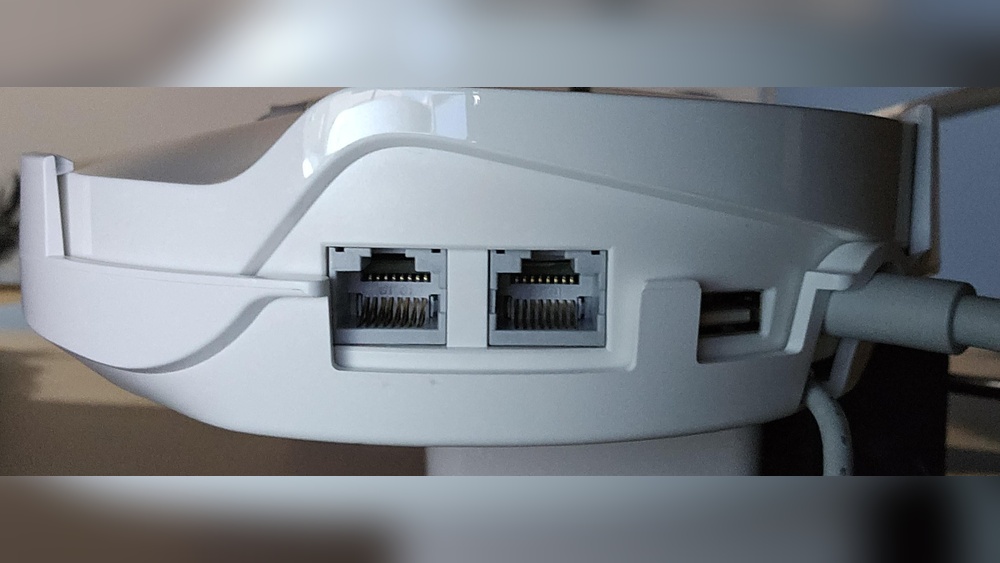
In today’s world, fast and reliable Wi-Fi is almost as important as electricity. We stream movies, join video meetings, play games, and control smart devices—all over Wi-Fi. But traditional routers often can’t cover large homes or spaces with strong, steady signals. That’s where mesh routers come in, offering seamless Wi-Fi across every corner of your house. But for many users, there’s one big question: *Do mesh routers have Ethernet ports?* And if they do, how useful are these ports for your devices, speeds, and home network setup?
This article will explore everything you need to know about Ethernet ports on mesh routers. We’ll look at why Ethernet ports matter, which mesh systems include them, how you can use them to improve speed and reliability, and what to consider before buying.
Whether you’re a gamer, work from home, or just want smoother streaming, understanding mesh router Ethernet options can help you make smart choices for your network.
What Are Mesh Routers And How Do They Work?
A mesh router system is different from a regular wireless router. With a traditional router, you have one device sending Wi-Fi to your whole home. If you’re far away, the signal can be weak or drop completely. Mesh routers solve this by using several units: a main “base” and one or more “satellites.” These units talk to each other to create a single, big Wi-Fi network.
Each mesh unit acts as a Wi-Fi access point. You can walk from room to room, and your device stays connected to the strongest node automatically. This means fewer dead zones and more consistent speeds.
How Mesh Networks Communicate
Mesh nodes connect to each other in two ways:
- Wirelessly: Most mesh systems use Wi-Fi to communicate between nodes. This is called a “wireless backhaul.”
- Wired (Ethernet) Backhaul: Some mesh systems let you connect nodes with Ethernet cables. This can make the connection between nodes faster and more stable.
Both types have pros and cons. Wireless backhaul is easy—just plug in your mesh nodes and go. Wired backhaul takes more setup (running cables), but gives you top performance.
Do Mesh Routers Have Ethernet Ports?
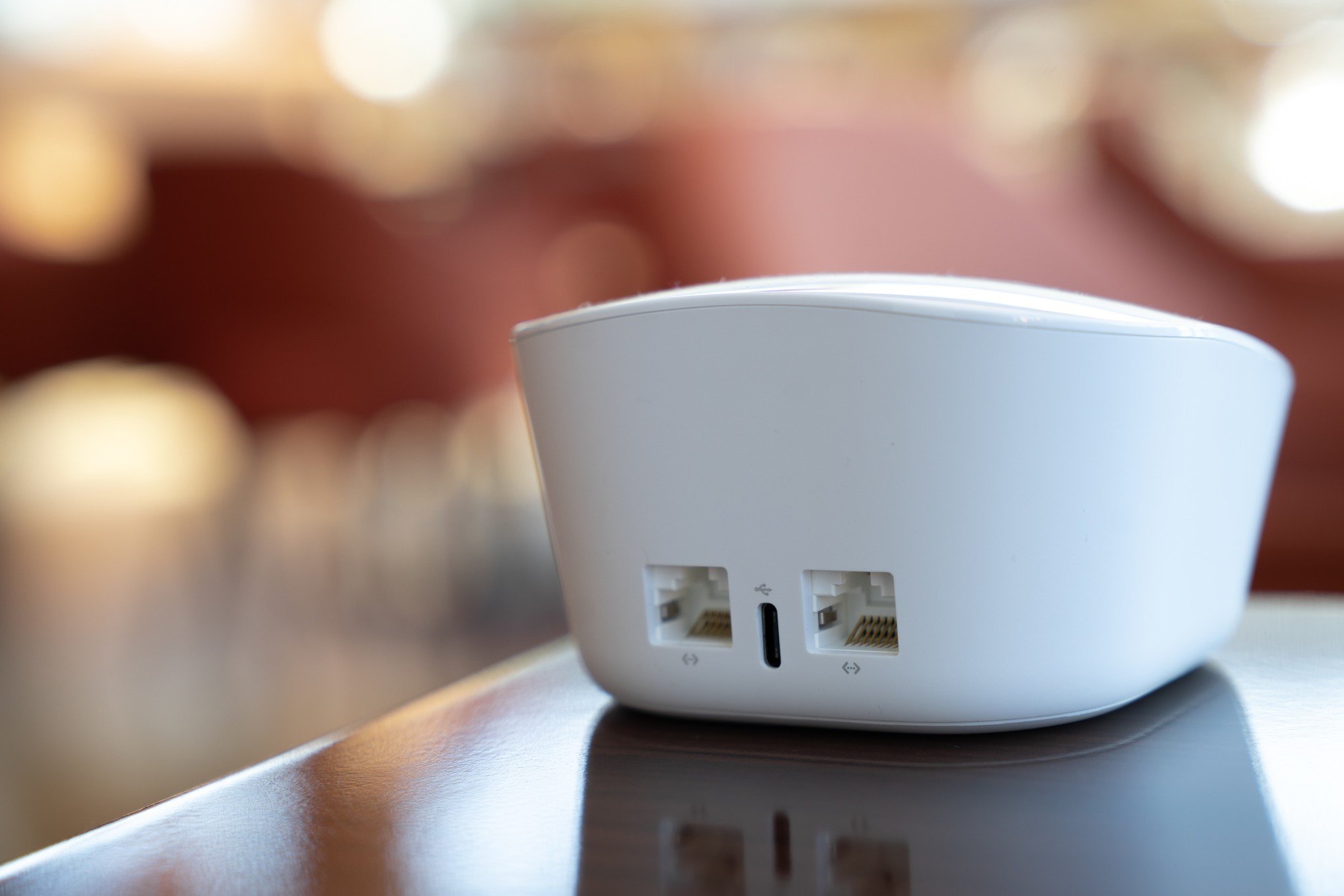
This is a common question for people setting up home networks. The short answer: Most mesh routers do have Ethernet ports, but not all of them. The number and type of ports can vary a lot between brands and models.
Why Ethernet Ports Matter On Mesh Routers
Ethernet ports allow you to connect devices directly to your router or mesh node using a cable. Wired connections are usually faster and more stable than Wi-Fi. They are great for:
- Gaming consoles
- Smart TVs
- Desktop computers
- Network-attached storage (NAS)
- Streaming devices
Some people also use Ethernet ports to link mesh nodes together (wired backhaul), boosting speed and reliability.
Typical Mesh Router Ethernet Port Configurations
Most mesh router kits come with:
- At least 1 Ethernet port on the main router.
- 1 or more Ethernet ports on each satellite node.
But there are exceptions. Some small, budget mesh systems have no Ethernet ports on satellites. Others may have multiple ports for flexible setups.
Here’s a quick look at common configurations:
| Mesh System | Main Router Ethernet Ports | Satellite Ethernet Ports |
|---|---|---|
| Google Nest Wifi | 2 | 0 (on regular satellites) |
| Netgear Orbi RBK50 | 3 (1 WAN, 2 LAN) | 4 (each satellite) |
| Eero 6 | 2 | 1 (on some models) |
| TP-Link Deco M5 | 2 | 2 (each node) |
| Amazon Eero Pro 6E | 2.5Gbps + 1Gbps | 2 (on Pro models) |
As you can see, the number and speed of Ethernet ports can be very different. Some satellite nodes have none, while others have several.
Main Uses For Ethernet Ports On Mesh Routers
Ethernet ports on mesh routers offer a few important uses. Let’s break them down:
1. Connecting Devices Directly
This is the most common use. Plug your smart TV, desktop, gaming console, or NAS into the Ethernet port for:
- Higher speed: Wired is usually faster than Wi-Fi.
- Lower latency: Important for gaming and video calls.
- Better reliability: Less interference than wireless.
2. Wired Backhaul Between Mesh Nodes
If your home is large, or has thick walls, Wi-Fi signals can struggle. Connecting mesh nodes with Ethernet cable (wired backhaul) solves this.
- Improved performance: Each node gets full speed from your internet.
- Consistent coverage: No slow spots, even far from the main router.
Some mesh systems even let you mix: some nodes on wireless backhaul, others on wired.
3. Expanding Your Wired Network
You can use mesh node Ethernet ports to add more wired devices in any room. For example:
- Add a network switch to connect several devices (printer, PC, TV).
- Connect smart home hubs for faster response.
This turns each mesh node into a mini-network hub.
Mesh Routers Without Ethernet Ports: Are They Worth It?
Some entry-level mesh systems (like basic Google Nest Wifi satellites) have no Ethernet ports at all. Why do companies do this?
- Lower cost: Fewer parts means lower price.
- Smaller size: Easier to hide or place anywhere.
- Simple setup: No confusion over which port to use.
But you lose the benefits of wired connections. If you want to connect a device with a cable or use wired backhaul, these models are not ideal.
If you only use Wi-Fi and have a small apartment, a mesh router without Ethernet ports might be fine. But for most people, especially in larger homes, having Ethernet ports gives more options.
Detailed Comparison: Popular Mesh Routers And Their Ethernet Ports
Let’s look at how some top mesh routers handle Ethernet ports. This will help you see what to expect when shopping.
| Brand & Model | Ports on Router | Ports on Satellites | Supports Wired Backhaul? | Max Port Speed |
|---|---|---|---|---|
| Netgear Orbi RBK852 | 1 WAN, 4 LAN | 4 LAN | Yes | 1 Gbps |
| Google Nest Wifi | 2 (1 WAN, 1 LAN) | 0 | No (on satellites) | 1 Gbps |
| TP-Link Deco X60 | 2 (auto WAN/LAN) | 2 (auto WAN/LAN) | Yes | 1 Gbps |
| Amazon Eero Pro 6E | 1 x 2.5Gbps, 1 x 1Gbps | 2 x 1Gbps | Yes | 2.5 Gbps (main) |
| ASUS ZenWiFi AX (XT8) | 1 WAN, 3 LAN, 1 2.5Gbps | 3 LAN, 1 2.5Gbps | Yes | 2.5 Gbps |
| Linksys Velop MX10 | 1 WAN, 4 LAN | 4 LAN | Yes | 1 Gbps |
As shown above, high-end mesh systems like Netgear Orbi and ASUS ZenWiFi offer several Ethernet ports on both routers and satellites. Google Nest Wifi offers none on its satellites, which is a trade-off for simplicity and size.
Why Use Wired Backhaul? The Hidden Power Of Ethernet With Mesh
Many users buy mesh routers for better Wi-Fi, but not everyone knows about the wired backhaul option. This feature lets you connect mesh nodes with Ethernet cables, creating a fast, interference-free “backbone” for your network.
Benefits Of Wired Backhaul
- Top speed at every node: Wireless backhaul uses some Wi-Fi bandwidth for node-to-node links, which can slow down device speeds. Wired backhaul removes this bottleneck.
- No wireless interference: Walls, microwaves, and other devices can weaken Wi-Fi. Ethernet is immune.
- Reliable for gaming and work: If you need lag-free video calls or fast file transfers, wired backhaul delivers.
When Wired Backhaul Makes Sense
- Large homes (over 2,500 sq ft)
- Houses with thick walls or multiple floors
- Heavy users (gamers, 4K streamers, remote workers)
- Homes with existing Ethernet wiring
If you’re building or renovating, consider adding Ethernet cables in walls for future-proof networking. Even a single cable between main router and one satellite can boost speeds.

Credit: support.eero.com
How To Use Ethernet Ports On Mesh Routers: Practical Guide
Setting up Ethernet connections on your mesh system is not hard, but there are a few tips and tricks for best results.
Step 1: Check Your Mesh Router’s Ports
Not all mesh systems have the same ports. Look at your model’s manual or website to see:
- How many Ethernet ports are on each node
- Which are WAN (for internet) and which are LAN (for devices)
- If satellites support Ethernet connections
Step 2: Plan Your Wired Backhaul
Decide which mesh nodes you want to link with cable. Common setups include:
- Main router to one or more satellites via Ethernet
- Daisy-chaining: Router → Satellite 1 → Satellite 2 (cable between each)
Use Cat5e or Cat6 Ethernet cables for best speeds, especially if you have gigabit internet.
Step 3: Connect Devices
Plug your wired devices (TV, PC, game console) into the mesh node’s LAN ports. If you need more ports, add an unmanaged network switch. This is a small device that adds more Ethernet jacks.
Step 4: Enable Wired Backhaul In Settings
Some mesh systems detect wired backhaul automatically. Others need you to enable it in the app or admin panel. Check your mesh system’s setup guide for details.
Step 5: Test And Optimize
After connecting, check your device speeds and coverage. You may need to move satellites for best signal, or adjust settings for optimal results.
Mesh Router Ethernet Port Speeds: What Should You Expect?
Not all Ethernet ports are equal. Here’s what you should know about port speed:
- 100 Mbps (Fast Ethernet): Rare on modern mesh routers, but some budget models still use it.
- 1 Gbps (Gigabit): Most common. Good for most home uses, including 4K streaming and gaming.
- 2.5 Gbps or higher: Found on premium mesh systems. Useful if you have very fast internet (fiber, multi-gig) or lots of wired devices.
If you want top speeds, check the port specs before buying. Using a slow port can limit your network, even if your Wi-Fi is fast.
Common Mistakes When Using Ethernet Ports On Mesh Routers
Many people buy mesh routers with Ethernet ports, but don’t use them to full potential. Here are some mistakes to avoid:
- Ignoring Ethernet ports completely: Many users never plug anything in, missing out on faster, more reliable connections.
- Not using wired backhaul: You might have Ethernet wiring at home, but rely only on wireless backhaul. Connecting nodes with cable can double or triple speeds.
- Using slow cables: Cheap or old Ethernet cables (Cat5) may limit your speed. Use Cat5e or Cat6 for gigabit performance.
- Overlooking port speeds: Some mesh nodes have both fast and slow ports. Always use the highest-speed port for main devices.
- Confusing WAN and LAN ports: Plugging devices into the wrong port can cause connection problems. Check your router’s labels and manual.
- Placing satellites too far apart: Even with wired backhaul, mesh nodes should not be too far from each other for the best coverage.
Who Needs Ethernet Ports On Mesh Routers?
Not everyone needs Ethernet ports on their mesh system, but for many users, they are a must-have. Here’s who benefits most:
- Gamers: Wired connections mean lower ping and lag.
- Remote workers: Video calls and file transfers are more stable.
- Home theaters: Streaming 4K or 8K video needs strong, steady speed.
- Smart home users: Hubs and bridges for devices like Philips Hue or security cameras work better when wired.
- Tech enthusiasts: Connecting NAS, servers, or advanced home networks.
If you only use smartphones and tablets, and don’t mind occasional slowdowns, you might not need Ethernet. But for most households, having the option is valuable.

Credit: www.reddit.com
How To Choose A Mesh Router With The Right Ethernet Ports
When shopping for a mesh router, don’t just look at Wi-Fi speed and range. Check the Ethernet specs too.
Key Factors To Consider
- Number of Ethernet ports: More ports mean more devices can be wired.
- Location of ports: Are they on the main router, satellites, or both?
- Port speed: Gigabit (1 Gbps) is standard, but 2.5Gbps+ is better for fast internet.
- Wired backhaul support: Not all mesh systems allow Ethernet between nodes.
- Auto WAN/LAN switching: Some systems let any port act as WAN or LAN for flexible setups.
Example: Comparing Two Popular Models
Let’s compare Google Nest Wifi and TP-Link Deco X60 side by side for Ethernet flexibility.
| Feature | Google Nest Wifi | TP-Link Deco X60 |
|---|---|---|
| Ethernet on Main Router | 2 (1 WAN, 1 LAN) | 2 (auto WAN/LAN) |
| Ethernet on Satellites | 0 | 2 (each node) |
| Wired Backhaul | No | Yes |
| Max Port Speed | 1 Gbps | 1 Gbps |
If you plan to use wired backhaul or want to plug in many devices, the Deco X60 is much more flexible.
Real-world Example: Mesh Router Ethernet Ports In Action
Let’s look at a real scenario to see the difference Ethernet ports make.
James lives in a two-story house. He works from home and has a gaming setup in the basement. His main internet connection is upstairs. He sets up a mesh router system:
- Main node upstairs (router) with Ethernet to his desktop PC.
- Satellite node in the basement, connected by Ethernet cable to the main node (wired backhaul).
- His gaming console and smart TV plug into the basement node’s Ethernet ports.
Result: Both floors have strong Wi-Fi, but his main devices get gigabit speeds and zero lag, thanks to the Ethernet ports and wired backhaul.
If James had chosen a mesh system with no Ethernet ports on satellites, he would be stuck with slower wireless backhaul and Wi-Fi for his gaming console—risking lag and dropouts.
What If My Mesh Router Lacks Enough Ethernet Ports?
Sometimes, even with a mesh router that includes Ethernet, you run out of ports. Here’s what you can do:
- Add a network switch: This device plugs into one Ethernet port and gives you several more. Switches are inexpensive and require no setup.
- Upgrade to a model with more ports: If you often need many wired connections, look for mesh systems designed for advanced users (like Netgear Orbi or ASUS ZenWiFi).
- Mix mesh and wired routers: In some advanced setups, you can use a regular router or switch for wired devices, and mesh for Wi-Fi only.
Do Ethernet Ports On Mesh Routers Support Power Over Ethernet (poe)?
A few mesh routers support Power over Ethernet (PoE). This means the node can get both power and data over a single Ethernet cable, making installation easier in places without nearby outlets.
- Business mesh systems (like Ubiquiti UniFi) often use PoE.
- Home mesh systems rarely include PoE, but some new models are starting to add it.
If you want to wall-mount a node, or place it in a hard-to-reach spot, PoE support can be a big plus.
Security And Ethernet Ports: Is There A Risk?
Some people worry about security when using Ethernet ports. The good news: wired connections are not less secure than Wi-Fi. In fact, they can be more secure, since there’s no wireless signal to intercept.
However, always:
- Use strong passwords for your router and devices.
- Keep your router’s firmware up to date.
- Don’t leave unused Ethernet cables plugged in where strangers can access them.
The Future Of Mesh Routers And Ethernet
Wi-Fi keeps getting faster, but Ethernet is not going away. In fact, as internet speeds rise (with fiber and 5G), having high-speed wired ports on mesh routers is more important than ever.
New mesh systems now offer:
- 2.5Gbps or 10Gbps ports for multi-gig internet
- More ports per node for connecting many devices
- Power over Ethernet for easy placement
Experts predict that even as Wi-Fi 7 and beyond arrive, Ethernet will remain the gold standard for speed and reliability, especially in homes with many smart devices.
For more technical details about mesh networking, you can visit the Wireless Mesh Network page on Wikipedia.
Credit: www.androidcentral.com
Frequently Asked Questions
How Many Ethernet Ports Do Most Mesh Routers Have?
Most mesh routers have at least two Ethernet ports on the main router. Satellite nodes may have one or more, but some have none. High-end systems often offer three or more ports per node, while budget models may have just one or two.
Can I Use Any Ethernet Cable With Mesh Routers?
Yes, but for best results, use Cat5e or Cat6 cables. These support gigabit speeds and work well for most home internet connections. Avoid very old Cat5 cables, as they may limit your speed.
Will Using Ethernet Ports Disable Wi-fi On My Mesh Router?
No. Plugging in devices with Ethernet does not turn off Wi-Fi. You can use both wired and wireless connections at the same time, which is great for homes with many different devices.
Is It Hard To Set Up Wired Backhaul With Mesh Routers?
For most systems, it’s easy. Just connect the mesh nodes with Ethernet cables, and the system usually detects the wired backhaul automatically. Some brands may require a setting change in the app, so check your model’s instructions.
Do All Mesh Routers Allow Ethernet Backhaul?
No, not all mesh routers support Ethernet backhaul. Some only work with wireless backhaul, especially basic or older models. Always check the product specs before buying if wired backhaul is important to you.
Having Ethernet ports on your mesh router gives you more speed, flexibility, and reliability. For many homes, it’s the key to getting the most out of your internet connection—now and in the future. Choose wisely, and your network will work better in every room.