
When you think of Tesla, you probably picture high-tech electric cars, sleek designs, and self-driving features. But there’s another big reason why Tesla is in the spotlight: security. Many owners want to know—do Teslas have security cameras? With car theft and vandalism on the rise, people want vehicles that do more than just get them from place to place; they want protection. Tesla has stepped into this space with features that go far beyond the basic car alarm.
This article explores how Tesla uses cameras as part of its security system. We’ll cover where the cameras are, how they work, what you can do with the footage, and the privacy questions that come with advanced tech. By the end, you’ll understand everything you need to know about Tesla’s security cameras, including practical tips and a clear look at what makes them unique.
Tesla Cameras: The Basics
Before diving into security, it’s important to know that Tesla cars come with multiple cameras built in. These aren’t just for security—they help with driving, parking, and even Tesla’s famous Autopilot system.
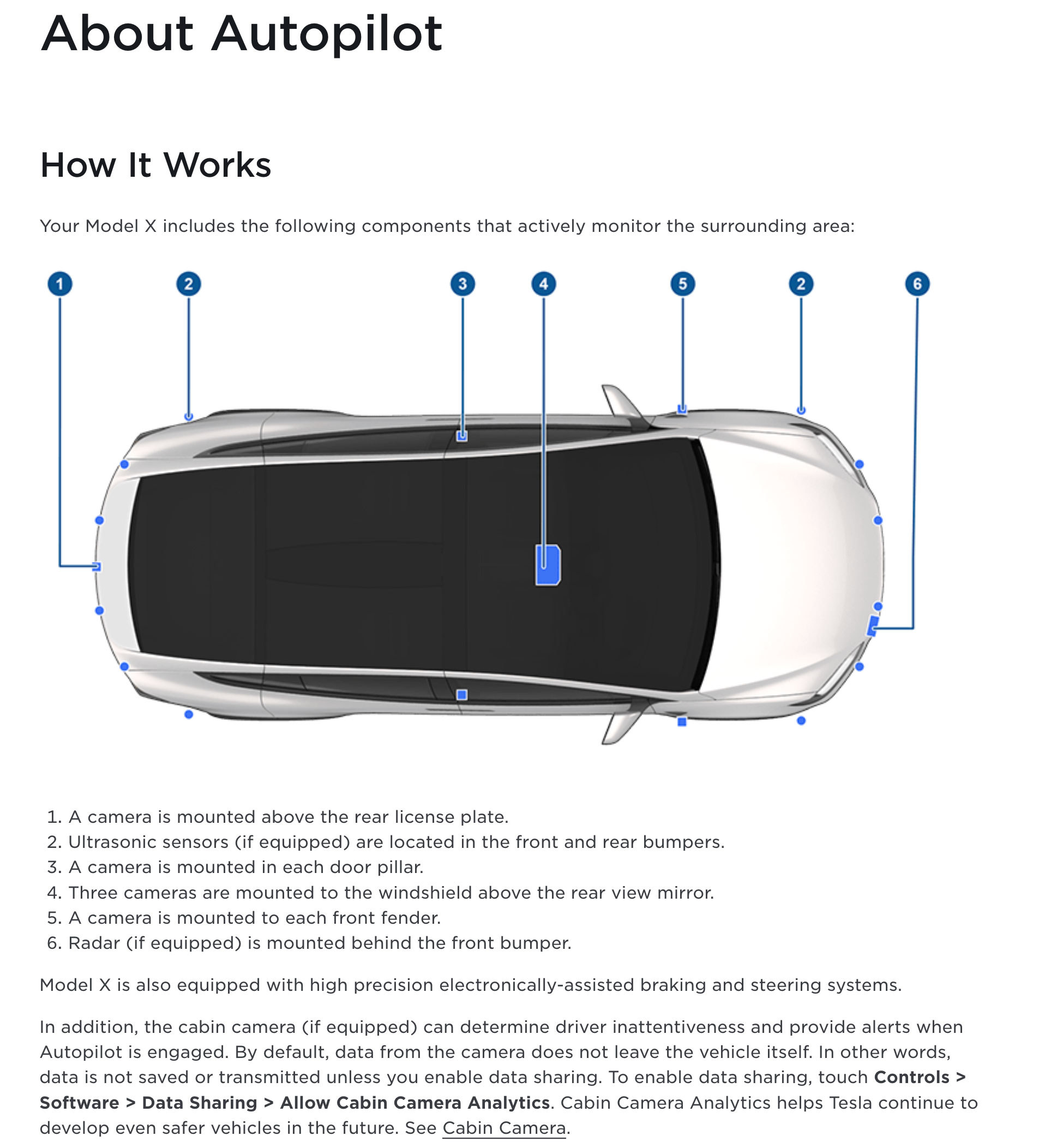
Every modern Tesla, including the Model 3, Model S, Model X, and Model Y, is equipped with a set of cameras placed around the vehicle. Most models from 2017 onwards have at least eight external cameras. Here’s where you’ll typically find them:
- Front-facing camera: Mounted above the windshield, looking forward.
- Rear-facing camera: Located above the rear license plate.
- Side cameras: Placed in the side repeaters (just behind the front wheels), under the side mirrors, and sometimes on the B-pillars (between the front and rear doors).
These cameras feed information to Tesla’s computers to help with lane-keeping, adaptive cruise control, and parking. But they also play a key role in security.
External Cameras And Their Functions
The external cameras serve multiple purposes:
- Driving Assistance: They help with Autopilot and Full Self-Driving features by tracking lanes, traffic, and obstacles.
- Parking: Provide views for parking sensors and help with the backup camera.
- Security Monitoring: Record and monitor the area around the car when the vehicle is parked or when certain security features are active.
Tesla’s use of these cameras for security is what sets the cars apart from most traditional vehicles.
Security Features Powered By Cameras
Tesla’s security system uses the car’s built-in cameras in ways that feel futuristic. The main features are Sentry Mode and Dashcam. Both use the car’s cameras, but in different situations.
Sentry Mode
Sentry Mode is Tesla’s always-on security watch. When you leave your car and lock it, Sentry Mode can be enabled to monitor your surroundings. Here’s what happens:
- The cameras keep an eye on the area around the car.
- If someone comes close or tries to touch the car, the system records video from multiple angles.
- The car may display a warning message on the center screen (“Recording”), letting people know they’re being watched.
- If a more serious threat is detected (like a window break or forced entry), the car can trigger an alarm, play loud music, and flash the lights.
Sentry Mode records video clips to a USB drive plugged into the car. You can review these later to see what happened.
Dashcam
The Dashcam feature is similar to traditional dashcams, but it uses Tesla’s multiple cameras. When you’re driving, the Dashcam records video from several angles at once. This can be very helpful in case of accidents or road rage incidents, providing evidence for insurance or police.
You can also manually save clips by tapping the Dashcam icon on the screen. These clips are saved to the same USB drive as Sentry Mode footage.
Dog Mode And Cabin Camera
Some newer Teslas also have a cabin-facing camera above the rearview mirror. While this camera is mainly for driver monitoring (for example, checking if the driver is paying attention during Autopilot), it can also be used for other features in the future. Dog Mode, which keeps the car comfortable for pets and displays a message on the screen, does not use the cameras for security, but it’s often mentioned alongside Sentry Mode as part of Tesla’s “smart features.”
Credit: www.reuters.com
How Tesla Security Cameras Work In Practice
Understanding how the cameras work in real life makes a big difference. Here’s a look at how they operate in various situations.
Monitoring While Parked
When you park and lock your Tesla, you can turn on Sentry Mode. The car’s cameras will then:
- Watch for movement or people near your car.
- Record short video clips if anything comes too close or touches the car.
- Store these clips on your USB drive, usually in a folder labeled for Sentry Mode events.
If the car detects something more serious, it can:
- Sound the car alarm.
- Blast music through the speakers.
- Send a notification to your Tesla mobile app, so you know right away.
Recording While Driving
While you drive, the Dashcam feature records video from the front, rear, and side cameras. You can set the system to record all the time, or only when you press the record button. If there’s a collision, the car can automatically save footage from just before and after the event.
Using The Footage
You can review video clips by:
- Removing the USB drive and plugging it into a computer.
- Using the Tesla screen (for some models and updates) to watch footage directly in the car.
The video files are usually in standard formats (like. mp4), making them easy to play on most devices.
Table: Tesla Camera Placement And Coverage
To give you a clear idea, here is a comparison of camera placement and their coverage in modern Tesla models.
| Model | Front Cameras | Side Cameras | Rear Camera | Cabin Camera |
|---|---|---|---|---|
| Model S (2021+) | 3 (windshield-mounted) | 2 (repeaters), 2 (B-pillars) | 1 (above license plate) | Yes |
| Model 3 | 3 | 2 (repeaters), 2 (B-pillars) | 1 | Yes |
| Model X (2021+) | 3 | 2 (repeaters), 2 (B-pillars) | 1 | Yes |
| Model Y | 3 | 2 (repeaters), 2 (B-pillars) | 1 | Yes |
Real-world Impact Of Tesla Security Cameras
Tesla’s use of cameras for security is not just about peace of mind—it has real-world effects. There are many stories in the news and on social media about Teslas catching thieves, vandals, and hit-and-run drivers. In fact, some police departments have used Tesla Sentry Mode footage to solve crimes.
A 2022 survey found that over 70% of Tesla owners believe Sentry Mode has made their car noticeably safer. In another example, a viral video showed a Tesla catching a vandal in the act, with clear video of the license plate and face. This kind of evidence is rare in traditional cars.
Insurance And Legal Benefits
Insurance companies like video evidence. In the event of an accident or break-in, having footage from different angles can speed up claims and prove what really happened. Some insurers even offer discounts for cars with advanced security features.
But there’s a practical tip that many new owners miss: Your Tesla will not save security footage unless you provide a properly formatted USB drive. The drive must be inserted into the USB port and set up correctly, or the cameras won’t save anything. This catches many people off guard, so it’s worth double-checking your setup.
Limitations And False Alarms
Tesla’s camera security is impressive, but not perfect. There can be false alarms—Sentry Mode might trigger if someone walks by too closely, or if a car parks nearby. Sometimes, the cameras may not record everything if the USB drive is full or corrupted.
Also, the system won’t stop a determined thief from breaking in. It’s a strong deterrent, not a complete solution. Still, the video evidence can be invaluable.
Privacy, Data, And Ethical Questions
With so many cameras recording, privacy is a real concern. Tesla has tried to address this, but some questions remain.
Who Sees The Footage?
By default, Sentry Mode and Dashcam videos are stored only on your USB drive. Tesla doesn’t get the footage unless you choose to share it, for example, to help with a service issue or an accident investigation.
The cabin camera is a special case. Tesla says that images from inside the car are not sent to the company unless you enable data sharing. Even then, the images are usually anonymized and used for improving safety features.
Tesla also has a “data privacy” section in the car’s settings, letting you control what is shared. Most owners keep the default setting, which is to keep data local and private.
Legal Issues
Laws about video recording vary by country and even by state. In some areas, recording audio without consent is illegal, but Tesla’s cameras do not record audio, only video. Still, it’s wise to check your local laws if you plan to use or share the footage publicly.
Some countries, like Germany, have strict rules about public video surveillance. If you use Sentry Mode in certain places, you might need to post a sign or inform people.
Ethical Considerations
Recording video in public spaces can make some people uncomfortable. It’s important to use these features responsibly. For example, don’t post videos online that show people without their permission. Use the footage for security, not for shaming or harassment.
Comparison: Tesla Vs. Other Car Security Systems
Tesla is not the only car company with advanced security, but its approach is unique. Here’s a comparison with other popular systems.
| Feature | Tesla | Traditional Car Alarm | Aftermarket Dashcam |
|---|---|---|---|
| Multiple Camera Angles | Yes (up to 8) | No | Usually 1-2 |
| Integrated Security Alerts | Yes (Sentry Mode) | Basic alarm only | No |
| Remote Notifications | Yes (mobile app) | No | Rarely |
| Built-In Video Storage | Yes (USB drive) | No | Yes (SD card) |
| Factory Warranty | Yes | Yes | No |
| Privacy Controls | Yes (settings menu) | No | No |
This comparison shows that Tesla’s system is more complete and integrated. Aftermarket systems may offer some features, but they often require extra wiring, don’t cover as many angles, and lack remote alerts.
How To Set Up Tesla Security Cameras
Many new owners are excited to try Sentry Mode and Dashcam, but setup is not automatic. Here’s how to make sure your Tesla’s cameras are ready to protect your car.
1. Prepare A Usb Drive
Tesla requires a USB drive (or solid-state drive) to store camera footage. It must be:
- At least 32 GB (more is better for longer storage)
- Formatted in FAT32 (Windows) or exFAT (Mac and Windows)
- Plugged into a front USB port (some newer Teslas use the glove box port for security)
Tesla recommends using a high-quality drive to avoid corruption. If your drive fails, you may lose footage.
2. Create The Correct Folders
On the USB drive, create a folder named TeslaCam (capital T, capital C). The car will use this folder for both Dashcam and Sentry Mode.
3. Enable Sentry Mode And Dashcam
- On the car’s touchscreen, tap the car icon, then go to Safety & Security.
- Turn on Sentry Mode. You can set it to always be on, or to exclude certain places like home or work.
- Make sure Dashcam is on. You’ll see the Dashcam icon on your screen.
4. Check Everything
After a drive or an event, remove the USB drive and check the footage on your computer. Make sure clips are being saved properly. If not, reformat the drive or try a different one.
5. Use The Mobile App
With the Tesla mobile app, you can get alerts if Sentry Mode is triggered. You can also view some camera feeds live (for some models and software versions), so you can check your car from anywhere.
Non-obvious Tips
- If your USB drive is almost full, the car will stop recording new footage. Regularly delete old clips to keep space available.
- Some high-end USB drives have built-in lights or indicators that show when they are recording. This can help you know if the drive is working properly.
- For the best reliability, consider a solid-state drive instead of a cheap flash drive. SSDs handle constant writing better.
Tesla Camera Footage: What You Can And Cannot Do
Once you have footage, you might wonder about your rights and options. Here’s what you need to know.
Reviewing And Sharing
You can:
- Watch the footage on your computer or, for some Teslas, on the car’s screen.
- Share clips with police, insurance, or anyone else you choose.
You cannot:
- Use the footage for commercial purposes without consent from anyone shown.
- Record audio—Tesla cameras do not capture sound.
Uploading To The Internet
Posting footage online is popular (especially for viral incidents), but be careful. If the video shows faces or license plates, you could violate privacy laws in some areas. Blur sensitive details if you share online.
Tesla’s Use Of Footage
Tesla only accesses your footage if you agree. If the car detects a crash, it may ask you to share clips to help improve safety features, but this is optional.
Table: Sentry Mode Vs. Dashcam
Here’s a quick look at the differences between the two main security camera features.
| Feature | Sentry Mode | Dashcam |
|---|---|---|
| When Active | When parked and locked | While driving |
| What It Records | People or movement near the car | Surroundings during driving events |
| How to Save | Automatic on trigger | Manual or automatic on impact |
| Storage | USB drive | USB drive |
| Notification | Yes (app alert if alarm triggers) | No |

Credit: www.aclu.org
Do All Teslas Have Security Cameras?
Most Tesla vehicles made after mid-2017 have the full camera suite. Here’s a breakdown:
- Model S and Model X built after August 2017: Full set of cameras and Sentry Mode support.
- Model 3 and Model Y (all years): All have cameras and Sentry Mode.
- Older Model S/X (before 2017): May have fewer cameras, limited or no Sentry Mode support.
- Model Y (all versions): Always includes cameras.
If you buy a used Tesla, check the build year and software version. Some early models need a software update to enable all security features.
Over-the-air Updates: Improving Security Over Time
One thing that makes Tesla unique is over-the-air software updates. This means your car can get new features and security improvements without a trip to the shop.
For example, Sentry Mode was first released in early 2019. All Teslas with the right hardware got the feature via a software update. Later updates added live camera viewing from the mobile app, improved video quality, and better privacy controls.
This is different from most other car brands, where features are “locked in” at the time of purchase.
Potential Drawbacks And Owner Concerns
No system is perfect. Here are some downsides that Tesla owners sometimes report:
- Battery Drain: Sentry Mode can use up to 1 mile of range per hour while parked. If you leave it on for days, your battery can run low.
- Storage Problems: If the USB drive is slow, old, or full, you may lose footage.
- False Alarms: Busy parking lots can trigger Sentry Mode many times, filling up your drive with useless clips.
- Privacy: Some people worry about being recorded without consent, especially with the cabin camera.
- Limited Night Vision: Tesla cameras do not have infrared or special low-light sensors, so footage at night can be grainy.
Despite these issues, most owners find the benefits outweigh the drawbacks, especially for peace of mind.
Owner Experiences: Stories From The Road
Tesla forums and owner groups are full of stories where camera footage helped in real life:
- One owner in California caught a thief trying to break into his car. The clear video helped police identify and arrest the suspect.
- In Canada, a Tesla owner used Dashcam footage to prove that another driver ran a red light, winning an insurance dispute.
- A family in Florida shared how Sentry Mode scared away vandals, who left when they saw the recording warning on the screen.
These stories highlight a key point: Tesla’s camera system doesn’t just record—it deters crime.

Credit: www.aclu.org
Future Of Tesla Security Cameras
Tesla continues to improve its camera system with each update. In the future, we may see:
- Better night vision: Newer hardware could include low-light sensors.
- 360-degree live view: Some updates already allow live viewing from the app.
- AI event detection: Smarter software could tell the difference between a real threat and a false alarm.
- Cloud storage: Instead of using a USB drive, footage could be saved directly to the cloud (with a subscription).
These changes will likely make Tesla’s security even more powerful and user-friendly.
For more on how Tesla’s cameras and security features compare to the wider car industry, check out this Wikipedia overview.
Frequently Asked Questions
Do Teslas Record All The Time?
No, Tesla cameras only record when certain features are active. Sentry Mode records when parked and it detects movement or threats. Dashcam records while driving, but only saves footage when you press the save button or when there is an accident.
Does Tesla Send My Video Footage To The Company?
By default, your footage stays on your USB drive and is not sent to Tesla. The company will only receive video if you choose to share it, such as after a crash or for technical support.
Can I Use Sentry Mode Anywhere?
You can use Sentry Mode almost anywhere, but there are exceptions. Some parking garages or private properties may not allow video recording. Always check local laws, especially outside the US.
Do Tesla Cameras Record Audio?
No, Tesla’s cameras record video only, not audio. This avoids some privacy and legal issues, but means you won’t have sound in your clips.
Can I View Tesla Camera Footage Live?
Yes, some newer Tesla models and software versions let you view live camera feeds from your phone using the Tesla mobile app. This feature requires a Premium Connectivity subscription and the latest updates.
Tesla’s use of security cameras is changing the way we think about vehicle safety. From catching vandals to helping with insurance claims, these features offer real benefits. But they also come with new responsibilities, like managing privacy and keeping your storage device working.
As technology advances, Teslas are likely to get even smarter and safer—making camera security a standard, not a luxury. If you’re considering a Tesla, understanding how the cameras work can help you get the most from your investment and keep your car secure for years to come.