
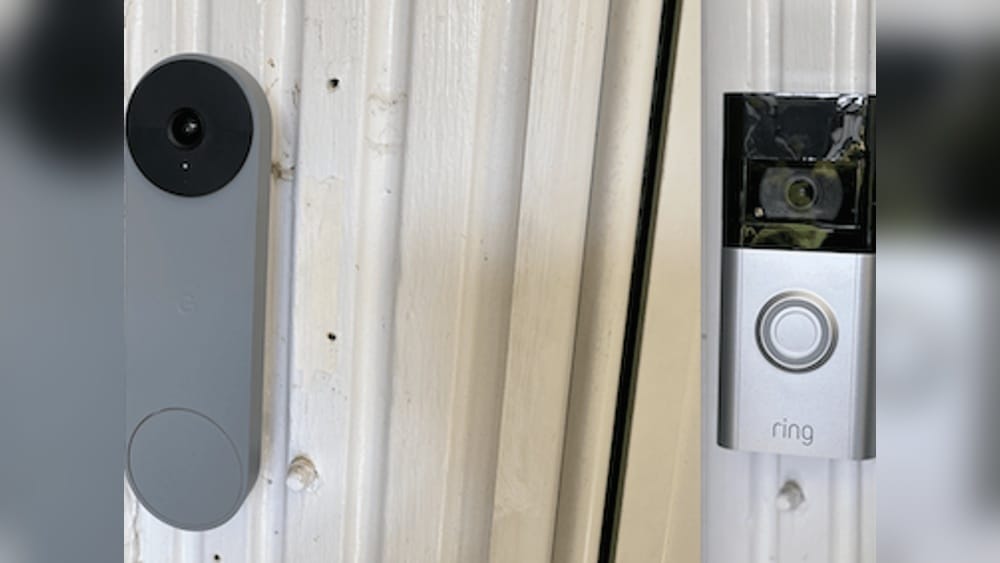
The world of smart home technology is growing fast. Every year, new devices appear, all promising to make life easier, safer, and more convenient. Two of the most popular brands in this space are Ring and Nest. Both offer smart doorbells, cameras, and home security solutions. But what happens if you want to mix these two brands in your home? Specifically, does the Ring Video Doorbell work with Nest? This is a common question for people who already have Nest devices, or are thinking of buying a Ring doorbell. The answer is not as simple as you might hope.
This article explores whether and how you can use Ring Video Doorbell with Nest products. We’ll look at compatibility, workarounds, real user experiences, and practical advice for getting the most from your smart home setup—even if it’s not all from the same brand.
Understanding Ring And Nest: The Basics
Before diving into compatibility, it helps to understand what each brand offers and how their systems are designed.
Ring is owned by Amazon. Its most popular product is the Ring Video Doorbell, which lets you see, hear, and talk to visitors at your door using your smartphone. Ring also sells security cameras, alarms, and smart lighting.
Nest is owned by Google. Its key products include the Nest Learning Thermostat, Nest cameras, and the Nest Hello Doorbell (now called Google Nest Doorbell). Nest devices are designed to work together and connect with the Google Home app.
Both systems aim to make your home smarter and safer. But each uses its own app, ecosystem, and approach to smart home integration.
Why Do People Want To Mix Ring And Nest?
Many homeowners end up with a mix of brands. For example, you might have a Nest thermostat from years ago, but prefer the features or look of a Ring doorbell. Or perhaps you’re moving into a home with both types of devices already installed.
Mixing brands can be practical, but only if they work together—or at least don’t cause problems.
Direct Compatibility: Can Ring Video Doorbell Work With Nest Devices?
The simple answer is no, Ring Video Doorbell does not directly work with Nest devices. There is no official, seamless integration between the two brands. Here’s why:
- Different Owners and Ecosystems: Ring is part of Amazon, and Nest is part of Google. Both companies compete in the smart home market and prefer customers to stay within their ecosystem.
- Separate Apps: Ring devices use the Ring app and can also connect to Amazon Alexa devices. Nest uses the Google Home app and works best with Google Assistant.
- No Shared Automation: You cannot control your Ring doorbell from the Google Home app, nor can you view Nest camera feeds in the Ring app.
What About Smart Displays And Speakers?
A common question: Can you see your Ring Video Doorbell feed on a Nest Hub or Google Nest smart display? Or, can you control Nest devices through a Ring Chime or other Ring hardware?
Again, the answer is no. Ring doorbell video cannot be viewed on a Google Nest Hub or Nest Hub Max. Likewise, Nest cameras or video doorbells do not display on Ring devices or within the Ring app.
Comparing Features: Ring Vs. Nest Video Doorbells
If you’re choosing between Ring Video Doorbell and Nest Doorbell, it’s helpful to see how they compare. Here’s a summary:
| Feature | Ring Video Doorbell (2023) | Google Nest Doorbell (Battery, 2023) |
|---|---|---|
| Resolution | 1080p HD | 960 x 1280 HD |
| Field of View | 155° horizontal | 145° diagonal |
| Power Options | Battery or Wired | Battery or Wired |
| Smart Assistant | Alexa | Google Assistant |
| Cloud Storage | Ring Protect (paid) | Google Nest Aware (paid) |
| App | Ring app | Google Home app |
| Works With | Amazon Echo, Alexa displays | Google Nest Hub, Google Assistant |
From this, it’s clear both devices have similar core features. But they connect to different smart home systems.
Key Differences That Matter
- Assistant Support: Ring works with Alexa. Nest works with Google Assistant. There is no cross-support.
- App Integration: You cannot add a Ring doorbell to Google Home, nor a Nest doorbell to Alexa (with video).
- Cloud Subscriptions: Each brand uses its own paid cloud storage. You need two subscriptions if you use both.
Workarounds: What’s Possible With Third-party Tools?
While there is no official integration, some tech-savvy users try to connect Ring and Nest devices using third-party tools or smart home hubs. Here’s what you need to know:
Smart Home Hubs
Certain smart home hubs, like Samsung SmartThings or Home Assistant, claim to support both Ring and Nest devices. However, the integration is often limited:
- You may be able to trigger basic actions (like turning on a light when the doorbell rings).
- Live video streams usually do not work across brands.
- Setup can be complex and may require custom code.
Ifttt (if This, Then That)
IFTTT is a popular automation tool for connecting different brands. In the past, you could use IFTTT to make simple automations, like:
- When Ring detects motion, turn on a Nest thermostat.
- When Nest detects a person, send a notification to your phone.
However, both Ring and Nest have reduced their support for IFTTT in recent years. As of 2024, most direct Ring-to-Nest automations are no longer supported due to tighter security and privacy rules.
Voice Assistants: Partial Solutions
If you have both Amazon Alexa and Google Assistant devices in your home, you can control each brand with its preferred assistant. But, for example, you cannot ask Google Assistant to show your Ring doorbell, or Alexa to show your Nest camera (with video).
Voice commands only work within each brand’s ecosystem.
Real-world Example
Suppose you have a Ring Video Doorbell and a Nest Learning Thermostat. While you can control each one separately, you cannot, for example, have the thermostat react automatically when someone rings your doorbell unless you use a complex third-party hub setup.
Even then, these connections are not always reliable.

Credit: www.pcmag.com
Why Don’t Ring And Nest Work Together?
It’s frustrating for many users that two leading brands don’t work together. Here’s why this is the case:
- Business Competition: Amazon and Google are direct competitors in smart home technology. They want you to buy more of their products, not mix and match.
- Technical Standards: Each brand uses different software protocols and APIs, making direct communication difficult.
- Data Privacy: Sharing video and personal data between companies increases security risks and privacy concerns.
- Customer Support: Supporting cross-brand integrations leads to more complex troubleshooting and support challenges.
While there is a push in the industry for more open standards (like the new Matter protocol), as of early 2024, Ring and Nest do not work together natively.
The Role Of Matter And Future Compatibility
You might have heard about Matter, a new smart home standard promoted by the Connectivity Standards Alliance. Matter aims to make smart devices from different brands work together easily. Does this mean Ring and Nest will work together soon?
What Is Matter?
Matter is designed to create a universal language for smart home devices. In theory, if both Ring and Nest support Matter, they could communicate.
The Current Reality
- Google has added Matter support to some Nest products, mainly for lights, plugs, and sensors.
- Ring has announced plans to support Matter in some products, but as of now, most of its devices—including doorbells—do not support Matter.
- Video streaming through Matter is not yet widely available. The standard focuses more on basic device control than complex video functions.
So, while Matter may eventually help bridge the gap, as of now, you cannot use Matter to connect Ring Video Doorbell with Nest devices.
Practical Tips For Mixed Smart Home Setups
If you already own both Ring and Nest devices, or want to combine them, you can still get good value. Here are some practical steps:
1. Use Each Brand’s App
You will need to use the Ring app for Ring devices, and the Google Home app for Nest devices. Keep both apps updated for security and new features.
2. Set Up Smart Notifications
Customize notifications in each app so you only get alerts that matter. For example, set Ring to notify you only for people, not all motion.
3. Use Multiple Voice Assistants
It’s possible to have both Alexa and Google Assistant devices in your home. Use Alexa for Ring and Google Assistant for Nest. You can even have both smart speakers in the same room.
4. Consider Smart Home Routines
While direct automation is limited, you can set up routines in each app. For example, create a routine in Alexa to turn on Ring cameras at night, and a routine in Google Home to adjust your Nest thermostat when you leave home.
5. Manual Workarounds
Some tasks, like viewing video feeds, will require manual switching between apps. It’s not as smooth as a single ecosystem, but it works.
6. Plan Future Purchases Carefully
If you want easier integration, consider choosing one ecosystem for future devices. If you prefer Google Assistant and Nest, stick to Nest products. If you prefer Alexa, build around Ring and Amazon devices.
7. Don’t Overlook Integration Limits
Before buying any new smart device, check if it works with your current system. Some brands advertise “Works with Alexa” or “Works with Google Assistant”—but always check the fine print for what features are actually supported.
8. Consider Professional Installation
If you’re not comfortable setting up and managing multiple smart home systems, a professional installer can help make things run smoothly and securely.
The Experience Of Real Users
Many people have tried to mix Ring and Nest devices. Here are some of the most common experiences:
- “I have a Ring doorbell and a Nest thermostat. They both work fine, but I have to use two apps. Not a big deal, but I wish they could talk to each other.”
- “I wanted to see my Ring doorbell on my Google Nest Hub, but it doesn’t work. I had to buy an Echo Show instead.”
- “I tried using IFTTT to connect Ring and Nest, but it stopped working after an update.”
These examples show a few patterns:
- Most users accept using two apps, even if it’s not ideal.
- Some users buy extra hardware (like smart displays) to get the features they want.
- Attempts to connect Ring and Nest through third-party tools often fail or are unreliable.

Credit: www.friservice.cz
Security And Privacy Considerations
Mixing brands in your smart home setup can create extra security challenges. Here’s what to keep in mind:
- App Security: Always use official apps from the App Store or Google Play. Avoid third-party apps that promise to combine Ring and Nest unless you fully trust them.
- Strong Passwords: Use strong, unique passwords for each account. Enable two-factor authentication where possible.
- Firmware Updates: Keep all devices updated. Each brand releases security patches, and running old software can put your home at risk.
- Data Privacy: Read the privacy policies for both Ring and Nest. Know where your video and data are stored, and who can access them.
- Network Security: Secure your home Wi-Fi with a strong password and consider using a separate network for smart home devices.
Cost Comparison: Ring Vs. Nest Doorbells
When choosing between Ring and Nest, price is often a deciding factor. Here’s a cost comparison for current models:
| Model | Device Price | Subscription (Monthly) | Cloud Video Storage |
|---|---|---|---|
| Ring Video Doorbell (2023) | $99.99 | $3.99 (Ring Protect Basic) | Up to 180 days |
| Google Nest Doorbell (Battery) | $179.99 | $8.00 (Nest Aware) | Up to 60 days |
Ring doorbells are usually less expensive up front, and their basic cloud plan is cheaper. However, Nest offers advanced features in its subscription, like familiar face detection and activity zones.

Credit: www.ottenbruch.de
Common Mistakes When Mixing Ring And Nest
If you decide to use both brands, avoid these common mistakes:
- Expecting Full Integration: As explained, the devices do not work together directly. Plan for separate apps and controls.
- Overlooking Subscription Costs: Using both brands means paying for two cloud services if you want video history.
- Assuming All Features Will Work: Some features, like video streaming to smart displays, require matching brands (Ring with Echo Show, Nest with Nest Hub).
- Ignoring Updates and Compatibility Notices: Both brands can change their integration policies, so what works today might stop working tomorrow.
- Not Checking Power Requirements: Some doorbells require wiring, others run on battery. Make sure your home setup matches the doorbell you buy.
Expert Insights: What Beginners Often Miss
When you’re new to smart home devices, it’s easy to miss some non-obvious details:
- Smart Home “Lock-In”: If you start with a few devices from one brand, it becomes easier—and cheaper—to stick with that brand for future devices. Mixing brands can increase complexity and costs.
- Ecosystem Perks: Some features are only available when you use all devices from one brand. For example, with all Nest devices, you get advanced routines and better support from Google Assistant.
- Voice Assistant Limitations: Even if both Alexa and Google Assistant support “smart home devices,” only basic functions may work across brands. Video streaming, notifications, and advanced features are usually locked to the same ecosystem.
The Future: Will Ring And Nest Ever Work Together?
There is hope for better integration in the future, thanks to industry pressure and standards like Matter. Both Amazon and Google have joined the Connectivity Standards Alliance, which suggests they may support more cross-brand compatibility over time.
However, as of 2024, the focus remains on keeping customers within each brand’s ecosystem. Unless there is a major shift, Ring Video Doorbell does not work with Nest in a direct, official way.
For now, if you want the smoothest smart home experience, it’s best to choose one ecosystem and stick with it for your main devices. If you must mix brands, be prepared for some manual work and a few limitations.
For more on smart home standards, see the official Connectivity Standards Alliance.
Frequently Asked Questions
Can I View My Ring Video Doorbell On A Google Nest Hub?
No, you cannot view Ring Video Doorbell video on a Google Nest Hub or Nest smart display. Ring doorbells are designed to work with Amazon Alexa displays, such as Echo Show. Nest Hubs only support Google Nest cameras and doorbells.
Is It Possible To Get Ring And Nest Devices To Talk To Each Other With Ifttt Or Smartthings?
As of 2024, direct integration between Ring and Nest using IFTTT or SmartThings is limited or not supported. Both brands have reduced third-party access for security reasons. Some basic automations may be possible with SmartThings, but video streaming and advanced features are not available.
Can I Control Ring Devices With Google Assistant, Or Nest Devices With Alexa?
You can add Ring devices to Google Assistant, but only for very basic features (such as turning on a Ring alarm). You cannot view Ring doorbell video or receive notifications through Google Assistant. Similarly, Nest devices have limited support in Alexa, and video feeds do not work across brands.
Do I Need To Pay Two Subscriptions If I Use Both Ring And Nest?
Yes. If you want cloud video storage and advanced features from both brands, you need to pay for both Ring Protect and Google Nest Aware subscriptions. Each brand uses its own cloud system and does not share video storage.
Are There Any Risks To Mixing Ring And Nest Devices In My Smart Home?
The main risks are increased complexity, higher costs (from multiple subscriptions), and more manual management. Security risks can also increase if you use unofficial third-party tools. Always use strong passwords and keep all devices updated.
Smart home technology is changing fast, and new standards like Matter may improve cross-brand integration in the future. For now, planning your setup around one main ecosystem is the best way to get a smooth, reliable experience.