

Are you tired of Wi-Fi dead zones in your home? Maybe your signal drops just when you need it most.
Mesh routers might be the solution you’ve been searching for. But how do mesh routers work to give you stronger, more reliable internet everywhere? Understanding this can help you decide if it’s time to upgrade your home network. Keep reading to discover how mesh routers can change the way you connect and bring seamless Wi-Fi to every corner of your space.
Mesh Router Basics
Mesh routers offer a smart way to spread Wi-Fi across your home or office. Unlike traditional routers, they create a network that covers every corner. This system reduces dead spots and keeps your connection steady. Understanding mesh router basics helps you see why they are popular for larger spaces.
What Is A Mesh Network
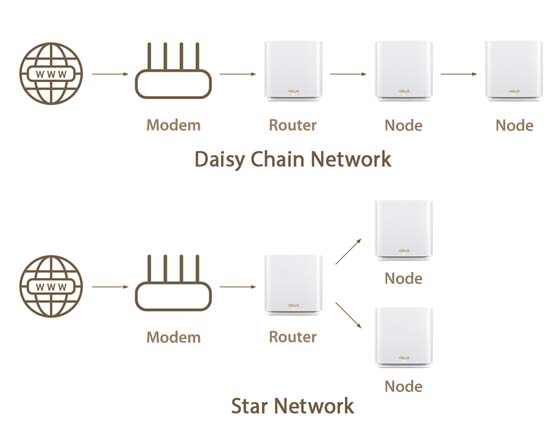
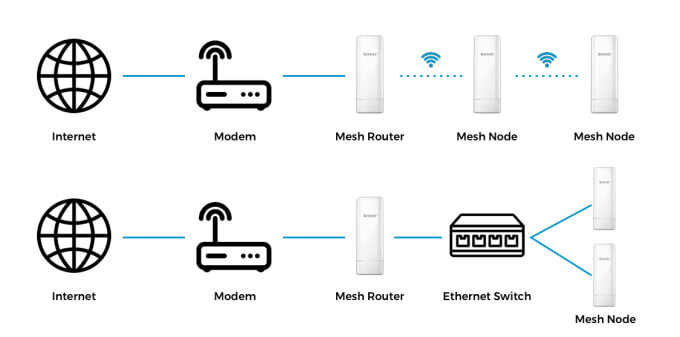
A mesh network uses multiple devices called nodes. These nodes work together to send internet signals. Each node connects with others directly and wirelessly. This creates a strong, seamless network across your space. If one node fails, others keep the network running. The network adapts to obstacles and changes automatically.
Key Components Of Mesh Systems
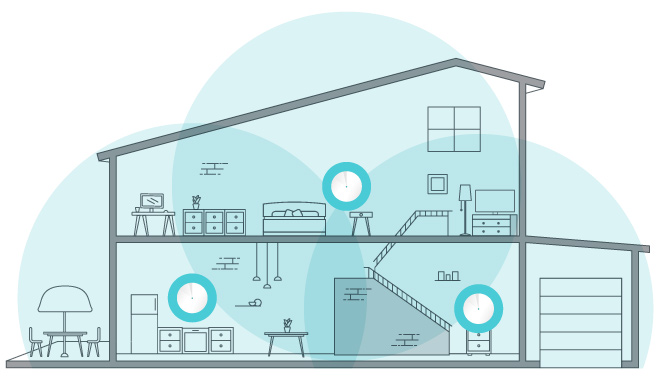
Mesh systems include several parts. The main router connects to your modem. Satellite nodes spread the signal to farther areas. Nodes communicate with each other to share data. The system often uses a single network name (SSID). This lets devices switch nodes without dropping Wi-Fi. Some systems have apps for easy setup and control.
Credit: www.tp-link.com
How Mesh Routers Operate
Mesh routers create a strong and wide Wi-Fi network inside homes or offices. They work by using several devices called nodes. These nodes share internet signals and work together to cover larger areas. This system avoids dead spots and keeps your connection steady. Understanding how mesh routers operate helps you see why they are effective for many users.
Node Communication
Each mesh router node talks to others nearby. They send data back and forth to share internet signals. This communication helps cover large spaces with Wi-Fi. Nodes use special wireless signals to link with one another. They work as a team to keep your internet fast and reliable.
Self-healing Networks
Mesh networks fix themselves if one node stops working. Other nodes find a new path for the data. This keeps your connection alive without interruptions. The network adjusts automatically to problems. This feature makes mesh routers very stable and dependable.
Dynamic Routing
Mesh routers choose the best route for your data. They check which path is fastest and least busy. If a route is slow, they pick another one. This helps avoid slowdowns and keeps your internet smooth. Dynamic routing works all the time to improve your experience.
Benefits Of Mesh Routers
Mesh routers offer many advantages over traditional routers. They create a strong, reliable WiFi network across large areas. Mesh systems use multiple devices that work together. This setup improves internet access in every corner of your home or office.
Expanded Wifi Coverage
Mesh routers spread WiFi signals far and wide. Each device acts as a signal point. This helps cover dead zones where WiFi is usually weak. You get stable internet in rooms, basements, and yards. No more worrying about dropped connections or weak signals.
Seamless Roaming
Mesh systems allow devices to switch smoothly between nodes. Your phone or laptop connects to the strongest signal automatically. This means no interruptions during calls or video streams. Move around your space without losing connection or speed.
Easy Scalability
Adding more coverage is simple with mesh routers. Just add another mesh device to the network. There is no need for complex setup or new wiring. This flexibility lets you expand WiFi as your needs grow. Perfect for larger homes or offices with changing layouts.
Setting Up A Mesh Network
Setting up a mesh network is simple and improves Wi-Fi coverage in your home or office. A mesh system uses multiple devices called nodes to spread the signal. Each node connects to others, creating a strong, reliable network.
Start by placing the nodes in good spots. Then, configure the system using an app or web interface. Finally, optimize the network for better speed and stability. Follow these steps for a smooth setup.
Placement Tips For Nodes
Place the main node near your modem or router. Other nodes should be spread evenly around your space. Keep nodes within range of each other for a strong link. Avoid walls, metal objects, and microwaves that block signals. Higher spots often give better coverage than floors.
Configuring The System
Use the mesh system’s app to start setup. The app guides you through connecting nodes step-by-step. Name your network and set a password for security. Update the system’s software if prompted. Check each node’s connection status in the app.
Optimizing Network Performance
Place nodes to cover all areas without overlap. Restart nodes if the signal gets weak. Use the app to test speed and adjust node locations. Avoid interference from other wireless devices. Set up guest networks to keep visitors separate from your main network.
Comparing Mesh Routers And Traditional Routers
Mesh routers and traditional routers both connect your devices to the internet. They do this in different ways, affecting your home Wi-Fi experience. Understanding their differences helps you choose the right system for your needs.
Coverage Differences
Traditional routers send signals from one point. This creates dead zones in bigger homes or offices. Mesh routers use multiple nodes spread around the space. Each node extends the Wi-Fi signal, covering larger areas without weak spots.
Mesh systems work well in multi-story houses. Traditional routers often struggle with walls and floors. Mesh routers ensure a steady connection everywhere.
Speed And Reliability
Traditional routers may slow down as devices increase. Mesh routers share the load between nodes. This keeps speeds more stable for many users. Signal handoff between nodes in mesh systems is smooth. It avoids connection drops while moving around your space.
Traditional routers can lose connection far from the device. Mesh routers reduce this problem with their network layout.
Cost Considerations
Traditional routers usually cost less upfront. They offer basic Wi-Fi for small spaces or few devices. Mesh routers come at a higher price. This cost covers multiple nodes and advanced technology.
Mesh systems may save money long-term by cutting dead zones. They reduce the need for extra extenders or upgrades. Choose based on your budget and coverage needs.
Credit: www.asus.com
Common Issues And Fixes
Mesh routers improve Wi-Fi by spreading signals through multiple points. Sometimes, issues arise that affect performance. These problems can cause slow speeds or lost connections. Fixes often involve simple steps anyone can try. Understanding common issues helps keep your network strong and stable.
Troubleshooting Connectivity
Check if all mesh nodes are powered on and connected. Restarting the router and nodes often restores connection. Move nodes closer if the signal is weak. Ensure devices connect to the nearest node for best speed. Resetting the network can clear temporary faults.
Firmware Updates
Keep your mesh router’s firmware up to date. Updates fix bugs and improve performance. Check the app or website for the latest version. Install updates regularly to avoid security risks. Automatic updates can simplify this process.
Interference Solutions
Wi-Fi signals can be blocked by walls or other devices. Avoid placing nodes near microwaves, cordless phones, or thick walls. Change the router’s channel to reduce interference. Use the 5 GHz band for less crowded signals. Moving nodes to open spaces often improves coverage.
Future Of Mesh Networking
The future of mesh networking looks promising. These systems will become faster, smarter, and more reliable. They will handle more devices and cover larger areas with ease.
Mesh networks will play a key role in connecting homes and businesses. They offer seamless internet access without dead spots or slowdowns. As technology improves, mesh routers will adapt to new demands and challenges.
Advancements In Technology
New mesh routers will use better chips and antennas. This will increase speed and range for all devices. AI will help routers learn and adjust to network conditions automatically.
More devices will connect smoothly without interrupting the network. Mesh systems will support higher data loads and reduce delays. This makes streaming, gaming, and video calls much better.
Integration With Smart Homes
Mesh routers will connect easily with smart home devices. Lights, cameras, and thermostats will work together without glitches. The network will prioritize important signals to keep homes secure and efficient.
Control apps will improve, letting users manage all devices in one place. Voice assistants will work closely with mesh systems for hands-free control. This integration will make smart homes simpler and more useful.
Credit: www.signalboosters.com
Frequently Asked Questions
What Is A Mesh Router System?
A mesh router system uses multiple devices to create one seamless Wi-Fi network. It improves coverage and reduces dead zones in homes or offices.
How Do Mesh Routers Improve Wi-fi Coverage?
Mesh routers communicate wirelessly to extend signals across large areas. They eliminate weak spots by providing consistent internet throughout the space.
Are Mesh Routers Better Than Traditional Routers?
Mesh routers offer better coverage and reliability for large or multi-story buildings. Traditional routers can struggle with distance and obstacles, causing slow speeds.
Can Mesh Routers Handle Multiple Devices Simultaneously?
Yes, mesh routers efficiently manage many devices by balancing network traffic. This ensures smooth internet performance even with multiple users or smart devices connected.
Conclusion
Mesh routers share internet signals across multiple devices smoothly. They create a strong network by using several connected points. This design helps cover large areas without dead zones. Each router talks to the others to keep you online. Your devices switch easily between routers for the best signal.
Mesh systems work well in big homes or offices. They make internet access simple and steady everywhere you go. Understanding how they work helps you choose the right setup. A good mesh network means fewer interruptions and faster speeds. Simple, smart, and effective—mesh routers improve your Wi-Fi experience.