

Have you ever wished you could control your home devices with just a tap on your phone? Smart plugs make that possible—and they’re easier to use than you might think.
But how do smart plugs work, exactly? Understanding this can help you make your home more convenient, save energy, and even boost your security. Keep reading, and you’ll discover how these small gadgets bring big changes to your everyday life.
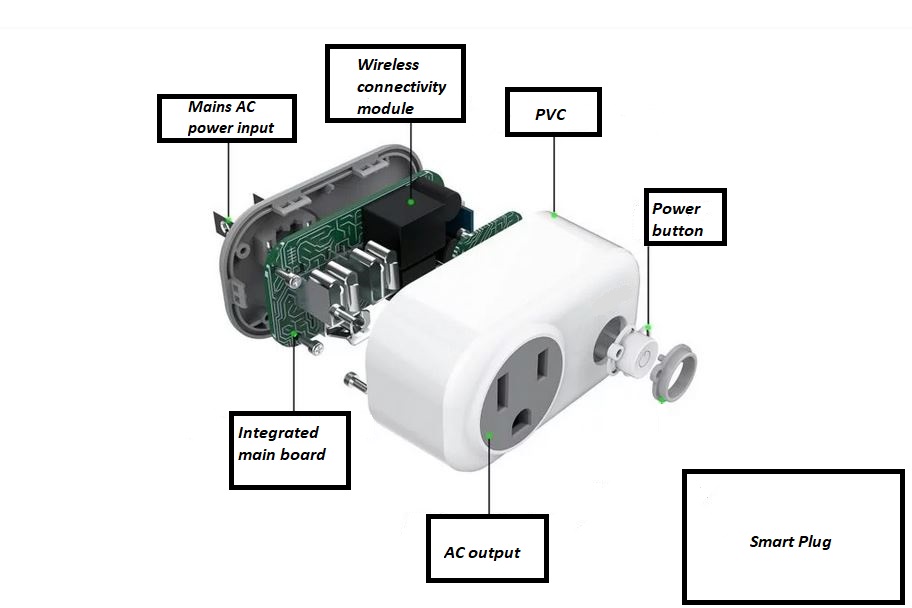
Credit: elexexplorer.com
Smart Plug Basics
Smart plugs are small devices that make regular electronics smarter. They let you control devices using your phone or voice. These plugs add convenience and help save energy. Understanding the basics helps you use them better.
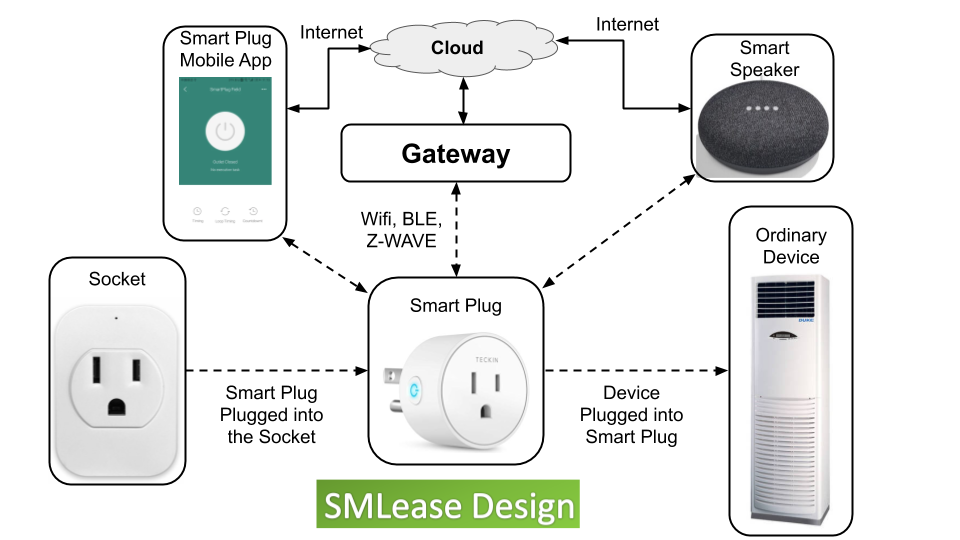
Smart plugs fit into your wall outlet. You then plug your device into the smart plug. The plug connects to your home Wi-Fi. This setup allows remote control and automation.
What Is A Smart Plug
A smart plug is a small adapter that fits into any outlet. It controls the power supply to devices. You can turn devices on or off remotely. Some models track energy use to help save power.
Core Components
Smart plugs have a few key parts. A microcontroller acts as the brain. It processes commands and controls power flow. A Wi-Fi or Bluetooth chip connects to your network. Relays inside switch electricity on or off. LED lights show the status of the plug.
How It Connects To Devices
Connect the smart plug to your home Wi-Fi through an app. The app sends commands to the plug over the internet. The plug controls power to the device plugged into it. Voice assistants can also control the plug using voice commands.
Wireless Communication Methods
Smart plugs use wireless communication to connect with your phone or smart home hub. This connection lets you control devices remotely. Different wireless methods offer various benefits in speed, range, and power use. Here are the common wireless communication methods used by smart plugs.
Wi-fi Connectivity
Wi-Fi is the most popular method for smart plugs. It connects directly to your home Wi-Fi network. This allows control from anywhere with internet access. Wi-Fi offers fast data transfer and easy setup. However, it uses more power than other methods. It also depends on your Wi-Fi signal strength.
Bluetooth Options
Bluetooth smart plugs connect to your phone directly. They use less power than Wi-Fi. Bluetooth works well for short-range control inside your home. It is simple to set up and use. The downside is limited range and no remote access outside Bluetooth range.
Zigbee And Z-wave Protocols
Zigbee and Z-Wave are special wireless protocols for smart homes. They create a mesh network where devices connect to each other. This improves range and reliability. These protocols use low power and work well with many smart devices. They require a hub or gateway to connect to your phone or internet.
Setting Up A Smart Plug
Setting up a smart plug is simple and fast. It lets you control devices from anywhere. This section shows easy steps to get started. Follow these tips for smooth setup and use.
Installation Steps
First, plug the smart plug into a power outlet. Make sure it fits tightly and is easy to reach. Next, connect the device you want to control to the smart plug. Check if the device is turned on. Finally, power on the smart plug. It should show a light or signal that it is ready.
Using Mobile Apps
Download the smart plug’s app from your phone’s store. Open the app and create an account if needed. Follow the app’s instructions to find your smart plug. Connect the smart plug to your Wi-Fi network. After connection, you can turn devices on or off from your phone. The app may let you set schedules and timers too.
Integrating With Smart Home Systems
Many smart plugs work with Alexa, Google Home, or Apple HomeKit. Open your smart home app and add a new device. Choose the smart plug from the list. Follow the instructions to link your accounts. After linking, you can use voice commands to control devices. This makes your home more convenient and smart.
Control Features
Smart plugs offer several control features that make managing your devices easy. These features help you save energy and add convenience. You can control your appliances from anywhere with just a few taps.
Smart plugs connect to your Wi-Fi and work through an app on your phone. The app gives you control over your devices even if you are not home. Let’s explore the main control features that smart plugs provide.
Remote On And Off
You can turn devices on or off from anywhere. This means you do not have to be near the plug. Forgot to switch off a lamp? Use your phone to turn it off instantly. Remote control adds safety and convenience to your daily routine.
Scheduling And Timers
Set specific times for your devices to turn on or off. This helps automate your home easily. You can schedule a coffee maker to start before you wake up. Timers also stop devices from running all day, saving energy and money.
Energy Monitoring
Track how much power each device uses with energy monitoring. The app shows detailed information about energy consumption. This feature helps you find devices that use too much power. You can make smarter choices to reduce your electricity bill.
Benefits Of Smart Plugs
Smart plugs bring several benefits to everyday life. They help control devices easily and save energy. Smart plugs also add safety to your home. These benefits make them a useful tool for modern living.
Enhanced Convenience
Smart plugs let you control devices from anywhere using your phone. You can turn lights on or off without standing up. Set schedules to automate devices, so they work on time. Voice control works with assistants like Alexa or Google. This makes managing home devices simple and quick.
Energy Savings
Smart plugs help reduce electricity use by turning off devices automatically. They stop power waste from devices left on by mistake. Some smart plugs show how much energy each device uses. This helps you find ways to save more energy every day.
Improved Safety
Smart plugs reduce fire risk by cutting power to devices not in use. You can check and control devices remotely to avoid accidents. They protect sensitive electronics by preventing overloads. Smart plugs add an extra layer of safety to your home.
Common Use Cases
Smart plugs are small devices that add intelligence to regular appliances. They make everyday tasks easier by connecting to your Wi-Fi network. These plugs allow you to control devices remotely and automate their usage. Below are some common ways people use smart plugs in daily life.
Home Automation
Smart plugs help automate your home. Set schedules for lights, fans, or heaters to turn on or off. This saves energy and adds convenience. For example, lights can turn on at sunset and off at bedtime. Automating appliances makes your home more comfortable and efficient.
Remote Appliance Control
Control appliances from anywhere using a smartphone app. Turn devices on or off even if you are far away. Forgot to switch off the coffee maker? No problem. Remote control helps avoid wasting electricity and keeps your home safe.
Voice Assistant Integration
Smart plugs work with voice assistants like Alexa or Google Assistant. Use simple voice commands to control devices. Say “turn on the lamp” or “turn off the fan” without using your hands. Voice control adds ease and accessibility for all users.
Security And Privacy
Smart plugs bring convenience but also raise security and privacy questions. These devices connect to your home Wi-Fi and collect data to operate remotely. This data includes usage patterns and device status. Protecting this information is crucial to keep your home safe and private.
Data Protection Measures
Smart plug makers use encryption to secure data. Encryption scrambles information so outsiders cannot read it. Many devices require a password to access their settings. Updates often fix security flaws and improve protection. Some smart plugs limit data sharing to trusted apps only.
Potential Risks
Hackers can target smart plugs to access your network. Weak passwords make it easier for attackers to break in. Data leaks can reveal your daily routines and habits. Unsecured devices may allow unauthorized control of your plugs. This can lead to privacy breaches or safety issues.
Best Practices
Choose strong, unique passwords for your smart plugs. Keep the device software updated regularly. Use a separate Wi-Fi network for smart home devices. Disable features you do not use to reduce risk. Review app permissions to control what data is shared.

Credit: www.ohmconnect.com
Troubleshooting Tips
Smart plugs make life easier, but they can sometimes stop working properly. Troubleshooting helps fix common problems quickly. Follow these simple tips to keep your smart plug running smoothly.
Connectivity Issues
Check your Wi-Fi signal strength near the smart plug. A weak signal can cause connection problems. Move your router closer or use a Wi-Fi extender. Restart the smart plug by unplugging it and plugging it back in. Also, restart your router to refresh the network. Make sure your phone or device is connected to the same Wi-Fi as the smart plug.
Device Compatibility
Ensure the smart plug supports your device’s voltage and current. Some plugs work only with specific appliances. Check the product manual for compatibility details. Confirm your smartphone or tablet works with the smart plug’s app. Older devices may face trouble connecting or controlling the plug.
Firmware Updates
Firmware updates improve smart plug performance and security. Open the app and check for updates regularly. Download and install updates when available. Updating fixes bugs that cause connectivity or control issues. Keep the plug plugged in during updates to avoid interruption.
Credit: www.arcachurch.com
Frequently Asked Questions
What Is A Smart Plug And How Does It Work?
A smart plug connects to your home Wi-Fi and allows remote control of devices. It enables scheduling, energy monitoring, and voice commands via apps or smart assistants.
Can Smart Plugs Save Energy And Reduce Bills?
Yes, smart plugs help save energy by scheduling devices to turn off when not in use. This reduces unnecessary power consumption and lowers electricity bills effectively.
Are Smart Plugs Compatible With All Home Devices?
Most smart plugs support standard appliances and electronics. However, high-power devices like heaters may not be compatible. Always check the plug’s specifications before use.
How Secure Are Smart Plugs From Hacking Threats?
Smart plugs use encryption and secure Wi-Fi protocols to protect data. Regular updates and strong passwords enhance security, reducing risks of unauthorized access.
Conclusion
Smart plugs help control devices with ease and convenience. They connect to Wi-Fi and respond to your phone or voice commands. These small tools can save energy and make your home smarter. Setting them up takes just a few minutes.
You gain better control over your appliances anytime, anywhere. Smart plugs fit well in daily life and simple homes. They bring comfort without needing complex skills or tools. Try using smart plugs to see how they improve your routine. Small changes can lead to big benefits in your home.