
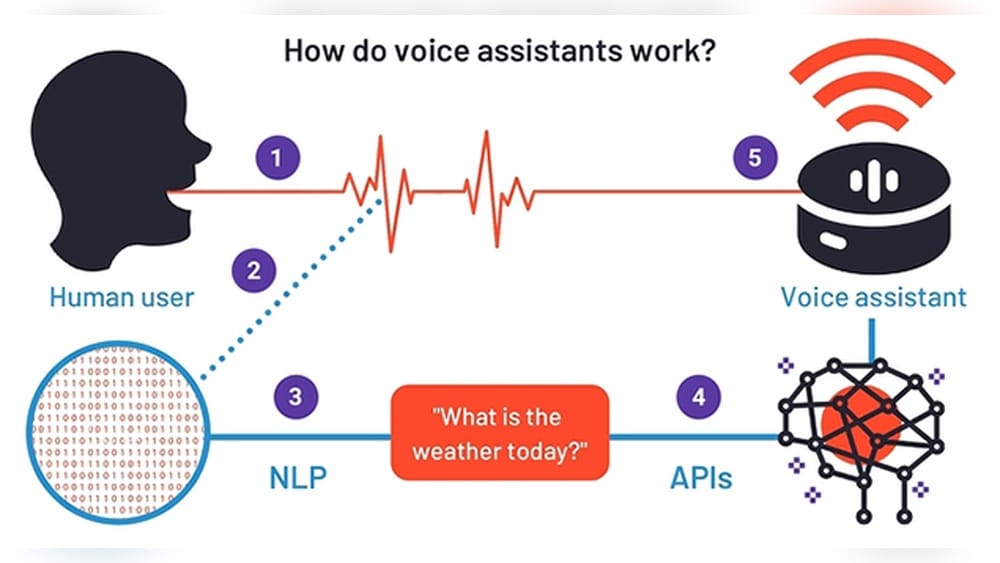
Voice assistants have become part of daily life for millions of people. From asking your phone about the weather, to telling your smart speaker to play your favorite song, these digital helpers are everywhere. But have you ever wondered how voice assistants actually work?
They seem almost magical—understanding your speech, answering questions, and even controlling your home devices. Yet, behind this magic is a blend of advanced technology, clever design, and constant learning.
Understanding how voice assistants work helps you use them more effectively and even keep your information secure. This guide explains the inner workings of popular voice assistants like Siri, Alexa, Google Assistant, and more. You’ll also discover real-world examples, common challenges, and what the future might hold. Whether you’re a curious user or someone thinking about creating voice-enabled applications, this article will give you clear answers.
What Is A Voice Assistant?
A voice assistant is a software program that listens to spoken language and responds with helpful actions or answers. These assistants are built into smartphones, smart speakers, computers, and even cars. The most well-known examples are Amazon Alexa, Apple Siri, Google Assistant, and Microsoft Cortana.
Voice assistants use artificial intelligence (AI) and natural language processing (NLP) to recognize, understand, and respond to spoken commands. Unlike simple voice recorders, they can answer questions, set reminders, control smart home devices, and perform many other tasks. They keep getting smarter as they learn from millions of interactions with users every day.
Some assistants are designed for general use (like Siri or Alexa), while others focus on specific areas, such as customer support chatbots or medical voice assistants. The core technology is similar, but the training data and use cases can be very different.
The Main Components Of Voice Assistants
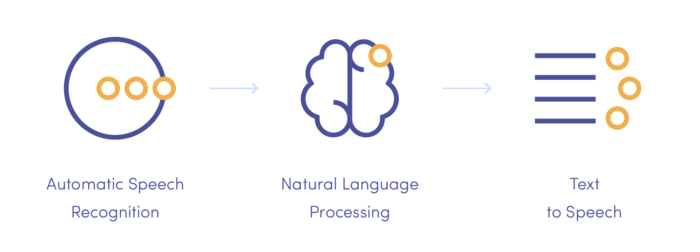
Voice assistants seem simple on the surface, but they rely on several complex systems working together. Here are the main components that make a voice assistant function:
- Microphone and Audio Input: Captures your voice.
- Wake Word Detection: Listens for a special word or phrase (like “Hey Siri” or “Alexa”) to start processing.
- Speech Recognition: Converts the audio of your speech into text.
- Natural Language Processing (NLP): Understands the meaning of your words.
- Task Execution: Performs the requested action or finds the answer.
- Text-to-Speech (TTS): Converts text responses back into spoken words.
- Cloud and Device Integration: Connects to online services and smart devices.
Let’s explore each part in more detail.
Credit: www.miquido.com
How Voice Assistants Capture And Process Speech
The process starts when you speak near a device with a voice assistant. This could be a smartphone, smart speaker, or car dashboard.
Step 1: Microphone And Wake Word Detection
Most assistants are always listening for their wake word (“OK Google,” “Alexa,” etc.). The device’s microphones capture all nearby sounds, but only start processing after hearing the wake word. This helps save power and protects privacy.
Wake word detection happens locally on the device. It uses a small, efficient AI model trained to recognize the wake word but ignore other noises. Only after the wake word is detected does the device start recording and sending your speech to the cloud for further processing.
Step 2: Speech Recognition (automatic Speech Recognition, Asr)
Once the assistant hears the wake word, it starts recording your voice command. The audio is sent to powerful servers in the cloud, where automatic speech recognition (ASR) software converts the sound waves into text.
This is not a simple process. The software must:
- Filter out background noise
- Recognize different accents and speaking speeds
- Understand context (for example, “read” and “red” sound the same)
- Segment continuous speech into separate words
Modern ASR uses deep learning—especially neural networks called recurrent neural networks (RNNs) and transformers—to achieve high accuracy.
Step 3: Natural Language Processing (nlp)
Once your words are converted into text, the assistant must understand what you mean. This is where natural language processing (NLP) comes in.
NLP breaks down your sentence into key parts:
- Intent: What do you want to do? (e.g., “set an alarm,” “play music”)
- Entities: The important details (e.g., time, song name, contact name)
For example, in the command “Remind me to call John at 5 PM,” the intent is “set a reminder,” and the entities are “call John” and “5 PM. ”
Advanced NLP models, such as BERT (from Google) and GPT (from OpenAI), help assistants understand not just words, but context and meaning. They also handle slang, incomplete sentences, and follow-up questions.
Step 4: Task Execution
After understanding your request, the assistant must carry it out. This could involve:
- Searching the web for information
- Sending a message
- Setting a timer or alarm
- Controlling a smart device (like a light bulb)
- Playing music or videos
Each action is handled by a specific module or connects to an external service (like a music streaming app or weather provider).
Step 5: Text-to-speech (tts)
If a spoken response is needed, the assistant uses text-to-speech (TTS) technology to turn text into natural-sounding speech. Early TTS systems sounded robotic, but today’s voices are smooth and expressive.
TTS uses deep learning to mimic real human voices. Some assistants let users choose between different voices or even regional accents.
Step 6: Cloud And Device Integration
Most assistants rely heavily on cloud computing. The heavy lifting—like speech recognition and NLP—happens on remote servers. This allows for faster updates and smarter responses, but requires an internet connection.
Voice assistants also integrate with other devices and services. For example, you can ask Alexa to turn on smart lights, or use Google Assistant to send a WhatsApp message. Each integration needs secure connections and permission from the user.
Key Technologies Behind Voice Assistants
Voice assistants would not be possible without advances in several areas of technology. Here’s a closer look at the main technologies involved:
Artificial Intelligence And Machine Learning
At the heart of every voice assistant is artificial intelligence (AI). Machine learning algorithms help assistants:
- Recognize speech in many languages
- Understand user intent
- Improve over time based on feedback
Deep learning, a subset of AI, uses neural networks with many layers to analyze speech patterns and language. These networks are trained on huge datasets—sometimes millions of audio samples.
Natural Language Processing (nlp)
NLP is the science of making computers understand human language. Voice assistants use NLP to:
- Parse grammar and sentence structure
- Handle slang, accents, and idioms
- Manage multi-turn conversations (follow-up questions)
Modern NLP models, like transformers, can even summarize long documents or hold basic conversations.
Speech Synthesis (text-to-speech)
To respond naturally, assistants use speech synthesis. This technology has improved dramatically in recent years. Today’s TTS systems use AI to generate speech that sounds nearly human.
Some assistants can even mimic emotions or adjust the tone to match the context (for example, sounding excited for good news).
Cloud Computing
Processing voice data requires a lot of computing power. Most devices send voice commands to the cloud, where powerful servers do the heavy work. This allows for smarter, more accurate responses.
However, sending data to the cloud also raises privacy concerns. Some newer assistants, like Apple’s Siri, now process more data on the device to improve privacy.
Integration With Third-party Services
Voice assistants are most useful when they connect to other apps and devices. This is done through APIs (application programming interfaces). For example, Alexa can order pizza, Google Assistant can book a ride, and Siri can control your smart thermostat.
These integrations require careful design to keep data secure and permissions clear.

Credit: www.researchgate.net
Popular Voice Assistants Compared
There are several leading voice assistants, each with its own strengths and ecosystem. Here’s a comparison of the most popular ones:
| Assistant | Company | Main Devices | Languages Supported | Key Strengths |
|---|---|---|---|---|
| Siri | Apple | iPhone, iPad, Mac, Apple Watch | 20+ | Privacy, device integration |
| Alexa | Amazon | Echo speakers, Fire TV | 10+ | Smart home, skills marketplace |
| Google Assistant | Android phones, Google Nest, smart displays | 40+ | Search accuracy, language support | |
| Cortana | Microsoft | Windows PCs (limited), Xbox | 8+ | Productivity tools |
Each assistant has its own “personality,” supported devices, and third-party integrations. Your choice often depends on which ecosystem you use most.
How Do Voice Assistants Improve Over Time?
Voice assistants are not static—they learn and get better with use. Here’s how they keep improving:
Data Collection And Machine Learning
Every time you use a voice assistant, it collects anonymous data to improve accuracy. This data includes:
- Voice recordings (if you allow it)
- Mistakes or corrections
- Common requests in your region
This information trains the AI models to better understand accents, new slang, and even local businesses.
User Feedback
Most assistants let you give feedback if something goes wrong (“That’s not what I meant!”). This feedback helps developers fix errors and improve the system.
Software Updates
Companies frequently update their assistants with new features, better voice recognition, and more integrations. These updates are often automatic.
Community And Third-party Skills
Some assistants, like Alexa, allow developers to create skills (mini-apps) that add new features. The more skills available, the more powerful the assistant becomes.
Context Awareness
Modern assistants remember past conversations and use context to answer follow-up questions. For example, you can ask, “Who is the president of France? ” and then say, “How old is he? ” The assistant understands “he” refers to the president.
Credit: agdongare4.medium.com
Real-world Applications Of Voice Assistants
Voice assistants are not just for checking the weather. They are used in many different areas:
- Home Automation: Control smart lights, thermostats, locks, and cameras using voice commands.
- Music and Media: Play songs, podcasts, audiobooks, or watch videos hands-free.
- Reminders and Productivity: Set alarms, create calendar events, send messages, or make calls.
- Search and Information: Ask for news, sports scores, translations, calculations, or facts.
- Shopping and Orders: Buy products, reorder groceries, or track deliveries.
- Accessibility: Help people with disabilities control devices or access information more easily.
- Cars and Navigation: Get directions, control music, or send texts safely while driving.
- Healthcare: Schedule appointments, get medication reminders, or answer basic health questions.
Voice assistants are also used in businesses, hotels, and customer support systems. The goal is always to make life easier and faster.
Challenges And Limitations
Despite their popularity, voice assistants still face several challenges:
Accents And Language Diversity
Understanding different accents, dialects, and languages is a huge challenge. While assistants support many languages, accuracy can drop with strong regional accents or less common languages.
Background Noise
Noisy environments make speech recognition harder. Although modern microphones and AI can filter some noise, accuracy is still lower in busy places.
Privacy Concerns
Voice assistants often send voice recordings to the cloud. This raises privacy questions, especially if recordings are kept or analyzed. Users should review privacy settings and understand what data is being stored.
Context And Common Sense
Voice assistants sometimes misunderstand context or complex questions. For example, they may not handle jokes, sarcasm, or multi-step instructions well.
Limited Offline Use
Most assistants need an internet connection for full functionality. Some, like Siri, are starting to process simple commands offline, but complex tasks still need the cloud.
Security Risks
Poorly secured devices or integrations can be targets for hackers. Always use strong passwords, enable updates, and review what devices are connected to your assistant.
How Voice Assistants Handle Security And Privacy
Privacy and security are top concerns for users and developers. Here’s how leading voice assistants address these issues:
Local Processing
Some commands are now processed locally on the device, without sending data to the cloud. This reduces the risk of data leaks.
User Controls
Most assistants allow you to:
- Review and delete voice recordings
- Turn off the microphone
- Manage which apps or devices have access
Encryption
Data sent to and from the cloud is usually encrypted. This means outsiders cannot easily listen in or steal your data.
Transparency
Companies publish privacy policies explaining what data is collected and how it’s used. Users should read these policies to make informed choices.
Permission Management
When connecting third-party apps or devices, assistants request permission. Only approved services can access your data or perform actions.
For more on privacy and voice assistants, see this Wikipedia article.
Future Trends In Voice Assistants
Voice assistants are still evolving. Here are some trends shaping their future:
More Natural Conversation
Future assistants will handle longer conversations, remember past interactions, and even understand emotions. AI models are getting better at managing complex dialogue.
Multilingual And Multimodal Support
Assistants will support more languages and even switch between them in a single conversation. Multimodal support means combining voice with gestures or screens for richer interactions.
Better Personalization
Assistants will use more context from your habits, preferences, and location to offer smarter suggestions. For example, suggesting a new route to work if there’s traffic.
Improved Privacy
As users demand more privacy, companies are building assistants that process more data locally and give clearer controls over what is shared.
Integration Everywhere
Voice control is spreading to more devices—cars, TVs, appliances, and even wearables. The “Internet of Things” means you’ll be able to talk to almost any device.
Smarter Home And Business Use
Voice assistants are being used in hotels, offices, hospitals, and public spaces. They can help with check-ins, customer service, and even security.
Voice Assistant Use Cases: Real Examples
Let’s look at some real-world examples to show how voice assistants work in practice:
Smart Home Control
You say, “Alexa, turn off the living room lights. ” The assistant recognizes the command, identifies the device (living room lights), and sends a signal to your smart lighting system. In seconds, your lights go off—no need to get up or use a switch.
Personal Productivity
You ask, “Hey Google, remind me to take my medicine at 8 PM. ” Google Assistant understands the intent (set a reminder), the action (take medicine), and the time (8 PM). At the right time, your phone or speaker reminds you.
Accessibility Support
A visually impaired user asks Siri, “What’s on my calendar today? ” Siri reads out the events, helping the user stay organized without looking at a screen.
In The Car
You’re driving and say, “Hey Siri, text Mom I’ll be late. ” Siri processes the command, asks for your message, and sends it—all hands-free for safety.
Business Applications
A hotel installs Google Assistant in every room. Guests can ask for towels, order room service, or get local recommendations by voice. This improves customer service and reduces calls to the front desk.
Comparing Speech Recognition Accuracy
Speech recognition is at the core of every voice assistant. Here’s how leading assistants compare in terms of recognition accuracy (based on a 2022 study):
| Assistant | Word Error Rate (WER) | Notes |
|---|---|---|
| Google Assistant | 5.2% | Best with general queries |
| Amazon Alexa | 6.0% | Strong smart home control |
| Apple Siri | 7.2% | Good device integration |
| Microsoft Cortana | 8.5% | Mostly used for productivity |
Word error rate (WER) measures how often the assistant misunderstands or misses a word. Lower numbers mean better accuracy.
Common Mistakes When Using Voice Assistants
Many users run into problems with voice assistants. Here are some common mistakes and how to avoid them:
- Not Speaking Clearly: Slurred or very fast speech can confuse the assistant. Speak naturally, but clearly.
- Ignoring Privacy Settings: Always review what data is being collected and adjust settings as needed.
- Using Complicated Commands: Start with simple commands. As you learn what your assistant can do, try more complex requests.
- Not Updating Devices: Keep your assistant and connected devices updated for better performance and security.
- Connecting Too Many Devices: Linking many smart devices can cause confusion or slowdowns. Only connect what you need.
Non-obvious Insights For Advanced Users
Even experienced users miss some key details:
- Multiple Wake Words: Some assistants (like Alexa) allow you to change the wake word. This can help avoid accidental triggers, especially in homes with similar-sounding names.
- Custom Routines: Many assistants let you create custom routines (for example, “Good morning” turns on lights, reads the news, and starts the coffee maker). This saves time and creates a personalized experience.
- Offline Capabilities: Newer assistants can handle some requests (like setting an alarm or playing local music) even without the internet. Explore what your device can do offline for privacy and reliability.
- Voice Matching: Some assistants can recognize different users’ voices and provide personalized responses (like reading your calendar, not your partner’s).
- Third-Party Integrations: Explore the skills or actions marketplace for your assistant. You might find useful add-ons for banking, fitness, or smart home control.
Frequently Asked Questions
What Is The Difference Between A Voice Assistant And A Chatbot?
A voice assistant uses spoken language for input and output, while a chatbot usually works with typed text. Voice assistants are designed for hands-free use and often integrate with devices, while chatbots are common on websites for customer support.
Are Voice Assistants Always Listening To Me?
Voice assistants are always listening for their wake word, but they do not record or send your speech to the cloud until they hear it. Some devices have options to turn off the microphone for extra privacy.
Can Voice Assistants Understand Multiple Languages?
Yes, most leading voice assistants support multiple languages and can even recognize different accents. Google Assistant, for example, supports over 40 languages. Some assistants can switch languages on the fly.
How Do Voice Assistants Handle Privacy?
Voice assistants use encryption to protect data sent to the cloud. Users can review and delete recordings, adjust privacy settings, and manage which apps or devices have access. For maximum privacy, use local processing features when available.
What Should I Do If My Voice Assistant Makes A Mistake?
If your assistant misunderstands or makes a mistake, try repeating your command more clearly. You can also give feedback using the assistant’s app, which helps improve accuracy over time. Some assistants let you edit or correct commands after the fact.
Voice assistants are powerful tools that keep getting smarter. By understanding how they work, you can use them more effectively, protect your privacy, and even discover new ways to make daily life easier. As technology advances, expect voice assistants to become even more helpful and natural—an essential part of how we interact with the digital world.