
Remote controls are everywhere today. From TVs and air conditioners to cars and drones, these small devices help us manage machines from a distance. Most people use remote controls daily but rarely stop to wonder: How does a remote control work? The answer is a fascinating mix of physics, electronics, and clever engineering. Knowing how remote controls function can help you use them better, fix common problems, and even appreciate the invisible technology shaping modern life. In this article, we’ll explore the science behind remote controls, the different types, their history, how they send and receive signals, and much more.
The Basics: What Is A Remote Control?
A remote control is a handheld device that lets you operate another machine from a distance. It sends signals—usually through light, radio waves, or sound—to tell the machine what to do. The most common example is the TV remote, but remotes are also used for garage doors, car locks, fans, lights, and toys.
Key Components Inside
Every remote control, no matter how simple or advanced, shares some basic parts:
- Buttons: Each button is linked to a command (like “volume up” or “power”).
- Circuit board: This is the “brain” of the remote, interpreting button presses and creating the right signal.
- Transmitter: Usually an LED (for infrared remotes) or a small antenna (for radio-frequency remotes).
- Power source: Almost always batteries.
- Casing: The outer shell, designed for comfort and protection.
When you press a button, the circuit board detects it and sends a coded signal using the transmitter. The machine you want to control has a receiver that picks up the signal and responds.
How Infrared (ir) Remote Controls Work
Most home electronics use infrared (IR) remote controls. The technology is simple but effective and has been around since the 1980s.
How Ir Signals Are Sent
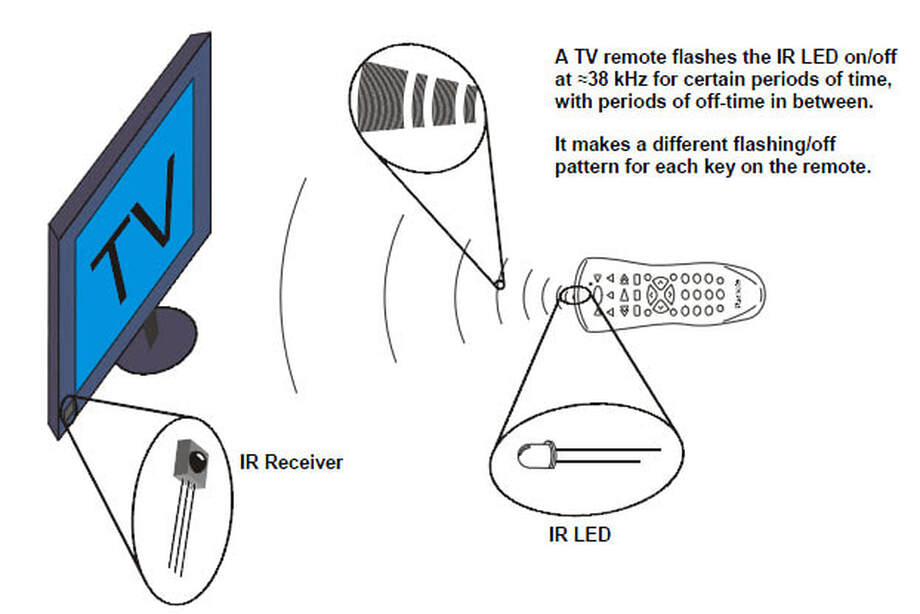
Infrared light is a type of invisible light just beyond what our eyes can see. When you press a button, the remote’s circuit board turns on a tiny infrared LED at the front. This LED flashes in a specific pattern—like Morse code—representing your command.
For example, pressing “1” might make the LED flash on and off in one sequence, while “2” uses a different pattern. These patterns are called codes. The device (like your TV) has a sensor that sees the infrared light, decodes the pattern, and then acts on your command.
Why Ir Remotes Need Line Of Sight
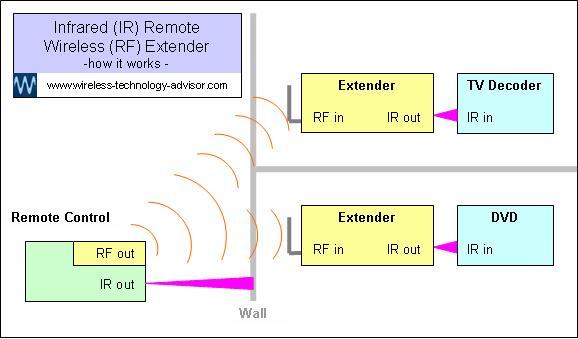
Infrared light can’t go through walls or objects. That’s why you need to point the remote directly at the TV or device. If something blocks the path, the signal can’t get through.
Ir Remote Control: An Example
Suppose you want to turn up the TV volume:
- You press the “volume up” button.
- The circuit board sends a special code to the infrared LED.
- The LED flashes this code as a series of rapid on/off bursts.
- The TV’s sensor receives the code, recognizes it, and increases the volume.
Advantages And Limits
Advantages:
- Simple and cheap technology
- Low power use
- Reliable for short distances
Limits:
- Needs direct line of sight
- Signals can be blocked by objects or sunlight
- Can only control one device at a time (unless using special codes)
Radio Frequency (rf) Remote Controls
Some devices, like garage doors, car keys, and smart home systems, use radio frequency (RF) remote controls. These remotes work differently from IR remotes.
How Rf Signals Work
RF remotes send commands as radio waves, which are a form of electromagnetic energy. Unlike IR, RF signals can travel through walls, furniture, and other barriers. This makes them perfect for situations where you can’t see the device you’re controlling.
Inside an RF remote, pressing a button tells the circuit board to send a coded message. Instead of light, the transmitter uses a small antenna to broadcast radio waves. The receiver in the device picks up these waves, reads the code, and acts.
Real-world Example: Car Key Fobs
Most modern car keys use RF remote controls. You can lock or unlock your car from across a parking lot—even if you can’t see the car—because the signal goes through the air and objects.
Security Features
Since RF signals can travel far and through walls, security is very important. Most RF remotes use rolling codes or encryption. This means the code changes every time you press the button, making it much harder for someone to copy or “hack” your signal.
Advantages And Challenges
Advantages:
- No need for line of sight
- Can work over longer distances
- Can send more complex signals
Challenges:
- Uses more power than IR
- Signals can sometimes interfere with other wireless devices
- Higher cost and more complex to design
How A Remote Control Sends And Receives Data
No matter if it’s IR or RF, every remote control follows a basic process to send and receive data.
The Sending Process
- Button Press: You press a button on the remote.
- Code Generation: The remote’s microchip creates a unique code for that command.
- Signal Transmission: The transmitter (LED for IR, antenna for RF) sends the code as light or radio waves.
The Receiving Process
- Signal Reception: The device’s receiver (sensor or antenna) picks up the signal.
- Code Decoding: The device’s microchip reads the code and checks if it’s valid.
- Action: If the code matches, the device performs the command (like turning on, changing channel, or opening a door).
Example: Universal Remotes
Some remote controls can operate many devices from different brands. These are called universal remotes. They store hundreds or thousands of codes. You program them to send the right code for each device, making life easier if you have lots of gadgets.
Technologies Behind Remote Controls
Remote controls use several different technologies. Let’s look at the most common ones.
Infrared (ir) Technology
- Wavelength: Around 940 nanometers (invisible to the human eye)
- Range: 5–10 meters (about 16–33 feet)
- Used for: TVs, DVD players, air conditioners
Radio Frequency (rf) Technology
- Frequency: Usually 315 MHz, 433 MHz, or 2.4 GHz
- Range: 20–100 meters (about 65–330 feet), sometimes more
- Used for: Car keys, garage doors, smart home devices
Bluetooth
- Type: A special type of RF using 2.4 GHz frequency
- Range: 10–100 meters
- Used for: Game controllers, smart TVs, audio systems
Wi-fi
- Type: Uses standard wireless internet signals
- Range: Up to 100 meters indoors
- Used for: Smart home remotes, some advanced TV remotes
Ultrasonic
- Type: Uses high-pitched sound above human hearing
- Range: Short, up to 10 meters
- Used for: Early TV remotes in the 1950s–1970s
A Short History Of Remote Controls
The remote control has an interesting past. Here are some key moments:
- 1950: Zenith introduces the first TV remote, called “Lazy Bones.” It was connected by a wire.
- 1955: The first wireless remote, “Flash-Matic,” used light beams but was affected by sunlight.
- 1956: Zenith releases the “Space Command,” which used ultrasonic sound.
- 1980s: Infrared remotes become standard for TVs and VCRs.
- 1990s: RF remotes appear for garage doors and car locks.
- 2000s–now: Bluetooth and Wi-Fi remotes arrive for smart devices.
How Remote Control Codes Work
Every command sent by a remote is really just a unique digital code. These codes are numbers written in binary (ones and zeros).
Example Of A Simple Code
Pressing “Power” on your remote might send the binary code: 00010110
Each button sends a different code, and each brand uses its own system. That’s why a Sony remote usually won’t work with a Samsung TV unless you have a universal remote.
Code Formats And Protocols
Manufacturers use different protocols (ways of formatting the data). Some common ones:
- NEC Protocol: Used by many Japanese brands
- RC-5/RC-6: Developed by Philips, used in Europe
- Sony SIRC: Used by Sony devices
Each protocol defines how the code is structured, how long it lasts, and how fast it repeats.
Why Codes Matter
Understanding codes can help if you’re programming a universal remote or troubleshooting a problem. If your device doesn’t respond, it may not recognize the code sent by the remote.
Comparison: Ir Vs Rf Vs Bluetooth Vs Wi-fi Remotes
Let’s compare the main types of remote control technology. Here’s a side-by-side look at how they differ:
| Technology | Signal Type | Range | Line of Sight Needed? | Common Uses | Power Usage |
|---|---|---|---|---|---|
| Infrared (IR) | Light | 5–10 meters | Yes | TVs, DVD players | Low |
| Radio Frequency (RF) | Radio waves | 20–100 meters | No | Garage doors, car keys | Medium |
| Bluetooth | Radio waves | 10–100 meters | No | Game controllers, smart TVs | Medium |
| Wi-Fi | Radio waves | Up to 100 meters | No | Smart home remotes | High |
Inside The Remote: Key Parts Explained
Let’s take a closer look at what’s inside a typical remote control.
| Component | Function | Where Found |
|---|---|---|
| Buttons | User input for commands | All remotes |
| Circuit board | Processes button presses and creates codes | All remotes |
| Transmitter | Sends out IR, RF, or Bluetooth signals | All remotes |
| Batteries | Power the remote | All remotes |
| Microcontroller | The “brain” that runs the software | Modern remotes |
| LED indicator | Shows when a signal is sent | Some remotes |
Common Problems And How To Fix Them
Remote controls are usually reliable, but problems can happen. Here are some typical issues and solutions.
1. The Remote Doesn’t Work
- Check batteries: Most remotes stop working when the batteries die. Replace them and try again.
- Check orientation: For IR remotes, make sure you’re pointing at the device’s sensor.
- Remove obstructions: Clear anything blocking the path between the remote and the device.
2. Unresponsive Buttons
- Dirty contacts: Over time, dirt can build up under the buttons. Carefully open the remote and clean the contacts with a little alcohol.
- Worn-out contacts: If cleaning doesn’t help, the contacts may be worn and need repair or replacement.
3. Interference
- Sunlight or strong lights: IR remotes can be affected by direct sunlight or bright indoor lighting.
- Other remotes: Some IR signals can interfere if two remotes use the same code.
4. Device Not Responding To Universal Remote
- Wrong code: Make sure you programmed the correct code for your device.
- Protocol mismatch: Some devices use rare protocols not supported by all universal remotes.
5. Range Problems
- Low battery: Weak batteries can reduce signal strength.
- Obstructions: For RF or Bluetooth, thick walls or metal objects can block or weaken the signal.
Non-obvious Insights For Better Remote Control Use
Many users miss some helpful tips that can make using remote controls easier and more effective:
- IR remotes can be tested using a smartphone camera. Since the human eye can’t see IR light, you might think your remote is dead when it’s not. Point the remote at your phone’s camera, press a button, and look for a flashing light on the screen. If you see it, the remote is working; the problem is with your device.
- Some remotes support “macro” commands. Higher-end universal remotes can send a series of commands with one button press. For example, you could turn on your TV, sound system, and streaming box all at once. This feature saves time but needs careful setup.
The Role Of Remote Controls In Modern Life
Remote controls have changed how we interact with technology. Here are some areas where they play a major role:
Home Entertainment
The classic TV remote makes it easy to change channels, adjust volume, or access streaming apps. Universal remotes can control everything—TV, soundbar, streaming box, and even smart lights—making home entertainment seamless.
Smart Homes
Modern homes often use RF, Bluetooth, or Wi-Fi remotes for lights, thermostats, security systems, and more. Some remotes even connect to voice assistants like Alexa or Google Home.
Automobiles
Car remotes use RF signals for locking/unlocking doors, starting the engine, or opening the trunk. Advanced key fobs can even remember seat positions and climate settings.
Toys And Gadgets
Drones, RC cars, and other toys use RF or Bluetooth remotes for precise control and fun.
Medical Devices
Some medical equipment, like adjustable beds or patient lifts, uses remotes for safety and comfort.
Credit: www.wireless-technology-advisor.com
Security And Privacy Considerations
As remotes become smarter, security is more important. Here’s what you should know:
- Rolling codes: Many RF remotes use rolling codes that change with every use, making it much harder for hackers to intercept.
- Encryption: Bluetooth and Wi-Fi remotes often use encrypted signals for extra safety.
- Smart home risks: Wi-Fi remotes can be vulnerable if your home network isn’t secure. Always use strong passwords and keep software updated.
The Future Of Remote Controls
Remote controls are evolving fast. Here’s what the future might look like:
- Voice control: Many devices now respond to voice commands, reducing the need for physical remotes.
- Smartphone apps: More companies are offering apps that let you control devices from your phone.
- Gesture control: Some advanced remotes use motion sensors to detect hand movements.
- Integration: One remote may soon control everything in your home, from lights to music to security.
Environmental Impact And Recycling
Millions of remotes are made and thrown away every year. Most are powered by disposable batteries, which can pollute the environment if not recycled properly. Here’s how you can help:
- Use rechargeable batteries to reduce waste.
- Recycle old remotes and batteries at electronics recycling centers.
- Choose multi-device remotes to cut down on the total number of remotes in your home.
Fun Facts About Remote Controls
- The world’s first TV remote in 1950 was called “Lazy Bones.” It had a long cable, and people often tripped over it.
- The average American home has at least four remote controls.
- Some remotes have hidden features, like backlighting or programmable buttons.
- The Guinness World Record for the largest remote is over 15 feet long!
Credit: science8sc.weebly.com
How To Choose The Right Remote Control
With so many options, picking the best remote can be tricky. Here are a few tips:
- Check compatibility: Make sure the remote works with your devices.
- Decide on features: Do you need backlighting, extra buttons, or learning ability?
- Think about range: For big rooms or outdoor use, RF or Bluetooth may be better than IR.
- Budget: Universal remotes range from under $10 to over $200, depending on features.
- Consider ease of use: Some remotes are very simple, while others need setup and programming.
Common Myths About Remote Controls
- Myth: All remotes work the same way.
Reality: Remotes use different technologies (IR, RF, Bluetooth, Wi-Fi) that have different strengths and weaknesses.
- Myth: Universal remotes can control anything.
Reality: Some devices use rare codes or protocols not supported by all universal remotes.
- Myth: You must point your remote exactly at the device.
Reality: Only IR remotes need line of sight. RF, Bluetooth, and Wi-Fi remotes work through walls and objects.
Innovations And Trends In Remote Control Design
Designers are making remotes smarter, simpler, and more comfortable. Recent trends include:
- Touchscreens: Some advanced remotes have small touchscreens instead of buttons.
- Backlit buttons: Useful for dark rooms.
- Voice integration: Microphones for voice commands.
- Eco-friendly materials: Some brands use recycled plastics or offer solar-powered remotes.
Remote Controls In Industry And Science
While most people think of remotes for TVs or toys, they’re also used in:
- Factories: Remotes control heavy machines or robots from a safe distance.
- Medicine: Doctors use remotes to operate medical equipment or scan patients.
- Space: NASA uses remote controls to operate rovers on Mars or satellites in orbit.
Credit: www.youtube.com
Practical Tips For Remote Control Maintenance
A little care can keep your remote working for years:
- Store in a dry place, away from heat or moisture.
- Clean the buttons and case with a soft, damp cloth.
- Remove batteries if you won’t use the remote for a long time, to prevent leaks.
- Replace batteries in pairs for best performance.
Frequently Asked Questions
What Should I Do If My Remote Control Stops Working Suddenly?
First, check the batteries and replace them if needed. Make sure nothing is blocking the signal path, especially with IR remotes. You can also test the remote with a smartphone camera—if the IR LED lights up, the remote works, and the problem may be with your device.
Can I Use One Remote For All My Devices?
Yes, universal remotes can control multiple devices if they support the right codes and protocols. You’ll need to program the remote for each device. Some devices, especially newer smart TVs or sound systems, might also support control via smartphone apps.
How Far Can A Remote Control Reach?
It depends on the type. IR remotes usually work up to 10 meters (about 33 feet). RF, Bluetooth, and Wi-Fi remotes can work from much farther away—sometimes up to 100 meters (330 feet)—and don’t need line of sight.
Are Remote Controls Safe To Use?
Yes. The signals used (infrared light, radio waves) are very low power and not harmful to humans. However, always use remotes as directed, and keep them away from small children, as batteries can be a choking hazard.
Where Can I Learn More About The Technical Side Of Remote Controls?
You can find detailed information on remote control technology, history, and protocols at the Wikipedia page on remote controls.
Remote controls have come a long way from their simple beginnings. Understanding how they work not only helps you use them better but also prepares you for the new ways we’ll interact with technology in the future. Whether you’re changing the channel or piloting a drone, these small devices put a world of control in your hands.