
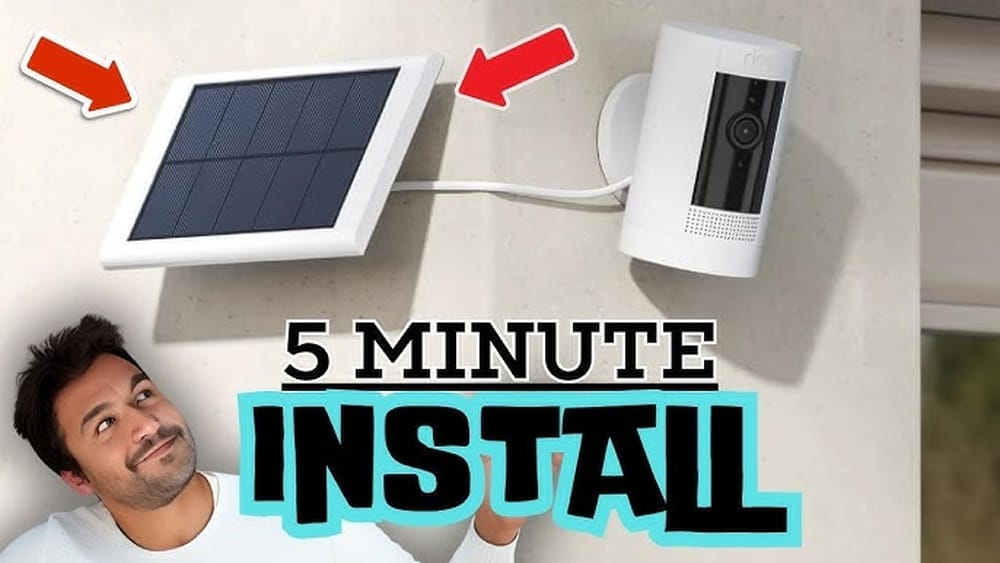
When you buy a security camera for your home, you want it to work all day and night. But keeping it powered can be tricky, especially if you don’t have an outlet nearby. That’s why many people choose the Ring Solar Panel. This small device uses sunlight to charge your Ring camera, so you don’t have to worry about changing batteries or running long wires. But how does the Ring Solar Panel connect to the camera? Is it easy, and does it really work as promised? Let’s explore these questions in detail.
What Is The Ring Solar Panel?
The Ring Solar Panel is a compact accessory designed for Ring cameras. It collects sunlight and turns it into electricity, which keeps your camera running longer. Most Ring panels are made for outdoor use and can handle rain, snow, and dust. The main goal is to reduce how often you need to recharge or replace your camera’s battery.
There are different types of Ring solar panels, but the most common are for the Ring Stick Up Cam and the Ring Spotlight Cam. These panels are lightweight, usually less than two pounds, and come with a mounting bracket and a power cable.
Ring solar panels are not universal; each model is made for specific Ring cameras. So, before buying, check that your camera and panel are compatible.
Why Use A Solar Panel For Ring Cameras?
People often ask why they should buy a solar panel instead of just plugging their camera into a wall. The answer is simple: convenience and flexibility.
- No need for electrical outlets outdoors
- Fewer battery swaps or recharges
- Camera placement flexibility (choose the best spot)
- Environmentally friendly power source
A Ring solar panel is especially useful if your camera is far from your house or garage. It’s also a smart choice if you want to lower your electricity bill and help the environment.
How Does The Ring Solar Panel Connect To The Camera?
The process is straightforward, but there are a few steps and details that matter. Let’s break it down.
Step 1: Unbox And Check The Components
When you open the box, you’ll find:
- The solar panel
- A mounting bracket
- Screws and anchors
- A power cable (usually 13 feet/4 meters)
- A user manual
Check that everything is included. Sometimes, extra adapters or extension cables are needed for certain camera models.
Step 2: Choose The Right Location
The solar panel needs direct sunlight to work well. So, location is key. Here are some tips:
- Find a spot that gets at least 3 hours of sunlight per day
- Avoid placing under trees, roofs, or anything that blocks the sun
- Mount the panel near your camera, but not so close that it shadows the panel
If your camera is already installed, make sure the panel’s cable can reach it easily. If not, you may need an extension cable.
Step 3: Mount The Solar Panel
Most Ring panels come with a simple mounting bracket. You can attach it to wood, brick, stucco, or metal.
- Hold the bracket against the wall or surface.
- Use a pencil to mark where the screws go.
- Drill holes and insert anchors if needed.
- Screw the bracket into place.
- Slide the solar panel onto the bracket.
The panel can tilt and rotate, so adjust it to face the sun as much as possible.
Step 4: Connect The Power Cable
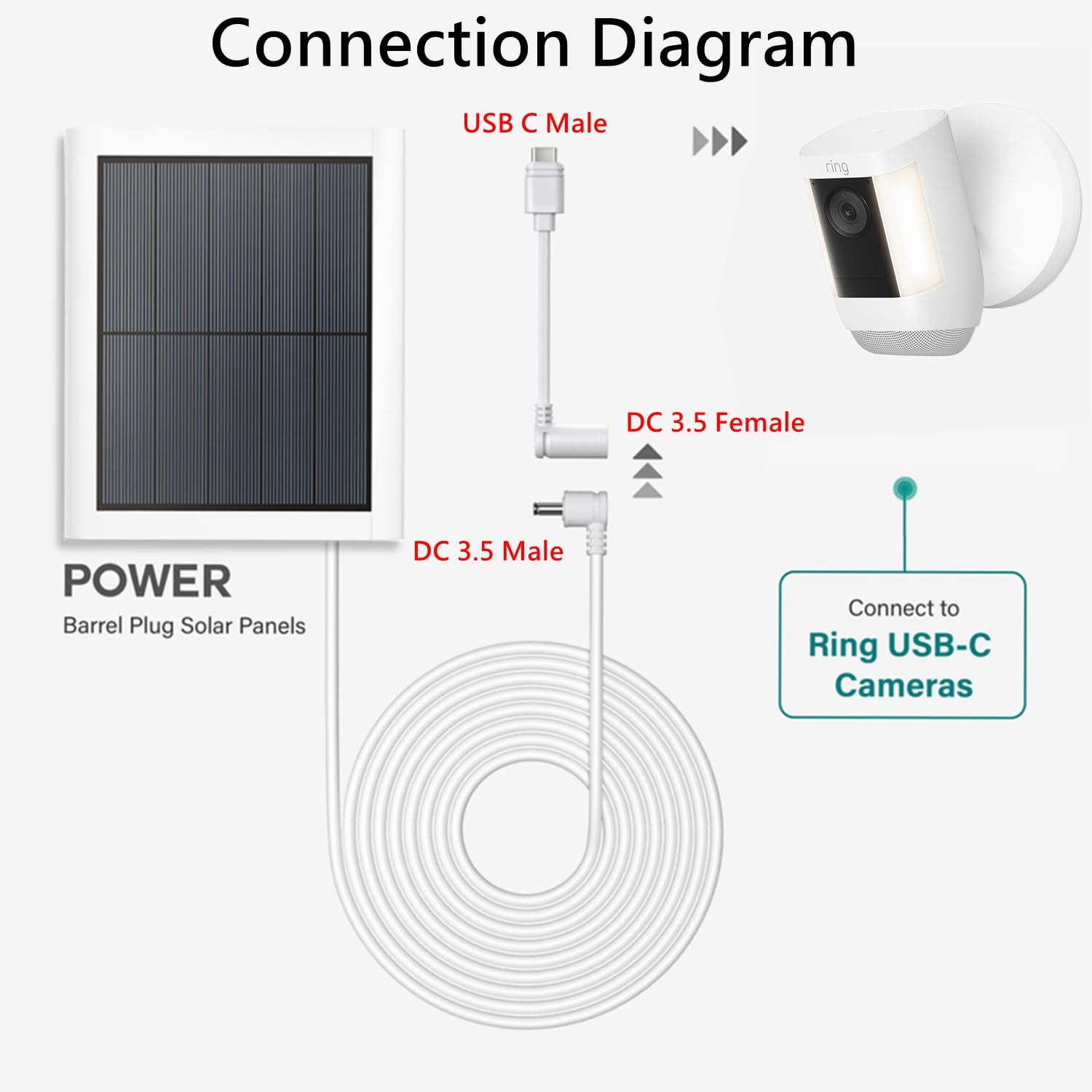
This is the key part. The Ring Solar Panel has a cable with a weatherproof connector. The connector fits into the camera’s charging port.
- For Ring Stick Up Cam: The port is usually at the back or bottom of the camera. Remove the rubber cover, then plug in the cable until it clicks.
- For Ring Spotlight Cam: There’s a special port under a flap. Lift the flap, insert the connector, then close the flap to keep water out.
Push the connector firmly, but don’t force it. The fit should be snug and secure.
Step 5: Check Power Status In The App
Once connected, open the Ring app on your phone or tablet. Go to your camera’s device settings and look for the battery status.
You should see a new indicator: “Solar Panel Connected” or “Solar Status”. This tells you if the panel is working and charging the camera.
If you don’t see this, double-check the cable connection and panel position. Sometimes, it takes a few minutes for the app to update.
How Does The Solar Panel Actually Charge The Camera?
The Ring solar panel uses a simple technology called photovoltaic cells. These cells capture sunlight and turn it into electricity. The power goes through the cable and into the camera’s battery.
But the panel doesn’t charge the camera directly like a wall outlet. Instead, it trickle charges the battery. This means it adds power slowly throughout the day. If your camera uses a lot of energy (for example, many motion alerts or live viewing), the panel might not fully recharge the battery. But it will keep the battery level higher for longer.
Ring recommends that the panel gets at least 3-4 hours of direct sunlight daily for best results. In cloudy or rainy weather, charging will be slower.

Credit: www.youtube.com
Compatibility: Which Cameras Work With The Ring Solar Panel?
Not all Ring cameras can use a solar panel. Here’s a simple overview:
| Ring Camera Model | Compatible Solar Panel | Charging Port Location |
|---|---|---|
| Ring Stick Up Cam Battery | Ring Stick Up Cam Solar Panel | Back/Bottom |
| Ring Spotlight Cam Battery | Ring Spotlight Cam Solar Panel | Side/Under Flap |
| Ring Spotlight Cam Wired | Not Needed | Direct Power |
| Ring Floodlight Cam | Not Compatible | No Battery |
| Ring Doorbell | Only Ring Doorbell Solar Charger (mount) | Back |
Non-obvious insight: The solar panel does not work with wired cameras or those without a battery. If you have a Ring Floodlight Cam, for example, you can’t use a solar panel.
Solar Panel Vs. Other Power Options
Choosing between solar, battery, or wired power depends on your needs. Here’s a quick comparison:
| Power Option | Pros | Cons |
|---|---|---|
| Solar Panel | Eco-friendly, flexible placement, fewer battery changes | Needs sunlight, slower charging, not for all cameras |
| Battery Only | Portable, easy setup | Frequent recharging, risk of power loss |
| Wired | Continuous power, no battery worries | Needs nearby outlet, complex installation |
If you want a camera in a spot without wires, the solar panel is often the best choice.
What Makes The Ring Solar Panel Reliable?
Ring has designed their solar panels for outdoor durability and easy connection. Here are some key features:
- Weatherproof design: Panels can survive rain, snow, and sun
- Long cable: Up to 13 feet, so you can mount the panel away from the camera
- Tilt adjustment: Lets you face the panel toward the sun for better charging
- Secure connector: Prevents water from entering the camera
Ring’s panels are tested to work in temperatures from -5°F to 120°F (-20°C to 50°C). This means they’re suitable for most locations in the US.
Non-obvious insight: If your panel gets dirty (dust, bird droppings), it will charge less. Clean the surface every few weeks for best results.
Step-by-step Example: Setting Up A Ring Stick Up Cam With Solar Panel
Let’s walk through a real setup. Suppose you have a Ring Stick Up Cam Battery and a Ring Stick Up Cam Solar Panel.
- Open the solar panel box and check all parts.
- Choose a sunny spot on your fence, wall, or roof.
- Mark the mounting holes and drill if needed.
- Attach the bracket and slide on the panel.
- Adjust the panel to face south (if you’re in the US) for maximum sunlight.
- Run the cable to your camera. Use clips to keep it neat and out of the way.
- Find the charging port on the camera, remove the cover, and plug in the cable.
- Open the Ring app and check the battery status and solar connection.
- Wait a day to see if the battery level stays steady or rises.
If the battery drains faster than expected, check:
- Is the panel getting enough sunlight?
- Are there too many motion alerts or live views?
- Is the cable firmly connected?

Credit: www.amazon.com
Common Problems And Solutions
Even with a simple setup, issues can happen. Here are frequent problems and how to fix them.
Solar Panel Not Charging
- Check the sunlight: Move the panel to a sunnier spot.
- Clean the panel: Remove dust, leaves, or snow.
- Inspect the cable: Look for cuts or loose connectors.
- Check the app: Restart your camera and refresh the app.
Cable Too Short
- Use a Ring-certified extension cable.
- Avoid using third-party cables; they may not be weatherproof.
Camera Battery Still Drains
- Reduce motion sensitivity in the app.
- Lower the frequency of live views.
- Make sure the panel gets at least 3 hours of direct sunlight.
App Doesn’t Show Solar Status
- Update the Ring app.
- Reboot your camera.
- Check the connector again.
Non-obvious insight: Sometimes, the camera firmware needs updating to recognize the solar panel. Check for updates in the app.
Can You Use Multiple Solar Panels With One Camera?
Some users ask if connecting two panels will charge faster. Ring does not support this. Their cameras are designed for one panel only. Adding more won’t improve charging and may cause technical issues.
Installation Safety Tips
Whenever you install a solar panel, keep safety in mind:
- Use a sturdy ladder for high mounts
- Wear gloves when drilling or handling screws
- Avoid installing during rain or wet conditions
- Secure cables to prevent tripping hazards
If you’re not comfortable with DIY, consider hiring a local handyman.
How Much Sunlight Does The Solar Panel Need?
Ring recommends at least 3-4 hours of direct sunlight daily. In areas with less sun, charging will be slower. If your camera is in constant use, you may need to recharge the battery sometimes.
Data point: In Arizona, a Ring solar panel can keep a camera charged nearly all year. In Seattle, you may need to recharge the battery every few months due to cloudy weather.
Credit: www.amazon.com
Real-life Examples: Performance In Different Climates
Let’s see how the Ring solar panel works in real situations.
Hot And Sunny (phoenix, Az)
- Panel gets 6+ hours of sun daily
- Camera battery stays above 90%
- No manual recharges needed
Cloudy And Rainy (seattle, Wa)
- Panel gets 2-3 hours of sun on average
- Battery drops to 60% after 2 weeks
- Needs manual recharge every 2 months
Cold And Snowy (chicago, Il)
- Panel works in cold, but snow blocks sunlight
- Battery level falls in winter
- Clean panel after snowstorms for best results
The panel works best in sunny places, but it still helps even in cloudy climates.
How Long Does The Ring Solar Panel Last?
Ring panels are built to last several years. Most users report good performance for 2-5 years. The cells may slowly lose efficiency over time, but you can extend their life with care:
- Clean the panel every month
- Avoid scratching the surface
- Check connectors for corrosion
Data point: Ring offers a one-year warranty on most panels.
Solar Panel Maintenance: What You Need To Know
Proper care keeps your panel working longer.
- Wipe the surface with a damp cloth
- Remove leaves, bird droppings, and dust
- Check the cable for damage each season
- Inspect mounting screws for rust
If you live near the ocean, salt can build up. Rinse the panel with fresh water every few months.
Is The Ring Solar Panel Worth The Investment?
Let’s look at the numbers.
- Ring Stick Up Cam Battery: $99.99
- Ring Solar Panel: $49.99
If you use the camera daily, you might need to recharge the battery every 2 weeks without a panel. With a panel, you can go months without manual charging.
Over one year, the solar panel can save you 12+ battery swaps and hours of hassle.
If you want a set-it-and-forget-it solution, the panel is a smart investment.
Comparison: Ring Solar Panel Vs. Third-party Panels
Some people ask if cheaper, non-Ring panels will work. Here’s a quick comparison:
| Feature | Ring Solar Panel | Third-Party Panel |
|---|---|---|
| Compatibility | Guaranteed for Ring cameras | May not fit, can void warranty |
| Weatherproofing | Tested for outdoor use | Varies by brand |
| Cable Quality | Weatherproof, long | Often shorter, less protection |
| Customer Support | Ring support | Limited support |
| Warranty | 1 year | Usually 6 months |
Confident guidance: If reliability matters, stick with Ring’s official panel.
What Happens If Your Camera Uses More Power Than The Panel Provides?
If your camera records many motion events, the battery may drain faster than the panel can recharge it. In this case:
- Lower motion sensitivity
- Reduce video length in the app
- Place the panel in a sunnier location
If you still need more power, consider adding a second battery (for Ring Stick Up Cam) or using a wired connection.
Technical Details: How Much Power Does The Ring Solar Panel Provide?
The average Ring solar panel produces about 2 to 2.4 watts in full sunlight. This is enough to offset average daily camera usage.
Data point: Ring Stick Up Cam uses about 1-1.5 watts per hour during normal operation.
If your camera is active all day, the panel may not keep up. But for standard home use (a few motion alerts and live views per day), the panel works well.
Are There Any Installation Mistakes To Avoid?
Many beginners make these mistakes:
- Installing the panel in shade
- Using a damaged cable
- Plugging the connector incorrectly
- Forgetting to check for compatibility
Double-check everything before starting, and read the manual carefully.
Can You Move The Solar Panel After Installation?
Yes. If you notice poor charging, you can unscrew the bracket and relocate the panel. The cable length gives you flexibility. Just avoid bending or damaging the cable.
How To Troubleshoot Advanced Problems
Sometimes, issues are not simple. Try these steps:
- Factory reset your camera in the Ring app
- Check for firmware updates
- Contact Ring support if nothing works
If your panel shows “connected” but the battery still drains, your camera may be using more power than expected.
Extra Tips For Best Performance
- Aim the panel toward the sun. In the US, south-facing is best.
- Check battery status weekly in the app.
- Clean the panel regularly.
- Adjust motion settings to reduce power drain.
- Use cable clips to keep the wire neat and safe.
Environmental Benefits
Using a solar panel cuts down on electricity use and battery waste. Over one year, a single panel can save dozens of battery charges. This helps the planet and your wallet.
If you want more details on solar energy, visit the Wikipedia Solar Panel page.
Frequently Asked Questions
How Long Does It Take For The Ring Solar Panel To Charge The Camera Battery?
Charging is slow and steady. The panel adds power throughout the day. If your camera isn’t used much, the battery can stay full. In busy times, the panel helps but may not fully charge the battery every day.
Can I Use The Ring Solar Panel Indoors?
No. The panel needs direct sunlight. Indoors, it won’t generate enough power. Always install it outdoors in a sunny spot.
Is The Ring Solar Panel Weatherproof?
Yes. It’s designed to handle rain, snow, and sun. The cable and connector are also weatherproof. Still, avoid installing in areas with standing water.
Will The Ring Solar Panel Work In Winter?
It works as long as there’s sunlight. In winter, the sun is weaker and days are shorter, so charging will be slower. Clean off snow and ice to keep the panel working.
Can I Use A Third-party Solar Panel With My Ring Camera?
It’s risky. Some third-party panels may fit, but they can void your warranty and might not work well. For best results, use the official Ring panel.
Connecting a Ring Solar Panel to your camera is simple but requires careful placement and setup. With the right location and regular maintenance, the panel can keep your camera powered for months, saving you time and money. If you want reliable security without the hassle of battery changes, the solar panel is a smart solution.