
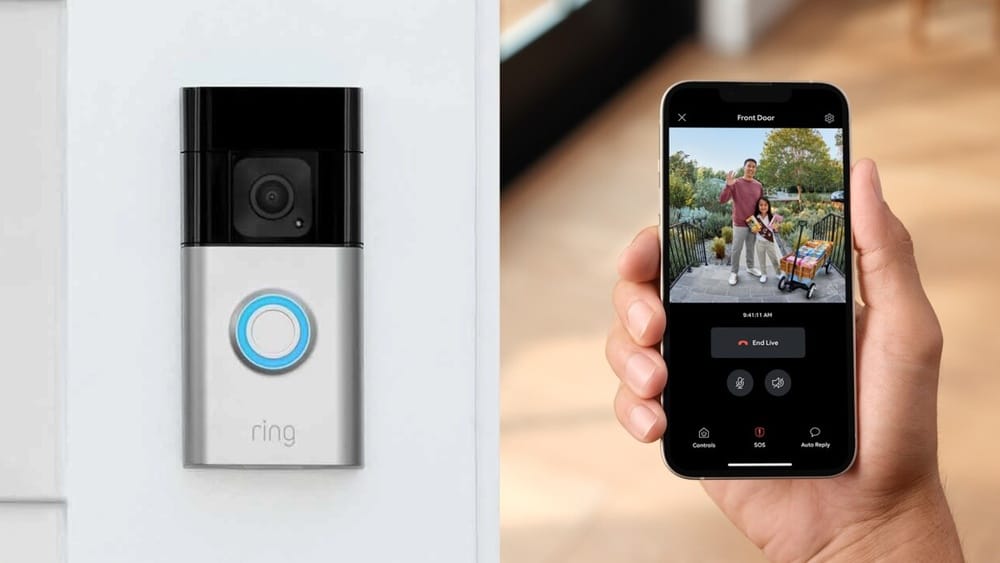
Anyone who has ever missed a package or wanted to know who was at the door when they weren’t home has probably wondered about smart doorbells. The Ring Video Doorbell is one of the best-known brands in this growing category. It lets you see, hear, and even talk to visitors at your door from anywhere in the world, using just your smartphone or computer. But how does the Ring Video Doorbell actually work? What technology powers it, and what do you need to use one effectively? This guide will answer all these questions and more, giving you a complete understanding of how the Ring Video Doorbell fits into modern home security.
The Basics Of The Ring Video Doorbell
The Ring Video Doorbell is a smart device that replaces or works alongside your traditional doorbell. Its main function is to let you know when someone is at your door, but it does much more than just ring. With built-in video, audio, and internet connectivity, it offers a real-time window to your front door, whether you’re home or far away.
There are several models of the Ring Video Doorbell, ranging from basic to advanced. All of them share some core features:
- HD video camera with wide-angle lens
- Microphone and speaker for two-way audio
- Motion detection sensors
- Wireless connectivity (Wi-Fi)
- Integration with smartphones and smart home systems
You can install a Ring Video Doorbell by yourself, usually in less than 30 minutes. After mounting it by your door and connecting it to your Wi-Fi, you can control and monitor it through the Ring app, available on iOS, Android, and web browsers.
Key Components And How They Work Together
To really understand how a Ring Video Doorbell works, it helps to break it down into its major parts and see how each one plays a role.
Camera And Video Streaming
At the heart of every Ring device is a high-definition camera. Most models record in 1080p HD, giving a clear view of whoever is at your door. The camera uses a wide-angle lens to maximize coverage, often between 155° to 180° field of view.
When someone presses the doorbell or triggers the motion sensor, the camera turns on and starts streaming live video to your smartphone or computer. You can also check the camera feed at any time, even if there is no activity.
Night vision is another key feature. The camera uses infrared LEDs to provide a clear black-and-white image in complete darkness, so you always know what’s happening, day or night.
Motion Detection Sensors
Ring Video Doorbells include motion detection technology. These sensors can detect movement within a certain range and send you instant alerts if someone approaches your door—even if they don’t ring the bell.
You can adjust the motion sensitivity and set specific zones in the Ring app, so you only get alerts for important areas (for example, your walkway but not the street). This helps reduce false alarms from passing cars or animals.
Two-way Audio
Built into the device is a microphone and a speaker. This lets you listen to what’s happening outside your door and speak back in real-time, directly from your phone. The audio is full-duplex, which means you and your visitor can talk at the same time, just like a phone call.
This feature is useful for more than just greetings. You can ask delivery drivers to leave packages in a safe spot, tell guests you’ll be there in a minute, or even deter suspicious people by letting them know you’re watching.
Wi-fi And Connectivity
The Ring Video Doorbell connects to your home Wi-Fi network. This is how it sends video and audio to your devices, and how you receive alerts wherever you are. Most models work with both 2. 4GHz and 5GHz Wi-Fi for flexibility and better performance.
If your Wi-Fi signal is weak at the front door, Ring offers Chime Pro, which acts as both a doorbell chime and a Wi-Fi extender.
Power Options
Depending on the model, Ring Video Doorbells can be powered in different ways:
- Battery-powered: Rechargeable battery inside the device. Lasts several months per charge, depending on usage.
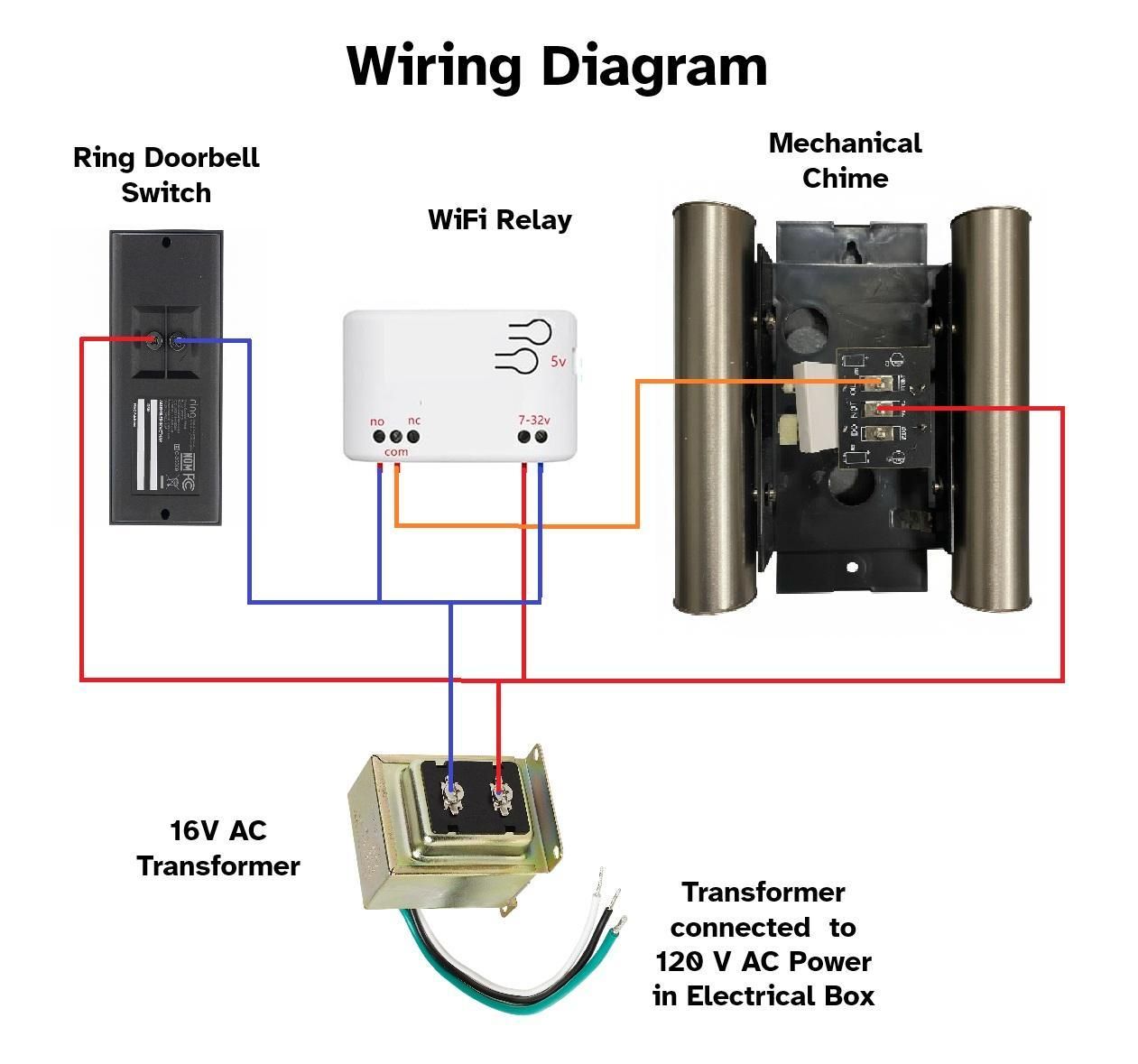
- Hardwired: Connects to existing doorbell wiring for continuous power.
- Plug-in adapter: Some models can use an AC adapter for power.
Battery-powered models are easy to install, while hardwired options offer more convenience since you don’t need to recharge.
Smart Home Integration
Ring devices can work with other smart home systems, such as Amazon Alexa. For example, you can ask your Echo Show to show your front door camera, or get alerts on Alexa-enabled devices. Some models also work with Google Assistant and IFTTT.
How Installation Works
Setting up a Ring Video Doorbell is designed to be as simple as possible. While you don’t need to be an expert, there are a few steps involved.
- Choose the Location: Usually near your main door, at a height of about 48 inches (122 cm) for the best view.
- Mount the Bracket: Use the included screws and tools to fix the mounting bracket to the wall or door frame.
- Attach the Doorbell: Snap the Ring device onto the bracket. If it’s hardwired, connect the wires before mounting.
- Power Up: Charge the battery (if needed) or connect to existing wiring.
- Connect to Wi-Fi: Open the Ring app and follow the on-screen instructions to link the doorbell to your home network.
- Set Up the App: Adjust motion zones, notification preferences, and other settings as desired.
Ring provides detailed instructions and videos, and many users finish installation in about 20–30 minutes. If you’re replacing a wired doorbell, you may need to turn off power at your circuit breaker for safety.
How The Ring App Works
The Ring app is the control center for your doorbell. Once installed, you can use the app to:
- Receive instant alerts when someone rings the bell or triggers motion
- View live video from the camera at any time
- Speak with visitors using two-way audio
- Replay recorded footage (with a Ring Protect subscription)
- Adjust motion detection zones and sensitivity
- Share access with family members
The app also lets you manage multiple Ring devices, such as other doorbells, cameras, or Ring Alarm systems, from the same dashboard.
Example: Using The App Day-to-day
Imagine you’re at work and your phone buzzes. The notification says “Motion detected at front door. ” You open the Ring app and see a delivery driver dropping off a package. You tap the microphone and say, “Hi, just leave it by the door, thank you!” The driver nods and leaves—problem solved, without you being home.
Recording And Storing Video
One important part of how Ring works is video recording. When motion is detected or someone rings the bell, the camera records a short video clip. But where does this footage go?
By default, live video is always available, but if you want to save and replay video clips, you need a Ring Protect subscription. This service saves videos to the cloud for 30 to 180 days, depending on your plan. You can download and share clips as needed.
Here’s a simple comparison of what you get with and without a subscription:
| Feature | Free Tier | Ring Protect Plan |
|---|---|---|
| Live View | Yes | Yes |
| Motion Alerts | Yes | Yes |
| Video Recording | No | Yes |
| Video History | No | Yes (30–180 days) |
| People Only Mode | No | Yes |
| Snapshot Capture | No | Yes |
Most users find the subscription useful, especially for reviewing missed visitors or sharing clips with the police if needed.
Security And Privacy
Smart home devices like Ring Video Doorbells raise important security and privacy questions. Ring uses several methods to keep your data safe:
- Encrypted video transmission: Video feeds are encrypted during transmission and storage.
- Two-factor authentication: Adds an extra layer of security to your account.
- User controls: You decide who can access your cameras and recordings.
- Privacy zones: You can mask parts of the camera’s view (such as a neighbor’s window) in the app.
However, it’s important to use strong passwords and keep your app updated. Some users worry about police partnerships and data sharing, so always review privacy settings and policies.
Credit: www.sepr.es
Ring Video Doorbell Models Compared
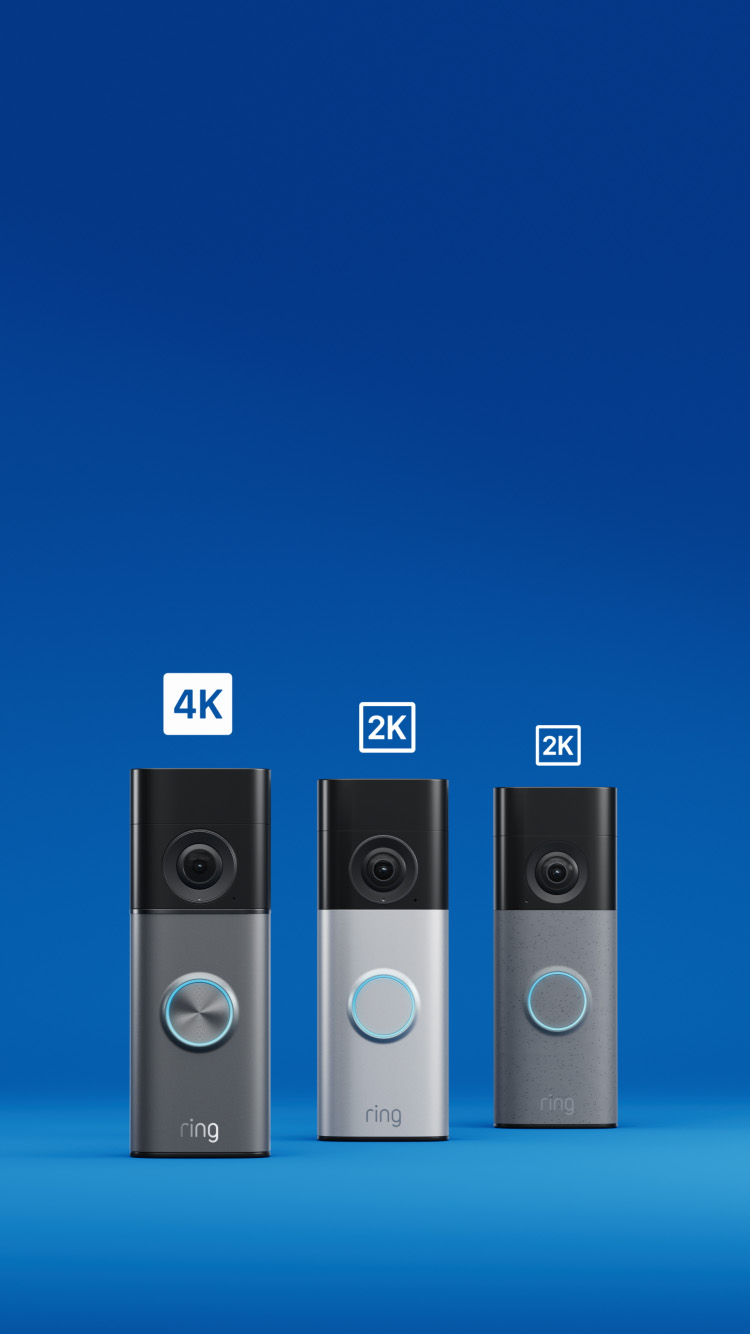
Ring has released many models, each with its own features and price. Here’s a comparison of some popular options:
| Model | Video Quality | Power Source | Field of View | Night Vision | Price (USD) |
|---|---|---|---|---|---|
| Ring Video Doorbell (2nd Gen) | 1080p HD | Battery/Hardwired | 155° | Yes | $99.99 |
| Ring Video Doorbell Pro 2 | 1536p HD | Hardwired | 150°x150° | Yes (Color) | $249.99 |
| Ring Video Doorbell 4 | 1080p HD | Battery/Hardwired | 160° | Yes | $199.99 |
| Ring Peephole Cam | 1080p HD | Battery | 155° | Yes | $129.99 |
Your choice depends on your budget, power preference, and the features you need. For example, if you want the best video quality and advanced motion detection, the Pro 2 is a top pick. If you rent and can’t hardwire, a battery-powered model is a better fit.
Real-life Benefits Of Using A Ring Video Doorbell
People buy Ring Video Doorbells for many reasons, but the benefits go beyond just convenience. Here are some real-world advantages:
- Deters package theft: Thieves are less likely to steal packages if they know they’re being recorded.
- Helps catch suspicious activity: Video evidence can help police solve crimes.
- Lets you answer the door from anywhere: Great for travelers, parents, or anyone who’s often out.
- Improves deliveries: You can give instructions to delivery people in real-time.
- Assists with elderly or disabled family members: Family can check in or help answer the door remotely.
Some insurance companies even offer discounts for having a video doorbell, as it can lower the risk of property crime.

Credit: www.aboutamazon.com
What You Need To Use A Ring Video Doorbell
To get the most from your Ring device, you’ll need:
- Wi-Fi connection: Reliable, with at least 1 Mbps upload speed for smooth video.
- Smartphone or tablet: For the Ring app (iOS or Android).
- Power source: Existing doorbell wiring or willingness to recharge batteries.
- Optional subscription: For video recording and advanced features.
If your Wi-Fi is weak at your front door, consider moving your router closer or using a Wi-Fi extender. Test your signal before installation to avoid frustration.
How Ring Video Doorbells Communicate
The technology behind Ring Video Doorbells is simple but powerful. Here’s what happens step by step when someone presses your Ring doorbell:
- Button Press/Movement Detected: The doorbell senses motion or the button is pressed.
- Signal Sent Over Wi-Fi: The device sends a notification through your home Wi-Fi to Ring’s cloud servers.
- Alert Delivered: Your phone receives a push notification from the Ring app.
- Live Video Starts: You tap the alert and the app connects to the camera’s live video feed.
- Two-Way Audio Opens: You can speak and listen through the app, using the built-in microphone and speaker.
- (Optional) Recording: If you have a Ring Protect plan, the video is saved to your cloud account.
This process takes just a few seconds, thanks to efficient cloud technology and modern Wi-Fi speeds.
Credit: www.instructables.com
Common Issues And How To Solve Them
While the Ring Video Doorbell is user-friendly, users sometimes run into problems. Here are common issues, and how to fix them:
Poor Wi-fi Connection
If your video is laggy or you miss notifications, your Wi-Fi may be weak where the doorbell is installed. Solutions:
- Move your router closer to the front door.
- Use a Wi-Fi extender or Ring Chime Pro.
- Check for interference from thick walls or metal doors.
Battery Drains Quickly
Frequent video events or cold weather can drain the battery faster. To extend battery life:
- Reduce motion sensitivity in the app.
- Adjust motion zones to avoid busy streets.
- Charge the battery fully before installing.
Missed Notifications
Sometimes notifications are delayed or missed. Make sure:
- The Ring app has permission to send notifications.
- Your phone’s battery optimization isn’t blocking the app.
- Wi-Fi is stable and has good upload speed.
False Motion Alerts
Too many alerts from cars, trees, or animals? Try these steps:
- Use “People Only Mode” (with subscription) to ignore non-human motion.
- Set motion zones carefully in the app.
- Lower the motion sensitivity.
These quick fixes solve most common issues, making your experience smoother.
Data Usage And Bandwidth
A question many users have is: How much data does a Ring Video Doorbell use? The answer depends on how often you access live video and how many motion events happen each day.
- Live video streaming: Uses about 150–300 MB per hour.
- Video recording: Each event is typically 30 seconds to 2 minutes, using 2–5 MB per clip.
- Monthly total: Light users may use 1–2 GB per month; heavy users could use 10 GB or more.
If you have a data cap on your internet plan, monitor usage in the Ring app and adjust motion settings to limit unnecessary recordings.
Privacy Concerns And Best Practices
Some people worry about privacy with video doorbells. Here are a few tips to keep your device secure and neighbors happy:
- Set up privacy zones: Mask parts of the camera view (such as a neighbor’s house).
- Share access only with trusted users: Limit device sharing to family.
- Check Ring’s privacy policies: Stay updated on how your data is used.
- Use strong passwords and two-factor authentication: Protect your account from hacking.
Ring also gives you control over sharing video clips with police or community apps. Always review your settings and local laws about video recording.
Ring Video Doorbell Vs. Other Brands
While Ring is a leader, there are other video doorbell brands like Nest, Arlo, and Eufy. Here’s a quick comparison:
| Feature | Ring | Nest Hello | Arlo Video Doorbell | Eufy Video Doorbell |
|---|---|---|---|---|
| Video Quality | 1080p–1536p | 1600×1200 | 1536×1536 | 2K |
| Cloud Storage | Paid | Paid | Paid | Local/Cloud |
| Works with Alexa | Yes | Yes | Yes | Yes |
| Local Storage | No | No | No | Yes |
| Subscription Needed for Recording | Yes | Yes | Yes | No (optional) |
| Starting Price | $99.99 | $179.99 | $129.99 | $139.99 |
Ring stands out for its large ecosystem and Alexa compatibility, but some users prefer brands with free local storage or Google integration.
Two Insights Most Beginners Miss
When you first get a Ring Video Doorbell, there are a couple of things that aren’t obvious:
- Wi-Fi Placement is Critical: Many users don’t realize that the signal strength at the door is often much lower than inside the house. Before installing, check your Wi-Fi signal at the spot you want to mount the doorbell. If it’s weak, your experience will suffer—sometimes even more than with video quality or battery life.
- Motion Zones are Customizable: You don’t have to accept all motion alerts. By carefully drawing zones and adjusting sensitivity, you can avoid 90% of false alarms. Most people use the default settings, but a few minutes of customization makes a huge difference.
Future Trends In Video Doorbells
The world of smart doorbells is changing quickly. In the future, expect features like:
- Better AI detection: Recognize faces, packages, and even pets more accurately.
- Faster cloud processing: Shorter delay between events and alerts.
- More integration: Work with more smart home devices and security systems.
- Improved privacy controls: More ways to limit what’s recorded and shared.
Companies like Ring are also investing in end-to-end encryption, so only you can view your videos, not even the company itself.
Frequently Asked Questions
What Happens If My Wi-fi Goes Down?
If your Wi-Fi is not working, your Ring Video Doorbell can’t send live video or alerts to your phone. However, some models can still ring an indoor chime if they are hardwired. Once the Wi-Fi is back, the device will reconnect automatically.
Can I Use A Ring Video Doorbell Without A Subscription?
Yes, you can use basic features like live video and motion alerts for free. However, you won’t be able to save or replay video clips without a Ring Protect subscription.
Is The Ring Video Doorbell Weatherproof?
Yes, all Ring Video Doorbells are designed to work in rain, snow, and temperatures from -5°F to 120°F (-20°C to 49°C). However, extreme cold may reduce battery life.
How Long Does The Battery Last?
On average, the battery lasts 2–6 months, depending on how often motion is detected and how many live views you use. Cold weather or frequent activity can shorten battery life.
Where Can I Learn More About Ring’s Privacy Policies?
You can find full details about privacy, data storage, and police partnerships on the official Ring Privacy Center.
The Ring Video Doorbell is a powerful tool for modern home security, combining convenience, safety, and peace of mind in one simple device. By understanding how it works and how to set it up, you’ll get the most value—and security—for your home.