
Google Mesh Routers have changed how people connect to Wi-Fi at home. Unlike traditional routers, these devices use multiple units to create a strong, seamless signal throughout your house. But if you’re thinking about buying one — or you already have a set — you might wonder: How long do Google Mesh Routers last? This is an important question, especially since Wi-Fi is now essential for everything from streaming movies to working from home.
Many people expect their routers to last for years, but devices don’t last forever. Over time, technology improves, software updates stop, and hardware wears down. In this article, you’ll find out what affects the lifespan of Google Mesh Routers, how they compare to other brands, how to spot signs of aging, and what you can do to make your system last as long as possible.
Along the way, you’ll also see real-world data, advice for maintenance, and answers to common questions.
What Are Google Mesh Routers?
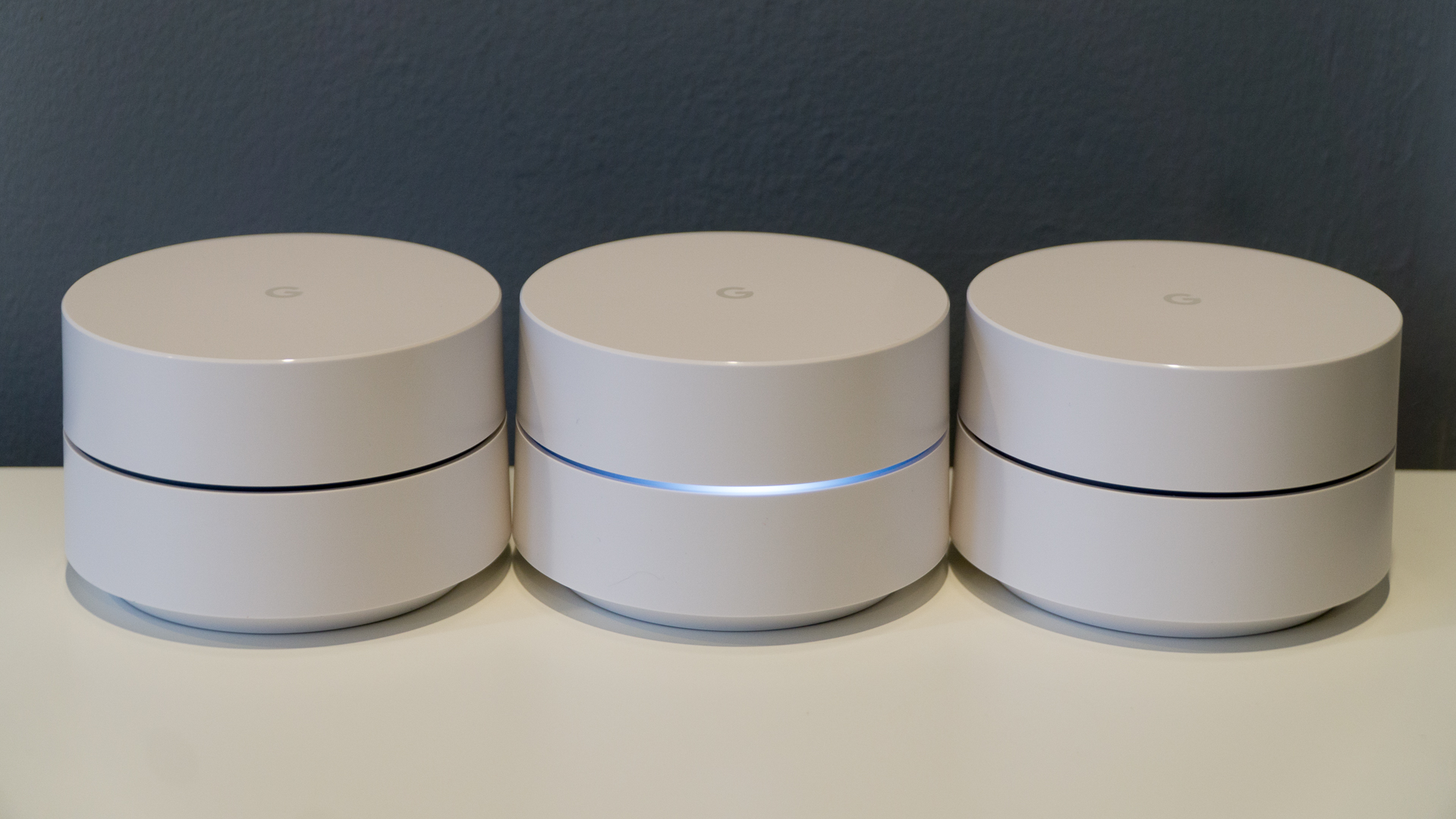
Google Mesh Routers, often known as Google Nest Wifi or Google Wifi, are wireless devices that work together to spread Wi-Fi all over your home. Instead of just one router, you use several “points” or “nodes.” Each point connects to the others, creating a “mesh” network that fills in dead spots and keeps your devices online as you move from room to room.
Key features of Google Mesh Routers:
- Easy setup: You can control everything with an app on your phone.
- Expandable: Add more points if you need stronger coverage.
- Automatic updates: Security and performance updates install on their own.
- Smart home support: Works with Google Assistant and other smart devices.
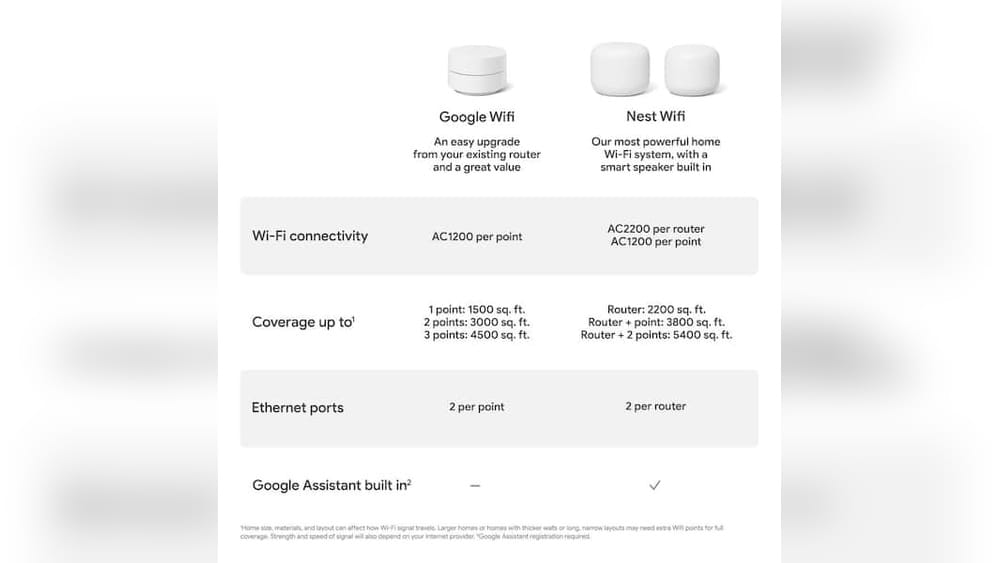
Google released their first mesh system, Google Wifi, in 2016. In 2019, they introduced Nest Wifi, which added stronger hardware, more features, and integration with smart speakers. Both products are still found in many homes.
Average Lifespan Of Google Mesh Routers
Most Google Mesh Routers last between 4 and 6 years before they start to show major issues. This is similar to the average lifespan of regular routers, but several factors can push this number higher or lower.
Why 4–6 Years?
- Hardware aging: The internal parts, like processors and memory, slowly degrade. Over years, they can’t handle new software as well.
- Software support: Google typically provides updates for about 5–6 years after release. Once support ends, the system becomes less secure.
- Wi-Fi standards: Newer Wi-Fi versions (like Wi-Fi 6 or Wi-Fi 6E) come out every few years. Older routers become outdated.
- Usage patterns: Heavy use, like streaming 4K video or many devices, can wear out hardware faster.
A 2023 survey of home Wi-Fi users found that most people replaced their mesh routers after 5 years. Only 12% kept their systems for longer than 7 years.
Factors That Affect Google Mesh Router Lifespan
Not every Google Mesh Router lasts the same amount of time. Some last longer, while others fail early. Here are the main factors that decide how long your system will work well.
1. Hardware Quality
Google Mesh Routers use quality parts, but they’re still consumer devices. Over time, heat, dust, and wear can cause failures. Power surges, like from lightning or unstable electrical outlets, can also damage them.
2. Location And Environment
Where you place your router matters. If it’s in a hot, dusty, or humid spot, it will break down faster. Routers placed on floors or behind furniture collect more dust and get less air flow. Sunlight can also overheat the device.
3. Internet Usage Patterns
A household with many users, smart devices, and lots of streaming puts more stress on the system. If your router is always busy, the hardware will wear out sooner. On the other hand, light use in a small home can help it last longer.
4. Software And Security Updates
Google’s routers are known for automatic updates. But once Google stops supporting your model, it will not get new security patches. This makes your network less safe over time. Unsupported routers should be replaced, even if the hardware still works.
5. New Technology
Wi-Fi standards change every few years. If you want the fastest speeds or support for new devices, you may need to upgrade before the old router physically fails. For example, Wi-Fi 6 is much faster and more efficient than older Wi-Fi 5 technology.
6. Power Supply And Outages
Frequent power cuts or unstable electricity can shorten the lifespan. Using a surge protector can help protect your router from sudden spikes in power.
How Google Mesh Routers Compare To Other Brands
It’s helpful to see how long Google Mesh Routers last compared to popular competitors. Below, you’ll find a data table with average lifespans and support periods.
| Brand | Model Example | Average Lifespan | Official Software Support |
|---|---|---|---|
| Google (Nest/Google Wifi) | Nest Wifi, Google Wifi | 4–6 years | 5–6 years |
| Netgear Orbi | RBK50, RBK852 | 4–7 years | 3–5 years |
| TP-Link Deco | Deco M5, Deco X20 | 4–6 years | 4–5 years |
| Eero | Eero 6, Eero Pro | 4–6 years | 5–6 years |
As you can see, Google Mesh Routers perform similarly to other leading brands. The biggest difference is often in how long the company provides software and security updates.
Signs Your Google Mesh Router Is Nearing The End
Most routers don’t suddenly stop working. Instead, they show signs that they’re getting old. Here’s what to watch for:
- Frequent disconnections: Devices drop off the Wi-Fi or lose signal more often.
- Slower speeds: You notice web pages, videos, and downloads are slower, even with a fast internet plan.
- Unresponsive app: The Google Home app struggles to connect or manage your network.
- Overheating: The router feels hot to the touch or restarts randomly.
- No more updates: Google no longer releases updates for your router, shown in the app or on Google’s support site.
- Smart home issues: Devices connected to Google Assistant or Nest products become unreliable.
If you see several of these problems, your router may be near the end of its useful life.
How To Check If Your Google Mesh Router Is Still Supported
Knowing whether your model is still supported is important for security and performance. Here’s how you can check:
- Google’s official support page: Visit the official support website and search for your model. Google lists end-of-support dates for most devices.
- Google Home app: Open the app, select your router, and look for notifications about updates or support status.
- Software version: Compare your router’s firmware version with the latest listed on Google’s site. If they match, you’re still supported.
- News and forums: Sometimes, Google announces end-of-life status on their blog or in help forums.
For example, Google announced in 2022 that the original Google Wifi will receive updates until at least 2026. However, this may change, so it’s good to check every year.
Extending The Life Of Your Google Mesh Router
You can’t make your router last forever, but you can help it reach the upper end of its lifespan. Here are practical tips to keep your mesh system running smoothly for as long as possible.
1. Good Placement
Keep your router in a cool, open spot with plenty of airflow. Avoid direct sunlight, closed cabinets, or places with lots of dust.
2. Surge Protection
Plug your router into a surge protector to protect against power spikes. This simple step can prevent sudden hardware failure.
3. Regular Cleaning
Dust can block vents and cause overheating. Wipe the outside with a dry cloth every few months, and gently blow out any dust in the vents.
4. Keep Software Updated
As long as your router is supported, let it install updates automatically. These updates fix bugs, improve security, and can make your router work better.
5. Limit Overloading
If you have many devices or stream a lot, consider adding another mesh point. This reduces the load on each unit and helps the whole system last longer.
6. Reboot Occasionally
Restart your router every few months. This clears out memory and can solve minor bugs before they become big problems.
7. Watch For Warnings
Pay attention to any alerts in the Google Home app or on your devices. If you see warnings about hardware, security, or updates, take them seriously.
When Should You Replace Your Google Mesh Router?
Even with good care, every router reaches a point where it should be replaced. Here are the best times to upgrade:
- End of software support: If Google no longer releases updates, it’s time to get a new router for security reasons.
- Major performance drop: If speeds and reliability fall, and basic fixes don’t help, replacement is likely needed.
- New Wi-Fi standards: If you want the benefits of Wi-Fi 6 or newer, you’ll need a new system.
- Home changes: Moving to a bigger house or adding more smart devices can mean your old mesh system isn’t enough.
Ignoring these signs can lead to security risks, poor internet, and frustration.

Credit: www.amazon.com
Comparing Google Mesh Router Models
There are several different Google Mesh Router models, each with unique features and expected lifespans. Here’s a quick comparison to help you see the differences.
| Model | Release Year | Wi-Fi Standard | Average Lifespan | Software Support End |
|---|---|---|---|---|
| Google Wifi | 2016 | Wi-Fi 5 (802.11ac) | 4–6 years | ~2026 |
| Nest Wifi | 2019 | Wi-Fi 5 (802.11ac) | 5–7 years | ~2027 |
| Nest Wifi Pro | 2022 | Wi-Fi 6E (802.11ax) | 6–8 years | TBD |
Nest Wifi Pro, using the latest Wi-Fi 6E standard, should last longer due to newer hardware and longer support windows.
What Happens When Google Ends Support?
One issue many people don’t realize: unsupported routers become a security risk. When Google stops releasing updates, your router is open to new threats and bugs. This doesn’t mean it will stop working right away, but you lose:
- Security patches: Protection against new hackers or viruses
- Bug fixes: Solutions for problems that may appear later
- New features: Improvements and compatibility with new devices
A router with no support can also become a weak link in your smart home. Hackers often target old devices, and some smart home features may stop working well.
If you keep using an unsupported router, use it with caution. Don’t use it for sensitive work (like banking), and avoid connecting too many smart devices.
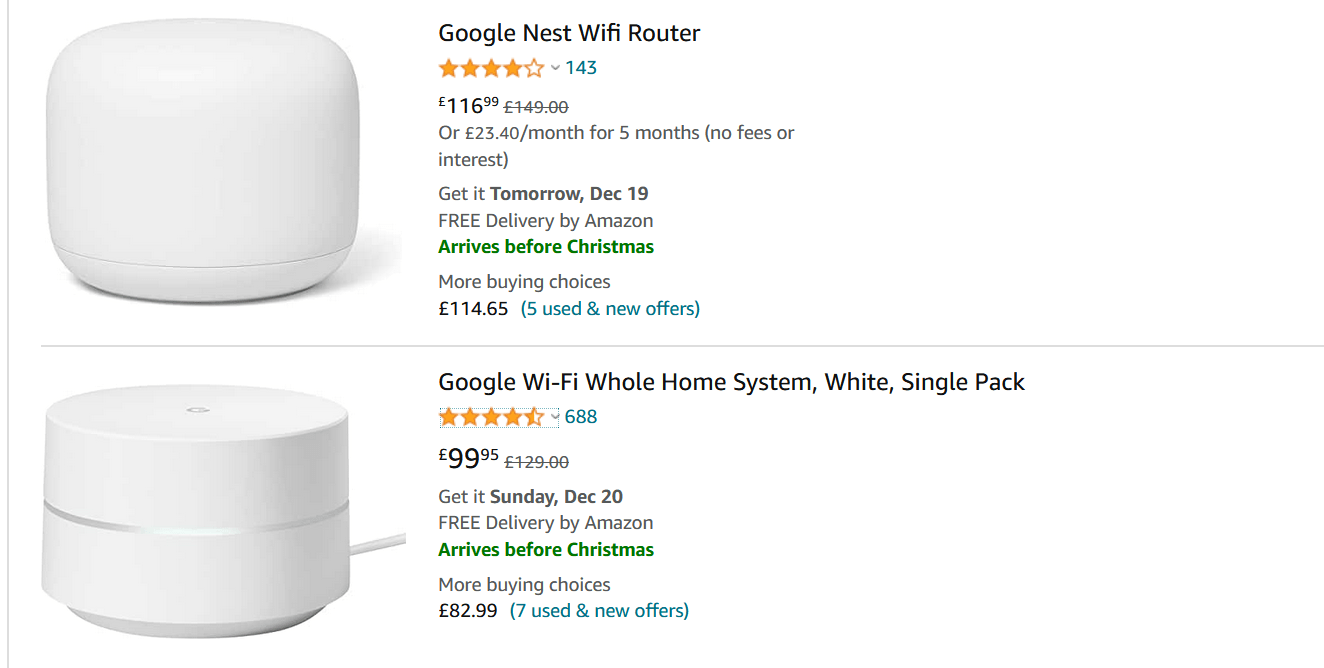
Cost Of Replacing Google Mesh Routers
Buying a new mesh system is a big investment, but waiting too long can cause more problems. Here’s a look at current prices (2024) for Google’s main models:
| Model | Single Unit Price | 3-Pack Price | Wi-Fi Standard |
|---|---|---|---|
| Google Wifi | $99 | $199 | Wi-Fi 5 |
| Nest Wifi | $129 | $249 | Wi-Fi 5 |
| Nest Wifi Pro | $199 | $399 | Wi-Fi 6E |
Waiting until the last minute to replace your system can lead to downtime and stress. Planning ahead makes the switch easier.
Common Mistakes That Shorten Mesh Router Lifespan
Many users accidentally make their mesh routers die sooner than they should. Here are some mistakes to avoid:
- Blocking airflow: Placing routers in cabinets or behind objects causes overheating.
- Ignoring updates: Not letting the router update can cause bugs and security holes.
- Never rebooting: Routers need an occasional restart to clear out memory.
- Overloading with too many devices: Too many connections can slow down the system and wear it out.
- Using old cables or power supplies: Damaged or low-quality cables can cause power problems.
- Not using surge protection: One power surge can destroy your router.
By avoiding these mistakes, you can get the most out of your system.
Environmental Impact Of Old Routers
When you replace your Google Mesh Router, don’t just throw the old one in the trash. Routers contain electronic waste that can harm the environment.
Responsible Disposal Options
- Electronics recycling: Many cities offer recycling centers for electronics.
- Retail drop-off: Stores like Best Buy and Staples accept old routers for recycling.
- Manufacturer take-back: Google has programs to recycle old devices. Check their website for details.
Recycling protects the environment and sometimes even helps you save on your next purchase.
Non-obvious Insights For Google Mesh Router Owners
Most guides cover the basics, but here are two insights most beginners miss:
- Mesh routers age as a system, not just single units: If one point fails or becomes unsupported, the whole mesh network can become less reliable. Always update or replace all points at once.
- Software updates may slow down older hardware: Sometimes, new updates require more power than the original hardware can provide. If your router slows down after an update, it could be a sign to upgrade, not just a temporary glitch.
Credit: www.techradar.com
Future Of Mesh Networking: Should You Wait To Upgrade?
Mesh Wi-Fi technology is always improving. Wi-Fi 6E and the upcoming Wi-Fi 7 promise even better speeds and more reliable connections. If your current Google Mesh Router is still supported and works well, it may be worth waiting a year or two for newer models. However, if your router is already unsupported or unreliable, don’t wait — upgrade for security and performance.
For up-to-date info on Wi-Fi standards and release dates, the Wi-Fi Wikipedia page is a reliable source.
Frequently Asked Questions
How Can I Tell If My Google Mesh Router Needs To Be Replaced?
Look for signs like frequent disconnects, slow speeds, overheating, or no longer receiving software updates. If you see several of these issues, it’s time to consider a replacement.
Can I Use Old Google Wifi And Nest Wifi Points Together?
Yes, you can mix Google Wifi and Nest Wifi points in one network. However, the network will run at the speed of the oldest device, and older points may lose support sooner.
Is It Safe To Use A Google Mesh Router After Software Updates Stop?
It’s not recommended. Without security updates, your network becomes vulnerable to hackers and bugs. For safety, replace your router when support ends.
How Many Years Of Updates Does Google Provide For Mesh Routers?
Google typically offers 5–6 years of updates from the date of release. Check Google’s support website for the latest information on your specific model.
Can A Power Surge Damage My Mesh Router Even With A Surge Protector?
A good surge protector blocks most power spikes, but very strong surges (like lightning strikes) can still get through. Unplug your router during storms for extra safety.
Google Mesh Routers offer easy, reliable Wi-Fi for most homes. With good care, you can expect 4–6 years of strong performance, but always watch for signs of aging or unsupported software. Upgrading on time keeps your internet fast, your smart home safe, and your family connected.
Credit: the5krunner.com