
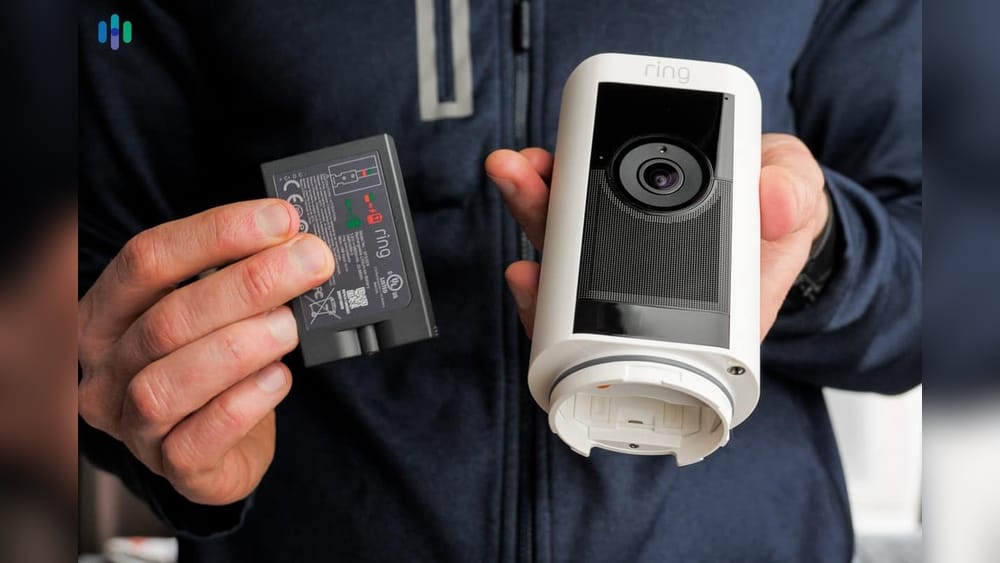
If you’re thinking about buying a Ring outdoor camera, or you already have one, you probably wonder about its battery life. How long will it last before you need to recharge? Can it handle cold winters or hot summers? What factors affect battery performance? Getting clear answers is important, especially if you rely on your camera for security and peace of mind.
This article gives a complete and practical guide to Ring outdoor camera battery life. You’ll learn how different models compare, what influences battery lifespan, how to optimize performance, and what real users experience. We’ll break down myths, highlight non-obvious tips, and offer confident answers so you can make smart decisions.
Whether you’re a beginner or have had a Ring camera for years, you’ll find insights here to help you get the most from your device.
Ring Outdoor Camera Models And Their Battery Specs
Ring offers several outdoor cameras, each with unique battery features. Understanding these specs is the first step to knowing what to expect.
The Main Battery-powered Ring Outdoor Cameras
- Ring Stick Up Cam Battery
- Removable battery pack
- Designed for flexible placement indoors/outdoors
- 6,000 mAh battery capacity
- Ring Spotlight Cam Battery
- Removable battery packs (can hold 2 at once)
- Built-in spotlight for extra security
- Each battery pack: 6,000 mAh
- Ring Floodlight Cam Battery
- Dual battery slots
- Floodlight for wide-area illumination
- 6,000 mAh per battery
- Ring Outdoor Camera Battery (newer models, as of 2024)
- Enhanced battery life
- Up to 8,000 mAh battery capacity
Key Battery Specs
- Battery type: Lithium-ion rechargeable
- Battery capacity: 6,000–8,000 mAh
- Removable battery: Yes, easy to swap
- Charging time: 5–10 hours (from empty to full)
- Dual battery option: Some models support two batteries for extended life
Battery Life Claims From Ring
According to Ring, their outdoor cameras should last:
- Stick Up Cam Battery: 3–6 months per charge
- Spotlight Cam Battery: 4–6 months per charge (with dual batteries, up to 12 months)
- Floodlight Cam Battery: 4–6 months per charge
- Outdoor Camera Battery: 6–12 months per charge (with dual batteries)
Note: These are ideal numbers, based on average use. Real-world battery life often differs.
What Really Influences Ring Camera Battery Life
The battery doesn’t last the same for everyone. Many factors affect how long your Ring camera will run between charges. Let’s break down the most important ones.
1. Camera Activity Level
- Motion events: Each time the camera detects movement, it records video and sends alerts.
- Frequent triggers: Lots of motion events drain battery quickly.
- Example: A camera near a busy street may last 1–2 months, not 6.
2. Live View Usage
- Live streaming: Using Live View to check the camera in real time uses extra power.
- Heavy use: Frequent live viewing shortens battery life.
3. Video Quality Settings
- HD video: Higher resolution means bigger files and more battery use.
- Lower quality: Using SD video saves battery.
4. Wi-fi Signal Strength
- Weak Wi-Fi: Camera works harder to connect, draining battery
- Strong Wi-Fi: More efficient, longer battery life
- Tip: Place camera close to your router or use a Wi-Fi extender.
5. Temperature Extremes
- Cold weather: Lithium-ion batteries lose charge faster in low temperatures.
- Hot weather: High heat can also reduce battery efficiency.
Example:
- At 20°F (-6°C), battery may last 30–40% less than in mild weather.
- At 90°F (32°C), battery may degrade faster over time.
6. Camera Placement
- Direct sunlight: Can heat battery and affect lifespan
- Sheltered spots: Protect battery from harsh weather
7. Firmware Updates And Features
- New features: Sometimes use more power
- Frequent updates: May temporarily drain battery faster
8. Battery Age
- Older batteries: After 1–2 years, most lithium-ion batteries hold less charge
- Replacement: Consider swapping for a fresh battery if lifespan drops

Credit: www.mca-sask.com
Real-world Battery Life: What Users Experience
Ring’s claims are optimistic. Let’s see what actual users report.
Typical User Reports
- Stick Up Cam Battery: Often 2–4 months per charge in moderate use
- Spotlight Cam Battery: 1–4 months per charge, depending on motion triggers
- Floodlight Cam Battery: Usually 2–3 months in busy areas
- Outdoor Camera Battery: 4–8 months per charge (with dual batteries, up to 12 months in quiet locations)
How Usage Affects Battery Life
In online forums and reviews, users mention:
- High-traffic areas: Battery lasts 1–2 months
- Low-traffic areas: Battery can last 6 months or longer
- Frequent Live View: Some users charge every 2–3 weeks
- Rare Live View: Battery lasts much longer
Example Data Table
Here’s a summary of user-reported battery life for different Ring outdoor cameras.
| Ring Outdoor Camera Model | Low Activity (Months) | High Activity (Months) | Dual Battery (Months) |
|---|---|---|---|
| Stick Up Cam Battery | 4–6 | 1–2 | N/A |
| Spotlight Cam Battery | 4–6 | 2–3 | 8–12 |
| Floodlight Cam Battery | 4–6 | 1–2 | 8–12 |
| Outdoor Camera Battery | 6–12 | 3–6 | 12–14 |
Common User Mistakes
Many users overlook key details:
- Ignoring motion sensitivity settings: High sensitivity causes more triggers
- Not updating firmware: Old software can drain battery faster
- Never checking Wi-Fi strength: Poor signal leads to power loss
How To Maximize Your Ring Outdoor Camera Battery Life
If you want your camera to last longer between charges, use these practical tips.
Adjust Motion Settings
- Lower motion sensitivity to avoid unnecessary triggers.
- Set “Motion Zones” so the camera only monitors areas you care about.
- Use “People Only” mode if available.
Optimize Video Settings
- Choose SD video when HD isn’t needed.
- Shorten video clip length to save battery.
Improve Wi-fi Connection
- Move camera closer to router.
- Install a Wi-Fi extender to boost signal.
- Avoid placing camera behind thick walls.
Place Cameras Wisely
- Avoid direct sunlight and extreme temperatures.
- Mount under eaves or shade for protection.
- Use waterproof covers if needed.
Update Firmware Regularly
- Keep camera software up to date for battery optimization.
- Enable automatic updates in the Ring app.
Use Dual Batteries
- For cameras with dual slots, install two batteries.
- When one battery drains, the other takes over.
Recharge Before It’s Empty
- Don’t let battery drop to 0%. Recharge at 10–20% for longer lifespan.
- Keep a spare battery charged and ready.
Example Table: Tips That Extend Battery Life
| Tip | Estimated Battery Life Increase |
|---|---|
| Lower motion sensitivity | 20–30% |
| Use SD video | 10–20% |
| Improve Wi-Fi signal | 15–25% |
| Dual batteries | 100% (doubles life) |
| Recharge before empty | 5–10% |
Comparing Ring Outdoor Camera Battery Life To Competitors
Ring isn’t the only player in battery-powered outdoor cameras. How does its battery life stack up against others?
Main Competitors
- Arlo Pro 4
- Blink Outdoor
- EufyCam 2
- Google Nest Cam Battery
Battery Life Claims
- Arlo Pro 4: 3–6 months per charge
- Blink Outdoor: Up to 24 months (AA lithium batteries, but less video quality)
- EufyCam 2: Up to 12 months per charge
- Nest Cam Battery: 3–6 months per charge
Comparison Table
Here’s how Ring compares to competitors.
| Camera | Claimed Battery Life (Months) | Actual User Reports (Months) | Battery Type |
|---|---|---|---|
| Ring Outdoor Camera Battery | 6–12 | 3–8 | Removable Lithium-ion |
| Arlo Pro 4 | 3–6 | 2–5 | Removable Lithium-ion |
| Blink Outdoor | 24 | 12–18 | AA Lithium |
| EufyCam 2 | 12 | 8–12 | Built-in Lithium-ion |
| Nest Cam Battery | 6 | 2–4 | Removable Lithium-ion |
Insights
- Ring performs well compared to Arlo and Nest, but Blink leads in battery duration (with lower video quality).
- EufyCam 2 offers similar or better battery life, but is less common in some regions.
- Ring’s dual battery feature is a big advantage for longer uptime.
Battery Charging And Replacement: What You Need To Know
Charging and replacing Ring camera batteries is simple, but there are some important details.
Charging Process
- Remove battery from camera.
- Plug into the supplied micro-USB cable.
- Charge until the battery LED turns green (fully charged).
- Insert battery back into camera.
Charging Time
- Typical charging time: 5–10 hours from empty.
- Dual batteries: Charge each separately, or have a spare ready.
Battery Replacement
- Ring batteries last about 500–700 charge cycles.
- After 1–2 years, you may notice shorter battery life.
- Replacement batteries are available from Ring and third-party suppliers.
Battery Cost
- Official Ring battery pack: $29–$35 (as of 2024)
- Third-party batteries: $20–$30, but may have lower reliability
Charging Tips
- Don’t use fast chargers—standard micro-USB is safest.
- Store spare batteries at room temperature.
- Avoid charging in freezing or very hot conditions.
Battery Recycling
- Old batteries should be recycled, not thrown away.
- Local electronics stores or recycling centers accept lithium-ion batteries.

Credit: www.lowes.com
Battery Life In Different Weather Conditions
Your climate has a big impact on battery performance.
Cold Climates
- Batteries drain faster in cold.
- Ring cameras may send “Low Battery” alerts more often.
- Keep camera sheltered from wind and snow.
- Expect 30–50% shorter battery life below 32°F (0°C).
Hot Climates
- Excessive heat can reduce battery lifespan.
- Avoid mounting in full sun.
- Ring cameras have safe operating range (32°F–120°F / 0°C–49°C).
Rain And Humidity
- Ring cameras are weather-resistant, but not waterproof.
- Heavy rain doesn’t affect battery, unless water seeps in.
- Use covers if mounting in exposed locations.
Seasonal Tips
- In winter, check battery level more often.
- In summer, shade the camera if possible.
Solar Charging: Extending Battery Life
Ring offers solar panels for some outdoor cameras. These can keep your battery charged without manual recharging.
How Solar Panels Work
- Plug Ring solar panel into camera’s battery port.
- Panel charges battery during daylight hours.
- Works best in sunny locations.
Solar Panel Performance
- In full sun, solar panel can keep battery nearly fully charged.
- In cloudy weather, battery may still drain, but more slowly.
- In winter, performance drops due to less sunlight.
Models Compatible With Solar Panels
- Stick Up Cam Battery
- Spotlight Cam Battery
- Floodlight Cam Battery
Real-world Results
- Users in sunny climates report going months without manual charging.
- In northern locations, solar panel reduces charging frequency but doesn’t eliminate it.
Non-obvious Insights
- Angle the panel for maximum sunlight.
- Clean panel regularly to prevent dirt buildup.
- Solar panels don’t work well behind glass or in shaded spots.
Battery Monitoring And Alerts In The Ring App
The Ring app makes it easy to keep track of battery status.
Battery Level Display
- App shows battery percentage for each camera.
- Alerts sent when battery is below 20%.
Charging Reminders
- App sends push notifications for low battery.
- Can set custom reminders to recharge.
Monitoring Multiple Cameras
- See battery status for all cameras in one dashboard.
- Useful for properties with several cameras.
Advanced Features
- View history of battery levels.
- Check charging cycle count for older batteries.
Common Mistakes
- Ignoring alerts leads to cameras shutting down.
- Not checking app regularly can mean missing security events.
Troubleshooting Battery Problems
Sometimes batteries don’t perform as expected. Here’s how to solve common issues.
Battery Draining Too Fast
- Check for excessive motion triggers.
- Lower video quality and clip length.
- Improve Wi-Fi signal.
- Update firmware.
Camera Not Charging
- Try a different cable and charger.
- Clean battery contacts.
- Replace battery if older than 2 years.
Camera Shuts Down Unexpectedly
- Battery may be too old.
- Extreme cold or heat can cause shutdown.
- App may have outdated firmware.
Battery Doesn’t Hold Charge
- After many cycles, battery capacity drops.
- Replace battery with official Ring pack.
Seeking Support
- Ring has customer support and online troubleshooting guides.
- Visit Ring Support for more help.

Credit: ring.com
Pros And Cons Of Battery-powered Ring Outdoor Cameras
Battery-powered cameras have unique strengths and weaknesses. Here’s what you should know.
Pros
- Flexible placement—no wiring needed
- Easy to install and move
- Dual battery option for longer uptime
- Solar charging available
- Works during power outages
Cons
- Limited by battery life—needs regular charging
- Shorter battery in cold weather
- Can miss events if battery runs out
- Batteries age and need replacement
Non-obvious Insight
- For larger properties, battery-powered cameras are easier to expand than wired systems.
- Having a spare battery reduces downtime during charging.
Is Ring Outdoor Camera Battery Life Enough For Most Users?
For most homes, Ring battery life is sufficient—but it depends on your needs.
Ideal For
- Quiet neighborhoods (few motion triggers)
- Small yards and driveways
- People who don’t want complicated wiring
Not Ideal For
- Very busy areas (lots of traffic or movement)
- Properties needing 24/7 recording
- Extreme climates (cold or hot)
Smart Strategies
- Combine battery cameras with wired ones for busy spots.
- Use dual batteries and solar panels for maximum uptime.
Frequently Asked Questions
How Often Should I Recharge My Ring Outdoor Camera Battery?
Most users recharge every 2–6 months, depending on activity and settings. In high-traffic areas, you may need to recharge monthly.
Can I Use Third-party Batteries In Ring Cameras?
Yes, but it’s risky. Official Ring batteries are safer and more reliable. Third-party batteries may have lower capacity or cause errors.
Does Cold Weather Permanently Damage Ring Camera Batteries?
No, but it reduces battery life during cold months. Long-term exposure to cold may shorten battery lifespan slightly.
Will Using A Solar Panel Mean I Never Need To Recharge?
In sunny climates, a solar panel can keep the battery nearly full. In cloudy or winter conditions, manual recharging may still be needed.
How Do I Know If My Battery Needs Replacement?
If your camera only lasts a few weeks per charge, or the battery won’t hold charge, it’s time to replace it. The Ring app shows battery health and charging cycles.
—
Ring outdoor camera battery life depends on many factors—model, placement, activity, settings, and climate. Most people get 2–6 months per charge, with longer life possible in quiet locations and with dual batteries or solar panels. By understanding the details and using practical tips, you can get the best performance and avoid common mistakes. Whether you want a simple home setup or full property coverage, Ring cameras offer flexible options that fit most needs. If you want more technical details, visit Wikipedia for background on Ring and its products. With smart management, you’ll enjoy reliable security and fewer battery worries.