
Choosing the right number of security cameras for your property can feel confusing. Many people worry about missing blind spots, spending too much, or not getting enough protection. The truth is, there’s no single answer—your needs depend on your space, goals, and budget.
Whether you want to protect a home, office, or store, understanding how many cameras you need will help you feel safer and avoid waste. Let’s explore the key factors, real examples, and practical tips to help you make a smart decision.
Why The Number Of Security Cameras Matters
The number of cameras you install affects your safety, privacy, and costs. Too few cameras leave blind spots, making your property vulnerable. Too many can be expensive and complicated. The right number means you cover all important areas, deter crime, and get clear evidence if something happens.
According to a 2023 survey by the National Crime Prevention Council, homes with visible cameras were 60% less likely to be targeted by burglars. Businesses with full coverage saw a 40% reduction in theft and vandalism. These numbers show that proper camera placement and quantity make a real difference.
Factors That Affect How Many Security Cameras You Need
Before you buy, you should look at several factors that influence the number of cameras needed. Each property is unique, so think about your situation carefully.
1. Property Size And Layout
Large properties need more cameras. Small homes or stores may need just a few. The layout matters, too. Open spaces are easier to cover; properties with many rooms, corners, or hallways need extra cameras.
2. Entry And Exit Points
Doors, gates, and windows are the most common entry points for intruders. Each entrance should have at least one camera. For homes, front and back doors are priorities. For businesses, loading docks, main entrances, and emergency exits need coverage.
3. Indoor Vs. Outdoor Coverage
Outdoor cameras protect against break-ins, vandalism, and trespassing. Indoor cameras help monitor people inside—employees, customers, or guests. Decide if you want full indoor coverage or just focus on key rooms (like living rooms, offices, or cash registers).
4. Purpose Of Surveillance
Are you trying to deter crime, monitor employees, or watch deliveries? Your goal changes the number and placement of cameras. For example, baby monitors need coverage in bedrooms, while retail stores require cameras at checkout counters.
5. Budget
Security systems can get expensive. Each camera costs $40–$400 depending on features. Adding more cameras increases installation, storage, and maintenance costs. Set your budget and balance it with your coverage needs.
6. Camera Type And Features
Different cameras cover different areas. Wide-angle cameras may cover large rooms, while pan-tilt-zoom (PTZ) cameras can track movement and adjust view. Night vision, motion detection, and high-definition recording also affect how many cameras you need.
7. Local Regulations
Some places have laws about camera placement, especially outdoors or in shared spaces. For example, you can’t always record neighbors or public areas. Check local rules before you install.
Determining The Right Number: Practical Steps
Let’s break down how to find the right number for your property. Use these steps for any home or business.
Step 1: Identify Vulnerable Areas
Walk around your property. List all doors, windows, driveways, and hallways. Don’t forget garages, basements, and side gates. These are the most common points for break-ins.
Step 2: Consider Traffic Flow
See where people move most. In homes, it’s usually the living room, kitchen, and main entrance. In offices, focus on reception, hallways, and storage rooms. Busy areas need extra attention.
Step 3: Decide On Indoor Vs. Outdoor Coverage
Some people prefer only outdoor cameras; others want full indoor coverage. For businesses, both are often needed. Decide what fits your goals and privacy needs.
Step 4: Choose Camera Types
Wide-angle cameras can cover large spaces, reducing the total number needed. PTZ cameras can replace two or three fixed cameras in some cases. Check the specs and compare.
Step 5: Map Your Coverage
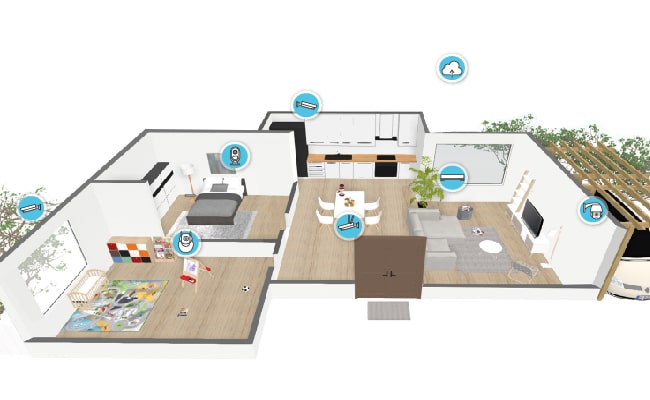
Draw a simple map of your property. Mark all vulnerable areas and high-traffic points. Place camera icons where needed. This helps you see if you have blind spots or overlap.
Step 6: Adjust For Budget
If your plan needs more cameras than you can afford, prioritize the most important areas. You can add more cameras later as your budget allows.
Typical Scenarios: Real Examples
Let’s look at some common property types and see how many cameras they usually need. These examples help you understand the process and make better decisions.
Single-family Home
Most homes have:
- 1 camera at the front door
- 1 at the back door
- 1–2 at side entrances or windows
- 1 covering the driveway or garage
- Optional: 1 in the living room or hallway
Total: 3–5 cameras for basic coverage; up to 8 for full coverage.
Apartment
- 1 at the main entrance
- 1 at the balcony or patio
- Optional: 1 in the living room or hallway
Total: 1–3 Cameras
Small Business/retail Store
- 1 at the main entrance
- 1 at the exit
- 1–2 at the cash register
- 1 covering stockroom or office
- 1 outside for the parking lot
Total: 4–6 Cameras
Office Building
- 1–2 at reception
- 1 at each entrance/exit
- 1 in each hallway
- 1 covering parking area
- Optional: 1 in meeting rooms
Total: 6–12 Cameras, Depending On Size
Warehouse
- 1–2 at the main entrance
- 1 at each loading dock
- 1–2 inside covering storage areas
- 1 outside for the parking lot
- Optional: 1 for office space
Total: 5–8 Cameras
Key Areas To Cover
Let’s break down which areas need cameras most.
- Front door: Most burglaries happen here.
- Back door: Second most common entry point.
- Garage/driveway: Protects vehicles and tools.
- Windows: Especially those hidden from street view.
- Living room/hallways: Monitors movement inside.
- Entrances/exits: For businesses, every door needs coverage.
- Cash register/office: Protects money and sensitive data.
- Parking lot: Deters theft and vandalism.
- Stockroom/warehouse: Monitors inventory and deliveries.
Missing any of these areas increases risk. It’s better to have one camera too many than one too few.
Camera Placement Tips For Maximum Coverage
Getting the right number is only part of the solution. Proper placement makes your system more effective.
- Mount cameras high enough to prevent tampering.
- Angle cameras to cover doors and windows directly.
- Avoid placing cameras where sunlight or glare can blind the lens.
- Use wide-angle cameras in large rooms.
- Cover overlapping areas to ensure nothing is missed.
- Keep indoor cameras away from private spaces (bedrooms, bathrooms).
- Use weatherproof cameras outdoors.
Small changes in placement can increase coverage and reduce the number of cameras needed.
Comparing Camera Types: Efficiency And Coverage
The type of camera you choose affects how many you need. Here’s a comparison of popular types:
| Camera Type | Coverage Area | Best Uses | Typical Quantity |
|---|---|---|---|
| Fixed Dome | 80–100° | Indoor rooms, entrances | 1 per area |
| Bullet | 60–90° | Outdoor, driveways | 1 per point |
| PTZ | 180–360° | Large open spaces | 1 for multiple points |
| Wide-Angle | 120–160° | Living rooms, parking lots | 1 per large area |
| Wireless | Varies | Flexible placement | As needed |
Wide-angle and PTZ cameras can reduce the total number needed. For example, one PTZ camera can cover a parking lot where two or three fixed cameras might be needed.
Budgeting For Your Security System
Security camera systems range from affordable to expensive. Planning your budget helps you decide how many cameras you can get.
Average Costs
- Basic cameras: $40–$80 each
- HD cameras: $100–$200 each
- PTZ or smart cameras: $200–$400 each
- Installation: $100–$250 per camera
- Storage (cloud or DVR): $50–$300 per year
A simple home system with 4 cameras might cost $600–$1,000 total. A business system with 10 cameras could cost $2,500–$6,000.
Cost Vs. Coverage
Don’t sacrifice important areas to save money. Start with the most critical spots and expand as you can. Sometimes, investing a bit more upfront saves bigger losses later.
Example: Cost Comparison For Home Vs. Business
| Property Type | Number of Cameras | Average Cost (Installed) | Annual Maintenance |
|---|---|---|---|
| Single-Family Home | 4 | $900 | $120 |
| Apartment | 2 | $450 | $70 |
| Small Business | 6 | $2,200 | $250 |
| Office Building | 10 | $4,000 | $400 |
Credit: pro-vigil.com
Common Mistakes In Estimating Camera Needs
Many beginners make simple mistakes that reduce security or waste money.
- Ignoring blind spots: Missing corners, hallways, or hidden windows leaves gaps.
- Overlapping coverage: Placing two cameras in the same spot wastes resources.
- Underestimating traffic: Not covering busy areas like entrances or parking lots.
- Choosing the wrong camera type: Fixed cameras in wide spaces may not work well.
- Not planning for growth: Failing to leave room for extra cameras as needs change.
- Forgetting about lighting: Cameras may not work well in dark areas without night vision.
- Neglecting privacy: Indoor cameras in private areas can cause legal issues.
Review your plan carefully to avoid these mistakes.
Data: Security Camera Effectiveness By Coverage
Studies show that the number of cameras and their placement directly affect crime rates. In a 2022 report from the Urban Institute, properties with complete coverage (all entry points and main areas) saw a 70% decrease in break-ins, compared to just 30% for properties with partial coverage. Businesses with cameras at cash registers and exits reduced employee theft by 50%.
Credit: reolink.com
Expanding Your System: Planning For The Future
You may want more cameras later—children grow, businesses expand, or new threats appear. Choose a system that lets you add cameras easily. Wireless systems and scalable DVRs make upgrades simple.
Pro tip: Buy a system with more channels than you need now. For example, a 4-camera system may support 8 cameras, so you can add extra later.
Advanced Features That Reduce Camera Needs
Modern cameras have features that increase efficiency:
- Motion detection: Only record when movement happens, reducing the need for extra cameras.
- Smart alerts: Send notifications to your phone, letting you monitor fewer cameras.
- Night vision: Covers dark areas without extra lighting.
- Two-way audio: Lets you speak to visitors or warn intruders.
- Cloud storage: Saves recordings securely and makes reviewing easier.
These features help you monitor more with fewer cameras.
Security Camera Coverage Table By Property Type
Here’s a clear comparison of how many cameras different property types usually need for full coverage:
| Property Type | Full Coverage Cameras | Basic Coverage Cameras | Recommended Areas |
|---|---|---|---|
| Single-Family Home | 6–8 | 3–5 | Front/back door, garage, windows, living room |
| Apartment | 3–4 | 1–2 | Main entrance, balcony, hallway |
| Small Business | 7–10 | 4–6 | Entrance, exit, cash register, stockroom, parking lot |
| Office Building | 12–18 | 6–10 | Reception, entrances, hallways, parking area |
| Warehouse | 8–12 | 4–6 | Main entrance, loading dock, storage, office |
How To Avoid Overbuying Cameras
It’s easy to think “more is better,” but extra cameras can create problems:
- Higher costs for purchase, installation, and maintenance
- More storage needs and complicated review process
- Increased privacy concerns for family or employees
Here’s how to avoid overbuying:
- Focus on key areas first.
- Use cameras with wider coverage.
- Test your system for blind spots before adding more.
- Consider smart features instead of more cameras.
- Ask a security expert for advice if unsure.
Privacy And Legal Considerations
Security cameras protect you, but they can also invade privacy. Laws in the US and other countries restrict camera placement:
- Don’t record people in bedrooms, bathrooms, or other private areas.
- Outdoor cameras must not point into neighbors’ yards.
- Businesses must inform employees and customers if they’re being recorded.
- Some states require signs or written notice.
Ignoring these rules can lead to fines or lawsuits. Always check local laws and respect privacy.
Real-life Case Studies
Homeowner Example
Sarah installed 4 cameras: front door, back door, garage, and living room. After a break-in attempt, she realized her side window was unprotected. She added a camera there and stopped a second incident. The lesson: review your coverage often and adjust as needed.
Small Business Example
Joe’s store had 2 cameras—entrance and cash register. He missed thefts near the exit. Adding 2 cameras at the exit and stockroom reduced losses by 60%. Coverage at all key points is essential.
Warehouse Example
A large warehouse used 10 cameras, but found blind spots in loading docks. Switching to PTZ cameras covered more area with fewer devices, saving $800 in equipment costs.
Diy Vs. Professional Installation
You can install cameras yourself or hire a professional. DIY is cheaper, but may miss key details. Professionals know how to avoid blind spots, legal issues, and technical problems.
- DIY: Save money; good for small homes or apartments
- Professional: Better coverage; needed for larger properties or businesses
If you’re not sure, ask for a consultation before buying.
Integrating Cameras With Other Security Systems
Cameras are just one part of security. Combine them with:
- Alarm systems: Alerts for break-ins
- Motion sensors: Detect movement in hidden areas
- Smart locks: Control access to doors
- Lighting: Deterrent for intruders
Integration increases safety and may reduce the number of cameras needed.

Credit: www.aosulife.com
Upgrading And Maintaining Your System
Regular checks keep your cameras working well:
- Clean lenses monthly to avoid blurry images
- Update firmware for security and new features
- Test night vision and motion alerts regularly
- Review recordings for blind spots or missed events
Maintenance is often overlooked, but it’s crucial for effective surveillance.
Choosing The Right Security Camera Brand
Not all cameras are equal. Brands matter for reliability and support. Popular brands include Arlo, Ring, Nest, and Lorex. Look for:
- Good reviews and ratings
- Warranty and customer support
- Easy integration with other devices
- Flexible upgrade options
Cheap, unknown brands may fail quickly or lack important features.
Environmental Factors: Weather And Lighting
Outdoor cameras must handle rain, snow, and heat. Choose weatherproof models for outside. Indoor cameras may need extra lighting for clear images. Place cameras away from direct sunlight to avoid glare.
Some advanced cameras adjust for lighting, but many do not. Check specs before buying.
Security Cameras And Insurance
Many insurance companies give discounts for properties with security cameras. Full coverage reduces risk and may lower premiums by 5–15%. Call your insurer to ask about benefits.
The Role Of Technology: Smart Cameras And Ai
Modern cameras use AI to detect faces, track movement, and send alerts. This means fewer cameras may be needed, since one smart camera can do the job of several older models.
AI can also help identify suspicious activity, reducing false alarms and improving safety.
How Many Security Cameras Is Too Many?
There’s a limit. Too many cameras can overwhelm you, create privacy problems, and make reviewing footage difficult. Aim for complete coverage without excess.
The best systems cover all entry points, main rooms, and outside areas, with no overlap. If you’re unsure, start small and add more as needed.
Frequently Asked Questions
How Can I Calculate The Exact Number Of Security Cameras Needed For My Property?
Start by mapping your property and marking all entry points and vulnerable areas. Use the guidelines above: cover doors, windows, driveways, and high-traffic rooms. Consider camera type, angle, and features. Adjust for budget and privacy. For most homes, 4–6 cameras are enough; for businesses, 6–12. Review your plan for blind spots before buying.
Do Security Cameras Really Reduce Crime?
Yes. Studies show that properties with visible cameras are up to 60% less likely to be targeted. Complete coverage lowers break-ins by 70%. Cameras also help catch criminals and provide evidence. For more details, see the National Crime Prevention Council.
Should I Use Indoor Cameras As Well As Outdoor Cameras?
It depends on your goals. Outdoor cameras deter break-ins and watch entrances. Indoor cameras monitor movement and protect valuables. Many people use both for full coverage, but you must respect privacy. Never place cameras in bedrooms or bathrooms.
Can I Install Security Cameras Myself, Or Should I Hire A Professional?
DIY is possible for small properties and basic systems. Professionals are better for larger spaces, complex layouts, or businesses. They know how to avoid blind spots, follow laws, and set up advanced features. If unsure, get a consultation before buying.
What’s The Most Important Area To Cover With Security Cameras?
The front door is the most important. Most break-ins happen here. Next are back doors, garages, and windows hidden from view. For businesses, entrances, exits, and cash registers are key. Start with these areas and expand as needed.
Choosing the right number of security cameras isn’t just about buying devices—it’s about feeling safe, protecting your property, and using your budget wisely. With careful planning, smart placement, and the right features, you can build a system that covers all your needs.
Keep reviewing and updating your system as your life or business changes. Security is an ongoing process, and a well-designed camera setup is your best defense.