
Mounting a TV is one of the most popular ways to upgrade a living room, bedroom, or office. It saves space, gives a modern look, and often improves your viewing experience. But if you’ve ever tried to figure out how much to mount a TV, you know the pricing can be confusing. There’s more to it than just buying a bracket and calling a handyman. Costs can change depending on the size of your TV, the type of wall you have, and who you hire to do the job.
Many homeowners are surprised by the extra fees and the choices they need to make. Should you do it yourself or pay a professional? What if you want to hide cables or add extra shelves? Is it safe to mount a big screen on drywall?
In this article, we’ll break down everything you need to know about TV mounting costs—from basic fees to hidden expenses, and tips to save money without risking your TV. Whether you’re planning for a small bedroom TV or a huge living room display, you’ll find clear answers and practical advice to help you budget confidently.
What Determines Tv Mounting Cost?
TV mounting prices aren’t just about the bracket and labor. Several factors combine to set the final price you pay.
Tv Size And Weight
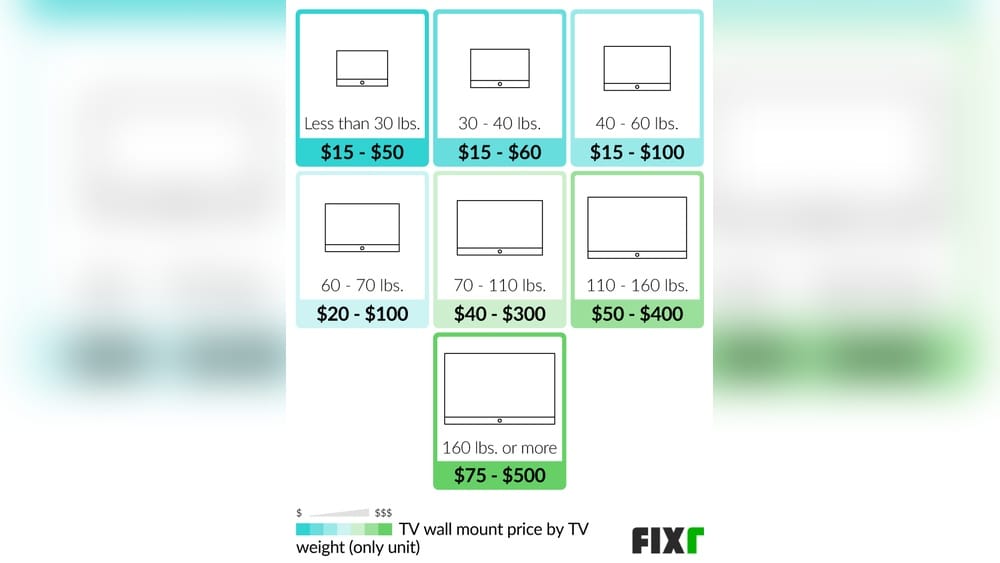
The larger and heavier your TV, the more difficult the installation. TVs between 32–50 inches are usually easier and cheaper to mount, while those above 65 inches often require extra help or special brackets. Heavy TVs may need reinforced anchors or two installers for safety.
Wall Type
Different walls require different installation methods:
- Drywall: Most common, but may need extra anchors for heavy TVs.
- Brick or Concrete: Harder to drill and mount, often costs more for tools and labor.
- Plaster: Fragile, sometimes needs special fasteners.
- Wood Paneling: Usually easier, but must locate studs.
If you don’t know your wall type, ask your installer before they arrive. Mounting into brick or concrete can add $50–$100 extra to the total price.
Mount Type
There are several types of TV mounts:
- Fixed: Holds the TV flat against the wall. Cheapest option.
- Tilting: Lets you angle the TV up or down. Slightly more expensive.
- Full-motion/Articulating: Allows the TV to swivel, tilt, and extend. Most expensive and complex to install.
Choosing a full-motion mount can add $40–$150 to the installation cost compared to a simple fixed mount.
Labor And Professional Fees
Labor is often the biggest part of the cost. Professional installers usually charge:
- Flat fee per job
- Hourly rates (usually $50–$100 per hour)
- Extra for difficult installs
DIY installation saves money, but professionals guarantee safety and quality, especially for big TVs or special walls.
Additional Services
Common extras include:
- Cable management: Hiding wires inside the wall or using covers.
- Shelf installation: For soundbars, gaming consoles, or streaming devices.
- Electrical outlet relocation: If your TV needs a new power source behind it.
- Old TV removal: Some companies offer removal for an extra fee.
These extras can add $25–$200 or more, depending on complexity.
Average Tv Mounting Prices In The Us
Let’s look at typical prices so you know what to expect. Below is a simple comparison of average costs for different TV sizes and mount types.
| TV Size | Fixed Mount | Tilting Mount | Full-motion Mount |
|---|---|---|---|
| 32–50 inches | $70–$120 | $90–$140 | $120–$200 |
| 51–65 inches | $120–$180 | $150–$210 | $200–$300 |
| 66–85 inches | $180–$250 | $220–$300 | $280–$400 |
These prices include labor and the basic wall mount. However, prices can change if you have a difficult wall, need cable management, or want extra shelves.
Extra Costs To Consider
Many homeowners forget about these extras:
- Wall reinforcement: $50–$200 if your wall needs extra support.
- Cable concealment: $75–$150 for hiding wires inside the wall.
- Device shelf: $30–$80 per shelf.
- Travel fee: $20–$50 if you live far from the installer.
- Old TV removal: $25–$50.
Always ask for a detailed quote so you don’t get surprised by hidden fees.
Diy Vs Professional Tv Mounting
You might be thinking, “Can I save money by mounting the TV myself? ” Let’s compare DIY and professional installation.
| Factor | DIY | Professional |
|---|---|---|
| Cost | $30–$100 (mount + tools) | $120–$400 (includes labor) |
| Time Required | 2–4 hours | 1–2 hours |
| Risk | Higher (TV may fall) | Lower (insured) |
| Warranty | No labor warranty | Usually 1–2 years |
| Tools Needed | Drill, level, anchors | Brought by installer |
Diy Pros And Cons
- Pros: Saves money, flexible timing, learn new skills.
- Cons: Risk of damaging wall or TV, no insurance, can take longer, may need help with heavy TVs.
Professional Pros And Cons
- Pros: Fast, safe, often insured, warranty included, better results.
- Cons: Higher cost, must schedule in advance, less personal control.
Non-obvious insight: Many people think DIY is always cheaper, but if you make a mistake, fixing the wall or replacing a broken TV can cost more than hiring a pro. Some installers also offer discounts for multiple TVs or bundled services.
How To Choose A Tv Mount
Picking the right mount is important for both safety and viewing comfort. Here’s what to consider:
Mount Types
- Fixed: Best for TVs at eye level, simple rooms, and tight spaces.
- Tilting: Useful if you mount the TV above a fireplace or higher than eye level.
- Full-motion: Great for open rooms, corner placement, or if you want to adjust the TV often.
Weight And Vesa Compatibility
Your mount must fit your TV’s VESA pattern (the standard for mounting holes on the back). Check your TV’s manual or the manufacturer’s website for this information. Using the wrong mount can risk your TV falling.
Room Layout
Think about where you sit and how much you want to move the TV. If you plan to watch from different spots, a full-motion mount is better. For a theater-style setup, a fixed mount works well.
Safety
Never use a mount that isn’t rated for your TV’s weight and size. Always mount into studs (wooden beams behind drywall) or solid walls. Avoid mounting heavy TVs on just drywall—this is a common mistake that can lead to accidents.
Typical Tv Mounting Process
Knowing the steps helps you understand what you’re paying for and why the price can change.
Site Assessment
Installer checks your wall type, finds studs, and discusses mount location. They’ll measure the height and viewing angle.
Bracket Installation
They secure the mounting bracket to the wall, making sure it’s level and anchored safely.
Tv Mounting
The TV is attached to the bracket. For bigger TVs, two installers may be needed.
Cable Management
If you want wires hidden, installers may run cables through the wall or use covers.
Device Connection
They connect power, HDMI, and other cables to your devices (streaming box, soundbar, etc. ).
Testing
Installer checks stability, viewing angle, and makes adjustments.
Clean Up
They remove packaging and clean the area. Some companies offer to remove your old TV or bracket.
National And Regional Price Differences
TV mounting costs vary by location in the US. Labor rates are higher in big cities and lower in rural areas. For example, New York City or San Francisco may charge $150–$300 for basic mounting, while smaller towns can offer the same service for $80–$150.
In regions with older homes, walls may need extra reinforcement, increasing costs. In newer homes, mounting is often easier and cheaper.
Non-obvious insight: Some installers charge more during busy seasons (like holidays or football season). Scheduling in off-peak times can save you money.
Hidden Costs And Mistakes To Avoid
Many people focus only on the mounting price, but forget about:
- Cable length: If your cables are too short, you’ll need to buy longer ones.
- Outlet placement: You may need an electrician if the outlet isn’t behind the TV.
- Wall repairs: If the installer makes mistakes, you may need to patch holes or repaint.
Common mistakes:
- Not checking stud location before booking.
- Using a mount not rated for your TV.
- Ignoring cable management until after the TV is up.
- Forgetting about soundbar or device placement.
Always ask your installer about these issues before the job starts.
Tv Mounting Cost Breakdown Example
Here’s a sample breakdown for mounting a 55-inch TV in a typical US home:
- Fixed mount + labor: $120
- Cable concealment: $80
- Soundbar shelf: $40
- Old TV removal: $30
- Total: $270
If you skip cable concealment and shelf, the cost drops to $120–$150. Adding extra devices or mounting on brick can increase this by another $100–$200.
How To Save Money On Tv Mounting
Shop Around
Ask for quotes from at least 3 installers. Prices can vary by $50–$150 for the same job.
Buy Your Own Mount
Many installers let you buy your own mount. Online prices are often lower than in-store or through the installer. Make sure it fits your TV and wall.
Bundle Services
If you have more than one TV or need extra shelves, ask for a bundle discount. Some installers offer deals for multiple items.
Choose Simple Cable Management
If you don’t mind visible wires, skip in-wall concealment. Simple covers cost less.
Off-peak Scheduling
Avoid busy times (holidays, weekends). Weekday appointments are often cheaper.
Diy Small Tasks
You can handle simple prep like moving furniture, marking stud locations, or cleaning up after the install. This sometimes reduces labor costs.
Tv Mounting Companies And Retailers
Many big retailers offer mounting services. Here’s a comparison of three popular options:
| Company | Basic Mounting Cost | Includes | Extras Offered |
|---|---|---|---|
| Best Buy (Geek Squad) | $150–$250 | Mount install, TV setup | Cable concealment, device setup, old TV removal |
| Amazon Home Services | $80–$180 | Mount install, TV setup | Shelf install, cable management, device setup |
| Local Handyman | $70–$200 | Mount install | Flexible services, custom jobs |
Non-obvious insight: Big companies often include warranties and insurance. Local handymen may be cheaper but sometimes lack formal guarantees.
Safety And Insurance Concerns
A mounted TV can weigh 50–100 pounds or more. If not installed correctly, it can fall and cause injury or damage. Professional installers usually have insurance to cover accidents. Always ask about insurance before booking.
If you mount the TV yourself, you take full responsibility for any damage. Some homeowners’ insurance policies won’t cover damage from DIY mistakes.
Mounting Tvs Above Fireplaces
Many people want their TV above the fireplace. This is a special case—extra costs and risks apply.
Challenges
- Heat: Can damage your TV. Always check temperature before mounting.
- Height: May be too high for comfortable viewing.
- Wall type: Often brick or stone, harder to drill.
Costs
Mounting above a fireplace can add $100–$250 due to extra labor, materials, and cable routing.
Tips
- Use a tilting or full-motion mount to reduce neck strain.
- Ask installer to measure heat levels.
- Plan cable paths carefully.

Credit: homeguide.com
Cable Management Options
Cable management isn’t just about looks—it also protects wires and devices.
Types
- In-wall concealment: Most expensive and cleanest look.
- Cable covers: Cheaper, easy to install, but visible.
- External raceways: Used for brick or stone walls.
Costs
- In-wall concealment: $75–$150
- Cable covers: $20–$40
- External raceways: $30–$60
Practical Advice
If you rent your home, avoid in-wall concealment. Landlords often don’t allow holes in walls. Use covers or raceways instead.
Tv Mounting For Renters
Renters face extra challenges. Most landlords don’t want holes in the wall or big changes to the apartment.
Solutions
- Use no-drill mounts that grip or hook onto furniture.
- Ask landlord before drilling.
- Use cable covers instead of running wires through the wall.
Costs
No-drill mounts can cost $80–$150. Installation is usually easier and cheaper.

Credit: www.fixr.com
Tv Mounting In Offices And Public Spaces
Mounting TVs in offices, restaurants, or waiting rooms often costs more. Commercial jobs require:
- Heavy-duty mounts
- Safety certification
- Insurance
- Multiple TVs
Prices start at $200–$500 per TV, depending on size and complexity.
Tip: Ask for bulk discounts if mounting several TVs.
Warranty And Service Guarantees
Many professional installers offer warranties for their work. These are usually 1–2 years and cover:
- Loose brackets
- Mount failure
- Installation mistakes
Always read the warranty terms. Some only cover labor, not the mount or TV itself.
Environmental And Disposal Fees
Some areas require special disposal fees for old TVs. Electronics can’t just go in the trash. Expect to pay $25–$50 for proper recycling.
Real-world Examples
Let’s look at a few real scenarios:
- Small Bedroom TV (40-inch, drywall, fixed mount):
- Mount + labor: $90
- No extras
- Total: $90
- Living Room TV (65-inch, brick wall, full-motion mount, cable concealment):
- Mount + labor: $250
- Brick wall fee: $75
- Cable concealment: $100
- Total: $425
- Above Fireplace (55-inch, stone, tilting mount, soundbar shelf):
- Mount + labor: $180
- Fireplace fee: $120
- Shelf install: $45
- Total: $345
These examples show how wall type, mount type, and extras change the price.

Credit: blog.puls.com
How To Find A Reliable Installer
Check Reviews
Look for installers with positive reviews on Google, Yelp, or company websites.
Ask About Insurance
Only use insured installers. This protects you if something goes wrong.
Compare Quotes
Get at least three quotes before choosing. Ask for a breakdown of costs.
Verify Experience
Ask if they have experience with your wall type and TV size.
Non-obvious insight: Some installers specialize in certain brands or wall types. Choosing a specialist can improve safety and quality.
Tv Mounting And Home Value
A well-mounted TV can make your home look modern and attractive. It’s a small investment that can help with home staging if you plan to sell. Buyers often notice clean, professional setups.
Frequently Asked Questions
How Much Does It Cost To Mount A Tv?
The average cost to mount a TV in the US ranges from $120–$400, depending on size, wall type, mount style, and extras. Basic installs can be as low as $70, while complex jobs with cable management and shelves can reach $400 or more.
Can I Mount A Tv Myself?
Yes, you can mount a TV yourself if you have the right tools and follow instructions. DIY jobs usually cost $30–$100 for the mount and hardware. However, mistakes can be expensive. Always check wall type and use studs for heavy TVs.
Do Installers Provide The Wall Mount?
Some installers include the mount in their price, while others ask you to buy it separately. It’s often cheaper to buy your own mount online. Make sure it fits your TV’s VESA pattern and weight.
What If My Wall Isn’t Strong Enough?
If your wall isn’t strong enough, installers may add reinforcement or suggest moving the TV. Reinforcement can cost $50–$200 extra. Never mount a heavy TV on drywall alone.
Is Cable Management Worth The Extra Cost?
Cable management is worth it if you want a clean, modern look or need to protect wires from pets or kids. In-wall concealment is the best but most expensive. External covers are cheaper and easier for renters.
Mounting a TV is an investment in your home’s comfort and style. Prices depend on many factors, but a little planning helps you find the best balance between cost and quality. Always compare quotes, check reviews, and consider extras before making your decision.
With careful choices, you’ll enjoy your new setup for years to come.
For more technical details and safety guidelines, visit the official Consumer Reports TV Buying Guide.