
If you own a Ring Spotlight Camera, you already know how useful it is for watching over your home. But many users get frustrated when the camera’s battery runs out quickly—especially if the camera is in a hard-to-reach spot or you don’t want to keep charging it. Adding a solar panel can keep your Ring Spotlight Cam powered all day, every day, with almost no work from you. This guide explains everything you need to know about adding a solar panel to your Ring Spotlight Camera, from choosing the right panel to installing it safely and maximizing its benefits.
Why Use A Solar Panel With Your Ring Spotlight Camera?
The main reason people add a solar panel is to avoid the hassle of taking out the battery to recharge it. The Ring Spotlight Cam is designed for easy DIY use, but without a constant power source, it can run out of battery at the worst time—like during a storm or when you’re away. A solar panel keeps your camera charged by using sunlight, offering these clear benefits:
- Continuous power: With enough sunlight, your camera stays charged 24/7.
- Less maintenance: No need to climb ladders or remove batteries every few weeks.
- Eco-friendly: Solar energy is clean and reduces your electricity use.
- Better security: Your camera stays on, even if you forget to check the battery.
It’s also important to know that solar panels for Ring cameras are small and designed to work with the camera’s battery—not replace it. The battery stays inside the camera and the solar panel just keeps it topped up. In places with good sunlight, you might never have to manually charge the battery again.
Compatibility: Is Your Camera Ready For Solar?
Before buying a solar panel, make sure your camera model supports it. Not all Ring cameras work with solar panels.
- Ring Spotlight Cam Battery: Yes, this model supports solar panels.
- Ring Spotlight Cam Wired: No, this model is meant for constant wired power.
- Ring Spotlight Cam Plus (Battery): Yes, works with solar.
- Ring Spotlight Cam Pro (Battery): Yes, works with solar.
- Ring Stick Up Cam Battery: Also supports solar panels.
If you have a wired-only model, adding a solar panel will not work. Check the label on your camera or your order receipt to be sure. You can also open the Ring app, select your device, and look for the power source type.
Tip: Some third-party solar panels claim they work with all Ring cameras, but always check the official compatibility list from Ring.

Credit: www.youtube.com
Choosing The Right Solar Panel For Ring Spotlight Camera
You have two main choices: the Ring Solar Panel (official accessory) or a compatible third-party panel. Here’s how to decide.
Official Ring Solar Panel Vs. Third-party Options
| Feature | Ring Solar Panel | Third-Party Panels |
|---|---|---|
| Warranty | 1 year (from Ring) | Varies (usually 6-12 months) |
| Cable Length | 13.1 ft (4 m) | 6-20 ft (varies by brand) |
| Weatherproofing | IP66 rated | Most are IP65 or IP66 |
| Connector Type | Custom Ring barrel plug | Must match Ring plug |
| Price (USD) | $49.99–$59.99 | $20–$45 |
| Power Output | 2.2W | 1.5–4W (check specs) |
The Ring Solar Panel is made specifically for Ring cameras. It’s easy to set up, comes with the correct plug, and is backed by Ring’s customer support. Some third-party panels are cheaper and may offer longer cables or more power, but using them could affect your camera’s warranty.
Non-obvious insight: If you live in a place with little sun (lots of shade or cloudy days), a panel with a higher watt rating (3–4W) is better. But always check that the voltage and connector match your camera, or you could damage the device.
Considerations When Buying
- Sunlight exposure: The panel needs at least 2–3 hours of direct sun daily.
- Cable length: Measure from your camera to the nearest sunny spot.
- Mount type: Look for adjustable mounts for better sun angle.
- Weather resistance: Check for IP65 or IP66 waterproof ratings.
- Brand reputation: Read user reviews and check for customer support.
Common mistake: Some buyers get a panel with a USB plug instead of the barrel connector used by Ring. Always double-check the plug type.
What’s In The Box: Solar Panel Kits
Most solar panel kits for the Ring Spotlight Cam include:
- The solar panel
- A mounting bracket (sometimes adjustable)
- Screws and wall anchors
- A power cable (pre-attached or separate, usually 13 ft)
- Instruction manual
Some third-party kits add extra cable clips or cable extension options. If you need to run cable further, check if extensions are available for your model.
How To Install A Solar Panel To Ring Spotlight Camera
Here’s a step-by-step guide to adding a solar panel to your camera. You’ll need a screwdriver, a drill (for wall mounting), and possibly a ladder.
Step 1: Plan The Location
Find a spot near your camera that gets direct sunlight for at least a few hours each day. The solar panel doesn’t need all-day sun, but the more it gets, the better it works. South-facing walls or roofs are best in the US. Avoid placing the panel under trees, roof overhangs, or in constant shade.
Practical tip: Use your phone’s compass or a sun tracker app to check how much sun the spot gets at different times of day.
Step 2: Mount The Solar Panel
- Hold the bracket where you want the panel.
- Mark the screw holes with a pencil.
- Drill pilot holes for the screws.
- Attach the bracket using the included screws and wall anchors.
- Slide or screw the solar panel onto the bracket.
Most panels can tilt and rotate. Aim the panel toward the sun’s path in the sky. In the northern hemisphere, point the panel south and tilt it at about the same angle as your latitude (for example, 30–40°).
Non-obvious insight: If you live in a snowy area, tilt the panel more steeply (up to 45–60°) so snow slides off.
Step 3: Run The Cable
- Use the included cable clips to secure the wire along the wall or under siding.
- Avoid tight bends or pinching the cable.
- Leave a little slack near both ends for easy adjustment.
If you’re worried about the cable being chewed by animals, use a cable cover or run it inside a conduit for extra protection.
Step 4: Connect The Solar Panel To The Camera
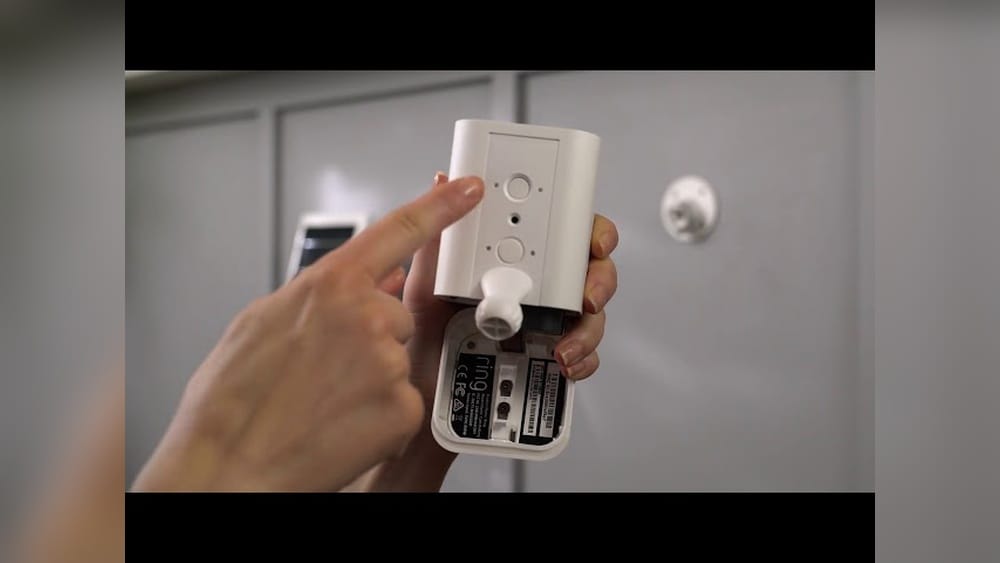
- Open the small rubber plug on the back or bottom of the Spotlight Cam (labeled “DC” or with a solar symbol).
- Insert the barrel connector from the solar panel until it clicks.
- Make sure the connection is firm and water-tight.
The camera’s battery should stay installed—do not remove it. The solar panel charges the battery, not the camera directly.
Step 5: Test The System
- Wait a few minutes for the camera to detect the solar panel.
- Open the Ring app on your phone.
- Go to Device Settings > Power Settings.
- Look for “Solar Panel Connected” on the status screen.
If you see this message, the panel is working. If not, double-check the connection, clean the solar panel surface, and make sure the battery is inserted.
Step 6: Adjust For Best Performance
- Watch the battery level in the app over the next few days.
- If the battery keeps draining, try moving the panel to get more sun, or clean off any dirt or debris.
- In winter or during long cloudy periods, the battery may still go down slowly. This is normal.
Practical tip: Wipe the solar panel with a damp cloth every few months to remove dust, pollen, or bird droppings.
Maximizing Solar Panel Performance
Getting the most out of your solar panel is about more than just plugging it in. Here’s how to make sure it works well year-round.
Panel Placement And Angle
- Face south (in the US) for best sun coverage.
- Adjust the tilt angle for your latitude or the season.
- Avoid shade from trees, wires, or satellite dishes.
Cleaning And Maintenance
- Clean the panel every 2–3 months or after storms.
- Use a soft cloth—never abrasive cleaners.
- In snowy areas, brush off snow after storms.
Monitoring Battery Health
- Use the Ring app to check battery charge trends.
- If the battery never gets above 80%, move the panel or reduce camera activity (like motion alerts).
- Replace the battery every 1–2 years for best results.
Firmware And App Updates
- Keep your Ring app and camera firmware up to date.
- Updates can improve charging efficiency and fix bugs.
Non-obvious insight: Very high temperatures (over 120°F) can actually slow down charging or cause the battery to stop charging for safety. If you live in a hot climate, provide a bit of shade for the panel during the hottest part of the day.

Credit: www.amazon.com
Common Problems And How To Fix Them
Even with a good setup, you might run into some issues. Here’s how to solve the most frequent problems.
Solar Panel Not Detected
- Unplug and re-plug the connector.
- Make sure the rubber port cover is open fully.
- Check for dirt or corrosion on the plug.
- Restart the camera by removing and reinserting the battery.
Battery Still Drains Fast
- Is the panel in full sun? Move it if needed.
- Too many motion alerts or live view events can drain the battery faster than the panel can charge.
- Use zones or schedules to limit activity during the day.
Camera Disconnects From Wi-fi
- Long cables or nearby power lines can cause interference.
- Try rerouting the cable away from other wires.
- Make sure your Wi-Fi signal is strong at the camera location.
Water Or Weather Damage
- Check the cable and panel for cracks or water inside the connector.
- Use weatherproof tape or silicone to seal any gaps.
- Replace damaged parts quickly to avoid camera problems.
Pro tip: If you have more than one Ring camera, each one needs its own solar panel. One panel can’t power multiple devices.
Cost And Savings: Is It Worth Adding A Solar Panel?
Many users wonder if buying a solar panel is worth the extra cost. Let’s break it down.
Upfront Cost
- Ring Solar Panel: $50–$60
- Third-party panels: $20–$45
- Tools (if needed): $0–$20 (screwdriver, drill)
Long-term Savings
- Fewer battery replacements ($20–$30 per battery)
- Less time spent climbing ladders or paying for installation help
- Lower risk of your camera being offline
Example: If you avoid buying just one extra battery or save two hours of climbing/charging time, the panel pays for itself in less than a year.
Environmental benefit: Using solar power reduces your electricity use and carbon footprint, especially if you have several cameras.
Real-world Examples And User Experiences
Let’s look at how some actual users benefit from adding a solar panel to their Ring Spotlight Camera.
- Busy parents: One family with a camera above their garage used to recharge the battery every 3 weeks. With a solar panel (facing south), their battery now stays above 90% even in winter.
- Rental property owners: Landlords who manage several properties save time and trips by adding solar panels, keeping cameras online for remote monitoring.
- Vacation homes: Owners with cabins or vacation houses often choose solar panels to avoid dead batteries during long absences.
A survey of Ring users on a home security forum found that over 70% of people who added a solar panel reported “no more manual charging.” About 10% still needed to recharge in winter or during long cloudy periods, usually due to poor panel placement.
Comparing Ring Solar Panel Vs Ring Super Solar Panel
Ring offers two main solar panel models for its Spotlight Cameras. Here’s a side-by-side comparison to help you pick the right one:
| Feature | Ring Solar Panel | Ring Super Solar Panel |
|---|---|---|
| Power Output | 2.2W | 5.2W |
| Panel Size | 7.8 x 5.5 in | 11.4 x 7.8 in |
| Best For | Sunny locations, low camera activity | Cloudy areas, high activity |
| Price (USD) | $49.99 | $59.99–$69.99 |
Key takeaway: If your camera gets triggered often or you live in a place with frequent clouds, the Super Solar Panel is a better choice. For low-activity cameras in sunny spots, the standard model is enough.
Safety Tips And Best Practices
Adding a solar panel is usually safe and easy, but it’s important to follow a few rules:
- Turn off the camera or remove the battery before plugging in the solar panel.
- Use a sturdy ladder and wear gloves if installing high up.
- Don’t force the connector—if it doesn’t fit, check the type.
- Only use outdoor-rated extension cables if needed.
- Keep the cable away from sharp edges or places where people walk.
Never try to power your Ring camera with a car battery or solar panels not made for small electronics. This could damage the camera or cause a fire.
Alternatives To Solar Panel Power
If a solar panel isn’t right for you, here are other ways to keep your Ring Spotlight Cam charged:
- Plug-in adapter: Ring sells an outdoor power adapter for constant power.
- Extra batteries: Keep a spare battery charged and swap as needed.
- Hardwired power: Some users run a low-voltage wire from a junction box, but this is best done by an electrician.
Solar panels are the most “set and forget” solution, but these options work if you don’t get enough sun or can’t mount a panel.

Credit: ring.com
Environmental Impact Of Using Solar Panels
Switching to solar power for your security cameras is a small but positive step for the environment.
- A single Ring camera uses about 10–20 kWh per year if charged by battery.
- Using a solar panel reduces this to nearly zero grid power.
- If every Ring user switched to solar, it would save thousands of megawatt-hours per year—enough to power hundreds of homes.
Non-obvious insight: Solar panels for cameras are made from the same materials as larger home panels and can last for 10+ years with proper care.
Expert Tips For Troubleshooting And Optimization
- If your camera battery drains below 20% even with a solar panel, try reducing the motion sensitivity or use motion zones to avoid false triggers from cars or animals.
- If you need more cable length, buy only Ring-approved extensions to avoid power loss.
- In high humidity areas, check connectors yearly for corrosion and clean with a little alcohol if needed.
Pro tip: For best results, install the solar panel during a sunny period and fully charge the camera battery first. The panel works best at keeping the battery topped up, not charging from empty.
How Weather And Seasons Affect Solar Charging
Solar panels work best in spring and summer when days are long and the sun is high. In fall and winter, shorter days and low sun angles mean less charging.
- In the northern US, expect up to 30% less charging in December compared to June.
- Heavy rain, snow, or dust can block sunlight—clean the panel after storms.
- In hot climates, make sure the panel has airflow behind it to avoid overheating.
It’s normal for the battery to drain slowly in winter. If the camera is very busy (lots of motion events), you might still need to recharge the battery once or twice a year.
Upgrading: Can You Use More Than One Solar Panel?
Some users wonder if adding a second solar panel will charge the camera faster. Ring doesn’t recommend this—most cameras are designed for just one panel. Using two at once could overload the charging circuit.
If you need more power, upgrade to the Ring Super Solar Panel or move your current panel to a sunnier spot.
Security And Theft Concerns
Solar panels are usually safe from theft, but if you’re worried:
- Mount the panel high up or out of easy reach.
- Use tamper-proof screws if possible.
- Some users add a security camera sticker nearby to deter thieves.
If a panel is stolen, report it to the police and your homeowner’s insurance. Ring’s warranty may not cover theft, so check your policy.
When To Call For Professional Help
Most installations can be done by anyone comfortable with basic tools. But call a pro if:
- You need to run cable through walls or the roof.
- You’re not comfortable climbing ladders.
- Your home has unusual siding or brickwork.
Some electricians offer solar panel installation for security systems for a small fee.
Where To Buy And How To Get Support
Buy official Ring solar panels at the Ring website, Amazon, or big-box retailers. For third-party panels, stick to well-known brands with good reviews.
If you have problems, Ring’s customer support can help with troubleshooting and warranty issues. For more technical help, visit the Ring Community forums or see the support pages on Ring’s official site.
Frequently Asked Questions
How Much Sunlight Does The Ring Solar Panel Need Each Day?
The solar panel needs at least 2–3 hours of direct sunlight every day for best performance. More sun is better, especially in winter or for cameras with lots of activity. If your panel is in the shade most of the day, the battery may still drain slowly.
Can I Use A Third-party Solar Panel With My Ring Spotlight Camera?
Yes, you can use a third-party panel if it has the correct voltage (usually 5V), the right connector, and is weatherproof. However, using a non-Ring panel may affect your warranty. Always check reviews and specs before buying.
Will The Solar Panel Work If The Weather Is Cloudy Or Rainy?
The panel will still collect some energy during cloudy days, but much less than in full sun. The battery may drain slowly during long periods of bad weather, so you may need to recharge it manually once or twice a year.
Do I Need To Remove The Camera Battery When Using A Solar Panel?
No, keep the battery installed at all times. The solar panel charges the battery, which then powers the camera. If you remove the battery, the camera won’t work—even with the panel connected.
Can One Solar Panel Power More Than One Ring Camera?
No, each Ring camera needs its own solar panel. Sharing a single panel between two or more cameras will not provide enough power and could damage the devices.
Adding a solar panel to your Ring Spotlight Camera is a smart, eco-friendly way to keep your home secure with less hassle. With the right panel, good placement, and a little care, your camera will stay powered and ready to protect what matters most.