
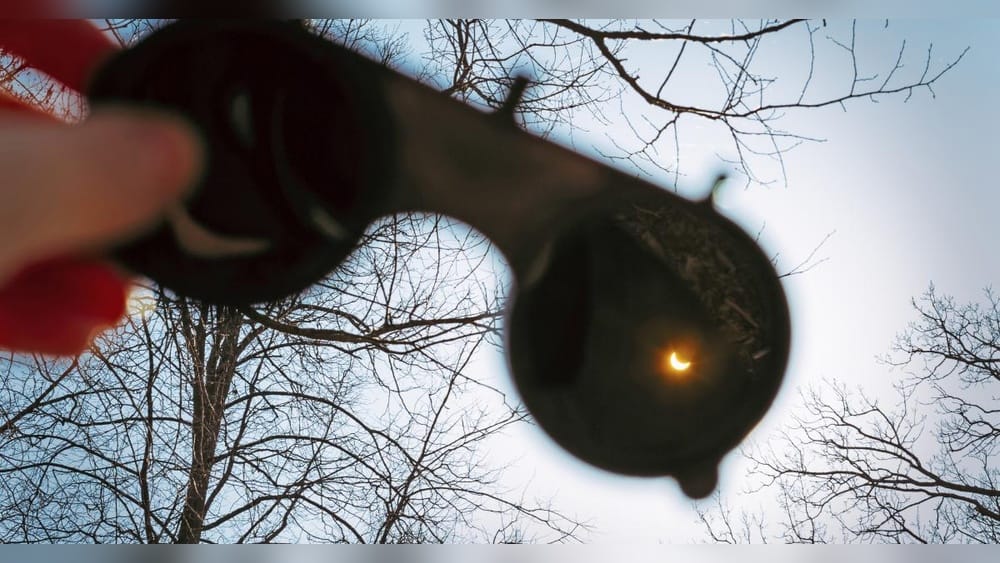
Capturing a solar eclipse with your phone camera is a thrilling experience. These rare events turn day into night for a few minutes, painting the sky with dramatic shadows and colors. Many people think you need expensive equipment to photograph a solar eclipse, but today’s smartphones are surprisingly powerful. With the right techniques, you can create stunning eclipse photos using just your phone. This guide will walk you through everything you need to know: from preparing your phone and safety tips to advanced shooting tricks and post-editing. Even if you are a beginner, you’ll be able to capture this celestial show and share it with friends and family.
Understanding Solar Eclipses And Why They’re Special
A solar eclipse happens when the Moon passes between the Earth and the Sun, blocking some or all of the Sun’s light. There are several types of solar eclipses:
- Total eclipse: The Moon fully covers the Sun for a short time.
- Partial eclipse: Only part of the Sun is hidden.
- Annular eclipse: The Moon covers the center of the Sun, leaving a bright ring called the “ring of fire.”
Eclipses are rare because the Sun, Moon, and Earth must be perfectly lined up. In most locations, a total solar eclipse only happens once every several decades. That makes capturing an eclipse photo a unique memory.
During a solar eclipse, the sky can darken in the middle of the day. Animals may behave strangely. Shadows become sharp and unusual. Colors and lighting change quickly. All these effects can be beautifully captured with your phone camera if you know how.
Safety First: Protecting Your Eyes And Phone
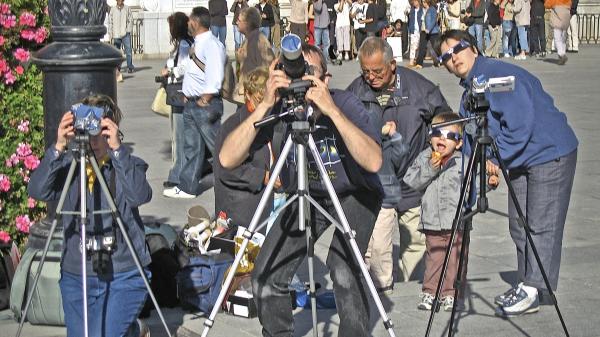
Photographing a solar eclipse is exciting, but safety is essential. Looking directly at the Sun without protection can cause permanent eye damage, even during an eclipse. Your phone camera can also be damaged by direct sunlight. Here’s how to stay safe:
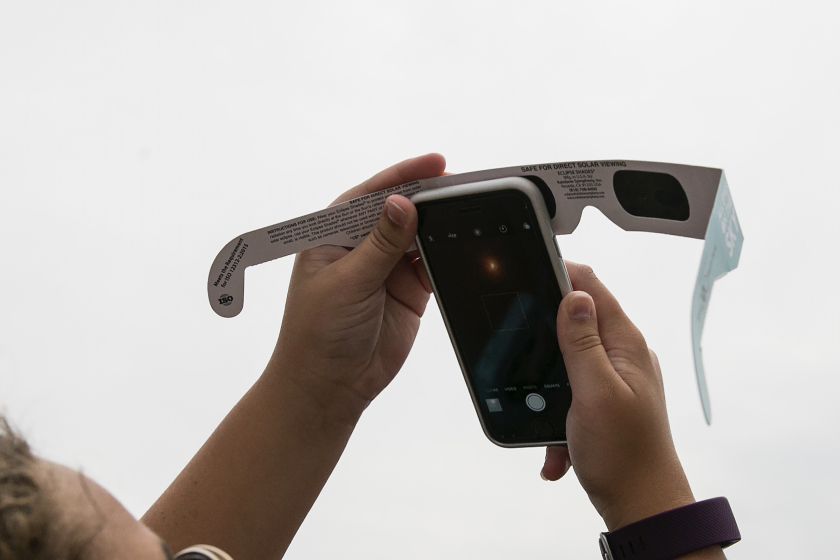
- Use certified solar eclipse glasses: Never look at the Sun with the naked eye. Use special eclipse glasses that meet ISO 12312-2 standards.
- Attach a solar filter to your phone’s lens: Just as your eyes need protection, your phone camera does too. Use a solar filter made for cameras or telescopes. Never use sunglasses, CDs, or smoked glass as a filter—they are not safe.
- Check the filter before use: Make sure there are no scratches or holes. A damaged filter is unsafe.
- Remove the filter only during totality: If you’re in the path of a total eclipse, there’s a short time (totality) when it’s safe to remove filters. For partial or annular eclipses, the filter must stay on at all times.
Pro tip: Practice using your eclipse glasses and filters before the event. Get comfortable with how to put them on and take them off quickly.
Credit: www.timeanddate.com
Preparing Your Phone For The Solar Eclipse
Success starts with good preparation. Today’s smartphones have advanced cameras, but capturing an eclipse is challenging. Here’s how to get your phone ready:
Clean Your Lens
A dirty lens creates blurry or hazy photos. Use a soft microfiber cloth to gently clean your phone’s camera lens before the eclipse.
Check Your Storage And Battery
Solar eclipses don’t last long. Missing the moment because of a full memory or dead battery is frustrating.
- Free up space: Delete old photos or move them to cloud storage.
- Charge fully: Start with 100% battery. Bring a portable power bank if possible.
Update Your Camera App
Some camera apps get updates that improve photo quality or add manual controls. Make sure your phone’s camera app is updated before the eclipse.
Turn Off Flash
Your phone’s flash won’t help and could spoil your shots. Double-check that the flash is off.
Set To Airplane Mode
This prevents calls or notifications from interrupting your shooting.
Use A Tripod Or Stable Surface
A stable phone means sharper images, especially during low light. Even a simple phone tripod or a stack of books can help.
Get A Remote Shutter Or Timer
Touching your phone to take a photo can cause shaking. Use a Bluetooth remote or set a timer to avoid blur.
Essential Gear For Eclipse Photography With A Phone
While you can take eclipse photos with just your phone, a few accessories make a big difference. Here are the most helpful items:
| Accessory | Purpose | Recommended for |
|---|---|---|
| Solar Filter | Protects camera sensor and captures Sun safely | Everyone |
| Tripod | Reduces camera shake, sharpens photos | Anyone wanting clear shots |
| Phone Mount/Clamp | Holds phone steady on tripod | All tripod users |
| Bluetooth Remote | Triggers camera without touching phone | For self-portraits or group shots |
| Clip-on Lens | Gives slight zoom or wider field of view | Creative shots |
| Portable Power Bank | Keeps phone charged during the event | Long viewing sessions |
Non-obvious insight: Some solar filters are made for telescopes but can be safely adapted for phone cameras with rubber bands or tape. Test this at home before the eclipse.
Choosing The Best Location For Eclipse Viewing
Where you watch the eclipse is just as important as your camera setup. Follow these tips to pick the perfect spot:
- Aim for clear skies: Cloud cover can block your view. Check weather forecasts and be flexible.
- Find the path of totality: For a total solar eclipse, you must be inside the narrow band where the Moon fully covers the Sun. Partial or annular eclipses are visible over wider areas, but totality is most dramatic.
- Choose an open area: Parks, fields, or beaches are ideal. Avoid tall buildings, trees, or mountains that can block your view.
- Arrive early: Eclipses draw crowds. Arriving early lets you set up your equipment and find the best angle.
- Think about foreground: Including interesting objects like trees, buildings, or people can add drama to your photos.
Non-obvious insight: If you’re not in the path of totality, you can still capture unique shadows and lighting—look for “eclipse shadows” under trees, where the gaps in leaves create hundreds of crescent shapes.
Essential Camera Settings For Phone Eclipse Photography
Most phone cameras work in “auto” mode, but you’ll get better results by adjusting a few settings. Here’s what to change:
Exposure
The Sun is extremely bright, even during an eclipse. Lower the exposure (brightness) to avoid a white, washed-out disk. On most phones:
- Tap and hold on the Sun in your camera app.
- Look for a slider (a sun icon or +/-) and drag it down to darken the image.
Focus
Lock the focus on the Sun. Tap and hold on the Sun until you see “AF/AE Locked” or a similar message. This prevents the camera from refocusing as you shoot.
Resolution
Set your camera to the highest resolution and quality. This keeps your images sharp, even if you crop them later.
Zoom
Digital zoom reduces quality. If you want a closer shot, use a clip-on telephoto lens or crop your photo later.
Burst Mode
Eclipses change quickly. Use burst mode to take many photos in seconds. On iPhones, hold down the shutter button. On Android, look for the “burst” or “continuous” option.
Raw Format
Some phones offer RAW (DNG) format. RAW photos keep more detail and are better for editing later. Use this if your phone supports it.
Night Or Pro Mode
During totality, the sky gets dark. Switch to “Night Mode” or “Pro Mode” if your phone has it. This gives you more control over exposure and ISO.
Tip: Practice changing these settings before the eclipse. You won’t have time to learn during the event.
Step-by-step Guide: How To Capture The Solar Eclipse With Your Phone
Let’s put it all together. Follow these steps for the best results:
- Prepare your gear: Clean your lens, attach the solar filter, set up the tripod, and mount your phone.
- Open your camera app: Set exposure, focus, and other settings as described above.
- Frame your shot: Position the Sun in the center or use the rule of thirds for a more artistic look.
- Test shots: Take a few practice photos before the eclipse begins. Check for sharpness and exposure.
- Start shooting early: Begin before the eclipse starts to capture the changing light.
- Use burst mode during key moments: As the eclipse reaches its peak, use burst mode to capture every stage.
- Remove filter only at totality: If you’re in the path of a total eclipse, you can remove the solar filter for a few seconds to photograph the Sun’s corona. Replace it immediately after totality ends.
- Capture surroundings: Don’t just focus on the Sun. Shoot the changing sky, crowd reactions, and unique shadows.
- Keep shooting as the eclipse ends: Sometimes the best colors appear just after totality.
Experience-based tip: Set a reminder for each eclipse phase. It’s easy to lose track of time in the excitement.
Creative Eclipse Photography Ideas
Phone cameras are limited compared to telescopes, but there are many creative ways to make your photos stand out.
Silhouettes
Include people or objects in front of the Sun. Their dark outlines against the bright eclipse can be dramatic.
Time-lapse Video
Use your phone’s time-lapse feature to record the entire event. This shows the Sun’s transformation and the changing sky.
Composite Shots
Take multiple photos at different stages. Later, you can combine them into a single image showing the eclipse’s progress.
Reflections
Look for water, glass, or even car hoods to capture the eclipse reflected in interesting ways.
Pinhole Projections
Make a pinhole projector with a piece of paper. Photograph the crescent-shaped Sun projected onto the ground or another surface.
Eclipse Shadows
Photograph the strange shadows and patterns that appear during partial eclipses, especially under trees or lattices.
Pro insight: Try shooting both wide and zoomed-in shots. The wide shots capture the environment, while zoomed shots focus on the Sun.
Common Problems And How To Solve Them
Shooting a solar eclipse with a phone isn’t always easy. Here’s how to fix common issues:
| Problem | Cause | Solution |
|---|---|---|
| Sun is a white blob | Exposure is too high | Lower exposure, use solar filter |
| Photos are blurry | Camera shake | Use tripod, timer, or remote |
| Reflections or flares | Dirty lens, cheap filter | Clean lens, use quality filter |
| Can’t focus on Sun | Auto-focus problems | Tap and hold on Sun to lock focus |
| Missed key moment | Poor timing | Set alarms for phases, use burst mode |
| Battery dies mid-eclipse | Long event, high power usage | Charge fully, bring power bank |
Hidden tip: If you see strange colored spots (lens flare), try shading your phone’s lens with your hand or a piece of cardboard.
Editing And Sharing Your Solar Eclipse Photos
After the event, a little editing can make your eclipse photos even more impressive. Here’s how to enhance and share your images:
Basic Editing Steps
- Crop and straighten: Focus on the Sun or interesting details. Remove distracting elements.
- Adjust exposure and contrast: Make the Sun stand out without blowing out highlights.
- Sharpen: Increase sharpness for clearer edges.
- Reduce noise: If your photo is grainy, use noise reduction tools.
- Color correction: Adjust white balance to get natural sky colors.
Useful Apps
- Snapseed (free, iOS/Android): Powerful editing tools, easy interface.
- Lightroom Mobile (free/paid, iOS/Android): Advanced controls, RAW editing.
- VSCO: Good filters and easy adjustments.
Creating A Composite Image
If you took photos at different eclipse phases, use apps like PicsArt or Photoshop Express to create a collage. Arrange the phases in a row or circle for a dramatic effect.
Sharing Your Images
Post your best shots on social media. Use hashtags like #SolarEclipse, #Eclipse2024, or #PhonePhotography to reach a wider audience. Share your story and any technical details—people love to learn how the photo was made.
Back Up Your Photos
Save your photos to the cloud (Google Photos, iCloud) or an external drive. Eclipses are rare, so protect your memories.
Pro tip: Add a watermark or credit to your image before sharing online. This helps you get recognition if your photo goes viral.
Credit: chicago.suntimes.com
Comparing Phone Cameras: Which Are Best For Eclipse Photography?
Not all phones are equal for eclipse photography. Here’s a quick comparison of some popular models:
| Phone Model | Main Camera Specs | Best Features | Drawbacks |
|---|---|---|---|
| iPhone 14 Pro | 48MP, f/1.78, RAW, Night Mode | High detail, ProRAW, burst mode | Expensive, limited optical zoom |
| Samsung Galaxy S23 Ultra | 200MP, f/1.7, RAW, Pro Mode | Massive resolution, 10x optical zoom | Complex interface for beginners |
| Google Pixel 7 Pro | 50MP, f/1.85, Night Sight, RAW | Easy interface, great HDR | No true telephoto lens |
| OnePlus 11 | 50MP, f/1.8, Pro Mode | Manual controls, fast charging | Image processing less advanced |
Straight-to-the-point insight: Any modern phone can capture the eclipse, but higher megapixels, RAW support, and a good zoom lens make a big difference.
Planning For The Next Solar Eclipse
Solar eclipses are predictable but rare. Here’s how to plan ahead:
- Check eclipse maps: NASA and other space agencies publish maps years in advance. See if you’re in the path of totality or need to travel.
- Mark your calendar: Set reminders for the next eclipse date.
- Scout locations: Visit your chosen viewing spot days or weeks before the event.
- Practice with your gear: Try shooting the Sun at sunrise or sunset to get used to your setup.
- Join a group: Local astronomy clubs often organize eclipse events.
Extra tip: Consider travel plans early. Hotels and campsites in the path of totality book up months in advance.
For more information on upcoming eclipses and safe viewing, see NASA’s Eclipse Website.

Credit: www.youtube.com
Frequently Asked Questions
How Do I Safely Photograph A Solar Eclipse With My Phone?
Always use a certified solar filter over your phone’s camera lens during the eclipse, except during totality (for total eclipses). Never look at the Sun or point your phone at it without proper protection. Follow the same safety rules for your eyes and your camera.
Can I Use My Phone’s Digital Zoom To Get A Closer Shot Of The Eclipse?
You can use digital zoom, but it reduces image quality and makes photos look pixelated. For best results, use a clip-on telephoto lens or crop your photo after shooting. Keeping the phone stable is especially important when zoomed in.
What Do I Do If Clouds Cover The Eclipse?
Clouds can block or soften the Sun, making it hard to capture sharp photos. Wait for breaks in the clouds, and keep shooting—sometimes clouds add dramatic effects. If the sky is fully overcast, focus on capturing the changing light and crowd reactions instead.
What’s The Best Way To Photograph The Sun’s Corona During Totality?
During totality (when the Sun is completely covered), remove the solar filter briefly and use your camera’s lowest ISO and slightly longer exposure. Use burst mode to capture several shots quickly. Replace the filter as soon as totality ends to avoid damaging your camera.
Can I Take A Video Of The Solar Eclipse With My Phone?
Yes, you can record video, but always use a solar filter over your lens (except during totality). Use a tripod for stability. Try the time-lapse feature to show the eclipse’s progression in a short video.
Capturing a solar eclipse with your phone camera is both fun and rewarding. With the right preparation, safety steps, and creative ideas, you’ll create images that help you remember this rare event for years to come. Good luck with your eclipse adventure!