
Is your ADT motion sensor acting up or showing a low battery warning? Don’t worry—you don’t need to call a technician or replace the whole device.
Changing the battery yourself is easier than you think, and it can save you time and money. In this guide, you’ll learn step-by-step how to quickly and safely replace the battery in your ADT motion sensor. Keep reading to make sure your home stays secure without any interruptions.
Tools Needed
Changing the battery in your ADT motion sensor requires a few simple tools. Having the right tools ready makes the process smooth and quick. You do not need many items. Just a few basic tools will do.
Small Phillips Head Screwdriver
This screwdriver helps to open the sensor’s battery compartment. Most ADT sensors use small screws. A small Phillips head fits perfectly. It prevents damage to the screws and sensor casing.
Replacement Battery
Get the correct battery type for your sensor. Most ADT motion sensors use CR123A batteries. Check your sensor’s manual to confirm. Using the right battery ensures proper function and longer life.
Soft Cloth Or Gloves
A soft cloth or gloves protect the sensor from dirt and oils. They also keep your hands clean. This simple step helps maintain the sensor’s condition.
Flat Plastic Pry Tool
A flat plastic pry tool helps open the battery cover gently. It avoids scratches or breaks. Use it carefully to avoid damaging the sensor.
Credit: www.youtube.com
Locating The Motion Sensor
Knowing where the ADT motion sensor is located is the first step in changing its battery. The sensor is small and blends into walls or corners. Finding it may take a little searching but is usually simple.
Most motion sensors sit high on walls, near the ceiling. This position helps them detect movement across a wide area. Common spots include hallways, living rooms, or entry points like doors and windows.
Check Near Entry Doors
Look around main doors inside your home. Sensors often sit nearby to catch anyone entering. They might be on the wall beside the door or above the frame.
Inspect Corners Of Rooms
Motion sensors are often placed in room corners. Corners give a clear view of the area. Scan walls and ceilings where walls meet.
Look Around Hallways
Hallways are common places for motion sensors. These narrow spaces let sensors detect movement easily. Check walls at a height of about 7 to 8 feet.
Use Your Security System App
Your ADT app might show the exact sensor location. Open the app and find the sensor list. This can save time and effort searching.
Removing The Sensor Cover
Removing the sensor cover is the first step to changing the battery in your ADT motion sensor. This part protects the battery and the sensor’s inner components. Taking off the cover carefully helps avoid damage. It also makes the battery replacement process easier.
Each ADT motion sensor model may have a slightly different cover design. Some covers slide off, while others snap open. Knowing the right method for your sensor ensures a smooth experience.
Locate The Sensor Cover
Look closely at your motion sensor’s front and sides. The cover is usually the largest plastic part. It may have a small notch or indentation. This is where you start to open it.
Use The Correct Tool
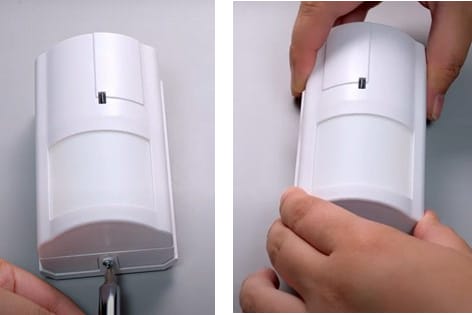
Use a flathead screwdriver or a plastic pry tool. Avoid sharp tools that can damage the sensor. Insert the tool gently into the notch or seam.
Carefully Pry Open The Cover
Apply light pressure to lift the cover. Do not force it. If the cover resists, check for small screws. Unscrew them before trying again.
Remove The Cover Safely
Once loosened, lift the cover away from the sensor. Place it on a clean surface. This keeps dirt and dust from entering the sensor.
Credit: cen.com.mx
Taking Out The Old Battery
Taking out the old battery from your ADT motion sensor is a simple process. It keeps your security system working well. Doing this step carefully helps avoid damage to the sensor. Follow clear steps to remove the battery safely.
Locate The Battery Compartment
First, find the battery compartment on the motion sensor. Usually, it is on the back or bottom. Look for a small cover or panel. This part holds the battery inside the sensor.
Open The Battery Cover
Use your fingers or a small tool to open the cover. Slide or lift the panel gently. Avoid using too much force. The cover may snap open with a light push.
Remove The Old Battery
Take out the battery carefully. Note how it is placed inside. Hold the battery with your fingers or a small tool. Pull it out slowly to prevent damage.
Dispose Of The Old Battery Properly
Do not throw the old battery in the trash. Batteries can harm the environment. Find a local recycling center or battery drop-off point. Dispose of it according to local rules.
Choosing The Right Replacement Battery
Choosing the right replacement battery for your ADT motion sensor is important. The correct battery keeps your sensor working well and lasts longer. Picking the wrong battery can cause problems or damage the device.
Different ADT motion sensors use different types of batteries. Knowing the right type helps you avoid mistakes. It also saves time and money in the long run.
Identify Your Sensor Model
Check the model number on your ADT motion sensor. This information is usually on the back or inside the battery cover. The model number tells you the exact battery size and type needed.
Check Battery Specifications
Look at the battery type listed in the sensor’s manual or on the old battery. Common types include CR123A, CR2, or AA batteries. Match voltage and size to ensure proper fit and function.
Buy Quality Batteries
Choose batteries from trusted brands for reliability. Cheap batteries may leak or die quickly. Quality batteries keep your sensor active and protect its internal parts.
Consider Battery Life
Check the battery’s expected life before buying. Longer life means fewer replacements and less hassle. This is especially important for sensors in hard-to-reach places.
Inserting The New Battery
Inserting the new battery into your ADT motion sensor is a simple task. It helps keep your security system working properly. Following the right steps ensures the sensor functions well and lasts longer.
Open The Battery Compartment
Locate the battery compartment on the back of the motion sensor. Use your fingers or a small tool to gently open the cover. Avoid forcing it to prevent damage.
Place The Battery Correctly
Insert the new battery with the positive (+) side facing up. Check the sensor’s markings for correct orientation. Proper placement is key for the sensor to work.
Close The Battery Compartment
Carefully snap the battery cover back into place. Make sure it fits tightly to protect the battery. A secure cover prevents dust and moisture from entering.
Test The Sensor
After inserting the battery, test the motion sensor. Walk in front of it to see if it detects movement. A working sensor confirms the battery is installed correctly.
Closing The Sensor Cover
Closing the sensor cover is the last step after changing the battery in your ADT motion sensor. This step protects the internal parts and keeps the sensor working properly. A secure closure prevents dust and moisture from entering. It also keeps the sensor’s battery safe and stable.
Make sure the cover fits well. A loose cover can cause the sensor to stop working. Pay attention to the edges and clips to ensure they snap into place correctly.
Aligning The Cover Properly
First, line up the cover with the sensor base. Check the shape and the clip positions. The cover should sit flat without any gaps. Hold the cover gently but firmly.
Pressing The Cover Until It Clicks
Push the cover down softly. Apply even pressure around the edges. Listen for a click sound. This indicates the cover locks in place. Do not force it too hard.
Testing The Sensor After Closing
After closing, test the sensor to confirm it works. Walk in front of it and watch the indicator light. A quick blink means the sensor is active. If no light appears, check the cover again.
Testing The Sensor
Testing the ADT motion sensor after changing the battery is important. It ensures the sensor works correctly. A working sensor keeps your home safe and secure.
Follow simple steps to check if the sensor detects motion and sends alerts. This helps avoid false alarms or missed detections.
Activate The Sensor
Turn on the sensor by closing its cover. Wait a few seconds for it to start. Most sensors have a small light that blinks when active.
Walk In Front Of The Sensor
Move slowly in front of the sensor. Watch for any lights or sounds from the device. This shows the sensor detects your movement.
Check Your Adt App Or Panel
Open the ADT app or security panel. Look for motion alerts or status updates. Confirm the sensor sends signals after detecting motion.
Test Multiple Times
Repeat the test several times at different spots. This ensures the sensor covers its full area. It also confirms the battery change fixed any issues.
Tips For Battery Maintenance
Proper battery maintenance helps your ADT motion sensor work well longer. It saves money and avoids sudden sensor failures. Follow simple tips to keep the battery healthy and ready to protect your home.
Regular care also improves sensor accuracy. A well-maintained battery means fewer false alarms and better performance. These tips are easy to follow and make a big difference.
Check Battery Status Often
Look at the sensor’s battery indicator every month. Replace the battery if the light shows low power. Waiting too long can cause the sensor to stop working.
Use The Right Battery Type
Always choose the battery recommended by ADT. Using the wrong type can damage the sensor or shorten battery life. Stick to high-quality brands for best results.
Keep Sensor Clean And Dry
Dirt and moisture can harm the battery and sensor parts. Wipe the sensor gently with a dry cloth. Avoid spraying water or cleaners directly on the device.
Remove Battery During Long Storage
If you will not use the sensor for months, take out the battery. This prevents battery leaks and corrosion. Store the battery in a cool, dry place.
Replace Batteries Annually
Change batteries once a year to avoid surprises. Even if the battery looks fine, it may lose power over time. A fresh battery keeps your sensor reliable.
Credit: www.adt.com
Frequently Asked Questions
How Do I Open The Adt Motion Sensor To Change Battery?
To open the ADT motion sensor, locate the small notch or screw on its side. Use a screwdriver or your fingernail to gently pry it open. Be careful not to damage the casing while accessing the battery compartment.
What Type Of Battery Does Adt Motion Sensor Use?
ADT motion sensors commonly use CR123A lithium batteries. Check your sensor’s manual or the existing battery for exact type. Using the correct battery ensures optimal performance and longer sensor life.
How Often Should I Replace Adt Motion Sensor Batteries?
Replace ADT motion sensor batteries every 1 to 2 years. Battery life depends on usage and environmental factors. Regular replacement prevents sensor malfunctions and keeps your security system reliable.
Will Changing The Battery Reset My Adt Motion Sensor?
No, changing the battery does not reset your ADT motion sensor. The sensor retains its settings and connection to the system. Simply replace the battery and close the compartment securely.
Conclusion
Changing the battery in your ADT motion sensor keeps your system working well. It only takes a few simple steps to do it right. Regular battery checks help avoid false alarms and sensor failures. Always use the right battery type for best results.
Keep your home safe by maintaining your security devices. Small actions like these make a big difference in security. Stay alert and keep your sensors powered up. It’s easy and important to do.