
Changing the battery in your Blink Outdoor Camera may sound simple, but a few small details can make the process smoother and safer. If you own a Blink Outdoor Camera, you probably rely on it for security and peace of mind.
But every few months, you will need to replace its batteries to keep it working well. This guide will walk you through every step, explain what to expect, and help you avoid common mistakes. Whether you are new to Blink devices or have used them for years, you will learn practical tips that make battery changes easy and reliable.
Understanding Blink Outdoor Camera Battery Basics
The Blink Outdoor Camera is designed for ease of use and durability. It runs on two AA lithium batteries, which last between 12–24 months depending on usage, weather, and camera settings. Unlike many home security cameras, Blink models do not use rechargeable batteries. This is a key point: always use non-rechargeable lithium AA batteries, not standard AA alkaline or rechargeable batteries. Lithium batteries provide longer life and stable performance, especially in extreme temperatures.
Why Battery Choice Matters
Lithium AA batteries are more expensive than regular AA batteries, but their performance is unmatched. Alkaline batteries can cause the camera to malfunction or drain quickly. Rechargeable batteries may not deliver enough power, especially in cold climates. Blink recommends Energizer Ultimate Lithium or Duracell Ultra Lithium. These brands are trusted for consistent output and reliability.
Typical Battery Lifespan
Most Blink Outdoor Cameras last about 18 months on a single set of batteries with average use (10 clips per day, average clip length). If you record more clips, use live view often, or have motion detection set high, expect faster battery drain. Cold temperatures (below 32°F) also shorten battery life by about 20–30%. Knowing these numbers helps you plan battery changes and avoid sudden camera outages.
Preparing To Change The Batteries
Before you open your camera, gather everything you need. This saves time and reduces the chance of damaging the device.
Tools And Materials
- 2 AA lithium batteries (not alkaline or rechargeable)
- Small Phillips screwdriver (some models)
- Soft cloth
- Ladder (if camera is mounted high)
- Gloves (optional, for grip and cleanliness)
Safety And Handling Tips
- Power off the camera from the Blink app before starting.
- Avoid touching the lens or sensor area.
- Work in a dry environment; moisture can damage electronics.
- Keep spare batteries on hand to avoid gaps in security.
Checking Battery Type And Compatibility
If you are unsure which batteries to buy, check the original packaging or look at the inside of the battery compartment. The label will show AA lithium. Never mix new and old batteries. Always replace both batteries at the same time.

Credit: www.youtube.com
Step-by-step Battery Replacement Guide
Changing the battery is straightforward, but doing it correctly ensures your camera stays secure and functional.
1. Disconnect Camera From Mount
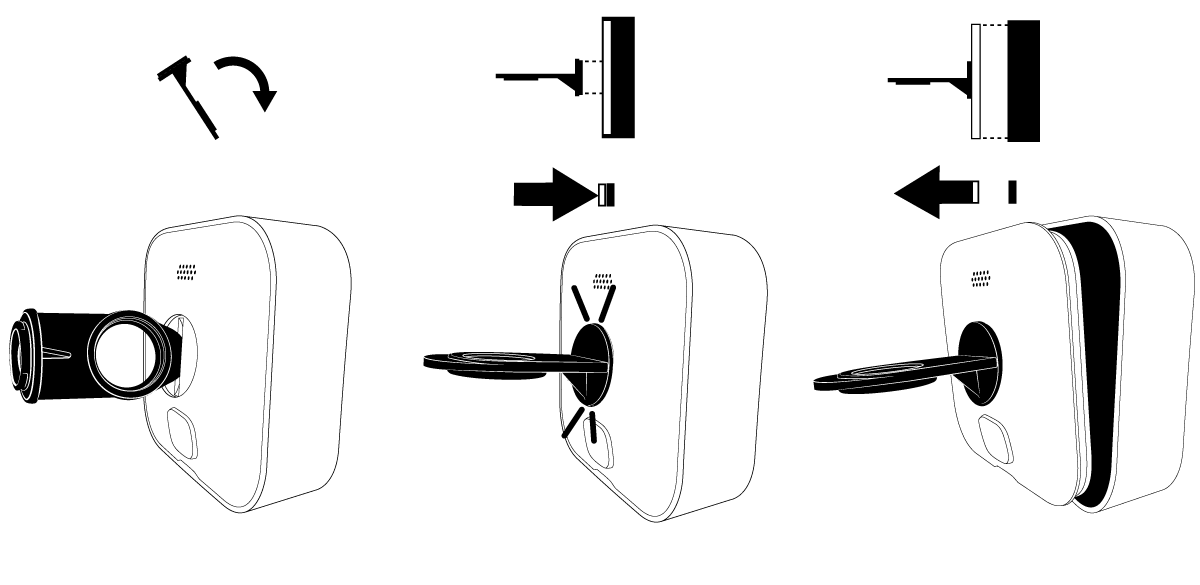
If your camera is mounted outside, use a ladder carefully. Most Blink Outdoor Cameras have a simple mounting bracket. Hold the camera firmly and slide it off the bracket. For some models, you may need to release a clip or unscrew a fastener.
2. Open The Battery Compartment
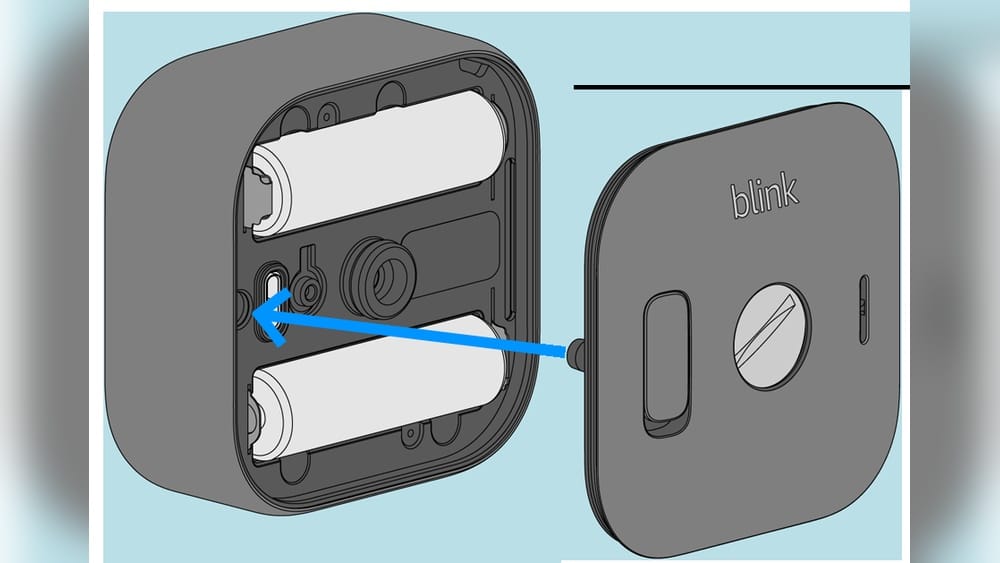
The back of the camera has a latch or screw. For the newer Blink Outdoor model, press the release button at the bottom and gently pull the cover off. Older models may require a Phillips screwdriver. Place the cover aside, making sure not to lose any screws.
3. Remove Old Batteries
Take out both AA batteries. Inspect them for corrosion or leakage. Dispose of them according to local regulations—lithium batteries should not go in regular trash.
4. Clean The Battery Contacts
Use a soft cloth to wipe the battery contacts inside the compartment. Dust or corrosion can prevent proper electrical connection. If you see green or white residue, use a cotton swab dipped in vinegar, then dry thoroughly.
5. Insert New Batteries
Place the new AA lithium batteries in the correct orientation. The compartment will have clear plus (+) and minus (-) signs. Make sure both batteries are seated firmly.
6. Close The Compartment
Align the cover and press it back in place. If your model uses screws, tighten them gently—do not overtighten, as this can crack the plastic.
7. Reattach Camera And Power On
Slide the camera back onto the mount. Open the Blink app, select the camera, and check battery status. If the app shows “Battery OK,” you are finished.
Troubleshooting Common Problems After Battery Change
Sometimes, a battery change causes unexpected issues. Here’s how to fix the most common ones.
Camera Won’t Turn On
- Double-check battery orientation.
- Make sure both batteries are lithium, not alkaline.
- Clean contacts again.
- Try another pair of batteries from a different pack.
Camera Shows Low Battery
- Confirm you used fresh lithium batteries.
- Restart the camera via the Blink app.
- Remove and reinsert batteries.
- If problem persists, check for firmware updates in the app.
Camera Not Connecting To Sync Module
- Move camera closer to the Sync Module.
- Power cycle the Sync Module (unplug, wait 30 seconds, plug back in).
- Check Wi-Fi connection strength.
- Re-add camera in the Blink app if needed.
Corroded Battery Contacts
Corrosion is rare, but if you see it, clean contacts with vinegar and dry well. Severe corrosion may require professional repair.
Battery Door Won’t Close
Check for debris or misaligned batteries. Never force the door; this can break the latches.
Credit: support.blinkforhome.com
Practical Tips For Longer Battery Life
You can stretch battery life with a few smart habits.
- Reduce clip length: Set motion clips to 10 seconds instead of 30.
- Lower motion sensitivity: Only record important movement.
- Avoid excessive live view: Using live view drains batteries fast.
- Disable audio: If you don’t need sound, turn it off in settings.
- Keep firmware updated: Updates often improve battery efficiency.
Seasonal Battery Planning
If you live in a cold area, consider changing batteries before winter. Lithium batteries perform better in cold, but still lose power faster.
Monitoring Battery Health
The Blink app shows battery status, but it’s not exact. If you notice shorter clip times or missed events, check batteries even if the app says they’re fine.
Comparing Battery Types For Blink Outdoor Camera
Not all AA batteries are equal. Here’s a quick comparison:
| Battery Type | Average Lifespan | Temperature Range | Cost (per pair) | Recommended? |
|---|---|---|---|---|
| Lithium (Energizer Ultimate) | 18–24 months | -40°F to 140°F | $4–$6 | Yes |
| Alkaline | 2–6 months | 0°F to 120°F | $1–$2 | No |
| Rechargeable NiMH | 1–3 months | 32°F to 100°F | $3–$7 | No |
Lithium batteries cost more but deliver consistent performance, especially in outdoor conditions. Alkaline batteries may seem cheaper but require frequent replacements and risk camera downtime.
How Often Should You Change Batteries?
Most users change batteries once a year. However, this depends on:
- Camera activity (number of clips)
- Temperature extremes
- Live view usage
- Firmware updates
Heavy users may need to change batteries every 6–9 months. Light users can go almost 2 years. Always keep a spare set ready.
Signs It’s Time To Change Batteries
- Battery status shows “Low” or “Replace Soon” in the app
- Clips are shorter than usual
- Camera misses events or fails to record
- Live view won’t activate
Blink Outdoor Camera Battery Change: Real-world Examples
Let’s look at two practical examples:
Example 1: Suburban Home, Moderate Use
Sarah uses her Blink Outdoor Camera to monitor her backyard. She gets about 8 motion clips per day, mostly during the afternoon. She changed batteries after 15 months. Her main tip: “I always use lithium batteries and check the app every few weeks. I noticed battery life drops faster in winter.”
Example 2: Business Premises, Heavy Use
Mike manages a small shop with a Blink Outdoor Camera at the entrance. His camera records 25–30 clips daily, plus live view checks. Batteries last about 7 months. Mike keeps a pack of lithium batteries on hand and schedules battery changes for the first day of each quarter. He says: “I avoid alkaline batteries because they failed after only two months.”
These examples show how usage patterns affect battery life. Adjust your battery change schedule to match your needs.
Improving Security During Battery Changes
Security cameras are most vulnerable when you change batteries. Here’s how to stay safe:
- Change batteries during low-activity hours (early morning or midday)
- Notify household members or coworkers when camera is offline
- Keep spare batteries within reach to minimize downtime
- Check camera position after remounting—it can shift during handling
Blink Outdoor Camera Models: Battery Change Differences
While most Blink Outdoor Cameras use the same battery process, some models have minor differences.
| Model | Battery Access | Tool Needed | Special Features |
|---|---|---|---|
| Blink Outdoor (2020) | Release latch | None | Weatherproof, easy access |
| Blink XT2 | Screw back | Phillips screwdriver | Older design, tighter seal |
| Blink Indoor | Release latch | None | Indoor use only |
Always check your model before starting. Newer Blink Outdoor models are easiest to open; older XT2 models require a screwdriver and a little more care.

Credit: www.youtube.com
Environmental Impact And Battery Disposal
Lithium batteries must be disposed of properly. Throwing them in regular trash can harm the environment. Most cities have battery recycling programs. Place used batteries in a sealed bag and drop them at a recycling center. Never burn or crush lithium batteries—they can leak toxic chemicals or explode.
Battery Recycling Locations
In the US, many stores like Home Depot and Best Buy accept batteries for recycling. For more information, visit the EPA’s battery disposal guide: EPA Battery Disposal.
Maintaining Your Blink Outdoor Camera After Battery Change
A battery change is a good time to check other parts of your camera.
- Clean the lens and sensor with a soft, dry cloth.
- Inspect the mounting bracket for cracks or wear.
- Check Wi-Fi signal strength in the Blink app.
- Update camera firmware if prompted.
These steps keep your camera running smoothly and extend its life.
Battery Change Costs: What To Expect
Lithium batteries are not cheap, but the value they provide is high. Here’s a quick summary:
- Average annual cost: $8–$12 per camera (2 lithium batteries per year)
- Bulk purchase savings: Buying packs of 8–12 batteries can reduce per-unit cost by 15–20%
- Avoiding alkaline batteries: Saves time and prevents camera downtime
Compare this with professional security cameras that need expensive battery packs or wired installations. Blink Outdoor Cameras are cost-effective for home and small business users.
Advanced Tips: Avoiding Battery Drain
Most guides mention basic tips, but here are two insights many beginners miss:
- Wi-Fi signal strength affects battery life. If your camera is far from your router, it works harder to stay connected, draining batteries faster. Place your Sync Module closer to cameras, or use a Wi-Fi extender.
- Firmware bugs can cause rapid battery drain. After changing batteries, check for firmware updates in the Blink app. Updates often fix bugs and improve battery efficiency. If you notice sudden drops in battery life, updating firmware can solve the problem.
Common Mistakes When Changing Batteries
Avoid these errors for a stress-free experience:
- Using alkaline or rechargeable batteries: Always use lithium AA.
- Installing batteries backward: Check the + and – signs.
- Forgetting to clean contacts: Dust can block power flow.
- Over-tightening screws: Can crack the battery door.
- Not checking camera status after battery change: Always use the app to confirm.
Blink Outdoor Camera Battery Change: Comparison With Other Brands
How Does Blink Compare With Other Wireless Security Cameras?
| Brand | Battery Type | Average Lifespan | Battery Cost | Ease of Change |
|---|---|---|---|---|
| Blink Outdoor | AA lithium | 18 months | $4–$6 | Easy |
| Arlo Pro | Rechargeable pack | 4–6 months | $30–$50 | Moderate |
| Ring Stick Up Cam | Rechargeable pack | 6–8 months | $20–$35 | Moderate |
| Wyze Cam Outdoor | Rechargeable pack | 3–6 months | $15–$25 | Easy |
Blink’s use of AA lithium batteries makes changes quick and affordable. Other brands use proprietary battery packs, which are expensive and require special chargers.
Frequently Asked Questions
How Do I Know When To Change Blink Outdoor Camera Batteries?
The Blink app will show a “Battery Low” or “Replace Soon” message. You may also notice shorter clips, missed recordings, or live view failures. If unsure, change batteries once a year as a safe rule.
Can I Use Rechargeable Batteries In My Blink Outdoor Camera?
No. Blink Outdoor Cameras are designed for non-rechargeable lithium AA batteries. Rechargeable batteries do not provide enough voltage and may cause camera errors or poor performance.
What Happens If I Use Alkaline Batteries?
Alkaline batteries will work for a short time, but they drain quickly and can cause the camera to malfunction. They are not recommended for Blink Outdoor Cameras.
Is It Safe To Change Batteries In Cold Or Rainy Weather?
It’s best to change batteries in dry conditions. Moisture can damage the camera. If you must change batteries outdoors, use a cover or towel to protect the device.
Where Can I Recycle Used Lithium Batteries?
Most hardware stores and electronics retailers accept used batteries for recycling. Check local regulations or visit the EPA’s guide: EPA Battery Disposal.
Changing the batteries in your Blink Outdoor Camera is a simple job, but doing it right keeps your home or business secure. By following these steps, choosing the correct batteries, and avoiding common mistakes, you ensure your camera works smoothly for months.
Smart battery habits and regular checks mean you never miss a moment. With this guide, you can confidently keep your Blink Outdoor Camera running at its best.