
Changing the battery in your car’s remote control is one of those simple tasks that can save you both time and frustration. Many people feel anxious when their car key fob stops working, thinking they need to visit a dealership or call a professional.
In reality, replacing the battery is something you can do yourself in just a few minutes with basic tools. This guide will walk you through every detail, explain the common pitfalls, and share insider tips to make the process smooth—even if you’ve never done it before.
Let’s dive into everything you need to know about changing a car remote control battery.
Why Car Remote Batteries Matter
A car remote, often called a key fob, is essential for modern vehicles. It unlocks doors, opens the trunk, and sometimes even starts the engine. When the battery is weak or dead, these functions can stop working.
It’s not just about convenience. A working remote fob can improve your safety, especially in dark parking lots or during emergencies. Some cars may even refuse to start if the key fob battery is too low to communicate with the vehicle’s computer.
Surprising fact: Most car remote batteries last 2–4 years, but factors like temperature and frequency of use can shorten their life. Extreme cold or heat can drain the battery faster.
Signs Your Car Remote Battery Needs Replacing
Don’t wait until your remote stops working completely. Look for these warning signs:
- Reduced Range: You need to stand closer to the car for it to unlock.
- Unresponsive Buttons: Sometimes the remote works, sometimes it doesn’t.
- Warning Light: Some cars display a dashboard message like “Key Fob Battery Low.”
- No Signal: The remote stops working entirely, even after trying new positions.
It’s easy to confuse a dying battery with other problems, like a faulty remote or a car with a drained main battery. If your remote works sometimes but not always, it’s almost always the battery.
Types Of Car Remotes And Batteries
Not all remotes are the same. There are several types, each using different batteries and opening methods.
Common Car Remote Types
- Standard Key Fobs: These have buttons for lock/unlock and sometimes trunk or alarm.
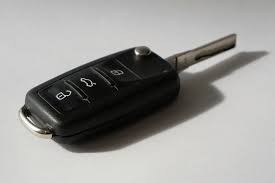
- Switchblade Keys: The key blade folds into the fob. The battery is usually inside the fob part.
- Smart Keys (Proximity): These do not require pressing buttons—just approach the car to unlock.
- Key Cards: Used in some modern vehicles, usually thinner with flat batteries.
Typical Battery Types
Most car remotes use small, round coin cell batteries. The most common sizes are:
- CR2032: 20mm diameter, 3.2mm thick, 3V
- CR2025: 20mm diameter, 2.5mm thick, 3V
- CR2016: 20mm diameter, 1.6mm thick, 3V
Some remotes use smaller or less common batteries, so always check your owner’s manual or open the remote to see the exact type.
Here’s a quick comparison of common battery types:
| Battery Model | Diameter (mm) | Thickness (mm) | Voltage | Typical Use |
|---|---|---|---|---|
| CR2032 | 20 | 3.2 | 3V | Key fobs, watches |
| CR2025 | 20 | 2.5 | 3V | Key fobs, calculators |
| CR2016 | 20 | 1.6 | 3V | Key cards, remotes |
Non-obvious insight: Some car remotes can technically accept more than one size (e.g., CR2025 or CR2032), but using the wrong thickness may cause poor contact or damage the housing.
What You Need Before Starting
Preparation makes the process much easier. Gather these items before you begin:
- Replacement battery: Make sure it’s the exact type (model and size).
- Small flathead screwdriver: For opening the remote. A coin or fingernail may work in some cases.
- Clean hands: Oil or dirt can damage the contacts.
- Soft cloth: For cleaning the inside if dirty.
- Owner’s manual: For instructions specific to your car.
Some modern key fobs are sealed to keep water out, requiring a thin plastic tool instead of metal. Never force the remote open—look for a notch or seam.
Credit: www.catautokeys.co.uk
How To Open Your Car Remote
This is the step that worries most people. But with the right technique, it’s easy and safe.
Step-by-step Process
- Locate the seam or notch: Most remotes have a small groove or slot where you can insert a tool.
- Insert the tool: Use a small flathead screwdriver, coin, or plastic prying tool.
- Gently twist or pry: Apply gentle pressure. If it doesn’t open, check for hidden screws (sometimes under a brand logo or sticker).
- Separate the halves: Open the remote carefully to avoid damaging the circuit board or buttons.
Important tip: Work on a flat surface and keep your hands steady. Small parts like springs or buttons can pop out if you’re not careful.
Non-obvious insight: Take a quick photo of the open remote before removing the old battery. This will help you remember how everything fits during reassembly.
Removing The Old Battery
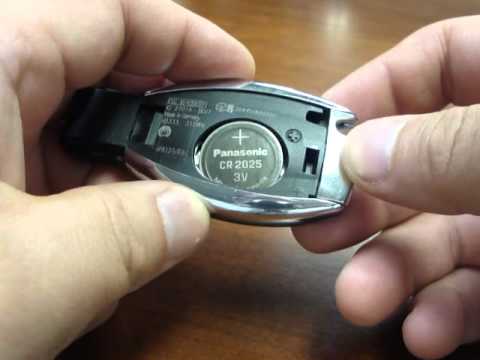
Once inside, you’ll see the battery clipped in place.
- Identify the battery: Look for a round, silver cell—usually marked with the battery code (e.g., CR2032).
- Note battery orientation: One side is marked “+” for positive. Remember which way it faces.
- Release the battery: Most batteries are held by small metal clips. Gently push or slide the battery out using your tool or fingernail.
Avoid using too much force. Metal tools can damage the circuit board if you slip.
Tip: If the contacts are dirty or corroded, wipe them with a soft cloth. Do not use water or cleaning sprays.
Installing The New Battery
This is where accuracy matters. The battery must be installed in the correct orientation and seated firmly.
- Check the battery code: Make sure your new battery matches the old one.
- Insert the battery: Align the positive (“+”) and negative (“-”) sides as before.
- Press firmly: The battery should snap into place under the clips. If it feels loose, double-check the orientation.
- Do not touch contacts: Finger oils can reduce battery life or cause poor connection. Hold the battery by the edges.
Practical example: If your old battery was a CR2025, and you try to install a thicker CR2032, the case may not close properly. Always use the exact size.
Reassembling The Remote
Before snapping the remote shut, inspect everything:
- Are the buttons in their correct positions?
- Is the circuit board aligned?
- Is the battery snug?
- Align the halves: Match the two sides carefully.
- Press together: Squeeze gently until you hear a click or snap.
- Check the seams: There should be no gaps. If there’s resistance, open and realign.
- Test the buttons: Before putting the remote away, press each button to check for normal feel.
Some remotes have a rubber gasket for water resistance. Make sure it’s in place before closing.
Testing Your Remote
Don’t wait until you need to use your car. Test the remote immediately:
- Press buttons near the car: Does the car lock/unlock as before?
- Check range: Walk away from the car and test at different distances.
- Try all functions: If your fob has trunk or panic buttons, test these too.
If the remote doesn’t work, open it again and check:
- Is the battery installed correctly?
- Are the contacts clean?
- Is the battery new (not dead out of the package)?
Expert tip: If your remote still fails, try the old battery again. If it works, the new battery may be defective or the wrong type.
Special Cases: Advanced Remotes
Some vehicles use remotes with special features that may require extra steps.
Smart Keys
Smart keys, or proximity keys, may require reprogramming after a battery change. Usually, this is not needed for just a battery swap, but if the remote stops working, consult your car’s manual.
Warning: Some luxury brands (e.g., BMW, Mercedes) have remotes that are glued or require special tools. In these cases, it’s safer to visit a dealer or locksmith.
Keyless Start Systems
If your car uses a push-button start, a dead remote battery may prevent starting. Most cars have a hidden backup—try holding the fob against the start button or a marked spot near the steering column.

Credit: www.youtube.com
Common Mistakes To Avoid
Even simple jobs can go wrong. Here are the mistakes people often make:
- Using the wrong battery size: Forcing a too-thick battery can break the remote.
- Installing backwards: The “+” side must match the original orientation.
- Touching the circuit board: Static electricity or oils can cause problems.
- Losing small parts: Springs and buttons are easy to lose. Work over a tray or towel.
- Not testing before reassembly: Always test the remote before closing fully.
When To Replace The Whole Remote
Sometimes, replacing the battery won’t fix your problem. Consider a full remote replacement if:
- The remote is cracked or water-damaged.
- The buttons are worn out or unresponsive.
- The circuit board has corrosion.
- The remote works only after repeated pressing, even with a new battery.
Replacement remotes can be programmed at dealerships, locksmiths, or even at home for many models.
How Much Does It Cost?
Changing a car remote battery yourself is inexpensive. A single coin cell battery costs between $2 and $8, depending on the brand. If you go to a dealership, expect to pay $20–$50 including labor.
Here’s a quick cost comparison:
| Service | Typical Cost | Time Required |
|---|---|---|
| DIY Battery Replacement | $2–$8 | 5–15 minutes |
| Dealership Replacement | $20–$50 | 30–60 minutes (including wait) |
| Professional Locksmith | $10–$30 | 10–20 minutes |
Insider tip: Always buy batteries from reputable stores. Cheap batteries from unknown sources may be old or fake.
How Often Should You Change The Battery?
On average, a car remote battery lasts 2–4 years. If you use the remote often (e. g. , for multiple lock/unlock cycles per day), it may die sooner. Cold climates and storing the key near electronics (phones, tablets) can also shorten battery life.
Proactive approach: Replace your battery every 2 years, even if it seems to work fine. This reduces the risk of being locked out unexpectedly.
Environmental Concerns: Disposing Old Batteries
Coin cell batteries contain chemicals and should not be thrown in regular trash. Many stores and recycling centers accept used batteries. Look for a battery recycling box at electronics stores, supermarkets, or community centers.
Fact: One coin cell battery can pollute up to 60,000 liters of water if not disposed of properly.
Quick Reference Guide: Steps To Change A Car Remote Battery
For easy recall, here’s a summary of the process:
- Gather tools and the correct battery.
- Open the remote at the seam or notch.
- Remove the old battery, noting its orientation.
- Clean contacts if needed.
- Insert the new battery, matching the + and – sides.
- Reassemble the remote.
- Test all functions near the car.
Keep this guide handy for the next time your remote starts acting up.
Credit: www.keylessshop.com
How To Find The Right Battery For Your Remote
Finding the correct battery is crucial. Here’s how to do it:
- Check the owner’s manual: It usually lists the battery type.
- Look inside the remote: The battery code is printed on the battery itself.
- Search online: Enter your car’s make, model, and year plus “key fob battery.”
- Ask at auto parts stores: Most staff can help you find the right type.
Pro tip: Some websites let you enter your car details and show the correct battery. For reliable information, see the official Energizer Keyless Entry Battery Guide.
How To Extend Your Remote Battery Life
You can get the most from your new battery by following these tips:
- Store remotes away from electronics: Phones and tablets can drain fob batteries through electromagnetic interference.
- Keep remotes at room temperature: Avoid leaving them in hot cars or freezing garages.
- Use only when needed: Excessive button pressing reduces battery life.
- Clean contacts: Occasionally open and wipe the battery contacts gently.
Is It Safe To Change The Battery Yourself?
Yes, changing a car remote battery is safe for almost all modern remotes. The voltage is low, and there’s minimal risk of damage if you use basic care.
Exceptions: If your remote is part of a smart key system with a rechargeable battery, it may require professional service. Some hybrid or electric vehicles have special safety features—check your manual.
Troubleshooting After Battery Replacement
If your remote does not work after you’ve changed the battery:
- Double-check orientation: The positive side should match the markings.
- Try another new battery: Some batteries are defective out of the package.
- Clean the contacts: Even a thin layer of dirt can block the circuit.
- Reset the remote: Some cars require you to press buttons in a sequence or hold the fob near the start button.
If none of these fixes work, the remote itself may be faulty.
When To Call A Professional
Most people can change a car remote battery themselves. However, seek professional help if:
- The remote is glued or sealed with no visible way to open it.
- You see corrosion or water damage inside.
- The remote still doesn’t work after several battery changes.
Dealerships and automotive locksmiths can test and replace remotes, but for most people, this is a last resort.
The Future Of Car Remotes
Car remote technology is always evolving. Some new cars use smartphone apps instead of physical remotes. Others use rechargeable key fobs with USB charging. As technology advances, battery changes may become less common—but for now, most drivers will still need to change a car remote control battery every few years.
Frequently Asked Questions
How Do I Know Which Battery My Car Remote Needs?
Most remotes use coin cell batteries, such as CR2032 or CR2025. Check your car’s manual or open the remote to see the battery code printed on the old battery. You can also ask at an auto parts store.
Can I Use A Different Battery Type If I Can’t Find The Exact One?
No, always use the exact battery code. A battery that’s too thick or thin may not fit or could damage your remote. If you’re in a pinch, a slightly thinner battery (e. g. , CR2016 instead of CR2025) may work temporarily but is not recommended for long-term use.
Will I Need To Reprogram My Car Remote After Changing The Battery?
Usually, no. Most remotes work immediately after a battery change. Some advanced smart keys may need reprogramming—refer to your owner’s manual if the remote does not work after installing a new battery.
How Long Does A Car Remote Battery Last?
Most car remote batteries last 2–4 years. Frequent use, extreme temperatures, and storing the remote near electronics can shorten battery life.
Where Can I Recycle My Old Car Remote Battery?
Many electronics stores, supermarkets, and recycling centers accept used coin cell batteries. Look for special recycling bins or ask staff for help. Never throw batteries in the regular trash, as they can harm the environment.
Changing your car remote battery is a quick and empowering task. With the right tools and a bit of care, you’ll save money, avoid dealership visits, and keep your car’s security features working their best. Next time your remote feels sluggish, you’ll know exactly what to do.