
Keeping your Eufy Solar Camera charged is essential for home security and peace of mind. Many people buy solar cameras expecting “set and forget” power, but real-life conditions can be more complex. Weather, sunlight hours, camera settings, and installation choices all affect how efficiently your camera charges. If you want your Eufy Solar Camera to perform at its best—day and night—there’s more to know than simply pointing the panel at the sky.
This guide explains, step by step, how to charge your Eufy Solar Camera correctly. You’ll learn how the camera’s solar panel works, the best installation methods, what to do when sunlight is low, and how to troubleshoot common charging issues.
Whether you’re installing the camera for the first time or trying to solve battery problems, you’ll find practical tips, clear data, and expert insights here.
Understanding The Eufy Solar Camera And Its Power System
The Eufy Solar Camera, such as the EufyCam S40 or the Eufy SoloCam S40, uses a built-in rechargeable battery and a solar panel for charging. The solar panel is designed to keep the battery topped up with just a few hours of sunlight each day. But what does this mean in real life?
The camera’s battery capacity is typically 13,400 mAh (milliampere-hours) for models like the SoloCam S40. Eufy claims that with normal use, the solar panel can keep the battery charged indefinitely, as long as the camera gets at least two hours of direct sunlight daily. However, actual charging speed depends on factors such as:
- Solar panel angle
- Amount of direct sunlight
- Weather conditions
- Camera settings (like detection sensitivity and recording length)
- Obstacles (dirt, shade, leaves, etc.)
A key point: If your camera is installed in a location with limited sunlight, the battery may eventually run low, and you’ll need to charge it manually.
Main Components
- Rechargeable battery (inside the camera)
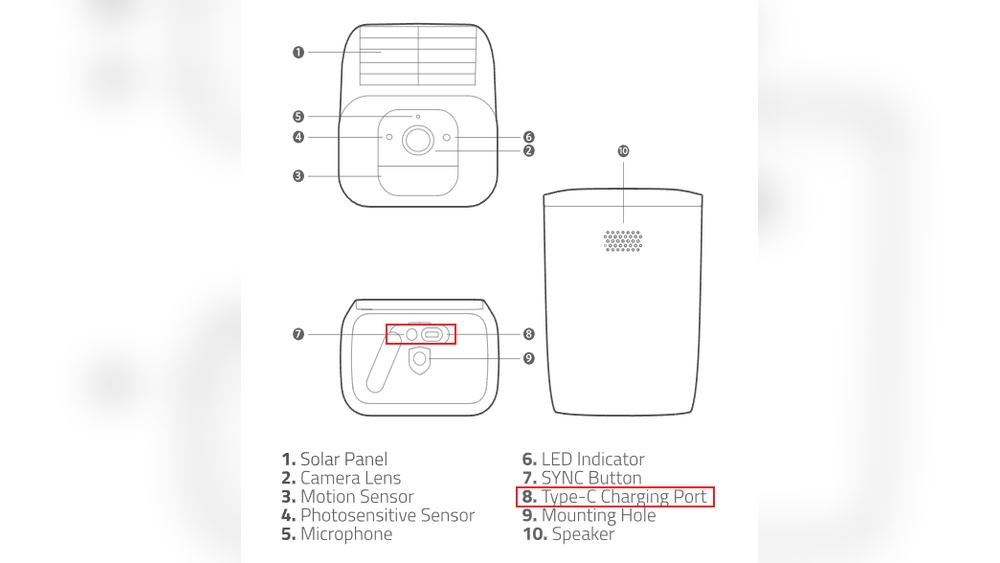
- Integrated solar panel (built-in or attached via cable, depending on model)
- Micro-USB or USB-C port for manual charging
How Solar Charging Works
During daylight, sunlight hits the solar panel, generating electricity to charge the battery. The camera uses power for recording, motion detection, and sending notifications. Ideally, the solar panel replaces all the energy used daily, keeping the battery full.
But if the camera uses more power than the panel provides, the battery level drops. This is especially likely in winter, in shaded areas, or if the camera records many events.
Choosing The Right Location For Maximum Solar Charging
Placement is the most important factor for efficient charging. A camera in a poor spot may never reach full power, no matter how good the panel is.
Steps To Find The Best Spot
- Look for direct sunlight: The solar panel must face the sun for at least 2-3 hours each day. South-facing walls or roofs (in the Northern Hemisphere) are usually best.
- Avoid shade: Trees, walls, gutters, or eaves can block sunlight. Even partial shade for part of the day reduces charging speed.
- Install at the right angle: Most panels work best at a tilt of 30–45 degrees. This angle helps maximize sunlight throughout the year.
- Keep it clean: Dirt, dust, bird droppings, or snow can block sunlight. The panel surface should be wiped clean every few weeks, especially after storms or pollen season.
Example: Good Vs. Bad Placement
| Placement Example | Direct Sun Hours | Expected Charging Performance |
|---|---|---|
| South-facing wall, no shade | 5–7 hours | Excellent |
| Under roof eave, partial shade | 1–2 hours | Poor |
| North-facing wall (Northern Hemisphere) | <1 hour | Very poor |
Non-obvious insight: Even if a spot looks “bright,” the panel only charges efficiently with direct sunlight, not just daylight. Dappled or reflected light is much less effective.

Credit: www.youtube.com
How To Install And Set Up Your Eufy Solar Camera For Charging
Tools And Items You’ll Need
- Eufy Solar Camera and solar panel kit
- Mounting screws and anchors (usually included)
- Power drill or screwdriver
- Smartphone with the Eufy Security app
- Microfiber cloth (for cleaning the panel)
- Optional: Ladder, level, compass app
Step-by-step Installation
- Choose the best location (see above).
- Mount the camera and panel using the supplied bracket. Make sure the solar panel faces the sun.
- Connect the solar panel cable to the camera (if it’s a separate panel). Some models have the panel built in.
- Check the angle using a smartphone compass app. South-facing is best in the US, while north-facing is best in Australia.
- Tighten all screws and ensure the camera is secure.
- Wipe the panel clean before finishing.
- Pair the camera with the Eufy Security app and check battery status.
- Test the camera by walking in front of it and checking notifications.
Practical tip: Do not install the camera under thick tree branches or near gutters that may drip water or leaves onto the panel.
Example Installation Time
Most people can install a Eufy Solar Camera in 20–40 minutes with simple tools.
Monitoring Charging Status And Battery Level
Knowing how to check your camera’s battery and charging status is essential. The Eufy Security app gives you real-time updates and warnings.
How To Check Battery In The App
- Open the Eufy Security app on your phone.
- Tap your camera in the device list.
- Look for the battery icon—it shows the percentage and charging status.
- If the solar panel is charging, you’ll see a charging symbol (usually a lightning bolt).
- The app may display notifications if the battery is low or if charging is not working.
What Battery Levels Mean
- 90–100%: Fully charged, working well
- 50–89%: Normal, no action needed
- 20–49%: Monitor usage; charging may be too slow
- Below 20%: Risk of shutdown; check panel and settings
Non-obvious insight: A battery stuck at 70–80% is normal during cloudy periods. The camera uses power even while charging, so it may never reach 100% in winter or rainy seasons.
How Much Sunlight Is Enough?
Eufy recommends at least two hours of direct sunlight per day for most solar camera models. But what happens if you get less, or the camera is used heavily?
Typical Solar Panel Output
- Panel size: 2–5 watts (depends on model)
- Charging rate: About 300–500 mAh per hour of full sun
- Daily need: Camera typically uses 100–300 mAh per day (varies with motion events and settings)
| Direct Sunlight Hours | Estimated Daily Charge (mAh) | Can Sustain Camera? |
|---|---|---|
| 2 hours | 600–1000 | Yes, for normal use |
| 1 hour | 300–500 | Maybe, if event recording is low |
| 0 hours | 0 | No, battery will slowly drain |
Tip: If your camera is in a high-traffic area and records many events, it may need more than 2 hours of sun. Consider reducing sensitivity or recording length if your battery drains quickly.
Manual Charging: When And How To Do It
Even with a solar panel, there may be times when you need to charge your Eufy camera manually. This is common after long periods of rain, snow, or heavy use.
Signs You Need Manual Charging
- Battery drops below 20% and stays low
- App says “Not charging” or “Low power mode”
- The camera stops recording or sending alerts
Manual Charging Steps
- Remove the camera from its mount (if needed).
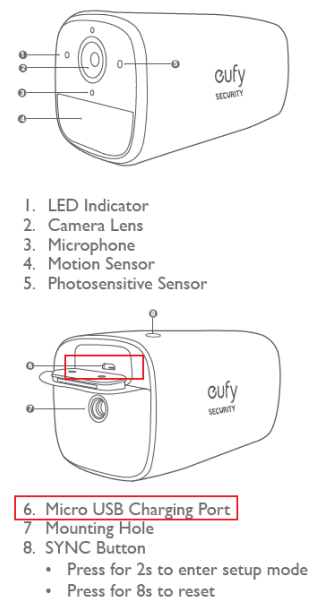
- Connect a USB cable (Micro-USB or USB-C, depending on model) to the charging port.
- Plug into a wall adapter (5V/2A is recommended for fastest charging).
- Wait 6–10 hours for a full charge (for a 13,400 mAh battery).
- Check the battery level in the Eufy app before reinstalling.
- Re-mount the camera and reconnect the solar panel.
Example: If your Eufy SoloCam S40’s battery drops to 10%, a full charge may take 8 hours with a standard phone charger.
Practical tip: Avoid charging from a computer USB port—it’s much slower than a wall adapter.
How Often Is Manual Charging Needed?
With good placement and enough sunlight, manual charging may only be needed once per year, if ever. But in shaded locations, manual charging could be needed every few months.
Credit: service.eufy.com
Optimizing Camera Settings For Maximum Battery Life
Camera settings make a big difference in power use. If your camera records every car, cat, or leaf, it will use much more power than a camera that only records people.
Important Settings To Check
- Motion detection sensitivity: Lower sensitivity = fewer false triggers = less power used.
- Recording length: Reduce clip length to 10–15 seconds if possible.
- Notification settings: Turn off unnecessary alerts.
- Activity zones: Set up zones so only important areas trigger recording.
- Night vision: Infrared LEDs use more power at night. If possible, use only when needed.
- Frequency of live viewing: Watching the camera live drains battery quickly.
Practical insight: Many users forget to set activity zones, leading to hundreds of false alarms and rapid battery drain.
Example: Power Use By Feature
| Feature | Approximate Power Use Increase |
|---|---|
| High sensitivity motion detection | +30% |
| Long recording clips (30s+) | +20% |
| Frequent live view (10+ times/day) | +25% |
Small changes to settings can double battery life, especially in busy areas.
Common Problems And How To Fix Them
Even with careful installation, you might face some charging issues. Here are the most common problems and solutions.
1. Solar Panel Not Charging
- Check the connection: Make sure the cable is firmly plugged in.
- Clean the panel: Dust and dirt block sunlight.
- Reposition for sunlight: Move the panel to a sunnier spot.
- Test with manual charge: If it charges with USB but not solar, the panel or cable may be faulty.
2. Battery Drains Quickly
- Check for frequent triggers: Reduce sensitivity or use activity zones.
- Update firmware: Sometimes updates fix bugs.
- Look for shade: Move the panel if possible.
- Replace the panel: Old or damaged panels may charge slowly.
3. Battery Never Reaches 100%
- Normal in winter: Less sunlight means lower charging.
- Panel angle: Adjust for better sun exposure.
- Heavy use: Reduce live views and notifications.
Uncommon insight: Sometimes, a nearby window reflects sunlight onto the panel for part of the day. This can help or hurt, depending on the angle—test and observe battery level changes.
4. App Shows “not Charging” Even In Sunlight
- Restart the camera: Turn off and on again.
- Check the app version: Update the Eufy Security app.
- Inspect the port: Make sure the charging port is clean and undamaged.
Seasonal Changes And How To Adapt
Solar charging is not the same all year round. In winter, the sun is lower and days are shorter. This means less energy for your camera.
How Seasons Affect Charging
- Winter: Sun is lower in the sky, days are shorter, often cloudy. Expect slower charging.
- Summer: Longer days, higher sun, more energy—battery often stays full.
How To Improve Winter Charging
- Increase the panel angle: Tilt it more vertically (up to 60 degrees) to catch low winter sun.
- Trim nearby branches: Remove anything that casts extra shade.
- Manually charge before winter: Top up the battery before the cloudy season starts.
- Monitor usage: Lower sensitivity and recording length during winter.
Practical tip: In northern states (e.g., Minnesota, Maine), winter solar output can be half of summer output. Plan accordingly.
Real-world Examples: Charging Performance In Different Environments
To give you a better idea of what to expect, here are some real-world examples from Eufy users and reviewers.
Example 1: Sunny Suburban Home
- Location: Texas, south-facing wall
- Sunlight: 6+ hours/day
- Usage: 8–10 motion events/day
- Result: Battery stays above 90% all year, no manual charging needed
Example 2: Shady City Apartment
- Location: New York, courtyard with tall buildings
- Sunlight: 1 hour/day
- Usage: 20+ events/day (busy street)
- Result: Battery drops to 30% in winter, requires manual charge every 2–3 months
Example 3: Rural Cabin
- Location: Colorado mountains, east-facing wall
- Sunlight: 3–4 hours/day (morning only)
- Usage: 2–3 events/day (low traffic)
- Result: Battery stays between 60–90% year-round
These examples show that sunlight and usage are the two most important factors for solar camera charging.
Comparing Eufy Solar Camera To Other Brands
How does Eufy’s solar charging compare to other brands like Arlo, Reolink, or Ring?
| Brand | Battery Size (mAh) | Solar Panel Output (W) | Minimum Sun Needed |
|---|---|---|---|
| Eufy SoloCam S40 | 13,400 | 2.5 | 2 hours/day |
| Arlo Essential XL | 13,000 | 2.0 | 2–3 hours/day |
| Ring Stick Up Cam Solar | 6,040 | 2.0 | 2 hours/day |
| Reolink Argus 3 Pro | 6,000 | 2.8 | 1–2 hours/day |
Eufy’s battery is larger than most competitors. This means it can last longer during cloudy weather, but also takes a bit longer to recharge fully.
How To Clean And Care For Your Solar Panel
A dirty or blocked solar panel can reduce charging by up to 50%. Keeping it clean is simple but often forgotten.
Cleaning Steps
- Use a soft, damp cloth to wipe dust and dirt off the panel.
- Remove leaves or twigs by hand.
- For bird droppings or sticky residue, use mild soap and water, then rinse.
- Avoid harsh chemicals or abrasive sponges, which can scratch the panel.
- Check after storms or pollen season for extra buildup.
Practical tip: Clean the panel every month during spring and fall, and every 2–3 months in winter and summer.
When To Replace The Battery Or Solar Panel
All batteries and solar panels have a limited lifespan. Eufy’s batteries are designed to last 3–5 years with normal use. Solar panels can last 10 years or more, but output drops slowly over time.
Signs Of Battery Wear
- Camera loses charge quickly, even with enough sunlight
- Battery won’t charge above 50%
- The camera shuts off unexpectedly
Signs Of Solar Panel Wear
- Panel surface is cracked or cloudy
- No charging even in strong sun (after ruling out other issues)
- Cable is frayed or connector is loose
If you notice these problems, contact Eufy support or buy a replacement panel.
What To Do If Your Camera Won’t Charge
Sometimes, your camera just won’t charge, no matter what you try. Here’s a checklist:
- Try a different cable and adapter for manual charging.
- Test the solar panel with another device, if possible.
- Reset the camera: Hold the reset button for 10 seconds.
- Update the firmware through the app.
- Contact Eufy support if all else fails.
Uncommon insight: In some rare cases, a surge or lightning strike can damage the camera’s charging circuit. If your camera was working and suddenly won’t charge, this could be the cause.
For more details, you can find the official charging and maintenance guide at the Eufy Support Site.

Credit: www.reddit.com
Frequently Asked Questions
What Happens If My Solar Camera Gets No Sun For A Week?
If your Eufy Solar Camera gets no direct sunlight for a full week, the battery will slowly drain as the camera uses power for motion detection and recording. How long it lasts depends on your settings and activity level. In most cases, the camera will continue working for several days, but you should plan to manually charge the battery if there is no sunlight for more than 7–10 days.
Can I Use A Larger Or Third-party Solar Panel To Charge My Eufy Camera?
Yes, you can use a compatible third-party solar panel if it meets the voltage and connector requirements (typically 5V, USB output). A larger panel may provide more charging power during cloudy weather. However, using non-Eufy accessories may affect your warranty, so check with Eufy support before making changes.
Why Does My Camera Battery Drop Even In Summer?
If your battery drops during summer, it usually means the camera is using more power than the panel can provide. This can happen if there are many motion events, very long recordings, or the panel is partially shaded or dirty. Check for shade, clean the panel, and reduce sensitivity or recording length to improve charging.
Is It Safe To Leave The Camera Plugged In All The Time For Charging?
Yes, it is generally safe to leave your Eufy camera connected to the solar panel all the time. The camera’s electronics prevent overcharging. However, it’s not recommended to leave it plugged into a USB wall charger 24/7 outdoors, as this can be a fire hazard and may not be weatherproof.
How Do I Know If My Solar Panel Is Working Properly?
You can check if the solar panel is working by looking at the battery icon in the Eufy Security app. If there is a charging symbol (lightning bolt), the panel is providing power. You can also cover the panel with your hand and see if the charging symbol disappears—this is a quick way to test panel function.
—
A well-charged Eufy Solar Camera brings reliable security without the hassle of frequent battery changes. With smart placement, a few setting tweaks, and regular maintenance, you can enjoy hands-free, eco-friendly surveillance for years. By understanding the details of sunlight, power use, and troubleshooting, you’ll avoid the frustration of a dead battery and keep your home safe around the clock.