
Choosing the right construction security camera is a serious decision. Construction sites face unique risks: expensive equipment, valuable materials, and a constant flow of workers and visitors. Theft, vandalism, and accidents can cost time and money. Today, a construction security camera is not just a “nice to have” — it’s a crucial part of any site’s protection strategy.
But with dozens of options and technical terms like “IP rating,” “NVR integration,” and “motion analytics,” it’s easy to feel overwhelmed. Should you go for a rugged 4K camera, or is a wireless 1080p model enough? How many cameras do you need?
What about night vision or remote monitoring? This guide walks you through every key factor, so you can confidently choose the best construction security camera for your needs, budget, and peace of mind.
Why Construction Sites Need Specialized Security Cameras
Construction sites are unlike offices or homes. They’re open, often unfenced, with expensive machinery and tools lying around. The National Equipment Register reported that construction site theft in the US leads to losses of more than $1 billion every year. Most thefts happen after hours, and recovery rates are below 25%.
Standard home cameras may not survive harsh outdoor conditions or capture all the action on a busy site. Specialized construction cameras are designed for:
- Extreme weather (rain, dust, heat, snow)
- Wide coverage for large, open spaces
- Mobile deployment as sites change
- Long recording times and cloud backups
- Integration with alarms and access control
A regular camera might fail in a week. A construction security camera is built to last and help you stop problems before they become disasters.
Key Features To Look For In Construction Security Cameras
Not all cameras are created equal. Here’s what truly matters when choosing a construction security camera.
1. Durability And Weatherproofing
A construction site camera will face rain, dust, wind, and temperature swings. Look for:
- IP Rating: This shows how well the camera resists dust and water. IP66 or higher is ideal for outdoor sites.
- Operating Temperature: Choose a camera that works reliably in your climate, whether that’s freezing winters or hot summers.
- Vandal Resistance: Cameras with IK10 rating or metal housings can withstand impacts from tools or rocks.
A common mistake is buying a cheap indoor camera, then discovering it fails after the first storm or gets damaged by flying debris.
2. Image Quality And Resolution
Clear footage is crucial for identifying faces, license plates, and incidents. Consider:
- Resolution: 1080p (Full HD) is the minimum. 4K (8MP) offers much more detail, especially for large sites.
- Night Vision: Infrared (IR) LEDs or low-light sensors let you see in darkness, which is when most thefts happen.
- Wide Dynamic Range (WDR): Helps balance bright sunlight and deep shadows, so nothing gets hidden.
Remember: higher resolution uses more storage and bandwidth. But blurry images are useless in an investigation.
3. Power And Connectivity Options
Construction sites change often. You may not always have stable power or wired internet. Look for:
- Wired (PoE): Power over Ethernet (PoE) cameras get power and data through one cable. Great for permanent spots.
- Wireless (Wi-Fi/Cellular): Perfect for mobile or remote areas. Cellular cameras work anywhere with a signal.
- Battery/Solar: Cameras with built-in batteries or solar panels can be placed anywhere, but check battery life and charge speed.
Don’t forget: Weak Wi-Fi or power issues are a common cause of missed footage.
4. Storage And Recording
How long do you need to keep footage? Who should access it?
- Local Storage: SD cards are simple but fill up quickly. NVRs (Network Video Recorders) handle multiple cameras and weeks of video.
- Cloud Storage: Lets you review footage from anywhere. Look for encrypted, reliable services.
- Backup Options: Redundant (double) storage reduces the risk of lost evidence.
One insight: Some cameras overwrite old footage automatically. Make sure you can keep important clips before they’re gone.
5. Smart Features And Alerts
Modern cameras do more than just record. They can help you react in real time:
- Motion Detection: Alerts you only when something moves.
- Intrusion Zones: Set “hot spots” for sensitive areas, like tool storage.
- Audio Recording: Useful for incidents, but check local laws.
- Mobile App: See live video, get alerts, and control settings from your phone.
A practical example: Motion alerts at 2am can let you call security before thieves act.
6. Camera Placement And Coverage
No single camera can see everything. Plan for:
- Wide-Angle Lenses: Cover more area with fewer cameras.
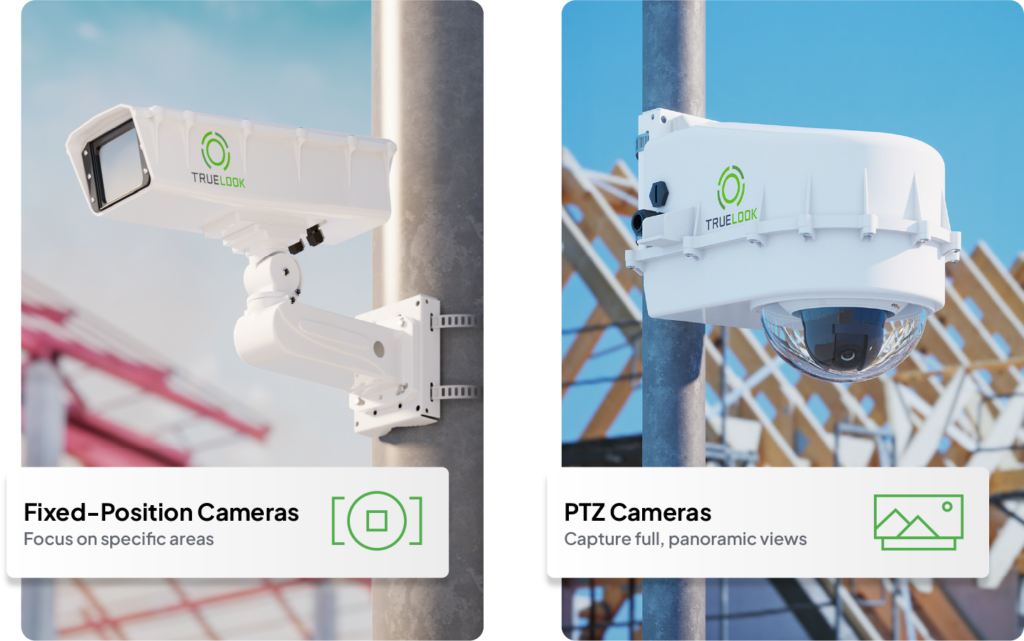
- PTZ (Pan-Tilt-Zoom): Move and zoom the camera remotely to track activity.
- Mounting Options: Flexible mounts (poles, walls, magnetic bases) let you adjust as the site changes.
Tip: Overlapping camera views reduce blind spots. Walk the site at different times to find weak spots.
7. Integration With Other Security Systems
The best security system works together. Consider:
- Alarm Integration: Some cameras trigger sirens or lights.
- Access Control: Link cameras with gates or turnstiles to record who enters.
- Time-Lapse: Useful for project updates, not just security.
A non-obvious insight: Some insurance companies give discounts if you can show integrated site security.
Comparison Of Common Camera Types For Construction Sites
To help you choose, here’s how popular camera types compare:
| Type | Main Advantage | Main Limitation | Best For |
|---|---|---|---|
| Fixed Bullet Camera | Wide view, simple install | Cannot pan or tilt | Perimeter and entrances |
| Dome Camera | Vandal-resistant, discreet | Smaller field of view | Indoor areas, site offices |
| PTZ Camera | Remote pan/tilt/zoom | Higher cost, needs control | Large open areas, material yards |
| Mobile/Trailer Unit | Self-contained, moveable | Expensive, may need rental | Changing sites, remote areas |
| Solar-Powered Camera | No wires, works anywhere | Dependent on sunlight | Temporary or off-grid spots |
Choose the types that match your site’s layout, risks, and budget.
How Many Cameras Do You Need?
There’s no magic number. The right answer depends on:
- Site Size: Larger sites need more cameras to cover all areas.
- Layout: Complex sites with corners, scaffolding, or multiple buildings need extra coverage.
- Value Zones: Focus on high-risk spots: material storage, equipment parking, entry/exit gates.
A practical approach is to walk the site and map out “must cover” areas. Use a site map and mark where cameras should go. Some security companies offer free site surveys — this can save you money by avoiding overbuying.
A common mistake: Focusing only on entrances. Thieves often climb fences or break through less visible areas.
Wired Vs. Wireless Cameras: Which Is Better?
Both options have advantages and trade-offs. Here’s a quick breakdown:
| Feature | Wired (PoE) | Wireless (Wi-Fi/Cellular) |
|---|---|---|
| Installation | More complex, needs cables | Quick setup, no wires |
| Reliability | Very stable, less interference | May drop out if signal weak |
| Power Source | Needs electricity/PoE switch | Battery/solar or AC power |
| Flexibility | Best for fixed locations | Can move as site changes |
| Data Security | Local network, harder to hack | Needs strong encryption |
A non-obvious insight: Mixing both types often works best. Use wired cameras for main gates and wireless for temporary or moving zones.
Storage: Local, Nvr, Or Cloud?
Video storage is where many buyers make expensive mistakes. Let’s break down the options:
Local Storage (sd Cards)
- Simple to set up
- Low cost
- Limited space (often 1-3 days of footage)
- If the camera is stolen, the footage goes too
Nvr (network Video Recorder)
- Central hub for many cameras
- Can store weeks or months of footage
- Needs safe, secure location
- Easier to search and back up
Cloud Storage
- Access footage from anywhere
- Off-site, so it can’t be stolen or damaged on-site
- Ongoing monthly fee
- Depends on internet connection
Some cameras allow dual storage (local + cloud) for extra protection.

Credit: sirixmonitoring.com
Smart Features That Add Real Value
Modern construction security cameras offer smart features that go far beyond basic recording. These can save you money and reduce false alarms:
- Human/Vehicle Detection: Camera can tell the difference between a person and a car, so you don’t get alerts every time a cat walks by.
- License Plate Recognition: Keep track of vehicles entering and leaving.
- Time-Lapse Mode: Useful for showing project progress to clients.
- Two-Way Audio: Speak directly to people on-site, even after hours.
A practical example: Some cameras let you set “business hours,” so you only get alerts outside normal working times.
Budgeting For Construction Security Cameras
Cost is always a factor, but remember: Cheap cameras often lead to expensive mistakes. Budget for:
- Camera Units: $100–$2,000 each, depending on features.
- Storage: NVRs cost $200–$800; cloud plans $10–$50/month.
- Installation: Professional setup can save headaches. Expect $100–$300 per camera.
- Maintenance: Plan for cleaning, battery changes, and software updates.
Don’t forget: Renting mobile surveillance trailers can cost $1,000–$3,000/month but is sometimes the best option for short-term or very large sites.
Common Buyer Mistakes (and How To Avoid Them)
Even experienced site managers sometimes get it wrong. Watch out for these traps:
- Underestimating Coverage: One camera cannot cover an entire site. Blind spots are common.
- Ignoring Lighting: Night vision only works well if not blocked by dust, plastic, or poor placement.
- Choosing Consumer Brands: Many home cameras aren’t tough enough for construction sites.
- Skipping Maintenance: Lenses get dirty fast. Schedule regular checks.
- Not Testing Alerts: Set up test alerts before you need them in a real emergency.
Another tip: Always check local privacy laws before recording audio or public spaces.
Steps To Select The Best Construction Security Camera
Choosing the right camera involves more than just specs. Here’s a step-by-step approach:
- Assess Your Site: Note entrances, high-value areas, lighting, and possible risks.
- Set Your Goals: Prevent theft, monitor safety, or both?
- Decide Coverage Zones: Mark on a map where you need cameras.
- Choose Camera Types: Fixed, PTZ, mobile, or a mix.
- Consider Power and Internet: Plan for cables, batteries, or solar as needed.
- Pick Storage Method: NVR, cloud, or both for backup.
- Select Smart Features: Motion alerts, night vision, remote access.
- Set Budget: Include installation and ongoing costs.
- Check for Integration: Make sure cameras work with other site systems.
- Plan for Maintenance: Assign someone to clean lenses and check systems.
A practical example: If your site changes layout every month, portable solar cameras may be worth the extra cost.
Real-world Examples: What Works On Actual Sites
Small Urban Construction Site
A building contractor in Chicago set up four 4K PoE dome cameras at entrances and storage areas, with an NVR in a locked office. Motion-activated floodlights improved night vision. They cut theft attempts from three in six months to zero after installation.
Large Remote Highway Project
A road crew in Texas used two mobile trailer units with solar-powered PTZ cameras and cellular backup. Footage streamed to the home office. They caught a trespasser and recovered stolen fuel worth $8,000.
Temporary Renovation In A Busy City
A retail shop renovation in San Francisco used three wireless battery cameras with cloud storage. The system moved as work progressed. Instant alerts helped the team respond quickly to after-hours break-ins.
Features Worth Paying More For
Some features cost extra but deliver real results:
- 4K Resolution: For sites with large open areas or lots of detail.
- Cellular Backup: If your site lacks reliable Wi-Fi or wired internet.
- Remote Pan/Tilt/Zoom: For tracking moving targets across a wide zone.
- Multiple Storage Options: Ensures evidence is safe, even if one system fails.
Don’t overspend on features you won’t use — but don’t skimp where it matters.
Evaluating Brands And Warranties
Not all brands deliver the same quality or support. Look for:
- Reputation: Choose brands with proven construction or industrial track records.
- Warranty: At least one year, ideally longer for outdoor models.
- Support: US-based customer service and easy access to replacement parts.
Read reviews on trusted sites, and ask for references from other contractors.
Questions To Ask Before You Buy
- Will the cameras work in your weather conditions year-round?
- Is the footage clear enough for police or insurance use?
- How easy is it to add or move cameras if the site changes?
- Who can access live and recorded footage? Is it secure?
- What happens if power or internet fails?
Get clear answers from the seller before buying.
Credit: www.truelook.com
Legal And Privacy Considerations
In the US, video surveillance is generally allowed on private property, but rules vary by state. Key points:
- Audio Recording: Some states require all parties to consent.
- Public Spaces: Avoid filming areas outside your property line.
- Signage: Post clear notices about video surveillance.
Consult with a legal advisor if you’re unsure, especially for large projects.
How To Maintain Your Construction Security Camera System
Even the best cameras need regular care:
- Clean Lenses: Dust, mud, and rain can blur images. Use a soft cloth weekly.
- Check Mounts: Vibrations or accidents can knock cameras out of position.
- Update Software: Firmware updates fix bugs and add security.
- Test Alerts: Run a “drill” every month to make sure the system notifies you.
Neglecting maintenance can turn your expensive system into a useless box.

Credit: www.clodesun.com
Future Trends In Construction Security Cameras
The industry is evolving. Here’s what’s coming:
- AI Analytics: Cameras that spot unusual behavior and send smarter alerts.
- Thermal Imaging: Detects people in total darkness or through smoke.
- Drone Surveillance: Quick, mobile eyes in the sky for large projects.
- Integration with Project Management Tools: Link security video with daily logs and safety reports.
Staying updated means better security and efficiency.
Where To Find Reliable Information And Reviews
When choosing a security camera, always check real-world reviews and independent testing. Good sources include:
- Industry forums (like IPVM.com)
- Official manufacturer sites (Axis, Hikvision, Hanwha)
- Construction magazines and safety publications
- Government safety guidelines (OSHA)
For deeper research, Security.org offers expert comparisons and buyer guides.
Frequently Asked Questions
What’s The Best Camera Resolution For Construction Sites?
For most construction sites, 1080p (Full HD) is the minimum, but 4K (8MP) is best for large areas or if you need to zoom in on details. Higher resolution gives clearer evidence but uses more storage.
How Long Should I Keep Construction Camera Footage?
Keep footage at least 30 days if possible. Some insurance claims or legal actions may require longer. Always back up important clips before they’re automatically deleted.
Can I Use Home Security Cameras On A Construction Site?
It’s not recommended. Home cameras often lack weatherproofing, durability, and advanced features needed for construction sites. They may fail quickly or miss critical incidents.
Are Wireless Cameras Secure?
Wireless cameras can be very secure if you use strong passwords, update software, and choose models with encrypted transmission. Cellular models are less likely to be hacked than open Wi-Fi.
Do I Need A Permit To Install Cameras At My Construction Site?
Usually, you don’t need a permit for cameras on your own property. However, always check local laws about surveillance, especially audio recording and public space coverage.
—
Choosing the best construction security camera isn’t just about picking the highest number of megapixels. It’s about matching the right features, durability, and setup to your unique jobsite. Take the time to assess your needs, plan for coverage, and invest in quality equipment.
The right camera system can stop theft, improve safety, and even help your project run smoother. With a clear plan and careful choices, you can protect your site, your workers, and your bottom line.