
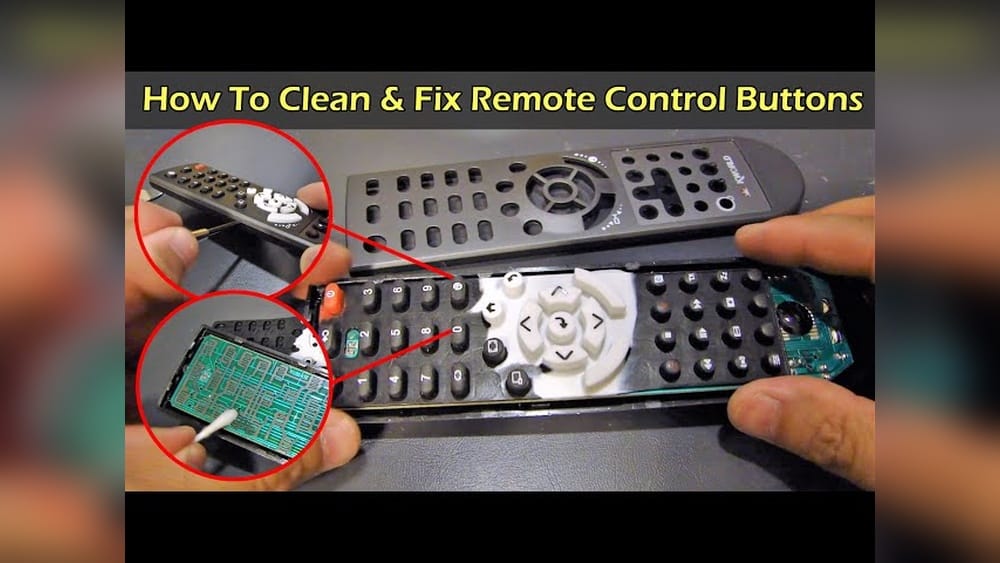
Cleaning your TV remote control may seem simple, but it’s one of the most overlooked tasks in home hygiene. Think about how many times you use your remote each day—after eating, touching your face, or coming home from work. TV remotes collect more germs than most people realize. In fact, studies have shown that a remote can have more bacteria than a toilet seat. Keeping your remote clean can help protect your family from illness, prevent sticky buttons, and even extend the life of the device.
But here’s the good news: you don’t need fancy equipment or special skills to clean a TV remote. Anyone can do it safely at home with just a few simple tools and some basic know-how. In this guide, you’ll learn step-by-step how to clean a TV remote control inside and out, what cleaning products to use, and even how to handle stubborn grime without damaging the buttons or electronics. Whether your remote is just dusty or covered in years of built-up grime, these methods will help you restore it to like-new condition.
Why Clean Your Tv Remote Control?
Cleaning your TV remote control is about much more than appearance. A dirty remote can cause a range of problems, some of which are not immediately obvious.
- Health Risks: Remotes are touched by many hands and are rarely cleaned. They can carry bacteria, viruses, and even mold. During cold and flu season, or times of illness like COVID-19 outbreaks, remotes can spread sickness quickly.
- Device Performance: Dirt, dust, and grime can build up in the buttons, causing them to stick or stop working. Pet hair, crumbs, and oils from your hands can get inside and interfere with the electronics.
- Hygiene: If you eat while watching TV, grease and food residue can make the remote sticky and unpleasant to use.
- Aesthetics: A clean remote simply looks and feels better in your hand.
Some research from the National Institutes of Health found that TV remotes in hospitals and hotels are among the dirtiest objects in the room. At home, regular cleaning can help you avoid similar problems.
What You’ll Need To Clean A Tv Remote
Before you start, gather the right supplies. You don’t need expensive products, but a few basic items will make the job easier and safer.
- Soft microfiber cloth (lint-free, to avoid scratching)
- Cotton swabs (for tight spaces)
- Toothpicks or wooden skewers (for stubborn grime)
- Rubbing alcohol (isopropyl alcohol, at least 70%)
- Mild dish soap
- Small bowl (for mixing solutions)
- Compressed air can (optional, for blowing out dust)
- Gloves (optional, for extra hygiene)
- Screwdriver (only if you plan to open the remote)
Never use bleach, strong chemicals, or water directly on the remote. These can damage the electronics and plastic.
Preparing Your Remote For Cleaning
Before you start scrubbing, take a few key steps to protect yourself and the device.
- Remove the batteries: Open the battery compartment and take out the batteries. This prevents accidental button presses and protects the remote from short-circuiting.
- Shake out debris: Gently tap or shake the remote to remove loose dust, crumbs, or pet hair.
- Take a photo: For complex remotes, take a quick photo with your phone. If you remove buttons or open the case, you’ll know how to put it back together.
- Work in a clean area: Choose a table or workspace with good lighting. Lay down a towel or mat to catch small parts.
These steps help prevent mistakes and make sure no moisture gets into the electronics.
Surface Cleaning: The Fast And Simple Method
If your remote is only a little dirty or you’re short on time, a surface cleaning is enough for most situations. This method is safe for all remotes.
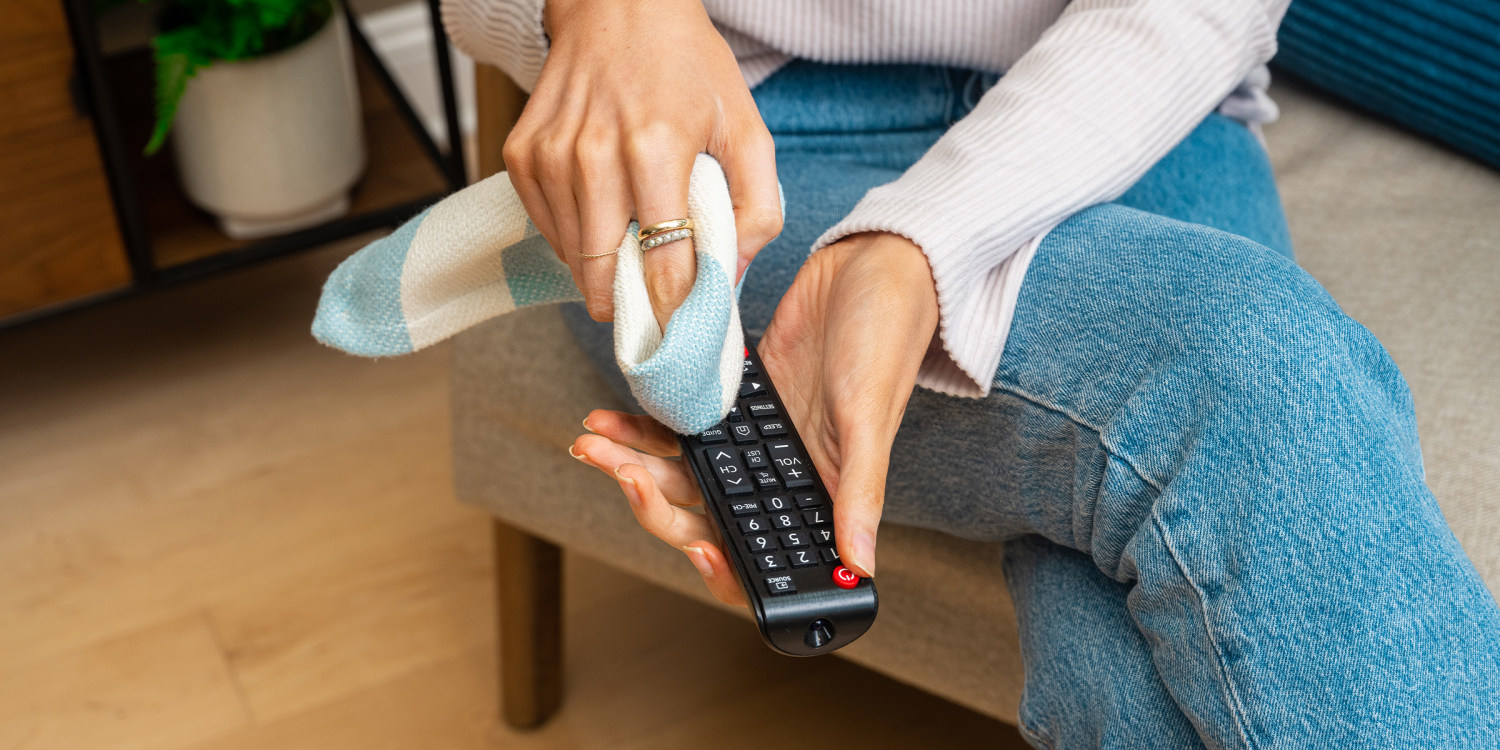
- Dampen a microfiber cloth with rubbing alcohol. Don’t soak the cloth—just make it slightly damp.
- Wipe all surfaces of the remote, including the buttons, sides, and back. Pay extra attention to areas that look shiny or sticky, as these are usually covered in oils from your skin.
- Use cotton swabs dipped in alcohol to clean around each button. Rotate the swab as you go to remove grime from the sides of the buttons.
- Dry with a clean cloth or let the remote air-dry for a few minutes before replacing the batteries.
Pro tip: Alcohol evaporates quickly, so it won’t damage the electronics if used in small amounts. Never pour alcohol directly onto the remote.
Credit: www.today.com
Deep Cleaning: For Sticky, Heavily Soiled, Or Old Remotes
Sometimes, a quick wipe isn’t enough. If your remote is sticky, has food stuck in the buttons, or hasn’t been cleaned in years, a deeper clean is needed.
Step 1: Remove The Batteries
Always start by taking out the batteries. This keeps you safe and protects the remote.
Step 2: Clean Between The Buttons
- Use a toothpick or wooden skewer to gently scrape out dirt around and between the buttons. Be careful not to scratch the plastic or push debris deeper inside.
- For stubborn spots, wrap a tiny piece of microfiber cloth around the toothpick, dip in alcohol, and use it to clean.
- A cotton swab works well for sticky buildup.
Step 3: Use Compressed Air
Blow compressed air around the buttons and into the seams. This removes dust, crumbs, and pet hair that may be stuck inside. Hold the can upright and use short bursts.
Step 4: Clean The Battery Compartment
- Use a dry cotton swab to remove dust and particles.
- If you see white, powdery residue (corroded battery acid), dampen a cotton swab with a little alcohol and gently wipe it away.
- Let the compartment dry completely before putting in new batteries.
Step 5: Disinfect All Surfaces
Mix a small amount of mild dish soap with water (a few drops in a small bowl). Dampen a microfiber cloth, wring out extra water, and wipe the remote again. Follow up with alcohol to disinfect.
Step 6: Dry Thoroughly
Leave the remote open (battery cover off) for at least 10 minutes before reassembling and replacing the batteries.
Opening The Remote: When And How To Do It Safely
Most remotes don’t need to be opened for regular cleaning. However, if something is stuck inside or the buttons aren’t working after a spill, you may need to open it up.
Warning: Opening the case can void the warranty. Only open the remote if you’re comfortable and the device is out of warranty.
- Find the screws. These are usually under the battery cover or under a label/sticker.
- Use the right screwdriver. Most remotes use small Phillips-head screws. Keep the screws in a safe place.
- Pry gently. Use a plastic tool or your fingernail to separate the case. Do not force it—look for hidden screws.
- Clean the inside:
- Use compressed air to blow out dust.
- Wipe plastic parts with a cloth dampened in alcohol.
- For sticky or greasy residue, use a bit of mild soap and water on the cloth (never on the circuit board).
- Do not touch or wet the circuit board.
- Reassemble carefully. Make sure all buttons are in the correct place. Use your photo as a guide if needed.
Insider tip: Some remotes use “snap” cases that are hard to open without breaking tabs. Search online for a teardown guide for your remote’s model if unsure.
Cleaning Different Types Of Tv Remotes
Not all remotes are the same. Some have special features, like touchpads, rubber coatings, or backlit buttons. Here’s how to handle different designs:
Basic Plastic Remotes
These are the most common. Follow the standard cleaning steps above. Alcohol and mild soap are safe for plastic.
Rubberized Or Soft-touch Remotes
Some remotes have a soft, rubbery feel. These can get sticky or attract lint over time. Alcohol can help, but test on a small spot first. Avoid harsh chemicals, which can make the rubber break down.
Remotes With Touchscreens
Do not use alcohol or harsh cleaners on touchscreens. Use a microfiber cloth dampened with water only. Dry immediately with a clean cloth.
Backlit Or Glow-in-the-dark Remotes
Wipe gently with a damp cloth. Avoid getting moisture into the seams, as water can damage the backlight or glow features.
Voice Control Or Smart Remotes
These often have microphones and speakers. Never spray or pour liquid near the openings. Use only a damp cloth and dry carefully.
How Often Should You Clean A Tv Remote?
The answer depends on your lifestyle:
- Every week: If you have children, pets, or a large household, clean the remote once a week.
- Every two weeks: For single-person homes or low-use situations, every two weeks is enough.
- After illness: If someone is sick in your home, clean all remotes daily to reduce the risk of spreading germs.
- After spills: Clean immediately if food or drink is spilled on the remote.
Regular cleaning prevents buildup, which makes deep cleaning easier and keeps your remote working well.
Common Mistakes To Avoid
Even though cleaning a remote is simple, many people make mistakes that can damage the device. Here’s what to avoid:
- Using too much liquid: Moisture inside the remote can damage the circuit board. Always use a damp (not wet) cloth.
- Spraying cleaners directly: Never spray alcohol or cleaner onto the remote. Spray onto the cloth first.
- Skipping battery removal: Always remove batteries before cleaning to avoid short circuits.
- Forcing open the case: If you need to open the remote, be gentle. Forcing it can break the plastic or tabs.
- Using harsh chemicals: Bleach, ammonia, and strong cleaners can damage plastic, rubber, or circuit boards.
- Ignoring sticky buttons: Don’t let sticky buttons go uncleaned—they can get worse over time and may stop working.
By avoiding these mistakes, you’ll keep your remote working and looking good for years.
How To Disinfect A Tv Remote During Illness
During cold, flu, or COVID-19 outbreaks, disinfecting your remote is especially important. Here’s the safest way:
- Remove batteries.
- Wipe all surfaces with a cloth dampened in at least 70% isopropyl alcohol. This concentration is needed to kill most viruses and bacteria.
- Use cotton swabs to clean around buttons and in crevices.
- Let the remote air-dry. Alcohol evaporates quickly and leaves surfaces safe to touch.
- Replace batteries only after the remote is completely dry.
For more information on disinfecting electronics, see the CDC’s guidance on cleaning household items.
Cleaning Remotes After Spills
If you spill a drink or food on your remote, act fast:
- Remove batteries immediately. This reduces the risk of a short circuit.
- Wipe off liquid with a dry cloth. Do not press buttons, as this can push liquid inside.
- If needed, open the case to check for liquid inside. Use a dry cloth or compressed air to remove moisture.
- Let the remote air-dry for at least 24 hours before using again.
If the spill is sticky (soda, juice), you may need to clean the inside with a cotton swab dampened in alcohol. Never use water inside the remote.
Comparing Cleaning Methods
Different cleaning methods work better for different levels of dirt and types of remotes. Here’s a comparison to help you choose the best approach:
| Cleaning Method | Best For | Time Needed | Risk Level |
|---|---|---|---|
| Surface Wipe (Alcohol Cloth) | Light dirt, regular cleaning | 2-3 minutes | Very Low |
| Deep Clean (Disassembly) | Sticky spills, heavy grime | 10-20 minutes | Medium (risk of damage if not careful) |
| Compressed Air | Dust in crevices | 1-2 minutes | Very Low |
| Soap & Water (on cloth) | Grease, sticky residue | 5 minutes | Low (do not over-wet) |
Choose your method based on how dirty your remote is and how much time you have.

Credit: www.nytimes.com
What To Do If Buttons Still Don’t Work
Sometimes, even after cleaning, remote buttons still stick or don’t respond. Here’s what you can try:
- Check the batteries. Weak or old batteries can cause unresponsive buttons.
- Double-check for debris. Use compressed air and a toothpick to clean around the buttons again.
- Open the case and clean the inside of the button contacts gently with alcohol and a cotton swab.
- Check the circuit board. Look for visible dirt or corrosion and clean carefully.
- If all else fails, the remote may need professional repair or replacement.
Non-obvious insight: Sometimes, sticky or unresponsive buttons aren’t caused by dirt, but by worn-out conductive pads under the buttons. These can sometimes be repaired with a special conductive paint kit (available online), but for most people, replacing the remote is easier and safer.
How To Keep Your Remote Clean Longer
A clean remote is easier to maintain if you make a few simple changes:
- Store remotes in a drawer or holder when not in use to avoid dust and spills.
- Wash your hands before using the remote, especially after eating.
- Don’t eat sticky or greasy foods while watching TV, or use a napkin before touching the remote.
- Clean regularly, not just when the remote looks dirty.
Some people use a plastic remote cover or slip a thin plastic bag over the remote during illness. These can be wiped or replaced easily.
Data: How Dirty Are Tv Remotes Really?
To understand why cleaning is so important, here’s some real-world data:
| Object | Average Bacteria Count (CFU*) | Notes |
|---|---|---|
| TV Remote | 20,000+ | More than toilet handles in some studies |
| Toilet Seat | 1,200 | Typically cleaned more often |
| Cell Phone | 25,000+ | Frequently touched, rarely cleaned |
| Kitchen Counter | 5,000 | Cleaned daily in most homes |
cfu: Colony Forming Units, A Measure Of Bacterial Contamination
As you can see, TV remotes are often among the dirtiest items in the home. Regular cleaning makes a big difference.
When To Replace Your Tv Remote
Cleaning can extend the life of your remote, but sometimes replacement is the best option. Here are signs it’s time for a new one:
- Buttons don’t work even after deep cleaning and battery replacement.
- Physical damage, like cracked cases or missing buttons.
- Corrosion in the battery compartment that can’t be cleaned off.
- Outdated technology (for example, old remotes that don’t work with new TVs).
New universal remotes are affordable and easy to set up. Consider replacing your remote if cleaning doesn’t solve the problem.
Safety Tips For Cleaning Tv Remotes
- Always remove batteries before cleaning.
- Use only a damp cloth, never a wet one.
- Keep liquids away from the circuit board.
- Do not use bleach, window cleaner, or abrasive products.
- Let the remote dry completely before putting batteries back in.
- Wash your hands after handling dirty or corroded remotes.
These tips protect both you and your device.
Real-life Example: Cleaning A Remote After A Spill
Imagine you accidentally spill cola on your remote while watching a game. Here’s what to do, step by step:
- Remove batteries immediately to stop electricity flow.
- Wipe the remote with a dry cloth to absorb as much liquid as possible.
- Open the case if possible and wipe inside with a cloth dampened in alcohol.
- Use compressed air to blow out any remaining moisture.
- Leave the remote open in a dry, warm place (not direct sunlight) for 24 hours.
- Reassemble and test. If buttons stick, repeat cleaning steps or consider replacement.
Non-obvious insight: Even small spills can cause sticky buttons if sugar dries inside the remote. Quick action is key to saving your device.
Eco-friendly Cleaning Tips
If you want to keep your cleaning routine green, try these ideas:
- Use reusable microfiber cloths instead of paper towels.
- Choose natural cleaners like white vinegar diluted with water (test on plastic first—some plastics don’t react well).
- Recycle old remotes at electronic recycling centers instead of throwing them in the trash.
Eco-friendly habits help your health and the planet.
Frequently Asked Questions
How Can I Clean My Remote Without Removing The Batteries?
It’s best to remove the batteries before cleaning. If you must clean quickly, use a dry microfiber cloth or a cloth slightly dampened with alcohol. Avoid getting moisture near the battery compartment. But for a proper clean, always remove the batteries.
Can I Use Disinfectant Wipes On My Tv Remote?
Yes, you can use disinfectant wipes if they are not too wet. Squeeze out excess liquid before wiping. Make sure the wipes do not contain bleach or harsh chemicals, which can damage some plastics. Always dry the remote after cleaning.
What Should I Do If I Dropped My Remote In Water?
Remove the batteries immediately. Shake out as much water as possible. Open the case if you can, and dry all parts with a towel. Let the remote air-dry in a warm, dry spot for at least 24 hours before using.
Never use a hairdryer or heat source, as this can warp plastic.
Is It Safe To Clean A Smart Remote With Alcohol?
For most smart remotes, yes—but avoid screens, microphones, or speaker holes. Use a soft cloth with a little alcohol for plastic areas and a dry microfiber cloth for sensitive parts. Always check your remote’s manual for any special cleaning instructions.
Where Can I Find More Tips For Cleaning Electronics?
For more on cleaning electronics and home hygiene, visit the CDC’s hand hygiene page. They offer advice on cleaning many household items, including remotes.
Cleaning your TV remote control is a simple habit that pays off with better hygiene, fewer germs, and longer device life. With the right tools and steps, anyone can keep their remote clean—no special skills required. Set a reminder to clean your remote regularly, and enjoy a healthier, more pleasant home environment.

Credit: www.nytimes.com