
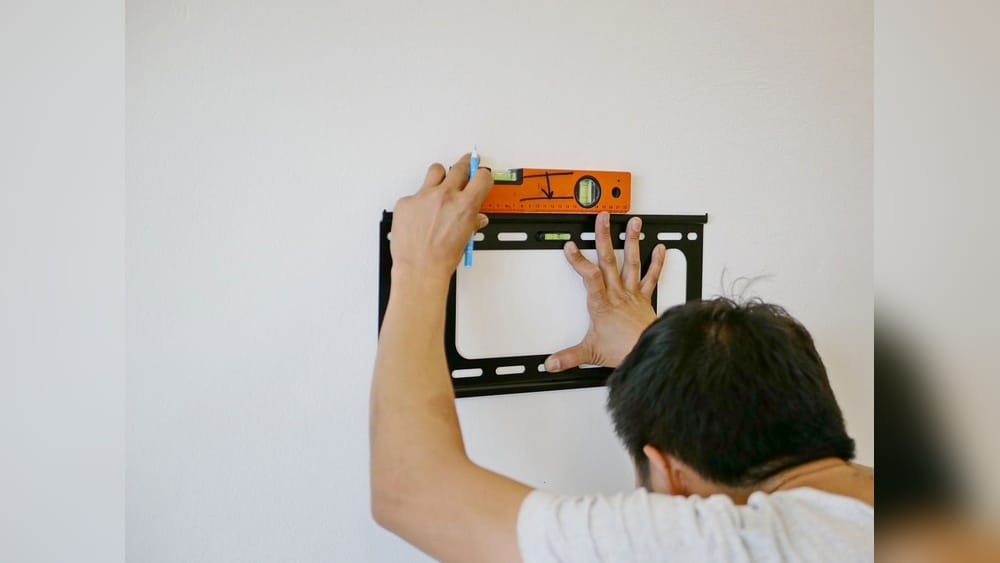
Mounting a TV on your wall creates a modern, clean look and can save valuable space. But what if your wall doesn’t have studs where you want to hang your TV? Or maybe your home uses materials like plaster, brick, or concrete that make finding studs difficult.
Many people face this challenge, and it’s important to know that mounting a TV without studs is possible, safe, and practical—if you follow the right steps and use the right tools.
This guide will walk you through every detail of how to mount a TV without studs. You’ll learn about the different wall types, the best anchors to use, how to avoid damaging your wall, and how to ensure your TV stays secure. Whether you’re a renter, a homeowner, or just someone who loves a good DIY project, you’ll find clear instructions and helpful tips. You’ll also discover common mistakes and advanced tricks most beginners miss. By the end, you’ll feel confident mounting your TV, even if you can’t find a stud.
Why People Mount Tvs Without Studs
Many homes, especially apartments and older buildings, have walls made of drywall, plaster, or masonry where studs aren’t always in the right place. In other cases, the studs might be too far apart for your TV bracket, or you may want to avoid drilling into them to protect the structure or for rental reasons. Sometimes, aesthetic preferences dictate the TV’s position, not the stud location.
Mounting without studs is about flexibility and overcoming these limitations. With the right wall anchors and methods, you can safely support even heavy TVs. The key is understanding your wall’s construction and choosing mounting hardware designed to distribute weight properly.
Understanding Wall Types
Before you start, you need to know what kind of wall you have. This affects which anchors work and how you should approach the job.
Drywall
Drywall is the most common wall material in modern homes. It’s a lightweight, gypsum-based board that covers the wall frame. Drywall itself is not strong enough to support a TV without help from anchors or studs.
Plaster
Older homes often have plaster walls, which are harder and more brittle than drywall. Plaster is applied over wooden lath strips, making it tricky to drill without cracking.
Masonry (brick Or Concrete)
Brick and concrete walls are strong and can hold a lot of weight, but they require special anchors and tools for drilling.
How To Identify Your Wall Type
- Knock test: Tap the wall. Drywall sounds hollow, plaster is harder, masonry feels solid.
- Look for dust: Drilling into drywall creates fine white dust, plaster is sandy, and masonry is gritty or red.
- Check wall thickness: Use a small nail or drill bit—drywall is about ½ inch thick, plaster is thicker, masonry is usually very thick.
Knowing your wall type is the first step for a safe installation.

Credit: www.reddit.com
What You Need Before Mounting
Gathering the right tools and supplies makes the job easier and safer.
Tools
- Drill (corded or cordless)
- Screwdriver
- Level
- Tape measure
- Pencil
- Stud finder (even if you don’t find any, it helps to check)
- Socket wrench (for some bolts)
- Masking tape (for marking)
Hardware
- TV wall mount bracket (check your TV’s VESA pattern and weight)
- Wall anchors (toggle bolts, molly bolts, or snap toggles)
- Bolts or screws (included with your anchors or wall mount)
Safety Gear
- Safety glasses
- Dust mask (especially with plaster or masonry)
- Drop cloth (to catch dust and debris)
Having everything ready before you start will help you avoid surprises.
Types Of Wall Anchors For Mounting Without Studs
The right anchor is critical for supporting your TV on drywall, plaster, or masonry. Here’s a comparison of the most common types:
| Anchor Type | Wall Type | Weight Capacity | Best For | Notes |
|---|---|---|---|---|
| Toggles (Snap Toggle, Toggle Bolt) | Drywall, Plaster | Up to 100 lbs per anchor | Medium to large TVs | Very strong, requires bigger hole |
| Molly Bolts | Drywall, Plaster | 30–50 lbs per anchor | Small to medium TVs | Good for thinner walls |
| Plastic Expansion Anchors | Drywall only | Up to 20 lbs per anchor | Small TVs only | Not recommended for TVs over 32 in |
| Sleeve Anchors | Masonry | Up to 100 lbs per anchor | Brick, concrete | Requires hammer drill |
Key Insight
Toggle bolts and snap toggles are often the best choice for mounting a TV on drywall without studs. They spread the load over a large area and are rated for heavy weights. Molly bolts are a good second option, especially for lighter TVs. Avoid using basic plastic anchors for anything but the smallest TVs—they’re not strong enough and can pull out over time.
Choosing The Right Tv Wall Mount
Not all wall mounts are made equal. The size and weight of your TV, as well as your viewing preferences, affect your choice.
Fixed Vs. Tilting Vs. Full-motion
| Mount Type | Movement | Ideal For | Installation Difficulty |
|---|---|---|---|
| Fixed | No movement | Eye-level viewing | Easy |
| Tilting | Vertical tilt | Above fireplace or high walls | Moderate |
| Full-Motion (Articulating) | Swivel, tilt, extend | Multiple viewing angles | Harder |
Vesa Pattern
Check your TV’s VESA mount pattern (distance between mounting holes), usually listed in millimeters (e.g., 200×200, 400×400). Your mount must match this pattern.
Weight Rating
Always check the mount’s weight capacity. Choose a mount that supports at least 20% more than your TV’s weight for safety.
Step-by-step Guide: How To Mount A Tv Without Studs
This section provides a clear path to safely mount your TV, even when there are no studs where you want them.
1. Find The Ideal Location
Measure your viewing height and mark the center point on the wall. Use a level to ensure your marks are straight. Consider glare from windows and the angle from your main seating area.
Tip: For most people, the center of the TV should be about 42 inches from the floor when seated.
2. Locate Studs (and Confirm Their Absence)
Use a stud finder to check for studs in your chosen area. Mark any you find—sometimes there’s one close by. If there are no studs, proceed with anchors.
3. Mark The Mounting Holes
Hold the wall mount bracket against the wall at your desired height. Use a pencil to mark the holes where the bracket will attach.
Pro insight: If possible, try to align at least one side of the bracket with a stud for extra security, even if the others need anchors.
4. Drill Pilot Holes
Use a drill bit sized to your anchors. For toggle bolts, you’ll need a larger hole (usually ½ inch or more). For molly bolts, use the diameter suggested by the manufacturer.
Tip: Drill slowly into plaster to avoid cracks. For masonry, use a hammer drill.
5. Install The Anchors
Insert your wall anchors according to the instructions:
- For toggle bolts, fold the toggle and push through the wall, then tighten so the wings open behind the wall.
- For molly bolts, tap them in with a hammer, then tighten so they expand behind the wall.
- For sleeve anchors in masonry, insert the anchor and tighten.
Advanced tip: Use a vacuum or tape a bag under the drill site to catch falling dust.
6. Attach The Mount Bracket
Line up the bracket with the installed anchors. Insert the screws or bolts and tighten firmly, but don’t over-tighten and damage the wall.
Check: The bracket should feel solid, with no wiggle or movement.
7. Attach The Tv To The Bracket
Follow your mount’s instructions. Usually, you attach adapter arms to the TV, then hook or bolt them onto the wall bracket.
Important: Get help lifting larger TVs. Two people are safer, and you reduce the risk of dropping or damaging the screen.
8. Double-check Stability
Gently pull and push the mounted TV. There should be no movement. Make sure all bolts are tight.
9. Conceal Cables (optional)
Use cable covers or run wires through the wall (if allowed) for a clean look. Avoid pinching power cords.
Common Mistakes And How To Avoid Them
Even experienced DIYers can make errors. Here are some common mistakes and how to prevent them:
- Using the wrong anchors: Never use plastic drywall anchors for large TVs. Always select anchors rated for at least the weight of your TV.
- Drilling too close to the edge: Drilling near wall corners or edges can weaken the wall and cause cracks.
- Over-tightening bolts: This can strip the anchor or damage the wall.
- Not checking for hidden pipes or wires: Use a wire detector or check building plans before drilling to avoid dangerous mistakes.
- Mounting too high or low: Measure carefully before drilling. Patch test with tape to visualize the final position.
How Much Weight Can Drywall Anchors Hold?
Many people overestimate how much weight drywall can support without a stud. Here’s a quick reference:
| Anchor Type | Drywall Thickness | Max Weight (Shear) | Max Weight (Pull-Out) |
|---|---|---|---|
| Toggle Bolt (1/8″) | ½ in | Up to 50 lbs | Up to 40 lbs |
| Snap Toggle (3/16″) | ½ in | Up to 100 lbs | Up to 80 lbs |
| Molly Bolt | ½ in | Up to 50 lbs | Up to 25 lbs |
| Plastic Anchor | ½ in | Up to 20 lbs | Up to 10 lbs |
Shear means force pulling down (weight of the TV). Pull-out is force pulling away from the wall (like if the mount tilts out).

Credit: www.youtube.com
Real-world Example: Mounting A 55-inch Tv On Drywall
Sarah lives in a rental apartment with drywall walls. The only place for her 55-inch TV (about 35 lbs) has no studs. Here’s what she did:
- She chose a tilting wall mount rated for 70 lbs.
- She bought four snap toggle anchors rated at 80 lbs each.
- After measuring, she drilled ½-inch holes and installed the toggles.
- With help, she attached the mount and then the TV.
- She checked stability and used a raceway to hide cables.
Result: The TV has been secure for over two years. When she moved, she patched the anchor holes easily.
Advanced Tips For A Stronger Mount
- Double up on anchors: If your mount has eight holes, use all of them. More anchors spread the load and increase safety.
- Use a plywood backer board: For very heavy TVs, screw a piece of ½-inch plywood to the wall using as many anchors as possible, then mount the TV bracket to the plywood. This spreads the weight even more.
- Check your mount’s instructions: Some brands have special requirements for mounting without studs—always read the manual.
- Avoid mounting on weak drywall: If your wall is water-damaged or soft, don’t mount a TV there.
When To Hire A Professional
While many people can mount a TV themselves, sometimes it’s best to call a pro:
- Large or expensive TVs (over 70 inches or 60 lbs)
- Unusual wall materials (lath-and-plaster, brick, concrete block)
- Historic homes where drilling may not be allowed
- If you’re not comfortable with tools
A professional installer has the right tools and can guarantee a safe, clean result.
Safety Precautions You Must Follow
- Always use anchors rated for more than your TV’s weight.
- Don’t mount above beds or in high-traffic areas where accidents could happen.
- Use a helper for lifting and positioning the TV.
- Never run power cords inside the wall unless you use a UL-rated kit.
Cost Estimate: Diy Vs. Professional
Let’s compare the typical costs:
| Item | DIY Cost (USD) | Professional Cost (USD) |
|---|---|---|
| Wall Mount Bracket | $30–$100 | Included/Extra |
| Anchors & Hardware | $10–$30 | Included |
| Tools (if needed) | $0–$50 | Included |
| Installation Labor | $0 | $100–$300 |
| Total | $40–$180 | $130–$430 |
DIY saves money but requires time and effort. Professional installation is more expensive but often includes a warranty.
Repairing Anchor Holes When You Move
If you’re a renter or plan to move, you’ll want to fix any holes left by wall anchors.
- Use spackle or joint compound for small holes.
- For larger holes (from toggle bolts), use a wall patch kit.
- Sand smooth and touch up with matching paint.
Well-patched holes are almost invisible, and most landlords won’t mind if you repair them properly.
Environmental Considerations
Mounting a TV without studs means drilling larger holes and possibly using more materials. You can reduce your impact by:
- Reusing wall mounts and hardware when possible.
- Recycling packaging and unused anchors.
- Avoiding unnecessary holes—plan carefully before you drill.
When Not To Mount Without Studs
There are times when you shouldn’t try to mount a TV without studs:
- Super heavy TVs (older plasma models, commercial displays)
- Unstable or damaged walls
- Very thin drywall (less than ½ inch)
- Walls with insulation that can be damaged by anchors
When in doubt, consult a professional.

Credit: www.wikihow.com
Top Brands For Wall Anchors And Tv Mounts
If you want the best results, stick to trusted brands:
- Wall anchors: Toggler, Hilti, Fischer, TOGGLER SNAPTOGGLE
- TV mounts: Sanus, Echogear, Mounting Dream, OmniMount, Kanto
These brands are widely available and have strong safety records.
Legal And Warranty Issues
Before you drill, check your lease or HOA rules. Some agreements limit wall modifications or require you to repair holes.
Also, check your TV’s warranty. Most will not cover damage from improper wall mounting, so use approved mounts and hardware.
Non-obvious Insights Most Beginners Miss
- Load distribution matters more than anchor strength: It’s not just about one strong anchor. Using more anchors spreads out the weight and prevents wall damage.
- The size of your anchor hole is critical: Too small, and the anchor won’t fit; too large, and it won’t hold. Measure carefully.
- The wall’s age can affect anchor strength: In older homes, plaster can be brittle, and anchors may loosen more easily. Test a small area first.
Frequently Asked Questions
Can I Mount A 65-inch Tv On Drywall Without Studs?
Yes, you can mount a 65-inch TV on drywall without studs if you use heavy-duty anchors like snap toggles or toggle bolts. Make sure your anchors are rated for more than the total weight of your TV and mount. Use at least four anchors and check for stability before hanging the TV.
Is It Safe To Use Only Plastic Anchors For My Tv?
No, plastic anchors are not safe for mounting TVs over 32 inches or 20 lbs. They are designed for light loads like pictures or shelves. For TVs, always use metal toggle or molly bolts.
What If I Accidentally Hit A Wire Or Pipe?
If you hit a wire or pipe, stop immediately. Turn off the power at the breaker and inspect the area. Call a professional if you’re unsure. To avoid this, use a wire/pipe detector before drilling.
Will Mounting A Tv Without Studs Void My Warranty?
Most TV manufacturers require using a compatible wall mount but do not specify anchors. However, if the TV falls due to poor mounting, your warranty may not cover the damage. Always follow both the TV and mount instructions.
Where Can I Find More Information About Safe Wall Mounting?
For detailed guidelines and safety standards, see the official Consumer Reports guide.
Mounting a TV without studs is entirely possible with the right tools, anchors, and methods. You can achieve a safe, stylish setup that looks great and lasts for years—no matter what kind of wall you have. Take your time, follow the steps, and enjoy your new view.