
Fans around the world have fallen in love with “Hogwarts Legacy,” a magical adventure that lets you explore the wizarding world in a whole new way. One of the most exciting parts for players is flying a broom across the open skies of Hogwarts and beyond. But for many, the question isn’t just how to fly—it’s how to actually mount your broom and get started with one of the game’s most freeing features. If you’re stuck, unsure, or just want to master every detail, this guide will walk you through everything you need to know about mounting your broom in Hogwarts Legacy—and how to make the most of your flight.
How To Unlock The Broom In Hogwarts Legacy
Before you can mount a broom, you need to unlock it in the game. Unlike some open-world games where you get access to key items immediately, Hogwarts Legacy makes you work for this privilege. Here’s how the process works:
- Reach Main Quest “Flying Class”: You won’t get a broom from the start. The ability to mount and ride a broom is tied to story progression. You must play through the main storyline until you reach the quest called Flying Class. This usually happens a few hours into the game—most players reach this around level 6-8.
- Complete the Flying Lesson: In this quest, Madam Kogawa will teach you the basics of flying. You’ll practice flying through hoops in the Hogwarts grounds. You must finish this class to unlock the ability to buy and use brooms.
- Buy Your First Broom: After the class, you’ll receive a prompt to visit Spintwitches Sporting Needs in Hogsmeade. This is the only shop where you can buy your first broom. Brooms cost 600 Galleons, so make sure you have enough money before heading there.
- Select and Purchase: There are several broom models, but they all perform the same at first. Pick the one you like best (the differences are only cosmetic). Once you buy it, the broom is added to your gear.
Pro Tip: If you rush through the main story, you’ll unlock flying sooner. But don’t neglect side quests—they can help you earn money for your broom faster.
How To Mount Your Broom
Once you have your broom, mounting it is simple—but there are a few key details that can trip up new players. Here’s how to get airborne:
- Find an Open Area: Not every part of the game allows flying. You must be in a “flight-allowed” zone, usually outdoors and away from the castle. Some areas, like inside buildings, the castle grounds, or during certain quests, will block broom use.
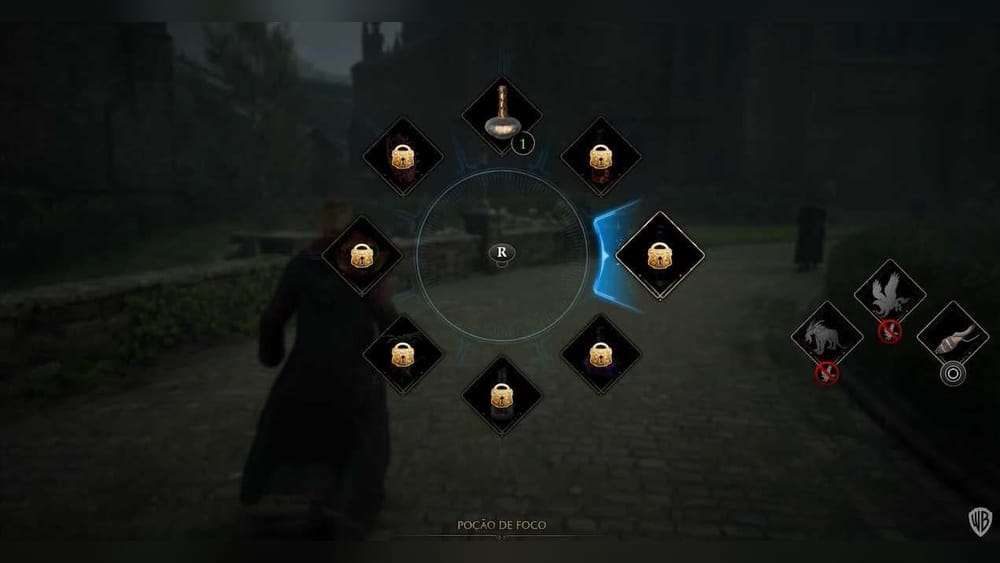
- Equip Your Broom: Open the tool wheel (hold L1 on PlayStation, LB on Xbox, or Tab on PC). The broom will appear as an option if you’re in a flight-allowed area.
- Mount the Broom: With the tool wheel open, select the broom (usually by pressing the right stick or clicking the icon), then release the wheel. Your character will hop onto the broom and you’re ready to fly.
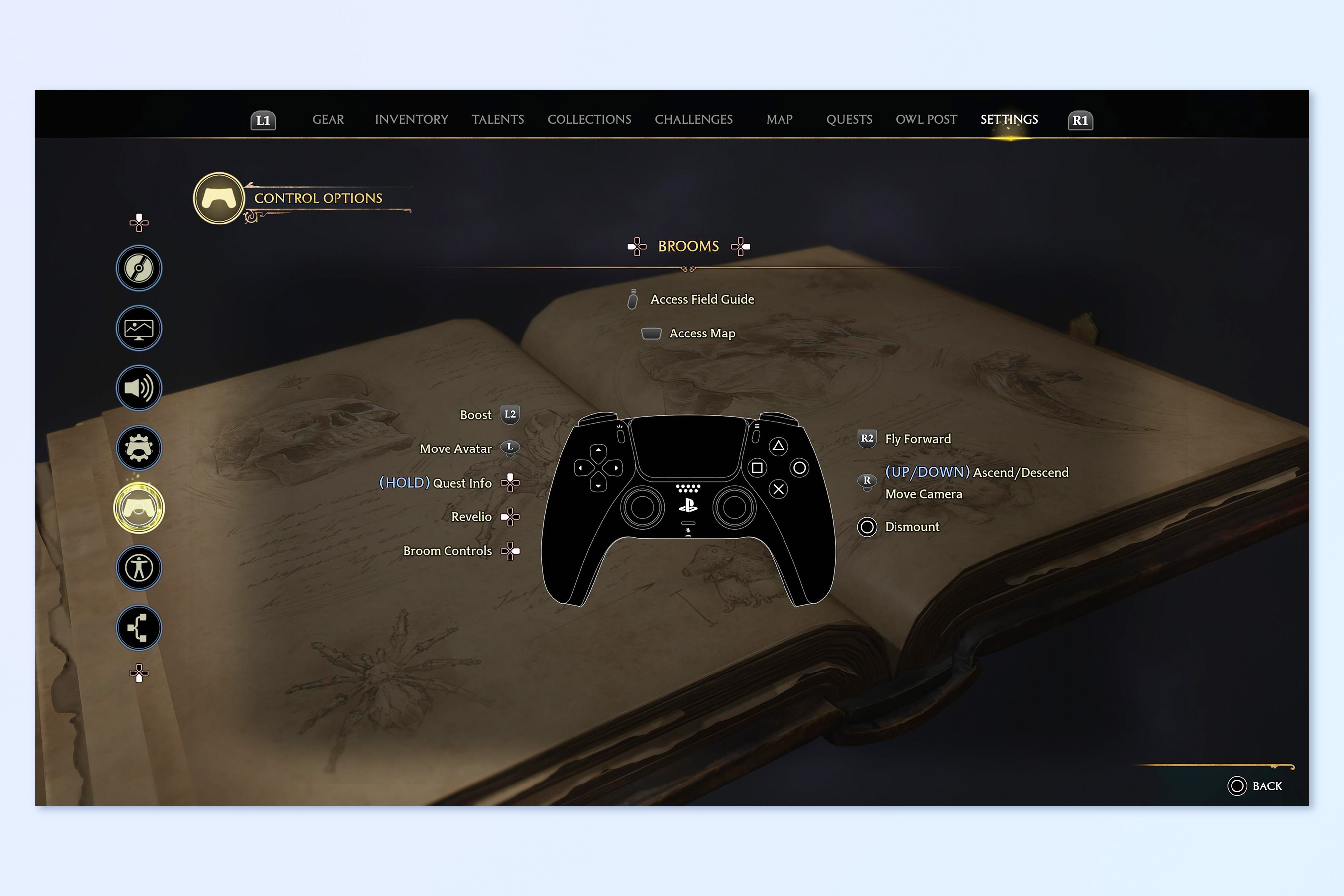
- Flying Controls: Use the left stick (or WASD) to steer and the right stick (or mouse) to look around. Press R2/RT (console) or Shift (PC) to accelerate.
Here’s a quick reference for mounting and flying across platforms:
| Platform | Open Tool Wheel | Select Broom | Accelerate |
|---|---|---|---|
| PlayStation | L1 (hold) | Right Stick | R2 |
| Xbox | LB (hold) | Right Stick | RT |
| PC | Tab (hold) | Mouse Click | Shift |
Tip for Beginners: The tool wheel can be confusing at first. If you can’t see your broom, double-check you’re outside and that flying is allowed in your current location.
Where Can You Fly Your Broom?
The world of Hogwarts Legacy is big, but not every area is open for flying. Understanding the map and its restrictions will save you a lot of frustration.
Flight-allowed Zones
- Open Hogwarts Grounds: Most outdoor areas, like the Quidditch Pitch, Black Lake, and the fields around the castle, allow flight.
- Hogsmeade Outskirts: You can mount your broom outside the main village.
- Wider World Map: As you explore, you’ll find large parts of the countryside perfect for flying. These areas are designed for broom travel, with hidden collectibles and shortcuts.
No-fly Zones
- Inside Hogwarts Castle: You cannot mount your broom indoors or in certain courtyard sections.
- Hogsmeade Center: Broom use is blocked in the heart of the village to prevent chaos and to keep the streets safe.
- Story Missions: Some quests and dungeons have flying disabled to keep gameplay balanced or guide you through specific experiences.
- Certain Caves and Dungeons: These are tight spaces where the broom simply won’t fit.
How To Tell If You Can Fly
- On-Screen Prompt: When you try to use your broom in a restricted area, you’ll see a “Broom flight unavailable” warning.
- Quick Test: Open the tool wheel—if the broom icon is grayed out, you can’t fly there.
Insider Detail: Some players miss that you can mount your broom immediately after stepping outside a no-fly zone. If you’re running through a blocked area, keep moving—once the restriction ends, the broom icon lights up.
Upgrading Your Broom: How And Why
When you first get your broom, its speed and handling are basic. You might notice that travel feels a bit slow or that the broom struggles at higher altitudes. Thankfully, you can upgrade your broom for better performance.
How To Upgrade
- Visit Spintwitches Sporting Needs: After buying your first broom, return to this shop in Hogsmeade. The owner, Albie Weekes, will eventually offer broom upgrades after you complete certain flying challenges.
- Complete Time Trials: Albie gives you side quests called “Broom Trials.” You’ll race through rings against the clock in different parts of the world.
- Purchase Upgrades: Each upgrade costs more Galleons (the first is 1,000, then 4,000, then 7,500). After completing the required trial, pay for the upgrade to improve your broom.
What Upgrades Do
- Increased Speed: Each upgrade makes your broom faster, letting you travel across the map more quickly.
- Better Handling: Upgrades improve turning and stability, making flying smoother, especially during sharp turns.
- Higher Altitude: Some upgrades allow you to fly higher, which is useful for reaching collectibles or bypassing obstacles.
Here’s a quick look at what you get with each upgrade:
| Upgrade Level | Cost (Galleons) | Main Benefit |
|---|---|---|
| Base Broom | 600 | Basic speed, low altitude |
| First Upgrade | 1,000 | Moderate speed, better handling |
| Second Upgrade | 4,000 | High speed, increased altitude |
| Third Upgrade | 7,500 | Maximum speed, smooth control |
Non-Obvious Insight: Unlike many games, broom models do not affect stats. All upgrades apply to every broom you own. Choose your favorite style—performance is based only on upgrades, not design.

Credit: www.reddit.com
How To Customize Your Broom
Personalization is a big part of Hogwarts Legacy. While brooms all function the same, you can collect different styles and tweak how your broom looks.
Broom Models
When you first buy a broom, you’ll notice several models, such as:
- Ember Dash Broom
- Wind Wisp Broom
- Moon Trimmer Broom
- Yew Weaver Broom
- Hogwarts House Brooms
You can buy more models from shops, find them as rewards, or unlock them by completing challenges.
Appearance Changes
- Cosmetic Only: Changing your broom’s appearance does not impact speed or handling.
- Easy Swapping: Go to your gear menu, select the broom slot, and pick any model you own. This lets you match your broom to your style or House colors.
Beginner Mistake: Some players waste money thinking a more expensive broom is faster. Remember, only upgrades improve performance—not the broom’s initial price or rarity.
Advanced Broom Controls And Flight Techniques
Once you know how to mount your broom, you can focus on mastering the skies. The controls are simple, but there are tricks to flying better and faster.
Basic Controls (console And Pc)
- Steering: Left stick (console) or WASD (PC)
- Look/Camera: Right stick (console) or mouse (PC)
- Accelerate: R2 (PlayStation), RT (Xbox), Shift (PC)
- Brake/Descend: L2 (PlayStation), LT (Xbox), Control (PC)
- Ascend: Right stick up (console), Mouse up (PC)
Useful Flying Tips
- Use Boost Wisely: The longer you hold the accelerate button, the faster you go, but the boost meter drains. Release to recharge quickly.
- Stay Low for Speed: Brooms are faster at lower altitudes. Flying too high slows you down until you upgrade.
- Quick Turns: Use the camera and steering together for sharp turns—especially useful in time trials or tight canyons.
- Landing: Press the dismount button (Circle on PlayStation, B on Xbox, Tab on PC) to safely land.
- Mid-Flight Mounting: You cannot mount or dismount in midair—land first, then change brooms or return to walking.
Hidden Detail: Some environmental obstacles, like trees or towers, do not stop your broom. You’ll glide past them, but the camera may shift suddenly—be ready to adjust your direction.
What You Can (and Can’t) Do On A Broom
Flying a broom is one of the highlights of Hogwarts Legacy, but there are limits to what you can do while in the air.
What’s Possible
- Travel Quickly: Cross the map much faster than on foot or with mounts.
- Reach High Places: Access ledges, towers, and hard-to-reach collectibles.
- Enjoy the View: Take in sweeping views of Hogwarts, Hogsmeade, and the countryside.
- Collect Floating Items: Some collectibles are only reachable by broom.
What’s Restricted
- No Combat: You cannot cast spells, fight enemies, or use items while flying.
- No Mounting in Battle: If you’re in combat, you must finish the fight before mounting your broom.
- No Entering Buildings: You can’t fly into houses or dungeons—dismount first.
Common Mistake: Trying to shortcut story missions by flying over obstacles. Most mission areas have invisible barriers or will automatically dismount you, so follow quest paths.
How Broom Flight Compares To Other Mounts
As you progress, you’ll unlock magical beasts to ride—like the Hippogriff and Thestral. How does broom flight stack up?
| Mount Type | Speed | Altitude | Combat Capabilities | Accessibility |
|---|---|---|---|---|
| Broom | High (with upgrades) | Very high (max with upgrades) | No | Early/Mid-game |
| Hippogriff | Moderate | High | No | Mid-game |
| Thestral | Moderate | High | No | Later-game (if pre-ordered or through quest) |
Key Differences:
- Broom: Customizable, upgradeable, and faster when fully upgraded. Great for exploring and collecting.
- Beast Mounts: Limited customization, but allow flying right after mounting. Some players prefer them for their style and animation.
Expert Note: If speed is your goal, a fully-upgraded broom is the fastest way to travel. For fans of magical creatures, beast mounts offer a different visual experience.

Credit: www.youtube.com
Earning Money For Your First Broom
Many players get stuck trying to afford their first broom. If you’re short on Galleons, try these tips:
- Loot Everything: Open every chest you find—especially in hidden corners of Hogwarts and Hogsmeade.
- Sell Extra Gear: Don’t hoard low-level or duplicate gear. Sell it at any shop to quickly earn money.
- Complete Side Quests: Many quests give Galleons as a reward. Prioritize ones that don’t require lots of combat.
- Open Eye Chests: These special chests have a blue eye and yield 500 Galleons each. Use the Disillusionment spell to sneak up on them.
Practical Example: In early play, run through the castle and Hogsmeade, unlocking chests and selling unwanted gear. You’ll reach 600 Galleons before the Flying Class mission if you’re thorough.
Common Problems And How To Fix Them
Not being able to mount your broom can be frustrating. Here are some typical problems and solutions:
Problem: Broom Icon Is Missing Or Greyed Out
- Cause: You’re in a no-fly zone or indoors.
- Fix: Move outside, away from walls or buildings, until the icon lights up.
Problem: “broom Flight Unavailable” Warning
- Cause: Story mission area restricts flying.
- Fix: Complete the mission or move to an open area.
Problem: Not Enough Money For Broom
- Cause: You haven’t collected enough Galleons.
- Fix: Loot, sell gear, and do side quests.
Problem: Can’t Find Spintwitches Sporting Needs
- Cause: Missed the store location.
- Fix: In Hogsmeade, look for the broom icon on your map; it’s near the northeast edge of the village.
Problem: Upgrades Not Available
- Cause: Haven’t completed enough broom trials.
- Fix: Talk to Albie Weekes and complete the side quests as they appear.
Best Ways To Use Your Broom
Once you’re flying, what should you do? Here are some of the best uses for broom flight:
- Fast Travel: Skip long walks or dangerous enemy zones by soaring above them.
- Exploration: Discover hidden caves, secret chests, and puzzles scattered across the world.
- Collectibles: Many floating items and Field Guide Pages are only accessible by broom.
- Enjoy the Scenery: Hogwarts Legacy is visually stunning—flying offers the best views.
- Time Trials: Race against the clock to test your skills and unlock upgrades.
Advanced Insight: Some field guide pages and collectibles are hidden at the tops of towers or cliffs. If you can’t reach something on foot, try flying around the structure—sometimes the best angle isn’t obvious from the ground.
How Broom Flight Fits Into The Hogwarts Legacy Experience
Mounting your broom is more than a way to move quickly—it’s a core part of the Hogwarts Legacy experience. Here’s why:
- Freedom: Flight lets you approach challenges from different angles, skip obstacles, and feel the magic of the wizarding world.
- Immersion: Soaring over the castle, lakes, and forests captures the spirit of Harry Potter in a way no other mechanic does.
- Exploration: Hidden secrets and Easter eggs are scattered in places only accessible by broom.
Beginner Oversight: Many players focus only on story missions and forget to explore with their broom. Take time to enjoy free flight—you’ll discover more about the world and its secrets.
Credit: www.tomsguide.com
Updates And Future Potential
The developers have hinted at possible future updates for Hogwarts Legacy, including new broom models and maybe even broom racing or Quidditch modes. For now, flying is purely about exploration and speed, but keep an eye on official announcements for new features.
External Resource: For the most up-to-date game news, check the Hogwarts Legacy Wiki.
Frequently Asked Questions
How Do I Unlock The Ability To Mount A Broom In Hogwarts Legacy?
You must reach and complete the main quest called “Flying Class. ” After this lesson with Madam Kogawa, you can buy a broom from Spintwitches Sporting Needs in Hogsmeade. You can then mount your broom in most outdoor areas.
Why Can’t I Mount My Broom In Certain Areas?
Some locations, like inside Hogwarts Castle, Hogsmeade’s center, and story mission zones, are no-fly areas. The game will block you from flying and show a warning. Move to an open outdoor spot to use your broom.
Do Different Broom Models Fly Differently?
No. All broom models have the same speed and handling. The only way to improve performance is by buying upgrades from Spintwitches after completing broom trials. Choose brooms based on appearance, not stats.
Can I Use Spells Or Fight While Flying My Broom?
No. You cannot cast spells, use items, or engage in combat while flying. If you enter combat, you must land and fight on foot.
How Do Broom Upgrades Work And Are They Worth It?
Upgrades improve your broom’s speed, handling, and maximum flight altitude. You must complete broom time trials and pay Galleons for each upgrade. They’re essential for faster travel and reaching new areas, making them very worthwhile for exploration.
Mounting your broom in Hogwarts Legacy opens up a whole new dimension of gameplay. Whether you’re exploring, racing, or simply enjoying the magical world, mastering the skies is a must for every aspiring witch or wizard. Take your time, experiment with different routes, and don’t forget to look up—the world is full of surprises waiting for you above the ground.