
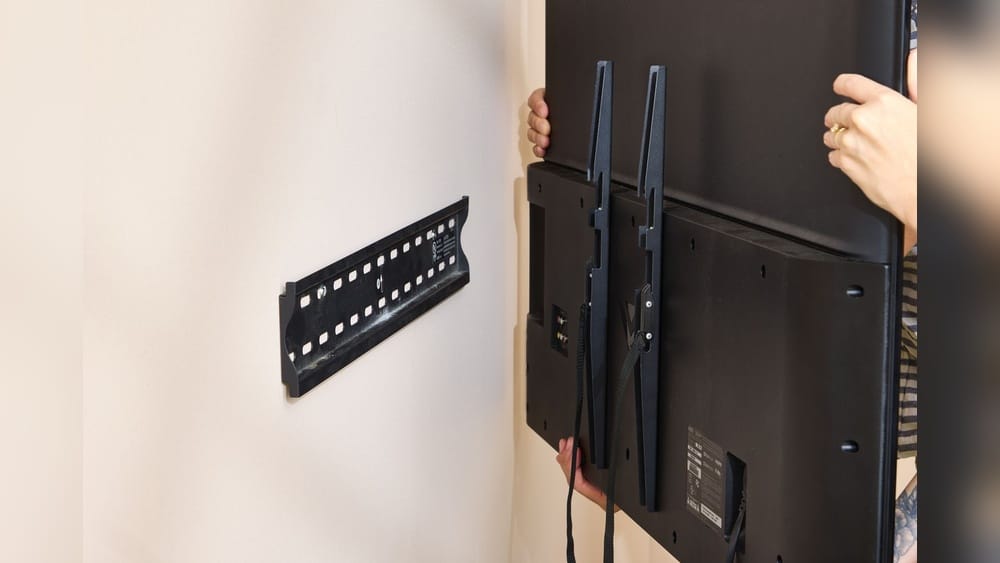
Removing a TV from a wall mount can feel like a challenge, especially if you’ve never done it before. Maybe you’re moving to a new home, upgrading your TV, or simply want to change the room layout. Whatever your reason, this task requires some planning, the right tools, and careful handling to avoid injury or damage.
Many people worry about scratching their TV, putting holes in the wall, or figuring out what type of mount they’re dealing with. The good news? With clear steps, a bit of patience, and safety in mind, almost anyone can do it.
In this guide, you’ll learn how to remove your TV from a wall mount safely and efficiently. You’ll get practical instructions for different types of mounts, tips for avoiding mistakes, and advice on what to do with your wall and TV afterward.
Whether you’re a DIY beginner or have some experience, you’ll find clear answers to common questions and challenges. Let’s make sure your TV comes down smoothly—and that your wall and electronics stay in great shape.
Understanding Your Wall Mount System
Before you reach for any tools, it’s important to identify what kind of wall mount you have. Not all mounts are the same, and the removal process can change depending on the style. There are three main types you’ll encounter:
- Fixed mounts — These keep the TV flat against the wall and don’t move.
- Tilting mounts — These allow the TV to tilt up or down for better viewing angles.
- Full-motion (articulating) mounts — These let you pull the TV out, swivel it side to side, and tilt it.
Each type has unique hardware and release methods. Most modern TVs (since 2010) use the VESA mounting standard, which means the screw holes on the back of the TV will fit most mounts. However, how the TV attaches to the bracket and the wall can still vary.
How To Identify Your Mount
- Look behind the TV: See if there’s a visible arm or if the bracket is flat against the wall.
- Check for levers or pull strings: Many tilting and full-motion mounts have small release cords or tabs at the bottom.
- Consult the manual: If you still have it, the mount’s manual or your TV’s setup guide can help.
- Search by brand/model: If you see a brand or number on the mount, a quick search online can reveal the style and removal tips.
Non-obvious insight: Some mounts have safety locks hidden behind decorative covers or plastic trim. Gently feel for these before forcing anything—breaking a hidden latch is a common mistake.
Tools And Preparation
Having the right tools on hand will save time and reduce frustration. Most people only need a few basic items:
- Phillips screwdriver (most common)
- Flathead screwdriver (for some covers or clips)
- Socket wrench (occasionally, for larger bolts)
- Flashlight (to see behind the TV)
- Step stool or sturdy chair (if the TV is mounted high)
- Soft blanket or towel (to lay the TV on once removed)
- Helper (TVs are heavy and awkward—never try to remove a large TV alone)
Safety First
TVs can weigh anywhere from 20 to over 100 pounds. Lifting them off a wall mount can be risky if you’re not prepared.
- Unplug everything: Remove all cables, including power, HDMI, and audio wires.
- Clear the area: Move furniture and obstacles to create space for you and your helper.
- Protect the screen: Have a soft surface ready to place the TV face-down or upright.
- Check the wall: Make sure the mount is secure and not pulling away from the wall.
Practical tip: Take a photo of your cable connections before unplugging them. This makes it easier to reconnect everything later.

Credit: www.youtube.com
Step-by-step: Removing A Tv From A Fixed Wall Mount
Fixed mounts are the simplest type, but the TV can still be tricky to lift off if you don’t know the release method.
Step 1: Disconnect Cables
Gently unplug all cables from the back and sides of your TV. Don’t yank them—HDMI ports are fragile. Coil the cables and set them aside.
Step 2: Locate Safety Locks Or Screws
Many fixed mounts have locking screws or tabs at the bottom that keep the TV from being lifted off accidentally. Feel along the lower edge for any:
- Small screws (often Phillips head)
- Pull tabs or cords
- Spring-loaded latches
Loosen or release these as needed. If you don’t see any, the TV may simply lift upward.
Step 3: Lift The Tv Off The Wall
This step usually requires two people. Hold the TV firmly at each side, lift straight up (about 1–2 inches), and pull it gently away from the wall. Go slowly—if it doesn’t move, check for missed locks or screws.
Step 4: Place The Tv On A Safe Surface
Lay the TV screen side up on a soft towel or blanket. Avoid hard surfaces, which can scratch the screen.
Non-obvious insight: Some fixed mounts have small “teeth” or hooks that can catch if the TV isn’t lifted straight up. Make sure both people lift evenly to avoid bending the mount or damaging the TV.
Step-by-step: Removing A Tv From A Tilting Or Full-motion Wall Mount
These mounts add complexity, often with extra locking features. However, they’re designed for easy removal once you know how.
Step 1: Unplug All Cables
As before, disconnect everything. If the TV sits close to the wall, you may need to tilt it forward or pull it out gently to access the ports.
Step 2: Identify The Release Mechanism
Most tilting and full-motion mounts have either:
- Pull strings or tabs at the bottom (pull downward to release)
- Levers or clips you press or slide
- Locking screws (sometimes hidden under plastic covers)
Check the bottom and sides of the mount. If you see cords hanging down, pull them gently—this usually unlocks the TV.
Step 3: Tilt Or Extend The Tv (if Needed)
If your mount lets you tilt or pull the TV out from the wall, do so carefully. This gives you more room to reach the locks and see what you’re doing.
Step 4: Release And Lift The Tv
With the locks disengaged, lift the TV up and away from the wall. Again, work with a helper. If the TV feels stuck, double-check for missed latches.
Step 5: Set The Tv Down Carefully
Place the TV on a soft surface. Avoid tilting it too far forward or backward—modern TVs can be damaged by pressure on the corners.
Common mistake: Not pulling both release cords at the same time. If only one side releases, the TV can tilt dangerously.

Credit: www.youtube.com
Special Cases: Removing Tvs From Specialty Mounts
Some TVs are installed on unique mounts—above fireplaces, on ceiling mounts, or with security features. If your setup looks unusual, check for:
- Locking bars (often with a small padlock or Allen screw)
- Security screws (require a special tool)
- Integrated power or cable covers (may need to be removed first)
In these cases, consult the mount’s brand website or manual for specific removal instructions. For example, Samsung’s “No Gap” wall mounts use a special hook, while some hotel TV mounts have anti-theft features.
Non-obvious insight: If you can’t see how the TV is attached, gently lift it to feel for movement. Never force it—if it doesn’t budge, there’s likely a hidden lock.
What To Do With The Wall Mount After Removing The Tv
Once your TV is off the wall, you’ll need to decide whether to leave the mount, remove it, or prepare for a new TV.
Leaving The Wall Mount
If you’re replacing the TV with a similar-sized model, it’s often easiest to leave the mount in place. Most new TVs use the same VESA hole pattern, but check that your new TV fits the existing bracket.
Removing The Wall Mount
If you want a clean wall or are moving out, you’ll need to remove the mount bracket.
How To Remove The Wall Bracket
- Locate the wall screws: These are usually large bolts at the four corners of the bracket.
- Use a socket wrench or screwdriver to remove them.
- Gently pull the bracket off the wall.
- Check for wall anchors or toggle bolts. Remove these with pliers if possible.
- Fill holes with spackle or wall putty. Sand smooth and touch up with paint as needed.
Preparing For A New Tv Or Mount
If you’re installing a new TV, measure the VESA pattern and compare it to your existing bracket. You may be able to reuse the wall plate, saving time and avoiding new holes.

Credit: www.reddit.com
Comparing Mount Types: Fixed Vs Tilting Vs Full-motion
To help visualize the differences in removal process and difficulty, here’s a quick comparison:
| Mount Type | Ease of Removal | Common Release Method | Helper Needed? |
|---|---|---|---|
| Fixed | Easy | Lift off after unlocking tabs or screws | Yes |
| Tilting | Moderate | Pull cords, release levers, or unscrew locks | Yes |
| Full-Motion | Moderate to Hard | Pull cords, release levers, extend arm | Yes |
Insight: The more a mount can move, the more likely it has extra safety features to prevent the TV from falling. Double-check for hidden locks!
Common Mistakes To Avoid
People often make small errors that can lead to bigger problems. Here are the most frequent mistakes and how to avoid them:
- Not using a helper — Even smaller TVs are awkward to lift alone.
- Forgetting to unplug cables — Pulling the TV off can damage ports or cables.
- Missing hidden locks — Forcing the TV off can break the bracket or TV.
- Lifting unevenly — Causes the TV to jam or bend the mount.
- Placing the TV on a hard surface — Scratches the screen or frame.
Pro tip: If you’re unsure, search for a video guide using your mount’s brand and model. Many manufacturers have step-by-step videos online.
Repairing The Wall After Removing A Tv Mount
Taking down the TV and its bracket often leaves behind holes, scuffs, or wall anchors. Here’s how to restore your wall:
Small Holes (screw Holes)
- Fill with spackle or lightweight wall putty.
- Smooth with a putty knife.
- Let dry, sand lightly, and touch up with paint.
Large Holes (wall Anchors Or Toggle Bolts)
- Remove any remaining plastic or metal anchors.
- Fill the hole with patching compound.
- For very large holes, use a wall repair patch before spackling.
- Sand smooth and repaint.
Scuffed Or Dirty Walls
- Clean gently with a damp cloth and mild soap.
- For stubborn marks, a magic eraser can help.
Extra tip: Keep some leftover paint for future touch-ups after removing mounts or hardware.
When To Call A Professional
While most people can remove a TV mount themselves, some situations call for expert help:
- Extra-large TVs (over 65 inches or 80 pounds)
- Mounts installed on stone, brick, or concrete
- Hidden wiring (in-wall cables or power)
- Older homes with fragile plaster walls
A professional can prevent accidental damage, especially with expensive or heavy TVs. The typical cost for TV removal is $50–$150 in the US, depending on complexity.
How To Store Or Reuse Your Old Wall Mount
Don’t toss your old mount right away—it might be useful later.
- Store all hardware: Keep screws, bolts, and instructions in a plastic bag taped to the bracket.
- Reuse for a new TV: Many mounts fit multiple TVs, especially if the VESA patterns match.
- Sell or give away: Wall mounts are in demand on sites like Craigslist or Facebook Marketplace.
- Recycle: If the mount is damaged, recycle it as scrap metal.
Practical insight: Before buying a new mount, check if your old one fits your next TV—it can save money and time.
Safety And Handling Data For Tv Removal
Modern TVs are lighter than older plasma or CRT models, but they’re still awkward to handle. Here’s a look at common TV weights and how many people are recommended for safe removal:
| TV Size | Average Weight (lbs) | People Needed |
|---|---|---|
| 32 inch | 10–15 | 1 (2 recommended) |
| 55 inch | 25–40 | 2 |
| 65 inch | 40–60 | 2 |
| 75+ inch | 60–100+ | 2–3 |
Never underestimate the weight or size—injuries and accidents often happen when people try to move a large TV alone.
What To Do After Removing Your Tv
You’ve Removed Your Tv From The Wall—what’s Next?
Reinstall The Tv Elsewhere
If you’re mounting it in a new location, keep all hardware and note the wall type (drywall, brick, etc. ) For the right anchors.
Use The Tv On A Stand
Most TVs come with feet or a base. If you lost the stand, you can often order a replacement from the manufacturer.
Prepare The Tv For Moving
- Use the original box if you have it.
- Wrap the screen in bubble wrap or a soft blanket.
- Stand the TV upright—never lay it flat in a truck or car.
Sell Or Donate The Tv
Wipe your personal data (smart TV apps, accounts) before giving away or selling your TV.
Non-obvious insight: If you plan to ship or store your TV, keep it upright at all times. Laying a large flat-screen flat can cause the glass to flex and crack.
Environmental Impact And Recycling
E-waste is a growing problem. If you’re getting rid of your TV or its mount:
- Recycle electronics at a certified e-waste facility.
- Donate working TVs to schools, shelters, or charities.
- Recycle metal mounts with your local scrap metal program.
According to the EPA, Americans throw away over 9 million tons of electronics each year. Responsible disposal reduces landfill waste and pollution. For more info, check the EPA’s guide to electronics recycling.
Frequently Asked Questions
How Do I Know If My Tv Needs A Special Tool To Remove It From The Wall Mount?
Most TVs use standard screws or quick-release mechanisms, but some specialty mounts (especially in hotels or commercial spaces) require a unique tool or key. If you see a hex (Allen) screw or a lock, check your mount’s manual or search online for your model to identify the tool needed.
Can I Reuse My Wall Mount With A New Tv?
Usually yes, if your new TV uses the same VESA mounting pattern and is within the weight limit of the mount. Check the back of your new TV for the screw hole distances (e.g., 200×200 mm, 400×400 mm) and compare with your old mount’s specs.
What Should I Do If The Tv Won’t Come Off The Wall After Unlocking Everything?
First, double-check for hidden locks, screws, or tabs. Some mounts require a firm upward lift, while others have a second safety catch. If it still won’t move, consult your mount’s brand website or call customer support before forcing anything.
How Do I Repair Large Holes After Removing A Wall Mount?
Remove any wall anchors or hardware. Fill holes with a wall patch or heavy-duty spackle, let it dry, sand smooth, and paint over. For very large holes (more than 1 inch), consider using a patch kit from a hardware store.
Is It Safe To Remove A Wall-mounted Tv By Myself?
For small TVs (under 30 pounds), it’s possible if you’re strong and careful. For larger TVs, always ask for help. TVs are bulky and easy to drop, which can cause injury or expensive damage.
—
Taking your TV off the wall mount is a manageable project for most people with some planning and the right approach. Remember to identify your mount type, gather your tools, and prioritize safety—using a helper is always wise. With each step, pay attention to small details like hidden locks and cable management to avoid common pitfalls.
Once your TV is safely down, you can repair your wall, move your TV, or prepare for your next home theater setup. With patience, anyone can handle this job and keep both their TV and their home in excellent condition.