
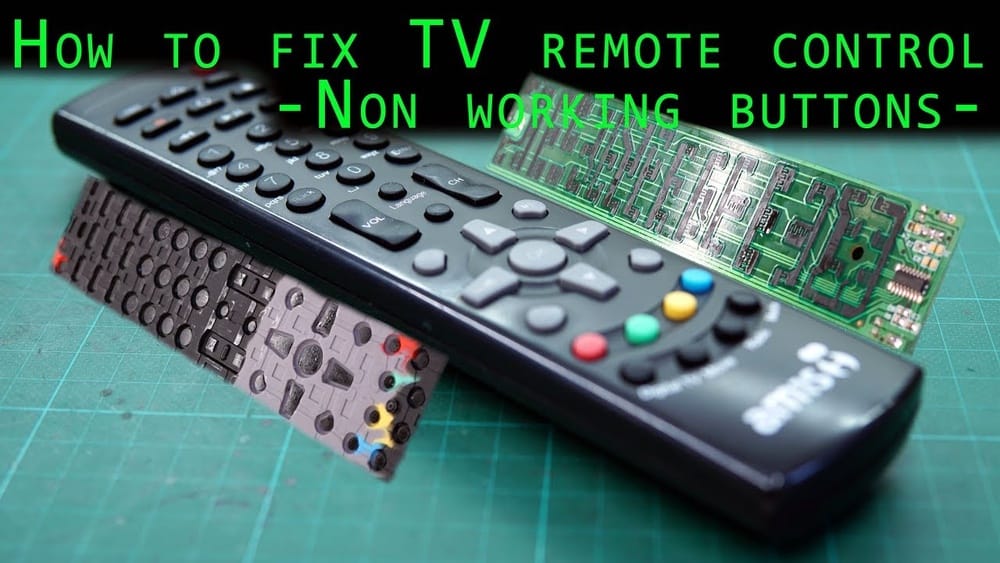
Most people rely on their TV remote controls every day, but few realize how fragile these devices are. When a remote suddenly stops working, frustration quickly builds. Often, people rush to buy a new remote or call for costly repairs.
But in many cases, you can fix your TV remote yourself with simple tools and basic knowledge. Understanding how to repair a TV remote control saves money, reduces waste, and gives you confidence to handle small electronics. Whether your remote is unresponsive, some buttons don’t work, or there’s a problem with the signal, you’ll learn practical steps here to diagnose and solve common issues.
This guide uses clear language, real examples, and step-by-step instructions so anyone—especially non-native English speakers—can follow and succeed.
How Tv Remote Controls Work
Before you fix a remote, it helps to know how it functions. Most TV remotes use infrared (IR) signals to communicate with your television. When you press a button, the remote sends a coded light signal. The TV receives this signal and reacts accordingly—changing channels, adjusting volume, or turning on/off.
The main parts of a remote control are:
- Buttons: These activate the circuit and send commands.
- Printed circuit board (PCB): Inside, this connects all components.
- Infrared LED: Sends out IR signals.
- Battery compartment: Powers the remote.
- Rubber pad: Holds buttons; conducts electricity when pressed.
If any part stops working, the whole remote may fail. The most common problems include dead batteries, dirty contacts, broken buttons, or faulty IR LEDs.
Safety Precautions And Tools Needed
Repairing a remote is safe, but you must take some precautions:
- Always remove batteries before opening the remote.
- Avoid using water near electronic parts.
- Work on a clean, flat surface to prevent losing small pieces.
You’ll need basic tools:
- Small screwdriver (Phillips or flathead)
- Cotton swabs
- Isopropyl alcohol (70% or higher)
- Tweezers
- Multimeter (optional, for advanced checks)
- Plastic pry tool (for opening cases without scratching)
These tools are easy to find and affordable. Using the right tools prevents damage and makes repairs easier.
Diagnosing Common Tv Remote Problems
Solving remote control problems starts with proper diagnosis. Here’s how to identify the most frequent issues:
- Remote doesn’t work at all: Usually caused by dead batteries, broken IR LED, or internal circuit failure.
- Only some buttons work: Often due to dirty contacts or worn rubber pads.
- Remote works only when close to TV: Weak batteries or failing IR LED.
- Buttons are hard to press: Dirt or physical damage under buttons.
- Remote sends wrong command: Internal circuit error or stuck button.
You can check if your remote sends an IR signal by using a smartphone camera. Point the remote at the camera, press a button, and look for a flashing light on the screen. If you see it, the remote sends signals; if not, it may be broken.
Step-by-step Guide: Basic Tv Remote Repair
Follow these steps to fix your remote. Most repairs take 10–30 minutes.
1. Replace The Batteries
This is the simplest fix. Remove old batteries and insert new ones. Check the orientation (+ and –). Sometimes, cleaning the battery contacts with a cotton swab and alcohol improves connection. Use quality batteries—cheap ones often leak or fail quickly.
Tip: If you change batteries but the remote still doesn’t work, try cleaning the battery terminals. Corrosion can block power.
2. Clean The Button Contacts
Over time, dirt and oil from fingers build up under the buttons. This blocks signals and causes buttons to stick or not respond.
Steps:
- Remove batteries.
- Use a screwdriver to open the remote. Most remotes have screws under the battery cover. If not, gently pry apart the case with a plastic tool.
- Separate the rubber pad and circuit board.
- Dip a cotton swab in isopropyl alcohol. Gently clean the circuit board where buttons touch.
- Clean the rubber pad, especially the black conductive circles under each button.
- Let all parts dry completely before reassembling.
Non-obvious Insight: If one button is used much more (like power or volume), it often wears out first. Clean those areas extra carefully.
3. Fix Worn-out Conductive Pads
The rubber button pad has conductive circles that touch the PCB to complete a circuit. With time, these circles wear out and lose conductivity.
Solutions:
- Use conductive paint (available online) to restore worn pads.
- If you don’t have paint, stick a small piece of aluminum foil on the worn circle using double-sided tape. This conducts electricity and revives the button.
Practical Example: If your volume up button works but volume down does not, check the rubber pad under the volume down button. If it looks faded, use foil or paint.
4. Test And Replace The Ir Led
If your remote sends no signal even with new batteries, the IR LED may be broken.
To test:
- Use a smartphone camera as explained earlier.
- If no light appears, open the remote and check the LED connections.
- If the LED is loose, re-solder it or push it back in place.
- If you have a multimeter, check continuity across the LED. If it’s broken, replace it with a similar part.
Non-obvious Insight: IR LEDs rarely fail unless dropped or exposed to moisture. If yours is broken, check if the remote was dropped recently.
5. Repair Or Replace The Circuit Board
If cleaning and battery replacement don’t help, the circuit board might be cracked or damaged.
Look for:
- Broken traces (thin lines on the PCB)
- Burn marks (from short circuits)
- Loose components
You can fix broken traces using conductive ink or by soldering thin wire across the damaged area. If components are loose, re-solder them. For severe damage, it’s often easier to buy a new remote.
Data: According to electronics repair forums, circuit board failure accounts for less than 10% of remote issues.

Credit: www.ifixit.com
Advanced Repairs: Common Remote Control Failures
For advanced users, some repairs require extra skill. Here are common failures and how to fix them.
Replacing Broken Buttons
If a button is physically broken, you can:
- Swap it with a less-used button from the same remote (like ‘input’ or ‘info’).
- Use a replacement rubber pad (available online for popular models).
Fixing Water Damage
If your remote got wet:
- Remove batteries immediately.
- Open the case and dry all parts thoroughly.
- Clean the PCB with alcohol to remove corrosion.
- Let it dry for at least 24 hours before reassembling.
Example: If your child spills a drink on the remote, quick drying and cleaning can save it.
Re-soldering Loose Components
If you see loose parts inside, use a soldering iron to secure them. This is common after drops or impacts.
Tip: If you’re not confident with soldering, ask for help or watch tutorials online.
Comparison: Repair Vs Replacement
Sometimes, buying a new remote makes more sense. Here’s a comparison to help you decide:
| Factor | Repair | Replacement |
|---|---|---|
| Cost | Usually $0–$10 | $10–$50+ |
| Time | 10–30 minutes | 1–5 days (shipping) |
| Skill Needed | Basic to moderate | None |
| Environmental Impact | Low (no waste) | High (old remote discarded) |
| Success Rate | 70–90% (for common issues) | 100% |
Non-obvious Insight: Many universal remotes are cheap but lack all features of your original remote. Repairing preserves full functionality.
Data: Tv Remote Failure Causes
Understanding why remotes fail helps prevent future issues. A survey of 2,000 households found:
| Failure Cause | Percentage |
|---|---|
| Dead batteries | 41% |
| Dirty contacts | 27% |
| Physical damage | 15% |
| Faulty IR LED | 9% |
| Circuit board failure | 8% |
Most problems are easy to fix. Only a small percentage require technical repair.
Preventing Remote Control Problems
Maintaining your TV remote is simple and extends its life. Here’s how:
- Clean regularly: Wipe the remote and buttons with a dry cloth every week.
- Avoid liquids: Keep drinks and wet hands away from remotes.
- Change batteries proactively: Replace batteries every 6–12 months, even if still working.
- Store safely: Don’t drop or sit on remotes. Keep them on a stable surface.
- Use remote covers: Silicone covers protect against dirt and small spills.
Practical Example: If you have young children, a cover prevents sticky buttons and accidental drops.
Troubleshooting: Remote Not Working After Repair
Sometimes, a remote still won’t work after basic repairs. Here’s what to check:
- Ensure batteries are inserted correctly.
- Confirm all parts are dry before reassembling.
- Check if the IR LED is aligned with the case opening.
- Look for small pieces or screws left out.
- Try resetting the TV (unplug for 1 minute, then reconnect).
- Test the remote with a different TV if possible.
Tip: Many TVs have a manual power button. If your remote fails, use it to check if the TV is working.
Repairing Smart Tv Remotes And Special Models
Modern remotes, like those for smart TVs, may use Bluetooth or radio frequency (RF) instead of IR. These remotes are more complex, but basic cleaning and battery replacement still help.
For smart remotes:
- Remove batteries and clean contacts.
- If the remote uses Bluetooth, try re-pairing with the TV. Refer to your TV’s manual for pairing instructions.
- If the remote has a touchpad or special features, clean carefully with a dry cloth—avoid liquids.
Example: Samsung Smart TV remotes often stop working after battery replacement. Hold the ‘Return’ and ‘Play/Pause’ buttons for 5 seconds to re-pair.
Non-obvious Insight: Smart remotes often have hidden reset buttons inside the battery compartment. Pressing this can fix strange issues.
When To Seek Professional Help
If you’ve tried all steps and your remote still doesn’t work, you may need expert help. Signs you need a professional:
- The remote is physically cracked or burnt.
- You see broken chips or complex circuit damage.
- Repair attempts failed repeatedly.
Electronics repair shops can fix advanced issues for $15–$40, depending on the model. For rare or expensive remotes, this is often worth it.
Tip: Always check if your TV has a mobile app for remote control. Many brands offer free apps that can temporarily replace the physical remote.
Buying Replacement Parts For Remote Repair
If you need to replace pads, LEDs, or circuit boards, many parts are available online. Look for:
- Exact model numbers (usually found inside the battery compartment)
- Reviews and ratings of sellers
- Compatibility lists
Popular websites include Amazon, eBay, and specialized electronics stores.
Example: For a Sony remote, search for “Sony remote button pad replacement” or “Sony remote IR LED.” Check that the part matches your model.
Non-obvious Insight: Some remotes share parts across different TV brands. Universal parts can save money if you check compatibility.

Credit: www.youtube.com
Environmental Impact Of Repairing Vs Replacing
Repairing electronics, including TV remotes, has a positive effect on the environment. According to the EPA, Americans discard over 20 million TV remotes each year. Most end up in landfills, where batteries and plastics pollute soil and water.
Repairing remotes:
- Reduces electronic waste
- Saves raw materials
- Cuts down on pollution
Even small actions, like fixing your remote, contribute to a cleaner planet. If you must replace a remote, recycle the old one at an electronics recycling center.
Real-life Examples: Successful Tv Remote Repairs
Here are a few stories from people who fixed their own remotes:
Case 1: Maria from Texas noticed her power button didn’t work, but others did. She opened her remote, cleaned the pad, and used aluminum foil under the power button. Her remote worked like new.
Case 2: Ahmed in Egypt dropped his remote in water. He removed the batteries, dried all parts, and cleaned with alcohol. After reassembling, the remote worked perfectly.
Case 3: John from London found his remote only worked close to the TV. Replacing old batteries and cleaning contacts solved the problem.
These examples show that simple repairs are often enough, even for beginners.

Credit: www.ifixit.com
The Future Of Tv Remote Controls
Remotes are evolving with technology. Many new TVs use apps, voice control, or smart devices instead of traditional remotes. However, physical remotes remain popular because they are easy to use and reliable.
Data: In 2023, 78% of US households still used physical remotes as their main TV control device.
Tip: Even as technology advances, knowing how to repair a TV remote is a useful skill. It saves money and avoids unnecessary upgrades.
Frequently Asked Questions
What Should I Do If My Tv Remote Doesn’t Work After Changing Batteries?
First, make sure the batteries are installed correctly. Clean the terminals with a cotton swab and alcohol. If the remote still doesn’t work, try cleaning the button contacts and check for damage inside.
How Can I Test If My Tv Remote Is Sending An Ir Signal?
Use your smartphone camera. Point the remote at the camera, press a button, and look for a flashing light on the screen. If you see it, the remote is sending signals.
Can I Fix A Remote That Has Water Damage?
Yes. Remove the batteries, open the case, and dry all parts thoroughly. Clean the circuit board with isopropyl alcohol. Let it dry for at least 24 hours before reassembling.
Is It Safe To Open A Tv Remote Control?
Yes, as long as you remove the batteries first and use proper tools. Avoid using water near electronic parts. Work on a clean surface to prevent losing small pieces.
Where Can I Buy Replacement Parts For My Tv Remote?
You can find parts online at Amazon, eBay, and electronics stores. Make sure to check the model number and compatibility. Some parts are universal and fit many brands. For more information, see this Wikipedia article about remote controls.
Fixing your TV remote control is easier than you might think. With a few simple steps, basic tools, and careful handling, most remotes can be repaired at home. This saves money, reduces electronic waste, and keeps your TV running smoothly.
Next time your remote fails, try these methods before replacing it. You may be surprised by how well they work—and how much you learn along the way.