
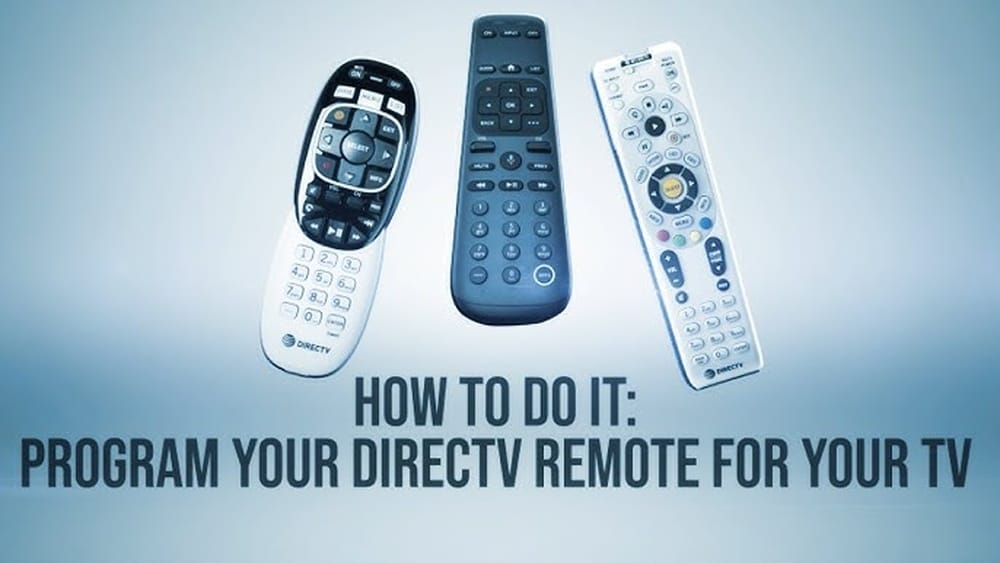
Reprogramming your DIRECTV remote control can seem confusing, especially if you are not familiar with all the steps or technical terms. Maybe your remote stopped working with your TV, or you bought a new TV and want to control it with the same remote. The good news: you can easily reprogram your DIRECTV remote with a few simple actions. This article will guide you through the full process, explain why it matters, and help you avoid common mistakes. Whether you have a standard or Genie remote, you will find step-by-step instructions, practical tips, and advice for every situation.
Many people do not realize how much time they waste searching for different remotes or trying to adjust settings manually. Learning how to reprogram your DIRECTV remote not only saves you time, but also gives you better control of your home entertainment.
Plus, if you ever upgrade your devices, knowing these steps makes the transition smooth. Let’s break down everything you need to know to get your DIRECTV remote working perfectly with your TV, audio device, or receiver.
Understanding Your Directv Remote Types
Before you start, it is important to know which DIRECTV remote you own. DIRECTV offers several types, and the programming steps can be different depending on the model.
Main Directv Remote Types
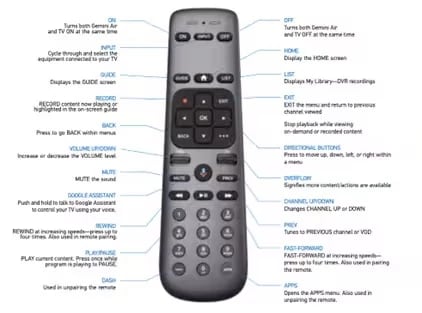
- Genie Remote (RC71, RC72, RC73, RC73B): Works with Genie receivers and most newer DIRECTV boxes. It is smaller with fewer buttons and offers both IR (infrared) and RF (radio frequency) modes.
- Universal Remote (RC65, RC66, etc. ): Older remotes that support most DIRECTV receivers and many TVs and audio devices. These are larger and have a mode switch at the top.
- DIRECTV Stream Remote: For the DIRECTV streaming box. Simple layout, specific to streaming services.
How To Identify Your Remote
- Check the model number on the back or inside the battery compartment.
- Look for the DIRECTV logo and button layout.
- Universal remotes have a mode switch for DIRECTV, AV1, AV2, and TV.
Why Remote Type Matters
Different remotes have different programming codes and steps. Using the wrong method can waste time or even lock the remote. Always confirm your remote type before starting.
Why You Might Need To Reprogram Your Directv Remote
You may wonder why reprogramming is sometimes necessary. Here are the most common reasons:
- New TV or device: When you upgrade or change your TV, soundbar, or receiver.
- Remote replacement: If you get a new or used remote.
- Malfunction: Buttons do not respond, or the remote controls the wrong device.
- Reset issues: After factory reset, remotes lose their programming.
- Switching devices: You want to control more than one device, such as both TV and audio system.
Reprogramming can restore full control and fix problems like volume not working or the power button not responding.
Credit: www.directv.com
Preparing To Reprogram Your Directv Remote
Getting ready before you start helps avoid mistakes. Here’s how to set up for success:
- Check Batteries: Make sure your remote has fresh, working batteries. Weak batteries can cause programming to fail.
- Identify Devices: Know the brand and model of your TV or audio device.
- Find Device Codes: You will need the correct code for your brand. These are available in the DIRECTV manual or online at the official DIRECTV code lookup page.
- Clear Obstacles: Point the remote directly at the device. Remove anything blocking the signal.
A common oversight: Many users start programming without knowing their exact device model. This leads to failed attempts or partial control.
How To Reprogram A Directv Genie Remote
The Genie remote is the most common DIRECTV remote today. It supports both IR and RF modes, which means you can control the box even if it is behind a cabinet (RF mode).
Programming The Genie Remote For Your Tv
- Press and hold the MUTE and ENTER buttons until the green light blinks twice. The screen will show “Applying IR/RF setup.”
- On your TV, you will see a prompt: “Your remote is now set up for RF.”
- Press MENU on the remote.
- Go to Settings & Help > Settings > Remote Control > Program Remote.
- Choose the device (TV or audio).
- Select your TV brand from the list.
- Follow the on-screen instructions to enter the code or test the remote.
If your brand is not listed, try the “I don’t know my model” option. The system will cycle through possible codes.
Switching Between Ir And Rf Modes
- IR mode requires a direct line of sight. RF mode allows you to hide your receiver inside a cabinet.
- To switch between modes, hold MUTE and ENTER until the light blinks and the TV confirms the change.
Common Genie Remote Problems And Solutions
- Remote not responding: Try resetting the remote by pressing and holding the Select and Mute buttons until the light flashes, then reprogram.
- Partial control: Some codes do not support all functions (e.g., volume up/down but not power). Try a different code.
Genie Remote Programming Tips
- The Genie remote auto-detects many TV brands. But for less common brands, you may need to test several codes.
- Write down the working code in case you need to reset later.
How To Reprogram A Directv Universal Remote
Universal remotes (RC65, RC66) require a code for each device. They can control up to four devices (DIRECTV, TV, AV1, AV2).
Step-by-step Programming For Tv
- Slide the mode switch to TV.
- Press and hold MUTE and SELECT until the green light flashes twice.
- Enter the 5-digit code for your TV brand.
- The green light should flash twice again.
- Test the remote. If it does not work, repeat with a different code.
Programming For Audio Devices
- Slide the mode switch to AV1 or AV2.
- Repeat the steps above, using the correct code for your audio device (soundbar, receiver, etc. ).
Direct Code Entry Vs. Automatic Search
- Direct code entry is faster if you know the code.
- If you do not, use the automatic search:
- Slide the mode switch to TV.
- Hold MUTE and SELECT until the light flashes.
- Enter 991. The light blinks twice.
- Point the remote at the TV and press CHANNEL UP repeatedly until the TV turns off.
- Press SELECT to lock in the code.
Common Universal Remote Mistakes
- Entering the wrong code for the device type (e.g., using a TV code for AV1).
- Not sliding the mode switch to the correct position.
- Not pressing SELECT after finding the code during search.
How To Program The Directv Stream Remote
If you use the DIRECTV Stream service, your remote is different. It is designed for streaming but can also control your TV power and volume.
Programming Steps
- Press Home on your remote.
- Go to Settings > System > Remote & Devices > Program Your Remote.
- Select the device you want to program.
- Follow the on-screen prompts to finish setup.
This remote uses automatic detection for most TVs, so you will not usually need to enter a code.
Troubleshooting Directv Stream Remote
- If the remote does not control your TV, make sure your streaming box is updated.
- If you have an older TV model, manual code entry may be required. Check the official DIRECTV Stream support page.

Credit: www.youtube.com
Resetting Your Directv Remote To Factory Settings
Sometimes, your remote may act strangely or not respond at all. Resetting to factory settings can help.
Reset Steps For Genie Remote
- Press and hold the MUTE and SELECT buttons until the green light flashes twice.
- Enter 981. The green light flashes four times.
This removes all settings and codes. You will need to reprogram for your TV and audio devices.
Reset Steps For Universal Remote
- Press and hold MUTE and SELECT until the green light blinks twice.
- Enter 981.
- The green light blinks four times.
All programming is erased. Start from scratch with your device codes.
When To Reset
- When the remote controls the wrong device.
- Buttons are stuck or do not work.
- After buying a used remote.
Using Your Directv Remote In Different Modes
DIRECTV remotes can operate in different modes depending on how you want to control your devices.
Ir Vs Rf Mode
- IR (Infrared): Needs line of sight. Simple to set up.
- RF (Radio Frequency): Works through walls and cabinets. Must be paired with the receiver.
How To Set Up Rf Mode
- Make sure your receiver supports RF.
- On Genie remote, press and hold MUTE and ENTER until you see “Applying IR/RF setup.”
- Follow on-screen steps to finish pairing.
Benefits Of Rf Mode
- Hide your DIRECTV box out of sight.
- Control from other rooms.
- Fewer signal interruptions.
Limitations
- Not all Universal remotes support RF.
- Must be paired to each receiver.

Credit: www.wikihow.com
Programming Your Directv Remote For Audio Devices
Many users want to control their soundbar or AV receiver with the same remote.
Steps For Genie Remote
- Go to Menu > Settings & Help > Settings > Remote Control > Program Remote.
- Select your audio device brand.
- Follow prompts to test functions like volume and mute.
Steps For Universal Remote
- Slide mode switch to AV1 or AV2.
- Hold MUTE and SELECT until the light flashes.
- Enter the code for your audio device.
- Test volume and power.
Common Problems
- Some codes allow only partial control (volume, but not power).
- Audio device may require learning remote instead of code entry.
Troubleshooting Directv Remote Programming Issues
Even when you follow all steps, things can go wrong. Here’s how to solve the most common issues.
Remote Does Not Program
- Try New Batteries: Weak batteries are a frequent cause.
- Double-Check Code: Make sure you are entering the code for the right device and brand.
- Use Automatic Search: If direct code does not work, use the auto search method.
Remote Controls Only Some Functions
- Some brands use different codes for power and volume. Try programming a different code.
- Check if the TV or audio device needs a firmware update.
Receiver Does Not Respond
- Make sure the receiver is not in standby mode.
- Try resetting the remote and receiver.
Buttons Stick Or Remote Lags
- Dust or spills can cause problems. Clean the remote with a soft cloth.
- Replace batteries if response is slow.
Non-obvious Tips Most Users Miss
- Write Down Working Codes: If you find a code that works, write it down and keep it with your manual. If you ever reset, you will not have to search again.
- Try Codes for Similar Brands: If your TV is made by a company that also makes other brands (e.g., TCL, Hisense, Roku TVs), codes may overlap.
Directv Remote Codes: How To Find And Use Them
Most remotes need a 5-digit code to control other devices. Here’s how to find and use the right one.
Where To Get Codes
- DIRECTV manuals
- Official DIRECTV website
- TV or audio device manufacturer’s website
Using The Code Lookup Tool
The DIRECTV website has a code lookup tool. Search for your device brand and model, and it will give you the correct code.
Example Codes For Popular Brands
Below is a quick reference for TV codes (always check for your exact model):
| Brand | Common Codes |
|---|---|
| Samsung | 10812, 10060, 10702 |
| LG | 11423, 10178, 11178 |
| Sony | 10810, 10000, 11300 |
| Vizio | 11758, 12707, 10864 |
| TCL | 11756, 12434, 10818 |
If none of these codes work, your device may use a newer or less common code. Always double-check with the latest online resources.
Directv Remote Features You May Not Know
DIRECTV remotes offer more than basic channel and volume controls. Here are some extra features:
- Input Button: Switch between HDMI ports, AV, or other inputs.
- TV Apps Shortcut: For Genie remotes, a dedicated button opens apps.
- Favorite Channels: Set favorite channels for quick access.
- Parental Controls: Lock certain functions or channels from the remote.
Learning these features can make your entertainment system easier to use.
Comparing Directv Remote Models
Not sure if you should upgrade your remote or which model fits your needs best? Here’s a quick comparison.
| Feature | Genie Remote | Universal Remote | DIRECTV Stream Remote |
|---|---|---|---|
| Controls TV & Audio | Yes | Yes | Yes |
| RF Mode | Yes | Some Models | No |
| Voice Control | No | No | Yes (Some Models) |
| Number of Devices | 2 (TV & Audio) | 4 (DIRECTV, TV, AV1, AV2) | 2 (TV & Stream box) |
| Auto Programming | Yes | No | Yes |
Advanced Programming: Macros And Customization
Some users want to set up more complex commands, like turning on the TV, soundbar, and DIRECTV box with one button. DIRECTV remotes have limited macro functions, but here are some options:
Macro Workarounds
- Power ON/OFF: Genie remote can turn TV and receiver on/off together if programmed correctly.
- Volume Lock: Lock volume control to always control your TV or audio device, not the receiver.
How To Set Volume Lock On Universal Remote
- Slide mode switch to the device you want to control (TV or AV1).
- Hold MUTE and SELECT until light blinks.
- Enter 993.
- Press the device key (TV or AV1). The light blinks twice.
Now, the remote will always control volume on the selected device.
Customizing Favorite Channels
- Use the Menu button to access the “Favorites” setup.
- Add, delete, or rearrange your favorite channels for faster access.
What To Do If Your Remote Still Does Not Work
If you have tried all programming and troubleshooting steps, but your remote is still not working, consider these final checks:
- Replace the Remote: Sometimes, remotes become faulty due to age or damage.
- Check the Receiver: Make sure your DIRECTV box is working. If the front panel buttons do not work, the problem may be with the box, not the remote.
- Update Software: Some issues are fixed with a receiver or streaming box update.
- Contact Support: DIRECTV offers support by phone, chat, or their official website.
You can also check online forums and user groups for help with rare problems.
Real-world Example: Reprogramming For A New Tv
Let’s walk through a practical example. Suppose you replace your old Samsung TV with a new LG model.
- Identify your remote: Genie RC73.
- Check batteries: All set.
- Find LG code: Use DIRECTV lookup tool, find code 11423.
- Enter programming mode: Hold MUTE and ENTER, wait for light.
- Follow on-screen prompts: Select LG, enter code, test volume and power.
- Success: Remote controls new TV.
If the first code does not work, try 10178 or 11178. Write down the code that works.
How Directv Remote Programming Compares To Other Brands
Programming a DIRECTV remote is similar to other universal remotes, but with some key differences.
| Feature | DIRECTV | DISH Network | Roku TV Remote |
|---|---|---|---|
| Manual Code Entry | Yes | Yes | No (auto only) |
| Auto Programming | Yes (Genie, Stream) | Yes | Yes |
| RF Mode | Yes (Genie) | Yes | No |
| Multi-Device Support | Yes | Yes | No |
| Voice Control | Some Models | Yes | Yes |
DIRECTV remotes offer a good mix of manual and automatic programming, making them flexible for most users.
When To Replace Or Upgrade Your Directv Remote
Even the best remotes wear out. Here’s when you should consider a replacement:
- Buttons do not respond, even after new batteries and reset.
- Physical damage (cracked case, stuck buttons).
- You want new features like voice control or better compatibility.
- Your remote is missing.
Official DIRECTV remotes are available from the DIRECTV website, electronics stores, and online retailers. Always buy from trusted sources to avoid counterfeit remotes.
Environmental Tips: Recycle Old Remotes
Do not throw old remotes in the trash. Many contain batteries or small electronics that can be recycled.
- Check local recycling centers for electronics drop-off.
- Some retailers accept old remotes for recycling.
This small action helps reduce electronic waste and protects the environment.
Where To Get More Help
If you still have questions, the official DIRECTV support page is a reliable resource. You can also find detailed guides and code lists at DIRECTV Support.
Frequently Asked Questions
Why Won’t My Directv Remote Control The Volume On My Tv?
This usually means the remote is not programmed correctly for your TV brand, or you entered the wrong code. Try reprogramming the remote with a different code. Some TV models need a specific code to enable volume control.
How Do I Know If My Directv Remote Is In Ir Or Rf Mode?
Most Genie remotes display a message on the TV screen when switching modes. You can also check by seeing if the remote works with the receiver inside a cabinet (RF) or only with a direct line of sight (IR).
Can I Use My Directv Remote To Control A Soundbar?
Yes, as long as your soundbar supports remote codes and the DIRECTV remote has the correct code. Try programming the remote in AV1 or AV2 mode and test volume and mute functions.
What Should I Do If My Directv Remote Stops Working After A Power Outage?
First, check the batteries. If the remote still does not work, try resetting it by holding MUTE and SELECT, entering 981, and then reprogramming. Sometimes, the receiver also needs to be reset after a power outage.
Is There A Way To Program My Directv Remote Without The Code?
Yes, both Genie and Universal remotes offer an automatic code search method. Follow the steps for automatic search, and the remote will cycle through possible codes until it finds one that works.
Reprogramming your DIRECTV remote is a skill that pays off every time you change your TV, upgrade your home theater, or fix a stubborn remote. With the right steps and a bit of patience, you can enjoy full control of your entertainment system without confusion.
If you ever need more help, DIRECTV’s support and user communities are always there to guide you.