
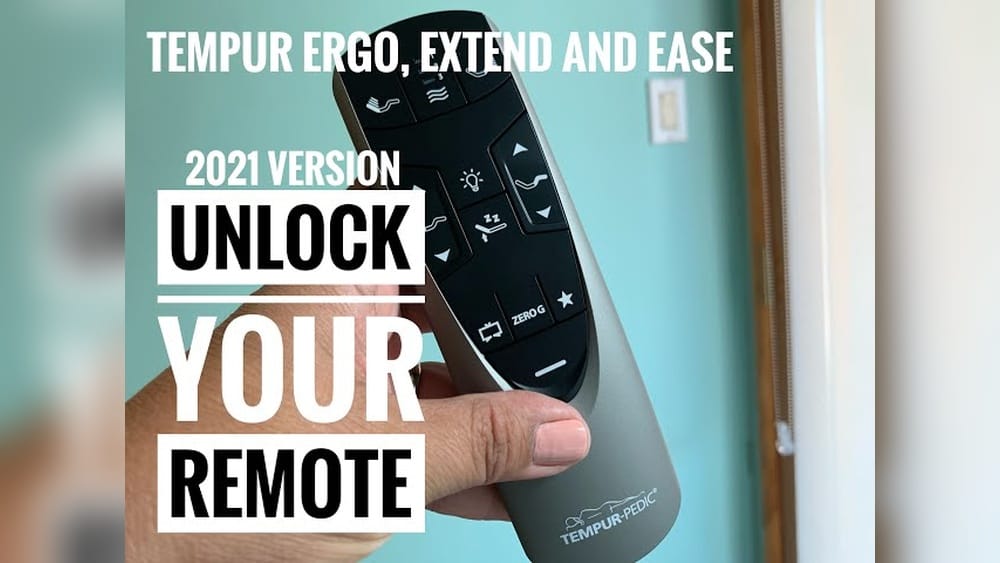
Tempurpedic adjustable beds offer amazing comfort and flexibility for sleep. Their remote controls let you adjust bed positions, massage settings, and more — all with a touch. But sometimes, the Tempurpedic remote control stops working, loses sync, or acts strangely. If this happens, you need to reset the remote. Resetting is not always obvious, and mistakes can lead to frustration or even damage. This article walks you through every detail, step by step, so you can reset your Tempurpedic remote safely and confidently. You’ll learn practical solutions, common mistakes to avoid, and how to handle different models. By the end, you’ll know exactly how to get your bed and remote working perfectly again.
Understanding Tempurpedic Remote Controls
Tempurpedic beds use wireless remotes to control different features. Most remotes are simple, but newer models have digital screens and multiple buttons. The main functions include:
- Head and foot position adjustment
- Massage settings
- Preset positions
- Under-bed lighting (in newer models)
- Favorite memory settings
The remote works by sending signals to a receiver in the bed base. If the signal breaks or the remote loses its programming, the bed will not respond. Remote controls also use batteries, which can cause problems if they run low.
You might notice that even if the buttons “feel” like they are working, nothing actually happens. This is because the remote and the bed must communicate perfectly. If a neighbor has a similar adjustable bed, sometimes the signals can even get confused for a moment, but this is rare.
Types Of Tempurpedic Remotes
There are three main types:
- Basic remote (few buttons, simple functions)
- Advanced remote (digital screen, preset buttons)
- Bluetooth-enabled remote (connects to smartphone apps)
Each type has a different reset method. Knowing your remote model helps you follow the right steps.
Basic remotes often have just up and down arrows for the head and foot positions. Advanced remotes may have extra buttons for massage, memory, or even a backlight. The Bluetooth remotes sometimes look like a TV remote but also include a pairing button and may have a Bluetooth logo.
Signs Your Remote Needs A Reset
Look for these signs:
- Bed does not move when you press buttons
- Massage feature won’t start
- Remote screen is blank
- Remote flashes but bed does not respond
- Settings are lost (favorite positions, presets)
- Remote shows error messages
Sometimes, new batteries solve the issue. But if you still have problems, a reset is needed.
Another less obvious sign is when the bed moves only halfway or stops in the middle of a movement. This often means the remote sent a partial signal, and the connection needs to be restored. If your massage function works but the movement does not, or vice versa, this is usually a sign of a communication error, not a hardware failure.
Why Resetting Matters
Resetting fixes many issues:
- Restores connection between remote and bed base
- Clears glitches from software updates or power outages
- Resets memory settings to default
- Syncs multiple remotes for split king or dual beds
If you skip resetting, your bed may not function properly. This can affect your sleep quality and even lead to expensive service calls.
Common Causes For Losing Sync
- Power outages
- Switching batteries
- Moving the bed
- Interference from other devices
- Software updates
Knowing these causes helps prevent future problems.
For example, if you unplug the bed to move it during cleaning, the remote may lose its memory. Or, after a thunderstorm or power surge, the connection between the remote and the bed base can be lost. Sometimes, even plugging in a new device close to the bed (like a phone charger) can cause brief interference, especially with Bluetooth remotes.
A non-obvious mistake is stacking remotes or storing them together. Signals can cross, especially during pairing, causing confusion between beds.
Preparing To Reset: Key Steps Before You Start
Before you reset your Tempurpedic remote, take these important steps:
- Identify your bed model and remote type. Check the manual or look for a sticker under the bed.
- Find the reset instructions. Manuals have specific steps for each model.
- Check battery life. Replace batteries with fresh ones before resetting.
- Clear space around the bed. Make sure you can access both sides.
- Unplug nearby electronics. This prevents interference.
- Have your manual ready. Many problems come from following wrong steps.
A beginner mistake is skipping battery checks. Low batteries often look “okay” but cause random problems.
Another detail: If you can, write down your favorite preset positions before resetting. Some advanced remotes will erase custom settings during a reset, so you’ll want to remember the numbers to restore them easily.
Also, for beds with USB ports or under-bed lights, unplug any devices or lights during the reset process. This ensures only the bed base is communicating with the remote, reducing possible confusion.
Step-by-step Reset Instructions For Tempurpedic Remote Controls
Resetting is not hard, but you must follow the steps exactly. Here are clear instructions for the main models.
Resetting A Basic Tempurpedic Remote
For simple remotes with only a few buttons:
- Remove the batteries from the remote.
- Wait 30 seconds. This clears any stored memory.
- Replace with new batteries.
- Locate the sync button under the bed (usually near the power cord).
- Press and hold the sync button on the bed base for 10 seconds.
- Release the sync button.
- Press any button on the remote. The bed should respond.
If nothing happens, repeat the steps. Sometimes, you must press the sync button on the bed and the remote at the same time.
If you’re not sure which button is the sync button, it’s usually a small, recessed button that may require a pen tip to press. Don’t confuse it with the power button. If your bed base is older, the sync button could be labeled as “pairing” or simply a color-coded button.
It’s important to wait the full 30 seconds after removing batteries. This allows all leftover electrical charge to leave the remote’s circuitry, ensuring a true reset. People sometimes rush this step, which leads to incomplete resets.
Resetting An Advanced Tempurpedic Remote
For remotes with screens and multiple features:
- Turn off the bed base power. Unplug the bed from the wall.
- Wait 1 minute. This clears power memory.
- Plug the bed back in.
- Press and hold both “head up” and “foot up” buttons on the remote for 10 seconds.
- Watch for a flash or beep from the bed base.
- Release the buttons.
- Test the bed. Try moving the head or foot.
If your remote has a pairing button, press and hold it while following the steps above.
Some advanced remotes have small screens that show messages like “PAIRING” or “RESET. ” Watch for these messages as you follow the steps. If nothing shows, try holding the buttons for a few seconds longer.
If your remote doesn’t respond after two tries, check if there’s a child lock or sleep mode activated. These features can block reset commands. Look for a key icon or lock icon on the remote screen.
Resetting Bluetooth-enabled Tempurpedic Remotes
If your remote connects to a smartphone app:
- Open the Tempurpedic app on your phone.
- Go to Settings > Pair New Device.
- Follow the app instructions to reset the connection.
- Press the sync button on the bed base.
- Confirm pairing in the app.
Bluetooth problems are often caused by app updates. Always update the app before resetting.
If you have trouble finding your bed in the app, check your phone’s Bluetooth settings. Sometimes, you need to “forget” the old bed connection before you can pair again. If your phone asks for a pairing code, check your manual or look for a sticker on the remote or bed base.
A less obvious tip: Some beds only allow Bluetooth pairing for a short time after you press the sync button (for example, 30 seconds). Be ready to pair quickly after pressing sync.
Handling Split King And Dual Bases
If you have a split king bed (two bases):
- Sync each remote separately.
- Make sure both bases are plugged in.
- Press sync buttons on both bases at the same time.
- Pair remotes one after another.
Split beds confuse many users. Sometimes, remotes get mixed up, so label them to avoid mistakes.
A good practice is to reset and pair one side completely before starting the other. This avoids accidental cross-pairing, which causes both sides to move at the same time.
Some split king systems allow you to “link” the remotes to move both sides together or separately. Make sure to check your manual for special instructions about linking or unlinking remotes, especially if you want independent control.

Credit: www.youtube.com
Troubleshooting After Reset
After you reset, test every feature. Common issues include:
- Bed only moves one side
- Massage works, but movement does not
- Remote flashes, but bed does not respond
- Favorite settings lost
If you see any problems:
- Repeat the reset steps.
- Check batteries again.
- Try a different outlet for the bed.
- Move other electronics away.
Many errors come from weak batteries or power surges.
If you have under-bed lights, USB ports, or extra features, test each one. Sometimes, a reset will restore bed movement but not accessory features. If you find that a certain feature is still not responding, unplug the bed for a longer period (up to 5 minutes) and try resetting again.
Also, check that your remote’s buttons are not stuck. Dust or crumbs can sometimes wedge into the gaps, causing buttons to remain pressed and blocking signals. Gently clean around the buttons with a dry cloth or compressed air.
Advanced Troubleshooting Tips
- Look for flashing lights on the bed base. Red means error, green means ready.
- Check for firmware updates if you use a smart remote.
- Reset the remote twice if the bed does not respond.
- Contact Tempurpedic support if you see error codes.
Most issues can be fixed by patience and careful steps.
If your bed shows a flashing error code, write it down before resetting. Each code points to a specific problem (for example, motor jam, connection lost, or power supply issue). You can check the code in your manual or on the Tempurpedic website.
Some advanced beds allow you to update the firmware (the remote’s software). If the remote still does not work after resetting, check for updates through the Tempurpedic app or website. Outdated firmware can sometimes block the reset process.
Practical Examples: Real-life Reset Scenarios
To make things clearer, here are examples from real users.
Example 1: Remote Won’t Sync After Power Outage
A user had a power outage. After power came back, the bed would not move. The remote flashed, but nothing happened. The solution:
- Unplugged the bed for 2 minutes
- Replaced remote batteries
- Held the sync button on the bed for 12 seconds
- Pressed any remote button
The bed started working again.
This example shows that simply unplugging for a few seconds is not always enough. Giving extra time helps the electronic memory clear out.
Example 2: Bluetooth Remote Loses Connection
After an app update, the remote would not connect. The fix:
- Updated the Tempurpedic app
- Used “Forget Device” in phone Bluetooth settings
- Repaired the remote with the bed base
This solved the issue.
Sometimes, phone settings hold onto old device profiles. Clearing these out before re-pairing is a small but important step.
Example 3: Split King Bed Remotes Mixed Up
Both sides of the bed moved when pressing one remote. The solution:
- Turned off power to both bases
- Synced each remote with its own base
- Labeled remotes left and right
This stopped cross-control.
A bonus tip: Use colored tape or stickers to mark each remote. This simple step avoids confusion, especially in households where more than one person uses the bed.

Credit: help.tempurpedic.com
Data Comparison: Common Reset Problems And Solutions
Here is a comparison of common issues and how often they occur, based on user forums and Tempurpedic support data:
| Problem | Frequency (%) | Best Solution |
|---|---|---|
| Remote not syncing | 34 | Manual reset, new batteries |
| Bed not responding | 27 | Power cycle bed, check connections |
| Bluetooth issues | 19 | App update, re-pair remote |
| Split bed confusion | 11 | Sync remotes separately |
| Error codes | 9 | Contact support, check manual |
Most problems are solved by a simple reset and new batteries.
A detail beginners often miss: If your issue is rare (like error codes), don’t guess at the solution. Go straight to your manual or contact support with the code.
Comparison Table: Tempurpedic Remote Models And Reset Methods
Knowing your remote model helps you follow the right reset steps. Here’s a comparison:
| Remote Model | Features | Reset Method | Difficulty |
|---|---|---|---|
| Basic | Head/foot up/down, few buttons | Batteries out, sync button | Easy |
| Advanced | Screen, presets, massage | Power cycle, button combination | Medium |
| Bluetooth | App control, phone pairing | App reset, sync button | Medium |
| Split King | Dual remotes, dual bases | Sync both remotes | Hard |
Some models are easier to reset than others. Advanced remotes need more steps.
Keep in mind that “difficulty” depends on your comfort with technology. If you are unsure, ask a family member or friend for help—sometimes a second set of hands makes the process less stressful.
Data Table: Battery Life And Remote Problems
Batteries play a big role in remote issues. Here’s how battery life affects problems:
| Battery Type | Expected Life (months) | Problems When Low | Recommended Replacement |
|---|---|---|---|
| AA Alkaline | 12 | Loss of sync, slow response | Every 9-10 months |
| AAA Alkaline | 10 | Random errors, blank screen | Every 8 months |
| CR2032 Coin Cell | 18 | Remote won’t turn on | Every 16 months |
A non-obvious tip: Replace batteries before they run out, not after problems start.
Buying batteries in bulk and marking the change date on the remote with a sticker can help you remember. Do not mix old and new batteries—always replace both at the same time if your remote uses two.
Mistakes To Avoid When Resetting Tempurpedic Remotes
Many users make mistakes that cause more problems. Avoid these:
- Using old batteries — always use fresh ones.
- Skipping the manual — instructions are model-specific.
- Pressing buttons too quickly — hold for the full time.
- Not unplugging the bed — power cycle is often needed.
- Trying to sync both remotes at once on split beds — do them one at a time.
- Forgetting to check for app updates — Bluetooth remotes need current software.
- Ignoring error codes — each code means something specific.
A key insight: Most resets fail because users rush or skip steps.
Another mistake is assuming the remote is broken if it does not work after one reset attempt. Be patient and try the process again, step by step.
Also, avoid pressing multiple buttons randomly—this can confuse the remote even more and make future resets harder.
Credit: help.tempurpedic.com
When To Call Tempurpedic Support
Some issues need professional help:
- Remote still won’t sync after several resets
- Bed shows persistent error codes
- Electrical smells, sparks, or overheating
- Bed moves on its own
- Remote screen is cracked or leaking
Tempurpedic has a support line and online help. If your bed is under warranty, repairs may be free. For tricky problems, contact Tempurpedic at their official website or support phone number.
Don’t try to open the remote or bed base yourself—this can void your warranty and is unsafe. If you notice your remote gets hot or the bed moves by itself, unplug everything and call support immediately.
Maintaining Your Tempurpedic Remote
After resetting, keep your remote working well:
- Replace batteries regularly
- Keep remote clean and dry
- Store remote away from magnets and electronics
- Update app and firmware
- Check for physical damage
A small tip: Put your remote in a safe spot at night to avoid dropping it.
For families with kids or pets, consider keeping the remote in a drawer when not in use to prevent accidental button presses. Clean the remote gently with a soft cloth—avoid liquids, as moisture can damage the electronics.
If your remote has a removable cover, check occasionally for dust or lint inside. Keeping the remote clean inside and out helps prevent problems.
Useful External Resource
If you need more details on Tempurpedic remote issues, visit the official Tempurpedic support guide at Tempurpedic Support.
Frequently Asked Questions
How Do I Know Which Tempurpedic Remote Model I Have?
Check the back of your remote for a model number or open your bed’s manual. If you lost the manual, look under the bed base for a sticker with the model name. You can also match your remote to images on the Tempurpedic website.
Some remotes have unique color schemes or button layouts. Take a photo and compare it online if you’re unsure.
Can I Reset My Tempurpedic Remote Without Unplugging The Bed?
Sometimes, yes. Basic remotes can often be reset with just the sync button and battery change. However, advanced models and Bluetooth remotes almost always need a power cycle to clear memory. If your first reset fails, unplug the bed for one minute and try again.
If you have frequent problems, consider plugging your bed into a surge protector. This can help prevent sync loss during power surges.
Why Does My Tempurpedic Remote Lose Sync After Changing Batteries?
Changing batteries can reset the remote’s internal memory. If the remote is not paired right away, it loses connection with the bed base. Always replace batteries quickly and follow the sync steps immediately after.
If you take a long break between removing and adding batteries, you may need to re-pair the remote.
What Do I Do If Both Sides Of My Split King Bed Move Together?
This happens when both remotes are paired to both bases. You need to unplug both bases, then pair each remote to its own base, one at a time. Label remotes “left” and “right” to avoid confusion in the future.
If you have visitors or housekeepers, explain the labeling system to them as well.
Is It Safe To Reset My Tempurpedic Remote Myself?
Yes, as long as you follow the steps in your manual and use fresh batteries. Do not force buttons, and never open the remote casing. If you smell burning or see sparks, stop and call Tempurpedic support.
Tempurpedic adjustable beds and remotes are designed for easy use, but problems happen. Resetting the remote is a simple fix for most issues, but you must follow the correct steps for your model. Always use fresh batteries, read your manual, and avoid rushing.
If you still have trouble, Tempurpedic support can help. With the guidance in this article, you should be able to reset your Tempurpedic remote control and enjoy perfect comfort again. Remember, patience and careful steps make all the difference.