
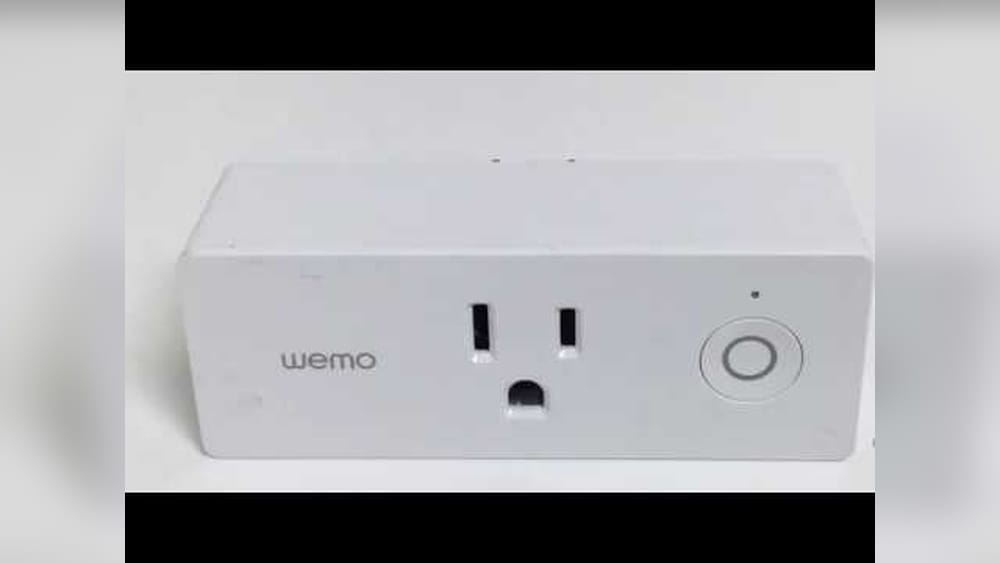
Have you ever faced trouble with your Wemo Smart Plug not responding or acting up? You’re not alone, and the good news is, resetting it can often fix the problem quickly.
Whether your device isn’t connecting properly or you just want to start fresh, knowing how to reset your Wemo Smart Plug is essential. In this guide, you’ll discover simple, clear steps to get your smart plug back on track—no tech jargon, no confusion.
Keep reading, and you’ll have your Wemo working perfectly again in no time.
What Is A Wemo Smart Plug
The Wemo Smart Plug is a small device that makes any ordinary appliance smart. It connects to your Wi-Fi network and lets you control devices from your phone. This plug works with many home assistants like Alexa and Google Home.
Using the Wemo Smart Plug, you can turn lights, fans, or other appliances on and off remotely. It helps save energy and adds convenience to your daily routine. Setting up the plug is simple and quick.
How Does A Wemo Smart Plug Work?
The plug connects to your home Wi-Fi. It communicates with the Wemo app on your smartphone. Through the app, you can control the plug from anywhere. This means you can switch devices on or off without being at home.
Key Features Of The Wemo Smart Plug
The plug offers scheduling to automate devices. You can set timers for your lights or coffee maker. It also supports voice commands with smart home assistants. The device is compact and fits into any outlet easily.
Benefits Of Using A Wemo Smart Plug
It saves electricity by turning off devices when not needed. You gain control over your home appliances remotely. The plug improves safety by allowing you to turn off forgotten devices. It also helps create smart home routines effortlessly.
:max_bytes(150000):strip_icc()/wemosmartplug-cfefc4c711b14b27a02957124e741f2d.jpg)
Credit: www.lifewire.com
When To Reset Your Wemo Smart Plug
Knowing when to reset your Wemo Smart Plug is important for smooth operation. Resetting can fix common issues and restore normal function. It is a simple step that often resolves problems quickly.
Resetting the device clears errors and reconnects it to your network. It can help maintain the plug’s performance over time. Understanding the signs that call for a reset helps avoid frustration.
Device Not Responding To Commands
When your Wemo Smart Plug does not respond to app commands, try a reset. The plug might lose connection with your phone or voice assistant. Resetting restores communication and control.
Wi-fi Connection Problems
Frequent disconnections or failure to connect to Wi-Fi signal a reset need. The plug may struggle to stay online or drop the network. Resetting often solves these connection issues.
Unusual Behavior Or Errors
If the smart plug turns on or off by itself, reset it. Strange behavior or error messages usually mean a reset is necessary. This clears glitches and resets settings to default.
After Firmware Updates
Resetting after a firmware update can improve device stability. Updates sometimes cause temporary bugs or changes in settings. A reset ensures the plug works correctly with new software.
Types Of Resets For Wemo Smart Plug
Resetting your Wemo Smart Plug can solve many common issues. There are two main types of resets. Each type serves a different purpose. Knowing these can save time and effort.
Soft Reset
A soft reset restarts the Wemo Smart Plug without erasing settings. It helps fix minor problems like connection drops. To do this, press the button on the plug for about five seconds. Release the button when the LED starts blinking. The plug will reboot and try to reconnect to your network.
Factory Reset
A factory reset erases all settings and data on the plug. Use this when you want to start fresh or give the plug to someone else. To perform a factory reset, hold the button for about 10 seconds. Wait until the LED blinks rapidly. The plug will reset to its original state. After this, you must set it up again from scratch.

Credit: www.youtube.com
Resetting Wemo Smart Plug Using The Button
Resetting your Wemo Smart Plug using the button is a quick way to fix many common problems. This process restores the plug to its factory settings. It clears previous connections and allows you to set it up fresh.
Using the reset button is simple. You do not need any special tools or apps. Just follow a few clear steps to complete the reset successfully.
Locate The Reset Button
First, find the reset button on your Wemo Smart Plug. It is usually small and round. The button often sits near the power plug or on the side of the device. Look closely around the edges. Some models have a tiny hole for the reset button. You may need a paperclip or pin to press it if it is recessed.
Step-by-step Reset Process
Start by plugging your Wemo Smart Plug into a power outlet. Make sure the plug is powered on. Press and hold the reset button for about 10 seconds. Watch the LED light on the plug. It should blink or change color. This signals the reset is in progress.
Release the button once the light changes. Wait for the plug to reboot. The LED light will stop blinking and stay steady. This means the reset is complete. Now, your Wemo Smart Plug is ready for new setup.
Resetting Via Wemo App
Resetting your Wemo Smart Plug through the Wemo App is a quick way to fix connection or performance issues. This method does not require physical access to the plug. You can reset the device right from your smartphone. It helps refresh settings and reconnect the plug to your network.
Accessing Device Settings
Start by opening the Wemo App on your phone. Make sure your phone is connected to the same Wi-Fi as your Wemo Smart Plug. On the main screen, find your Wemo device listed. Tap on the device name to open its settings. This section controls the smart plug’s features and network setup.
Initiating The Reset
Inside the device settings, scroll down to find the reset option. It may be labeled as “Reset” or “Restore Factory Settings.” Tap the reset button to start the process. The app will ask for confirmation to avoid accidental resets. Confirm your choice, and the smart plug will restart. After this, you will need to set up the plug again in the app.

Credit: www.belkin.com
Troubleshooting Reset Issues
Resetting a Wemo Smart Plug can sometimes bring up issues that stop the device from working right. Troubleshooting these reset problems helps get your plug back to normal fast. Knowing common problems and how to fix them saves time and frustration.
Common Problems
The Wemo plug may not reset if the reset button is not held long enough. Sometimes, the plug stays offline after reset. Another issue is the app not recognizing the plug. Power surges or unstable Wi-Fi can also cause reset failures. These problems block the plug from reconnecting to your network.
Solutions And Tips
Hold the reset button for 10 seconds until the light blinks rapidly. Ensure the plug is plugged into a working outlet. Restart your router to fix Wi-Fi issues. Use the Wemo app to check for firmware updates. Move the plug closer to the router for a stronger signal. Unplug other devices that may cause interference. Lastly, try resetting the plug again after these steps.
Reconnecting Your Wemo Smart Plug After Reset
Reconnecting your Wemo Smart Plug after a reset is a simple process. It helps your device work properly again. Follow the steps carefully to set it up and check its connection. This section guides you through the process clearly.
Setting Up The Device Again
Start by plugging the Wemo Smart Plug into a power outlet. Wait for the LED light to flash amber and green. Open the Wemo app on your smartphone. Follow the app instructions to add the device. Choose your Wi-Fi network and enter the password. The app will connect the plug to your network. Give the device a name for easy control. Finish the setup by confirming all settings in the app.
Testing Connectivity
After setup, check if the plug responds to commands. Use the app to turn the plug on and off. Make sure the connected device reacts quickly. Check the Wi-Fi signal strength near the plug. A strong signal ensures stable connection and control. If the plug does not respond, try moving it closer to the router. Repeat the setup steps if problems continue. Confirm your Wemo Smart Plug is ready to use.
Preventing Future Issues With Wemo Smart Plug
Keeping your Wemo Smart Plug working well saves time and frustration. Preventing issues helps the device last longer. It also keeps your home automation smooth and reliable. Simple habits make a big difference in avoiding problems. Follow these easy tips to protect your smart plug.
Regular Updates
Updating your Wemo Smart Plug software is important. Updates fix bugs and improve performance. Check for updates often in the Wemo app. Install updates as soon as they appear. This stops small issues from growing bigger. Updates also add new features and security fixes. Don’t skip this simple step.
Proper Usage Practices
Use the Wemo Smart Plug as directed. Avoid plugging in devices that exceed its power limit. Keep the plug dry and away from extreme heat. Avoid unplugging the device forcefully. Use the app to control it instead of manual switches. Proper care prevents damage and keeps it running well. Treat it gently for longer life.
Frequently Asked Questions
How Do I Reset My Wemo Smart Plug?
To reset your Wemo Smart Plug, press and hold the reset button for 10 seconds until the LED blinks. This restores factory settings and clears previous connections.
Why Should I Reset My Wemo Smart Plug?
Resetting fixes connectivity issues and restores default settings. It helps when the plug is unresponsive or not pairing with the app.
Can I Reset Wemo Smart Plug Without The App?
Yes, you can reset by pressing the physical reset button on the plug. No app is needed for a factory reset.
What Happens After Resetting Wemo Smart Plug?
The plug erases saved Wi-Fi settings and disconnects from the app. You must set it up again like a new device.
Conclusion
Resetting your Wemo Smart Plug is quick and simple. Just follow the steps carefully to avoid mistakes. A reset can fix many common issues with your device. It helps your plug work smoothly again. Keep your plug updated and connected for best results.
Regular resets can improve performance and reliability. Now you can enjoy better control of your smart home devices. Try resetting anytime your Wemo plug acts up. Easy, fast, and effective—no need to worry.